key VOLVO XC90 2006 Service Manual
[x] Cancel search | Manufacturer: VOLVO, Model Year: 2006, Model line: XC90, Model: VOLVO XC90 2006Pages: 254, PDF Size: 8.43 MB
Page 188 of 254
187 Maintenanceandservice
ReplacingbulbsBulbsinrearlampcluster–Switchoffalllightsandturntheignition
keytoposition0.
–Lowerthebottomofthetailgateandopen
thefloorhatch.
–Ifthecarisequippedwithagrocerybag
holder(option),loosentheholder’s
retainingstraps.
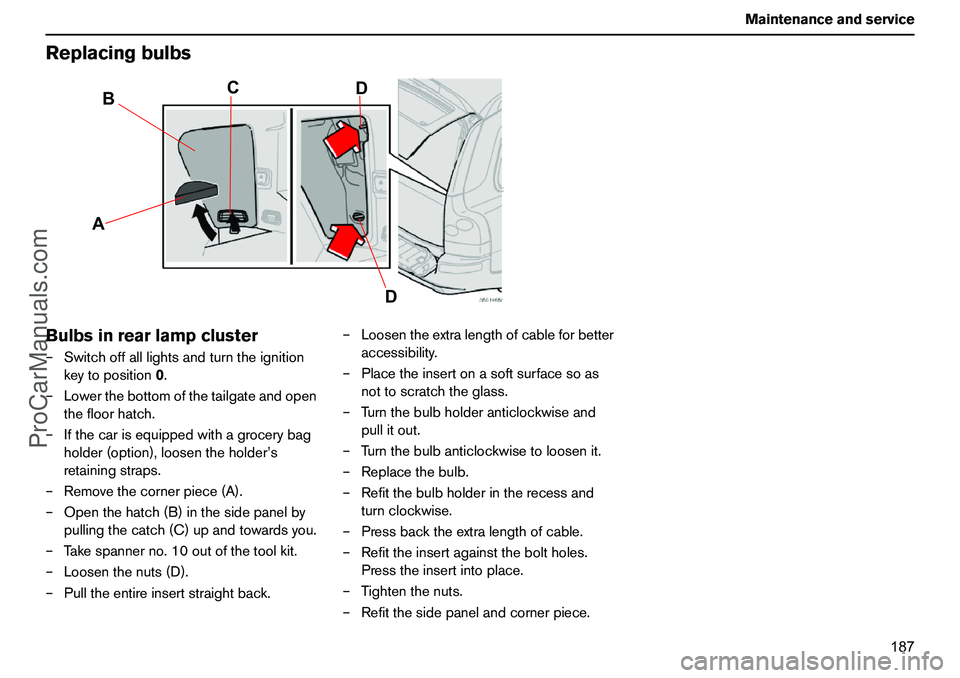
–Removethecornerpiece(A).
–Openthehatch(B)inthesidepanelby
pullingthecatch(C)upandtowardsyou.
–Takespannerno.10outofthetoolkit.
–Loosenthenuts(D).
–Pulltheentireinsertstraightback.–Loosentheextralengthofcableforbetter
accessibility.
–Placetheinsertonasoftsurfacesoas
nottoscratchtheglass.
–Turnthebulbholderanticlockwiseand
pullitout.
–Turnthebulbanticlockwisetoloosenit.
–Replacethebulb.
–Refitthebulbholderintherecessand
turnclockwise.
–Pressbacktheextralengthofcable.
–Refittheinsertagainsttheboltholes.
Presstheinsertintoplace.
–Tightenthenuts.
–Refitthesidepanelandcornerpiece.
AB
C
D
D
ProCarManuals.com
Page 189 of 254
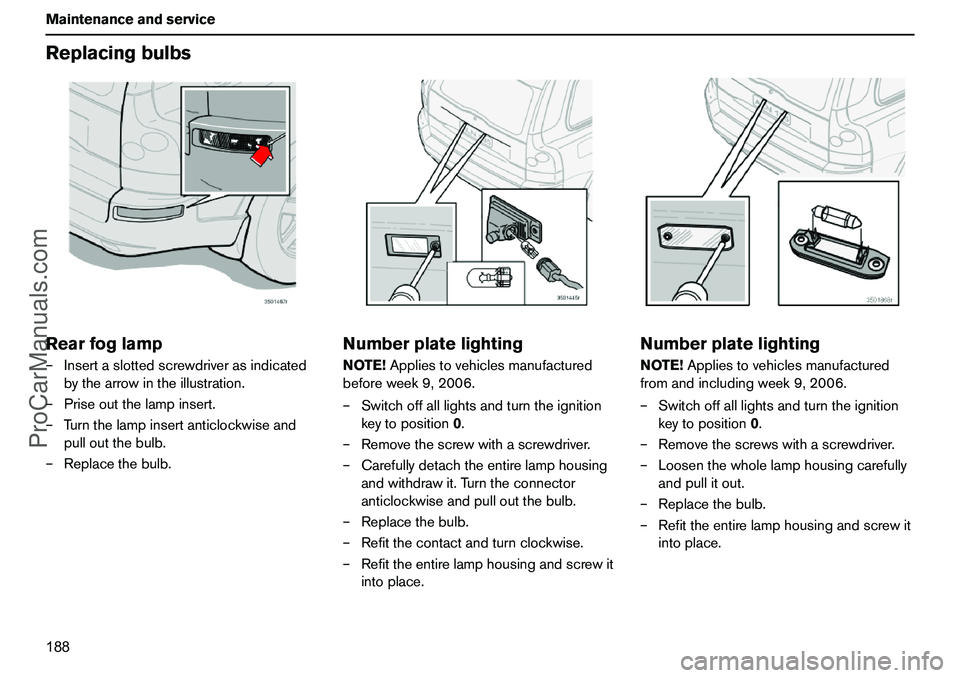
188 MaintenanceandserviceReplacingbulbsRearfoglamp–Insertaslottedscrewdriverasindicated
bythearrowintheillustration.
–Priseoutthelampinsert.
–Turnthelampinsertanticlockwiseand
pulloutthebulb.
–Replacethebulb.
NumberplatelightingNOTE!Appliestovehiclesmanufactured
beforeweek9,2006.
–Switchoffalllightsandturntheignition
keytoposition0.
–Removethescrewwithascrewdriver.
–Carefullydetachtheentirelamphousing
andwithdrawit.Turntheconnector
anticlockwiseandpulloutthebulb.
–Replacethebulb.
–Refitthecontactandturnclockwise.
–Refittheentirelamphousingandscrewit
intoplace.
NumberplatelightingNOTE!Appliestovehiclesmanufactured
fromandincludingweek9,2006.
–Switchoffalllightsandturntheignition
keytoposition0.
–Removethescrewswithascrewdriver.
–Loosenthewholelamphousingcarefully
andpullitout.
–Replacethebulb.
–Refittheentirelamphousingandscrewit
intoplace.
ProCarManuals.com
Page 199 of 254
198 InfotainmentsystemInfotainmentsystemInformation–EntertainmentInfotainmentisasystemwithintegrated
audioandtelephonefunctions.Youcan
easilyandconvenientlyuseyourInfotainment
systembymeansofthejointcontrolpanelor
thesteeringwheelkeypad.Thecontrolpanel
displayindicatesthecurrentfunction.
XC90canbeequippedwithDolbySurround
ProLogicII(PremiumSound),whichoffers
anoptimalsoundexperienceverycloseto
beingtherewithabroad,naturalsound
profile.
Thesystemalsoallowsyourpassengersto
useheadphones(option)withseparate
soundsources.
ProCarManuals.com
Page 200 of 254
199 Infotainmentsystem
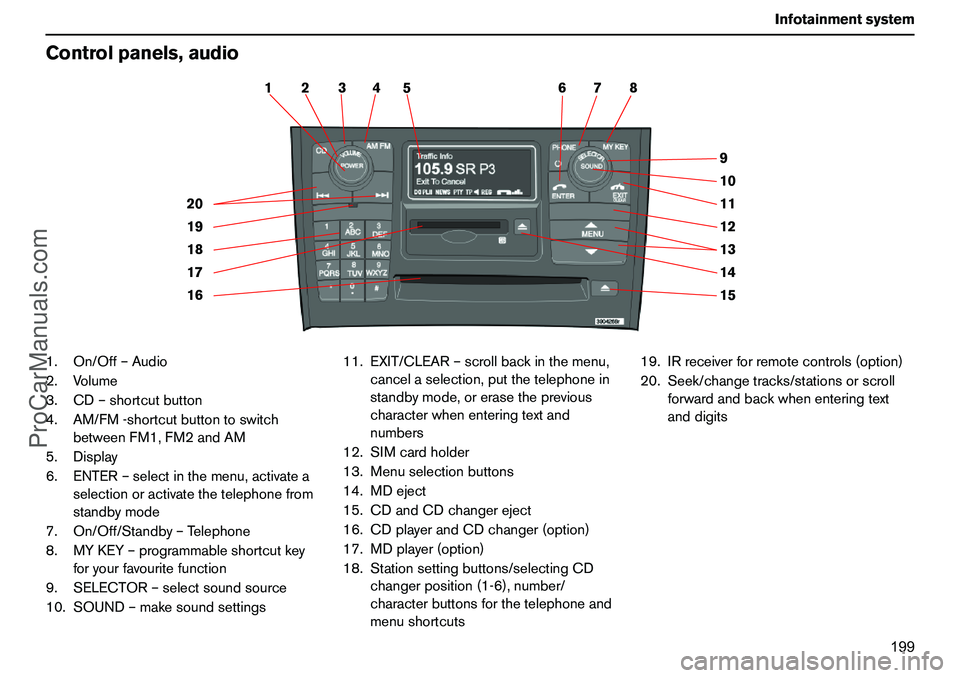
Controlpanels,audio1.On/Off–Audio
2.Volume
3.CD–shortcutbutton
4.AM/FM-shortcutbuttontoswitch
betweenFM1,FM2andAM
5.Display
6.ENTER–selectinthemenu,activatea
selectionoractivatethetelephonefrom
standbymode
7.On/Off/Standby–Telephone
8.MYKEY–programmableshortcutkey
foryourfavouritefunction
9.SELECTOR–selectsoundsource
10.SOUND–makesoundsettings11.EXIT/CLEAR–scrollbackinthemenu,
cancelaselection,putthetelephonein
standbymode,orerasetheprevious
characterwhenenteringtextand
numbers
12.SIMcardholder
13.Menuselectionbuttons
14.MDeject
15.CDandCDchangereject
16.CDplayerandCDchanger(option)
17.MDplayer(option)
18.Stationsettingbuttons/selectingCD
changerposition(1-6),number/
characterbuttonsforthetelephoneand
menushortcuts19.IRreceiverforremotecontrols(option)
20.Seek/changetracks/stationsorscroll
forwardandbackwhenenteringtext
anddigits
15 14 13 12 11 9
10 2 1
20
19
18
16 177 6 5 4 38
ProCarManuals.com
Page 201 of 254
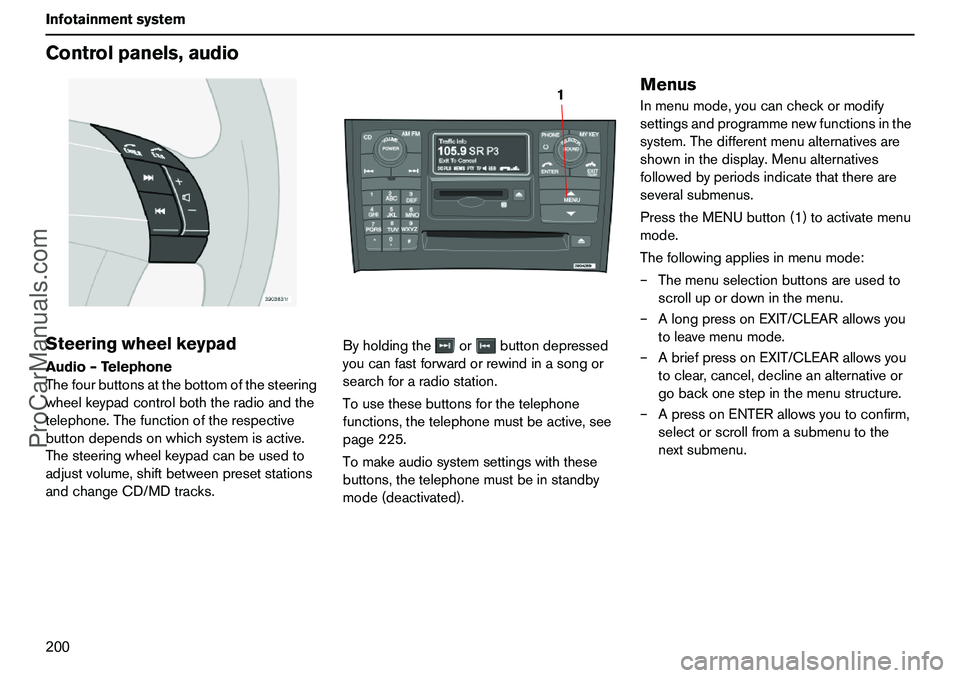
200 InfotainmentsystemControlpanels,audioSteeringwheelkeypadAudio–Telephone
Thefourbuttonsatthebottomofthesteering
wheelkeypadcontrolboththeradioandthe
telephone.Thefunctionoftherespective
buttondependsonwhichsystemisactive.
Thesteeringwheelkeypadcanbeusedto
adjustvolume,shiftbetweenpresetstations
andchangeCD/MDtracks.Byholdingtheorbuttondepressed
youcanfastforwardorrewindinasongor
searchforaradiostation.
Tousethesebuttonsforthetelephone
functions,thetelephonemustbeactive,see
page225.
Tomakeaudiosystemsettingswiththese
buttons,thetelephonemustbeinstandby
mode(deactivated).
MenusInmenumode,youcancheckormodify
settingsandprogrammenewfunctionsinthe
system.Thedifferentmenualternativesare
showninthedisplay.Menualternatives
followedbyperiodsindicatethatthereare
severalsubmenus.
PresstheMENUbutton(1)toactivatemenu
mode.
Thefollowingappliesinmenumode:
–Themenuselectionbuttonsareusedto
scrollupordowninthemenu.
–AlongpressonEXIT/CLEARallowsyou
toleavemenumode.
–AbriefpressonEXIT/CLEARallowsyou
toclear,cancel,declineanalternativeor
gobackonestepinthemenustructure.
–ApressonENTERallowsyoutoconfirm,
selectorscrollfromasubmenutothe
nextsubmenu.
1
ProCarManuals.com
Page 202 of 254
201 Infotainmentsystem
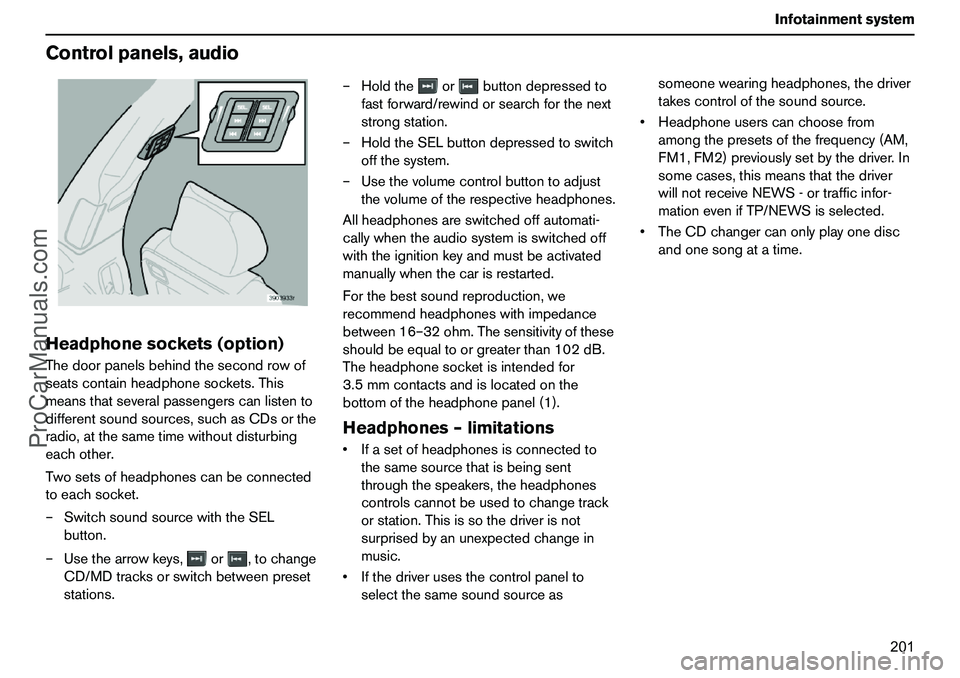
Controlpanels,audioHeadphonesockets(option)Thedoorpanelsbehindthesecondrowof
seatscontainheadphonesockets.This
meansthatseveralpassengerscanlistento
differentsoundsources,suchasCDsorthe
radio,atthesametimewithoutdisturbing
eachother.
Twosetsofheadphonescanbeconnected
toeachsocket.
–SwitchsoundsourcewiththeSEL
button.
–Usethearrowkeys,or,tochange
CD/MDtracksorswitchbetweenpreset
stations.–Holdtheorbuttondepressedto
fastforward/rewindorsearchforthenext
strongstation.
–HoldtheSELbuttondepressedtoswitch
offthesystem.
–Usethevolumecontrolbuttontoadjust
thevolumeoftherespectiveheadphones.
Allheadphonesareswitchedoffautomati-
callywhentheaudiosystemisswitchedoff
withtheignitionkeyandmustbeactivated
manuallywhenthecarisrestarted.
Forthebestsoundreproduction,we
recommendheadphoneswithimpedance
between16–32ohm.Thesensitivityofthese
shouldbeequaltoorgreaterthan102dB.
Theheadphonesocketisintendedfor
3.5mmcontactsandislocatedonthe
bottomoftheheadphonepanel(1).
Headphones–limitationsIfasetofheadphonesisconnectedto
thesamesourcethatisbeingsent
throughthespeakers,theheadphones
controlscannotbeusedtochangetrack
orstation.Thisissothedriverisnot
surprisedbyanunexpectedchangein
music.
Ifthedriverusesthecontrolpanelto
selectthesamesoundsourceassomeonewearingheadphones,thedriver
takescontrolofthesoundsource.
Headphoneuserscanchoosefrom
amongthepresetsofthefrequency(AM,
FM1,FM2)previouslysetbythedriver.In
somecases,thismeansthatthedriver
willnotreceiveNEWS-ortrafficinfor-
mationevenifTP/NEWSisselected.
TheCDchangercanonlyplayonedisc
andonesongatatime.
ProCarManuals.com
Page 205 of 254
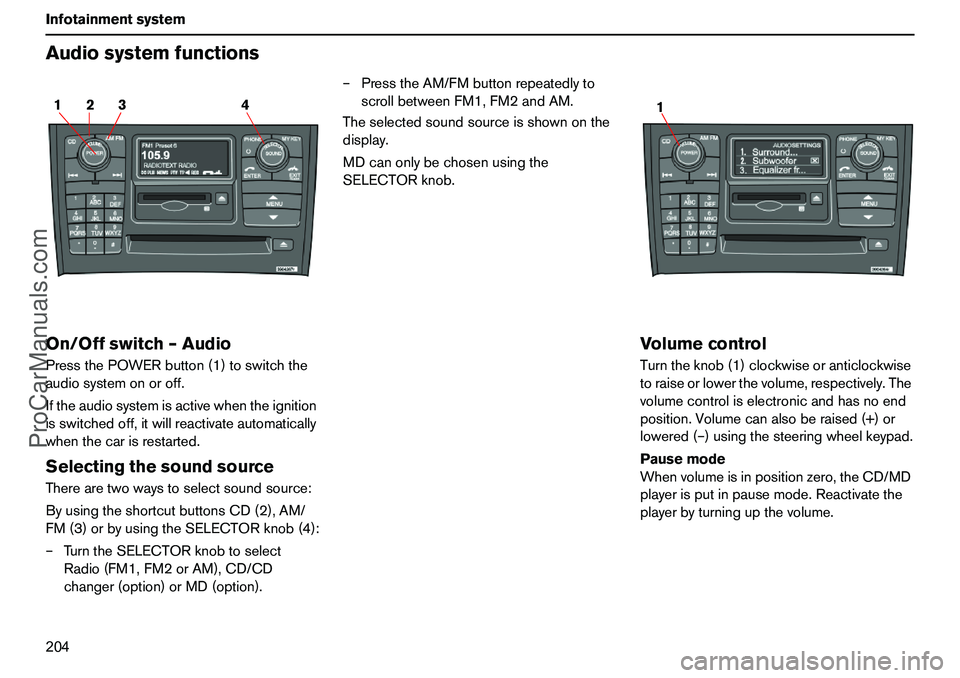
204 InfotainmentsystemAudiosystemfunctionsOn/Offswitch–AudioPressthePOWERbutton(1)toswitchthe
audiosystemonoroff.
Iftheaudiosystemisactivewhentheignition
isswitchedoff,itwillreactivateautomatically
whenthecarisrestarted.SelectingthesoundsourceTherearetwowaystoselectsoundsource:
ByusingtheshortcutbuttonsCD(2),AM/
FM(3)orbyusingtheSELECTORknob(4):
–TurntheSELECTORknobtoselect
Radio(FM1,FM2orAM),CD/CD
changer(option)orMD(option).–PresstheAM/FMbuttonrepeatedlyto
scrollbetweenFM1,FM2andAM.
Theselectedsoundsourceisshownonthe
display.
MDcanonlybechosenusingthe
SELECTORknob.
VolumecontrolTurntheknob(1)clockwiseoranticlockwise
toraiseorlowerthevolume,respectively.The
volumecontroliselectronicandhasnoend
position.Volumecanalsoberaised(+)or
lowered(–)usingthesteeringwheelkeypad.
Pausemode
Whenvolumeisinpositionzero,theCD/MD
playerisputinpausemode.Reactivatethe
playerbyturningupthevolume.
2 14 3
1
ProCarManuals.com
Page 209 of 254
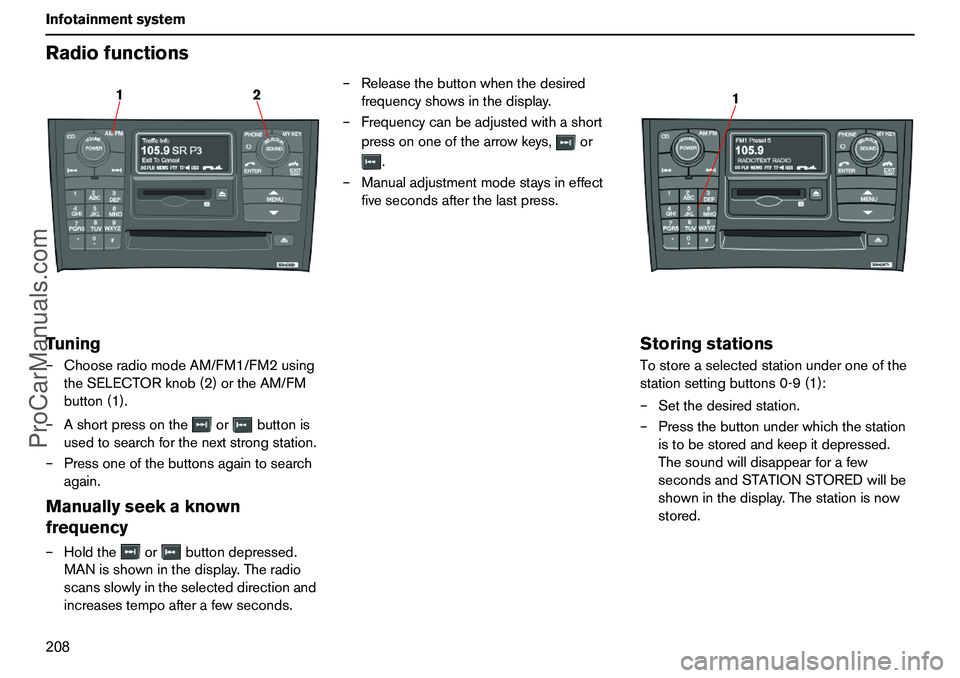
208 InfotainmentsystemRadiofunctionsTuning–ChooseradiomodeAM/FM1/FM2using
theSELECTORknob(2)ortheAM/FM
button(1).
–Ashortpressontheorbuttonis
usedtosearchforthenextstrongstation.
–Pressoneofthebuttonsagaintosearch
again.Manuallyseekaknown
frequency–Holdtheorbuttondepressed.
MANisshowninthedisplay.Theradio
scansslowlyintheselecteddirectionand
increasestempoafterafewseconds.–Releasethebuttonwhenthedesired
frequencyshowsinthedisplay.
–Frequencycanbeadjustedwithashort
pressononeofthearrowkeys,or
.
–Manualadjustmentmodestaysineffect
fivesecondsafterthelastpress.
StoringstationsTostoreaselectedstationunderoneofthe
stationsettingbuttons0-9(1):
–Setthedesiredstation.
–Pressthebuttonunderwhichthestation
istobestoredandkeepitdepressed.
Thesoundwilldisappearforafew
secondsandSTATIONSTOREDwillbe
showninthedisplay.Thestationisnow
stored.
12
1
ProCarManuals.com
Page 217 of 254
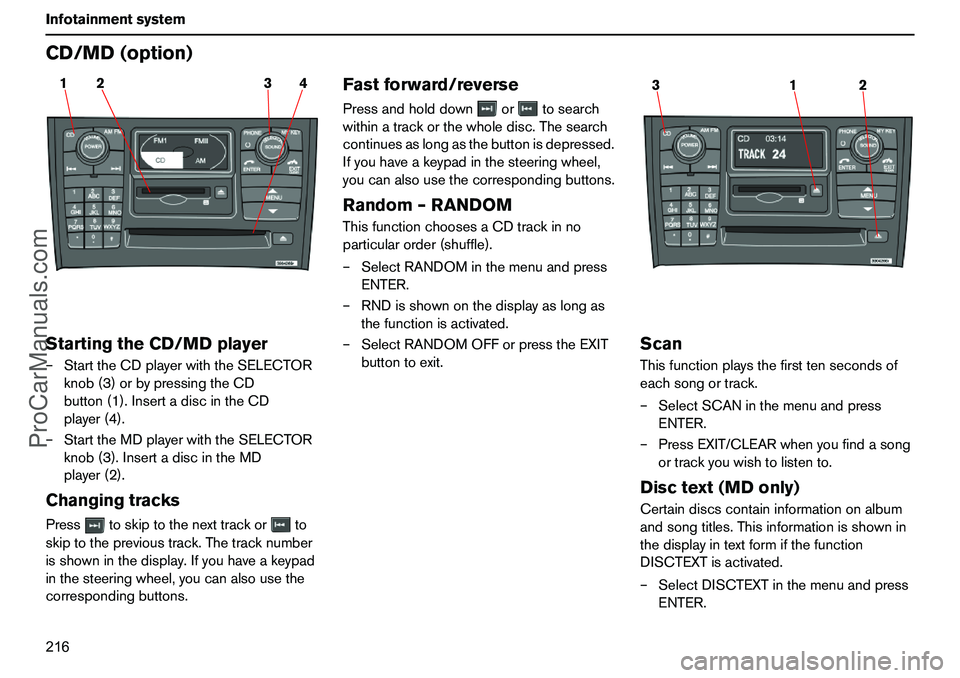
216 InfotainmentsystemCD/MD(option)StartingtheCD/MDplayer–StarttheCDplayerwiththeSELECTOR
knob(3)orbypressingtheCD
button(1).InsertadiscintheCD
player(4).
–StarttheMDplayerwiththeSELECTOR
knob(3).InsertadiscintheMD
player(2).ChangingtracksPresstoskiptothenexttrackorto
skiptotheprevioustrack.Thetracknumber
isshowninthedisplay.Ifyouhaveakeypad
inthesteeringwheel,youcanalsousethe
correspondingbuttons.
Fastforward/reversePressandholddownortosearch
withinatrackorthewholedisc.Thesearch
continuesaslongasthebuttonisdepressed.
Ifyouhaveakeypadinthesteeringwheel,
youcanalsousethecorrespondingbuttons.Random–RANDOMThisfunctionchoosesaCDtrackinno
particularorder(shuffle).
–SelectRANDOMinthemenuandpress
ENTER.
–RNDisshownonthedisplayaslongas
thefunctionisactivated.
–SelectRANDOMOFForpresstheEXIT
buttontoexit.
ScanThisfunctionplaysthefirsttensecondsof
eachsongortrack.
–SelectSCANinthemenuandpress
ENTER.
–PressEXIT/CLEARwhenyoufindasong
ortrackyouwishtolistento.Disctext(MDonly)Certaindiscscontaininformationonalbum
andsongtitles.Thisinformationisshownin
thedisplayintextformifthefunction
DISCTEXTisactivated.
–SelectDISCTEXTinthemenuandpress
ENTER.
2 14 3
1 32
ProCarManuals.com
Page 219 of 254
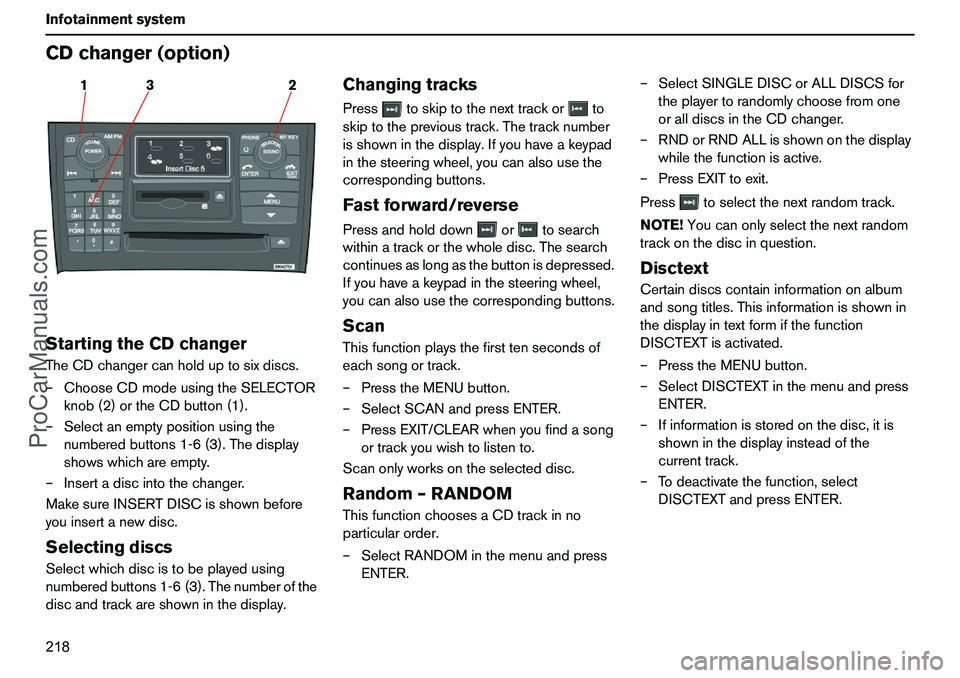
218 InfotainmentsystemCDchanger(option)StartingtheCDchangerTheCDchangercanholduptosixdiscs.
–ChooseCDmodeusingtheSELECTOR
knob(2)ortheCDbutton(1).
–Selectanemptypositionusingthe
numberedbuttons1-6(3).Thedisplay
showswhichareempty.
–Insertadiscintothechanger.
MakesureINSERTDISCisshownbefore
youinsertanewdisc.SelectingdiscsSelectwhichdiscistobeplayedusing
numberedbuttons1-6(3).Thenumberofthe
discandtrackareshowninthedisplay.
ChangingtracksPresstoskiptothenexttrackorto
skiptotheprevioustrack.Thetracknumber
isshowninthedisplay.Ifyouhaveakeypad
inthesteeringwheel,youcanalsousethe
correspondingbuttons.Fastforward/reversePressandholddownortosearch
withinatrackorthewholedisc.Thesearch
continuesaslongasthebuttonisdepressed.
Ifyouhaveakeypadinthesteeringwheel,
youcanalsousethecorrespondingbuttons.ScanThisfunctionplaysthefirsttensecondsof
eachsongortrack.
–PresstheMENUbutton.
–SelectSCANandpressENTER.
–PressEXIT/CLEARwhenyoufindasong
ortrackyouwishtolistento.
Scanonlyworksontheselecteddisc.Random–RANDOMThisfunctionchoosesaCDtrackinno
particularorder.
–SelectRANDOMinthemenuandpress
ENTER.–SelectSINGLEDISCorALLDISCSfor
theplayertorandomlychoosefromone
oralldiscsintheCDchanger.
–RNDorRNDALLisshownonthedisplay
whilethefunctionisactive.
–PressEXITtoexit.
Presstoselectthenextrandomtrack.
NOTE!Youcanonlyselectthenextrandom
trackonthediscinquestion.
DisctextCertaindiscscontaininformationonalbum
andsongtitles.Thisinformationisshownin
thedisplayintextformifthefunction
DISCTEXTisactivated.
–PresstheMENUbutton.
–SelectDISCTEXTinthemenuandpress
ENTER.
–Ifinformationisstoredonthedisc,itis
showninthedisplayinsteadofthe
currenttrack.
–Todeactivatethefunction,select
DISCTEXTandpressENTER.
3 12
ProCarManuals.com