wheel VOLVO XC90 2006 Service Manual
[x] Cancel search | Manufacturer: VOLVO, Model Year: 2006, Model line: XC90, Model: VOLVO XC90 2006Pages: 254, PDF Size: 8.43 MB
Page 163 of 254
162 WheelsandtyresEmergencypuncturerepair–Pushdownthebutton(8)whileturning
thecanister(6)andtheholder(9)
clockwise.Removethem.
–Pullouttheairhose(10).
–Wipeoffremainingsealingfluidwitharag
orscrapeitawayifitishasalreadydried.
–Fitanewairhose(10).Checkthatitis
fittedcorrectly.
–Checkthattheseal(7)onthenew
canisterisnotdamaged.Screwthe
holder(9)ontothecanister(6)andturnit
anticlockwiseuntilaclickisheard.
–Refitthecase(3).Checkthatthecaseis
correctlyfitted.Screwitonwiththe
screws(2).
–Affixthespeedlabel(4)andnewdate
label(1)tothetyrerepairkit.
Theemptycanisterandairhosecanbe
treatedasnormalwaste.
ProCarManuals.com
Page 171 of 254
170 MaintenanceandserviceVolvoserviceVolvoserviceprogrammeBeforethecarleftthefactory,itwas
thoroughlytestdriven.Itwascheckedagain
inaccordancewithVolvoCarCorporation
regulationsbeforeitwashandedovertoyou.
TokeepyourVolvoassafeandreliableas
possible,followtheVolvoserviceprogramme
specifiedintheServiceandWarranty
Booklet.HaveanauthorisedVolvoworkshop
carryoutserviceandmaintenancework.
Volvoworkshopshavethepersonnel,special
toolsandserviceliteraturetoguaranteethe
highestqualityofservice.SpecialservicemeasuresCertainservicemeasures,whichaffectthe
car’selectricalsystem,canonlybe
performedusingelectronicequipment
speciallydevelopedforyourcar.Always
contactanauthorisedVolvoworkshopbefore
beginningorperformingserviceworkthat
affectstheelectricalsystem.
InstallingaccessoriesTheincorrectconnectionandinstallationof
accessoriescannegativelyaffectthecar’s
electricalsystem.Certainaccessoriesonly
functionwhentheappropriatesoftwarehas
beenprogrammedintothecar’selectrical
system.AlwayscontactanauthorisedVolvo
workshopbeforeinstallingaccessories
whichareconnectedtooraffectthe
electricalsystem.RecordingvehicledataOneormoreofthecomputersinyourVolvo
arecapableofrecordingdetailedinformation.
Thisinformationisintendedforusein
researchtoenhancesafetyandfor
diagnosingfaultsinsomeofthein-car
systems.Thedatamayincludedetails
regardingseatbeltusebythedriverand
passengers,thefunctionsofvariousvehicle
systemsandmodules,andstatusinformation
abouttheengine,throttle,steering,brakes
andothersystems.Thisdatacanalsoinclude
detailsofthewaythecarisdriven.Thistype
ofinformationcaninclude,withoutbeing
limitedto,specificdetailssuchasvehicle
speed,theuseofthebrakeandaccelerator
pedalsandsteeringwheelposition.This
lattertypeofdatacanbestoredforalimited
periodwhilethecarisbeingdrivenand
subsequentlyduringacollisionoranear-collision.VolvoCarCorporationwillnot
disclosethestoredinformationwithout
consent.However,VolvoCarCorporation
maybeforcedtodisclosetheinformationdue
tonationallegislation.VolvoCarCorporation
anditsworkshopsmayalsoreadandusethe
information.
IMPORTANT!FortheVolvowarrantytoapply,check
andfollowtheinstructionsintheService
andWarrantyBooklet.
ProCarManuals.com
Page 178 of 254
177 Maintenanceandservice
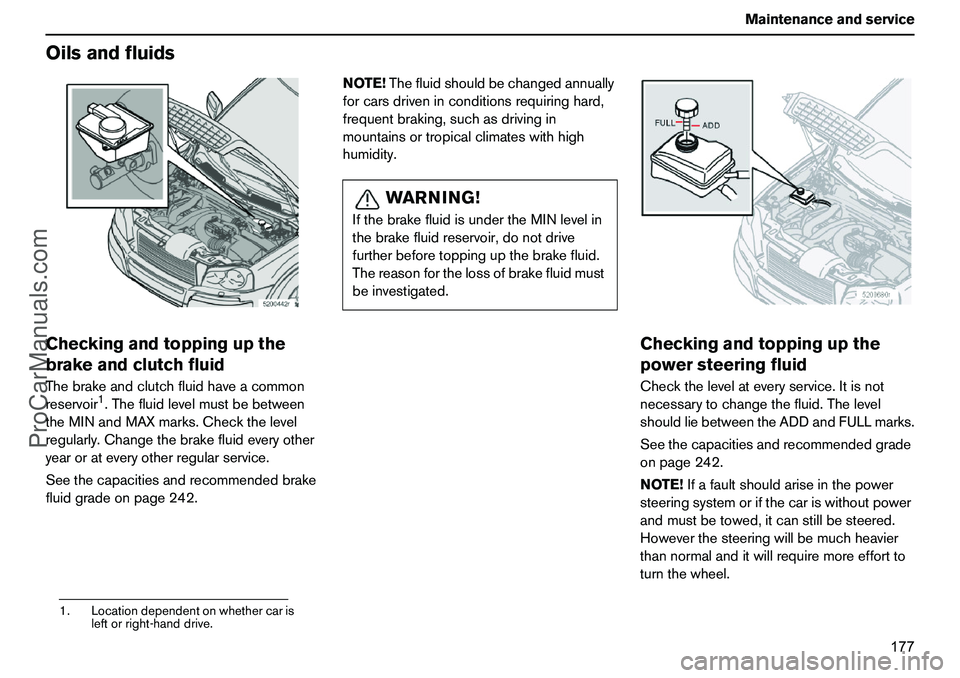
OilsandfluidsCheckingandtoppingupthe
brakeandclutchfluidThebrakeandclutchfluidhaveacommon
reservoir
1.Thefluidlevelmustbebetween
theMINandMAXmarks.Checkthelevel
regularly.Changethebrakefluideveryother
yearorateveryotherregularservice.
Seethecapacitiesandrecommendedbrake
fluidgradeonpage242.NOTE!Thefluidshouldbechangedannually
forcarsdriveninconditionsrequiringhard,
frequentbraking,suchasdrivingin
mountainsortropicalclimateswithhigh
humidity.
Checkingandtoppingupthe
powersteeringfluidCheckthelevelateveryservice.Itisnot
necessarytochangethefluid.Thelevel
shouldliebetweentheADDandFULLmarks.
Seethecapacitiesandrecommendedgrade
onpage242.
NOTE!Ifafaultshouldariseinthepower
steeringsystemorifthecariswithoutpower
andmustbetowed,itcanstillbesteered.
Howeverthesteeringwillbemuchheavier
thannormalanditwillrequiremoreeffortto
turnthewheel.
1.Locationdependentonwhethercaris
leftorright-handdrive.
WARNING!
IfthebrakefluidisundertheMINlevelin
thebrakefluidreservoir,donotdrive
furtherbeforetoppingupthebrakefluid.
Thereasonforthelossofbrakefluidmust
beinvestigated.
ProCarManuals.com
Page 193 of 254
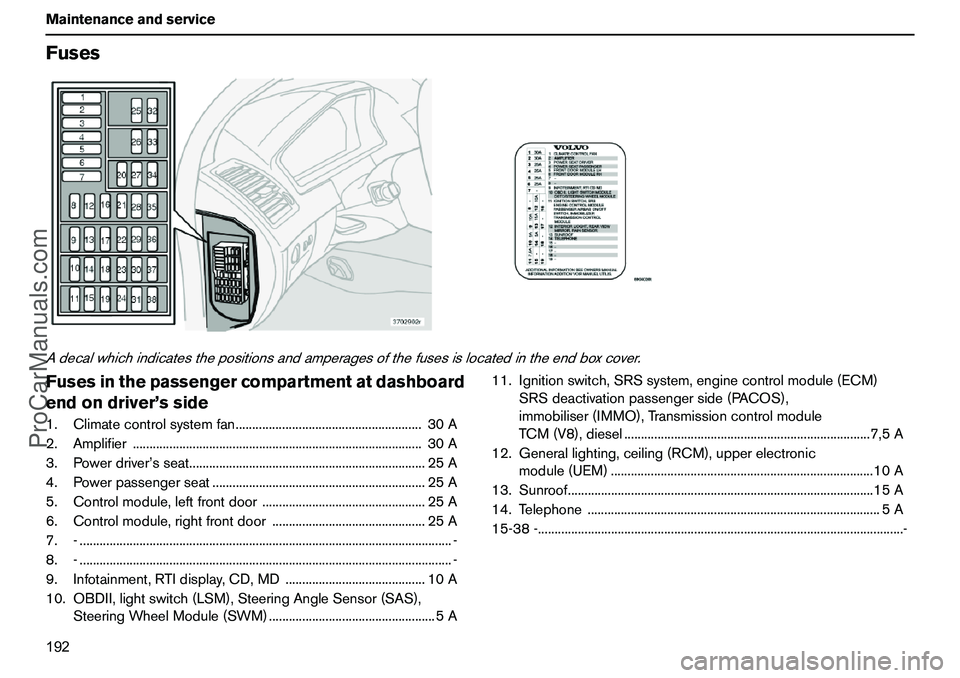
192 MaintenanceandserviceFusesAdecalwhichindicatesthepositionsandamperagesofthefusesislocatedintheendboxcover.Fusesinthepassengercompartmentatdashboard
endondriver’sside1.Climatecontrolsystemfan........................................................30A
2.Amplifier.......................................................................................30A
3.Powerdriver’sseat.......................................................................25A
4.Powerpassengerseat................................................................25A
5.Controlmodule,leftfrontdoor.................................................25A
6.Controlmodule,rightfrontdoor..............................................25A
7.-................................................................................................................-
8.-................................................................................................................-
9.Infotainment,RTIdisplay,CD,MD..........................................10A
10.OBDII,lightswitch(LSM),SteeringAngleSensor(SAS),
SteeringWheelModule(SWM)..................................................5A11.Ignitionswitch,SRSsystem,enginecontrolmodule(ECM)
SRSdeactivationpassengerside(PACOS),
immobiliser(IMMO),Transmissioncontrolmodule
TCM(V8),diesel..........................................................................7,5A
12.Generallighting,ceiling(RCM),upperelectronic
module(UEM)...............................................................................10A
13.Sunroof............................................................................................15A
14.Telephone........................................................................................5A
15-38-..............................................................................................................-
ProCarManuals.com
Page 199 of 254
198 InfotainmentsystemInfotainmentsystemInformation–EntertainmentInfotainmentisasystemwithintegrated
audioandtelephonefunctions.Youcan
easilyandconvenientlyuseyourInfotainment
systembymeansofthejointcontrolpanelor
thesteeringwheelkeypad.Thecontrolpanel
displayindicatesthecurrentfunction.
XC90canbeequippedwithDolbySurround
ProLogicII(PremiumSound),whichoffers
anoptimalsoundexperienceverycloseto
beingtherewithabroad,naturalsound
profile.
Thesystemalsoallowsyourpassengersto
useheadphones(option)withseparate
soundsources.
ProCarManuals.com
Page 201 of 254
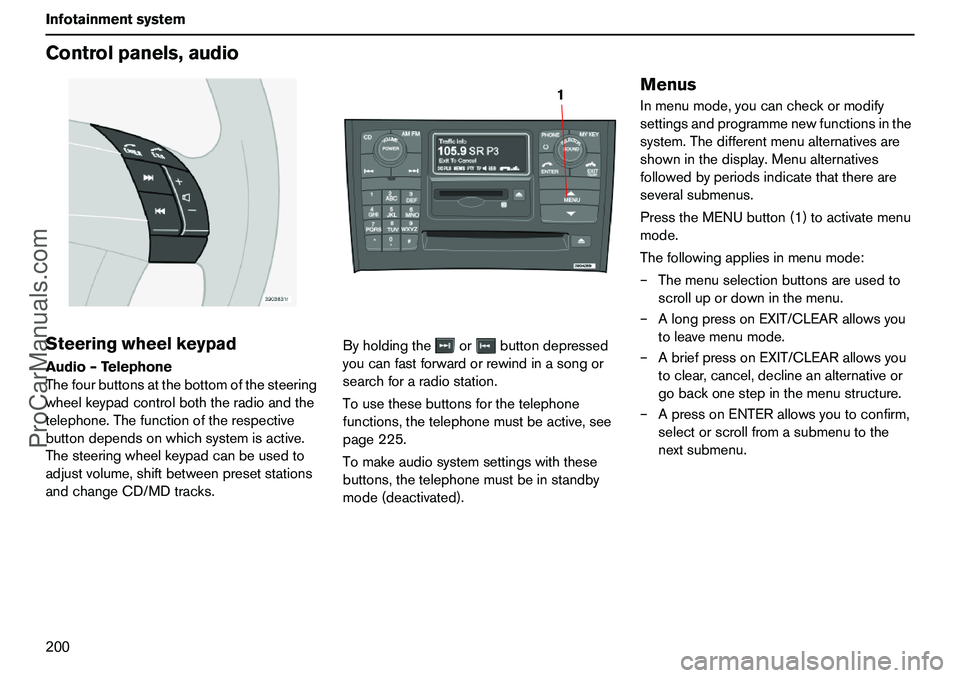
200 InfotainmentsystemControlpanels,audioSteeringwheelkeypadAudio–Telephone
Thefourbuttonsatthebottomofthesteering
wheelkeypadcontrolboththeradioandthe
telephone.Thefunctionoftherespective
buttondependsonwhichsystemisactive.
Thesteeringwheelkeypadcanbeusedto
adjustvolume,shiftbetweenpresetstations
andchangeCD/MDtracks.Byholdingtheorbuttondepressed
youcanfastforwardorrewindinasongor
searchforaradiostation.
Tousethesebuttonsforthetelephone
functions,thetelephonemustbeactive,see
page225.
Tomakeaudiosystemsettingswiththese
buttons,thetelephonemustbeinstandby
mode(deactivated).
MenusInmenumode,youcancheckormodify
settingsandprogrammenewfunctionsinthe
system.Thedifferentmenualternativesare
showninthedisplay.Menualternatives
followedbyperiodsindicatethatthereare
severalsubmenus.
PresstheMENUbutton(1)toactivatemenu
mode.
Thefollowingappliesinmenumode:
–Themenuselectionbuttonsareusedto
scrollupordowninthemenu.
–AlongpressonEXIT/CLEARallowsyou
toleavemenumode.
–AbriefpressonEXIT/CLEARallowsyou
toclear,cancel,declineanalternativeor
gobackonestepinthemenustructure.
–ApressonENTERallowsyoutoconfirm,
selectorscrollfromasubmenutothe
nextsubmenu.
1
ProCarManuals.com
Page 205 of 254
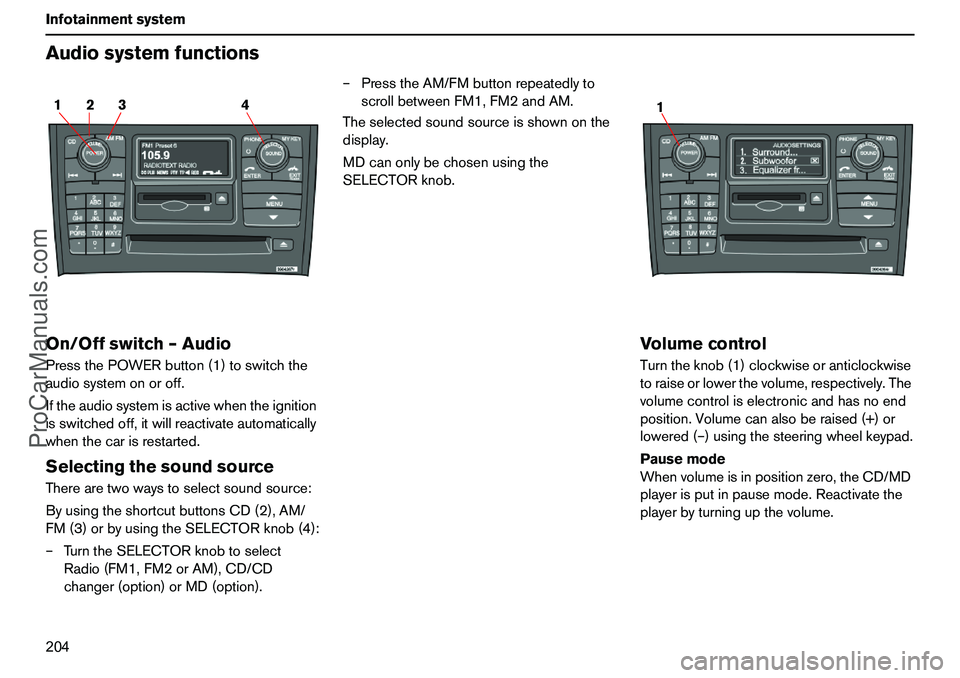
204 InfotainmentsystemAudiosystemfunctionsOn/Offswitch–AudioPressthePOWERbutton(1)toswitchthe
audiosystemonoroff.
Iftheaudiosystemisactivewhentheignition
isswitchedoff,itwillreactivateautomatically
whenthecarisrestarted.SelectingthesoundsourceTherearetwowaystoselectsoundsource:
ByusingtheshortcutbuttonsCD(2),AM/
FM(3)orbyusingtheSELECTORknob(4):
–TurntheSELECTORknobtoselect
Radio(FM1,FM2orAM),CD/CD
changer(option)orMD(option).–PresstheAM/FMbuttonrepeatedlyto
scrollbetweenFM1,FM2andAM.
Theselectedsoundsourceisshownonthe
display.
MDcanonlybechosenusingthe
SELECTORknob.
VolumecontrolTurntheknob(1)clockwiseoranticlockwise
toraiseorlowerthevolume,respectively.The
volumecontroliselectronicandhasnoend
position.Volumecanalsoberaised(+)or
lowered(–)usingthesteeringwheelkeypad.
Pausemode
Whenvolumeisinpositionzero,theCD/MD
playerisputinpausemode.Reactivatethe
playerbyturningupthevolume.
2 14 3
1
ProCarManuals.com
Page 217 of 254
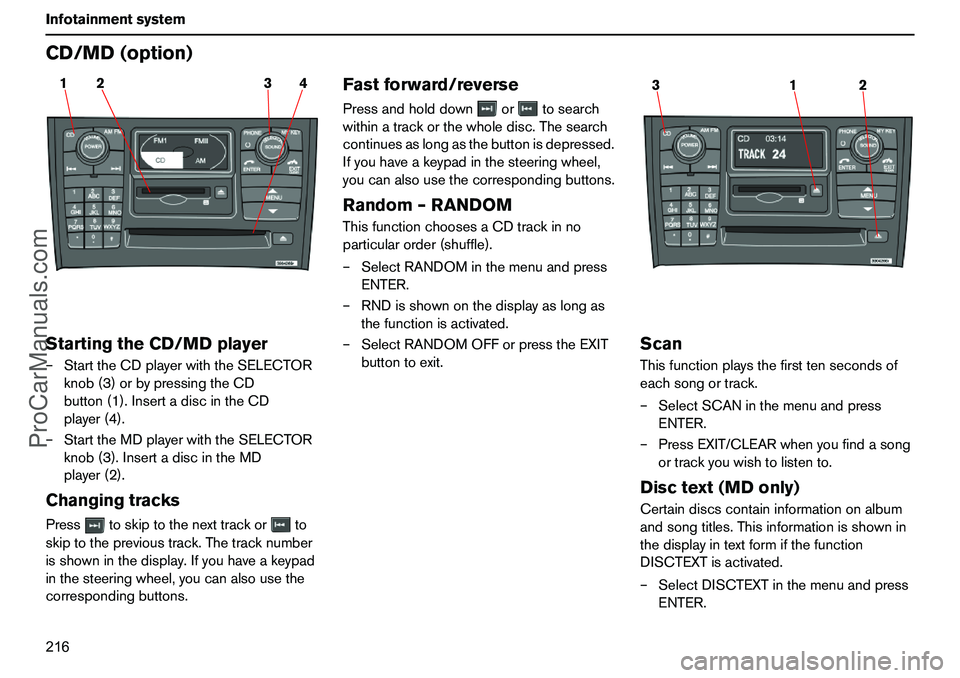
216 InfotainmentsystemCD/MD(option)StartingtheCD/MDplayer–StarttheCDplayerwiththeSELECTOR
knob(3)orbypressingtheCD
button(1).InsertadiscintheCD
player(4).
–StarttheMDplayerwiththeSELECTOR
knob(3).InsertadiscintheMD
player(2).ChangingtracksPresstoskiptothenexttrackorto
skiptotheprevioustrack.Thetracknumber
isshowninthedisplay.Ifyouhaveakeypad
inthesteeringwheel,youcanalsousethe
correspondingbuttons.
Fastforward/reversePressandholddownortosearch
withinatrackorthewholedisc.Thesearch
continuesaslongasthebuttonisdepressed.
Ifyouhaveakeypadinthesteeringwheel,
youcanalsousethecorrespondingbuttons.Random–RANDOMThisfunctionchoosesaCDtrackinno
particularorder(shuffle).
–SelectRANDOMinthemenuandpress
ENTER.
–RNDisshownonthedisplayaslongas
thefunctionisactivated.
–SelectRANDOMOFForpresstheEXIT
buttontoexit.
ScanThisfunctionplaysthefirsttensecondsof
eachsongortrack.
–SelectSCANinthemenuandpress
ENTER.
–PressEXIT/CLEARwhenyoufindasong
ortrackyouwishtolistento.Disctext(MDonly)Certaindiscscontaininformationonalbum
andsongtitles.Thisinformationisshownin
thedisplayintextformifthefunction
DISCTEXTisactivated.
–SelectDISCTEXTinthemenuandpress
ENTER.
2 14 3
1 32
ProCarManuals.com
Page 219 of 254
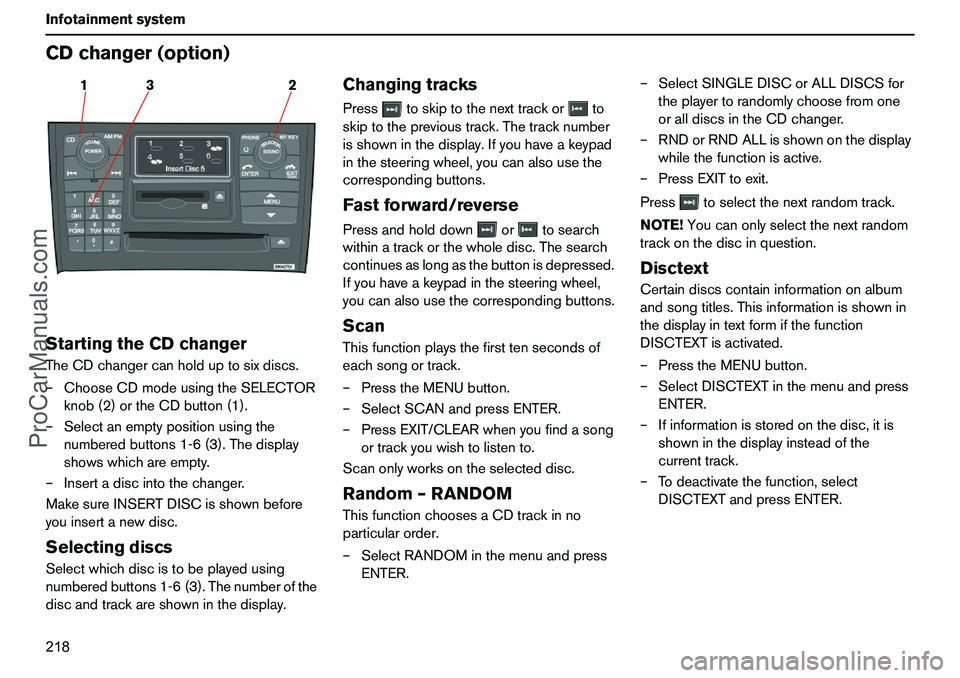
218 InfotainmentsystemCDchanger(option)StartingtheCDchangerTheCDchangercanholduptosixdiscs.
–ChooseCDmodeusingtheSELECTOR
knob(2)ortheCDbutton(1).
–Selectanemptypositionusingthe
numberedbuttons1-6(3).Thedisplay
showswhichareempty.
–Insertadiscintothechanger.
MakesureINSERTDISCisshownbefore
youinsertanewdisc.SelectingdiscsSelectwhichdiscistobeplayedusing
numberedbuttons1-6(3).Thenumberofthe
discandtrackareshowninthedisplay.
ChangingtracksPresstoskiptothenexttrackorto
skiptotheprevioustrack.Thetracknumber
isshowninthedisplay.Ifyouhaveakeypad
inthesteeringwheel,youcanalsousethe
correspondingbuttons.Fastforward/reversePressandholddownortosearch
withinatrackorthewholedisc.Thesearch
continuesaslongasthebuttonisdepressed.
Ifyouhaveakeypadinthesteeringwheel,
youcanalsousethecorrespondingbuttons.ScanThisfunctionplaysthefirsttensecondsof
eachsongortrack.
–PresstheMENUbutton.
–SelectSCANandpressENTER.
–PressEXIT/CLEARwhenyoufindasong
ortrackyouwishtolistento.
Scanonlyworksontheselecteddisc.Random–RANDOMThisfunctionchoosesaCDtrackinno
particularorder.
–SelectRANDOMinthemenuandpress
ENTER.–SelectSINGLEDISCorALLDISCSfor
theplayertorandomlychoosefromone
oralldiscsintheCDchanger.
–RNDorRNDALLisshownonthedisplay
whilethefunctionisactive.
–PressEXITtoexit.
Presstoselectthenextrandomtrack.
NOTE!Youcanonlyselectthenextrandom
trackonthediscinquestion.
DisctextCertaindiscscontaininformationonalbum
andsongtitles.Thisinformationisshownin
thedisplayintextformifthefunction
DISCTEXTisactivated.
–PresstheMENUbutton.
–SelectDISCTEXTinthemenuandpress
ENTER.
–Ifinformationisstoredonthedisc,itis
showninthedisplayinsteadofthe
currenttrack.
–Todeactivatethefunction,select
DISCTEXTandpressENTER.
3 12
ProCarManuals.com
Page 224 of 254
223 Infotainmentsystem
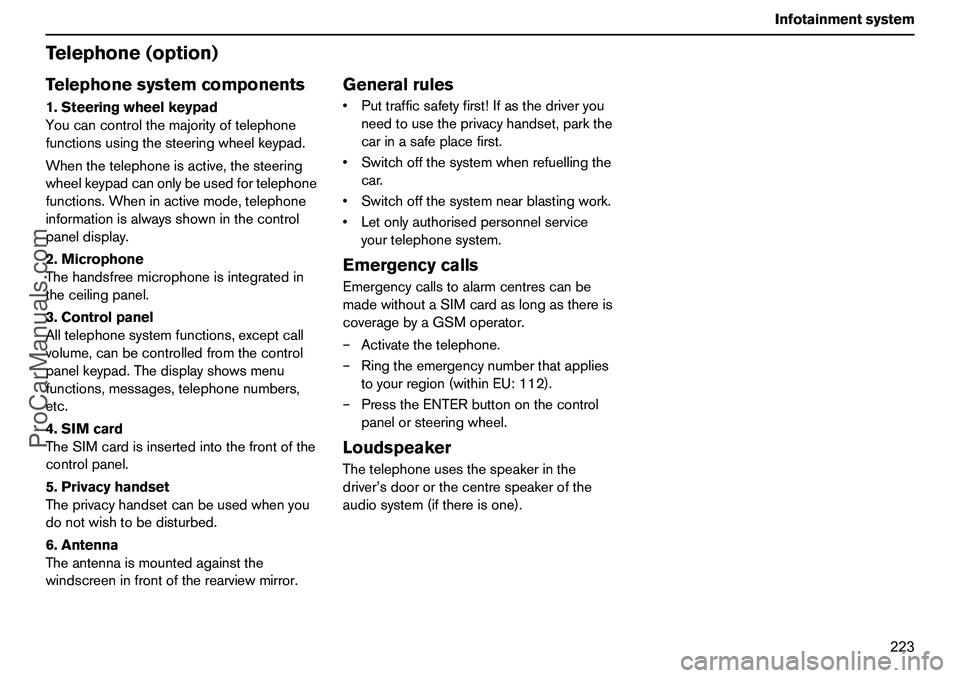
Telephone(option)Telephonesystemcomponents1.Steeringwheelkeypad
Youcancontrolthemajorityoftelephone
functionsusingthesteeringwheelkeypad.
Whenthetelephoneisactive,thesteering
wheelkeypadcanonlybeusedfortelephone
functions.Wheninactivemode,telephone
informationisalwaysshowninthecontrol
paneldisplay.
2.Microphone
Thehandsfreemicrophoneisintegratedin
theceilingpanel.
3.Controlpanel
Alltelephonesystemfunctions,exceptcall
volume,canbecontrolledfromthecontrol
panelkeypad.Thedisplayshowsmenu
functions,messages,telephonenumbers,
etc.
4.SIMcard
TheSIMcardisinsertedintothefrontofthe
controlpanel.
5.Privacyhandset
Theprivacyhandsetcanbeusedwhenyou
donotwishtobedisturbed.
6.Antenna
Theantennaismountedagainstthe
windscreeninfrontoftherearviewmirror.
GeneralrulesPuttrafficsafetyfirst!Ifasthedriveryou
needtousetheprivacyhandset,parkthe
carinasafeplacefirst.
Switchoffthesystemwhenrefuellingthe
car.
Switchoffthesystemnearblastingwork.
Letonlyauthorisedpersonnelservice
yourtelephonesystem.EmergencycallsEmergencycallstoalarmcentrescanbe
madewithoutaSIMcardaslongasthereis
coveragebyaGSMoperator.
–Activatethetelephone.
–Ringtheemergencynumberthatapplies
toyourregion(withinEU:112).
–PresstheENTERbuttononthecontrol
panelorsteeringwheel.LoudspeakerThetelephoneusesthespeakerinthe
driver’sdoororthecentrespeakerofthe
audiosystem(ifthereisone).
ProCarManuals.com