reset VOLVO XC90 2006 Owners Manual
[x] Cancel search | Manufacturer: VOLVO, Model Year: 2006, Model line: XC90, Model: VOLVO XC90 2006Pages: 254, PDF Size: 8.43 MB
Page 44 of 254
43 Instrumentsandcontrols
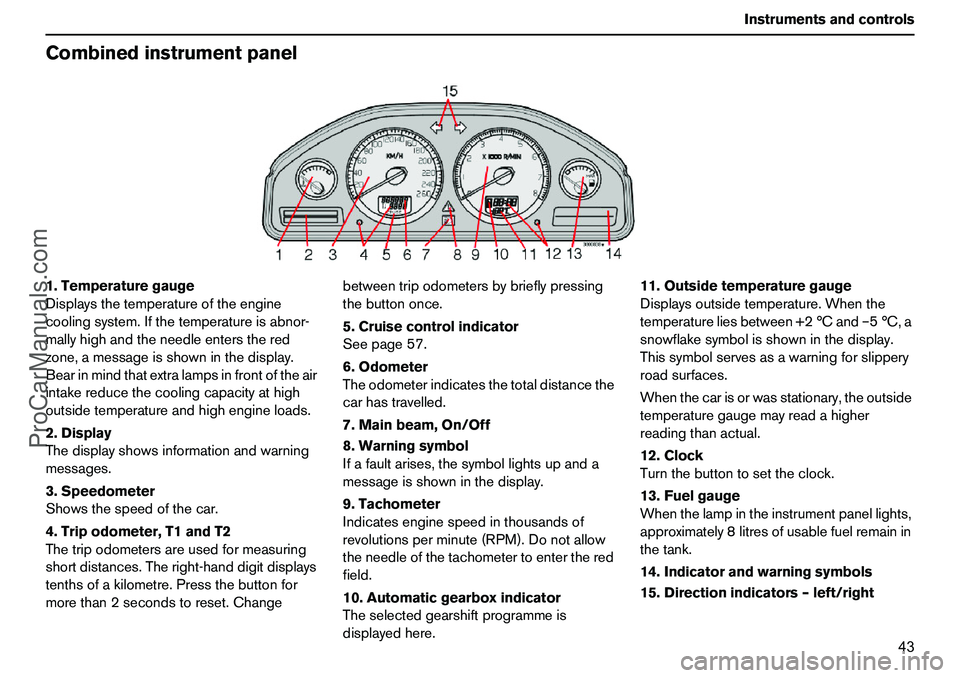
Combinedinstrumentpanel1.Temperaturegauge
Displaysthetemperatureoftheengine
coolingsystem.Ifthetemperatureisabnor-
mallyhighandtheneedleentersthered
zone,amessageisshowninthedisplay.
Bearinmindthatextralampsinfrontoftheair
intakereducethecoolingcapacityathigh
outsidetemperatureandhighengineloads.
2.Display
Thedisplayshowsinformationandwarning
messages.
3.Speedometer
Showsthespeedofthecar.
4.Tripodometer,T1andT2
Thetripodometersareusedformeasuring
shortdistances.Theright-handdigitdisplays
tenthsofakilometre.Pressthebuttonfor
morethan2secondstoreset.Changebetweentripodometersbybrieflypressing
thebuttononce.
5.Cruisecontrolindicator
Seepage57.
6.Odometer
Theodometerindicatesthetotaldistancethe
carhastravelled.
7.Mainbeam,On/Off
8.Warningsymbol
Ifafaultarises,thesymbollightsupanda
messageisshowninthedisplay.
9.Tachometer
Indicatesenginespeedinthousandsof
revolutionsperminute(RPM).Donotallow
theneedleofthetachometertoenterthered
field.
10.Automaticgearboxindicator
Theselectedgearshiftprogrammeis
displayedhere.11.Outsidetemperaturegauge
Displaysoutsidetemperature.Whenthe
temperatureliesbetween+2°Cand–5°C,a
snowflakesymbolisshowninthedisplay.
Thissymbolservesasawarningforslippery
roadsurfaces.
Whenthecarisorwasstationary,theoutside
temperaturegaugemayreadahigher
readingthanactual.
12.Clock
Turnthebuttontosettheclock.
13.Fuelgauge
Whenthelampintheinstrumentpanellights,
approximately8litresofusablefuelremainin
thetank.
14.Indicatorandwarningsymbols
15.Directionindicators–left/right
ProCarManuals.com
Page 57 of 254

56 InstrumentsandcontrolsTripcomputerControlsToaccessthetripcomputerinformation,you
mustturnthering(B)insteps,eitherforward
orbackward.Byturningagain,youreturnto
thestartingpoint.
NOTE!Ifawarningmessageinterruptswhile
youareusingthetripcomputer,youmustfirst
acknowledgethemessagebypressingthe
READbutton(A)toreturntothetrip
computer.FunctionsThetripcomputerdisplaysthefollowing
information:
AVERAGESPEEDSPEEDINMILESPERHOUR
1
CURRENTFUELCONSUMPTION
AVERAGEFUELCONSUMPTION
RANGETOEMPTYFUELTANK
Averagespeed
Theaveragespeedsincethelastreset
(RESET).Whentheignitionisswitchedoff,
theaveragespeedisstoredandusedasthe
basisofthenewvaluewhenyoucontinue
driving.ThiscanberesetwiththeRESET
button(C)onthelever.
Speedinmilesperhour
1
Currentspeedisdisplayedinmph.
Currentfuelconsumption
Continuousinformationoncurrentfuel
consumption,calculatedeachsecond.The
figureinthedisplayisupdatedeverycouple
ofseconds.Whenthecarisstationary,"----"
isshownonthedisplay.
NOTE!Theremaybeaslighterrorinthe
readingifafuel-drivenheaterisused.
Averagefuelconsumption
Theaveragefuelconsumptionsincethelast
reset(RESET).Theaveragefuel
consumptionisstoredwhentheignitionis
switchedoffandremainsuntilresetwiththe
RESETbutton(C)onthelever.NOTE!Theremaybeaslighterrorinthe
readingifafuel-drivenheaterisused.
Rangetoemptyfueltank
Therangetoemptyiscalculatedbasedon
theaveragefuelconsumptionoverthelast
30km.Whentherangetoemptyisshorter
than20kmthen"----"isshownonthe
display.
NOTE!Theremaybeaslighterrorinthe
readingiffuelconsumptionischangeddueto
achangeindrivingstyleorifafuel-driven
heaterisusedforexample.1.Certaincountries
ProCarManuals.com
Page 78 of 254
77 Climatecontrol
Parkingheater(option)Carclock/timerForsafetyreasons,alltimersettingswillbe
clearedifthecarclockisresetaftertimer
settingshavebeenmade.SettingTIMER1and2Forsafetyreasons,youcanonlyprogramme
timesforthefollowing24hours,notseveral
daysinadvance.
–Usethering(B)totoggletoTIMER1.
–BrieflypresstheRESETbutton(C)so
thatthehourssettingstartstoflash.
–Usethering(B)tosetthedesiredhours.
–BrieflypresstheRESETbuttonsothat
theminutessettingstartstoflash.
–Usethering(B)tosetthedesired
minutes.
–BrieflypresstheRESETbuttontoconfirm
yoursetting.
–PresstheRESETbuttontoactivatethe
timer.
AftersettingTIMER1,toggletoTIMER2.
Settingsaremadethesamewayasfor
TIMER1.
Deactivatingtimer-startedheating
Doasfollowstomanuallyswitchoffthe
heaterbeforethesettimehaselapsed:
–PresstheREADbutton(A).–Usethering(B)totoggletoPARKHEAT
TIMER1or2.ThetextONflashes.
–PresstheRESETbutton(C).Thetext
OFFisdisplayedwithasteadyglowand
theheaterisswitchedoff.
Directstart–Usethering(B)totoggletoDIRECT
START.
–PresstheRESETbutton(C)toaccess
thealternativesONorOFF.
SelectON.
Theheaterwillnowrunfor60minutes.
Heatingofthepassengercompartmentwill
beginassoonastheenginecoolanthas
reachedanadequatetemperature.
Deactivatingheaterafterdirectstart
–Usethering(B)totoggletoDIRECT
START.
–PresstheRESETbutton(C)tomakeON
andOFFselectionsavailable.
–SelectOFF.BatteryandfuelIfthebatteryisnotsufficientlychargedorthe
petroltankisclosetoempty,theparking
heaterwillbeswitchedoff.Ifthisisthecase,
youwillreceiveamessageinthedisplay.
ConfirmthemessageusingtheREAD
button(A).
Additionalheater(diesel)
(certaincountries)Extraheatfromtheadditionalheatermaybe
requiredincoldweathertoreachthecorrect
temperatureinthepassengercompartment.
Theadditionalheaterstartsautomatically
whenextraheatisrequirediftheengineis
running.Itisswitchedoffautomaticallywhen
thecorrecttemperatureisreachedorwhen
theengineisswitchedoff.IMPORTANT!Repeateduseoftheparkingheaterin
combinationwithshorttripscanleadto
batterydischargeandtherebydifficulty
starting.
Iftheheaterisusedregularly,thecar
shouldbedrivenforthesameamountof
timeastheheaterwasusedinorderto
ensurethatthegeneratorisableto
produceenoughenergytocompensate
fortheamountconsumed.
ProCarManuals.com
Page 81 of 254
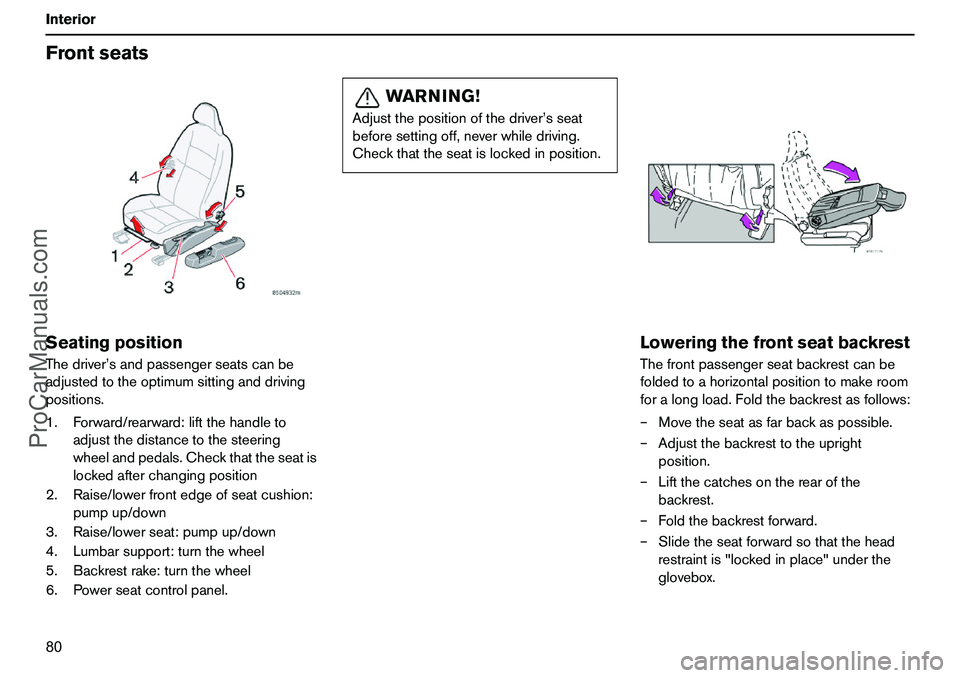
80 InteriorFrontseatsSeatingpositionThedriver’sandpassengerseatscanbe
adjustedtotheoptimumsittinganddriving
positions.
1.Forward/rearward:liftthehandleto
adjustthedistancetothesteering
wheelandpedals.Checkthattheseatis
lockedafterchangingposition
2.Raise/lowerfrontedgeofseatcushion:
pumpup/down
3.Raise/lowerseat:pumpup/down
4.Lumbarsupport:turnthewheel
5.Backrestrake:turnthewheel
6.Powerseatcontrolpanel.
LoweringthefrontseatbackrestThefrontpassengerseatbackrestcanbe
foldedtoahorizontalpositiontomakeroom
foralongload.Foldthebackrestasfollows:
–Movetheseatasfarbackaspossible.
–Adjustthebackresttotheupright
position.
–Liftthecatchesontherearofthe
backrest.
–Foldthebackrestforward.
–Slidetheseatforwardsothatthehead
restraintis"lockedinplace"underthe
glovebox.
WARNING!
Adjustthepositionofthedriver’sseat
beforesettingoff,neverwhiledriving.
Checkthattheseatislockedinposition.
ProCarManuals.com
Page 82 of 254
81 Interior
FrontseatsPowerseat(option)Preparations
Theseatisnormallyadjustedwiththeignition
keyisinpositionIorII.Itcanalsobe
adjustedwithin4,5minutesofthedoorbeing
unlockedwiththekeyorremotecontrol.Ifthe
doorisclosedandtheignitionkeyisnotyet
intheignition,orisinthe0position,adjust-
mentscanbemadewithin40secondsofthe
doorbeingclosed.
Memoryfunctionintheremotecontrol
(option)
Theremotecontrolusedtounlockthecar
storesinformationaboutthechangesmade
totheseatsettings.Whenthecarisnext
unlockedwiththesameremotecontroland
thedoorisopenedwithinfiveminutes,the
driver’sseatandthedoormirrorsassumethe
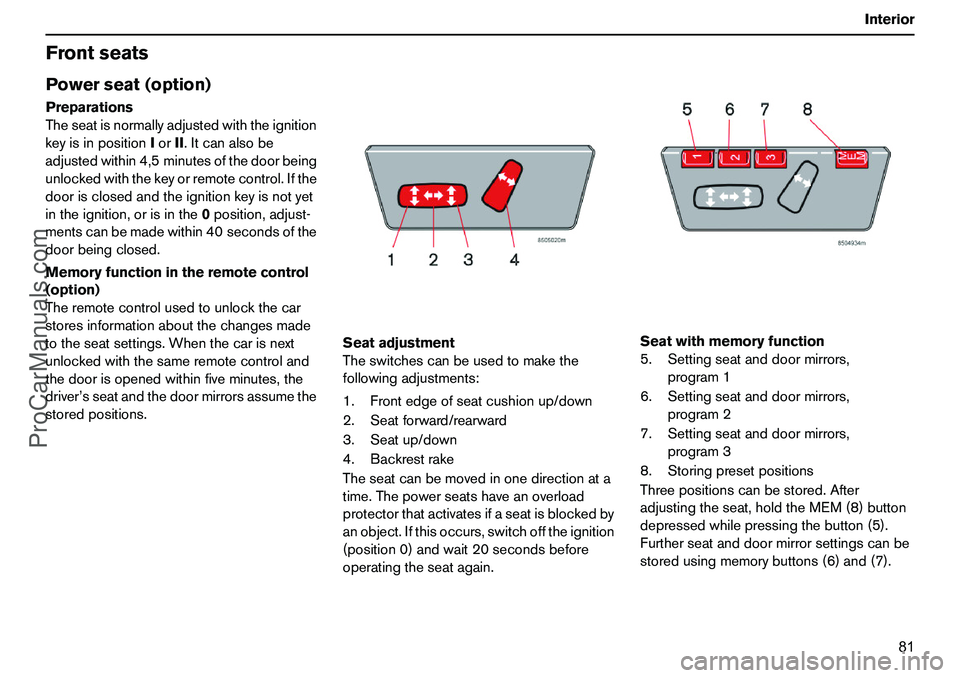
storedpositions.Seatadjustment
Theswitchescanbeusedtomakethe
followingadjustments:
1.Frontedgeofseatcushionup/down
2.Seatforward/rearward
3.Seatup/down
4.Backrestrake
Theseatcanbemovedinonedirectionata
time.Thepowerseatshaveanoverload
protectorthatactivatesifaseatisblockedby
anobject.Ifthisoccurs,switchofftheignition
(position0)andwait20secondsbefore
operatingtheseatagain.Seatwithmemoryfunction
5.Settingseatanddoormirrors,
program1
6.Settingseatanddoormirrors,
program2
7.Settingseatanddoormirrors,
program3
8.Storingpresetpositions
Threepositionscanbestored.After
adjustingtheseat,holdtheMEM(8)button
depressedwhilepressingthebutton(5).
Furtherseatanddoormirrorsettingscanbe
storedusingmemorybuttons(6)and(7).
ProCarManuals.com
Page 83 of 254
82 InteriorFrontseatsSettingpresetpositionsPressandholdoneofthememory
buttons(5),(6)or(7)untiltheseatstops.If
youreleasethebutton,theseatstops
immediatelyforsafetyreasons.
Emergencystop
Iftheseataccidentallybeginstomove,press
oneofthebuttonstostoptheseat.
WARNING!
Ensurethatthereisnothinginfrontof,
behind,orundertheseatduring
adjustment.
Ensurethatnoneofthebackseat
passengerswillbetrapped.
Toavoidinjury,ensurethatchildrendonot
playwiththeswitches.
ProCarManuals.com
Page 201 of 254
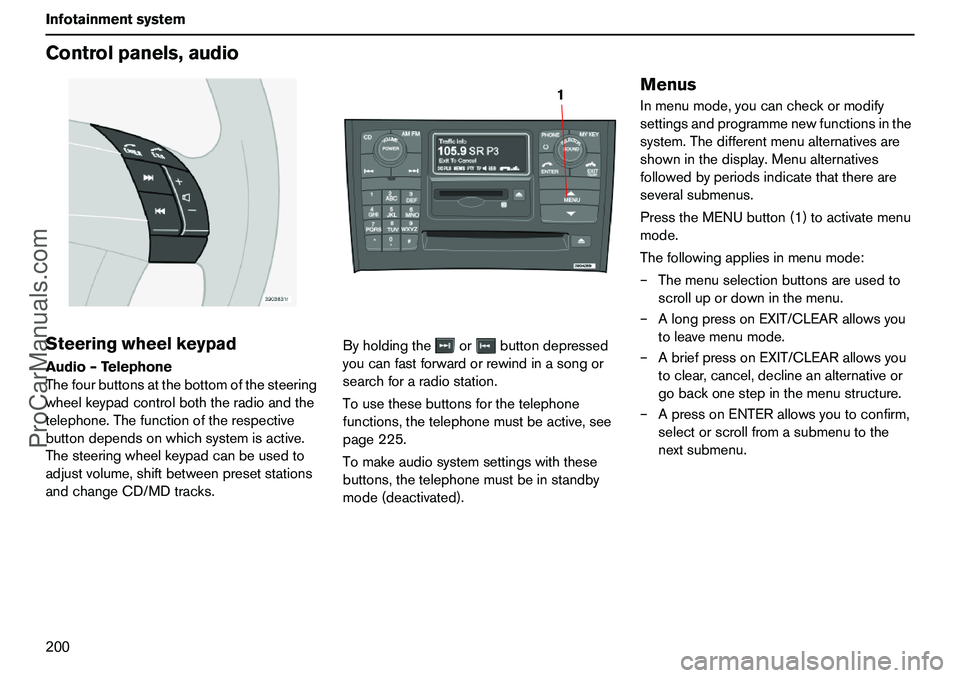
200 InfotainmentsystemControlpanels,audioSteeringwheelkeypadAudio–Telephone
Thefourbuttonsatthebottomofthesteering
wheelkeypadcontrolboththeradioandthe
telephone.Thefunctionoftherespective
buttondependsonwhichsystemisactive.
Thesteeringwheelkeypadcanbeusedto
adjustvolume,shiftbetweenpresetstations
andchangeCD/MDtracks.Byholdingtheorbuttondepressed
youcanfastforwardorrewindinasongor
searchforaradiostation.
Tousethesebuttonsforthetelephone
functions,thetelephonemustbeactive,see
page225.
Tomakeaudiosystemsettingswiththese
buttons,thetelephonemustbeinstandby
mode(deactivated).
MenusInmenumode,youcancheckormodify
settingsandprogrammenewfunctionsinthe
system.Thedifferentmenualternativesare
showninthedisplay.Menualternatives
followedbyperiodsindicatethatthereare
severalsubmenus.
PresstheMENUbutton(1)toactivatemenu
mode.
Thefollowingappliesinmenumode:
–Themenuselectionbuttonsareusedto
scrollupordowninthemenu.
–AlongpressonEXIT/CLEARallowsyou
toleavemenumode.
–AbriefpressonEXIT/CLEARallowsyou
toclear,cancel,declineanalternativeor
gobackonestepinthemenustructure.
–ApressonENTERallowsyoutoconfirm,
selectorscrollfromasubmenutothe
nextsubmenu.
1
ProCarManuals.com
Page 202 of 254
201 Infotainmentsystem
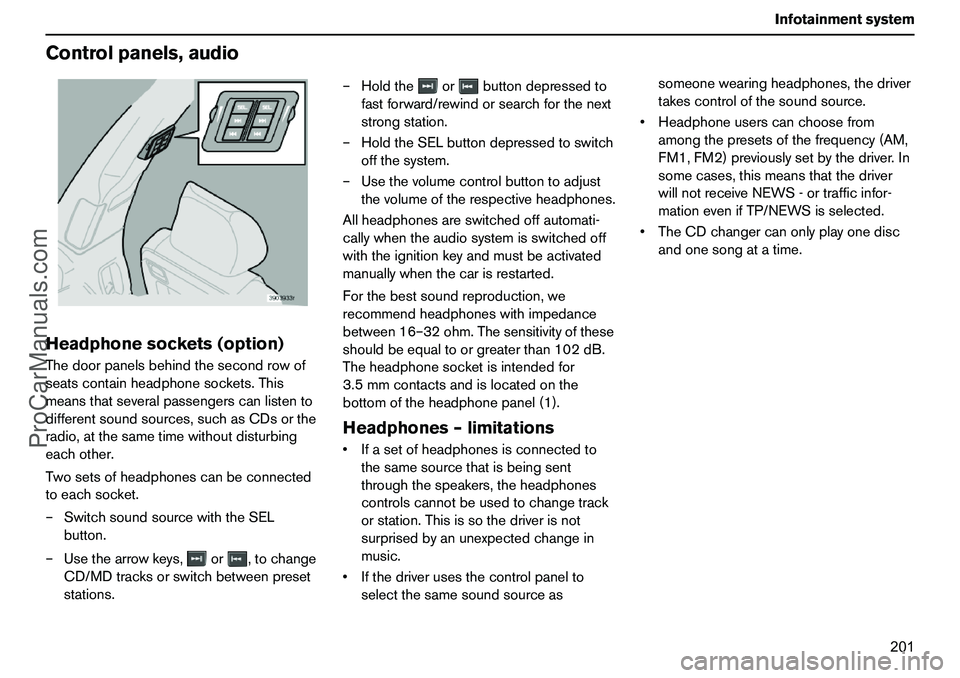
Controlpanels,audioHeadphonesockets(option)Thedoorpanelsbehindthesecondrowof
seatscontainheadphonesockets.This
meansthatseveralpassengerscanlistento
differentsoundsources,suchasCDsorthe
radio,atthesametimewithoutdisturbing
eachother.
Twosetsofheadphonescanbeconnected
toeachsocket.
–SwitchsoundsourcewiththeSEL
button.
–Usethearrowkeys,or,tochange
CD/MDtracksorswitchbetweenpreset
stations.–Holdtheorbuttondepressedto
fastforward/rewindorsearchforthenext
strongstation.
–HoldtheSELbuttondepressedtoswitch
offthesystem.
–Usethevolumecontrolbuttontoadjust
thevolumeoftherespectiveheadphones.
Allheadphonesareswitchedoffautomati-
callywhentheaudiosystemisswitchedoff
withtheignitionkeyandmustbeactivated
manuallywhenthecarisrestarted.
Forthebestsoundreproduction,we
recommendheadphoneswithimpedance
between16–32ohm.Thesensitivityofthese
shouldbeequaltoorgreaterthan102dB.
Theheadphonesocketisintendedfor
3.5mmcontactsandislocatedonthe
bottomoftheheadphonepanel(1).
Headphones–limitationsIfasetofheadphonesisconnectedto
thesamesourcethatisbeingsent
throughthespeakers,theheadphones
controlscannotbeusedtochangetrack
orstation.Thisissothedriverisnot
surprisedbyanunexpectedchangein
music.
Ifthedriverusesthecontrolpanelto
selectthesamesoundsourceassomeonewearingheadphones,thedriver
takescontrolofthesoundsource.
Headphoneuserscanchoosefrom
amongthepresetsofthefrequency(AM,
FM1,FM2)previouslysetbythedriver.In
somecases,thismeansthatthedriver
willnotreceiveNEWS-ortrafficinfor-
mationevenifTP/NEWSisselected.
TheCDchangercanonlyplayonedisc
andonesongatatime.
ProCarManuals.com
Page 203 of 254
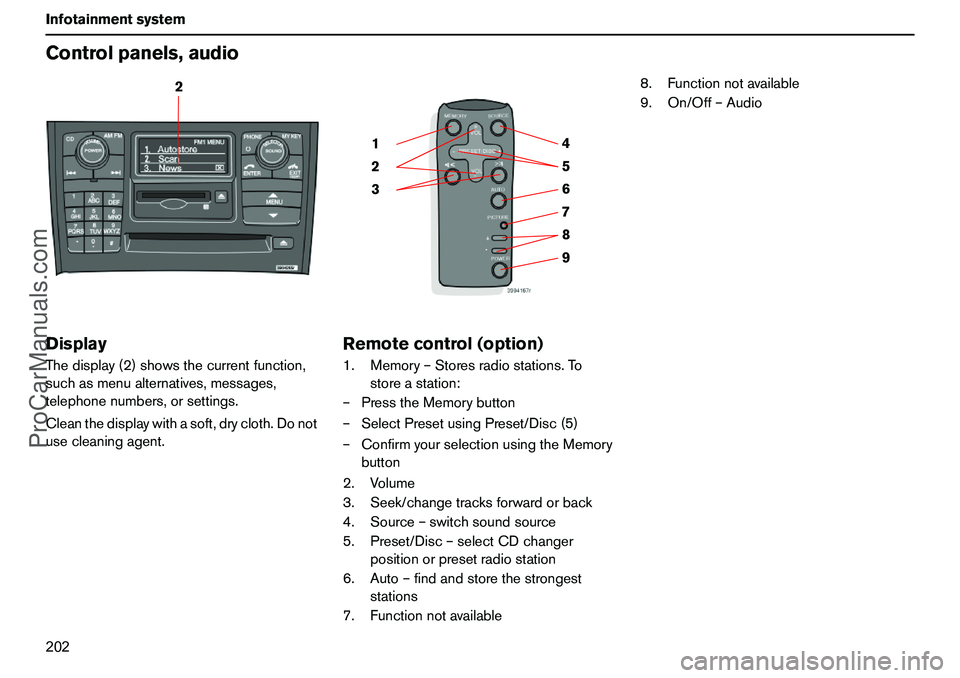
202 InfotainmentsystemControlpanels,audioDisplayThedisplay(2)showsthecurrentfunction,
suchasmenualternatives,messages,
telephonenumbers,orsettings.
Cleanthedisplaywithasoft,drycloth.Donot
usecleaningagent.
Remotecontrol(option)1.Memory–Storesradiostations.To
storeastation:
–PresstheMemorybutton
–SelectPresetusingPreset/Disc(5)
–ConfirmyourselectionusingtheMemory
button
2.Volume
3.Seek/changetracksforwardorback
4.Source–switchsoundsource
5.Preset/Disc–selectCDchanger
positionorpresetradiostation
6.Auto–findandstorethestrongest
stations
7.Functionnotavailable8.Functionnotavailable
9.On/Off–Audio
2
9 876 5 4
3 21
ProCarManuals.com
Page 210 of 254
209 Infotainmentsystem
RadiofunctionsYoucanstoreupto10stationseachforAM,
FM1andFM2,i.e.atotalof30stations.
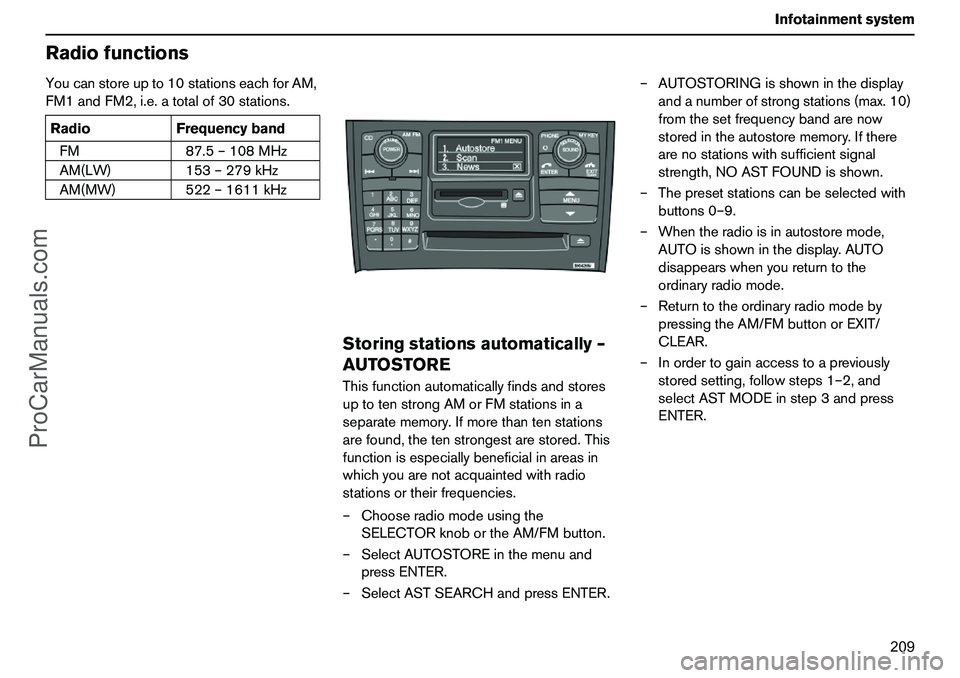
Storingstationsautomatically–
AUTOSTOREThisfunctionautomaticallyfindsandstores
uptotenstrongAMorFMstationsina
separatememory.Ifmorethantenstations
arefound,thetenstrongestarestored.This
functionisespeciallybeneficialinareasin
whichyouarenotacquaintedwithradio
stationsortheirfrequencies.
–Chooseradiomodeusingthe
SELECTORknobortheAM/FMbutton.
–SelectAUTOSTOREinthemenuand
pressENTER.
–SelectASTSEARCHandpressENTER.–AUTOSTORINGisshowninthedisplay
andanumberofstrongstations(max.10)
fromthesetfrequencybandarenow
storedintheautostorememory.Ifthere
arenostationswithsufficientsignal
strength,NOASTFOUNDisshown.
–Thepresetstationscanbeselectedwith
buttons0–9.
–Whentheradioisinautostoremode,
AUTOisshowninthedisplay.AUTO
disappearswhenyoureturntothe
ordinaryradiomode.
–Returntotheordinaryradiomodeby
pressingtheAM/FMbuttonorEXIT/
CLEAR.
–Inordertogainaccesstoapreviously
storedsetting,followsteps1–2,and
selectASTMODEinstep3andpress
ENTER. RadioFrequencyband
FM87.5–108MHz
AM(LW)153–279kHz
AM(MW)522–1611kHz
ProCarManuals.com