reset infotainment system VOLVO XC90 2006 Owners Manual
[x] Cancel search | Manufacturer: VOLVO, Model Year: 2006, Model line: XC90, Model: VOLVO XC90 2006Pages: 254, PDF Size: 8.43 MB
Page 201 of 254
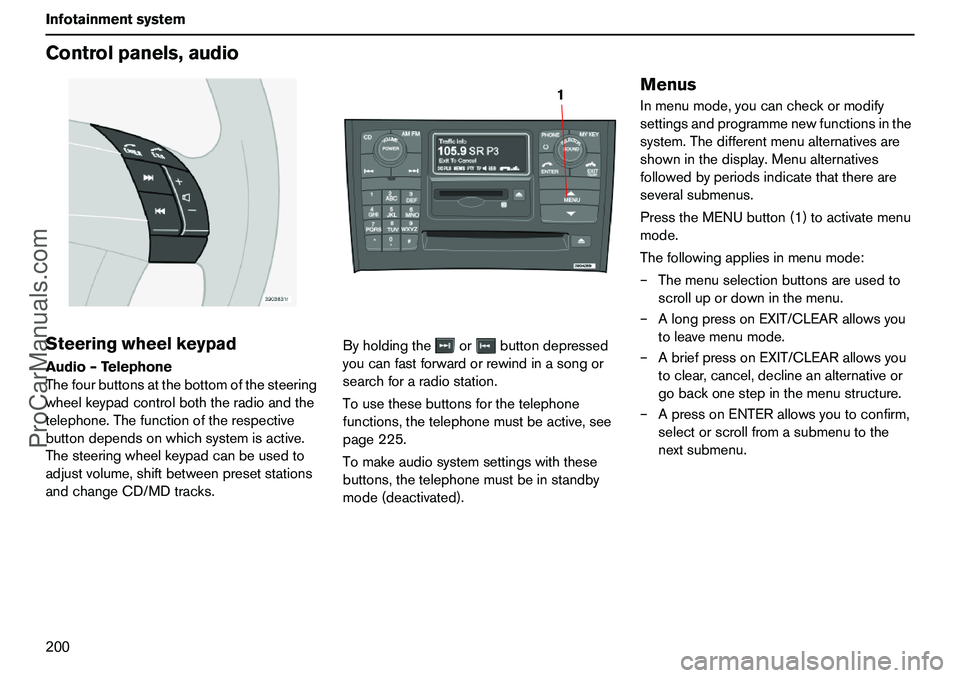
200 InfotainmentsystemControlpanels,audioSteeringwheelkeypadAudio–Telephone
Thefourbuttonsatthebottomofthesteering
wheelkeypadcontrolboththeradioandthe
telephone.Thefunctionoftherespective
buttondependsonwhichsystemisactive.
Thesteeringwheelkeypadcanbeusedto
adjustvolume,shiftbetweenpresetstations
andchangeCD/MDtracks.Byholdingtheorbuttondepressed
youcanfastforwardorrewindinasongor
searchforaradiostation.
Tousethesebuttonsforthetelephone
functions,thetelephonemustbeactive,see
page225.
Tomakeaudiosystemsettingswiththese
buttons,thetelephonemustbeinstandby
mode(deactivated).
MenusInmenumode,youcancheckormodify
settingsandprogrammenewfunctionsinthe
system.Thedifferentmenualternativesare
showninthedisplay.Menualternatives
followedbyperiodsindicatethatthereare
severalsubmenus.
PresstheMENUbutton(1)toactivatemenu
mode.
Thefollowingappliesinmenumode:
–Themenuselectionbuttonsareusedto
scrollupordowninthemenu.
–AlongpressonEXIT/CLEARallowsyou
toleavemenumode.
–AbriefpressonEXIT/CLEARallowsyou
toclear,cancel,declineanalternativeor
gobackonestepinthemenustructure.
–ApressonENTERallowsyoutoconfirm,
selectorscrollfromasubmenutothe
nextsubmenu.
1
ProCarManuals.com
Page 202 of 254
201 Infotainmentsystem
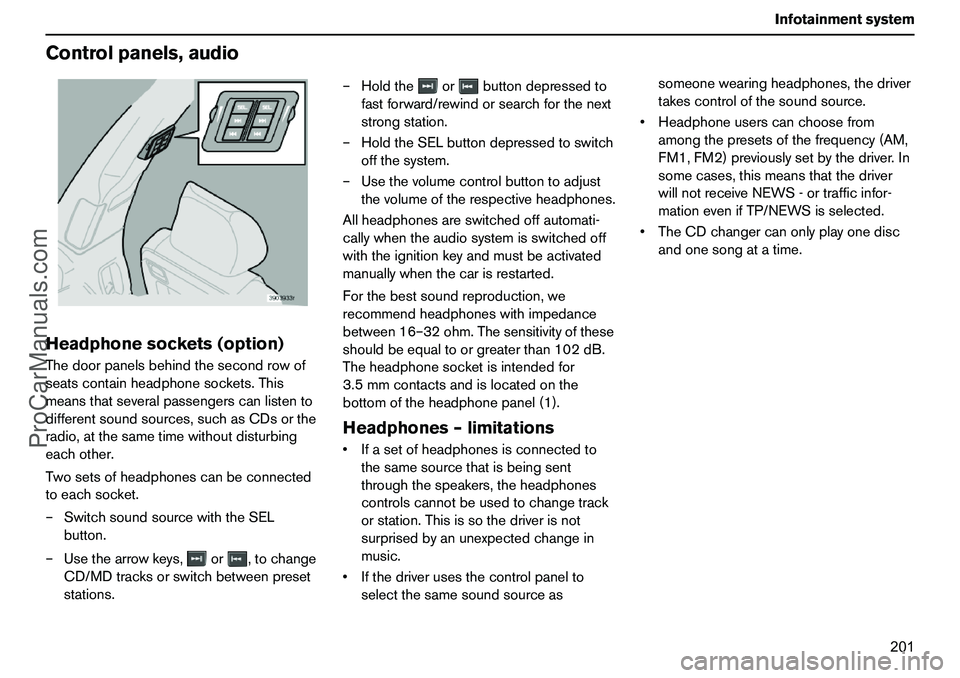
Controlpanels,audioHeadphonesockets(option)Thedoorpanelsbehindthesecondrowof
seatscontainheadphonesockets.This
meansthatseveralpassengerscanlistento
differentsoundsources,suchasCDsorthe
radio,atthesametimewithoutdisturbing
eachother.
Twosetsofheadphonescanbeconnected
toeachsocket.
–SwitchsoundsourcewiththeSEL
button.
–Usethearrowkeys,or,tochange
CD/MDtracksorswitchbetweenpreset
stations.–Holdtheorbuttondepressedto
fastforward/rewindorsearchforthenext
strongstation.
–HoldtheSELbuttondepressedtoswitch
offthesystem.
–Usethevolumecontrolbuttontoadjust
thevolumeoftherespectiveheadphones.
Allheadphonesareswitchedoffautomati-
callywhentheaudiosystemisswitchedoff
withtheignitionkeyandmustbeactivated
manuallywhenthecarisrestarted.
Forthebestsoundreproduction,we
recommendheadphoneswithimpedance
between16–32ohm.Thesensitivityofthese
shouldbeequaltoorgreaterthan102dB.
Theheadphonesocketisintendedfor
3.5mmcontactsandislocatedonthe
bottomoftheheadphonepanel(1).
Headphones–limitationsIfasetofheadphonesisconnectedto
thesamesourcethatisbeingsent
throughthespeakers,theheadphones
controlscannotbeusedtochangetrack
orstation.Thisissothedriverisnot
surprisedbyanunexpectedchangein
music.
Ifthedriverusesthecontrolpanelto
selectthesamesoundsourceassomeonewearingheadphones,thedriver
takescontrolofthesoundsource.
Headphoneuserscanchoosefrom
amongthepresetsofthefrequency(AM,
FM1,FM2)previouslysetbythedriver.In
somecases,thismeansthatthedriver
willnotreceiveNEWS-ortrafficinfor-
mationevenifTP/NEWSisselected.
TheCDchangercanonlyplayonedisc
andonesongatatime.
ProCarManuals.com
Page 203 of 254
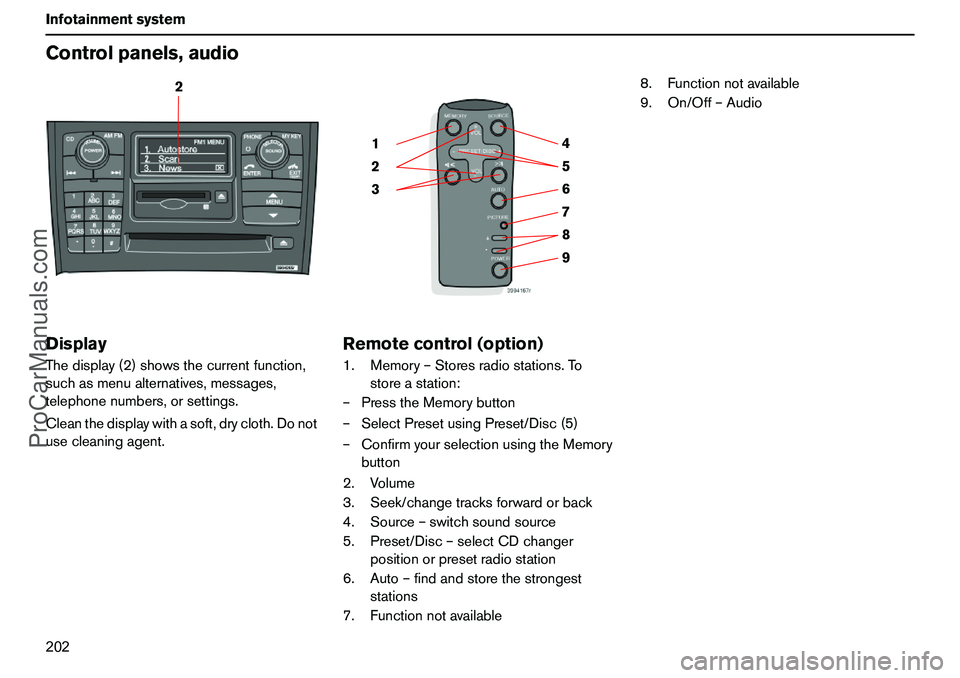
202 InfotainmentsystemControlpanels,audioDisplayThedisplay(2)showsthecurrentfunction,
suchasmenualternatives,messages,
telephonenumbers,orsettings.
Cleanthedisplaywithasoft,drycloth.Donot
usecleaningagent.
Remotecontrol(option)1.Memory–Storesradiostations.To
storeastation:
–PresstheMemorybutton
–SelectPresetusingPreset/Disc(5)
–ConfirmyourselectionusingtheMemory
button
2.Volume
3.Seek/changetracksforwardorback
4.Source–switchsoundsource
5.Preset/Disc–selectCDchanger
positionorpresetradiostation
6.Auto–findandstorethestrongest
stations
7.Functionnotavailable8.Functionnotavailable
9.On/Off–Audio
2
9 876 5 4
3 21
ProCarManuals.com
Page 210 of 254
209 Infotainmentsystem
RadiofunctionsYoucanstoreupto10stationseachforAM,
FM1andFM2,i.e.atotalof30stations.
Storingstationsautomatically–
AUTOSTOREThisfunctionautomaticallyfindsandstores
uptotenstrongAMorFMstationsina
separatememory.Ifmorethantenstations
arefound,thetenstrongestarestored.This
functionisespeciallybeneficialinareasin
whichyouarenotacquaintedwithradio
stationsortheirfrequencies.
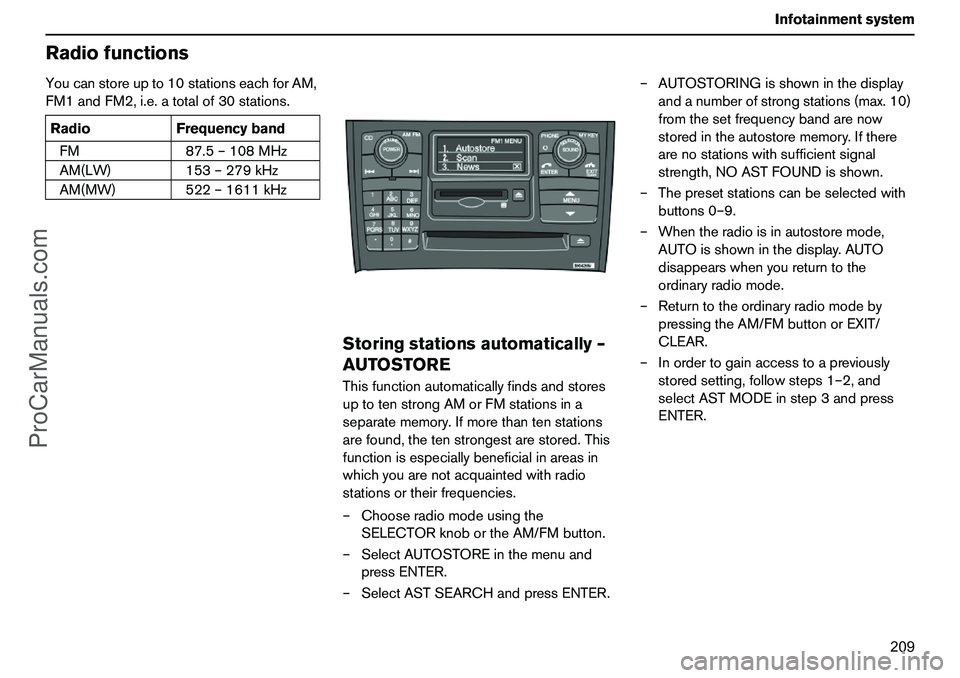
–Chooseradiomodeusingthe
SELECTORknobortheAM/FMbutton.
–SelectAUTOSTOREinthemenuand
pressENTER.
–SelectASTSEARCHandpressENTER.–AUTOSTORINGisshowninthedisplay
andanumberofstrongstations(max.10)
fromthesetfrequencybandarenow
storedintheautostorememory.Ifthere
arenostationswithsufficientsignal
strength,NOASTFOUNDisshown.
–Thepresetstationscanbeselectedwith
buttons0–9.
–Whentheradioisinautostoremode,
AUTOisshowninthedisplay.AUTO
disappearswhenyoureturntothe
ordinaryradiomode.
–Returntotheordinaryradiomodeby
pressingtheAM/FMbuttonorEXIT/
CLEAR.
–Inordertogainaccesstoapreviously
storedsetting,followsteps1–2,and
selectASTMODEinstep3andpress
ENTER. RadioFrequencyband
FM87.5–108MHz
AM(LW)153–279kHz
AM(MW)522–1611kHz
ProCarManuals.com
Page 215 of 254
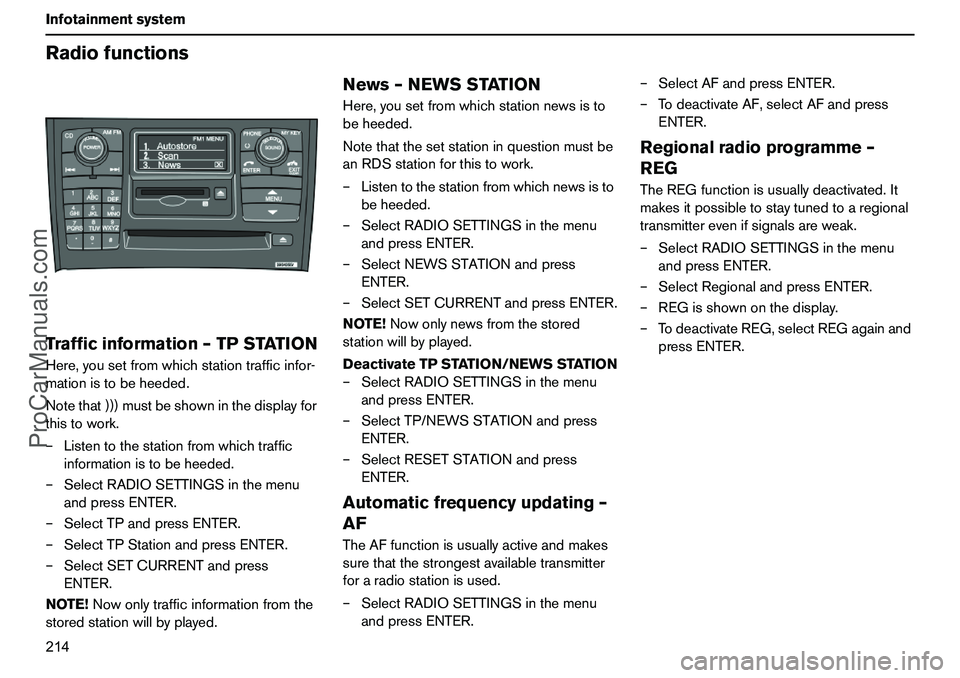
214 InfotainmentsystemRadiofunctionsTrafficinformation–TPSTATIONHere,yousetfromwhichstationtrafficinfor-
mationistobeheeded.
Notethat)))mustbeshowninthedisplayfor
thistowork.
–Listentothestationfromwhichtraffic
informationistobeheeded.
–SelectRADIOSETTINGSinthemenu
andpressENTER.
–SelectTPandpressENTER.
–SelectTPStationandpressENTER.
–SelectSETCURRENTandpress
ENTER.
NOTE!Nowonlytrafficinformationfromthe
storedstationwillbyplayed.
News–NEWSSTATIONHere,yousetfromwhichstationnewsisto
beheeded.
Notethatthesetstationinquestionmustbe
anRDSstationforthistowork.
–Listentothestationfromwhichnewsisto
beheeded.
–SelectRADIOSETTINGSinthemenu
andpressENTER.
–SelectNEWSSTATIONandpress
ENTER.
–SelectSETCURRENTandpressENTER.
NOTE!Nowonlynewsfromthestored
stationwillbyplayed.
DeactivateTPSTATION/NEWSSTATION
–SelectRADIOSETTINGSinthemenu
andpressENTER.
–SelectTP/NEWSSTATIONandpress
ENTER.
–SelectRESETSTATIONandpress
ENTER.Automaticfrequencyupdating–
AFTheAFfunctionisusuallyactiveandmakes
surethatthestrongestavailabletransmitter
foraradiostationisused.
–SelectRADIOSETTINGSinthemenu
andpressENTER.–SelectAFandpressENTER.
–TodeactivateAF,selectAFandpress
ENTER.
Regionalradioprogramme–
REGTheREGfunctionisusuallydeactivated.It
makesitpossibletostaytunedtoaregional
transmitterevenifsignalsareweak.
–SelectRADIOSETTINGSinthemenu
andpressENTER.
–SelectRegionalandpressENTER.
–REGisshownonthedisplay.
–TodeactivateREG,selectREGagainand
pressENTER.
ProCarManuals.com
Page 216 of 254
215 Infotainmentsystem
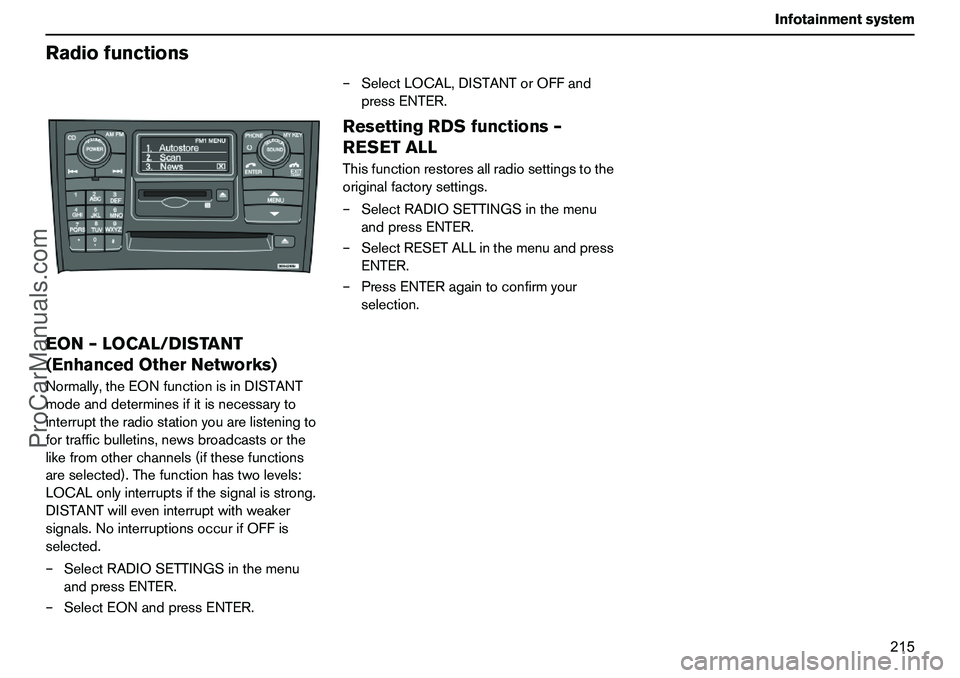
RadiofunctionsEON–LOCAL/DISTANT
(EnhancedOtherNetworks)Normally,theEONfunctionisinDISTANT
modeanddeterminesifitisnecessaryto
interrupttheradiostationyouarelisteningto
fortrafficbulletins,newsbroadcastsorthe
likefromotherchannels(ifthesefunctions
areselected).Thefunctionhastwolevels:
LOCALonlyinterruptsifthesignalisstrong.
DISTANTwilleveninterruptwithweaker
signals.NointerruptionsoccurifOFFis
selected.
–SelectRADIOSETTINGSinthemenu
andpressENTER.
–SelectEONandpressENTER.–SelectLOCAL,DISTANTorOFFand
pressENTER.
ResettingRDSfunctions–
RESETALLThisfunctionrestoresallradiosettingstothe
originalfactorysettings.
–SelectRADIOSETTINGSinthemenu
andpressENTER.
–SelectRESETALLinthemenuandpress
ENTER.
–PressENTERagaintoconfirmyour
selection.
ProCarManuals.com
Page 221 of 254
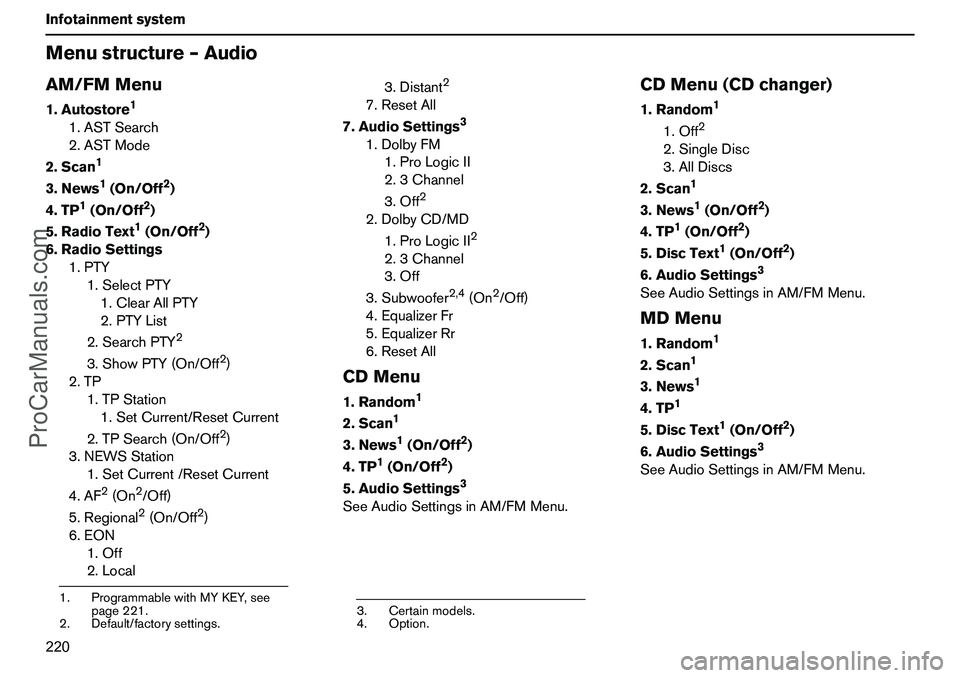
220 InfotainmentsystemMenustructure–AudioAM/FMMenu1.Autostore
1
1.ASTSearch
2.ASTMode
2.Scan
1
3.News
1(On/Off
2)
4.TP
1(On/Off
2)
5.RadioText1(On/Off
2)
6.RadioSettings
1.PTY
1.SelectPTY
1.ClearAllPTY
2.PTYList
2.SearchPTY
2
3.ShowPTY(On/Off
2)
2.TP
1.TPStation
1.SetCurrent/ResetCurrent
2.TPSearch(On/Off2)
3.NEWSStation
1.SetCurrent/ResetCurrent
4.AF
2(On
2/Off)
5.Regional2(On/Off
2)
6.EON
1.Off
2.Local3.Distant
2
7.ResetAll
7.AudioSettings
3
1.DolbyFM
1.ProLogicII
2.3Channel
3.Off
2
2.DolbyCD/MD
1.ProLogicII
2
2.3Channel
3.Off
3.Subwoofer
2,4
(On
2/Off)
4.EqualizerFr
5.EqualizerRr
6.ResetAll
CDMenu1.Random
1
2.Scan
1
3.News
1(On/Off
2)
4.TP
1(On/Off
2)
5.AudioSettings3
SeeAudioSettingsinAM/FMMenu.
CDMenu(CDchanger)1.Random
1
1.Off
2
2.SingleDisc
3.AllDiscs
2.Scan
1
3.News
1(On/Off
2)
4.TP
1(On/Off
2)
5.DiscText
1(On/Off
2)
6.AudioSettings
3
SeeAudioSettingsinAM/FMMenu.MDMenu1.Random
1
2.Scan
1
3.News
1
4.TP
1
5.DiscText
1(On/Off
2)
6.AudioSettings
3
SeeAudioSettingsinAM/FMMenu.
1.ProgrammablewithMYKEY,see
page221.
2.Default/factorysettings.
3.Certainmodels.
4.Option.
ProCarManuals.com
Page 232 of 254
231 Infotainmentsystem
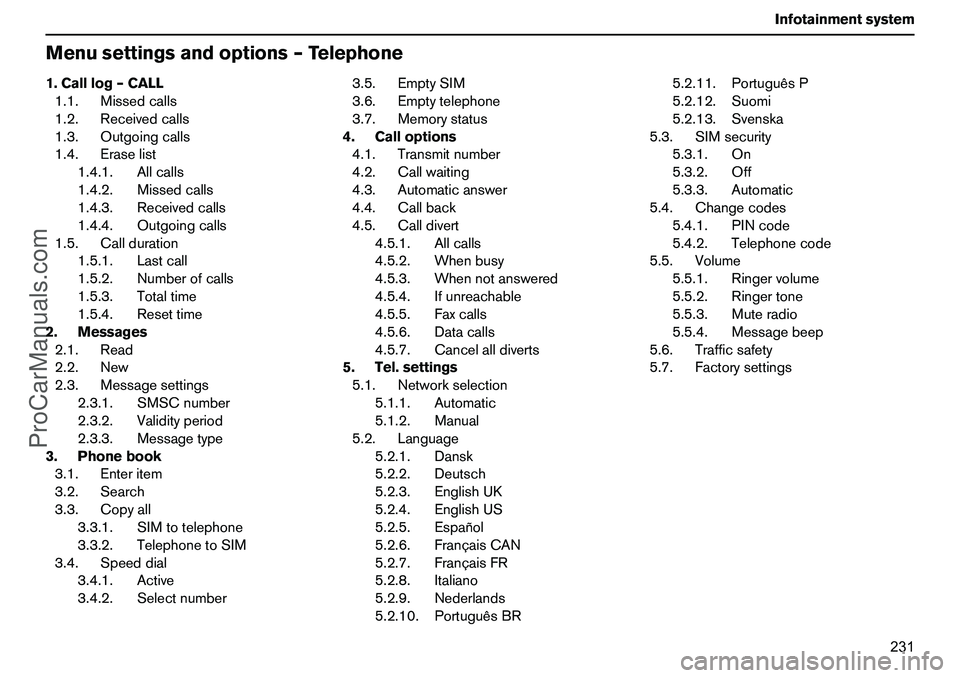
Menusettingsandoptions–Telephone1.Calllog–CALL
1.1.Missedcalls
1.2.Receivedcalls
1.3.Outgoingcalls
1.4.Eraselist
1.4.1.Allcalls
1.4.2.Missedcalls
1.4.3.Receivedcalls
1.4.4.Outgoingcalls
1.5.Callduration
1.5.1.Lastcall
1.5.2.Numberofcalls
1.5.3.Totaltime
1.5.4.Resettime
2.Messages
2.1.Read
2.2.New
2.3.Messagesettings
2.3.1.SMSCnumber
2.3.2.Validityperiod
2.3.3.Messagetype
3.Phonebook
3.1.Enteritem
3.2.Search
3.3.Copyall
3.3.1.SIMtotelephone
3.3.2.TelephonetoSIM
3.4.Speeddial
3.4.1.Active
3.4.2.Selectnumber3.5.EmptySIM
3.6.Emptytelephone
3.7.Memorystatus
4.Calloptions
4.1.Transmitnumber
4.2.Callwaiting
4.3.Automaticanswer
4.4.Callback
4.5.Calldivert
4.5.1.Allcalls
4.5.2.Whenbusy
4.5.3.Whennotanswered
4.5.4.Ifunreachable
4.5.5.Faxcalls
4.5.6.Datacalls
4.5.7.Cancelalldiverts
5.Tel.settings
5.1.Networkselection
5.1.1.Automatic
5.1.2.Manual
5.2.Language
5.2.1.Dansk
5.2.2.Deutsch
5.2.3.EnglishUK
5.2.4.EnglishUS
5.2.5.Español
5.2.6.FrançaisCAN
5.2.7.FrançaisFR
5.2.8.Italiano
5.2.9.Nederlands
5.2.10.PortuguêsBR5.2.11.PortuguêsP
5.2.12.Suomi
5.2.13.Svenska
5.3.SIMsecurity
5.3.1.On
5.3.2.Off
5.3.3.Automatic
5.4.Changecodes
5.4.1.PINcode
5.4.2.Telephonecode
5.5.Volume
5.5.1.Ringervolume
5.5.2.Ringertone
5.5.3.Muteradio
5.5.4.Messagebeep
5.6.Trafficsafety
5.7.Factorysettings
ProCarManuals.com
Page 233 of 254
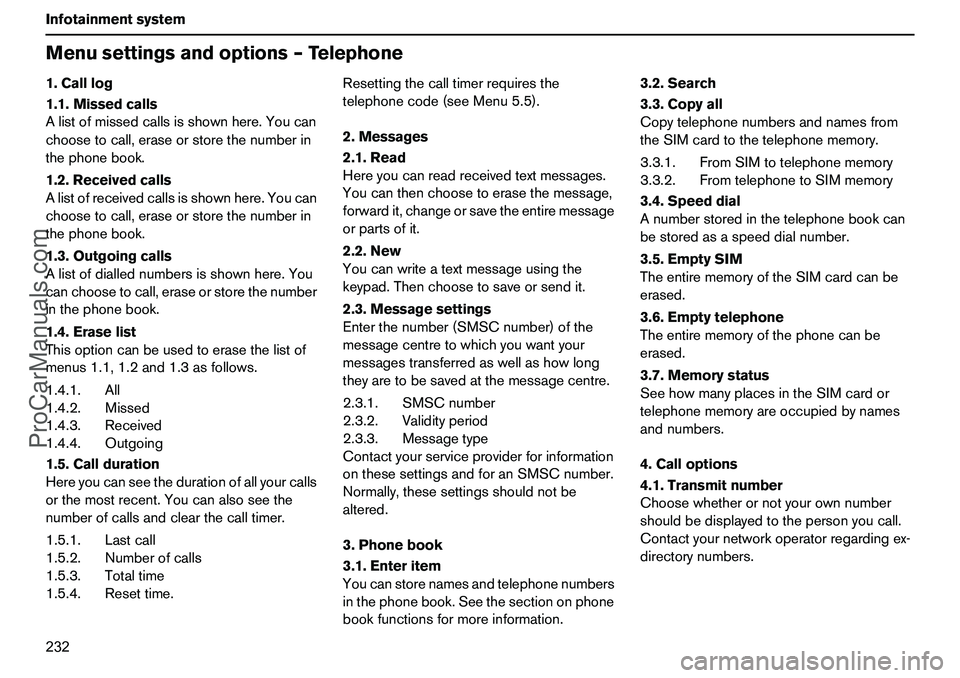
232 InfotainmentsystemMenusettingsandoptions–Telephone1.Calllog
1.1.Missedcalls
Alistofmissedcallsisshownhere.Youcan
choosetocall,eraseorstorethenumberin
thephonebook.
1.2.Receivedcalls
Alistofreceivedcallsisshownhere.Youcan
choosetocall,eraseorstorethenumberin
thephonebook.
1.3.Outgoingcalls
Alistofdiallednumbersisshownhere.You
canchoosetocall,eraseorstorethenumber
inthephonebook.
1.4.Eraselist
Thisoptioncanbeusedtoerasethelistof
menus1.1,1.2and1.3asfollows.
1.4.1.All
1.4.2.Missed
1.4.3.Received
1.4.4.Outgoing
1.5.Callduration
Hereyoucanseethedurationofallyourcalls
orthemostrecent.Youcanalsoseethe
numberofcallsandclearthecalltimer.
1.5.1.Lastcall
1.5.2.Numberofcalls
1.5.3.Totaltime
1.5.4.Resettime.Resettingthecalltimerrequiresthe
telephonecode(seeMenu5.5).
2.Messages
2.1.Read
Hereyoucanreadreceivedtextmessages.
Youcanthenchoosetoerasethemessage,
forwardit,changeorsavetheentiremessage
orpartsofit.
2.2.New
Youcanwriteatextmessageusingthe
keypad.Thenchoosetosaveorsendit.
2.3.Messagesettings
Enterthenumber(SMSCnumber)ofthe
messagecentretowhichyouwantyour
messagestransferredaswellashowlong
theyaretobesavedatthemessagecentre.
2.3.1.SMSCnumber
2.3.2.Validityperiod
2.3.3.Messagetype
Contactyourserviceproviderforinformation
onthesesettingsandforanSMSCnumber.
Normally,thesesettingsshouldnotbe
altered.
3.Phonebook
3.1.Enteritem
Youcanstorenamesandtelephonenumbers
inthephonebook.Seethesectiononphone
bookfunctionsformoreinformation.3.2.Search
3.3.Copyall
Copytelephonenumbersandnamesfrom
theSIMcardtothetelephonememory.
3.3.1.FromSIMtotelephonememory
3.3.2.FromtelephonetoSIMmemory
3.4.Speeddial
Anumberstoredinthetelephonebookcan
bestoredasaspeeddialnumber.
3.5.EmptySIM
TheentirememoryoftheSIMcardcanbe
erased.
3.6.Emptytelephone
Theentirememoryofthephonecanbe
erased.
3.7.Memorystatus
SeehowmanyplacesintheSIMcardor
telephonememoryareoccupiedbynames
andnumbers.
4.Calloptions
4.1.Transmitnumber
Choosewhetherornotyourownnumber
shouldbedisplayedtothepersonyoucall.
Contactyournetworkoperatorregardingex-
directorynumbers.
ProCarManuals.com
Page 234 of 254
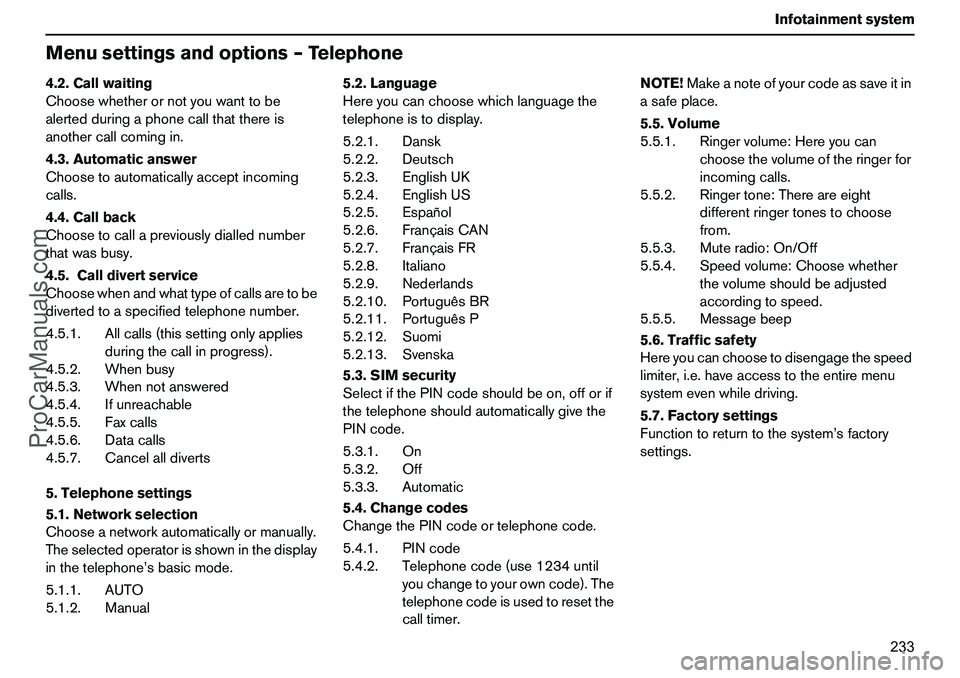
233 Infotainmentsystem
Menusettingsandoptions–Telephone4.2.Callwaiting
Choosewhetherornotyouwanttobe
alertedduringaphonecallthatthereis
anothercallcomingin.
4.3.Automaticanswer
Choosetoautomaticallyacceptincoming
calls.
4.4.Callback
Choosetocallapreviouslydiallednumber
thatwasbusy.
4.5.Calldivertservice
Choosewhenandwhattypeofcallsaretobe
divertedtoaspecifiedtelephonenumber.
4.5.1.Allcalls(thissettingonlyapplies
duringthecallinprogress).
4.5.2.Whenbusy
4.5.3.Whennotanswered
4.5.4.Ifunreachable
4.5.5.Faxcalls
4.5.6.Datacalls
4.5.7.Cancelalldiverts
5.Telephonesettings
5.1.Networkselection
Chooseanetworkautomaticallyormanually.
Theselectedoperatorisshowninthedisplay
inthetelephone’sbasicmode.
5.1.1.AUTO
5.1.2.Manual5.2.Language
Hereyoucanchoosewhichlanguagethe
telephoneistodisplay.
5.2.1.Dansk
5.2.2.Deutsch
5.2.3.EnglishUK
5.2.4.EnglishUS
5.2.5.Español
5.2.6.FrançaisCAN
5.2.7.FrançaisFR
5.2.8.Italiano
5.2.9.Nederlands
5.2.10.PortuguêsBR
5.2.11.PortuguêsP
5.2.12.Suomi
5.2.13.Svenska
5.3.SIMsecurity
SelectifthePINcodeshouldbeon,offorif
thetelephoneshouldautomaticallygivethe
PINcode.
5.3.1.On
5.3.2.Off
5.3.3.Automatic
5.4.Changecodes
ChangethePINcodeortelephonecode.
5.4.1.PINcode
5.4.2.Telephonecode(use1234until
youchangetoyourowncode).The
telephonecodeisusedtoresetthe
calltimer.NOTE!Makeanoteofyourcodeassaveitin
asafeplace.
5.5.Volume
5.5.1.Ringervolume:Hereyoucan
choosethevolumeoftheringerfor
incomingcalls.
5.5.2.Ringertone:Thereareeight
differentringertonestochoose
from.
5.5.3.Muteradio:On/Off
5.5.4.Speedvolume:Choosewhether
thevolumeshouldbeadjusted
accordingtospeed.
5.5.5.Messagebeep
5.6.Trafficsafety
Hereyoucanchoosetodisengagethespeed
limiter,i.e.haveaccesstotheentiremenu
systemevenwhiledriving.
5.7.Factorysettings
Functiontoreturntothesystem’sfactory
settings.
ProCarManuals.com