ESP VOLVO XC90 2006 User Guide
[x] Cancel search | Manufacturer: VOLVO, Model Year: 2006, Model line: XC90, Model: VOLVO XC90 2006Pages: 256, PDF Size: 6.87 MB
Page 156 of 256

2006 VOLVO XC90
Tire inflation placard on Canadian models
NOTE: The placards shown indicate inflation pressure for the tires installed \
on the car at the factory
only.
l Use a tire gauge to check the tire inflation pressure, including the spa\
re, at least once a month and
before long trips. You are strongly urged to buy a reliable tire pressur\
e gauge, as automatic service
station gauges may be inaccurate.
l Use the recommended cold inflation pressure for optimum tire performance\
and wear.
l Under-inflation or over-inflation may cause uneven treadwear patterns.
WARNING!
- Under-inflation is the most common cause of tire failure and may resul\
t in severe tire cracking, tread
separation, or "blowout," with unexpected loss of vehicle control and in\
creased risk of injury.
- Under-inflated tires reduce the load carrying capacity of your vehicle\
.
When weather temperature changes occur, tire inflation pressures also ch\
ange. A 10-degree temperature
drop causes a corresponding drop of 1 psi (7 kPa) in inflation pressur\
e. Check your tire pressures
frequently and adjust them to the proper pressure, which can be found on\
the vehicle's tire information
placard or certification label.
Checking tire pressure
Cold tires
Inflation pressure should be checked when the tires are cold.
The tires are considered to be cold when they have the same temperature \
as the surrounding
(ambient) air.
This temperature is normally reached after the car has been parked for a\
t least 3 hours.
file:///K|/ownersdocs/2006/2006_XC90/06xc90_08.htm (5 of 22)12/30/2006\
5:32:49 PM
Page 165 of 256
2006 VOLVO XC90
Uniform Tire Quality Grading
ALL PASSENGER VEHICLE TIRES MUST CONFORM TO FEDERAL SAFETY
REQUIREMENTS IN ADDITION TO THESE GRADES
Quality grades can be found, where applicable, on the tire sidewall betw\
een the tread shoulder
and maximum section width. For example:
Treadwear 200 Traction AA Temperature A
TREADWEAR
The treadwear grade is a comparative rating based on the wear rate of th\
e tire when tested under
controlled conditions on a specified government test course. For example\
, a tire graded 150 would wear
one and one half (1 1/2) times as well on the government course as a t\
ire graded 100. The relative
performance of tires depends upon the actual conditions of their use, ho\
wever, and many depart
significantly from the norm due to variation in driving habits, maintena\
nce practices and differences in
road characteristics and climate.
TRACTION
The traction grades, from highest to lowest, are AA, A, B, and C, as mea\
sured under controlled
conditions on specified government test surfaces of asphalt and concrete\
. A tire marked C may have
poor traction performance.
WARNING!
The traction grade assigned to this tire is based on braking (straight-\
ahead) traction tests and is not a
measure of cornering (turning) traction.
TEMPERATURE
The temperature grades are AA (the highest), A, B, and C, representing\
the tire's resistance to the
generation of heat and its ability to dissipate heat when tested under c\
ontrolled conditions on specified
indoor laboratory test wheel. Sustained high temperature can cause the m\
aterial of the tire to degenerate
and reduce tire life, and excessive temperature can lead to sudden tire \
failure. The grade C corresponds
to minimum level of performance that all passenger vehicle tires must me\
et under the Federal Motor
Safety Standard No. 109. Grades B and A represent higher levels of perfo\
rmance on the laboratory test
wheel than the minimum required by law.
WARNING!
The temperature grade for this tire is established for a tire that is pr\
operly inflated and not overloaded.
Excessive speed, under-inflation, or excessive loading, either separatel\
y or in combination, can cause
heat buildup and possible tire failure.
file:///K|/ownersdocs/2006/2006_XC90/06xc90_08.htm (14 of 22)12/30/200\
6 5:32:49 PM
Page 167 of 256
 during wh\
ich the car should be driven as
smoothly as possible to give the studs the opportunity to seat properly \
in t")
2006 VOLVO XC90
- Studded tires should be run-in 300-600 miles (500-1000 km) during wh\
ich the car should be driven as
smoothly as possible to give the studs the opportunity to seat properly \
in the tires. The tires should have
the same rotational direction throughout their entire lifetime.
NOTE: Please consult state or provincial regulations restricting the use of st\
udded winter tires before
installing such tires.
1. Where permitted
pg. 124 Wheels and tires
Temporary Spare
The spare tire in your car is called a "Temporary Spare".
Recommended tire pressure (see the placard on the B-pillar or on the fu\
el filler door) should be
maintained irrespective of which position on the car the temporary spare\
tire is used on. In the event of
damage to this tire, a new one can be purchased from your Volvo retailer\
.
WARNING!
! Current legislation prohibits the use of the "Temporary Spare" tire ot\
her than as a temporary
replacement for a punctured tire. It must be replaced as soon as possibl\
e by a standard tire. Road
holding and handling may be affected with the "Temporary Spare" in use. \
Do not exceed 50 mph (80
km/h). Do not drive farther than 50 miles (80 km) on a temporary spar\
e tire.
CAUTION:
The car must not be driven with wheels of different dimensions or with a\
spare tire other than the one
that came with the car. The use of different size wheels can seriously d\
amage your car's transmission.
pg. 125 Wheels and tires
Changing wheels
file:///K|/ownersdocs/2006/2006_XC90/06xc90_08.htm (16 of 22)12/30/200\
6 5:32:49 PM
Page 182 of 256
2006 VOLVO XC90
l The API Service Symbol "donut" is divided into three parts:
l The upper section describes the oil's performance level.
l The center identifies the oil's viscosity.
l The lower section indicates whether the oil has demonstrated energy-cons\
erving properties in a
standard test in comparison to a reference oil.
pg. 149 Maintenance
Changing engine oil and oil filter
See the previous page for oil specifications and
page 176 for oil volumes. Refer to the Warranty and
Service Records Information booklet for information on the oil change in\
tervals.
NOTE:
l Volvo does not recommend the use of oil additives.
l Synthetic oil is not used when the oil is changed at the normal maintena\
nce intervals except at ower
request and at additional charge. Please consult your Volvo retailer.
Checking and adding oil
The oil level should be checked every time the vehicle is refueled. This\
is especially important during
the period up to the first scheduled maintenance service.
l The car should be parked on a level surface when the oil is checked.
l If the engine is warm, wait for at least 10-15 minutes after the engine has been switched off\
before
checking the oil.
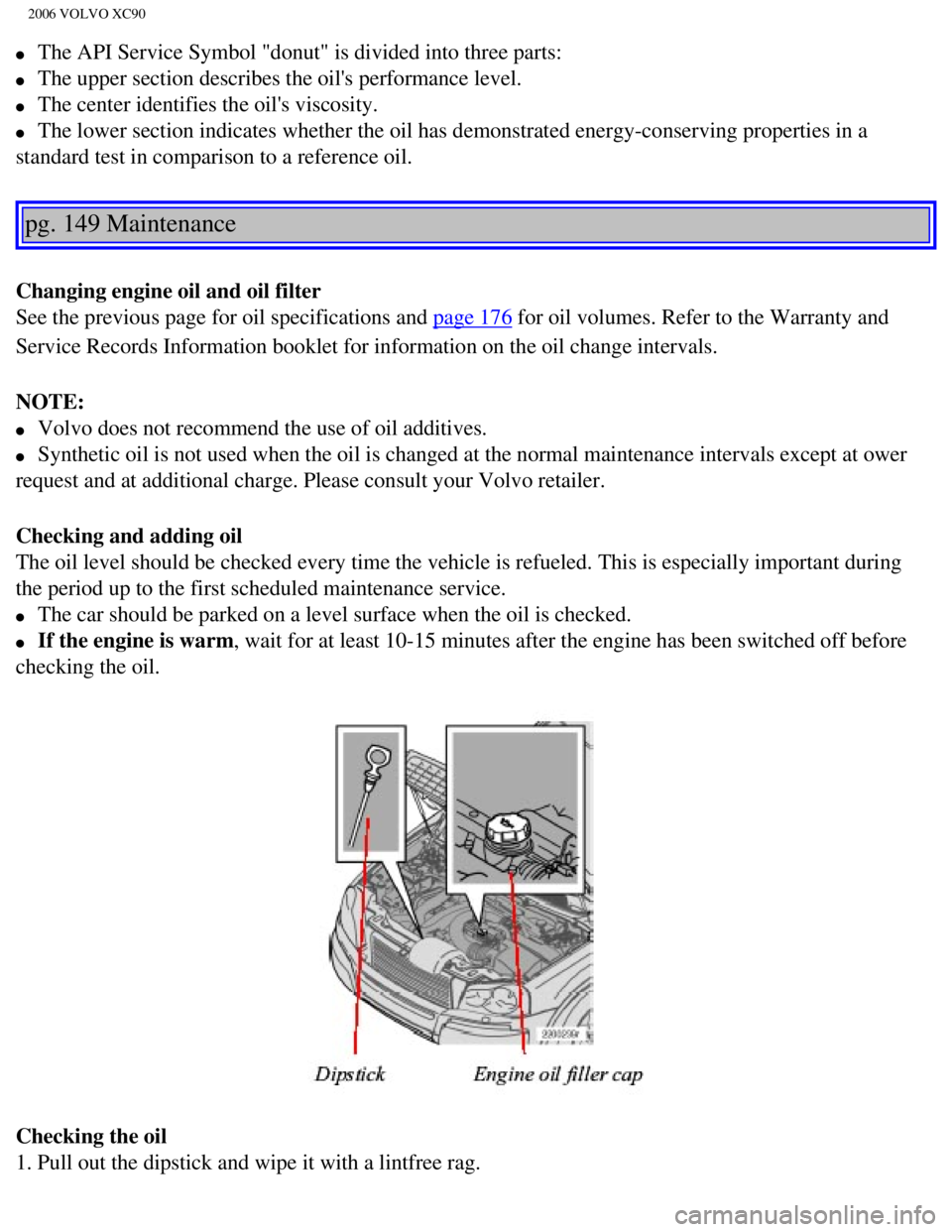
Checking the oil
1. Pull out the dipstick and wipe it with a lintfree rag.
file:///K|/ownersdocs/2006/2006_XC90/06xc90_09a.htm (9 of 15)12/30/200\
6 5:32:50 PM
Page 199 of 256
2006 VOLVO XC90
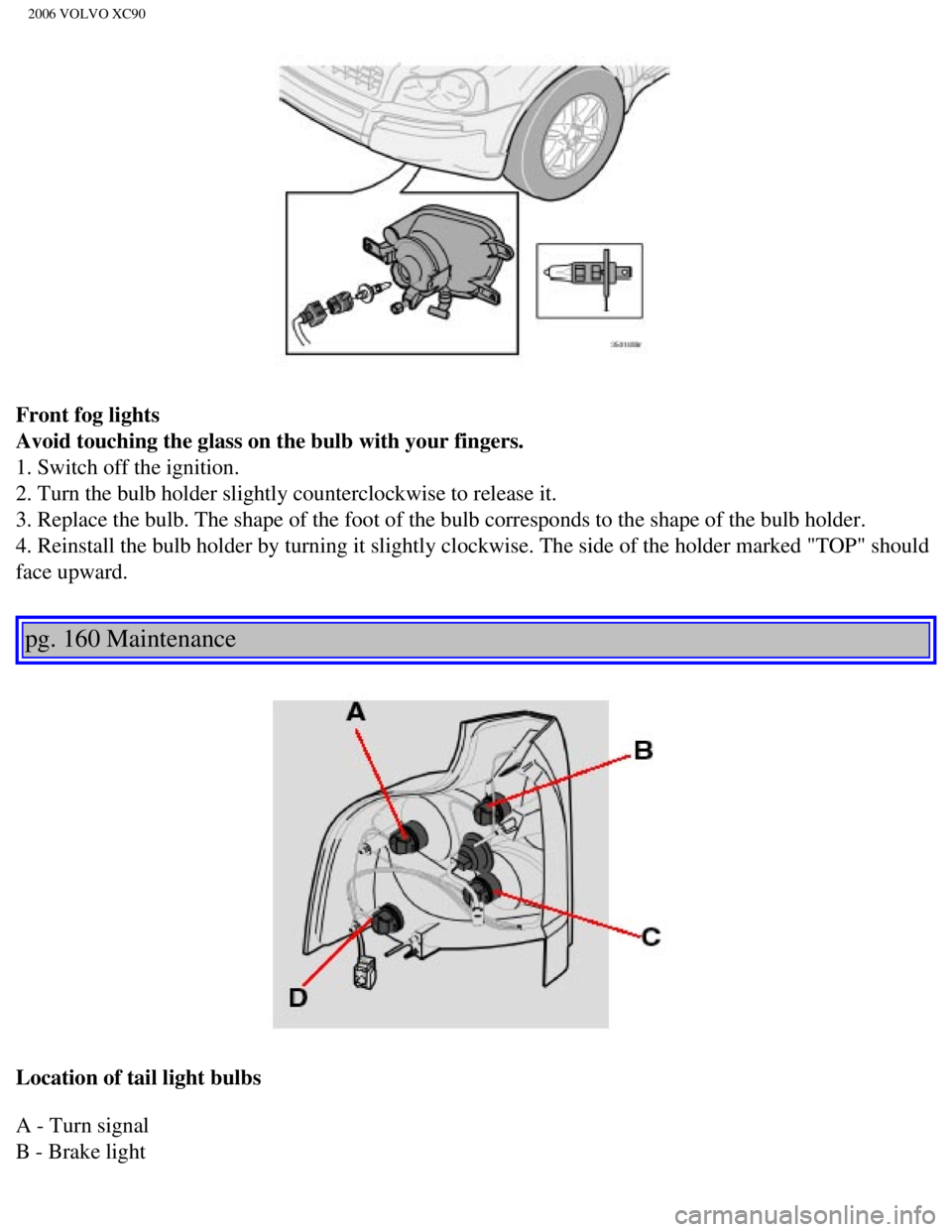
Front fog lights
Avoid touching the glass on the bulb with your fingers.
1. Switch off the ignition.
2. Turn the bulb holder slightly counterclockwise to release it.
3. Replace the bulb. The shape of the foot of the bulb corresponds to th\
e shape of the bulb holder.
4. Reinstall the bulb holder by turning it slightly clockwise. The side \
of the holder marked "TOP" should
face upward.
pg. 160 Maintenance
Location of tail light bulbs
A - Turn signal
B - Brake light
file:///K|/ownersdocs/2006/2006_XC90/06xc90_09b.htm (11 of 24)12/30/20\
06 5:32:52 PM
Page 215 of 256
 specifications (USA) and Ministry of Transport (C\
MVSS) standards (Canada) Your
Volvo is designed to meet all applicable safety standards, as evidenced \
by the ce")
2006 VOLVO XC90
Standards (FMVSS) specifications (USA) and Ministry of Transport (C\
MVSS) standards (Canada) Your
Volvo is designed to meet all applicable safety standards, as evidenced \
by the certification label on the
facing side of the driver's door. For further information regarding thes\
e regulations, please consult your
Volvo retailer.
6. Loads and Tire Pressures U.S. models only
Certain models will only have one decal, depending on the specifications\
of the vehicle.
7. Vehicle Identification Number (VIN)
1
The VIN plate is located on the top left surface of the dashboard. The V\
IN is also stamped on the right
hand door pillar.
8. Model plate
Vehicle Identification Number (VIN). Codes for color and upholstery, e\
tc. The plate is located in the
engine compartment, on the inside of the left front fender.
1. The Vehicle Identification Number (VIN) should always be quoted in \
all correspondence concerning
your vehicle with the retailer and when ordering parts.
pg. 173 Specifications
Weights
Gross vehicle weight* USACanada
5-seat, 5-cyl, FWD 5640
lbs -
5-seat, 5-cyl, AWD 5790
lbs 2630 kg
5-seat, 8-cyl, AWD 5900
lbs 2680 kg
7-seat, 5-cyl, FWD 5840
lbs -
7-seat, 5-cyl, AWD 6005
lbs 2720 kg
7-seat, 8-cyl, AWD 6080
lbs 2760 kg
Capacity weight
file:///K|/ownersdocs/2006/2006_XC90/06xc90_10.htm (3 of 10)12/30/2006\
5:32:53 PM
Page 233 of 256
 or the \
AM/FM button (2).
2. Press briefly on
or to search for the next strong station. The radio wi")
2006 VOLVO XC90
Station search
1. Choose radio mode AM/FM1/FM2 using the SELECTOR control (1) or the \
AM/FM button (2).
2. Press briefly on
or to search for the next strong station. The radio will search for the ne\
xt
audible station and then stop.
3. Press one of the buttons again to start a new search.
Manually search for a known frequency
1. Press and hold the
or button (or the corresponding buttons on the steering wheel
keypad). MAN will be shown in the display. The radio will slowly scroll\
in the desired direction and
then increase speed after a few seconds.
2. Release the button when the desired frequency is displayed.
3. If you need to adjust the frequency, press briefly on
or .
4. The manual search function is available for five seconds after you la\
st pressed the button.
pg. 193 Audio
file:///K|/ownersdocs/2006/2006_XC90/06xc90_11a.htm (11 of 18)12/30/20\
06 5:32:55 PM
Page 235 of 256

Automatically storing stations - AUTOSTORE
This functio")
2006 VOLVO XC90
NOTE: The MY KEY buttons can only be programmed for one shortcut function at a\
time.
pg. 194 Audio
Radio functions (contd)
Automatically storing stations - AUTOSTORE
This function automatically searches for, and stores up to 10 strong AM \
or FM stations in a separate
memory. If more than 10 stations are found, the 10 strongest ones will b\
e stored. The function is
especially useful in areas in which you are not acquainted with radio st\
ations or their frequencies.
1. Choose radio mode using the SELECTOR control or the AM/FM button.
2. Select AUTOSTORE in the menu and press ENTER.
3. Select AST SEARCH and press ENTER.
4. AUTOSTORING is shown in the display and a number of strong stations (\
max. 10) from the set
frequency band are now automatically stored in the autostore memory. If \
there are no stations with
sufficient signal strength, NO AST FOUND is displayed.
5. The stored stations are available under the buttons 0-9 (1).
6. When the radio is in autostore mode, AUTO is shown in the display. AU\
TO disappears when you
return to the normal radio mode.
7. Return to normal radio mode by pressing the AM/FM button or EXIT/CLEA\
R.
8. To access previously stored stations, carry out steps 1-2 but select \
AST MODE in step 3 and press
ENTER.
file:///K|/ownersdocs/2006/2006_XC90/06xc90_11a.htm (13 of 18)12/30/20\
06 5:32:55 PM