turn signal VOLVO XC90 2006 User Guide
[x] Cancel search | Manufacturer: VOLVO, Model Year: 2006, Model line: XC90, Model: VOLVO XC90 2006Pages: 256, PDF Size: 6.87 MB
Page 193 of 256

2006 VOLVO XC90
locking system's remote control to reactivate such features as the power\
windows, moonroof, courtesy
lighting, etc.
WARNING!
PROPOSITION 65 WARNING!
Battery posts, terminals, and related accessories contain lead and lead \
compounds, chemicals known
to the state of California to cause cancer and reproductive harm. Wash h\
ands after handling.
pg. 156 Maintenance
Bulbs
The following bulbs are used in the vehicle:
Bulb Type Socket
1. High beam H7 65W-
1. Low beam H11 55W-
2. Bi-Xenon headlight (option) D2R 35W
3. Front fog lights H1 55W
4. Front parking lights, front/rear side marker lights, license plate li\
ght, rear
footwell lighting W5W
W2,1x9,5d
5. Front turn signals H21W BAY9s
5. Rear fog light P21/4W BAY9s
file:///K|/ownersdocs/2006/2006_XC90/06xc90_09b.htm (5 of 24)12/30/200\
6 5:32:52 PM
Page 194 of 256
2006 VOLVO XC90
6. Side turn signals WY5W W2,1x9,5d
7. Brake lights, backup lights P21W BAY15d
8. Rear turn signals PY21W BA15s
9. Rear parking lights P21/4W BAZ15s
10. Vanity mirror lighting 1.2W SV5.5
11. Front footwell lighting, cargo area lighting C5W SV8.5
WARNING!
Bi-Xenon headlights (option) - due to the high voltage used by these h\
eadlights, these bulbs should
only be replaced by an authorized Volvo service technician.
pg. 157 Maintenance
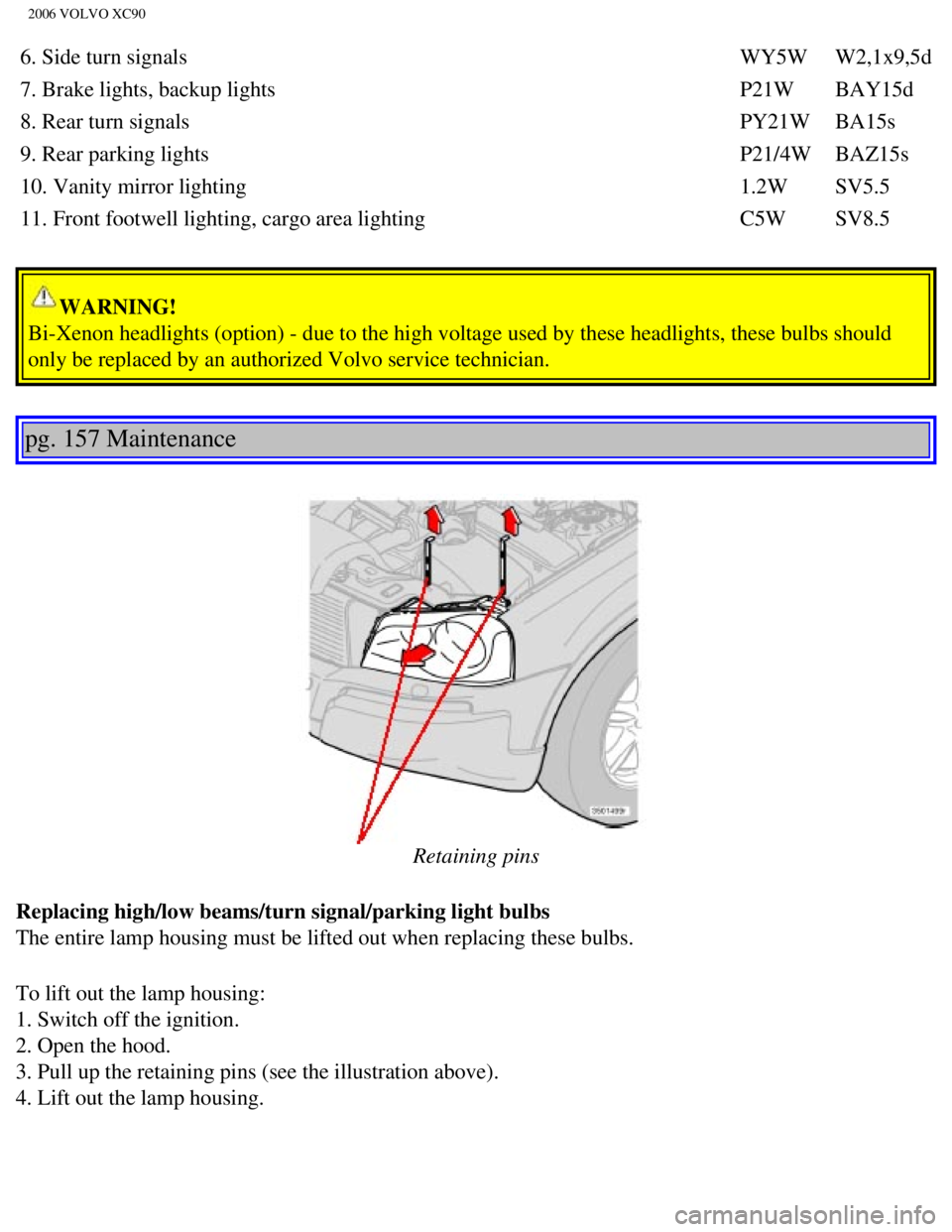
Retaining pins
Replacing high/low beams/turn signal/parking light bulbs
The entire lamp housing must be lifted out when replacing these bulbs.
To lift out the lamp housing:
1. Switch off the ignition.
2. Open the hood.
3. Pull up the retaining pins (see the illustration above).
4. Lift out the lamp housing.
file:///K|/ownersdocs/2006/2006_XC90/06xc90_09b.htm (6 of 24)12/30/200\
6 5:32:52 PM
Page 195 of 256

2006 VOLVO XC90
CAUTION
- Do not touch the glass on the halogen bulbs with your fingers. Grease,\
oil, or any other impurities
can be carbonized onto the bulb and cause damage to the reflector.
- Be sure to use bulbs of the correct type and voltage.
Location of the bulbs in the headlight housing
1. Low beam headlight/Bi-Xenon headlight (option)
2. High beam headlight
3. Turn signal
4. Parking light
5. Side marker light
pg. 158 Maintenance
file:///K|/ownersdocs/2006/2006_XC90/06xc90_09b.htm (7 of 24)12/30/200\
6 5:32:52 PM
Page 198 of 256

2006 VOLVO XC90
Replacing the turn signal bulb
1. Turn the lamp holder approximately 1/4 turn counterclockwise and pull\
it out of the headlight housing.
2. Press in the bulb slightly and pull it out of the holder.
3. Align the guide lugs on the side of the base of the new bulb in the g\
rooves in the holder. Press it in
and turn it slightly clockwise.
4. Press the lamp holder into the place in the headlight housing and tur\
n it approximately 1/4 turn
clockwise.
Replacing the side turn signal bulb
1. Switch off the ignition.
2. Pry out the lens by inserting a small screw driver under the lower ed\
ge.
3. Turn the lamp holder 1/4 turn counterclockwise and pull it straight o\
ut.
4. Pull the bulb straight out of the holder.
5. Press the new bulb into the holder.
6. Reinsert the bulb holder in the lens and turn 1/4 turn clockwise.
file:///K|/ownersdocs/2006/2006_XC90/06xc90_09b.htm (10 of 24)12/30/20\
06 5:32:52 PM
Page 199 of 256
2006 VOLVO XC90
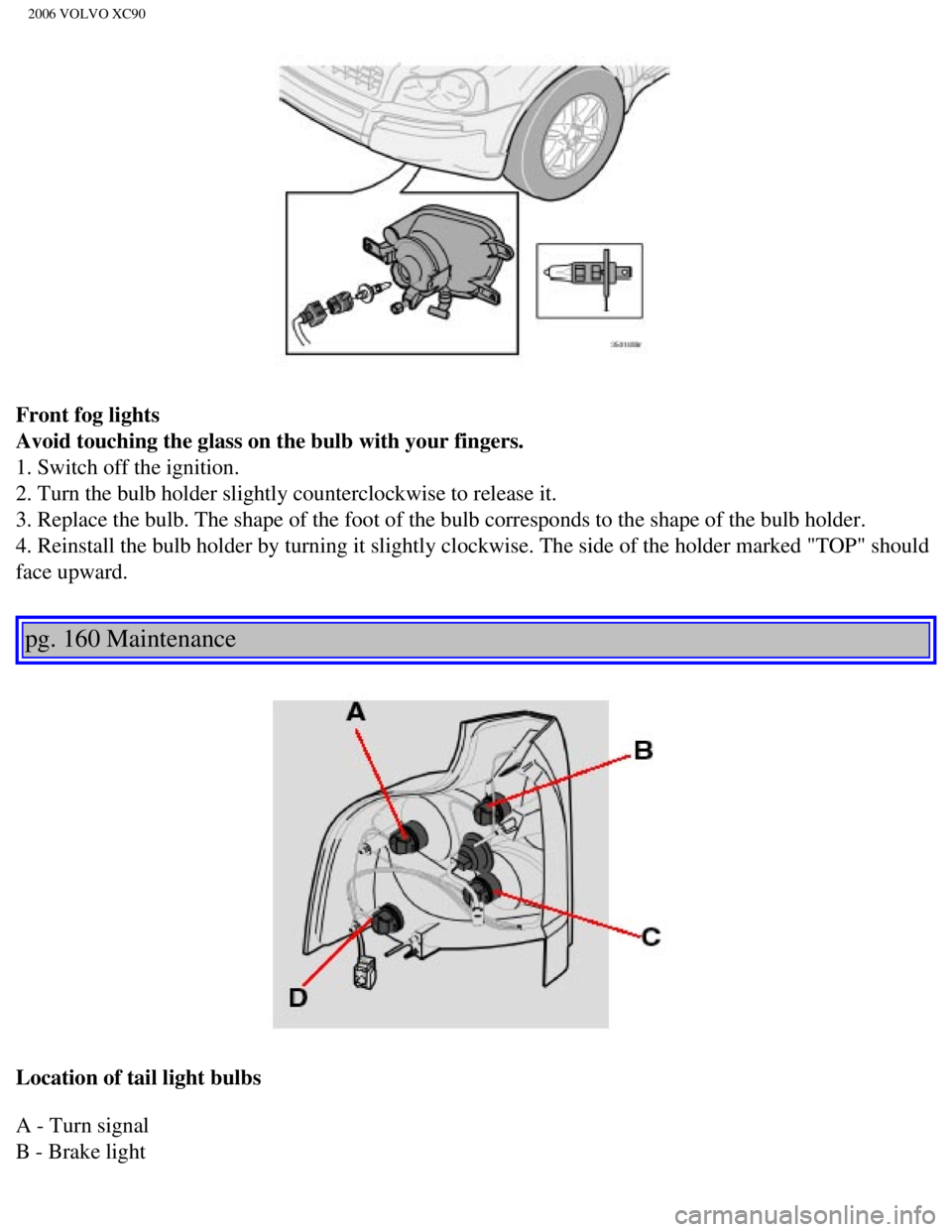
Front fog lights
Avoid touching the glass on the bulb with your fingers.
1. Switch off the ignition.
2. Turn the bulb holder slightly counterclockwise to release it.
3. Replace the bulb. The shape of the foot of the bulb corresponds to th\
e shape of the bulb holder.
4. Reinstall the bulb holder by turning it slightly clockwise. The side \
of the holder marked "TOP" should
face upward.
pg. 160 Maintenance
Location of tail light bulbs
A - Turn signal
B - Brake light
file:///K|/ownersdocs/2006/2006_XC90/06xc90_09b.htm (11 of 24)12/30/20\
06 5:32:52 PM
Page 211 of 256

2006 VOLVO XC90
No. Amperage
1. Backup lights 10A
2. Parking lights, foglights, cargo compartment lighting, license plate \
lights, brake light
diodes 20A
3. Accessories 15A
4. -
5. Rear electronic module 10A
6. Navigation system (option), radio receiver, rear seat entertainment\
(accessory) 7.5A
7. Trailer wiring (30-feed) 15A
8. 12-volt socket in cargo compartment 15A
9. Rear passenger's side door: power window, power window cutout functio\
n 20A
10. Rear driver's side door: power window, power window cutout function \
20A
11. -
12. -
13. -
14. Subwoofer (option), rear air conditioning system (option) 15A
15. -
16. -
17. Accessory audio 5A
18. -
19. Rear window wiper 15A
20. Trailer wiring (15-feed) 20A
21. -
22. -
23. All Wheel Drive 7.5A
24. -
25. -
26. Park assist 5A
27. Main fuse: trailer wiring, park assist, All Wheel Drive 30A
28. Central locking system 15A
29. Driver's side trailer lighting: parking light, turn signal 25A
30. Passenger's side trailer lighting: brake light, fog light, turn sign\
al 25A
31. Main fuse: fuses 37, 38 40A
32. -
file:///K|/ownersdocs/2006/2006_XC90/06xc90_09b.htm (23 of 24)12/30/20\
06 5:32:52 PM
Page 235 of 256

Automatically storing stations - AUTOSTORE
This functio")
2006 VOLVO XC90
NOTE: The MY KEY buttons can only be programmed for one shortcut function at a\
time.
pg. 194 Audio
Radio functions (contd)
Automatically storing stations - AUTOSTORE
This function automatically searches for, and stores up to 10 strong AM \
or FM stations in a separate
memory. If more than 10 stations are found, the 10 strongest ones will b\
e stored. The function is
especially useful in areas in which you are not acquainted with radio st\
ations or their frequencies.
1. Choose radio mode using the SELECTOR control or the AM/FM button.
2. Select AUTOSTORE in the menu and press ENTER.
3. Select AST SEARCH and press ENTER.
4. AUTOSTORING is shown in the display and a number of strong stations (\
max. 10) from the set
frequency band are now automatically stored in the autostore memory. If \
there are no stations with
sufficient signal strength, NO AST FOUND is displayed.
5. The stored stations are available under the buttons 0-9 (1).
6. When the radio is in autostore mode, AUTO is shown in the display. AU\
TO disappears when you
return to the normal radio mode.
7. Return to normal radio mode by pressing the AM/FM button or EXIT/CLEA\
R.
8. To access previously stored stations, carry out steps 1-2 but select \
AST MODE in step 3 and press
ENTER.
file:///K|/ownersdocs/2006/2006_XC90/06xc90_11a.htm (13 of 18)12/30/20\
06 5:32:55 PM