audio VOLVO XC90 2006 Owner's Manual
[x] Cancel search | Manufacturer: VOLVO, Model Year: 2006, Model line: XC90, Model: VOLVO XC90 2006Pages: 256, PDF Size: 6.87 MB
Page 237 of 256
2006 VOLVO XC90
2. Select SCAN to start searching and press ENTER.
3. SCAN will be shown in the display.
4. Press the EXIT/CLEAR button to stop scanning.
pg. 196 Audio
Radio functions (contd)
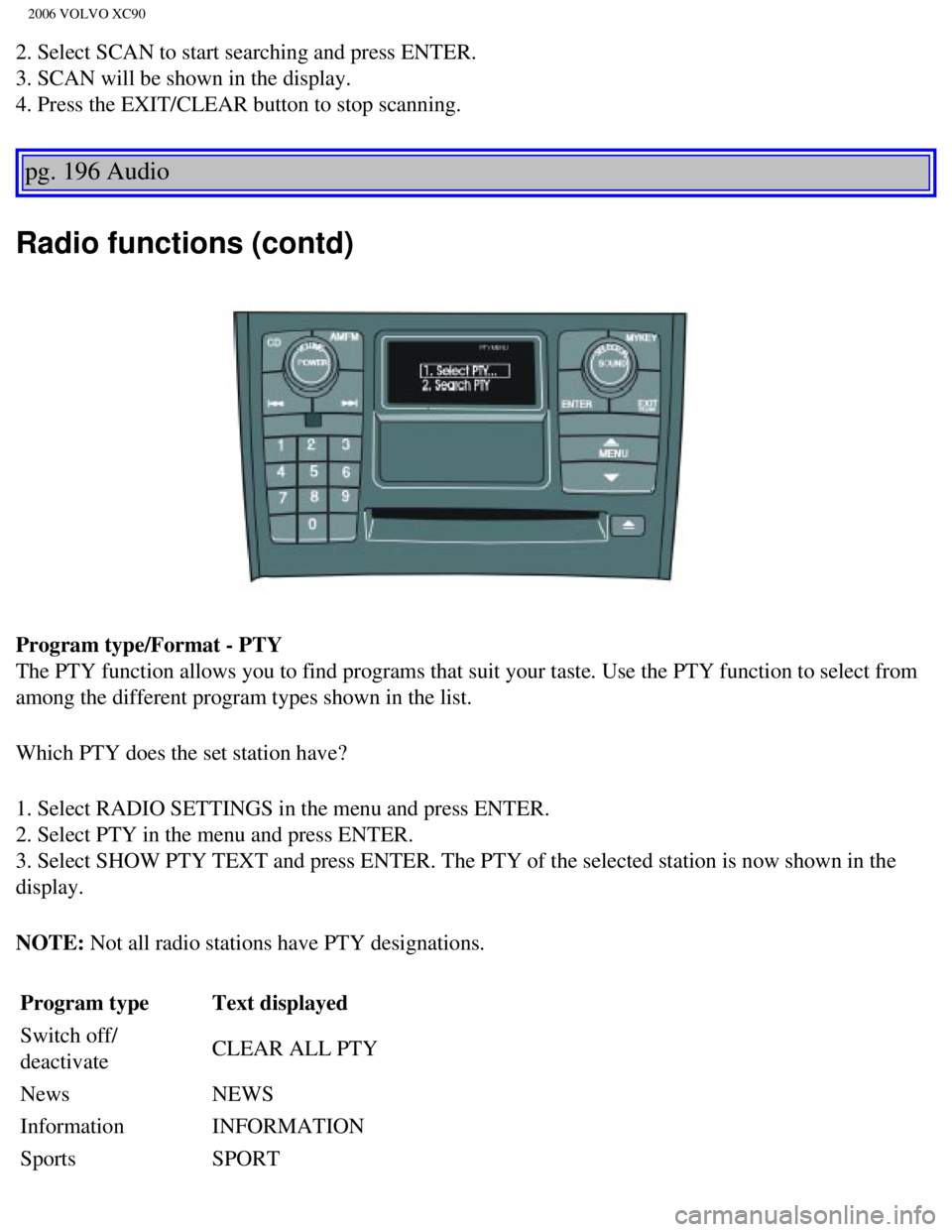
Program type/Format - PTY
The PTY function allows you to find programs that suit your taste. Use t\
he PTY function to select from
among the different program types shown in the list.
Which PTY does the set station have?
1. Select RADIO SETTINGS in the menu and press ENTER.
2. Select PTY in the menu and press ENTER.
3. Select SHOW PTY TEXT and press ENTER. The PTY of the selected station\
is now shown in the
display.
NOTE: Not all radio stations have PTY designations. Program type Text displayed
Switch off/
deactivate CLEAR ALL PTY
News NEWS
Information INFORMATION
Sports SPORT
file:///K|/ownersdocs/2006/2006_XC90/06xc90_11a.htm (15 of 18)12/30/20\
06 5:32:55 PM
Page 238 of 256

2006 VOLVO XC90
Talk TALK
Rock ROCK
Classic rock CLASSIC ROCK
Adult hits ADULT HITS
Soft rock SOFT ROCK
Top 40 TOP 40
Country COUNTRY
Oldies OLDIES
Soft SOFT
Nostalgia NOSTALGIA
Jazz JAZZ
Classical CLASSICAL
Rhythm & Blues RHYTHM & BLUES
Soft R&B SOFT R&B
Language LANGUAGE
Religious music RELIGIOUS MUSIC
Religious talk RELIGION TALK
Personality PERSONALITY
Public PUBLIC
College COLLEGE
Weather WEATHER
Radio text
Certain stations broadcast program information, which can be shown in th\
e display.
1. Press the MENU button.
2. Select RADIOTEXT in the menu and press ENTER.
3. Select RADIOTEXT again to deactivate.
pg. 197 Audio
file:///K|/ownersdocs/2006/2006_XC90/06xc90_11a.htm (16 of 18)12/30/20\
06 5:32:55 PM
Page 241 of 256

2006 VOLVO XC90
pg. 198 Audio
Menu settings and selections
Main menus/submenus
RADIO
1. AUTOSTORE*
1.1. AST MODE
1.2. AST SEARCH
1.2.1 AUTOSTORING
2. SCAN* ON/OFF**
3. RADIOTEXT* ON/OFF**
4. RADIO SETTINGS
4.1. PTY
4.1.1. SELECT PTY
4.1.2. SEARCH PTY*
4.1.3. SHOWPTY ON/OFF**
4.2. AF* ON**/OFF
4.3. RESET ALL
5. AUDIO SETTINGS
5.1. Dolby FM
5.1.1. Pro Logic II
5.1.2. 3CH
5.1.3. OFF**
5.2. Dolby CD
5.2.1. Pro Logic II**
5.2.2. 3CH
5.2.3. OFF
5.3. SUBWOOFER* ON/OFF** (certain audio systems)
5.4. EQ FRONT (certain audio systems)
5.5. EQ REAR (option)
5.6. RESET ALL
CD (single disc)
1. RANDOM*
2. SCAN*
3. AUDIO SETTINGS*
3.1. Dolby FM
3.1.1. Pro Logic II
3.1.2. 3CH
3.1.3. OFF**
file:///K|/ownersdocs/2006/2006_XC90/06xc90_11b.htm (1 of 11)12/30/200\
6 5:32:56 PM
Page 242 of 256
2006 VOLVO XC90
3.2. Dolby CD
3.2.1. Pro Logic II**
3.2.2. 3 CH
3.2.3. OFF ON/**OFF
3.3. SUBWOOFER* ON/OFF** (option)
3.4. EQ FRONT (certain audio systems)
3.5. EQ REAR (certain audio systems)
3.6. RESET ALL
CDX (CD changer - option)
1. RANDOM*
1.1. OFF
1.2. SINGLE DISC
1.3. ALL DISCS
2. SCAN*
3. DISC TEXT
4. AUDIO SETTINGS*
4.1. Dolby FM
4.1.1. Pro Logic II
4.1.2. 3CH
4.1.3. OFF**
4.2. Dolby CD
4.2.1. Pro Logic II**
4.2.2. 3 CH
4.2.3. OFF ON/**OFF
4.3. SUBWOOFER* ON**/OFF (option)
4.4. EQ FRONT (certain audio systems)
4.5. EQ REAR (certain audio systems)
4.6. RESET ALL
* These functions can be programmed with MY KEY (see
page 193).
** Default
pg. 199 Audio
CD player
file:///K|/ownersdocs/2006/2006_XC90/06xc90_11b.htm (2 of 11)12/30/200\
6 5:32:56 PM
Page 244 of 256
2006 VOLVO XC90
pg. 200 Audio
CD player (contd)
SCAN This function plays the first ten seconds of each track.
1. Press the MENU button.
2. Select SCAN and press ENTER.
3. Press EXIT/CLEAR to listen to an entire track.
Disctext
Certain CDs contain information about the disc, such as the titles of th\
e tracks, etc. This information can
be shown in the display by activating the DISCTEXT function.
1. Press the MENU button.
2. Select DISCTEXT in the menu and press ENTER.
3. Any information that may be stored on the disc will be displayed.
4. To deactivate this function, select DISCTEXT and press ENTER.
NOTE: This function is only available on the CD changer.
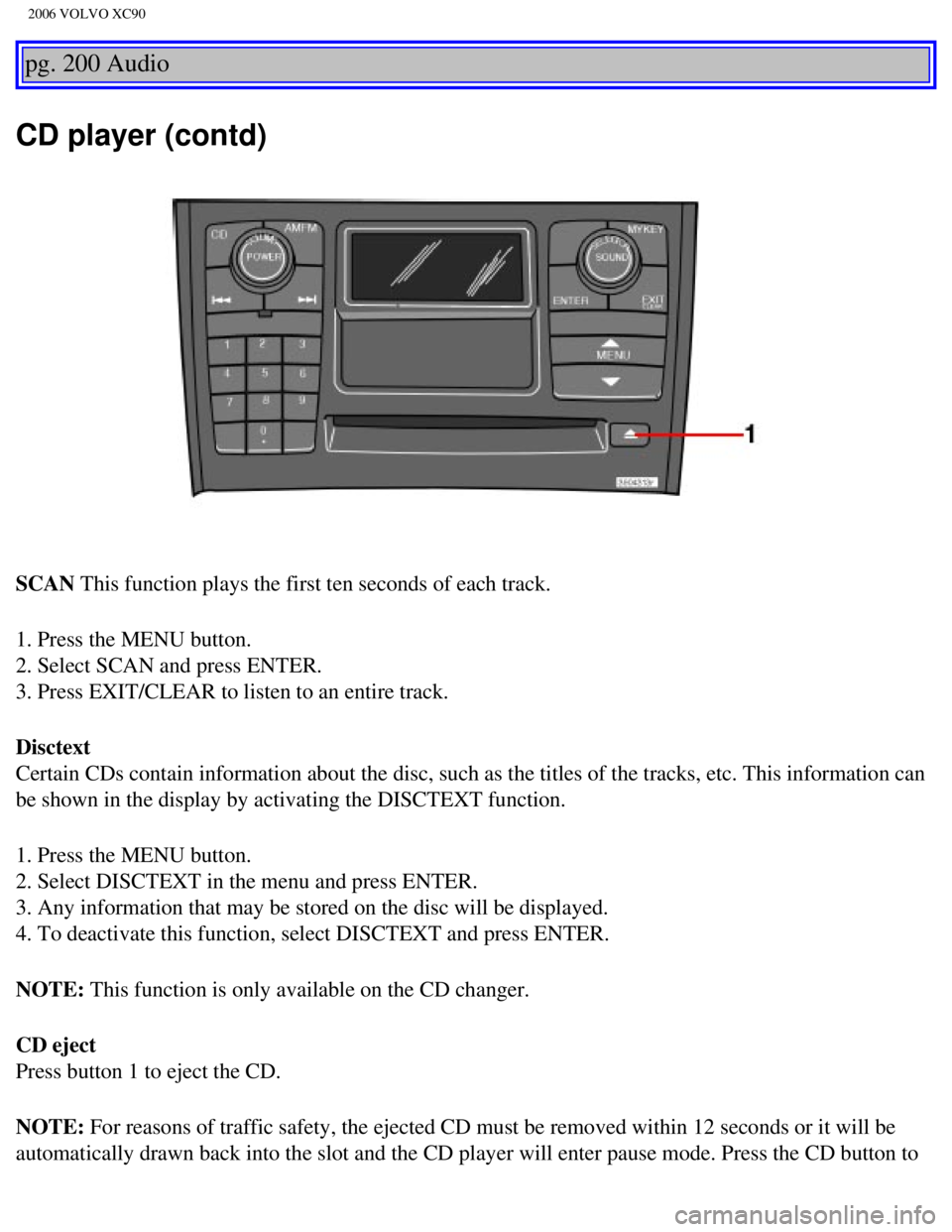
CD eject
Press button 1 to eject the CD.
NOTE: For reasons of traffic safety, the ejected CD must be removed within 12 \
seconds or it will be
automatically drawn back into the slot and the CD player will enter paus\
e mode. Press the CD button to
file:///K|/ownersdocs/2006/2006_XC90/06xc90_11b.htm (4 of 11)12/30/200\
6 5:32:56 PM
Page 245 of 256
2006 VOLVO XC90
restart the disc.
pg. 201 Audio
CD changer (option)
CD changer (option)
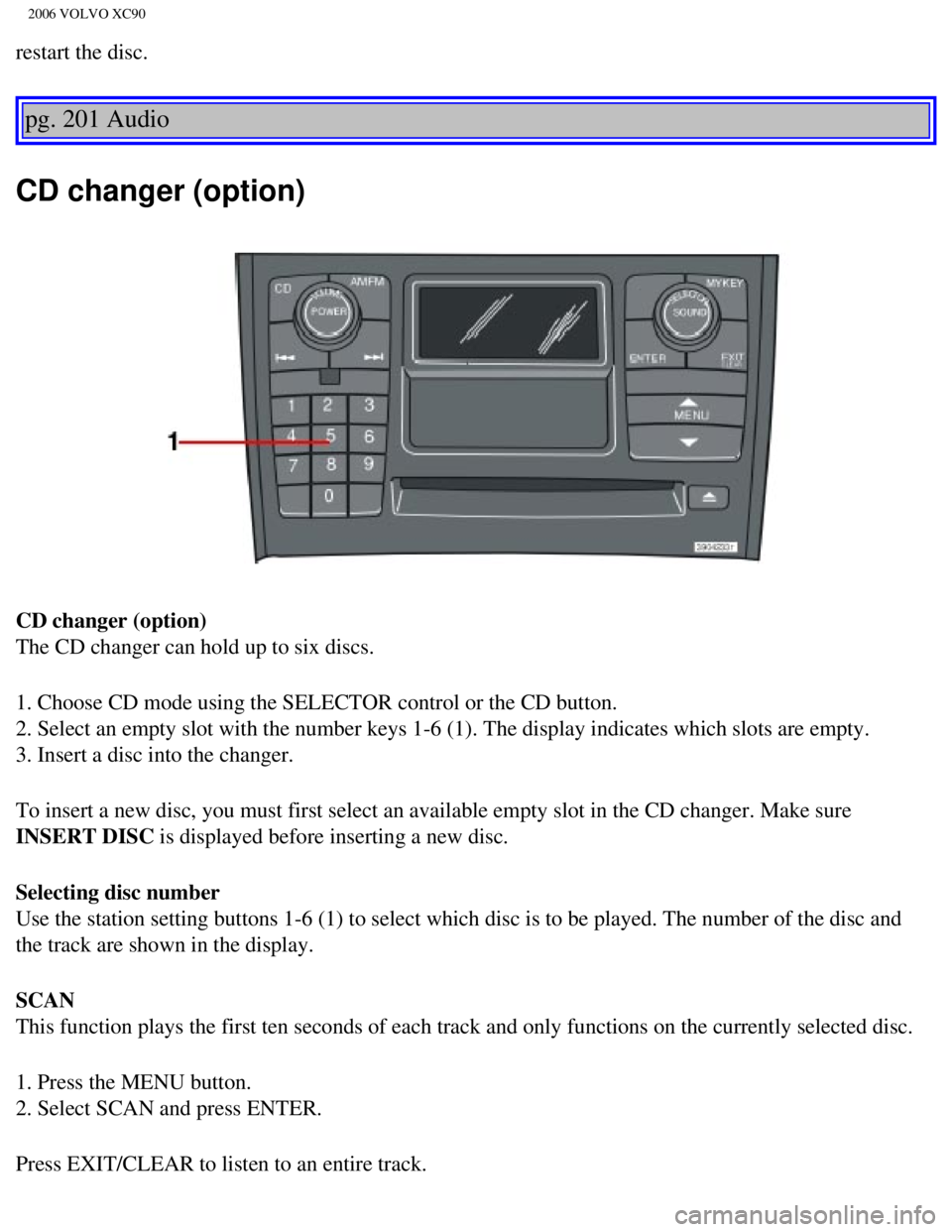
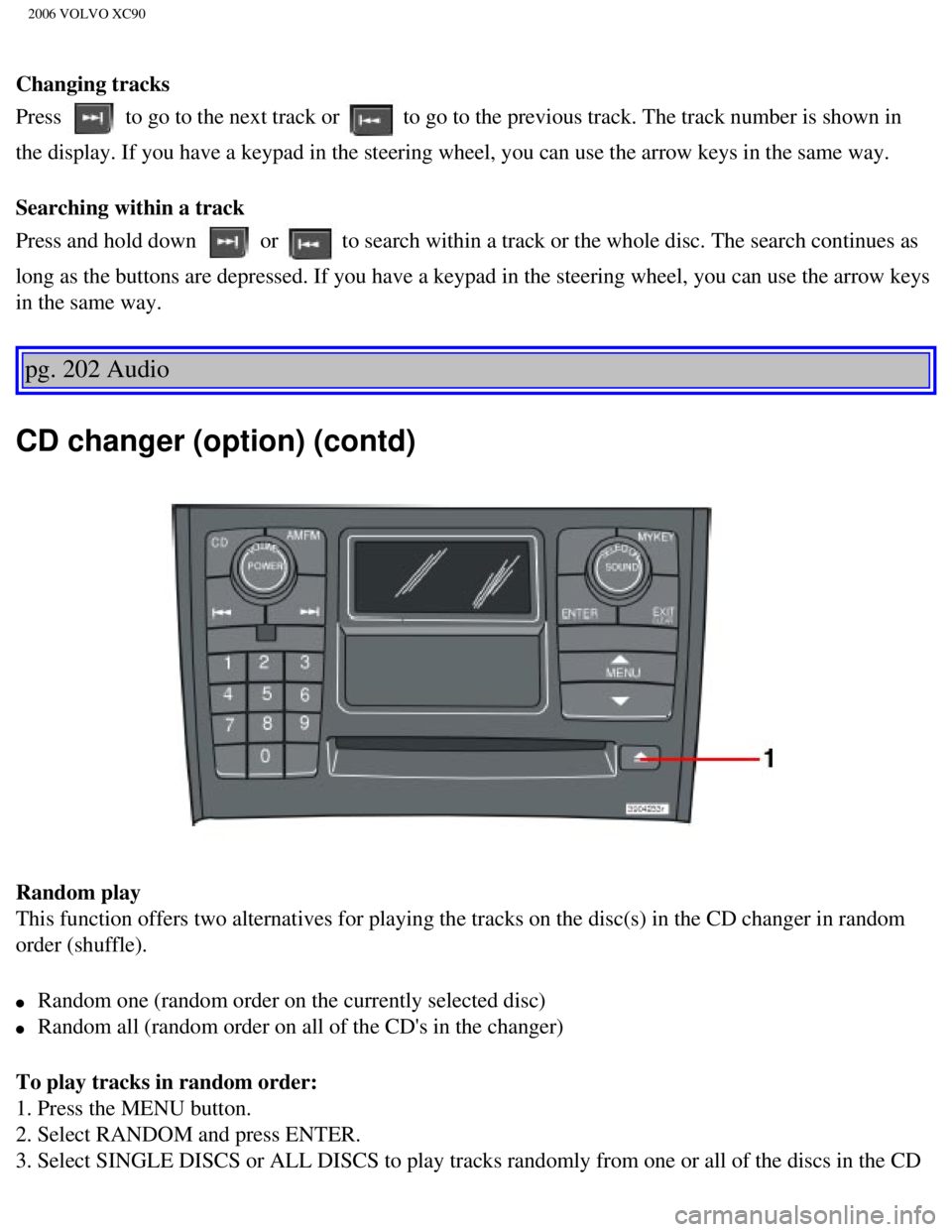
The CD changer can hold up to six discs.
1. Choose CD mode using the SELECTOR control or the CD button.
2. Select an empty slot with the number keys 1-6 (1). The display indi\
cates which slots are empty.
3. Insert a disc into the changer.
To insert a new disc, you must first select an available empty slot in t\
he CD changer. Make sure
INSERT DISC is displayed before inserting a new disc.
Selecting disc number
Use the station setting buttons 1-6 (1) to select which disc is to be \
played. The number of the disc and
the track are shown in the display.
SCAN
This function plays the first ten seconds of each track and only functio\
ns on the currently selected disc.
1. Press the MENU button.
2. Select SCAN and press ENTER.
Press EXIT/CLEAR to listen to an entire track.
file:///K|/ownersdocs/2006/2006_XC90/06xc90_11b.htm (5 of 11)12/30/200\
6 5:32:56 PM
Page 246 of 256
2006 VOLVO XC90
Changing tracks
Press
to go to the next track or to go to the previous track. The track number is shown in
the display. If you have a keypad in the steering wheel, you can use the\
arrow keys in the same way.
Searching within a track
Press and hold down
or to search within a track or the whole disc. The search continues as
long as the buttons are depressed. If you have a keypad in the steering \
wheel, you can use the arrow keys
in the same way.
pg. 202 Audio
CD changer (option) (contd)
Random play
This function offers two alternatives for playing the tracks on the disc\
(s) in the CD changer in random
order (shuffle).
l Random one (random order on the currently selected disc)
l Random all (random order on all of the CD's in the changer)
To play tracks in random order:
1. Press the MENU button.
2. Select RANDOM and press ENTER.
3. Select SINGLE DISCS or ALL DISCS to play tracks randomly from one or \
all of the discs in the CD
file:///K|/ownersdocs/2006/2006_XC90/06xc90_11b.htm (6 of 11)12/30/200\
6 5:32:56 PM
Page 247 of 256

2006 VOLVO XC90
changer.
4. RND or RND ALL is shown in the display for as long as the function is\
activated.
NOTE: Press
to play the next randomly selected track. This can only be done on the \
currently
selected disc.
5. Press EXIT to stop random play.
Ejecting one disc
A short press on the EJECT button (1) will eject the CD that is currently playing. \
NOTE: For reasons of traffic safety, you have 12 seconds in which to remove th\
e ejected disc. After
that, the disc automatically reinserts into the player.
Ejecting all discs
A long press on the EJECT button (1) starts the EJECT ALL function.
The text EJECTING ALL will be displayed and the entire magazine will be \
emptied disc by disc.
NOTE:
- The EJECT ALL function can only be used while the vehicle is at a stan\
dstill and will be cancelled if
the vehicle begins to move.
- For reasons of traffic safety, you have 12 seconds in which to remove \
the ejected disc. After that, the
disc automatically reinserts into the player.
pg. 203 Audio
Audio systems - general information
Compact disc care
l Before using a new CD for the first time, remove any burrs in the center\
/outer edge by running the
stem of a pen or similar object around the hole/edge of the disc.
l Use CD standard EN 60908 discs only. Discs not meeting this standard may\
cause problems with
system (poor sound). CDR discs can cause listening problems due to the\
quality of the disc or recording
equipment used.
l Keep the discs clean. Wipe them with a soft, clean, lint-free cloth, wor\
king from the center outwards.
If necessary, dampen the cloth with a neutral soap solution. Dry thoroug\
hly before using.
l Never use cleaning spray or antistatic liquid. Use only cleaners specifi\
cally made for CD's.
l Use discs of the correct size only (3.5" discs should never be used). \
l Do not put tape or labels on the disc itself. They could become stuck in\
the player.
l Volvo does not recommend the use of plastic outer rings on the disc.
l Condensation may occur on discs/optical components of the changer in col\
d winter weather. The disc
file:///K|/ownersdocs/2006/2006_XC90/06xc90_11b.htm (7 of 11)12/30/200\
6 5:32:56 PM
Page 248 of 256

2006 VOLVO XC90
can be dried with a clean, lint-free cloth. Optical components in the CD\
changer may, however, take up
to one hour to dry off.
l Never attempt to play a disc which is damaged in any way.
l When not in use, the discs should be stored in their covers. Avoid stori\
ng discs in excessive heat,
direct sunlight or dusty locations.
pg. 204 Audio
HomeLink® Universal Transceiver
Hand-held transmitter
HomeLink® Universal Transceiver
HomeLink® is an advanced system that can be programmed to learn the c\
odes of three different remote
controlled-devices (e.g., garage door openers, remote lighting, entry d\
oor lock). HomeLink®'s sun visor-
mounted transceiver, powered by your vehicle's electrical system, may th\
en be used in place of your
hand-held remote controls.
NOTE: For your security, the HomeLink® Universal Transceiver is designed to\
not function if you lock
your vehicle from the outside.
Programming the transceiver
1. The ignition switch must be turned to the "accessory" position (II)\
before programming the
HomeLink® Universal Transceiver.
2. Begin by erasing all 3 factory default channels. Hold down the two ou\
tside buttons (buttons 1 and 3 in
the illustration) on the HomeLink® Universal Transceiver for about 2\
0 seconds, until HomeLink®'s
indicator light begins to flash. Then release the buttons.
file:///K|/ownersdocs/2006/2006_XC90/06xc90_11b.htm (8 of 11)12/30/200\
6 5:32:56 PM
Page 249 of 256
 2\
to 5 in. (5 to 12 cm) away from
the HomeLink® surface, keeping the indicator light in view. For place\
ment")
2006 VOLVO XC90
3. Hold your hand-held transmitter (garage door opener, for example) 2\
to 5 in. (5 to 12 cm) away from
the HomeLink® surface, keeping the indicator light in view. For place\
ment questions, contact
HomeLink® toll-free 1-800-355-3515 (Internet:
www.HomeLink.com).
4. Using two hands, push and hold both your hand-held transmitter's butt\
on and the transceiver button
you wish to program. The indicator light will flash first slowly, then r\
apidly. Rapid flashing tells you the
HomeLink® button has been successfully programmed. Release both butto\
ns.
5. If you are programming a rolling code-equipped device (e.g., garage \
door opener or entry door lock),
refer to "Programming rolling codes" on the next page to complete the pr\
ogramming process.
Repeat steps 3 and 4 to program the other two transceiver buttons.
If, after several attempts, you are unable to successfully train the Hom\
eLink® Universal Transceiver to
learn your hand-held transmitter's signal, contact HomeLink® toll-fre\
e 1-800-355-3515 (Internet:
www.
HomeLink.com).
pg. 205 Audio
WARNING!
- If you use HomeLink® to open a garage door or gate, be sure no one \
is near the gate or door while it
is in motion.
- Do not use the HomeLink® Universal Transceiver with any garage door\
opener that lacks safety
"stop" and "reverse" features as required by federal safety standards. (\
This includes any garage door
opener model manufactured before April 1, 1982). A garage door opener t\
hat cannot "detect" an
object, signalling the door to "stop" and "reverse" does not meet curren\
t federal safety standards.
Using a garage door opener without these features increases the risk of \
serious injury or death. For
more information on this matter, call toll-free 1-800-355-3515 (Interne\
t:
www.HomeLink.com).
NOTE: Canadian residents:
During programming, your hand-held transmitter may automatically stop tr\
ansmitting. To successfully
train HomeLink®, continue to hold the HomeLink® button. At the sam\
e time, repeatedly press and hold
your hand-held transmitter's button at two-second intervals until HomeLi\
nk® has learned your
transmitter's code. The HomeLink® indicator light will flash first sl\
owly, and then rapidly to indicate
that the button has been successfully programmed.
Determining if your garage door uses a rolling code
Determine, in one of the following ways, if your garage door uses a roll\
ing code system and is
file:///K|/ownersdocs/2006/2006_XC90/06xc90_11b.htm (9 of 11)12/30/200\
6 5:32:56 PM