wheel VOLVO XC90 2006 Repair Manual
[x] Cancel search | Manufacturer: VOLVO, Model Year: 2006, Model line: XC90, Model: VOLVO XC90 2006Pages: 256, PDF Size: 6.87 MB
Page 243 of 256
 or the CD button \
(2).
2. Insert a CD into the player.
CD Pause
To pause CD playback, turn the volume all the")
2006 VOLVO XC90
Starting the CD
1. Select the CD mode using the SELECTOR control (1) or the CD button \
(2).
2. Insert a CD into the player.
CD Pause
To pause CD playback, turn the volume all the way down. "CD paused" will\
be displayed. This will not
occur if someone in the rear seat is listening to the CD through the opt\
ional headphones.
Play will resume when the volume is turned up again.
Changing tracks
Press
to go to the next track or to go to the previous track. The track number is shown in the
display. If you have a keypad in the steering wheel, you can use the arr\
ow keys in the same way.
Searching within a track
Press and hold down
or to search within a track or the whole disc. The search continues as
long as the buttons are depressed. If you have a keypad in the steering \
wheel, you can use the arrow keys
in the same way.
Random play
This function plays the tracks on a CD in random order (shuffle).
1. Press the MENU button.
2. Select RANDOM and press ENTER.
3. RND is shown in the display as long as the function is activated.
4. Go into the menu and select RANDOM OFF to stop random play, or press \
EXIT.
file:///K|/ownersdocs/2006/2006_XC90/06xc90_11b.htm (3 of 11)12/30/200\
6 5:32:56 PM
Page 246 of 256
2006 VOLVO XC90
Changing tracks
Press
to go to the next track or to go to the previous track. The track number is shown in
the display. If you have a keypad in the steering wheel, you can use the\
arrow keys in the same way.
Searching within a track
Press and hold down
or to search within a track or the whole disc. The search continues as
long as the buttons are depressed. If you have a keypad in the steering \
wheel, you can use the arrow keys
in the same way.
pg. 202 Audio
CD changer (option) (contd)
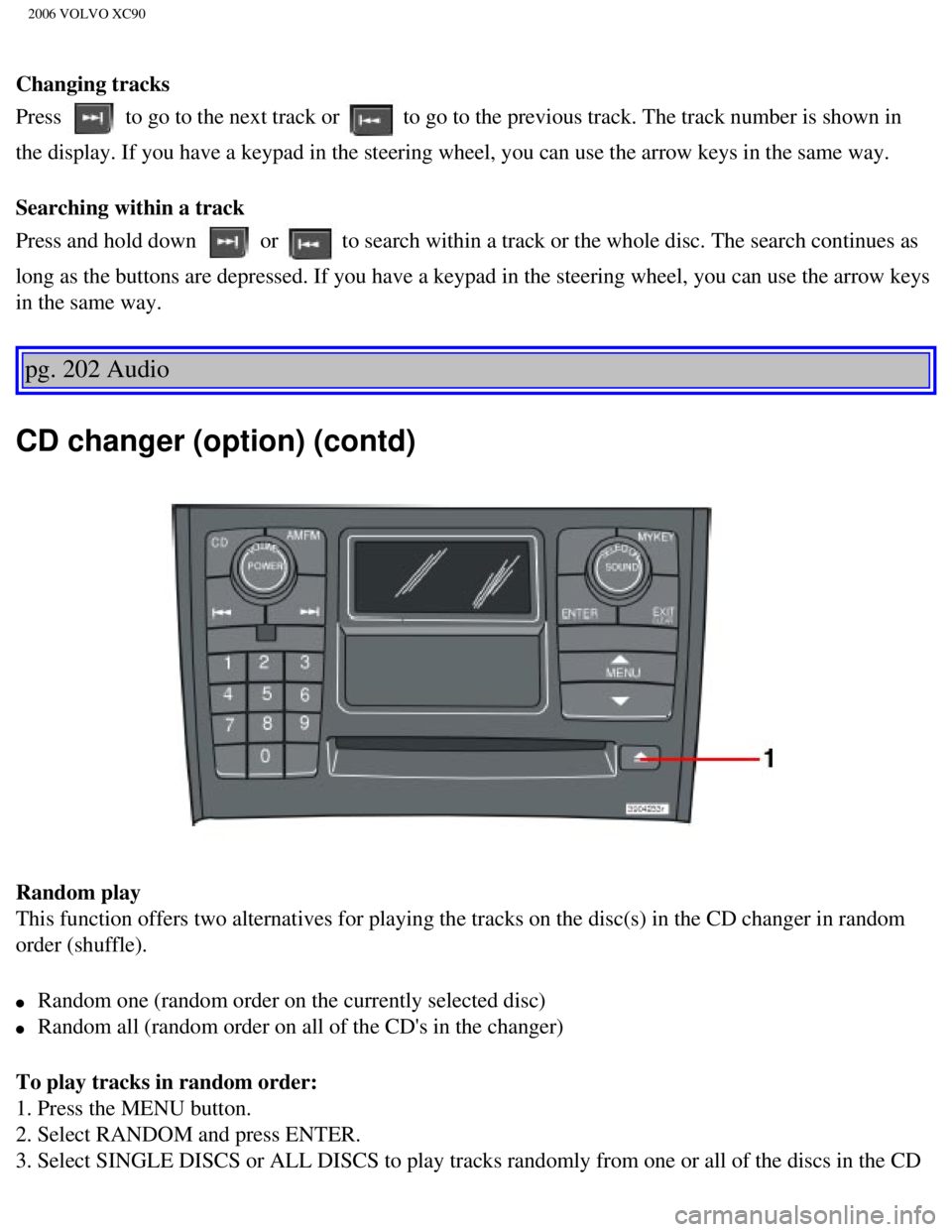
Random play
This function offers two alternatives for playing the tracks on the disc\
(s) in the CD changer in random
order (shuffle).
l Random one (random order on the currently selected disc)
l Random all (random order on all of the CD's in the changer)
To play tracks in random order:
1. Press the MENU button.
2. Select RANDOM and press ENTER.
3. Select SINGLE DISCS or ALL DISCS to play tracks randomly from one or \
all of the discs in the CD
file:///K|/ownersdocs/2006/2006_XC90/06xc90_11b.htm (6 of 11)12/30/200\
6 5:32:56 PM
Page 252 of 256
2006 VOLVO XC90
2 0 0 6
VOLVO XC90
Index
pg. 207-211 Index
A/C (air conditioning)
55
ABS
ii, 23, 97
Air cleaner
147
Air distribution
52, 55
Air Quality sensor
56
Air vents
52
Alarm
82
All Wheel Drive
95
All Wheel Drive - towing
102
Anchorages, for child seats
20
Anti-lock Brake System (ABS)
ii, 23
Approach lighting
77
Ashtray
40, 68
Audio system
183
AUTO (climate control)
54
Automatic climate control, ECC
53
Automatic gearbox
91
Autostart
90
Auxiliary 12-volt sockets
40
Auxiliary lights
27
Average speed
37
file:///K|/ownersdocs/2006/2006_XC90/06xc90_12.htm (1 of 5)12/30/2006 \
5:32:56 PM
Page 253 of 256
2006 VOLVO XC90
AWD 95
B
Bass
189
Battery
145, 152, 179
Battery - replacing
154
Battery drain - avoiding
92
Battery maintenance
153
Belt check
146
Black box (Vehicle Event Data)
142
Blower (fan)
54
Booster cushion, integrated
18
Brake system
24, 96
Bulbs, list of
156
Bulbs, replacing
157
C
Capacities
175
Capacity weight
121
Carbon Monoxide - Important Warning
87
Cargo capacity
174
Catalytic converter
178
CD changer
201
CD eject
200
CD Pause
199
CD player
199
Ceiling lighting
162
Center console - storage compartments
68
Central locking system - remote control
77
Changing a wheel
128
Changing coolant
146
Check Engine warning light
25
Child booster cushion
18
Child restraint anchorages
20
file:///K|/ownersdocs/2006/2006_XC90/06xc90_12.htm (2 of 5)12/30/2006 \
5:32:56 PM