ECO mode VOLVO XC90 2009 Owner´s Manual
[x] Cancel search | Manufacturer: VOLVO, Model Year: 2009, Model line: XC90, Model: VOLVO XC90 2009Pages: 282, PDF Size: 8.76 MB
Page 237 of 282
10 Audio
Audio system controls
10``237 Steering wheel keypad
G027135
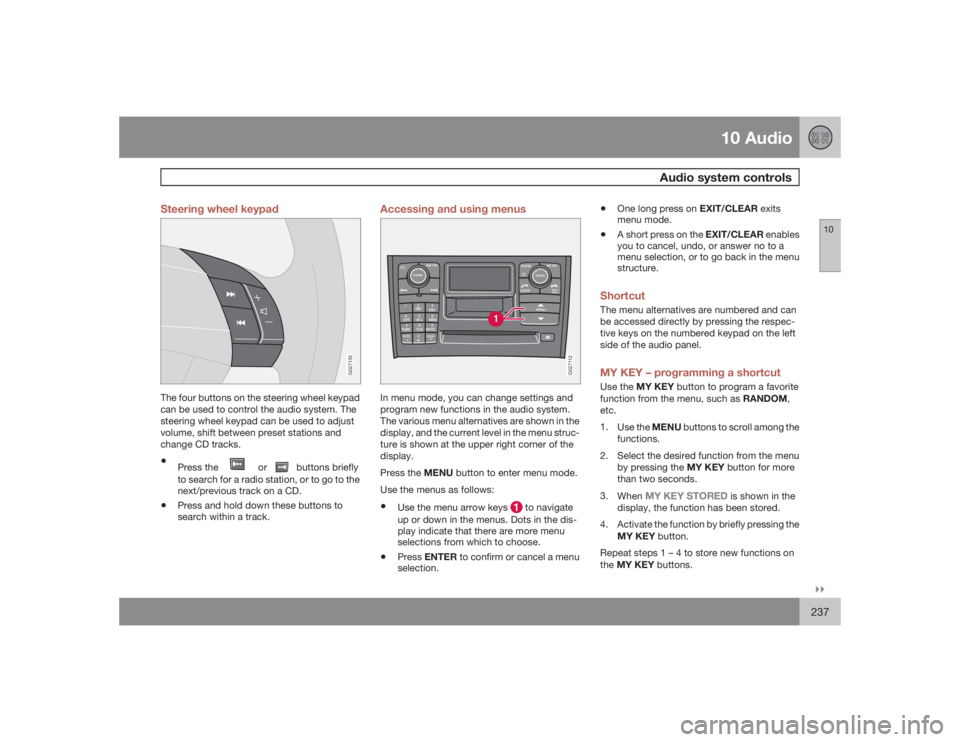
The four buttons on the steering wheel keypad
can be used to control the audio system. The
steering wheel keypad can be used to adjust
volume, shift between preset stations and
change CD tracks.•
Press the
or
buttons briefly
to search for a radio station, or to go to the
next/previous track on a CD.
•
Press and hold down these buttons to
search within a track.
Accessing and using menus
G027112
In menu mode, you can change settings and
program new functions in the audio system.
The various menu alternatives are shown in the
display, and the current level in the menu struc-
ture is shown at the upper right corner of the
display.
Press the MENU button to enter menu mode.
Use the menus as follows:•
Use the menu arrow keys
to navigate
up or down in the menus. Dots in the dis-
play indicate that there are more menu
selections from which to choose.
•
PressENTER to confirm or cancel a menu
selection.
•
One long press on EXIT/CLEAR exits
menu mode.
•
A short press on the EXIT/CLEAR enables
you to cancel, undo, or answer no to a
menu selection, or to go back in the menu
structure.
ShortcutThe menu alternatives are numbered and can
be accessed directly by pressing the respec-
tive keys on the numbered keypad on the left
side of the audio panel.MY KEY – programming a shortcutUse the MY KEY button to program a favorite
function from the menu, such as RANDOM,
etc.
1.
Use the MENU buttons to scroll among the
functions.
2. Select the desired function from the menu
by pressing the MY KEY button for more
than two seconds.
3.
When
MY KEY STORED
is shown in the
display, the function has been stored.
4. Activate the function by briefly pressing the
MY KEY button.
Repeat steps 1 – 4 to store new functions on
theMY KEY buttons.
Page 240 of 282
10 AudioAudio system controls
10240
NOTE
Sound level for the center speaker can only
be set if Dolby Pro Logic II (
DPL II
) or three-
channel stereo (
3-CH
) is selected in the
menu.
Sound level for the subwoofer can only be set
ifSUBWOOFER
is selected in the menu (acti-
vated).
Setting
Shown in the dis-
play
Bass
BASS
Treble
TREBLE
Balance between
the right and left
speakers
BALANCE
Balance between
the front and rear
speakers
FADER
Bass speaker level
SUBWOOFER(option)
Setting
Shown in the dis-
play
Center speaker level
CENTER
(Premium
Sound system only)
Surround sound
level
SURROUND
(Pre-
mium Sound system
only)
SURROUND MODESurround sound settings are used to balance
sound levels throughout the vehicle. Surround
settings for the various sound sources are
made separately.
There are three settings for surround sound.•
PRO LOGIC II
•
3-CHANNEL
•
OFF (2-channel stereo)
The
symbol in the display indicates that
Dolby Surround Pro Logic II is activated.
•
Dolby Surround Pro Logic II functions in
CD mode only.
•
2-channel stereo is recommended for AM/
FM radio broadcasts.
•
Dolby Surround Pro Logic II is only availa-
ble on the highest level audio system –
Premium Sound.Use the following instructions to select PRO
LOGIC II, 3-CHANNEL, or to turn these func-
tions off. See also the menu structure on page
252.
1.
Select
AUDIO SETTINGS
in the menu and
pressENTER.
2.
Select
CD SURROUND
and press
ENTER.
3.
Select
PRO LOGIC II, 3-CHANNEL
, or
OFF
and press ENTER.
4.
The symbol
PL II
is displayed when
Pro Logic II is selected.
5.
3-CH
is displayed when 3-channel stereo
is selected.
6.
OFF
indicates normal stereo mode.
Dolby noise reduction is manufactured under
license from Dolby Laboratories Licensing Cor-
poration.
"Dolby Surround Pro Logic II", and the double-
D symbol are trademarks of Dolby Laborato-
ries Licensing Corporation. Dolby Surround
Pro Logic II is manufactured under licence from
Dolby Laboratories Licensing Corporation.
Page 242 of 282
10 AudioRadio functions
10242
Station search
G027148
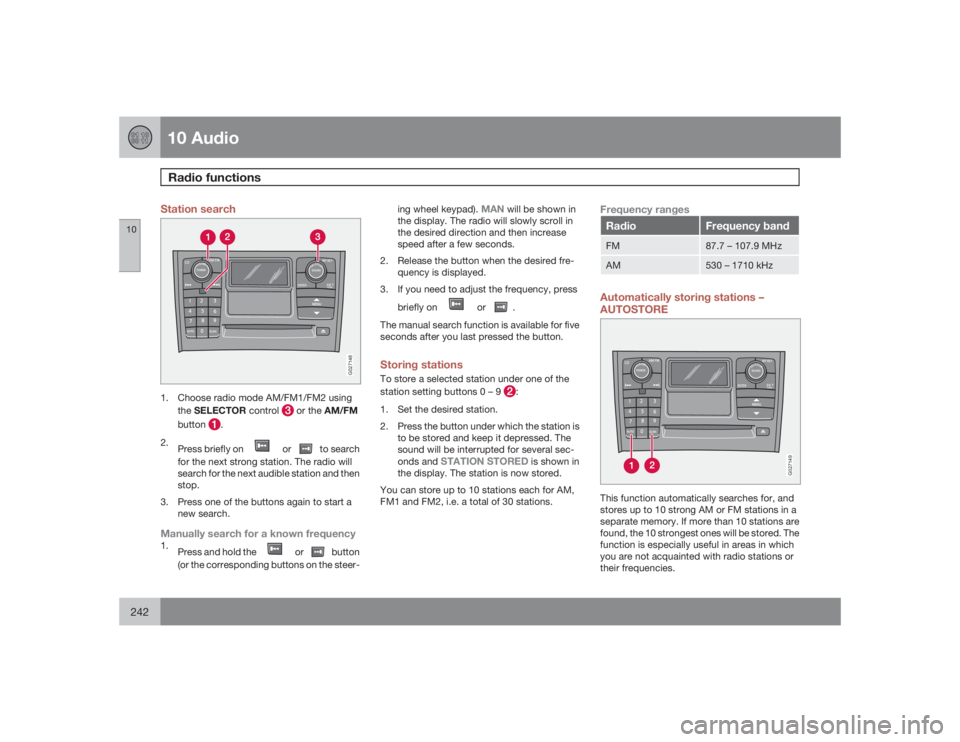
1. Choose radio mode AM/FM1/FM2 using
theSELECTOR control
or the AM/FM
button
.
2.
Press briefly on
or
to search
for the next strong station. The radio will
search for the next audible station and then
stop.
3. Press one of the buttons again to start a
new search.
Manually search for a known frequency1.
Press and hold the
or
button
(or the corresponding buttons on the steer-ing wheel keypad).
MAN
will be shown in
the display. The radio will slowly scroll in
the desired direction and then increase
speed after a few seconds.
2. Release the button when the desired fre-
quency is displayed.
3. If you need to adjust the frequency, press
briefly on
or
.
The manual search function is available for five
seconds after you last pressed the button.
Storing stationsTo store a selected station under one of the
station setting buttons 0 – 9
:
1. Set the desired station.
2. Press the button under which the station is
to be stored and keep it depressed. The
sound will be interrupted for several sec-
onds and
STATION STORED
is shown in
the display. The station is now stored.
You can store up to 10 stations each for AM,
FM1 and FM2, i.e. a total of 30 stations.
Frequency rangesRadio
Frequency band
FM
87.7 – 107.9 MHz
AM
530 – 1710 kHz
Automatically storing stations –
AUTOSTORE
G027149
This function automatically searches for, and
stores up to 10 strong AM or FM stations in a
separate memory. If more than 10 stations are
found, the 10 strongest ones will be stored. The
function is especially useful in areas in which
you are not acquainted with radio stations or
their frequencies.
Page 243 of 282
10 Audio
Radio functions
10
243
Starting autostore1.
Choose a frequency band with the AM/
FM button.
2.
Press and hold down the AUTO button
until
AUTOSTORING
is shown in the
display.
When
AUTOSTORING
is no longer displayed,
the autostore process is complete. The auto-
matically stored stations can be selected withe
the preset (number) keys If there are no stations
with sufficient signal strength,
NO AST
FOUND
is displayed.
Stopping autostorePressEXIT.Selecting an autostored station1.
PressAUTO (1) briefly. AUTOwill be dis-
played.
2. Press one of the preset buttons (0 – 9).
The radio will remain in Autostore mode until
AUTO, EXIT, or AM/FM is pressed.
SCANThis function automatically searches the cur-
rently selected waveband (AM, FM1, or FM2)
for strong stations. When the radio finds a sta-
tion, it will pause for approximately 8 seconds,
after which it will continue scanning.Activating/deactivating Scan1.
Choose a waveband by pressing the AM/
FM button.
2.
PressSCAN
.SCAN will be shown in the
display.
3.
PressEXIT to stop scanning.
Storing a station found by SCANStations can be stored on the preset buttons
while the SCAN function is activated.•
Press a preset button and hold it down until
Station stored is displayed.
This deactivates SCAN and the stored station
can be selected by pressing the preset button.
Radio textCertain stations broadcast program informa-
tion, which can be shown in the display.
1.
Press the MENU button.
2.
Select
RADIOTEXT
in the menu and press
ENTER.
Select
RADIOTEXT
again to deactivate.
Page 244 of 282

10 AudioSirius satellite radio
10244
Listening to satellite radioThe optional Sirius satellite system consists of
a number of high elevation satellites in geo-
synchronous orbit.
NOTE
•
The digital signals from the Sirius satel-
lites are line-of-sight, which means that
physical obstructions such as bridges,
tunnels, etc, may temporarily interfere
with signal reception.
•
Avoid any obstructions, such as metal-
lic objects transported on roof racks or
in a ski box, or other antennas that may
impede signals from the SIRIUS satel-
lites.
Selecting Sirius radio mode1.
PressPower to switch on the audio sys-
tem (see page 236 for information on the
standard radio functions).
2.
Turn the SELECTOR dial until Sirius 1 or 2
is displayed.Activating Sirius radio1. Tune to a satellite channel that has no
audio, which means that the channel is
unsubscribed and the text "
Call 888-539-
SIRIUS TO SUBSCRIBE" is displayed(see also "Selecting a channel" in the right
column).
2. Call Sirius at 1-888-539-SIRIUS (7474).
3. When asked for the Sirius ID number press
AUTO to display this number. It is also
possible to retrieve the Sirius ID from the
MENU.
4.
"
UPDATING SUBSCRIPTION
" will be
displayed while the subscription is being
updated, after which the display will return
to the normal view.
SIRUS IDThe SIRIUS ID is required when contacting the
Sirius Call Center. It is used to activate your
account and when making any account trans-
actions. The SIRIUS ID is sometimes referred
to as the Electronic Serial Number (ESN).
This function displays the 12-digit SIRIUS ID.Selecting a channel category1. Select Sirius radio mode as described
above.
2.
PressENTER.
3. Use the up/down arrow keys to scroll
through the list of categories.
4.
PressENTER to select a category.5.
Use the
and
buttons to
select a channel in the currently chosen
category.
NOTE
The category "All" is default, which enables
you to scroll through the entire list of avail-
able satellite channels.
The channel categories are automatically
updated several times a year. This takes
approximately two minutes and will inter-
rupt normal broadcasting. A message will
be displayed while updating is in progress.
Information on channel or feature updates is
available at www.sirius.com.Selecting a channelThere are two ways of tuning in a channel:•
By pressing and holding the
and
buttons to start the scroll function.
The scrolling function begins slowly and
increases speed after approximately
5 seconds. Release the button to listen to
the currently displayed channel.
•
Through direct channel entry
Direct channel entryThe Sirius satellite channels are numbered
consecutively throughout all of the categories.
To access a channel directly:
Page 249 of 282
10 Audio
CD player/changer
10``249
G027151
Playing a CD
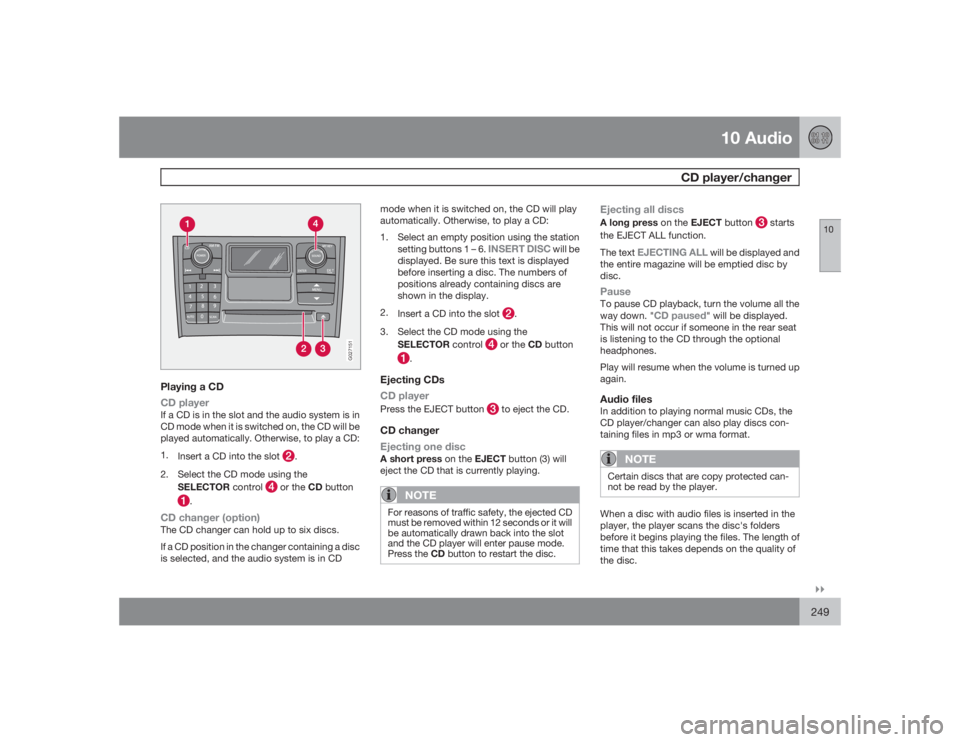
CD playerIf a CD is in the slot and the audio system is in
CD mode when it is switched on, the CD will be
played automatically. Otherwise, to play a CD:
1.
Insert a CD into the slot
.
2. Select the CD mode using the
SELECTOR control
or the CD button
.
CD changer (option)The CD changer can hold up to six discs.
If a CD position in the changer containing a disc
is selected, and the audio system is in CDmode when it is switched on, the CD will play
automatically. Otherwise, to play a CD:
1. Select an empty position using the station
setting buttons 1 – 6.
INSERT DISC
will be
displayed. Be sure this text is displayed
before inserting a disc. The numbers of
positions already containing discs are
shown in the display.
2.
Insert a CD into the slot
.
3. Select the CD mode using the
SELECTOR control
or the CD button
.
Ejecting CDs
CD playerPress the EJECT button
to eject the CD.
CD changer
Ejecting one discA short press on the EJECT button (3) will
eject the CD that is currently playing.
NOTE
For reasons of traffic safety, the ejected CD
must be removed within 12 seconds or it will
be automatically drawn back into the slot
and the CD player will enter pause mode.
Press the CD button to restart the disc.
Ejecting all discsA long press on the EJECT button
starts
the EJECT ALL function.
The text
EJECTING ALL
will be displayed and
the entire magazine will be emptied disc by
disc.
PauseTo pause CD playback, turn the volume all the
way down. "
CD paused
" will be displayed.
This will not occur if someone in the rear seat
is listening to the CD through the optional
headphones.
Play will resume when the volume is turned up
again.
Audio filesIn addition to playing normal music CDs, the
CD player/changer can also play discs con-
taining files in mp3 or wma format.
NOTE
Certain discs that are copy protected can-
not be read by the player.When a disc with audio files is inserted in the
player, the player scans the disc's folders
before it begins playing the files. The length of
time that this takes depends on the quality of
the disc.
Page 278 of 282
12 Index
12278
Shiftlock...................................................133
Side impact protection (SIPS) airbags....... 28
Snow chains............................................ 177
Snow tires................................................ 177
Spare tire – accessing.............................181
Spare wheel, lowering.............................181
Speedometer............................................. 54
Starting the car........................................ 133
Start inhibitor (immobilizer)...................... 118
Steering wheel lock.................................135
Stone chips, touching up......................... 198
Storage compartments............108, 110, 111
Studded tires........................................... 177
Sun visor.................................................... 84TTachometer................................................ 54
Tailgate
locking/unlocking................................ 122
opening................................................. 77
Tailgate wipers......................................... 213
Technician certification............................ 273Temperature control.................................. 95
Temperature gauge................................... 54
Three-way catalytic converter................. 272
TIME FOR REGULAR SERVICE................. 58
Tire inflation pressure table
Canadian models................................ 171
US models.......................................... 170
Tire Pressure Monitoring System (TPMS) 190
Tires
changing............................................. 180
designations....................................... 172
improving economy............................ 167
inflation............................................... 168
inflation pressure, checking................ 168
inflation pressure tables..................... 170
rotation............................................... 179
tire sealing system.............................. 185
tread wear indicator............................ 166
Tire sealing system.................................. 185
Towing a trailer........................................ 151
V8-engine........................................... 153
Towing - cars with All Wheel Drive.......... 150
Towing the vehicle................................... 149
Trailer hitch - detachable......................... 155
Trailer towing...................................151, 153Transmission, automatic.......................... 138
Tread wear indicator................................ 166
Treble....................................................... 239
Trip computer............................................ 71
Trip odometer............................................ 54
Turn signals............................................... 66
UUniform Tire Quality Grading................... 176
Unlocking fuel filler door............................ 64
Unlocking the car..................................... 122
Unpaved roads, driving on...................... 137VV8 engine and trailer towing....................153
Valet key.................................................. 118
Vanity mirror............................................. 107
Vehicle dimensions.................................. 260
Vehicle Event Data................................... 202
Vehicle Identification Number (VIN)......... 259