AUX VOLVO XC90 2014 Owner´s Manual
[x] Cancel search | Manufacturer: VOLVO, Model Year: 2014, Model line: XC90, Model: VOLVO XC90 2014Pages: 308, PDF Size: 13.31 MB
Page 269 of 308
10 Audio
Auxiliary equipment
10
* Option/accessory, for more information, see Introduction.267
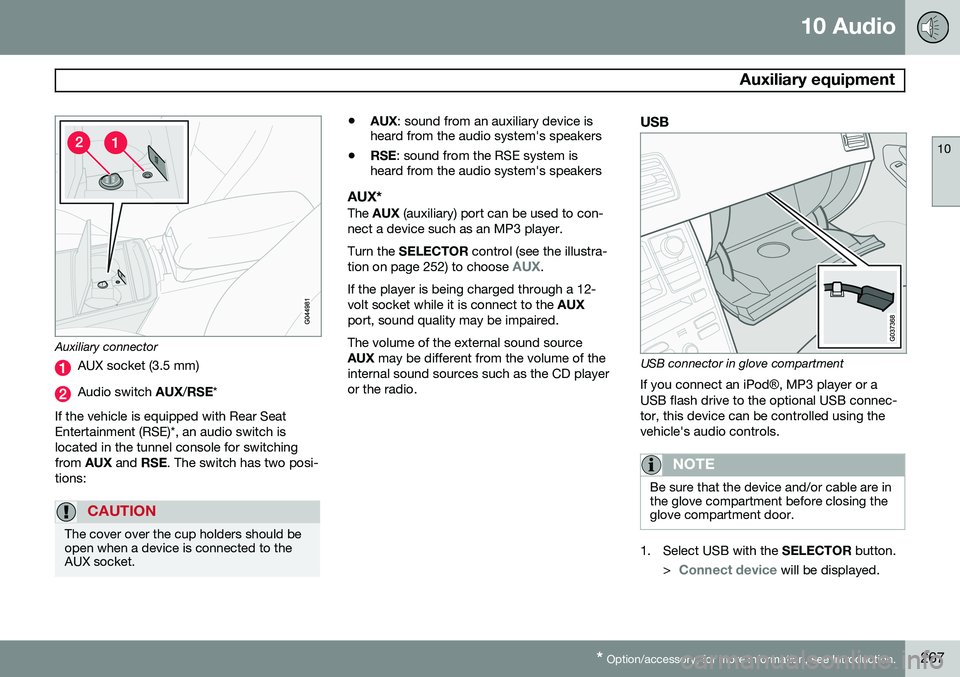
Auxiliary connector
AUX socket (3.5 mm)
Audio switch AUX/RSE *
If the vehicle is equipped with Rear Seat Entertainment (RSE)*, an audio switch islocated in the tunnel console for switchingfrom AUX and RSE. The switch has two posi-
tions:
CAUTION
The cover over the cup holders should be open when a device is connected to theAUX socket.
• AUX
: sound from an auxiliary device is
heard from the audio system's speakers
• RSE
: sound from the RSE system is
heard from the audio system's speakers
AUX*The AUX (auxiliary) port can be used to con-
nect a device such as an MP3 player. Turn the SELECTOR control (see the illustra-
tion on page 252) to choose
AUX.
If the player is being charged through a 12- volt socket while it is connect to the AUX
port, sound quality may be impaired. The volume of the external sound source AUX may be different from the volume of the
internal sound sources such as the CD player or the radio.
USB
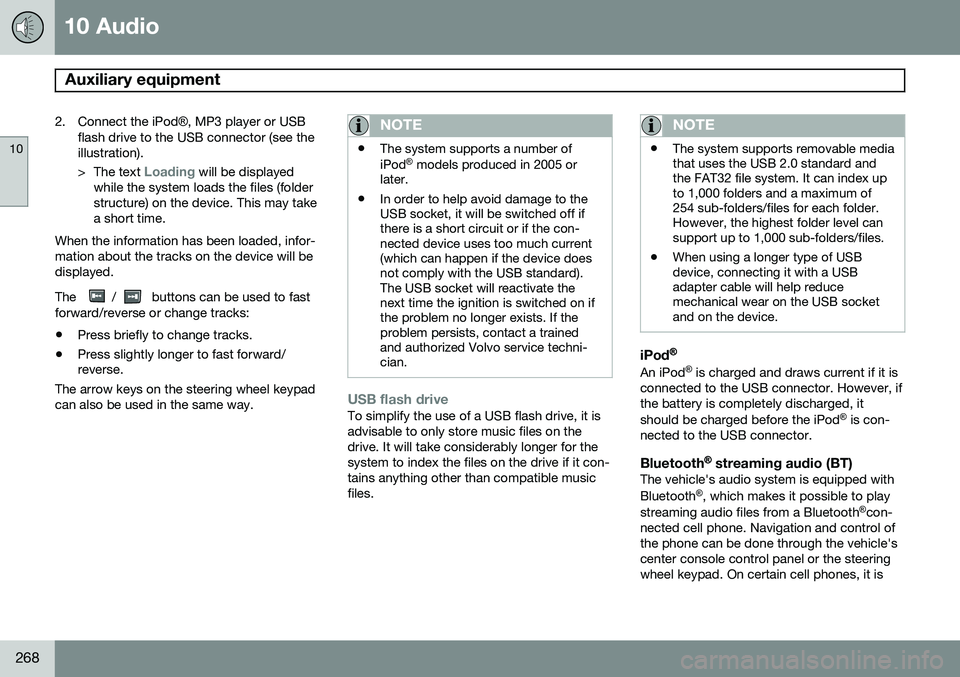
USB connector in glove compartment
If you connect an iPod ®, MP3 player or a
USB flash drive to the optional USB connec- tor, this device can be controlled using thevehicle's audio controls.
NOTE
Be sure that the device and/or cable are in the glove compartment before closing theglove compartment door.
1. Select USB with the SELECTOR button.
>
Connect device will be displayed.
Page 270 of 308
10 Audio
Auxiliary equipment
10
268
2. Connect the iPod®, MP3 player or USB
flash drive to the USB connector (see the illustration). > The text
Loading will be displayed
while the system loads the files (folder structure) on the device. This may takea short time.
When the information has been loaded, infor-mation about the tracks on the device will bedisplayed. The
/ buttons can be used to fast
forward/reverse or change tracks:
• Press briefly to change tracks.
• Press slightly longer to fast forward/ reverse.
The arrow keys on the steering wheel keypad can also be used in the same way.
NOTE
• The system supports a number of iPod ®
models produced in 2005 or
later.
• In order to help avoid damage to the USB socket, it will be switched off ifthere is a short circuit or if the con-nected device uses too much current(which can happen if the device doesnot comply with the USB standard).The USB socket will reactivate thenext time the ignition is switched on ifthe problem no longer exists. If theproblem persists, contact a trainedand authorized Volvo service techni-cian.
USB flash driveTo simplify the use of a USB flash drive, it is advisable to only store music files on thedrive. It will take considerably longer for thesystem to index the files on the drive if it con-tains anything other than compatible musicfiles.
NOTE
• The system supports removable media that uses the USB 2.0 standard andthe FAT32 file system. It can index upto 1,000 folders and a maximum of254 sub-folders/files for each folder.However, the highest folder level cansupport up to 1,000 sub-folders/files.
• When using a longer type of USBdevice, connecting it with a USBadapter cable will help reducemechanical wear on the USB socketand on the device.
iPod®
An iPod ®
is charged and draws current if it is
connected to the USB connector. However, if the battery is completely discharged, it should be charged before the iPod ®
is con-
nected to the USB connector.
Bluetooth ®
streaming audio (BT)The vehicle's audio system is equipped withBluetooth ®
, which makes it possible to play
streaming audio files from a Bluetooth ®
con-
nected cell phone. Navigation and control of the phone can be done through the vehicle'scenter console control panel or the steeringwheel keypad. On certain cell phones, it is
Page 271 of 308
10 Audio
Auxiliary equipment
10
269
also possible to change tracks from the phone itself. In order to listen streaming audio,
BT must be
selected as a sound source (see page 255) and a Bluetooth ®
cell phone must be con-
nected (paired) with the audio system. See page 275 for more information.
NOTE
Any Bluetooth cell phones used must sup- port Audio/Video Remote Control Profile(AVRCP) and Advanced Audio DistributionProfile (A2DP). The phone must useAVRCP version 1.3 and A2DP 1.2. If olderversions of these standards are used, cer-tain features (e.g., scan or random) maynot function. Not all cell phones are fully compatible with the vehicle's Bluetooth system. A listof compatible phones is available at youVolvo retailer or at www.volvocars.us.
Listening to streaming audioTurn SELECTOR to select BT as the sound
source. The
/ buttons can be used to fast-
forward/back or change tracks: • Press briefly to change tracks.
• Press and hold to go fast-forward/back. The buttons in the steering wheel keypad can be used in the same way.
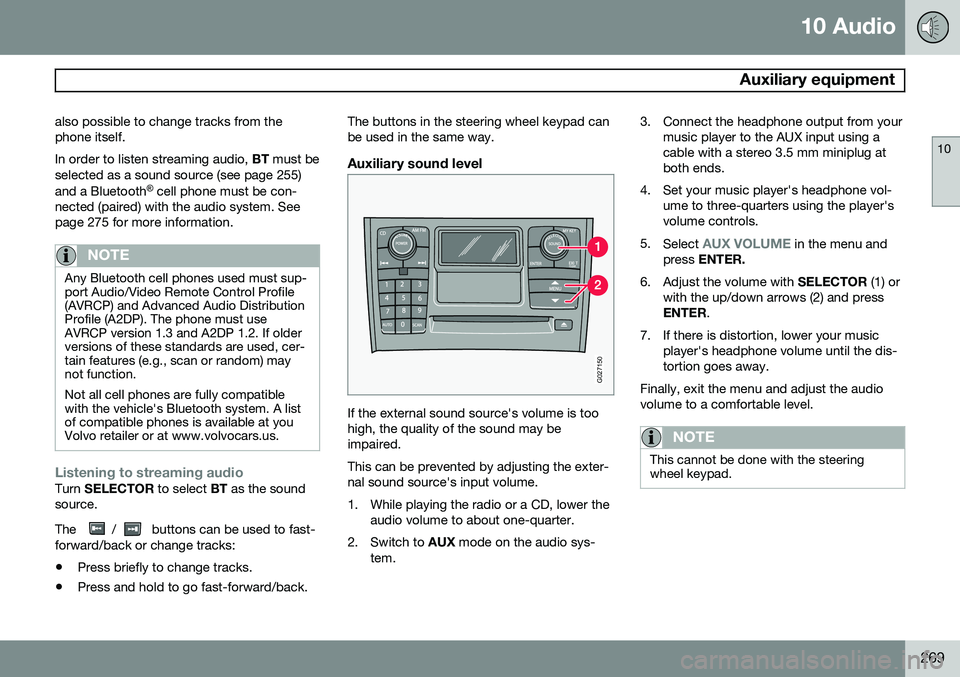
Auxiliary sound level
G027150
If the external sound source's volume is too high, the quality of the sound may beimpaired. This can be prevented by adjusting the exter- nal sound source's input volume.
1. While playing the radio or a CD, lower the
audio volume to about one-quarter.
2. Switch to AUX mode on the audio sys-
tem. 3. Connect the headphone output from your
music player to the AUX input using a cable with a stereo 3.5 mm miniplug atboth ends.
4. Set your music player's headphone vol- ume to three-quarters using the player'svolume controls.
5. Select
AUX VOLUME in the menu and
press ENTER.
6. Adjust the volume with SELECTOR (1) or
with the up/down arrows (2) and press ENTER .
7. If there is distortion, lower your music player's headphone volume until the dis-tortion goes away.
Finally, exit the menu and adjust the audiovolume to a comfortable level.
NOTE
This cannot be done with the steering wheel keypad.
Page 275 of 308
10 Audio
Menu structure
10
273
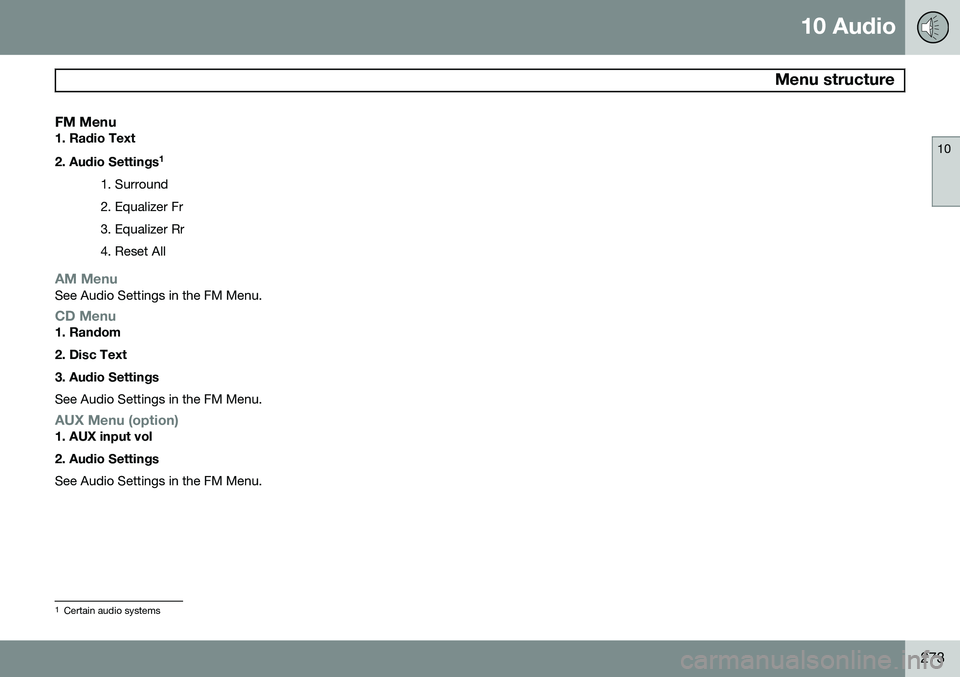
FM Menu1. Radio Text 2. Audio Settings1
1. Surround 2. Equalizer Fr3. Equalizer Rr4. Reset All
AM MenuSee Audio Settings in the FM Menu.
CD Menu1. Random 2. Disc Text3. Audio Settings See Audio Settings in the FM Menu.
AUX Menu (option)1. AUX input vol 2. Audio Settings See Audio Settings in the FM Menu.
1 Certain audio systems
Page 300 of 308
12 Index
12
298
1, 2, 3 ...
12-volt sockets.......................................... 80
A
A/C (air conditioning)........................... 98, 99
ABS.......................................................... 155Accessory installation warning.................. 14
Airbag system............................................ 23
Air cleaner................................................ 221
Air conditioning.......................................... 94
Air distribution...................................... 96, 99
Air quality sensor....................................... 98
Air vents..................................................... 96
Alarm........................................................ 133
All Wheel Drive......................................... 153
All Wheel Drive – towing.......................... 163Anti-lock brake system warning light......................................... 60
Anti-lock Brake System (ABS)................. 155
Ashtray..................................................... 115 Audio
system introduction............................ 252
Audio system Bluetooth streaming audio................. 268
HD digital radio................................... 260SiriusXM ™ satellite radio.................... 263
AUTO (climate control)....................... 99, 100
Automatic locking retractor....................... 39
Automatic transmission........................... 149 shiftlock override.................................. 23
Autostart.......................................... 143, 145
AUX (audio system)................................. 267
Average speed........................................... 76
AWD......................................................... 153
B
Bass......................................................... 255
Battery..................................................... 219 maintenance....................................... 227
specifications...................................... 292
Battery – replacing................................... 228
Belt check................................................ 220
Blind Spot Information System (BLIS)..... 171 Blower (fan).............................................. 100
Bluetooth cell phone connection............. 274Booster cushion
accessory............................................. 48
integrated.............................................. 52
Brake fluid................................................ 225
Brake system........................................... 154 Brake pad inspection.......................... 154
Bulbs........................................................ 230 specifications...................................... 236
Bulbs, replacing....................................... 230
C
Capacities, fluids..................................... 288
Capacity weight....................................... 187
Cargo area cover..................................... 122
Cargo grid................................................ 121
Cargo net................................................. 119
Catalytic converter, three-way................. 293
CD Pause................................................. 270
Cell phone, hands-free connection......... 274
Center console buttons............................. 64