AUX VOLVO XC90 2014 Owner´s Manual
[x] Cancel search | Manufacturer: VOLVO, Model Year: 2014, Model line: XC90, Model: VOLVO XC90 2014Pages: 308, PDF Size: 13.31 MB
Page 7 of 308
Contents
5
09
09 Maintenance and servicing
Volvo service........................................... 216
Maintaining your vehicle......................... 217
Working on your vehicle......................... 219
Engine compartment............................... 221
Engine oil................................................ 222
Fluids...................................................... 224
Wiper blades........................................... 226
Battery..................................................... 227
Replacing bulbs...................................... 230
Fuses...................................................... 238
10
10 Audio
Audio system overview........................... 252
Audio system controls............................ 253
Radio functions....................................... 258SiriusXM™ satellite radio........................ 263
Auxiliary equipment................................ 267
CD player/changer.................................. 270
Menu structure........................................ 273 Bluetooth ®
hands-free connection......... 274
11
11 Specifications
Label information.................................... 282
Dimensions ............................................ 284
Weights .................................................. 286
Fluids...................................................... 288
Suspension............................................. 289
Engine oil................................................ 290
Engine specifications.............................. 291
Electrical system..................................... 292
Three-way catalytic converter................. 293Overview of information and warning
symbols .................................................. 294
Volvo programs....................................... 296
Page 67 of 308
02 Instruments and controls
Center console buttons
02
* Option/accessory, for more information, see Introduction.65
NOTE
If the door mirrors have been inadvertently pushed out of position (in a car wash,parking lot, etc.) manually return them tonormal position. If mirror adjustment doesnot seem to operate after manual folding,reset the folding mirrors as follows:
• Turn the ignition key to position
II.
• Manually fold the mirror(s) to the nor- mal position.
• Press the button to fold both mirrorsin.
• Press the button again to fold the mir-rors out to their normal position.
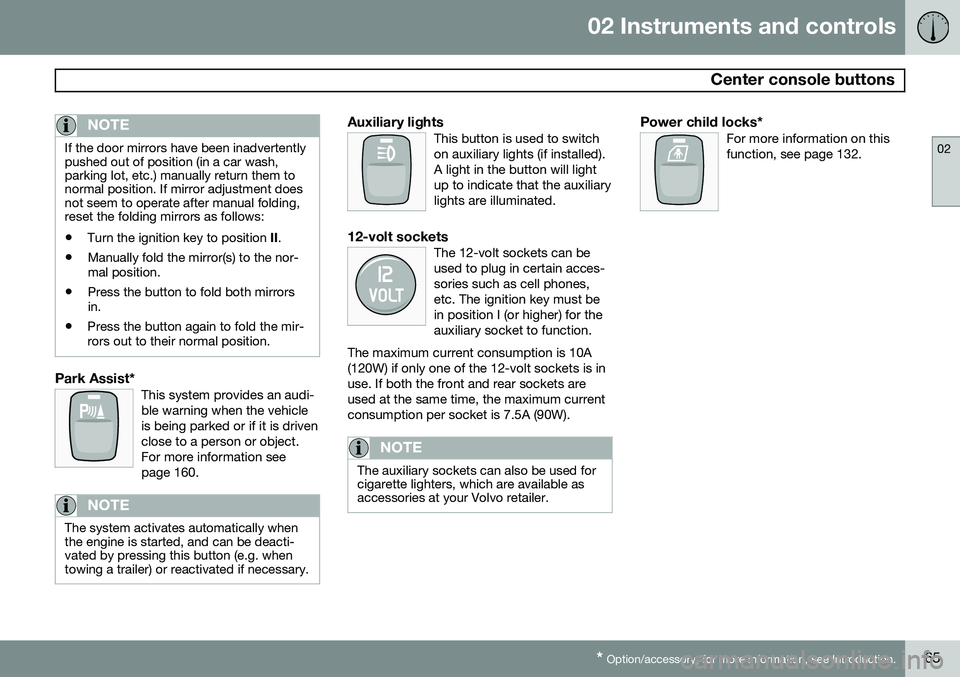
Park Assist*This system provides an audi- ble warning when the vehicleis being parked or if it is drivenclose to a person or object.For more information seepage 160.
NOTE
The system activates automatically when the engine is started, and can be deacti-vated by pressing this button (e.g. whentowing a trailer) or reactivated if necessary.
Auxiliary lightsThis button is used to switch on auxiliary lights (if installed).A light in the button will lightup to indicate that the auxiliarylights are illuminated.
12-volt socketsThe 12-volt sockets can be used to plug in certain acces-sories such as cell phones,etc. The ignition key must bein position I (or higher) for theauxiliary socket to function.
The maximum current consumption is 10A(120W) if only one of the 12-volt sockets is inuse. If both the front and rear sockets areused at the same time, the maximum currentconsumption per socket is 7.5A (90W).
NOTE
The auxiliary sockets can also be used for cigarette lighters, which are available asaccessories at your Volvo retailer.
Power child locks*For more information on this function, see page 132.
Page 82 of 308
02 Instruments and controls
12-volt sockets
02
80* Option/accessory, for more information, see Introduction.
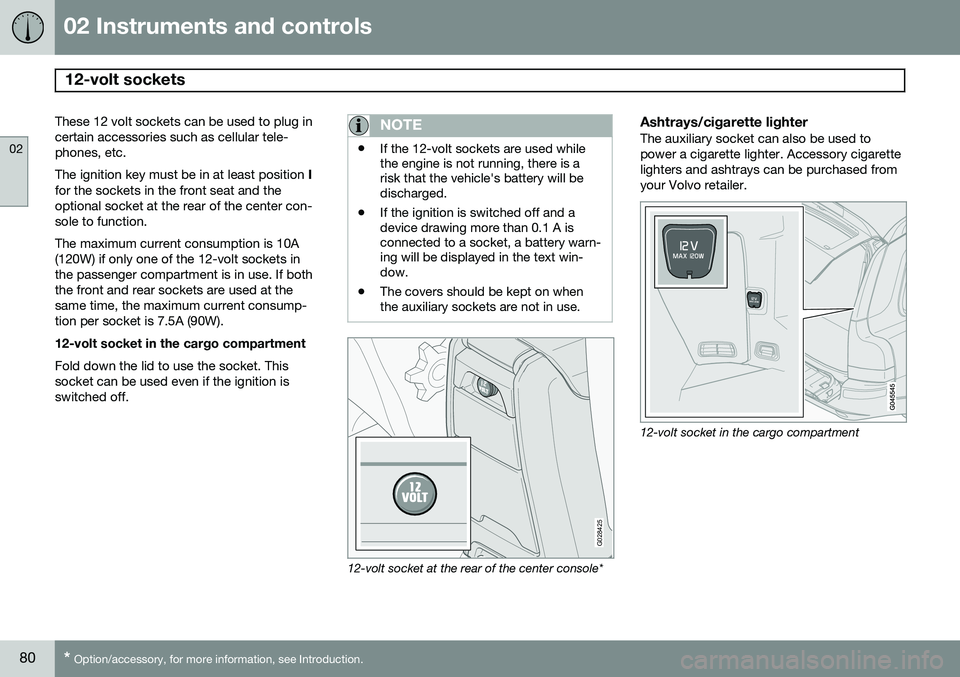
These 12 volt sockets can be used to plug in certain accessories such as cellular tele-phones, etc. The ignition key must be in at least position I
for the sockets in the front seat and the optional socket at the rear of the center con-sole to function. The maximum current consumption is 10A (120W) if only one of the 12-volt sockets inthe passenger compartment is in use. If boththe front and rear sockets are used at thesame time, the maximum current consump-tion per socket is 7.5A (90W). 12-volt socket in the cargo compartment Fold down the lid to use the socket. This socket can be used even if the ignition isswitched off.NOTE
• If the 12-volt sockets are used while the engine is not running, there is arisk that the vehicle's battery will bedischarged.
• If the ignition is switched off and adevice drawing more than 0.1 A isconnected to a socket, a battery warn-ing will be displayed in the text win-dow.
• The covers should be kept on whenthe auxiliary sockets are not in use.
G028425
12-volt socket at the rear of the center console*
Ashtrays/cigarette lighterThe auxiliary socket can also be used to power a cigarette lighter. Accessory cigarettelighters and ashtrays can be purchased fromyour Volvo retailer.
12-volt socket in the cargo compartment
Page 154 of 308
06 Starting and driving
Jump starting
06
152
G030860
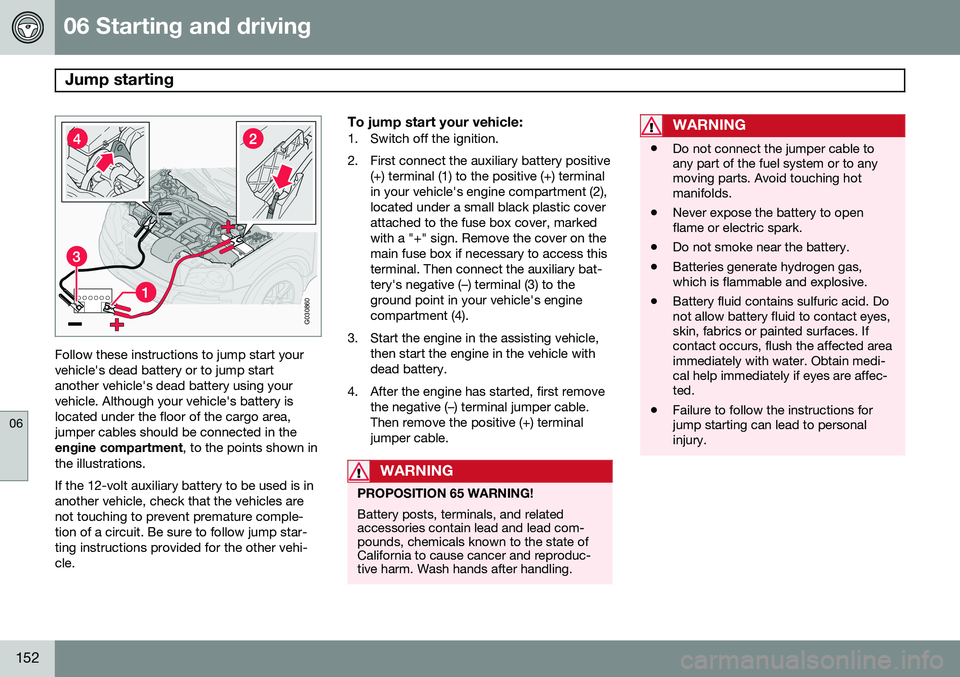
Follow these instructions to jump start your vehicle's dead battery or to jump startanother vehicle's dead battery using yourvehicle. Although your vehicle's battery islocated under the floor of the cargo area,jumper cables should be connected in theengine compartment, to the points shown in
the illustrations. If the 12-volt auxiliary battery to be used is in another vehicle, check that the vehicles arenot touching to prevent premature comple-tion of a circuit. Be sure to follow jump star-ting instructions provided for the other vehi-cle.
To jump start your vehicle:1. Switch off the ignition.
2. First connect the auxiliary battery positive (+) terminal (1) to the positive (+) terminal in your vehicle's engine compartment (2),located under a small black plastic coverattached to the fuse box cover, markedwith a "+" sign. Remove the cover on themain fuse box if necessary to access thisterminal. Then connect the auxiliary bat-tery's negative (–) terminal (3) to theground point in your vehicle's enginecompartment (4).
3. Start the engine in the assisting vehicle, then start the engine in the vehicle withdead battery.
4. After the engine has started, first remove the negative (–) terminal jumper cable.Then remove the positive (+) terminaljumper cable.
WARNING
PROPOSITION 65 WARNING! Battery posts, terminals, and related accessories contain lead and lead com-pounds, chemicals known to the state ofCalifornia to cause cancer and reproduc-tive harm. Wash hands after handling.
WARNING
•Do not connect the jumper cable to any part of the fuel system or to anymoving parts. Avoid touching hotmanifolds.
• Never expose the battery to openflame or electric spark.
• Do not smoke near the battery.
• Batteries generate hydrogen gas,which is flammable and explosive.
• Battery fluid contains sulfuric acid. Donot allow battery fluid to contact eyes,skin, fabrics or painted surfaces. Ifcontact occurs, flush the affected areaimmediately with water. Obtain medi-cal help immediately if eyes are affec-ted.
• Failure to follow the instructions forjump starting can lead to personalinjury.
Page 162 of 308
06 Starting and driving
Front/rear park assist*
06
160* Option/accessory, for more information, see Introduction.
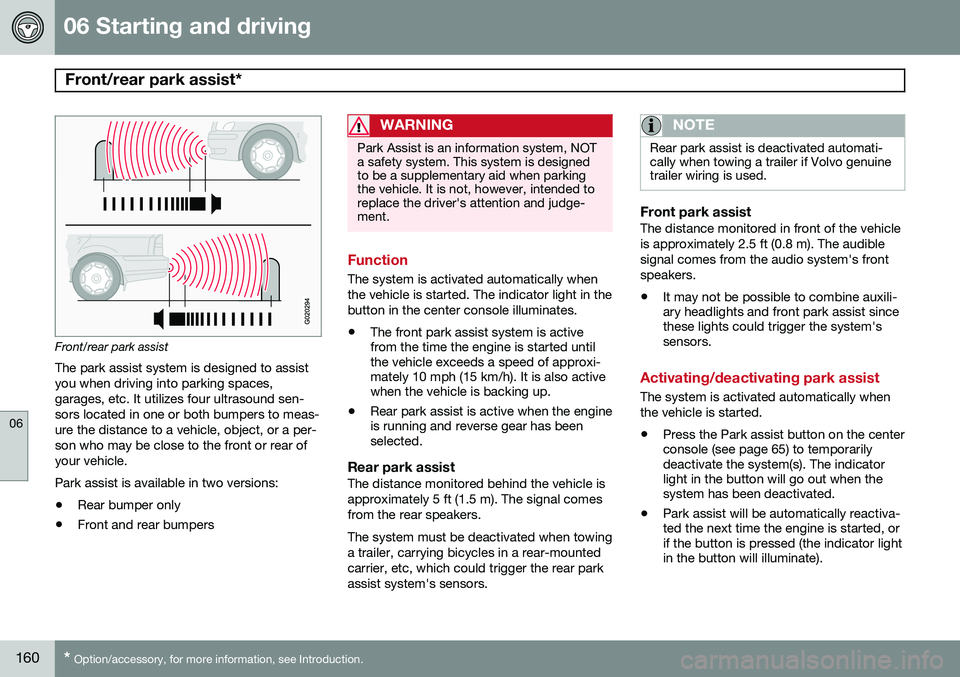
Front/rear park assist
The park assist system is designed to assist you when driving into parking spaces,garages, etc. It utilizes four ultrasound sen-sors located in one or both bumpers to meas-ure the distance to a vehicle, object, or a per-son who may be close to the front or rear ofyour vehicle. Park assist is available in two versions:
• Rear bumper only
• Front and rear bumpers
WARNING
Park Assist is an information system, NOT a safety system. This system is designedto be a supplementary aid when parkingthe vehicle. It is not, however, intended toreplace the driver's attention and judge-ment.
Function
The system is activated automatically when the vehicle is started. The indicator light in thebutton in the center console illuminates. • The front park assist system is active from the time the engine is started untilthe vehicle exceeds a speed of approxi-mately 10 mph (15 km/h). It is also activewhen the vehicle is backing up.
• Rear park assist is active when the engineis running and reverse gear has beenselected.
Rear park assistThe distance monitored behind the vehicle is approximately 5 ft (1.5 m). The signal comesfrom the rear speakers. The system must be deactivated when towing a trailer, carrying bicycles in a rear-mountedcarrier, etc, which could trigger the rear parkassist system's sensors.
NOTE
Rear park assist is deactivated automati- cally when towing a trailer if Volvo genuinetrailer wiring is used.
Front park assistThe distance monitored in front of the vehicle is approximately 2.5 ft (0.8 m). The audiblesignal comes from the audio system's frontspeakers.
• It may not be possible to combine auxili- ary headlights and front park assist sincethese lights could trigger the system'ssensors.
Activating/deactivating park assist
The system is activated automatically when the vehicle is started.
• Press the Park assist button on the center console (see page 65) to temporarilydeactivate the system(s). The indicatorlight in the button will go out when thesystem has been deactivated.
• Park assist will be automatically reactiva-ted the next time the engine is started, orif the button is pressed (the indicator lightin the button will illuminate).
Page 165 of 308
06 Starting and driving
Towing
06
163
CAUTION
Vehicles with AWD (All Wheel Drive) with the front wheels off the ground should notbe towed at speeds above 50 mph(70 km/h) or for distances longer than30 miles (50 km).
CAUTION
•Please check with state and local authorities before attempting this typeof towing, as vehicles being towed aresubject to regulations regarding maxi-mum towing speed, length and type oftowing device, lighting, etc.
• If the vehicle's battery is dead, do notattempt to start the vehicle by pushingor pulling it as this will damage thethree-way catalytic converter(s). Theengine must be jump started using anauxiliary battery (see page 152).
• If the vehicle is being towed on a flatbed truck, the towing eyelets must notbe used to pull the vehicle up onto theflat bed or to secure the vehicle on theflat bed. Consult the tow truck opera-tor.
WARNING
•The power brakes and power steering will not function when the engine is notrunning. Approximately 5 times morepressure will be required on the brakepedal and the steering wheel will beconsiderably harder to turn.
• The towing eyelets must not be usedfor pulling the vehicle out of a ditch orfor any similar purpose involvingsevere strain.
G030862
Towing vehicles with front wheel drive/All Wheel Drive
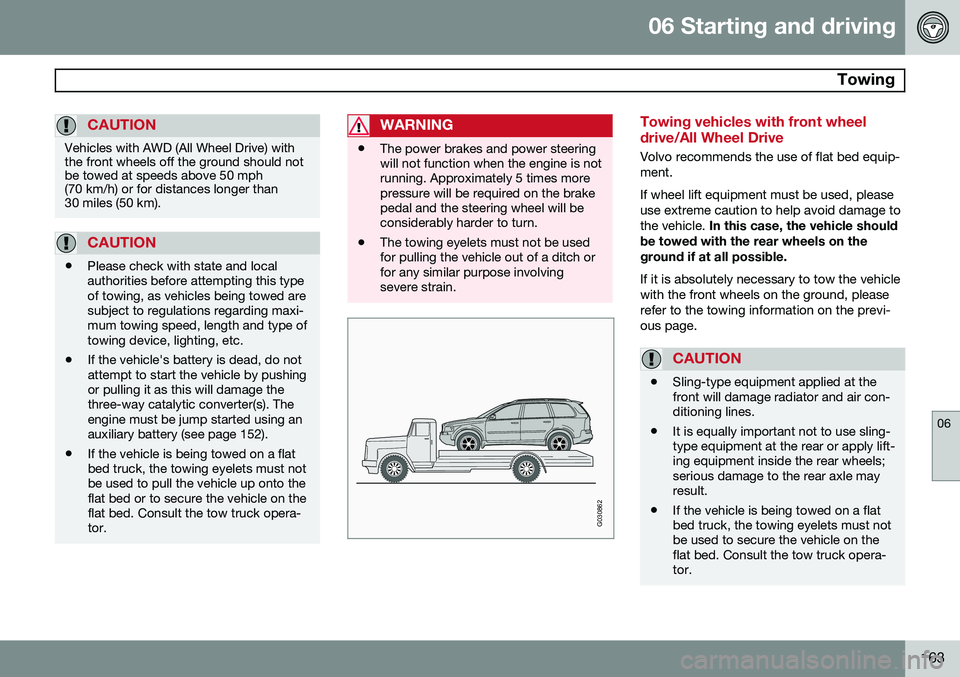
Volvo recommends the use of flat bed equip- ment. If wheel lift equipment must be used, please use extreme caution to help avoid damage tothe vehicle.
In this case, the vehicle should
be towed with the rear wheels on theground if at all possible. If it is absolutely necessary to tow the vehicle with the front wheels on the ground, pleaserefer to the towing information on the previ-ous page.
CAUTION
• Sling-type equipment applied at the front will damage radiator and air con-ditioning lines.
• It is equally important not to use sling-type equipment at the rear or apply lift-ing equipment inside the rear wheels;serious damage to the rear axle mayresult.
• If the vehicle is being towed on a flatbed truck, the towing eyelets must notbe used to secure the vehicle on theflat bed. Consult the tow truck opera-tor.
Page 211 of 308
08 Car care
Washing and cleaning the vehicle
08
209
Exterior componentsVolvo recommends the use of special clean- ing products, available at your Volvo retailer,for cleaning colored plastic, rubber, or orna-mental components such as chromed stripson the exterior of your vehicle. The instruc-tions for using these products should be fol-lowed carefully. Solvents or stain removersshould not be used.
CAUTION
•Avoid waxing or polishing plastic or rubber components
• Polishing chromed strips can wearaway or damage the surface
• Polishes containing abrasive sub-stances should not be used
NOTE
When washing the vehicle, remember to remove dirt from the drain holes in thedoors and sills.
WARNING
•When the vehicle is driven immediately after being washed, apply the brakesseveral times in order to remove anymoisture from the brake linings.
• Engine cleaning agents should not beused when the engine is warm. Thisconstitutes a fire risk.
Automatic washing – simple and quick
•
We do NOT recommend washing your vehicle in an automatic wash during thefirst few months (because the paint willnot have hardened sufficiently).
• An automatic wash is a simple and quickway to clean your vehicle, but it is worthremembering that it may not be as thor-ough as when you yourself go over thevehicle with sponge and water. Keepingthe underbody clean is most important,especially in the winter. Some automaticwashers do not have facilities for washingthe underbody.
• Before driving into an automatic carwash, make sure that side view mirrors,auxiliary lamps, etc, are secure, and thatany antenna(s) are retracted or removed.Otherwise there is risk of the machinedislodging them.
Exterior lightingCondensation may form temporarily on the inside of the lenses of exterior lights such asheadlights, fog lights, or tail lights. This is nor-mal and the lights are designed to withstandmoisture. Normally, condensation will dissi-pate after the lights have been on for a shorttime.
Polishing and waxing
•
Normally, polishing is not required during the first year after delivery, however, wax-ing may be beneficial.
• Before applying polish or wax the vehiclemust be washed and dried. Tar spots canbe removed with kerosene or tar remover.Difficult spots may require a fine rubbingcompound.
• After polishing use liquid or paste wax.
• Several commercially available productscontain both polish and wax.
• Waxing alone does not substitute for pol-ishing a dull surface.
• A wide range of polymer-based carwaxes can be purchased today. Thesewaxes are easy to use and produce along-lasting, high-gloss finish that pro-
Page 242 of 308
09 Maintenance and servicing
Fuses 09
240* Option/accessory, for more information, see Introduction.
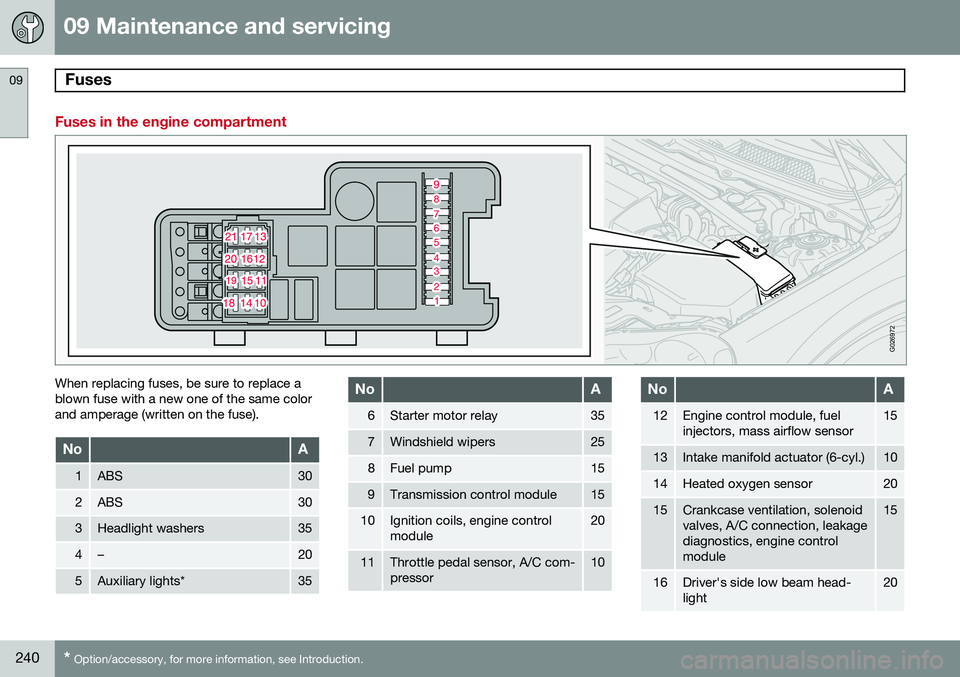
Fuses in the engine compartment
G026972
When replacing fuses, be sure to replace a blown fuse with a new one of the same colorand amperage (written on the fuse).
NoA
1ABS30
2ABS30
3Headlight washers35
4–20
5Auxiliary lights*35
NoA
6Starter motor relay35
7Windshield wipers25
8Fuel pump15
9Transmission control module15
10Ignition coils, engine control module20
11Throttle pedal sensor, A/C com- pressor10
NoA
12Engine control module, fuel injectors, mass airflow sensor15
13Intake manifold actuator (6-cyl.)10
14Heated oxygen sensor20
15Crankcase ventilation, solenoid valves, A/C connection, leakagediagnostics, engine controlmodule15
16Driver's side low beam head- light20
Page 252 of 308
250
Audio system overview......................................................................... 252
Audio system controls.......................................................................... 253
Radio functions.....................................................................................258SiriusXM™ satellite radio...................................................................... 263
Auxiliary equipment............................................................................... 267
CD player/changer................................................................................ 270
Menu structure......................................................................................273 Bluetooth ®
hands-free connection....................................................... 274
Page 257 of 308
10 Audio
Audio system controls
10
* Option/accessory, for more information, see Introduction.255
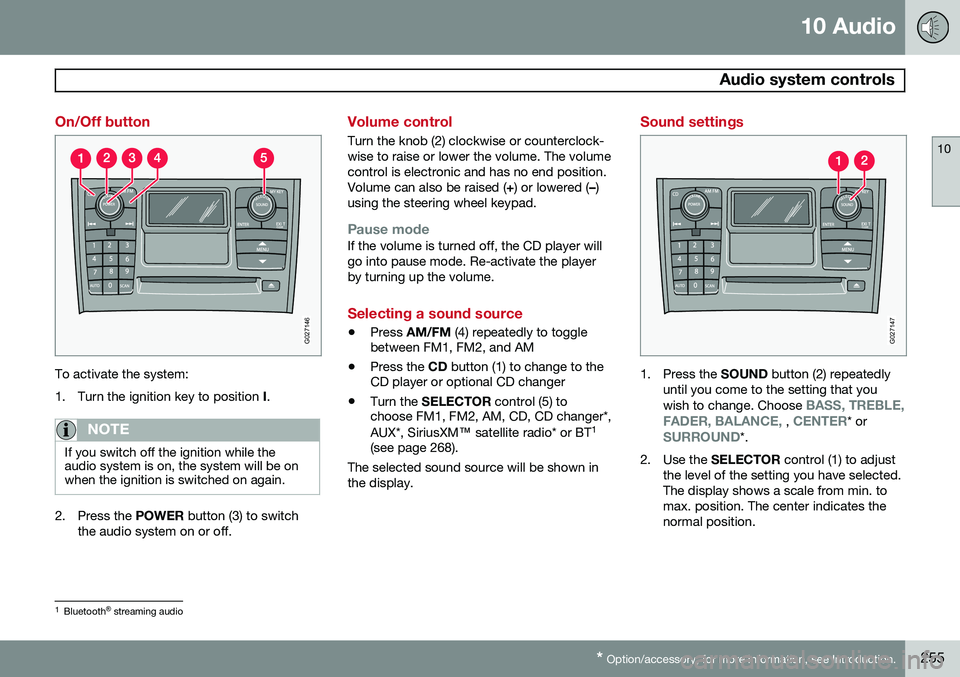
On/Off button
G027146
To activate the system:
1. Turn the ignition key to position I.
NOTE
If you switch off the ignition while the audio system is on, the system will be onwhen the ignition is switched on again.
2. Press the POWER button (3) to switch
the audio system on or off.
Volume control
Turn the knob (2) clockwise or counterclock- wise to raise or lower the volume. The volumecontrol is electronic and has no end position.Volume can also be raised ( +) or lowered ( –)
using the steering wheel keypad.
Pause modeIf the volume is turned off, the CD player will go into pause mode. Re-activate the playerby turning up the volume.
Selecting a sound source
• Press
AM/FM (4) repeatedly to toggle
between FM1, FM2, and AM
• Press the
CD button (1) to change to the
CD player or optional CD changer
• Turn the
SELECTOR control (5) to
choose FM1, FM2, AM, CD, CD changer*, AUX*, SiriusXM ™ satellite radio* or BT 1
(see page 268).
The selected sound source will be shown in the display.
Sound settings
G027147
1. Press the SOUND button (2) repeatedly
until you come to the setting that you wish to change. Choose
BASS, TREBLE,
FADER, BALANCE, , CENTER* orSURROUND*.
2. Use the SELECTOR control (1) to adjust
the level of the setting you have selected. The display shows a scale from min. tomax. position. The center indicates thenormal position.
1 Bluetooth ®
streaming audio