instrument panel VOLVO XC90 2014 Owner´s Manual
[x] Cancel search | Manufacturer: VOLVO, Model Year: 2014, Model line: XC90, Model: VOLVO XC90 2014Pages: 308, PDF Size: 13.31 MB
Page 4 of 308
Contents
2* Option/accessory, for more information, see Introduction.
00
00 Introduction
Important information................................. 8
Environment.............................................. 13
Important warnings................................... 14
01
01 Safety
Occupant safety........................................ 18
Reporting safety defects........................... 19
Seat belts.................................................. 20
Supplemental Restraint System............... 23
Front airbags............................................. 24
Occupant Weight Sensor.......................... 28
Side impact protection airbags................. 32
Inflatable Curtain....................................... 34
Whiplash Protection System..................... 36
Child safety............................................... 38
Child restraint systems............................. 41
Infant seats............................................... 43
Convertible seats...................................... 45
Booster cushions...................................... 48
ISOFIX/LATCH lower anchors.................. 49
Top tether anchors.................................... 51
Integrated booster cushion....................... 52
02
02 Instruments and controls
Instrument overview.................................. 56
Instrument panel....................................... 58
Information display................................... 62
Center console buttons............................ 64
Steering wheel adjustment....................... 66
Lighting panel........................................... 67
Manually unlocking the fuel filler door...... 70
Left-side steering wheel lever................... 71
Right-side steering wheel lever................. 72
Hazard warning flashers........................... 75
Trip computer........................................... 76
Cruise control............................................ 78
12-volt sockets......................................... 80
Hood/tailgate............................................ 81
Power windows......................................... 82
Mirrors....................................................... 84
Power moonroof....................................... 87 HomeLink ®
Wireless Control System*...... 89
Page 23 of 308
01 Safety
Seat belts01
21
Seat belt reminderThe seat belt reminder consists of an audible signal, an indicator light above the rearviewmirror, and a symbol in the instrument panelthat alert the driver and front seat passengerif their seat belts are not fastened.WARNING
•Never use a seat belt for more than one occupant.
• Never wear the shoulder portion of thebelt under the arm, behind the back orotherwise out of position. Such usecould cause injury in the event of anaccident.
• Seat belts lose much of their strengthwhen exposed to violent stretchingand should be replaced after any colli-sion, even if they appear to be undam-aged.
• Never repair the belt yourself; have thiswork done by an authorized Volvoservice technician only.
• Any device used to induce slack intothe shoulder belt portion of the three-point belt system will have a detrimen-tal effect on the amount of protectionavailable to you in the event of a colli-sion.
• The seat back should not be tilted toofar back. The shoulder belt must betaut in order to function properly.
• Do not use child safety seats or childbooster cushions/backrests in thefront passenger's seat. We also rec-ommend that children who have out-grown these devices sit in the rear
seat with the seat belt properly fas- tened.
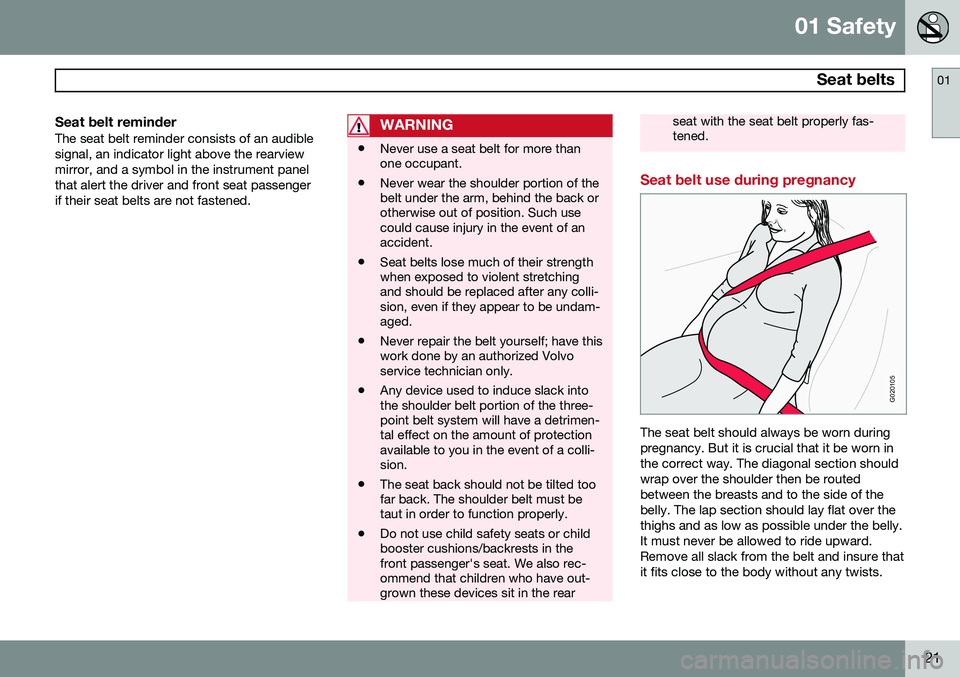
Seat belt use during pregnancy
G020105
The seat belt should always be worn during pregnancy. But it is crucial that it be worn inthe correct way. The diagonal section shouldwrap over the shoulder then be routedbetween the breasts and to the side of thebelly. The lap section should lay flat over thethighs and as low as possible under the belly.It must never be allowed to ride upward.Remove all slack from the belt and insure thatit fits close to the body without any twists.
Page 25 of 308
01 Safety
Supplemental Restraint System01
23
Supplemental Restraint System (SRS)
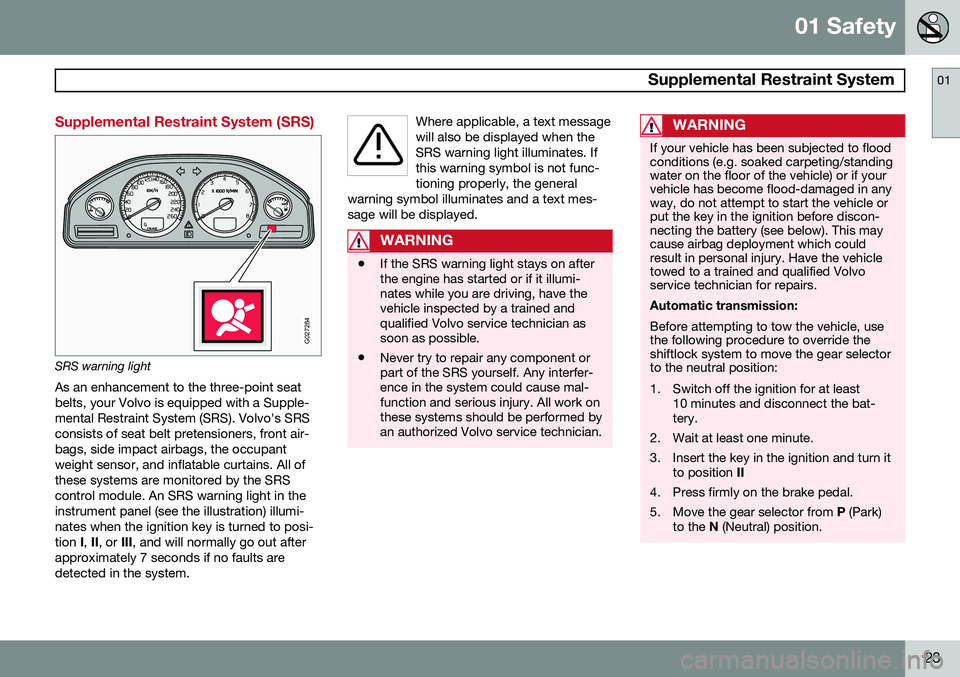
G027284
SRS warning lightAs an enhancement to the three-point seat belts, your Volvo is equipped with a Supple-mental Restraint System (SRS). Volvo's SRSconsists of seat belt pretensioners, front air-bags, side impact airbags, the occupantweight sensor, and inflatable curtains. All ofthese systems are monitored by the SRScontrol module. An SRS warning light in theinstrument panel (see the illustration) illumi-nates when the ignition key is turned to posi-tion I, II , or III, and will normally go out after
approximately 7 seconds if no faults aredetected in the system. Where applicable, a text messagewill also be displayed when theSRS warning light illuminates. Ifthis warning symbol is not func-tioning properly, the general
warning symbol illuminates and a text mes-sage will be displayed.
WARNING
• If the SRS warning light stays on after the engine has started or if it illumi-nates while you are driving, have thevehicle inspected by a trained andqualified Volvo service technician assoon as possible.
• Never try to repair any component orpart of the SRS yourself. Any interfer-ence in the system could cause mal-function and serious injury. All work onthese systems should be performed byan authorized Volvo service technician.
WARNING
If your vehicle has been subjected to flood conditions (e.g. soaked carpeting/standingwater on the floor of the vehicle) or if yourvehicle has become flood-damaged in anyway, do not attempt to start the vehicle orput the key in the ignition before discon-necting the battery (see below). This maycause airbag deployment which couldresult in personal injury. Have the vehicletowed to a trained and qualified Volvoservice technician for repairs. Automatic transmission: Before attempting to tow the vehicle, use the following procedure to override theshiftlock system to move the gear selectorto the neutral position:
1. Switch off the ignition for at least
10 minutes and disconnect the bat- tery.
2. Wait at least one minute.
3. Insert the key in the ignition and turn it to position II
4. Press firmly on the brake pedal.
5. Move the gear selector from P (Park)
to the N (Neutral) position.
Page 28 of 308
01 Safety
Front airbags 01
26
WARNING
•Do not use child safety seats or child booster cushions/backrests in thefront passenger's seat. We also rec-ommend that occupants under 4 feet7 inches (140 cm) in height who haveoutgrown these devices sit in the rearseat with the seat belt fastened.
• Never drive with the airbags deployed.The fact that they hang out can impairthe steering of your vehicle. Othersafety systems can also be damaged.
• The smoke and dust formed when theairbags are deployed can cause skinand eye irritation in the event of pro-longed exposure.
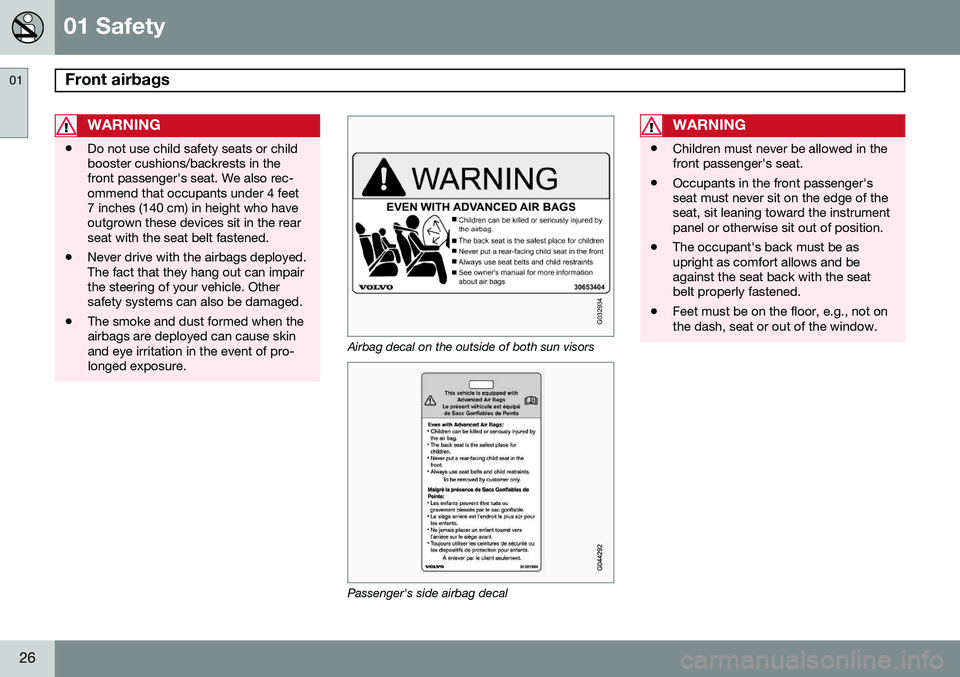
G032934
Airbag decal on the outside of both sun visors
Passenger's side airbag decal
WARNING
•Children must never be allowed in the front passenger's seat.
• Occupants in the front passenger'sseat must never sit on the edge of theseat, sit leaning toward the instrumentpanel or otherwise sit out of position.
• The occupant's back must be asupright as comfort allows and beagainst the seat back with the seatbelt properly fastened.
• Feet must be on the floor, e.g., not onthe dash, seat or out of the window.
Page 56 of 308
54* Option/accessory, for more information, see Introduction. Instrument overview................................................................................ 56 Instrument panel..................................................................................... 58Information display.................................................................................. 62
Center console buttons........................................................................... 64
Steering wheel adjustment..................................................................... 66Lighting panel.......................................................................................... 67
Manually unlocking the fuel filler door.................................................... 70
Left-side steering wheel lever................................................................. 71
Right-side steering wheel lever............................................................... 72
Hazard warning flashers......................................................................... 75Trip computer.......................................................................................... 76Cruise control.......................................................................................... 7812-volt sockets....................................................................................... 80Hood/tailgate.......................................................................................... 81
Power windows.......................................................................................82Mirrors..................................................................................................... 84
Power moonroof..................................................................................... 87 HomeLink
®
Wireless Control System*.................................................... 89
Page 59 of 308
02 Instruments and controls
Instrument overview
02
* Option/accessory, for more information, see Introduction.57
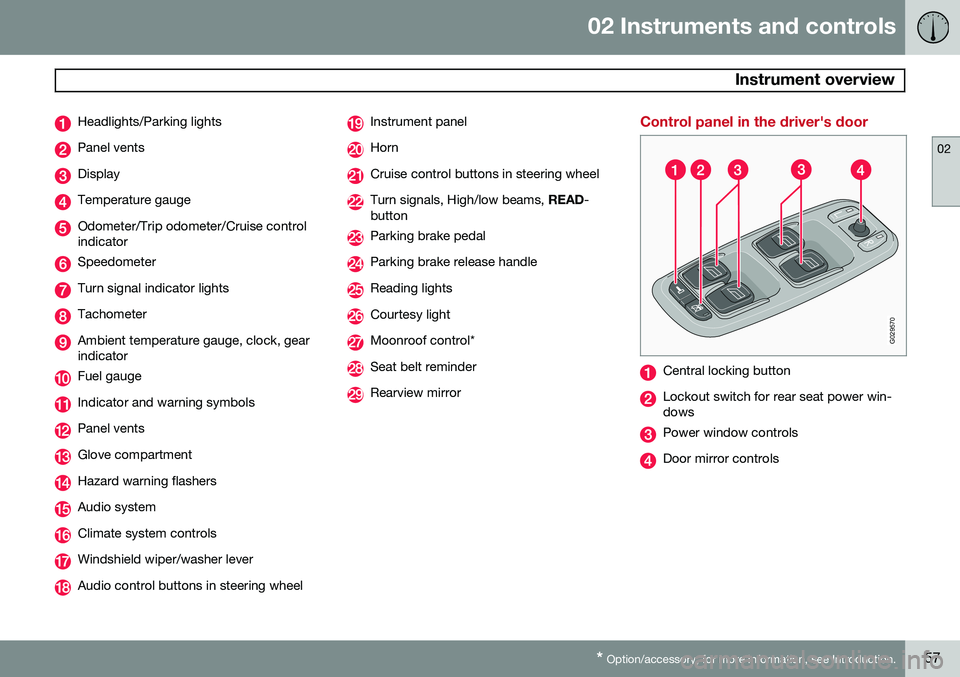
Headlights/Parking lights
Panel vents
Display
Temperature gauge
Odometer/Trip odometer/Cruise control indicator
Speedometer
Turn signal indicator lights
Tachometer
Ambient temperature gauge, clock, gear indicator
Fuel gauge
Indicator and warning symbols
Panel vents
Glove compartment
Hazard warning flashers
Audio system
Climate system controls
Windshield wiper/washer lever
Audio control buttons in steering wheel
Instrument panel
Horn
Cruise control buttons in steering wheel
Turn signals, High/low beams, READ-
button
Parking brake pedal
Parking brake release handle
Reading lights
Courtesy light
Moonroof control*
Seat belt reminder
Rearview mirror
Control panel in the driver's door
G029570
Central locking button
Lockout switch for rear seat power win- dows
Power window controls
Door mirror controls
Page 60 of 308
02 Instruments and controls
Instrument panel
02
58
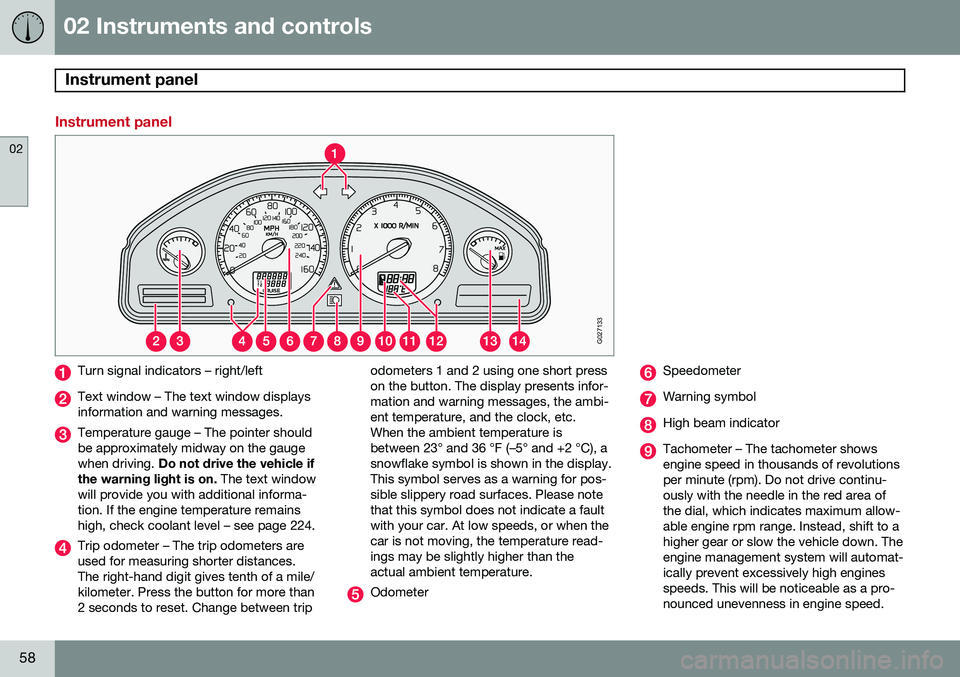
Instrument panel
G027133
Turn signal indicators – right/left
Text window – The text window displays information and warning messages.
Temperature gauge – The pointer should be approximately midway on the gaugewhen driving. Do not drive the vehicle if
the warning light is on. The text window
will provide you with additional informa-tion. If the engine temperature remainshigh, check coolant level – see page 224.
Trip odometer – The trip odometers are used for measuring shorter distances.The right-hand digit gives tenth of a mile/kilometer. Press the button for more than2 seconds to reset. Change between trip odometers 1 and 2 using one short presson the button. The display presents infor-mation and warning messages, the ambi-ent temperature, and the clock, etc.When the ambient temperature isbetween 23° and 36 °F (–5° and +2 °C), asnowflake symbol is shown in the display.This symbol serves as a warning for pos-sible slippery road surfaces. Please notethat this symbol does not indicate a faultwith your car. At low speeds, or when thecar is not moving, the temperature read-ings may be slightly higher than theactual ambient temperature.
Odometer
Speedometer
Warning symbol
High beam indicator
Tachometer – The tachometer shows engine speed in thousands of revolutionsper minute (rpm). Do not drive continu-ously with the needle in the red area ofthe dial, which indicates maximum allow-able engine rpm range. Instead, shift to ahigher gear or slow the vehicle down. Theengine management system will automat-ically prevent excessively high enginesspeeds. This will be noticeable as a pro-nounced unevenness in engine speed.
Page 61 of 308
02 Instruments and controls
Instrument panel
02
59
Gear and driving mode indicator – The currently selected driving mode is dis-played here. If you use the Geartronicfunction on the automatic transmission,the currently selected gear will be dis-played.
Ambient temperature gauge – This dis- play indicates the air temperature outsideyour vehicle. A "snowflake" symbol in thetext window is displayed when the tem-perature is in the range of 23 – 36 °F (–5 –+2 °C). Please note that this symbol doesnot indicate a fault with your vehicle. Atlow speeds or when the vehicle is notmoving, the temperature readings may beslightly higher than the actual ambienttemperature.
Clock/set button – Turn the button to set the clock.
Fuel gauge – see page 288 for fuel tank volume. When the warning light in thegauge comes on, the vehicle should berefueled as soon as possible. The tripcomputer section (see page 76) pro-vides more information on fuel level andconsumption.
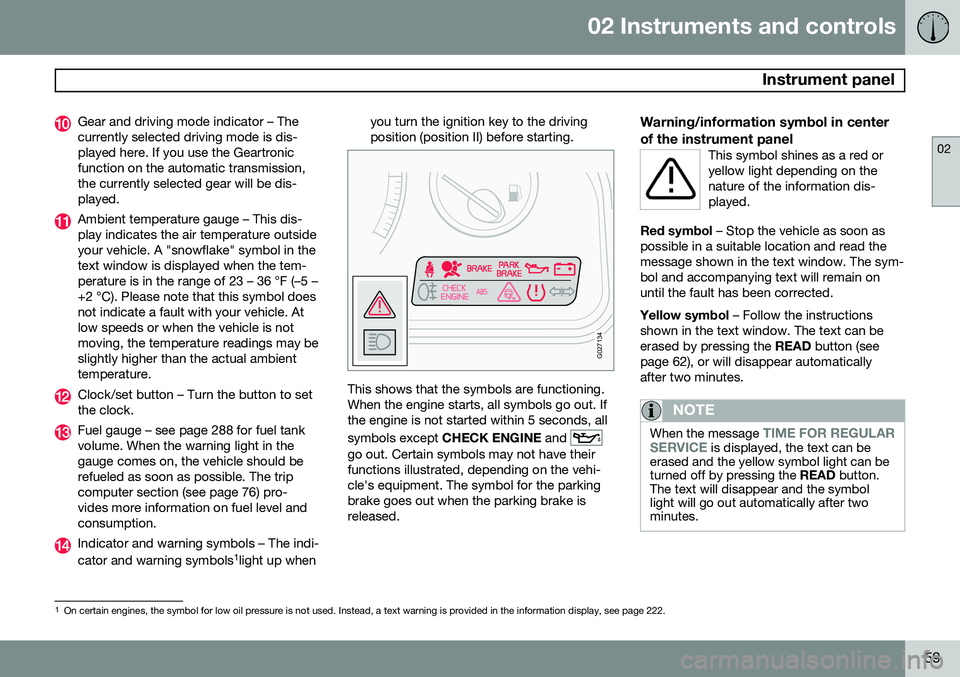
Indicator and warning symbols – The indi- cator and warning symbols1
light up when you turn the ignition key to the driving position (position II) before starting.
G027134
This shows that the symbols are functioning. When the engine starts, all symbols go out. Ifthe engine is not started within 5 seconds, all symbols except
CHECK ENGINE and
go out. Certain symbols may not have their functions illustrated, depending on the vehi-cle's equipment. The symbol for the parkingbrake goes out when the parking brake isreleased.
Warning/information symbol in center of the instrument panel
This symbol shines as a red or yellow light depending on thenature of the information dis-played.
Red symbol – Stop the vehicle as soon as
possible in a suitable location and read the message shown in the text window. The sym-bol and accompanying text will remain onuntil the fault has been corrected. Yellow symbol – Follow the instructions
shown in the text window. The text can be erased by pressing the READ button (see
page 62), or will disappear automaticallyafter two minutes.
NOTE
When the message TIME FOR REGULAR
SERVICE is displayed, the text can be
erased and the yellow symbol light can be turned off by pressing the READ button.
The text will disappear and the symbollight will go out automatically after twominutes.
1 On certain engines, the symbol for low oil pressure is not used. Instead, a text warning is provided in the information display, see page 222.
Page 62 of 308
02 Instruments and controls
Instrument panel
02
60
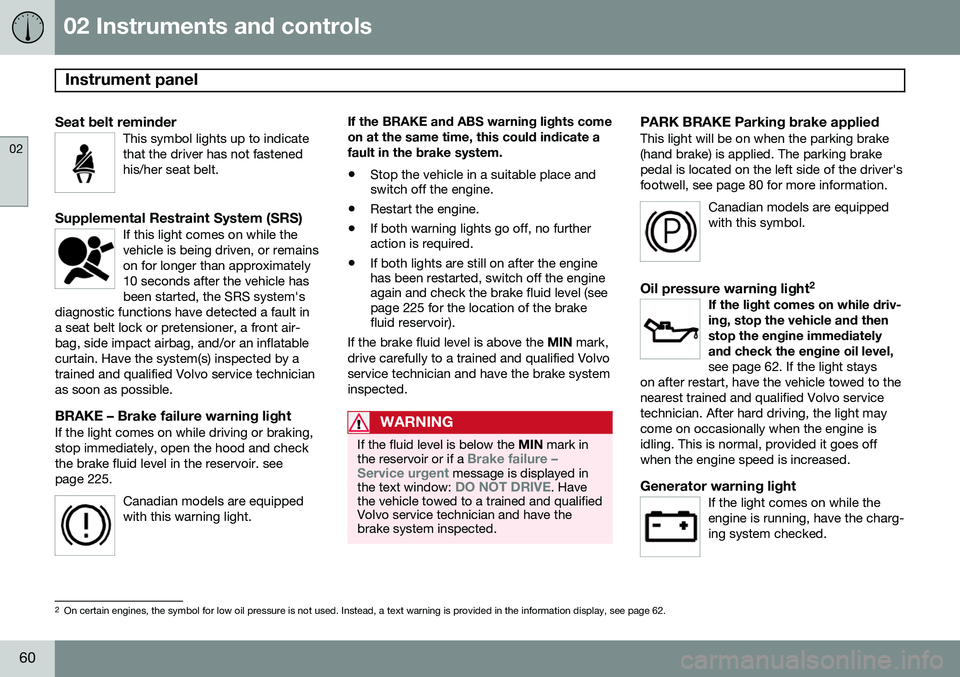
Seat belt reminderThis symbol lights up to indicate that the driver has not fastenedhis/her seat belt.
Supplemental Restraint System (SRS)If this light comes on while the vehicle is being driven, or remainson for longer than approximately10 seconds after the vehicle hasbeen started, the SRS system's
diagnostic functions have detected a fault ina seat belt lock or pretensioner, a front air-bag, side impact airbag, and/or an inflatablecurtain. Have the system(s) inspected by atrained and qualified Volvo service technicianas soon as possible.
BRAKE – Brake failure warning lightIf the light comes on while driving or braking, stop immediately, open the hood and checkthe brake fluid level in the reservoir. seepage 225.
Canadian models are equippedwith this warning light.
If the BRAKE and ABS warning lights come on at the same time, this could indicate afault in the brake system.
• Stop the vehicle in a suitable place and switch off the engine.
• Restart the engine.
• If both warning lights go off, no furtheraction is required.
• If both lights are still on after the enginehas been restarted, switch off the engineagain and check the brake fluid level (seepage 225 for the location of the brakefluid reservoir).
If the brake fluid level is above the MIN mark,
drive carefully to a trained and qualified Volvo service technician and have the brake systeminspected.
WARNING
If the fluid level is below the MIN mark in
the reservoir or if a Brake failure –
Service urgent message is displayed in
the text window: DO NOT DRIVE. Have
the vehicle towed to a trained and qualified Volvo service technician and have thebrake system inspected.
PARK BRAKE Parking brake appliedThis light will be on when the parking brake (hand brake) is applied. The parking brakepedal is located on the left side of the driver'sfootwell, see page 80 for more information.
Canadian models are equippedwith this symbol.
Oil pressure warning light 2If the light comes on while driv- ing, stop the vehicle and thenstop the engine immediatelyand check the engine oil level, see page 62. If the light stays
on after restart, have the vehicle towed to the nearest trained and qualified Volvo servicetechnician. After hard driving, the light maycome on occasionally when the engine isidling. This is normal, provided it goes offwhen the engine speed is increased.
Generator warning lightIf the light comes on while the engine is running, have the charg-ing system checked.
2 On certain engines, the symbol for low oil pressure is not used. Instead, a text warning is provided in the information display, see page 62.
Page 63 of 308
02 Instruments and controls
Instrument panel
02
61
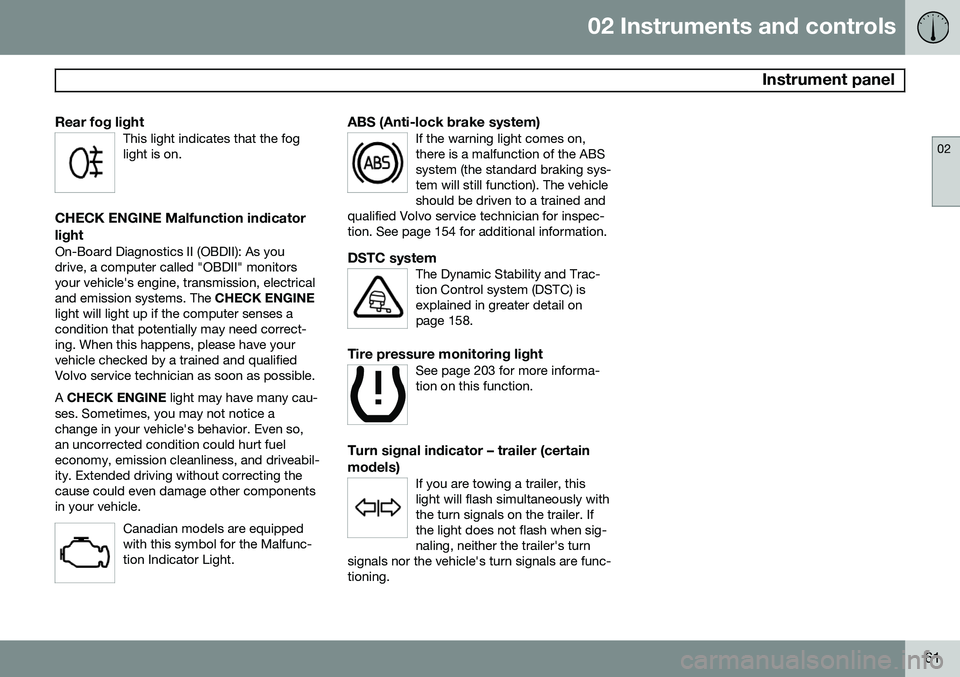
Rear fog lightThis light indicates that the fog light is on.
CHECK ENGINE Malfunction indicator light
On-Board Diagnostics II (OBDII): As you drive, a computer called "OBDII" monitorsyour vehicle's engine, transmission, electricaland emission systems. The CHECK ENGINE
light will light up if the computer senses acondition that potentially may need correct-ing. When this happens, please have yourvehicle checked by a trained and qualifiedVolvo service technician as soon as possible. A CHECK ENGINE light may have many cau-
ses. Sometimes, you may not notice a change in your vehicle's behavior. Even so,an uncorrected condition could hurt fueleconomy, emission cleanliness, and driveabil-ity. Extended driving without correcting thecause could even damage other componentsin your vehicle.
Canadian models are equippedwith this symbol for the Malfunc-tion Indicator Light.
ABS (Anti-lock brake system)If the warning light comes on, there is a malfunction of the ABSsystem (the standard braking sys-tem will still function). The vehicleshould be driven to a trained and
qualified Volvo service technician for inspec-tion. See page 154 for additional information.
DSTC systemThe Dynamic Stability and Trac- tion Control system (DSTC) isexplained in greater detail onpage 158.
Tire pressure monitoring lightSee page 203 for more informa- tion on this function.
Turn signal indicator – trailer (certain models)
If you are towing a trailer, this light will flash simultaneously withthe turn signals on the trailer. Ifthe light does not flash when sig-naling, neither the trailer's turn
signals nor the vehicle's turn signals are func-tioning.