instrument panel VOLVO XC90 2014 Owner´s Manual
[x] Cancel search | Manufacturer: VOLVO, Model Year: 2014, Model line: XC90, Model: VOLVO XC90 2014Pages: 308, PDF Size: 13.31 MB
Page 64 of 308
02 Instruments and controls
Information display
02
62
Message in the text windows
G026979
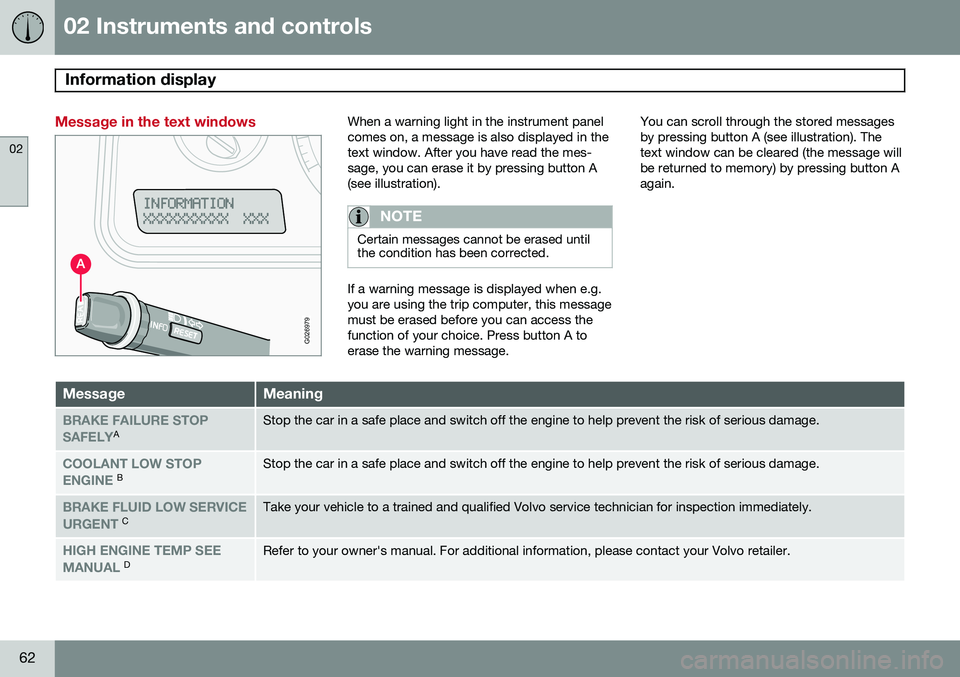
When a warning light in the instrument panel comes on, a message is also displayed in thetext window. After you have read the mes-sage, you can erase it by pressing button A(see illustration).
NOTE
Certain messages cannot be erased until the condition has been corrected.
If a warning message is displayed when e.g. you are using the trip computer, this messagemust be erased before you can access thefunction of your choice. Press button A toerase the warning message.You can scroll through the stored messagesby pressing button A (see illustration). Thetext window can be cleared (the message willbe returned to memory) by pressing button Aagain.
MessageMeaning
BRAKE FAILURE STOP SAFELYAStop the car in a safe place and switch off the engine to help prevent the risk of serious damage.
COOLANT LOW STOP ENGINE BStop the car in a safe place and switch off the engine to help prevent the risk of serious damage.
BRAKE FLUID LOW SERVICE URGENT CTake your vehicle to a trained and qualified Volvo service technician for inspection immediately.
HIGH ENGINE TEMP SEE MANUAL DRefer to your owner's manual. For additional information, please contact your Volvo retailer.
Page 69 of 308
02 Instruments and controls
Lighting panel
02
}}
* Option/accessory, for more information, see Introduction.67
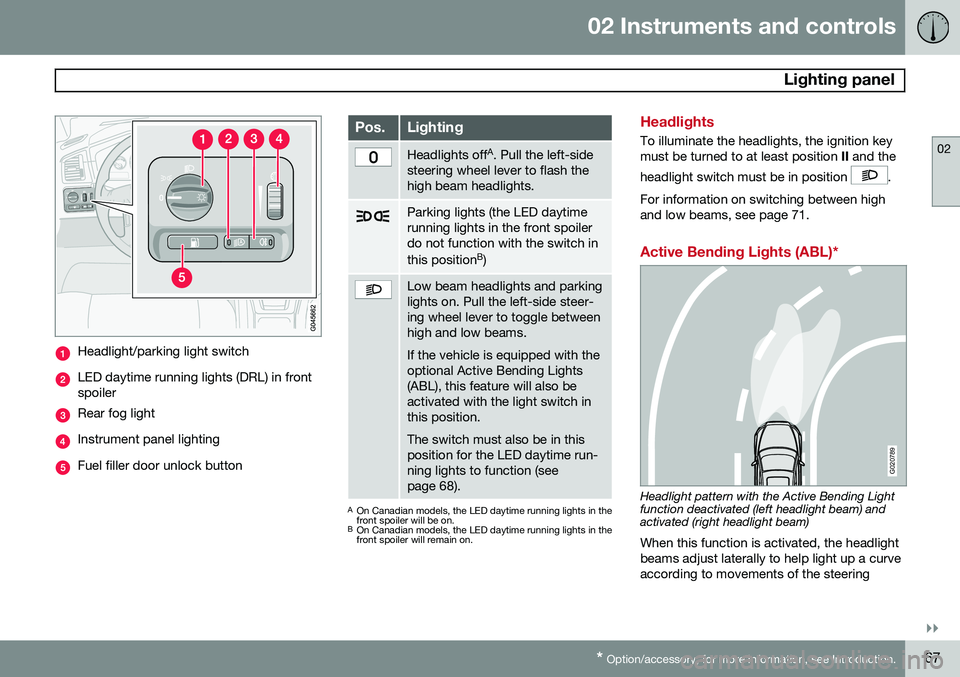
Headlight/parking light switch
LED daytime running lights (DRL) in front spoiler
Rear fog light
Instrument panel lighting
Fuel filler door unlock button
Pos.Lighting
Headlights off A
. Pull the left-side
steering wheel lever to flash the high beam headlights.
Parking lights (the LED daytime running lights in the front spoilerdo not function with the switch in this position B
)
Low beam headlights and parking lights on. Pull the left-side steer-ing wheel lever to toggle betweenhigh and low beams. If the vehicle is equipped with the optional Active Bending Lights(ABL), this feature will also beactivated with the light switch inthis position. The switch must also be in this position for the LED daytime run-ning lights to function (seepage 68).
A On Canadian models, the LED daytime running lights in the front spoiler will be on.
B On Canadian models, the LED daytime running lights in thefront spoiler will remain on.
Headlights
To illuminate the headlights, the ignition key must be turned to at least position II and the
headlight switch must be in position
.
For information on switching between high and low beams, see page 71.
Active Bending Lights (ABL)*
G020789
Headlight pattern with the Active Bending Light function deactivated (left headlight beam) andactivated (right headlight beam) When this function is activated, the headlight beams adjust laterally to help light up a curveaccording to movements of the steering
Page 70 of 308
02 Instruments and controls
Lighting panel
02
68
wheel (see the right-pointing beam in the illustration).
NOTE
When driving in daylight conditions, the headlights will switch off and the daytimerunning lights will come on. In darkness,the daytime running lights will switch offand the Active Bending Lights will switchon.
The ABL function is activated automatically when the engine is started and the headlight switch is in the
position and can be
deactivated/reactivated by pressing the but- ton in the center console (see page 64.
LED Daytime Running Lights (DRL)
To help conserve fuel by reducing the use of electrical current in the vehicle, DRL can beused in daylight conditions instead of the lowbeam headlights, which consume more elec-trical current. The daytime running lights aremounted in the front spoiler and use bright,electricity-saving LEDs (light emitting diodes).
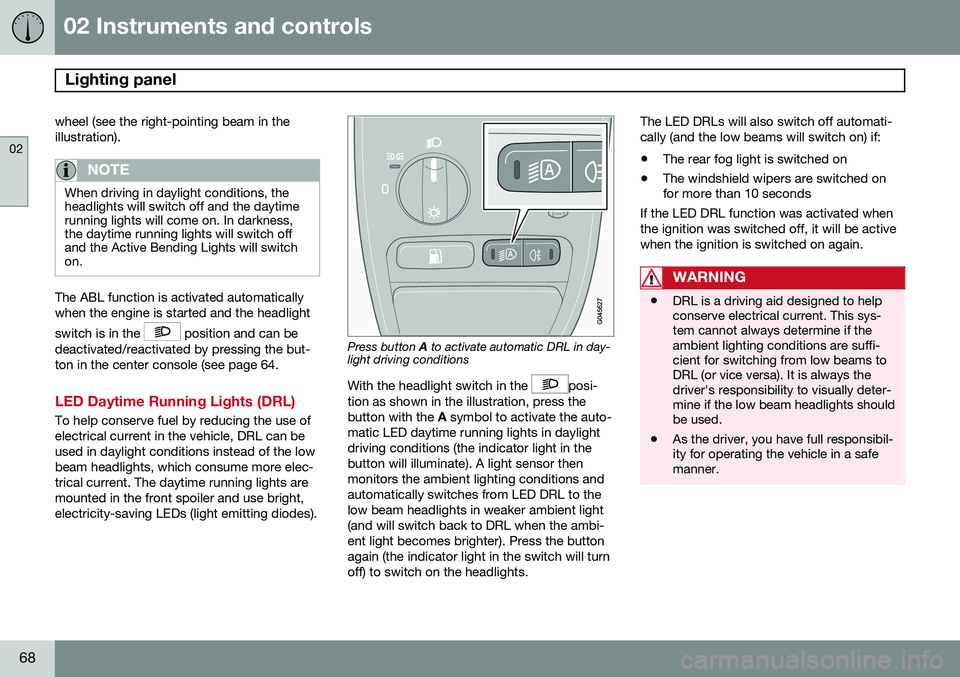
Press button A to activate automatic DRL in day-
light driving conditions
With the headlight switch in the
posi-
tion as shown in the illustration, press the button with the A symbol to activate the auto-
matic LED daytime running lights in daylightdriving conditions (the indicator light in thebutton will illuminate). A light sensor thenmonitors the ambient lighting conditions andautomatically switches from LED DRL to thelow beam headlights in weaker ambient light(and will switch back to DRL when the ambi-ent light becomes brighter). Press the buttonagain (the indicator light in the switch will turnoff) to switch on the headlights. The LED DRLs will also switch off automati-cally (and the low beams will switch on) if:
• The rear fog light is switched on
• The windshield wipers are switched on for more than 10 seconds
If the LED DRL function was activated when the ignition was switched off, it will be activewhen the ignition is switched on again.
WARNING
• DRL is a driving aid designed to help conserve electrical current. This sys-tem cannot always determine if theambient lighting conditions are suffi-cient for switching from low beams toDRL (or vice versa). It is always thedriver's responsibility to visually deter-mine if the low beam headlights shouldbe used.
• As the driver, you have full responsibil-ity for operating the vehicle in a safemanner.
Page 71 of 308
02 Instruments and controls
Lighting panel
02
69
Parking lights
The front and rear parking lights can be turned on even when the ignition is switchedoff.
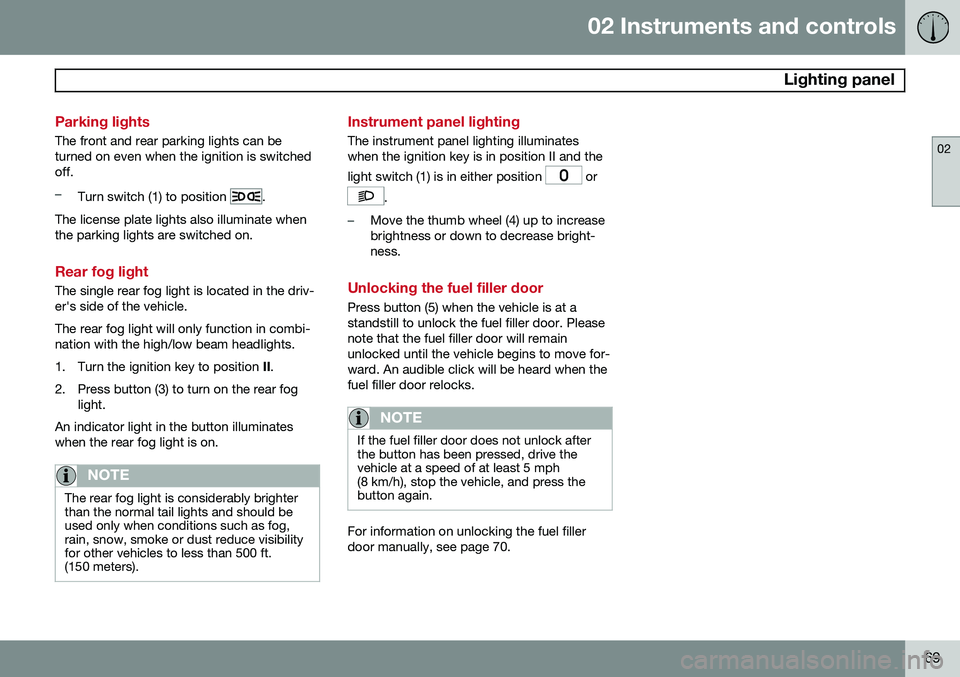
–Turn switch (1) to position .
The license plate lights also illuminate when the parking lights are switched on.
Rear fog light
The single rear fog light is located in the driv- er's side of the vehicle. The rear fog light will only function in combi- nation with the high/low beam headlights.
1. Turn the ignition key to position II.
2. Press button (3) to turn on the rear fog light.
An indicator light in the button illuminates when the rear fog light is on.
NOTE
The rear fog light is considerably brighter than the normal tail lights and should beused only when conditions such as fog,rain, snow, smoke or dust reduce visibilityfor other vehicles to less than 500 ft.(150 meters).
Instrument panel lighting
The instrument panel lighting illuminates when the ignition key is in position II and the light switch (1) is in either position
or
.
–Move the thumb wheel (4) up to increase brightness or down to decrease bright-ness.
Unlocking the fuel filler door
Press button (5) when the vehicle is at a standstill to unlock the fuel filler door. Pleasenote that the fuel filler door will remainunlocked until the vehicle begins to move for-ward. An audible click will be heard when thefuel filler door relocks.
NOTE
If the fuel filler door does not unlock after the button has been pressed, drive thevehicle at a speed of at least 5 mph(8 km/h), stop the vehicle, and press thebutton again.
For information on unlocking the fuel filler door manually, see page 70.
Page 72 of 308
02 Instruments and controls
Manually unlocking the fuel filler door
02
70
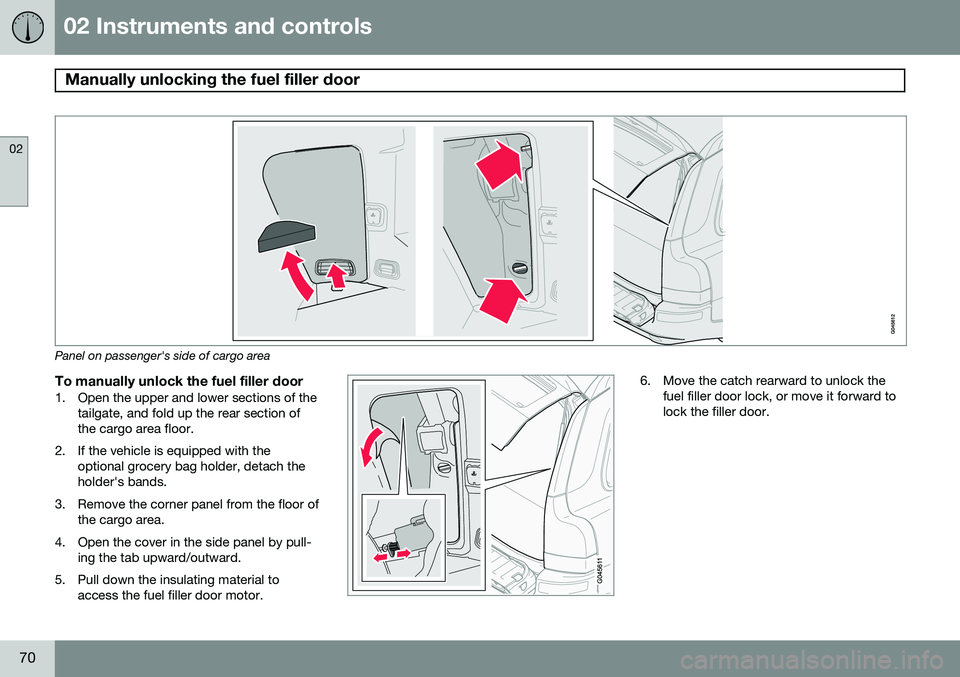
Panel on passenger's side of cargo area
To manually unlock the fuel filler door1. Open the upper and lower sections of thetailgate, and fold up the rear section of the cargo area floor.
2. If the vehicle is equipped with the optional grocery bag holder, detach theholder's bands.
3. Remove the corner panel from the floor of the cargo area.
4. Open the cover in the side panel by pull- ing the tab upward/outward.
5. Pull down the insulating material to access the fuel filler door motor.
6. Move the catch rearward to unlock thefuel filler door lock, or move it forward to lock the filler door.
Page 80 of 308
02 Instruments and controls
Cruise control
02
78
Engaging the cruise control function
G027098
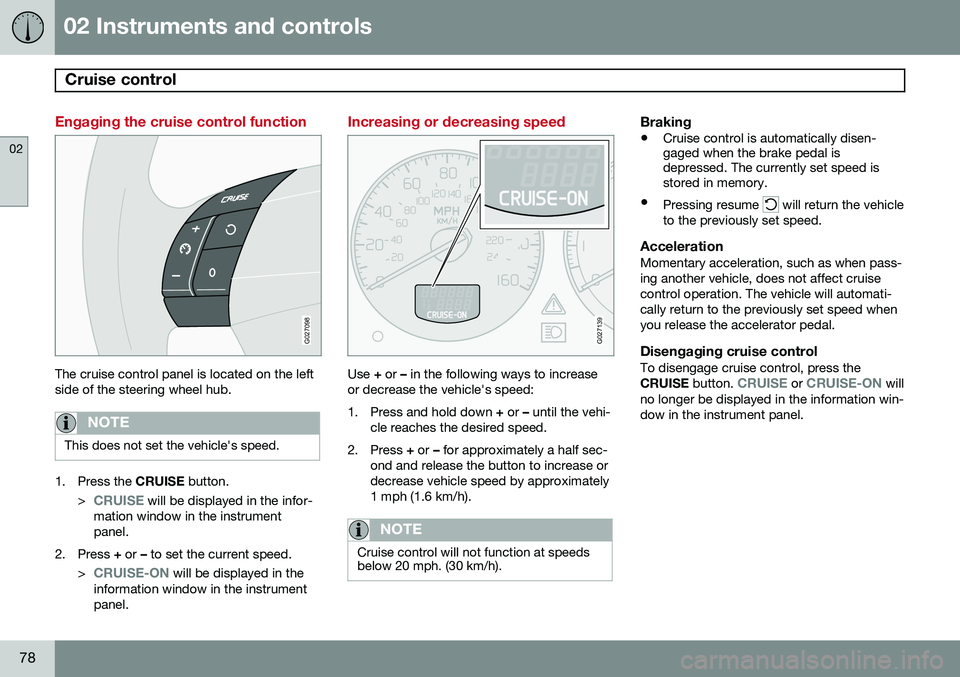
The cruise control panel is located on the left side of the steering wheel hub.
NOTE
This does not set the vehicle's speed.
1. Press the CRUISE button.
>
CRUISE will be displayed in the infor-
mation window in the instrument panel.
2. Press + or – to set the current speed.
>
CRUISE-ON will be displayed in the
information window in the instrument panel.
Increasing or decreasing speed
G027139
Use + or – in the following ways to increase
or decrease the vehicle's speed:
1. Press and hold down + or – until the vehi-
cle reaches the desired speed.
2. Press + or – for approximately a half sec-
ond and release the button to increase or decrease vehicle speed by approximately1 mph (1.6 km/h).
NOTE
Cruise control will not function at speeds below 20 mph. (30 km/h).
Braking
• Cruise control is automatically disen- gaged when the brake pedal isdepressed. The currently set speed isstored in memory.
• Pressing resume
will return the vehicle
to the previously set speed.
AccelerationMomentary acceleration, such as when pass- ing another vehicle, does not affect cruisecontrol operation. The vehicle will automati-cally return to the previously set speed whenyou release the accelerator pedal.
Disengaging cruise controlTo disengage cruise control, press the CRUISE button. CRUISE or CRUISE-ON will
no longer be displayed in the information win- dow in the instrument panel.
Page 81 of 308
02 Instruments and controls
Cruise control
02
79
NOTE
Cruise control is automatically disengaged if:
• When the brake pedal is depressed.
• the engine is switched off
• the gear selector is placed in (
N) Neu-
tral
• the wheels start to spin or lock
• if an increase in speed is maintained for more than one minute
• if the vehicle's speed falls belowapproximately 20 mph (30 km/h).
Temporarily disengaging the cruise control
1. Press
0 to temporarily disengage cruise
control. >
CRUISE will be displayed in the infor-
mation window in the instrument panel.
2. Depress the brake pedal. Pressing "resume"
causes the vehicle to
return to the previously set speed.
WARNING
Cruise control should not be used in heavy traffic or when driving on wet or slipperyroads, or when driving on unpaved oruneven road surfaces. Cruise control maynot maintain set speed on steep down-grades.
Page 85 of 308
02 Instruments and controls
Power windows
02
83
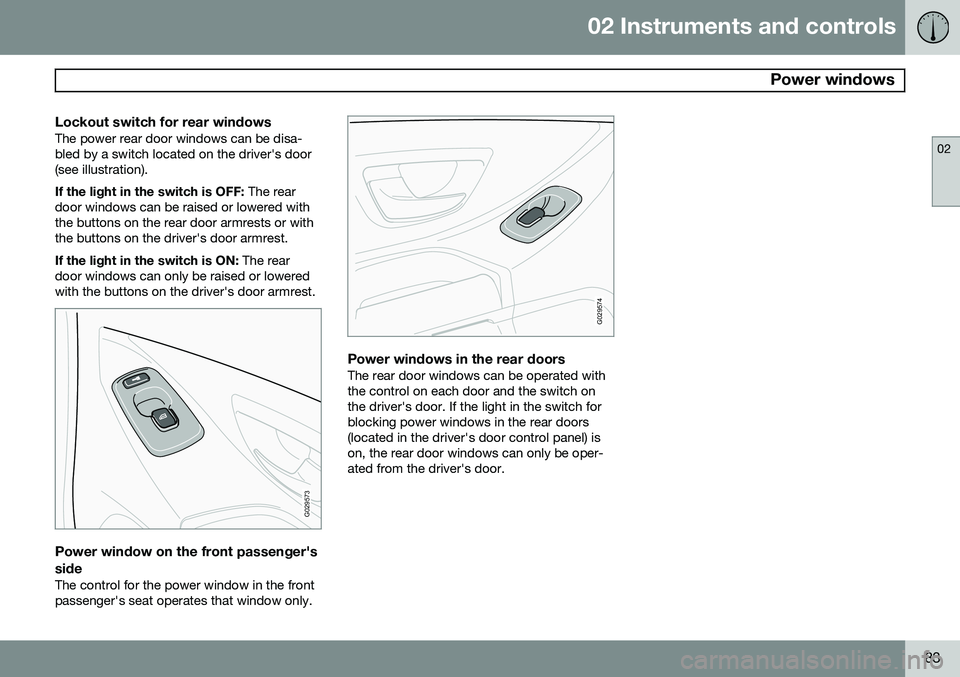
Lockout switch for rear windowsThe power rear door windows can be disa- bled by a switch located on the driver's door(see illustration). If the light in the switch is OFF: The rear
door windows can be raised or lowered with the buttons on the rear door armrests or withthe buttons on the driver's door armrest. If the light in the switch is ON: The rear
door windows can only be raised or lowered with the buttons on the driver's door armrest.
G029573
Power window on the front passenger's side
The control for the power window in the front passenger's seat operates that window only.
G029574
Power windows in the rear doorsThe rear door windows can be operated with the control on each door and the switch onthe driver's door. If the light in the switch forblocking power windows in the rear doors(located in the driver's door control panel) ison, the rear door windows can only be oper-ated from the driver's door.
Page 97 of 308
03 Climate
Climate control system – general information
03
95
Climate system blower
The climate system blower will be automati- cally switched off when the engine is not run-ning (even if the ignition key is in position I or
II ) to avoid unnecessary battery drain. To
activate the blower, turn the control to thedesired setting. The climate system blower may start auto- matically during a period of up to approxi-mately 50 minutes after the ignition has beenturned off to remove condensation in the A/Cevaporator. It will run for 15 minutes andswitch off automatically.
Passenger compartment blower
Approximately 50 minutes after the ignition is turned off, the blower may come on automati-cally, and run for seven minutes, to removecondensation in the A/C evaporator.
Blower function to reduce battery drain
The climate system's blower functions nor- mally while the engine is running. However, when the engine is switched off (even if the ignition is switched to positions I
or II), the blower control will be automatically
switched off to avoid unnecessary batterydrain. The following points pertain if the ignition ison but the engine in not running:
• To restart the blower, turn the control knob to the setting of your choice.
• After approximately 2 minutes, the blowerspeed will be reduced to avoid batterydrain.
You can reset the blower speed at any time. Please be aware that the system has beendesigned to reduce the blower's speed againafter 2 minutes, until the engine is started. If the battery becomes drained: • LOW BATTERY, FAN IS REDUCED
will
be displayed in the text window in the instrument panel.
• The yellow warning light in the instrumentpanel (see page 58) will also light up.
Page 134 of 308
05 Locks and alarm
Child safety locks
05
132* Option/accessory, for more information, see Introduction.
G021513
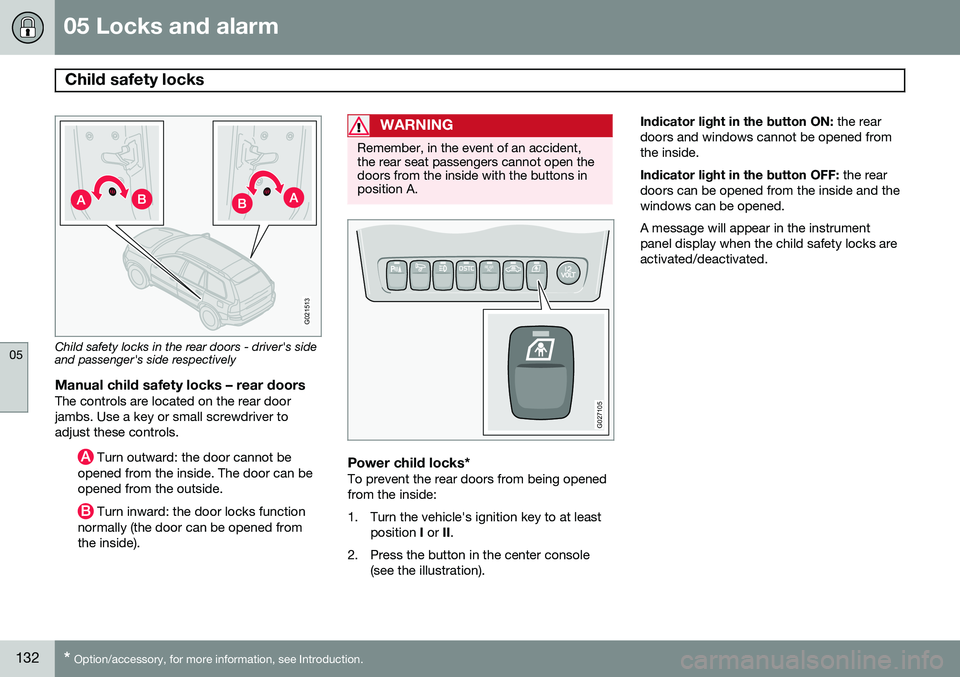
Child safety locks in the rear doors - driver's side and passenger's side respectively
Manual child safety locks – rear doorsThe controls are located on the rear door jambs. Use a key or small screwdriver toadjust these controls.
Turn outward: the door cannot be
opened from the inside. The door can be opened from the outside.
Turn inward: the door locks function
normally (the door can be opened from the inside).
WARNING
Remember, in the event of an accident, the rear seat passengers cannot open thedoors from the inside with the buttons inposition A.
REAR AC
G027105
Power child locks*To prevent the rear doors from being opened from the inside:
1. Turn the vehicle's ignition key to at least
position I or II.
2. Press the button in the center console (see the illustration). Indicator light in the button ON:
the rear
doors and windows cannot be opened from the inside. Indicator light in the button OFF: the rear
doors can be opened from the inside and the windows can be opened. A message will appear in the instrument panel display when the child safety locks areactivated/deactivated.