turn signal VOLVO XC90 2014 Owner´s Manual
[x] Cancel search | Manufacturer: VOLVO, Model Year: 2014, Model line: XC90, Model: VOLVO XC90 2014Pages: 308, PDF Size: 13.31 MB
Page 238 of 308
09 Maintenance and servicing
Replacing bulbs 09
236
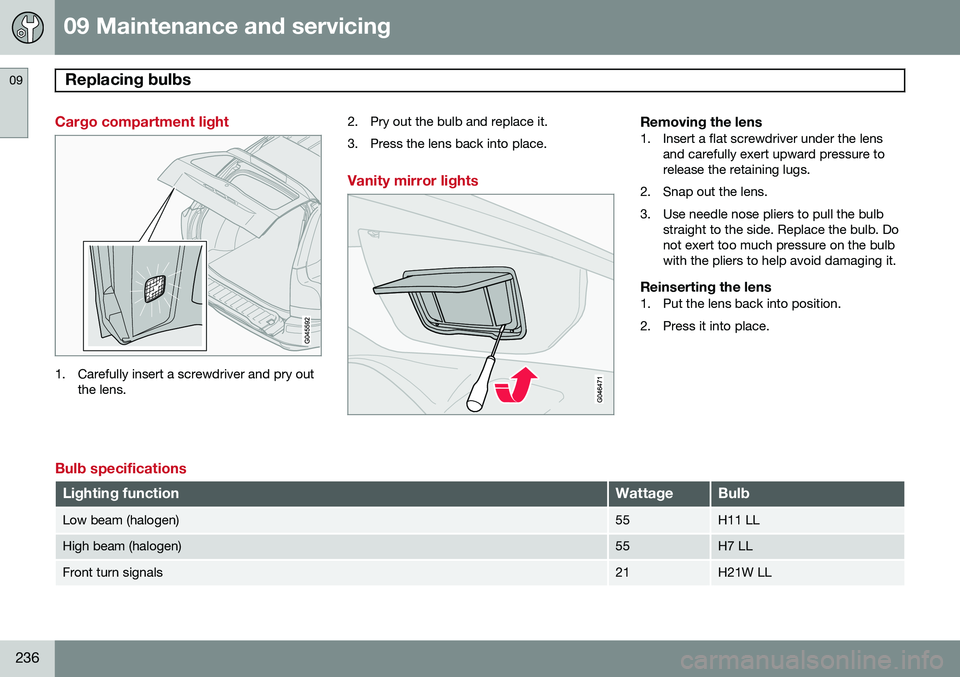
Cargo compartment light
1. Carefully insert a screwdriver and pry outthe lens. 2. Pry out the bulb and replace it.
3. Press the lens back into place.
Vanity mirror lights
Removing the lens1. Insert a flat screwdriver under the lens
and carefully exert upward pressure to release the retaining lugs.
2. Snap out the lens.
3. Use needle nose pliers to pull the bulb straight to the side. Replace the bulb. Do not exert too much pressure on the bulbwith the pliers to help avoid damaging it.
Reinserting the lens1. Put the lens back into position.
2. Press it into place.
Bulb specifications
Lighting functionWattageBulb
Low beam (halogen)55H11 LL
High beam (halogen)55H7 LL
Front turn signals21H21W LL
Page 239 of 308
09 Maintenance and servicing
Replacing bulbs09
237
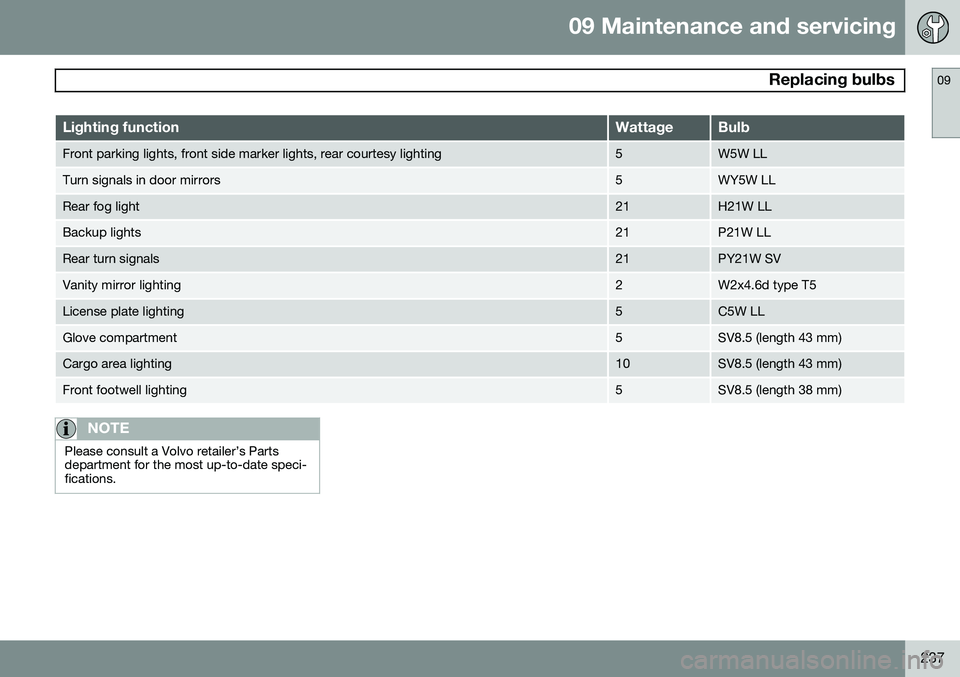
Lighting functionWattageBulb
Front parking lights, front side marker lights, rear courtesy lighting5W5W LL
Turn signals in door mirrors5WY5W LL
Rear fog light21H21W LL
Backup lights21P21W LL
Rear turn signals21PY21W SV
Vanity mirror lighting2W2x4.6d type T5
License plate lighting5C5W LL
Glove compartment5SV8.5 (length 43 mm)
Cargo area lighting10SV8.5 (length 43 mm)
Front footwell lighting5SV8.5 (length 38 mm)
NOTE
Please consult a Volvo retailer’s Parts department for the most up-to-date speci-fications.
Page 249 of 308
09 Maintenance and servicing
Fuses09
}}
* Option/accessory, for more information, see Introduction.247
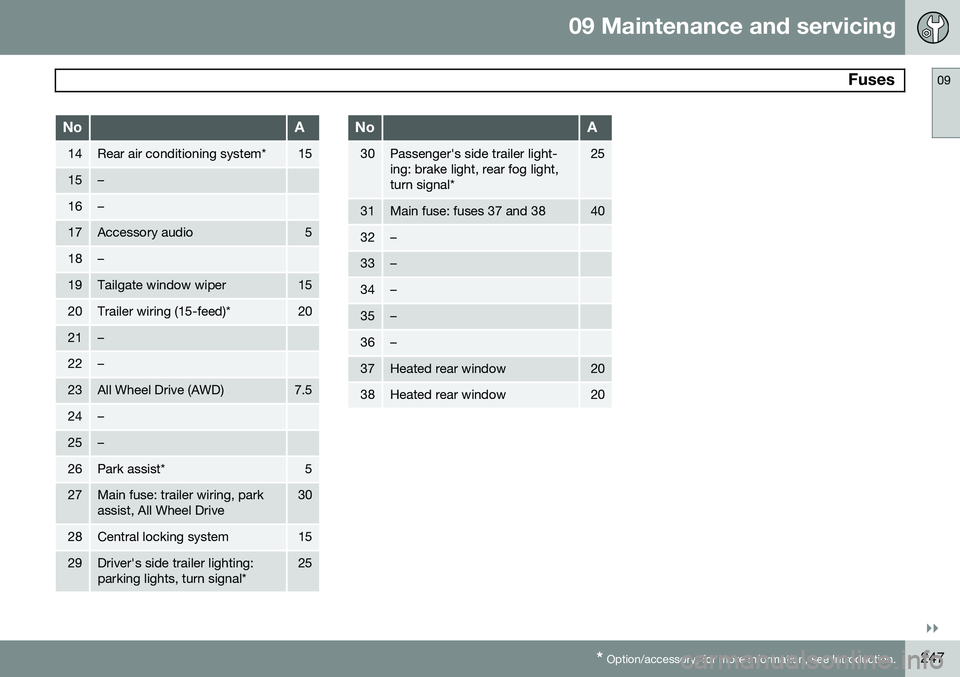
NoA
14Rear air conditioning system*15
15–
16–
17Accessory audio5
18–
19Tailgate window wiper15
20Trailer wiring (15-feed)*20
21–
22–
23All Wheel Drive (AWD)7.5
24–
25–
26Park assist*5
27Main fuse: trailer wiring, park assist, All Wheel Drive30
28Central locking system15
29Driver's side trailer lighting: parking lights, turn signal*25
NoA
30Passenger's side trailer light- ing: brake light, rear fog light,turn signal*25
31Main fuse: fuses 37 and 3840
32–
33–
34–
35–
36–
37Heated rear window20
38Heated rear window20
Page 263 of 308
10 Audio
Radio functions
10
261
channels will be displayed as 93.9 – 2 WNYC, 93.9 - 3 WNYC, etc.
• Reception coverage area
: Due to cur-
rent IBOC transmitter power limitations,the reception coverage area in digitalmode is somewhat more limited than thestation's analogue coverage area. Pleasebe aware that as with any radio broadcasttechnology, terrain, time of day, foliagelevel and building location can have posi-tive or negative effects on radio recep-tion.
• Analogue to digital/digital to analogue blending
: Analogue to digital blending
will occur as the signal strength reaches a preset threshold in the receiver. This willbe noticeable in fringe areas (areas withweak reception) and is normal.
NOTE
There may be a noticeable difference in sound quality when a change from ana-logue to digital or digital to analogueoccurs, such as:
• Volume increase or decrease
• Equalizer settings, i.e., Bass/ Mid- range/Treble cut or boost
• Time alignment (Digital program mate-rial in extreme cases can be as muchas 8 seconds behind the analogue).This will noticeable as a "stuttering"effect.
The above items are dependant on the broadcaster's equipment settings and do not indicate a fault in the vehicle's radio receiver or antenna systems .
Switching HD on or offThe factory setting for HD radio is on. How-
ever, when driving through areas with weak HD signals (fringe areas), you may experiencethat the radio repeatedly switches betweenanalogue/digital and digital/analogue recep-tion. If this happens, it may be desirable toswitch HD off. To do so:
1. Be sure the audio system is switched on and in AM or FM mode.
2. Press MENU in the center console con-
trol panel. 3. Press
ENTER to turn HD off (the X will
disappear from the box on the display screen).
This will disable the radio's capability to receive digital broadcasts but it will continueto function as a conventional (analogue)AM/FM receiver. Please note that when HD isswitched off, it will not be possible to tune tosub-channels (see the following section for amore detailed explanation of sub-channels). Repeat steps 2 and 3 above to reactivate HD (an X will appear in the box on the displayscreen).
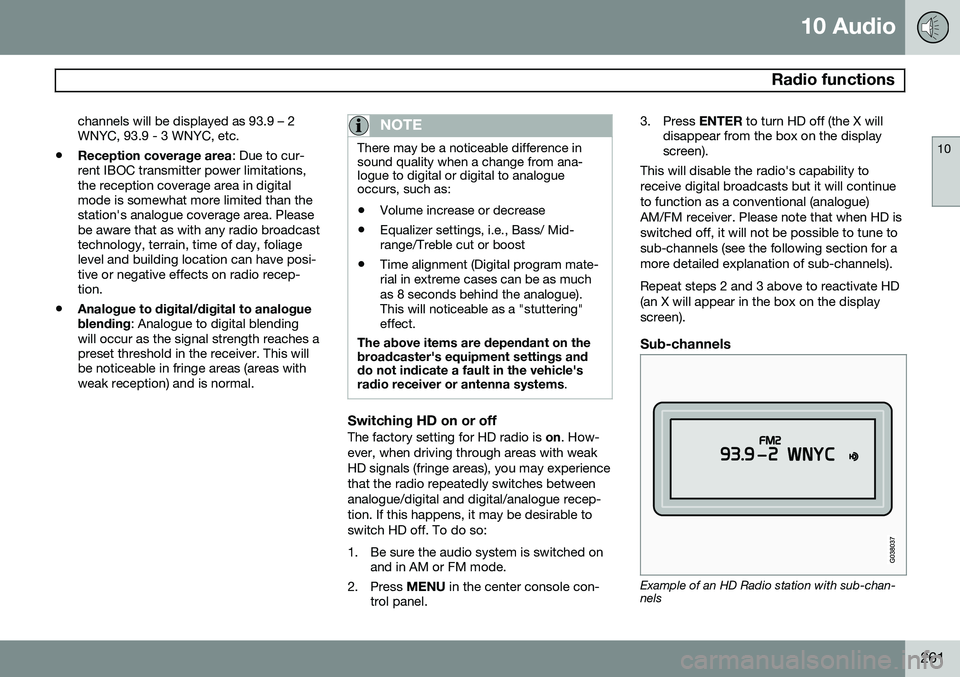
Sub-channels
Example of an HD Radio station with sub-chan- nels
Page 265 of 308
10 Audio
SiriusXM™ satellite radio
10
263
Listening to satellite radio
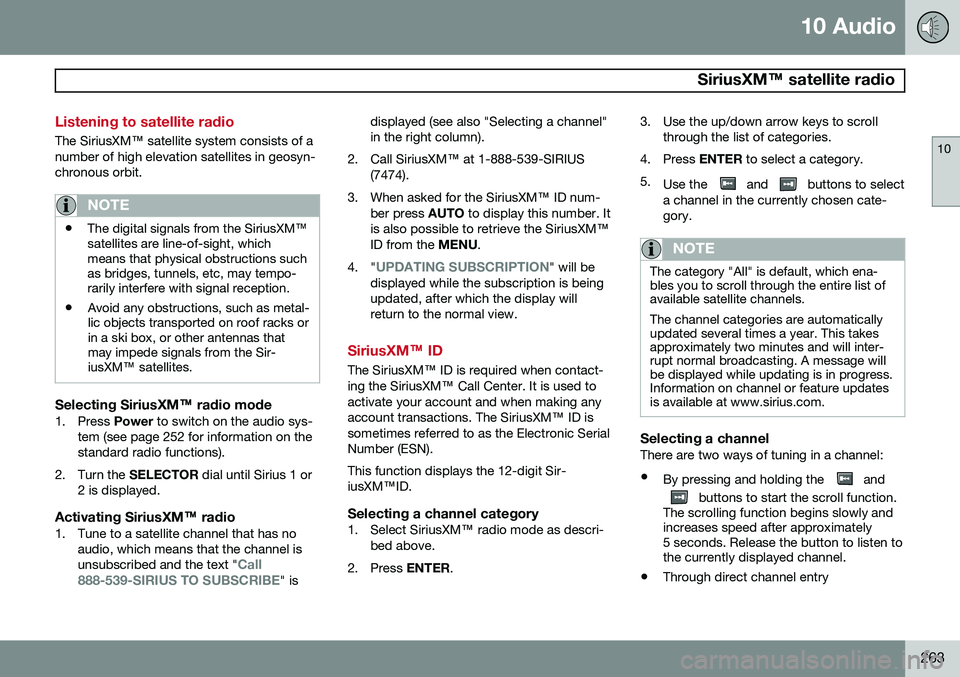
The SiriusXM ™ satellite system consists of a
number of high elevation satellites in geosyn- chronous orbit.
NOTE
• The digital signals from the SiriusXM
™
satellites are line-of-sight, which means that physical obstructions suchas bridges, tunnels, etc, may tempo-rarily interfere with signal reception.
• Avoid any obstructions, such as metal-lic objects transported on roof racks orin a ski box, or other antennas thatmay impede signals from the Sir-iusXM
™ satellites.
Selecting SiriusXM™ radio mode
1. Press Power to switch on the audio sys-
tem (see page 252 for information on the standard radio functions).
2. Turn the SELECTOR dial until Sirius 1 or
2 is displayed.
Activating SiriusXM ™ radio
1. Tune to a satellite channel that has no
audio, which means that the channel is unsubscribed and the text "
Call
888-539-SIRIUS TO SUBSCRIBE" is displayed (see also "Selecting a channel" in the right column).
2. Call SiriusXM ™ at 1-888-539-SIRIUS
(7474).
3. When asked for the SiriusXM ™ ID num-
ber press AUTO to display this number. It
is also possible to retrieve the SiriusXM ™
ID from the MENU.
4. "
UPDATING SUBSCRIPTION" will be
displayed while the subscription is being updated, after which the display willreturn to the normal view.
SiriusXM™ ID
The SiriusXM ™ ID is required when contact-
ing the SiriusXM ™ Call Center. It is used to
activate your account and when making any account transactions. The SiriusXM ™ ID is
sometimes referred to as the Electronic SerialNumber (ESN). This function displays the 12-digit Sir- iusXM ™ID.
Selecting a channel category1. Select SiriusXM ™ radio mode as descri-
bed above.
2. Press ENTER. 3. Use the up/down arrow keys to scroll
through the list of categories.
4. Press ENTER to select a category.
5. Use the
and buttons to select
a channel in the currently chosen cate- gory.
NOTE
The category "All" is default, which ena- bles you to scroll through the entire list ofavailable satellite channels. The channel categories are automatically updated several times a year. This takesapproximately two minutes and will inter-rupt normal broadcasting. A message willbe displayed while updating is in progress.Information on channel or feature updatesis available at www.sirius.com.
Selecting a channelThere are two ways of tuning in a channel:
• By pressing and holding the
and
buttons to start the scroll function.
The scrolling function begins slowly and increases speed after approximately5 seconds. Release the button to listen tothe currently displayed channel.
• Through direct channel entry
Page 296 of 308
11 Specifications
Overview of information and warning symbols
11
294
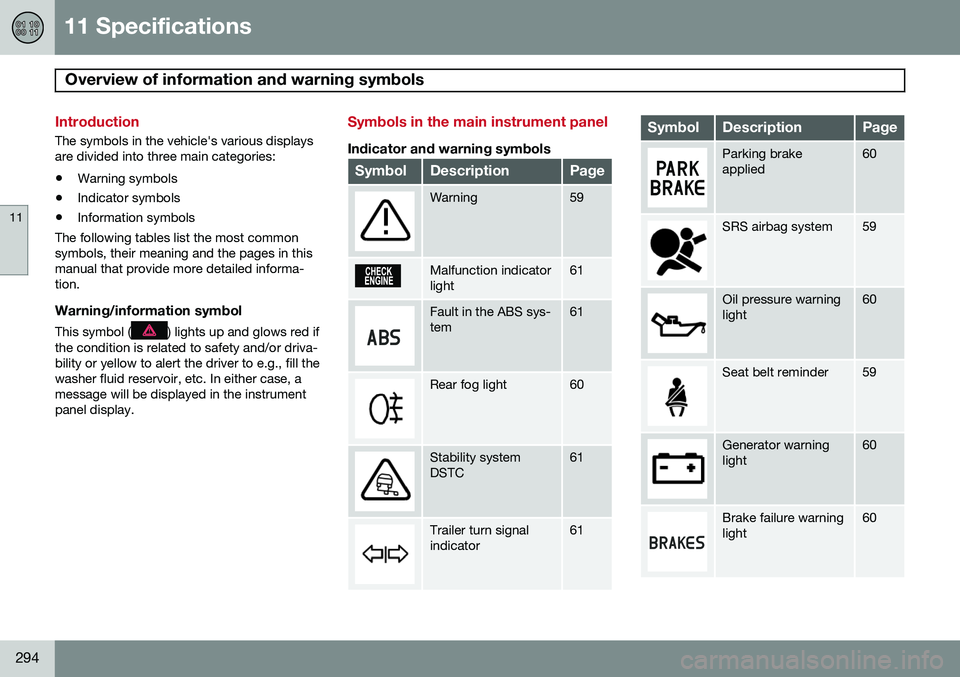
Introduction
The symbols in the vehicle's various displays are divided into three main categories:• Warning symbols
• Indicator symbols
• Information symbols
The following tables list the most commonsymbols, their meaning and the pages in thismanual that provide more detailed informa-tion.
Warning/information symbol
This symbol () lights up and glows red if
the condition is related to safety and/or driva- bility or yellow to alert the driver to e.g., fill thewasher fluid reservoir, etc. In either case, amessage will be displayed in the instrumentpanel display.
Symbols in the main instrument panel
Indicator and warning symbols
SymbolDescriptionPage
Warning59
Malfunction indicator light61
Fault in the ABS sys- tem61
Rear fog light60
Stability system DSTC61
Trailer turn signal indicator61
SymbolDescriptionPage
Parking brake applied60
SRS airbag system59
Oil pressure warning light60
Seat belt reminder59
Generator warning light60
Brake failure warning light60
Page 297 of 308
11 Specifications
Overview of information and warning symbols
11
295
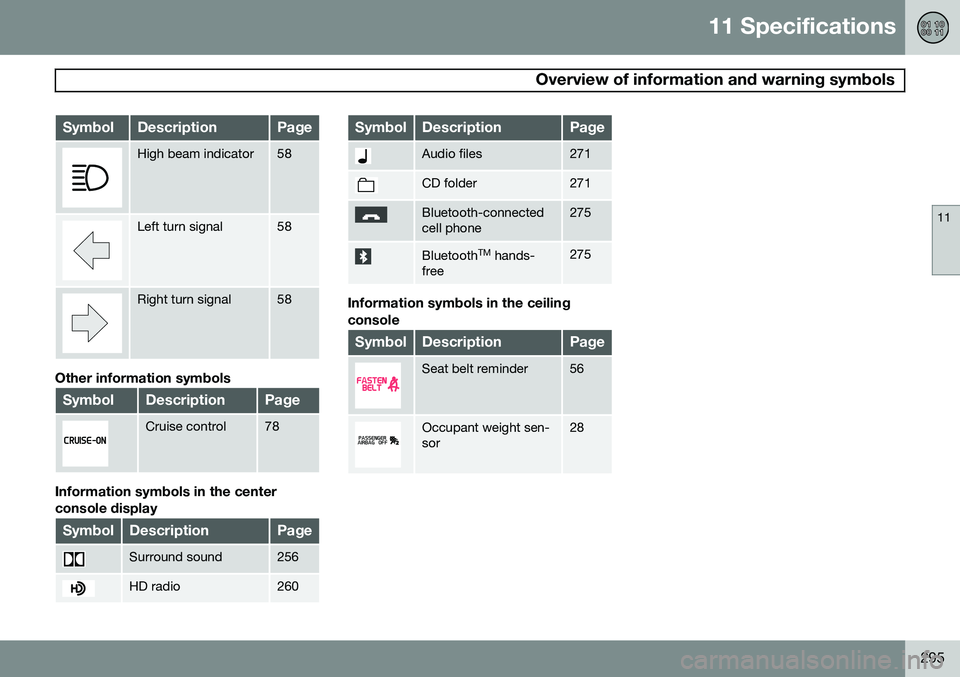
SymbolDescriptionPage
High beam indicator58
Left turn signal58
Right turn signal58
Other information symbols
SymbolDescriptionPage
Cruise control78
Information symbols in the center console display
SymbolDescriptionPage
Surround sound256
HD radio260
SymbolDescriptionPage
Audio files271
CD folder271
Bluetooth-connected cell phone275
BluetoothTM
hands-
free275
Information symbols in the ceiling console
SymbolDescriptionPage
Seat belt reminder56
Occupant weight sen- sor28
Page 305 of 308
12 Index
12
303
rotation............................................... 178
Self-supporting run flat tires (SST)..... 205
spare................................................... 191
speed ratings...................................... 182
storing................................................. 180
tire sealing system.............................. 192
tread wear indicator............................ 179
Tire sealing system.................................. 192
Towing a trailer........................................ 164
Towing - cars with All Wheel Drive.......... 163
Towing the vehicle................................... 162
Trailer hitch - detachable......................... 167
Trailer towing........................................... 164Transmission shiftlock override.................................. 23
Transmission, automatic.......................... 149
Tread wear indicator................................ 179
Treble....................................................... 255
Trip computer............................................ 76
Trip odometer............................................ 58
Turn signals............................................... 71
U
Uniform Tire Quality Grading................... 189
Unlocking fuel filler door............................ 69
Unlocking the car..................................... 130 Unpaved roads, driving on...................... 147
V
Vanity mirror............................................ 112
Vehicle dimensions.................................. 284
Vehicle Identification Number (VIN)......... 283
Vehicle loading........................................ 187
Vehicle maintenance................................ 216
Vehicle weights........................................ 286
Ventilated seats......................................... 97
Volvo and the environment........................ 13
Volvo maintenance.................................. 216
Volvo On Call Roadside Assistance........ 296
W
Warning symbol......................................... 58
Warning symbol in center of dashboard.... 58
Warranties................................................ 216
Washer fluid reservoir...................... 221, 224
Washing the vehicle................................. 208
Water, driving through............................. 147
Waxing..................................................... 209
Weights.................................................... 286
Wheels..................................................... 178 storing................................................. 180
Windshield IR coating............................................. 74
Windshield washer fluid reservoir............ 224
Windshield wipers.................................... 226
Winter/Wet driving mode......................... 169
Wipers...................................................... 226
W – Winter............................................... 150