ECU VOLVO XC90 2014 Owner´s Manual
[x] Cancel search | Manufacturer: VOLVO, Model Year: 2014, Model line: XC90, Model: VOLVO XC90 2014Pages: 308, PDF Size: 13.31 MB
Page 106 of 308
04 Interior
Front seats
04
104* Option/accessory, for more information, see Introduction.
Manually adjusted front seats
G027214
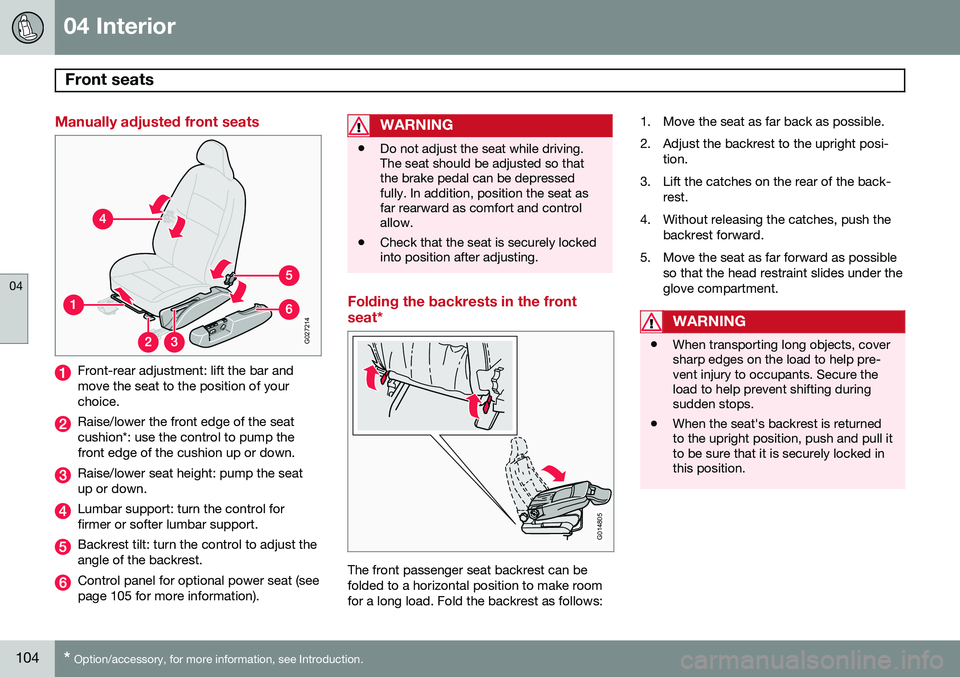
Front-rear adjustment: lift the bar and move the seat to the position of yourchoice.
Raise/lower the front edge of the seat cushion*: use the control to pump thefront edge of the cushion up or down.
Raise/lower seat height: pump the seat up or down.
Lumbar support: turn the control for firmer or softer lumbar support.
Backrest tilt: turn the control to adjust the angle of the backrest.
Control panel for optional power seat (see page 105 for more information).
WARNING
• Do not adjust the seat while driving. The seat should be adjusted so thatthe brake pedal can be depressedfully. In addition, position the seat asfar rearward as comfort and controlallow.
• Check that the seat is securely lockedinto position after adjusting.
Folding the backrests in the front seat*
G014805
The front passenger seat backrest can be folded to a horizontal position to make roomfor a long load. Fold the backrest as follows: 1. Move the seat as far back as possible.
2. Adjust the backrest to the upright posi-
tion.
3. Lift the catches on the rear of the back- rest.
4. Without releasing the catches, push the backrest forward.
5. Move the seat as far forward as possible so that the head restraint slides under the glove compartment.
WARNING
•When transporting long objects, cover sharp edges on the load to help pre-vent injury to occupants. Secure theload to help prevent shifting duringsudden stops.
• When the seat's backrest is returnedto the upright position, push and pull itto be sure that it is securely locked inthis position.
Page 112 of 308
04 Interior
Rear seats
04
110
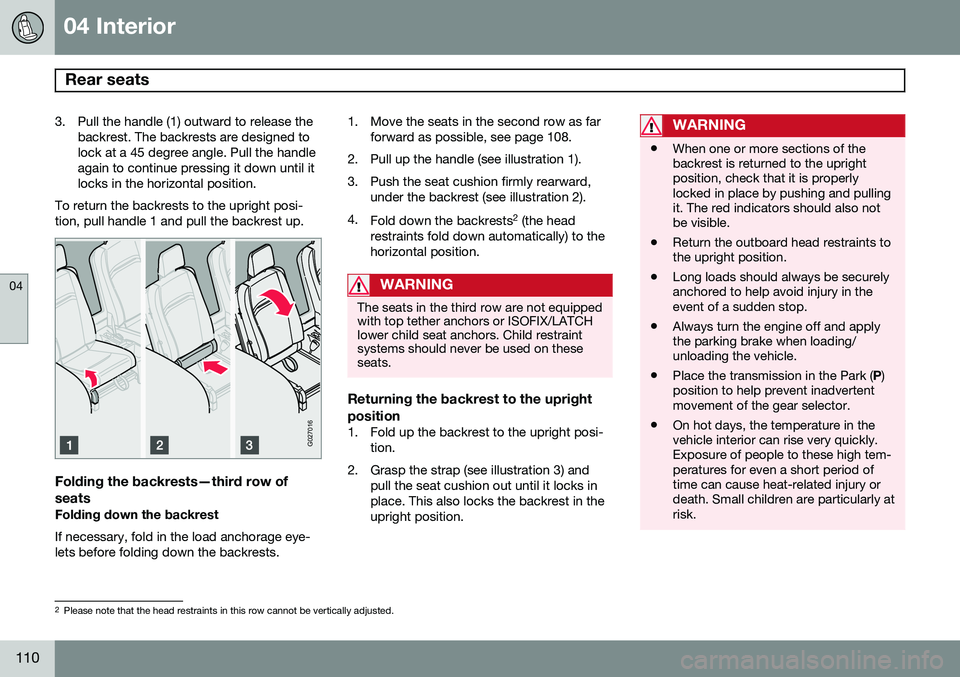
3. Pull the handle (1) outward to release thebackrest. The backrests are designed to lock at a 45 degree angle. Pull the handleagain to continue pressing it down until itlocks in the horizontal position.
To return the backrests to the upright posi-tion, pull handle 1 and pull the backrest up.
G027016
Folding the backrests—third row of seats
Folding down the backrest If necessary, fold in the load anchorage eye- lets before folding down the backrests. 1. Move the seats in the second row as far
forward as possible, see page 108.
2. Pull up the handle (see illustration 1).
3. Push the seat cushion firmly rearward, under the backrest (see illustration 2).
4. Fold down the backrests 2
(the head
restraints fold down automatically) to the horizontal position.
WARNING
The seats in the third row are not equipped with top tether anchors or ISOFIX/LATCHlower child seat anchors. Child restraintsystems should never be used on theseseats.
Returning the backrest to the upright position
1. Fold up the backrest to the upright posi- tion.
2. Grasp the strap (see illustration 3) and pull the seat cushion out until it locks in place. This also locks the backrest in theupright position.
WARNING
•When one or more sections of the backrest is returned to the uprightposition, check that it is properlylocked in place by pushing and pullingit. The red indicators should also notbe visible.
• Return the outboard head restraints tothe upright position.
• Long loads should always be securelyanchored to help avoid injury in theevent of a sudden stop.
• Always turn the engine off and applythe parking brake when loading/unloading the vehicle.
• Place the transmission in the Park (
P)
position to help prevent inadvertentmovement of the gear selector.
• On hot days, the temperature in thevehicle interior can rise very quickly.Exposure of people to these high tem-peratures for even a short period oftime can cause heat-related injury ordeath. Small children are particularly atrisk.
2
Please note that the head restraints in this row cannot be vertically adjusted.
Page 117 of 308
04 Interior
Storage compartments
04
* Option/accessory, for more information, see Introduction.115
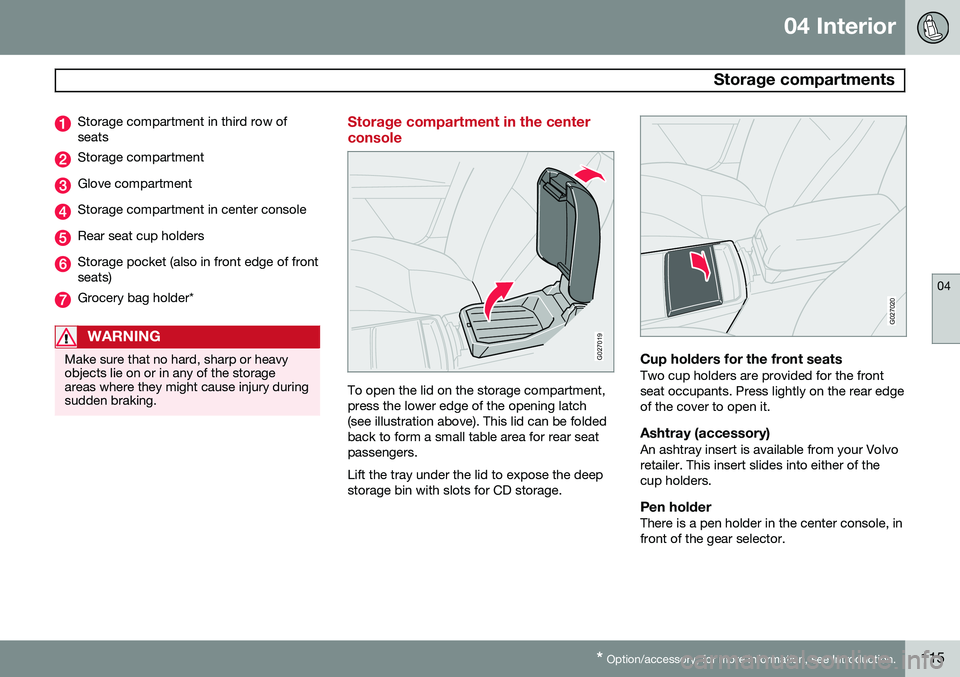
Storage compartment in third row of seats
Storage compartment
Glove compartment
Storage compartment in center console
Rear seat cup holders
Storage pocket (also in front edge of front seats)
Grocery bag holder*
WARNING
Make sure that no hard, sharp or heavy objects lie on or in any of the storageareas where they might cause injury duringsudden braking.
Storage compartment in the center console
G027019
To open the lid on the storage compartment, press the lower edge of the opening latch(see illustration above). This lid can be foldedback to form a small table area for rear seatpassengers. Lift the tray under the lid to expose the deep storage bin with slots for CD storage.
G027020
Cup holders for the front seatsTwo cup holders are provided for the front seat occupants. Press lightly on the rear edgeof the cover to open it.
Ashtray (accessory)An ashtray insert is available from your Volvoretailer. This insert slides into either of thecup holders.
Pen holderThere is a pen holder in the center console, infront of the gear selector.
Page 120 of 308
04 Interior
Storage compartments
04
118* Option/accessory, for more information, see Introduction.
Refrigerator*
G027068
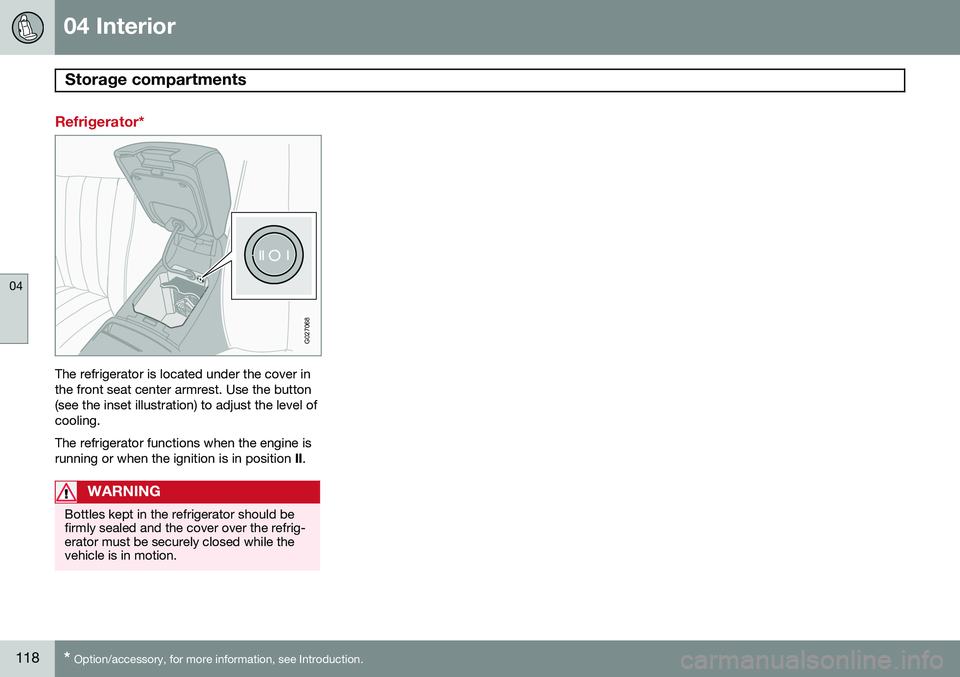
The refrigerator is located under the cover in the front seat center armrest. Use the button(see the inset illustration) to adjust the level ofcooling. The refrigerator functions when the engine is running or when the ignition is in position II.
WARNING
Bottles kept in the refrigerator should be firmly sealed and the cover over the refrig-erator must be securely closed while thevehicle is in motion.
Page 121 of 308
04 Interior
Securing cargo
04
119
G027031
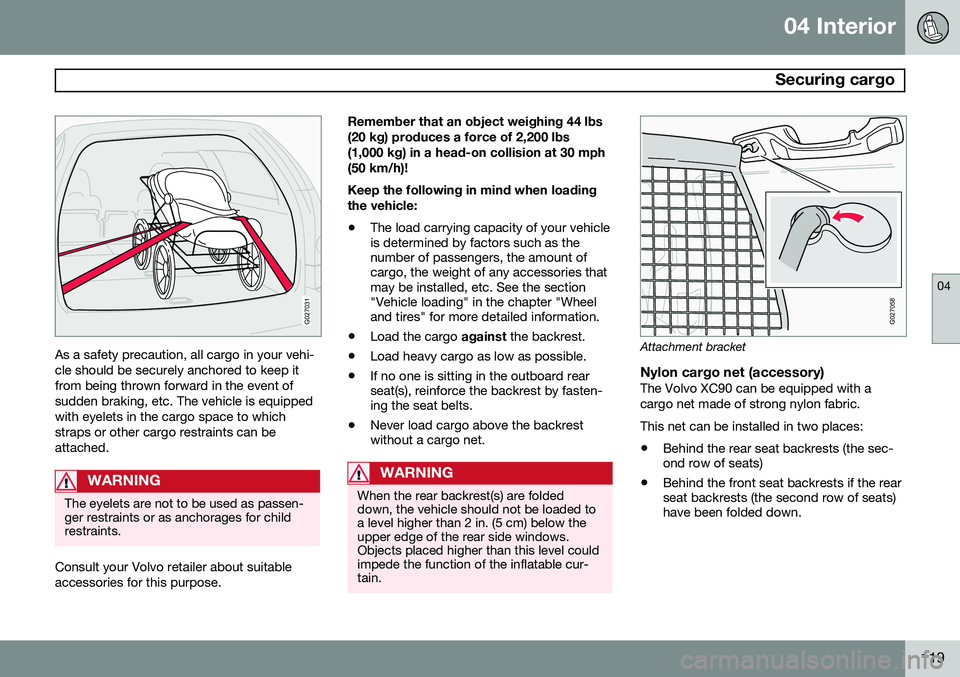
As a safety precaution, all cargo in your vehi- cle should be securely anchored to keep itfrom being thrown forward in the event ofsudden braking, etc. The vehicle is equippedwith eyelets in the cargo space to whichstraps or other cargo restraints can beattached.
WARNING
The eyelets are not to be used as passen- ger restraints or as anchorages for childrestraints.
Consult your Volvo retailer about suitable accessories for this purpose.Remember that an object weighing 44 lbs(20 kg) produces a force of 2,200 lbs(1,000 kg) in a head-on collision at 30 mph(50 km/h)! Keep the following in mind when loading the vehicle:
• The load carrying capacity of your vehicle is determined by factors such as thenumber of passengers, the amount ofcargo, the weight of any accessories thatmay be installed, etc. See the section"Vehicle loading" in the chapter "Wheeland tires" for more detailed information.
• Load the cargo
against the backrest.
• Load heavy cargo as low as possible.
• If no one is sitting in the outboard rearseat(s), reinforce the backrest by fasten-ing the seat belts.
• Never load cargo above the backrestwithout a cargo net.
WARNING
When the rear backrest(s) are folded down, the vehicle should not be loaded toa level higher than 2 in. (5 cm) below theupper edge of the rear side windows.Objects placed higher than this level couldimpede the function of the inflatable cur-tain.
G027058
Attachment bracket
Nylon cargo net (accessory)The Volvo XC90 can be equipped with a cargo net made of strong nylon fabric. This net can be installed in two places:
• Behind the rear seat backrests (the sec- ond row of seats)
• Behind the front seat backrests if the rearseat backrests (the second row of seats)have been folded down.
Page 122 of 308
04 Interior
Securing cargo
04
120
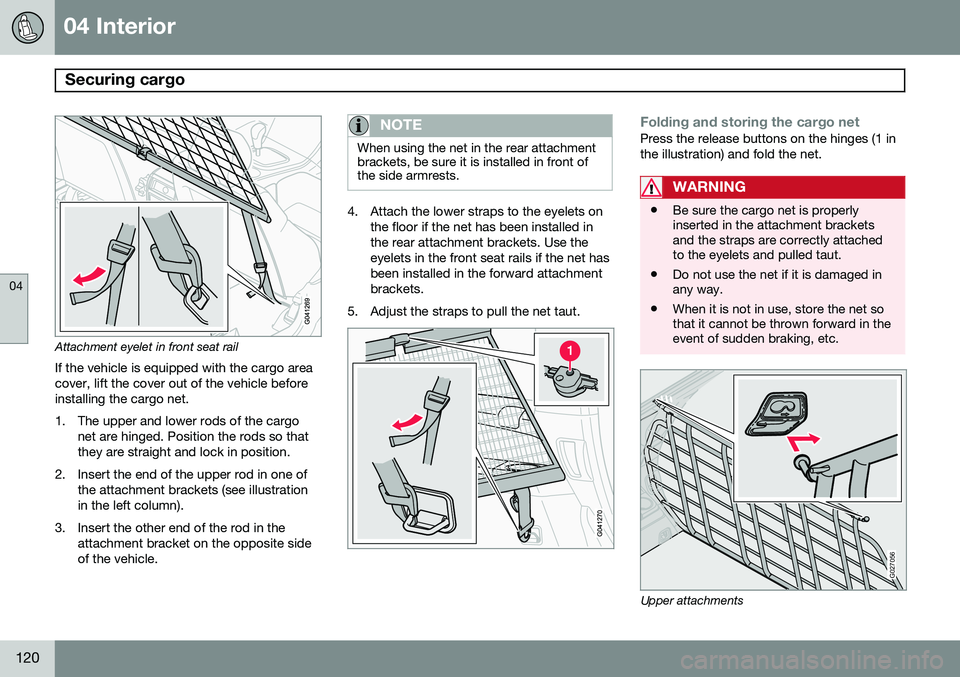
Attachment eyelet in front seat rail
If the vehicle is equipped with the cargo area cover, lift the cover out of the vehicle beforeinstalling the cargo net.
1. The upper and lower rods of the cargo net are hinged. Position the rods so that they are straight and lock in position.
2. Insert the end of the upper rod in one of the attachment brackets (see illustrationin the left column).
3. Insert the other end of the rod in the attachment bracket on the opposite sideof the vehicle.
NOTE
When using the net in the rear attachment brackets, be sure it is installed in front ofthe side armrests.
4. Attach the lower straps to the eyelets onthe floor if the net has been installed in the rear attachment brackets. Use theeyelets in the front seat rails if the net hasbeen installed in the forward attachmentbrackets.
5. Adjust the straps to pull the net taut.
Folding and storing the cargo netPress the release buttons on the hinges (1 in the illustration) and fold the net.
WARNING
• Be sure the cargo net is properly inserted in the attachment bracketsand the straps are correctly attachedto the eyelets and pulled taut.
• Do not use the net if it is damaged inany way.
• When it is not in use, store the net sothat it cannot be thrown forward in theevent of sudden braking, etc.
G027056
Upper attachments
Page 123 of 308
04 Interior
Securing cargo
04
121
Steel grid (accessory)
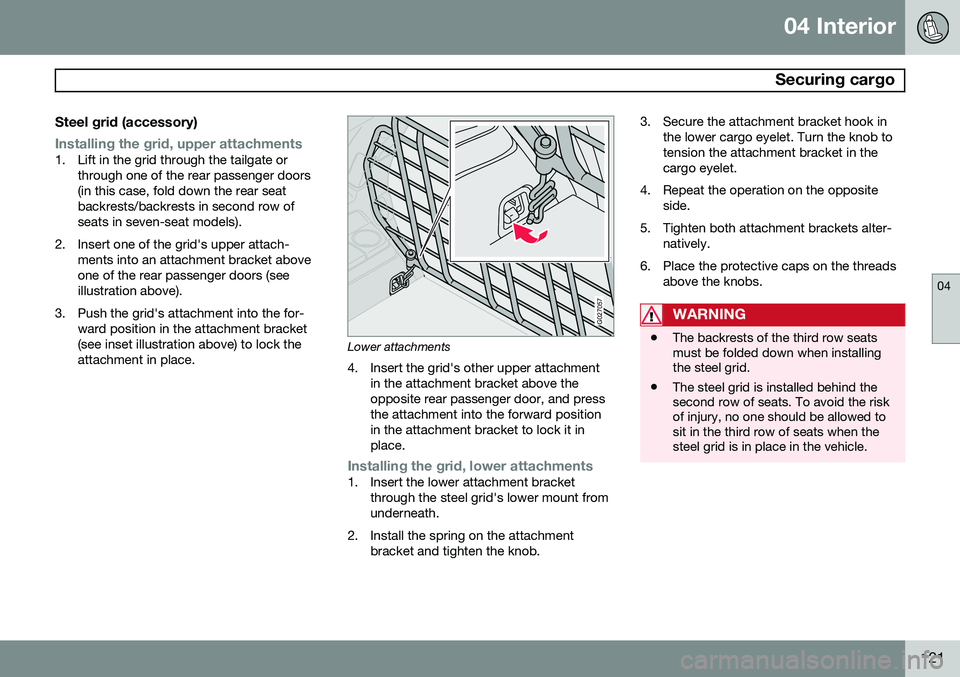
Installing the grid, upper attachments1. Lift in the grid through the tailgate orthrough one of the rear passenger doors (in this case, fold down the rear seatbackrests/backrests in second row ofseats in seven-seat models).
2. Insert one of the grid's upper attach- ments into an attachment bracket aboveone of the rear passenger doors (seeillustration above).
3. Push the grid's attachment into the for- ward position in the attachment bracket(see inset illustration above) to lock theattachment in place.
G027057
Lower attachments
4. Insert the grid's other upper attachment in the attachment bracket above the opposite rear passenger door, and pressthe attachment into the forward positionin the attachment bracket to lock it inplace.
Installing the grid, lower attachments1. Insert the lower attachment bracketthrough the steel grid's lower mount from underneath.
2. Install the spring on the attachment bracket and tighten the knob. 3. Secure the attachment bracket hook in
the lower cargo eyelet. Turn the knob totension the attachment bracket in thecargo eyelet.
4. Repeat the operation on the opposite side.
5. Tighten both attachment brackets alter- natively.
6. Place the protective caps on the threads above the knobs.
WARNING
•The backrests of the third row seats must be folded down when installingthe steel grid.
• The steel grid is installed behind thesecond row of seats. To avoid the riskof injury, no one should be allowed tosit in the third row of seats when thesteel grid is in place in the vehicle.
Page 124 of 308
04 Interior
Securing cargo
04
122* Option/accessory, for more information, see Introduction.
G027055
Cargo area cover*
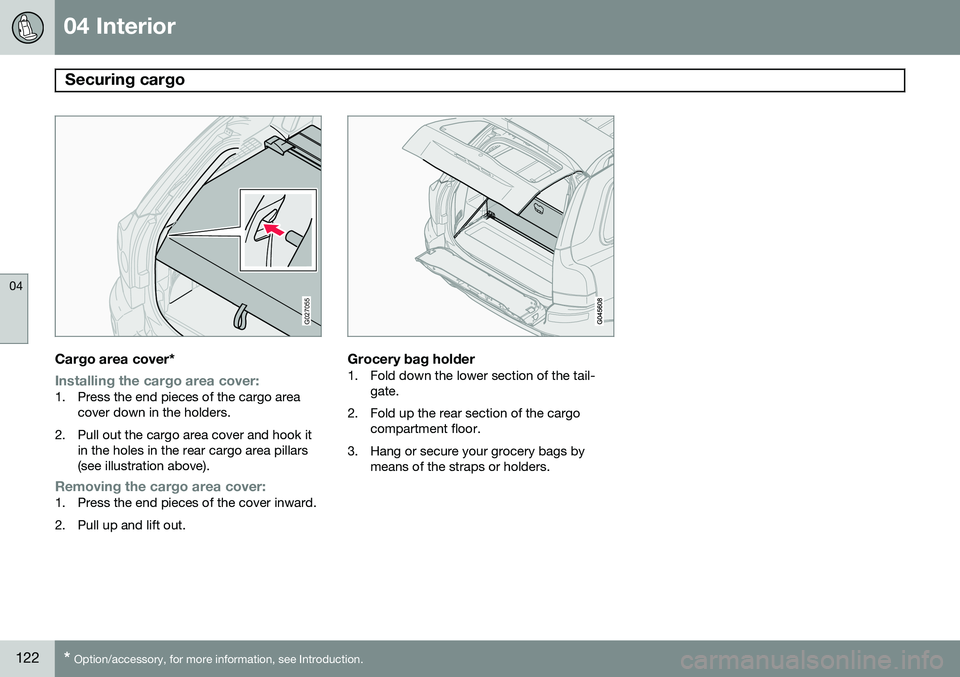
Installing the cargo area cover:1. Press the end pieces of the cargo area
cover down in the holders.
2. Pull out the cargo area cover and hook it in the holes in the rear cargo area pillars (see illustration above).
Removing the cargo area cover:1. Press the end pieces of the cover inward.
2. Pull up and lift out.
Grocery bag holder1. Fold down the lower section of the tail-gate.
2. Fold up the rear section of the cargo compartment floor.
3. Hang or secure your grocery bags by means of the straps or holders.
Page 145 of 308

06 Starting and driving
Starting the vehicle
06
143
Starting the engine
WARNING
Before starting, check that the seat, steer- ing wheel and mirrors are adjusted prop-erly. Make sure the brake pedal can bedepressed completely. Adjust the seat ifnecessary, see page 104.
1. Fasten the seat belt.
2. Apply the parking brake (hand brake) ifnot already set. The gear selector is locked in the P position (SHIFTLOCK).
3. Without touching the accelerator pedal, turn the ignition key 1
to the starting posi-
tion. Allow the starter to operate for up to10 seconds. Release the key as soon as the engine starts 2
. If the engine fails to
start, repeat this step.
CAUTION
If the engine does not start after the third try, wait for approximately 3 minutesbefore trying to start it again to give thebattery time to recover its startingcapacity.
WARNING
• Never use more than one floor mat at a time on the driver's floor. An extramat on the driver's floor can cause theaccelerator and/or brake pedal tocatch. Check that the movement ofthese pedals is not impeded.
• Volvo's floor mats are specially manu-factured for your car. They must befirmly secured in the clips on the floorso that they cannot slide and becometrapped under the pedals on the driv-er's side.
NOTE
•If the key blade section of the remote is not fully folded out when starting thevehicle, the immobilizer function maymake it impossible to start the engine.
• After a cold start, idle speed may benoticeably higher than normal for ashort period. This is done to help bringcomponents in the emission controlsystem to their normal operating tem-perature as quickly as possible, whichenables them to control emissions andhelp reduce the vehicle's impact onthe environment.
• To release the gear selector from the
P
(Park) position, the engine must berunning (or the ignition key must be inposition II) and the brake pedal must
be depressed.
• Select the desired gear. The gearengages after a very slight delay whichis especially noticeable when selecting R.
1
If two of the keys to your vehicle are close together, e.g. on the same key ring when you try to start the vehicle, this could cause interference in the immobilizer system and result in the vehicle not starting. If this should occur, remove one of the keys from the key ring before trying to start the vehicle again.
2 On vehicles equipped with the autostart feature, release the key immediately. See also page 145.
Page 159 of 308
06 Starting and driving
Parking brake
06
157
G026992
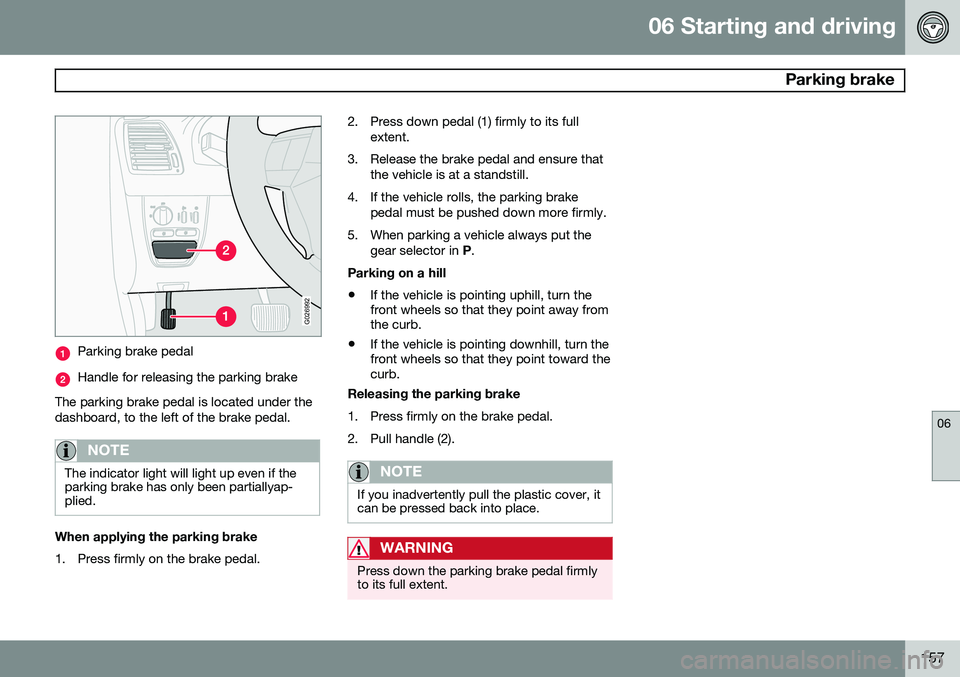
Parking brake pedal
Handle for releasing the parking brake
The parking brake pedal is located under the dashboard, to the left of the brake pedal.
NOTE
The indicator light will light up even if the parking brake has only been partiallyap-plied.
When applying the parking brake
1. Press firmly on the brake pedal. 2. Press down pedal (1) firmly to its full
extent.
3. Release the brake pedal and ensure that the vehicle is at a standstill.
4. If the vehicle rolls, the parking brake pedal must be pushed down more firmly.
5. When parking a vehicle always put the gear selector in P.
Parking on a hill • If the vehicle is pointing uphill, turn the front wheels so that they point away fromthe curb.
• If the vehicle is pointing downhill, turn thefront wheels so that they point toward thecurb.
Releasing the parking brake
1. Press firmly on the brake pedal.
2. Pull handle (2).
NOTE
If you inadvertently pull the plastic cover, it can be pressed back into place.
WARNING
Press down the parking brake pedal firmly to its full extent.