lock VOLVO XC90 2014 Owner´s Manual
[x] Cancel search | Manufacturer: VOLVO, Model Year: 2014, Model line: XC90, Model: VOLVO XC90 2014Pages: 308, PDF Size: 13.31 MB
Page 67 of 308
02 Instruments and controls
Center console buttons
02
* Option/accessory, for more information, see Introduction.65
NOTE
If the door mirrors have been inadvertently pushed out of position (in a car wash,parking lot, etc.) manually return them tonormal position. If mirror adjustment doesnot seem to operate after manual folding,reset the folding mirrors as follows:
• Turn the ignition key to position
II.
• Manually fold the mirror(s) to the nor- mal position.
• Press the button to fold both mirrorsin.
• Press the button again to fold the mir-rors out to their normal position.
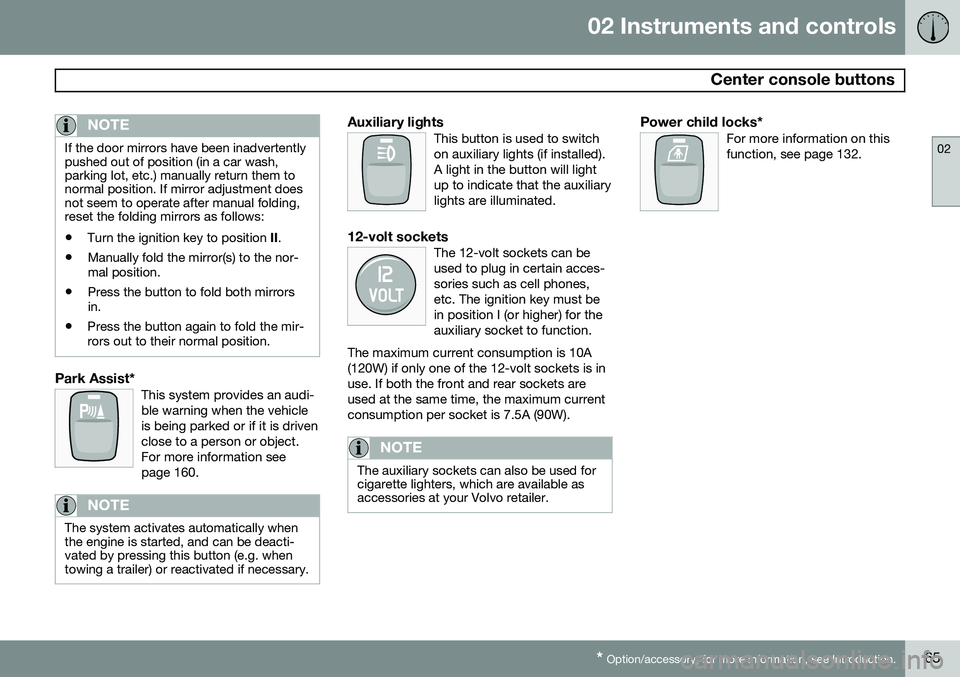
Park Assist*This system provides an audi- ble warning when the vehicleis being parked or if it is drivenclose to a person or object.For more information seepage 160.
NOTE
The system activates automatically when the engine is started, and can be deacti-vated by pressing this button (e.g. whentowing a trailer) or reactivated if necessary.
Auxiliary lightsThis button is used to switch on auxiliary lights (if installed).A light in the button will lightup to indicate that the auxiliarylights are illuminated.
12-volt socketsThe 12-volt sockets can be used to plug in certain acces-sories such as cell phones,etc. The ignition key must bein position I (or higher) for theauxiliary socket to function.
The maximum current consumption is 10A(120W) if only one of the 12-volt sockets is inuse. If both the front and rear sockets areused at the same time, the maximum currentconsumption per socket is 7.5A (90W).
NOTE
The auxiliary sockets can also be used for cigarette lighters, which are available asaccessories at your Volvo retailer.
Power child locks*For more information on this function, see page 132.
Page 68 of 308
02 Instruments and controls
Steering wheel adjustment
02
66
G026999
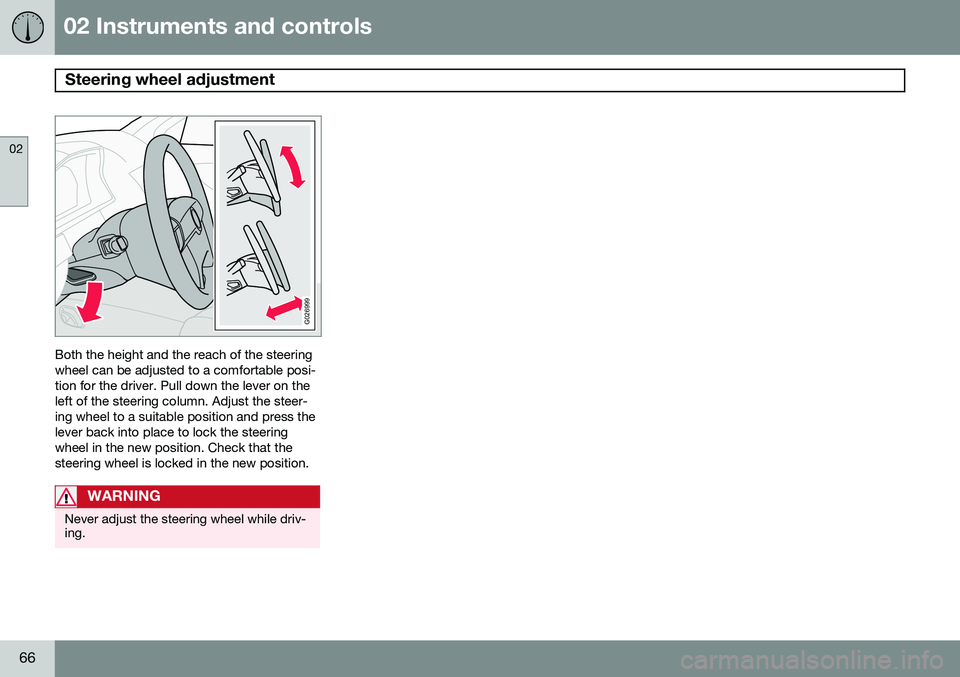
Both the height and the reach of the steering wheel can be adjusted to a comfortable posi-tion for the driver. Pull down the lever on theleft of the steering column. Adjust the steer-ing wheel to a suitable position and press thelever back into place to lock the steeringwheel in the new position. Check that thesteering wheel is locked in the new position.
WARNING
Never adjust the steering wheel while driv- ing.
Page 69 of 308
02 Instruments and controls
Lighting panel
02
}}
* Option/accessory, for more information, see Introduction.67
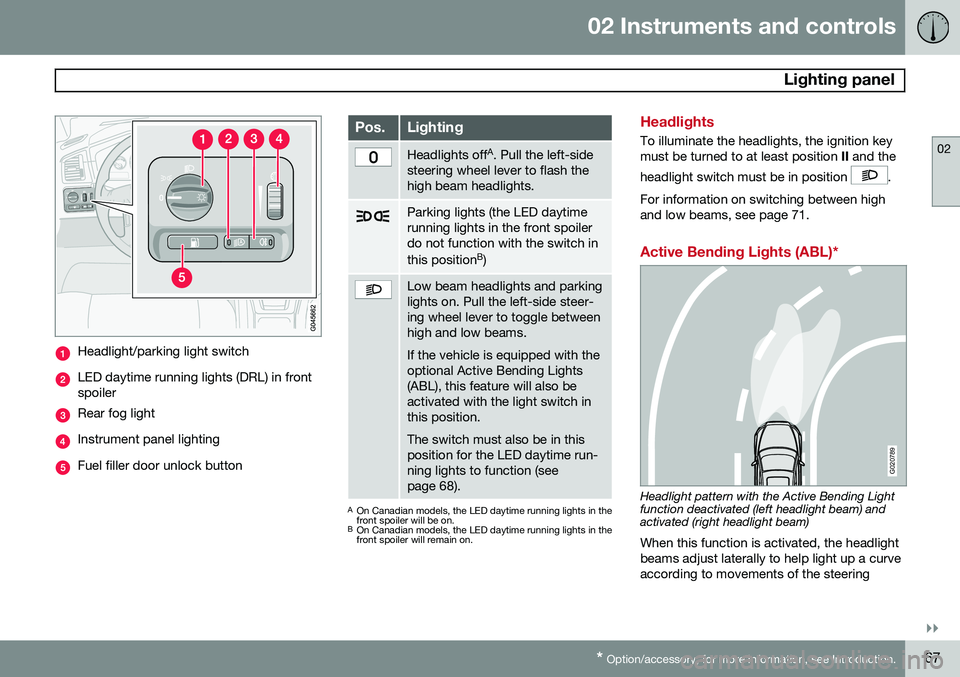
Headlight/parking light switch
LED daytime running lights (DRL) in front spoiler
Rear fog light
Instrument panel lighting
Fuel filler door unlock button
Pos.Lighting
Headlights off A
. Pull the left-side
steering wheel lever to flash the high beam headlights.
Parking lights (the LED daytime running lights in the front spoilerdo not function with the switch in this position B
)
Low beam headlights and parking lights on. Pull the left-side steer-ing wheel lever to toggle betweenhigh and low beams. If the vehicle is equipped with the optional Active Bending Lights(ABL), this feature will also beactivated with the light switch inthis position. The switch must also be in this position for the LED daytime run-ning lights to function (seepage 68).
A On Canadian models, the LED daytime running lights in the front spoiler will be on.
B On Canadian models, the LED daytime running lights in thefront spoiler will remain on.
Headlights
To illuminate the headlights, the ignition key must be turned to at least position II and the
headlight switch must be in position
.
For information on switching between high and low beams, see page 71.
Active Bending Lights (ABL)*
G020789
Headlight pattern with the Active Bending Light function deactivated (left headlight beam) andactivated (right headlight beam) When this function is activated, the headlight beams adjust laterally to help light up a curveaccording to movements of the steering
Page 71 of 308
02 Instruments and controls
Lighting panel
02
69
Parking lights
The front and rear parking lights can be turned on even when the ignition is switchedoff.
–Turn switch (1) to position .
The license plate lights also illuminate when the parking lights are switched on.
Rear fog light
The single rear fog light is located in the driv- er's side of the vehicle. The rear fog light will only function in combi- nation with the high/low beam headlights.
1. Turn the ignition key to position II.
2. Press button (3) to turn on the rear fog light.
An indicator light in the button illuminates when the rear fog light is on.
NOTE
The rear fog light is considerably brighter than the normal tail lights and should beused only when conditions such as fog,rain, snow, smoke or dust reduce visibilityfor other vehicles to less than 500 ft.(150 meters).
Instrument panel lighting
The instrument panel lighting illuminates when the ignition key is in position II and the light switch (1) is in either position
or
.
–Move the thumb wheel (4) up to increase brightness or down to decrease bright-ness.
Unlocking the fuel filler door
Press button (5) when the vehicle is at a standstill to unlock the fuel filler door. Pleasenote that the fuel filler door will remainunlocked until the vehicle begins to move for-ward. An audible click will be heard when thefuel filler door relocks.
NOTE
If the fuel filler door does not unlock after the button has been pressed, drive thevehicle at a speed of at least 5 mph(8 km/h), stop the vehicle, and press thebutton again.
For information on unlocking the fuel filler door manually, see page 70.
Page 72 of 308
02 Instruments and controls
Manually unlocking the fuel filler door
02
70
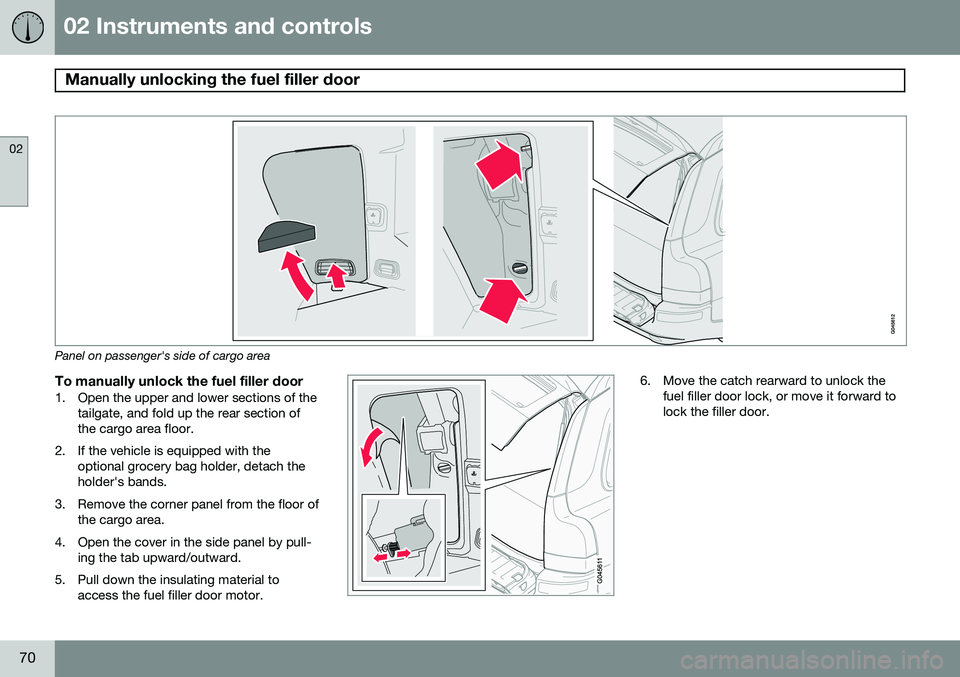
Panel on passenger's side of cargo area
To manually unlock the fuel filler door1. Open the upper and lower sections of thetailgate, and fold up the rear section of the cargo area floor.
2. If the vehicle is equipped with the optional grocery bag holder, detach theholder's bands.
3. Remove the corner panel from the floor of the cargo area.
4. Open the cover in the side panel by pull- ing the tab upward/outward.
5. Pull down the insulating material to access the fuel filler door motor.
6. Move the catch rearward to unlock thefuel filler door lock, or move it forward to lock the filler door.
Page 73 of 308
02 Instruments and controls
Left-side steering wheel lever
02
71
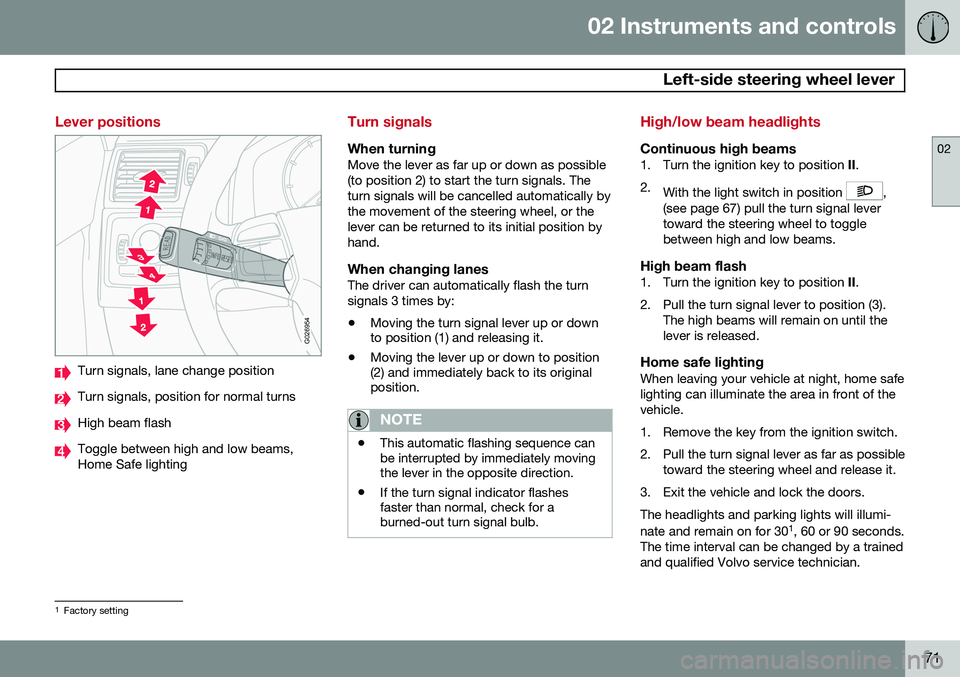
Lever positions
G026954
Turn signals, lane change position
Turn signals, position for normal turns
High beam flash
Toggle between high and low beams, Home Safe lighting
Turn signals
When turningMove the lever as far up or down as possible (to position 2) to start the turn signals. Theturn signals will be cancelled automatically bythe movement of the steering wheel, or thelever can be returned to its initial position byhand.
When changing lanesThe driver can automatically flash the turnsignals 3 times by:• Moving the turn signal lever up or down to position (1) and releasing it.
• Moving the lever up or down to position(2) and immediately back to its originalposition.
NOTE
• This automatic flashing sequence can be interrupted by immediately movingthe lever in the opposite direction.
• If the turn signal indicator flashesfaster than normal, check for aburned-out turn signal bulb.
High/low beam headlights
Continuous high beams1. Turn the ignition key to position
II.
2. With the light switch in position
,
(see page 67) pull the turn signal lever toward the steering wheel to togglebetween high and low beams.
High beam flash1. Turn the ignition key to position II.
2. Pull the turn signal lever to position (3). The high beams will remain on until thelever is released.
Home safe lightingWhen leaving your vehicle at night, home safelighting can illuminate the area in front of thevehicle.
1. Remove the key from the ignition switch.
2. Pull the turn signal lever as far as possibletoward the steering wheel and release it.
3. Exit the vehicle and lock the doors.The headlights and parking lights will illumi- nate and remain on for 30 1
, 60 or 90 seconds.
The time interval can be changed by a trained and qualified Volvo service technician.
1 Factory setting
Page 81 of 308
02 Instruments and controls
Cruise control
02
79
NOTE
Cruise control is automatically disengaged if:
• When the brake pedal is depressed.
• the engine is switched off
• the gear selector is placed in (
N) Neu-
tral
• the wheels start to spin or lock
• if an increase in speed is maintained for more than one minute
• if the vehicle's speed falls belowapproximately 20 mph (30 km/h).
Temporarily disengaging the cruise control
1. Press
0 to temporarily disengage cruise
control. >
CRUISE will be displayed in the infor-
mation window in the instrument panel.
2. Depress the brake pedal. Pressing "resume"
causes the vehicle to
return to the previously set speed.
WARNING
Cruise control should not be used in heavy traffic or when driving on wet or slipperyroads, or when driving on unpaved oruneven road surfaces. Cruise control maynot maintain set speed on steep down-grades.
Page 83 of 308
02 Instruments and controls
Hood/tailgate
02
81
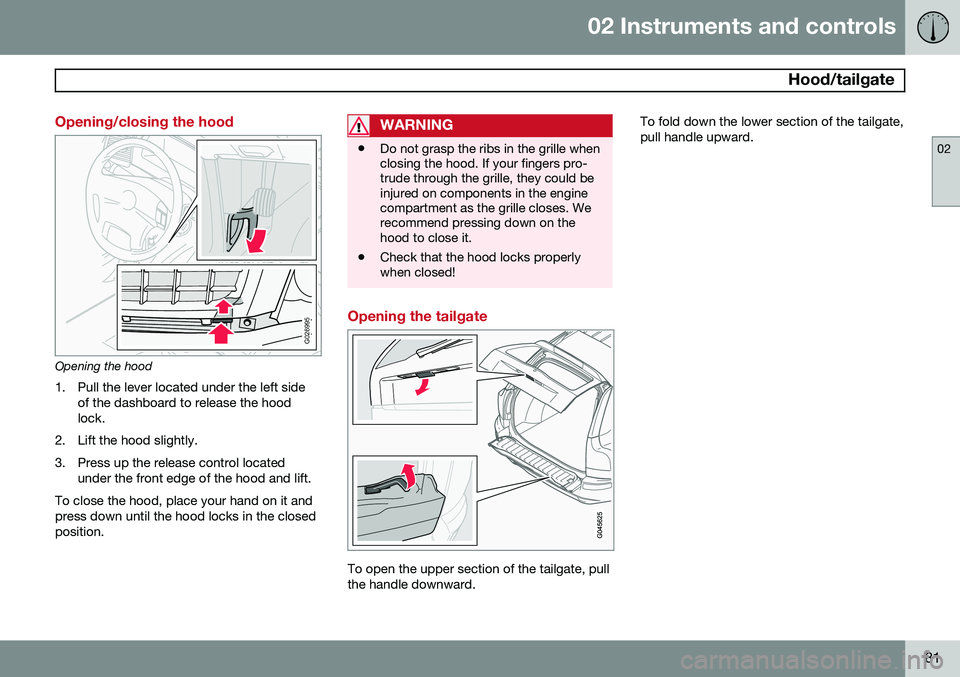
Opening/closing the hood
G026995
Opening the hood1. Pull the lever located under the left side of the dashboard to release the hood lock.
2. Lift the hood slightly.
3. Press up the release control located under the front edge of the hood and lift.
To close the hood, place your hand on it and press down until the hood locks in the closedposition.
WARNING
• Do not grasp the ribs in the grille when closing the hood. If your fingers pro-trude through the grille, they could beinjured on components in the enginecompartment as the grille closes. Werecommend pressing down on thehood to close it.
• Check that the hood locks properlywhen closed!
Opening the tailgate
To open the upper section of the tailgate, pull the handle downward. To fold down the lower section of the tailgate,pull handle upward.
Page 85 of 308
02 Instruments and controls
Power windows
02
83
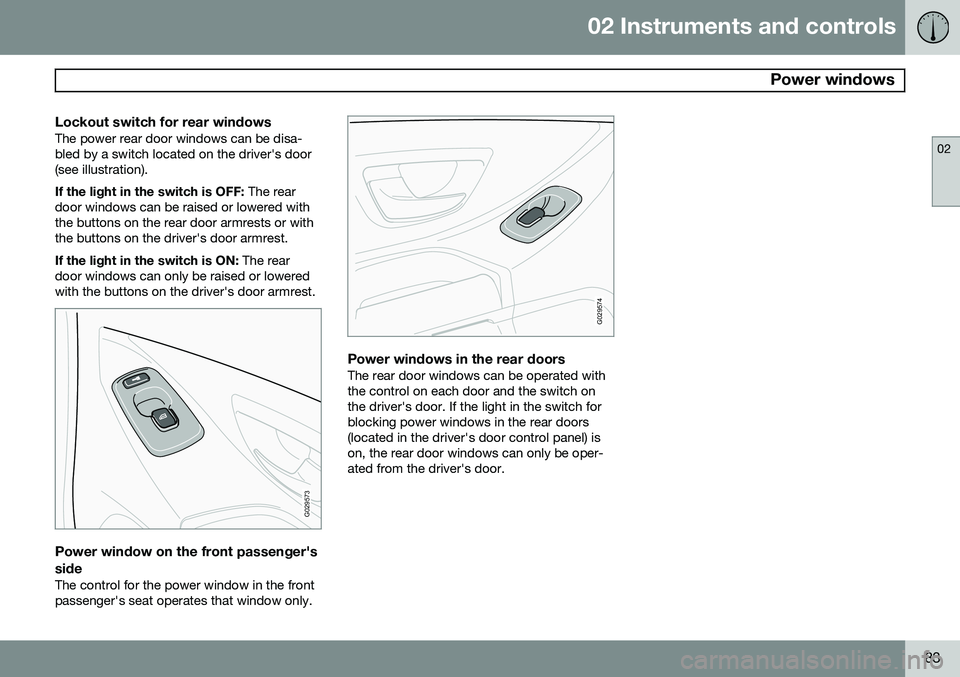
Lockout switch for rear windowsThe power rear door windows can be disa- bled by a switch located on the driver's door(see illustration). If the light in the switch is OFF: The rear
door windows can be raised or lowered with the buttons on the rear door armrests or withthe buttons on the driver's door armrest. If the light in the switch is ON: The rear
door windows can only be raised or lowered with the buttons on the driver's door armrest.
G029573
Power window on the front passenger's side
The control for the power window in the front passenger's seat operates that window only.
G029574
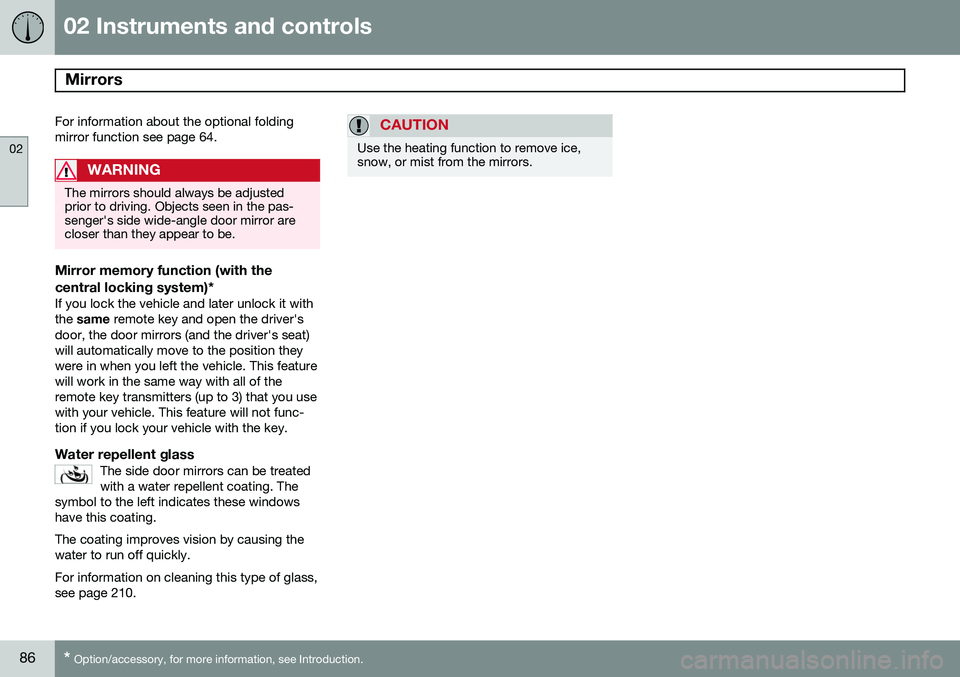
Power windows in the rear doorsThe rear door windows can be operated with the control on each door and the switch onthe driver's door. If the light in the switch forblocking power windows in the rear doors(located in the driver's door control panel) ison, the rear door windows can only be oper-ated from the driver's door.
Page 88 of 308
02 Instruments and controls
Mirrors
02
86* Option/accessory, for more information, see Introduction.
For information about the optional folding mirror function see page 64.
WARNING
The mirrors should always be adjusted prior to driving. Objects seen in the pas-senger's side wide-angle door mirror arecloser than they appear to be.
Mirror memory function (with the
central locking system)*
If you lock the vehicle and later unlock it with the same remote key and open the driver's
door, the door mirrors (and the driver's seat)will automatically move to the position theywere in when you left the vehicle. This featurewill work in the same way with all of theremote key transmitters (up to 3) that you usewith your vehicle. This feature will not func-tion if you lock your vehicle with the key.
Water repellent glassThe side door mirrors can be treatedwith a water repellent coating. The
symbol to the left indicates these windowshave this coating.
The coating improves vision by causing the water to run off quickly. For information on cleaning this type of glass, see page 210.
CAUTION
Use the heating function to remove ice, snow, or mist from the mirrors.