lock VOLVO XC90 2014 Owner´s Manual
[x] Cancel search | Manufacturer: VOLVO, Model Year: 2014, Model line: XC90, Model: VOLVO XC90 2014Pages: 308, PDF Size: 13.31 MB
Page 137 of 308
05 Locks and alarm
05
135
Page 138 of 308
136* Option/accessory, for more information, see Introduction. General information............................................................................... 138
Fuel requirements................................................................................. 139Refueling............................................................................................... 141
Starting the vehicle............................................................................... 143
Ignition switch and steering wheel lock................................................ 145
Economical driving................................................................................ 146
Difficult driving conditions..................................................................... 147
Automatic transmission........................................................................ 149Jump starting........................................................................................ 152All Wheel Drive*..................................................................................... 153
Brake system........................................................................................154Parking brake........................................................................................ 157Stability system..................................................................................... 158
Front/rear park assist*........................................................................... 160Towing.................................................................................................. 162Towing a trailer...................................................................................... 164
Detachable trailer hitch......................................................................... 167
Load carriers (accessory)...................................................................... 168
Cold weather precautions..................................................................... 169
Before a long distance trip.................................................................... 170
Blind Spot Information System*............................................................ 171
Page 143 of 308
06 Starting and driving
Refueling
06
141
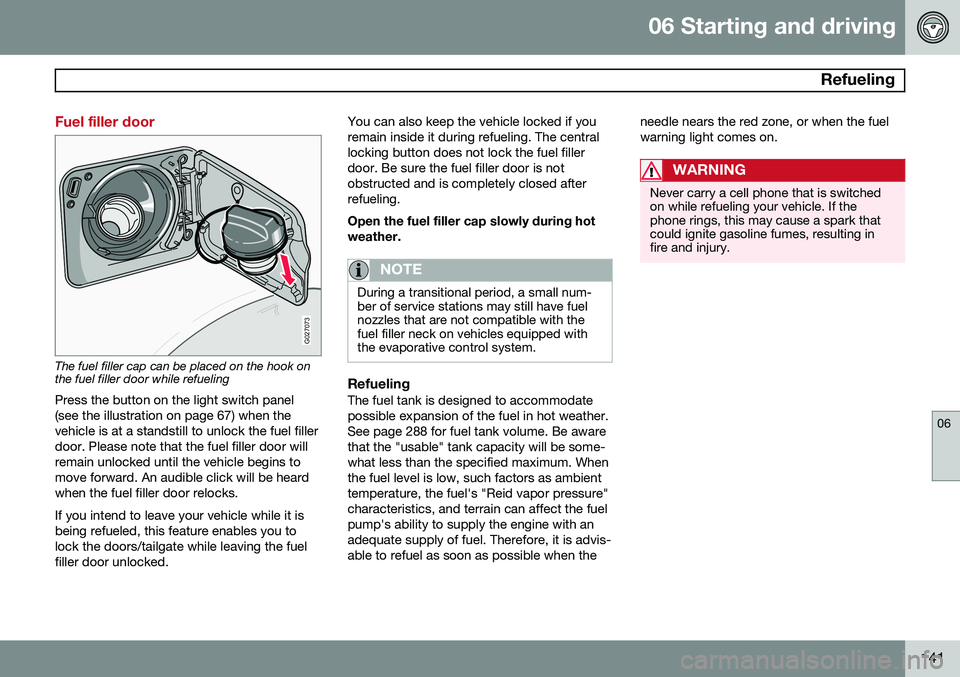
Fuel filler door
G027073
The fuel filler cap can be placed on the hook on the fuel filler door while refuelingPress the button on the light switch panel (see the illustration on page 67) when thevehicle is at a standstill to unlock the fuel fillerdoor. Please note that the fuel filler door willremain unlocked until the vehicle begins tomove forward. An audible click will be heardwhen the fuel filler door relocks. If you intend to leave your vehicle while it is being refueled, this feature enables you tolock the doors/tailgate while leaving the fuelfiller door unlocked. You can also keep the vehicle locked if youremain inside it during refueling. The centrallocking button does not lock the fuel fillerdoor. Be sure the fuel filler door is notobstructed and is completely closed afterrefueling. Open the fuel filler cap slowly during hot weather.
NOTE
During a transitional period, a small num- ber of service stations may still have fuelnozzles that are not compatible with thefuel filler neck on vehicles equipped withthe evaporative control system.
RefuelingThe fuel tank is designed to accommodate possible expansion of the fuel in hot weather.See page 288 for fuel tank volume. Be awarethat the "usable" tank capacity will be some-what less than the specified maximum. Whenthe fuel level is low, such factors as ambienttemperature, the fuel's "Reid vapor pressure"characteristics, and terrain can affect the fuelpump's ability to supply the engine with anadequate supply of fuel. Therefore, it is advis-able to refuel as soon as possible when the
needle nears the red zone, or when the fuelwarning light comes on.
WARNING
Never carry a cell phone that is switched on while refueling your vehicle. If thephone rings, this may cause a spark thatcould ignite gasoline fumes, resulting infire and injury.
Page 144 of 308
06 Starting and driving
Refueling
06
142
CAUTION
•Do not refuel with the engine running 1
.
Turn the ignition off or to position I. If
the ignition is on, an incorrect reading could occur in the fuel gauge.
• After refueling, close the fuel filler capby turning it clockwise until it clicks into place 1
.
• Avoid overfilling the fuel tank. Do not press the handle on the filler nozzlemore than one extra time. Too muchfuel in the tank in hot weather condi-tions can cause the fuel to overflow.Overfilling could also cause damage tothe emission control systems.
• Avoid spilling gasoline during refueling.In addition to causing damage to theenvironment, gasolines containingalcohol can cause damage to paintedsurfaces, which may not be coveredunder the New Vehicle Limited War-ranty.
• Do not use gasolines containing meth-anol (methyl alcohol, wood alcohol).This practice can result in vehicle per-formance deterioration and can dam-age critical parts in the fuel system.Such damage may not be covered
under the New Vehicle Limited War- ranty.
1
If the fuel filler cap is not closed tightly or if the engine is running when the vehicle is refueled, the Check Engine Light (malfunction indicator lamp) may indicate a fault. However, your vehicle's performance will not be affected. Use only Volvo original or approved fuel filler caps.
Page 145 of 308

06 Starting and driving
Starting the vehicle
06
143
Starting the engine
WARNING
Before starting, check that the seat, steer- ing wheel and mirrors are adjusted prop-erly. Make sure the brake pedal can bedepressed completely. Adjust the seat ifnecessary, see page 104.
1. Fasten the seat belt.
2. Apply the parking brake (hand brake) ifnot already set. The gear selector is locked in the P position (SHIFTLOCK).
3. Without touching the accelerator pedal, turn the ignition key 1
to the starting posi-
tion. Allow the starter to operate for up to10 seconds. Release the key as soon as the engine starts 2
. If the engine fails to
start, repeat this step.
CAUTION
If the engine does not start after the third try, wait for approximately 3 minutesbefore trying to start it again to give thebattery time to recover its startingcapacity.
WARNING
• Never use more than one floor mat at a time on the driver's floor. An extramat on the driver's floor can cause theaccelerator and/or brake pedal tocatch. Check that the movement ofthese pedals is not impeded.
• Volvo's floor mats are specially manu-factured for your car. They must befirmly secured in the clips on the floorso that they cannot slide and becometrapped under the pedals on the driv-er's side.
NOTE
•If the key blade section of the remote is not fully folded out when starting thevehicle, the immobilizer function maymake it impossible to start the engine.
• After a cold start, idle speed may benoticeably higher than normal for ashort period. This is done to help bringcomponents in the emission controlsystem to their normal operating tem-perature as quickly as possible, whichenables them to control emissions andhelp reduce the vehicle's impact onthe environment.
• To release the gear selector from the
P
(Park) position, the engine must berunning (or the ignition key must be inposition II) and the brake pedal must
be depressed.
• Select the desired gear. The gearengages after a very slight delay whichis especially noticeable when selecting R.
1
If two of the keys to your vehicle are close together, e.g. on the same key ring when you try to start the vehicle, this could cause interference in the immobilizer system and result in the vehicle not starting. If this should occur, remove one of the keys from the key ring before trying to start the vehicle again.
2 On vehicles equipped with the autostart feature, release the key immediately. See also page 145.
Page 146 of 308
06 Starting and driving
Starting the vehicle
06
144
NOTE
Your vehicle is equipped with a KEYLOCK
system. When the engine is switched off, the gear selector must be in the P position
before the key can be removed from theignition switch. When starting in cold weather, the trans- mission may shift up at slightly higherengine speeds than normal until the auto-matic transmission fluid reaches normaloperating temperature.
NOTE
Do not race a cold engine immediately after starting. Oil flow may not reach somelubrication points fast enough to preventengine damage.
WARNING
Always place the gear selector in Park and apply the parking brake before leaving thevehicle. Never leave the vehicle unatten-ded with the engine running.
• Always open garage doors fully before starting the engine inside a garage toensure adequate ventilation. Theexhaust gases contain carbon monox-ide, which is invisible and odorless butvery poisonous.
CAUTION
Automatic transmission
• The engine should be idling when you move the gear selector. Never acceler-ate until after you feel the transmissionengage! Accelerating immediately afterselecting a gear will cause harshengagement and premature transmis-sion wear.
• Selecting
P or N when idling at a
standstill for prolonged periods of timewill help prevent overheating of theautomatic transmission fluid.
Page 147 of 308
06 Starting and driving
Ignition switch and steering wheel lock
06
145
Ignition switch and steering wheel lock
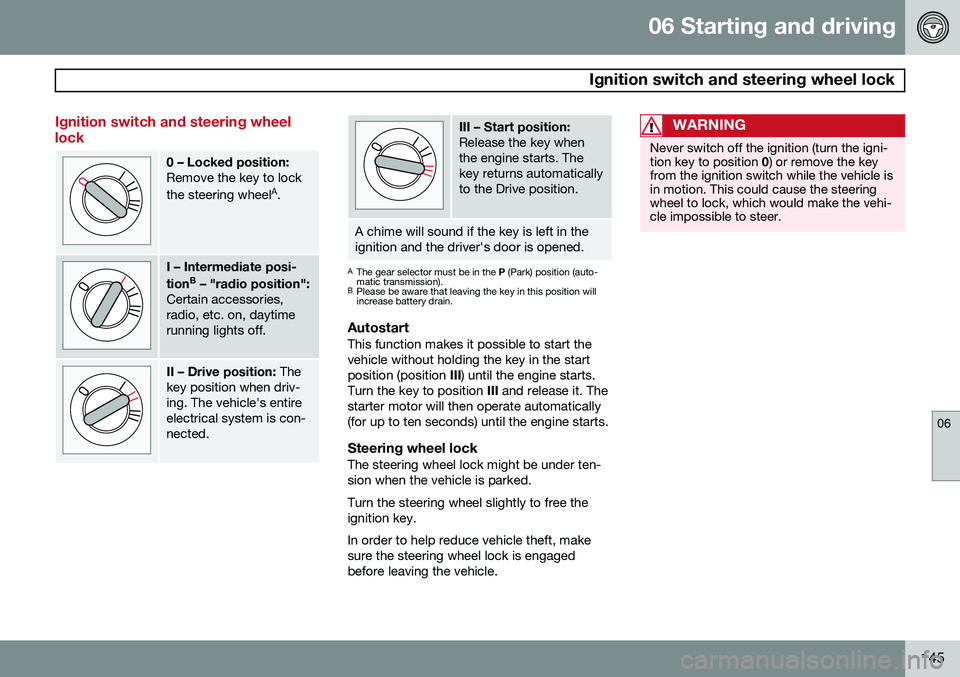
0 – Locked position: Remove the key to lock the steering wheelA
.
I – Intermediate posi- tion B
– "radio position":
Certain accessories, radio, etc. on, daytimerunning lights off.
II – Drive position: The
key position when driv- ing. The vehicle's entireelectrical system is con-nected.
III – Start position: Release the key when the engine starts. Thekey returns automaticallyto the Drive position.
A chime will sound if the key is left in the ignition and the driver's door is opened.
A The gear selector must be in the P (Park) position (auto-
matic transmission).
B Please be aware that leaving the key in this position will increase battery drain.
AutostartThis function makes it possible to start the vehicle without holding the key in the startposition (position III) until the engine starts.
Turn the key to position III and release it. The
starter motor will then operate automatically(for up to ten seconds) until the engine starts.
Steering wheel lockThe steering wheel lock might be under ten-sion when the vehicle is parked. Turn the steering wheel slightly to free the ignition key. In order to help reduce vehicle theft, make sure the steering wheel lock is engagedbefore leaving the vehicle.
WARNING
Never switch off the ignition (turn the igni- tion key to position 0) or remove the key
from the ignition switch while the vehicle isin motion. This could cause the steeringwheel to lock, which would make the vehi-cle impossible to steer.
Page 151 of 308
06 Starting and driving
Automatic transmission
06
149
G026990
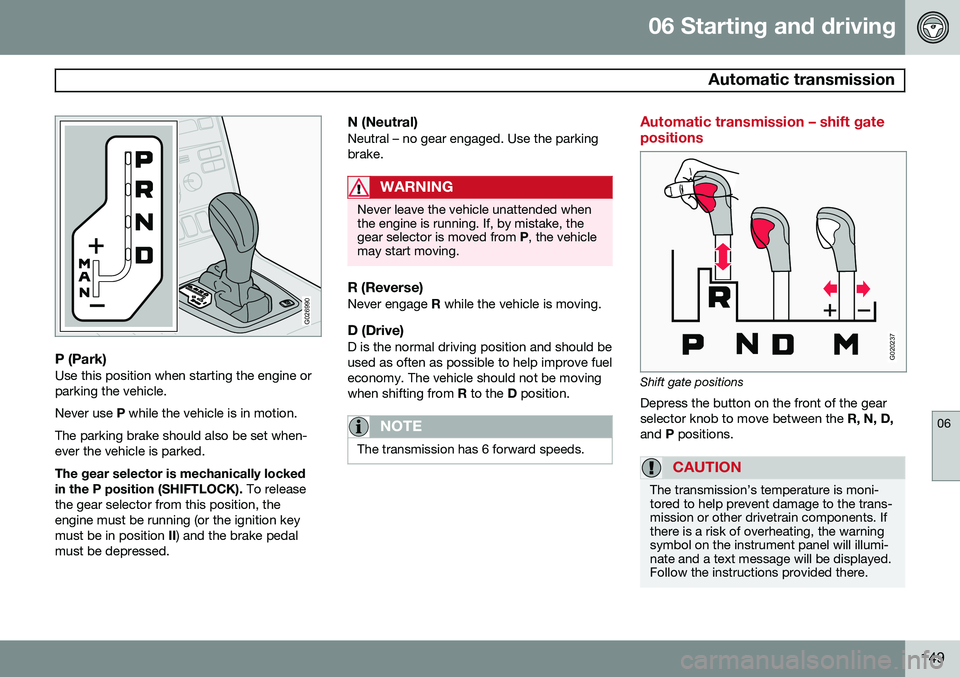
P (Park)Use this position when starting the engine or parking the vehicle. Never use P while the vehicle is in motion.
The parking brake should also be set when- ever the vehicle is parked. The gear selector is mechanically locked in the P position (SHIFTLOCK). To release
the gear selector from this position, the engine must be running (or the ignition keymust be in position II) and the brake pedal
must be depressed.
N (Neutral)Neutral – no gear engaged. Use the parkingbrake.
WARNING
Never leave the vehicle unattended when the engine is running. If, by mistake, thegear selector is moved from P, the vehicle
may start moving.
R (Reverse)Never engage R while the vehicle is moving.
D (Drive)D is the normal driving position and should be used as often as possible to help improve fueleconomy. The vehicle should not be movingwhen shifting from R to the D position.
NOTE
The transmission has 6 forward speeds.
Automatic transmission – shift gate positions
G020237
Shift gate positions
Depress the button on the front of the gear selector knob to move between the R, N, D,
and P positions.
CAUTION
The transmission’s temperature is moni- tored to help prevent damage to the trans-mission or other drivetrain components. Ifthere is a risk of overheating, the warningsymbol on the instrument panel will illumi-nate and a text message will be displayed.Follow the instructions provided there.
Page 152 of 308
06 Starting and driving
Automatic transmission
06
150
KickdownAutomatic shift to a lower gear (kickdown) is achieved by depressing the accelerator pedalfully and briskly. An upshift will occur whenapproaching the top speed for a particulargear or by releasing the accelerator pedalslightly. Kickdown can be used for maximum acceler- ation or when passing at highway speeds.
NOTE
The gear selector must be in the D (Drive)
position for kickdown to function.
Manual shifting – Geartronic
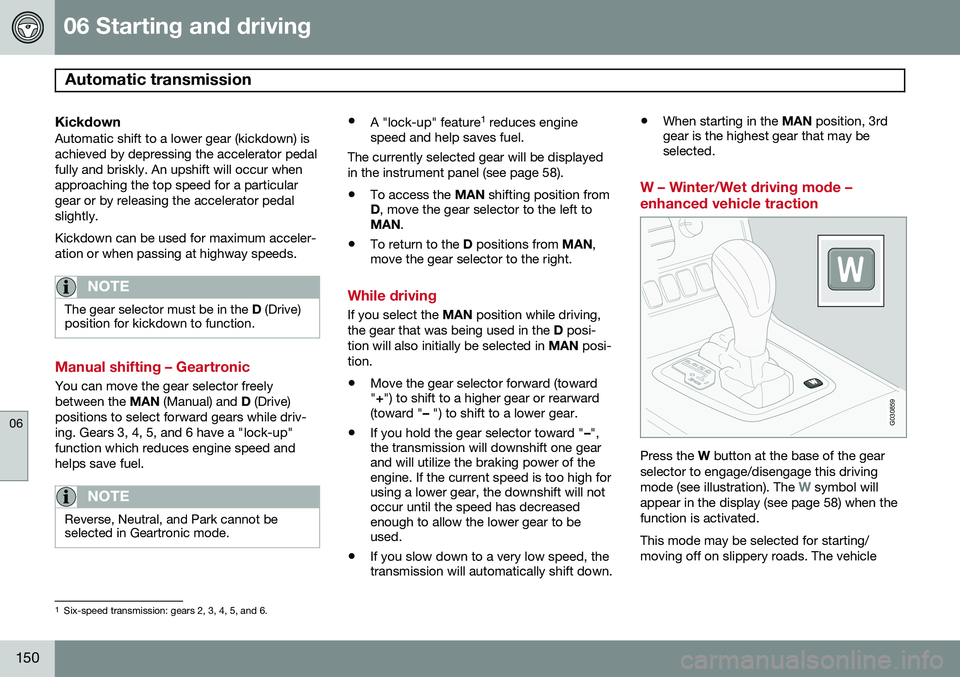
You can move the gear selector freely between the MAN (Manual) and D (Drive)
positions to select forward gears while driv-ing. Gears 3, 4, 5, and 6 have a "lock-up"function which reduces engine speed andhelps save fuel.
NOTE
Reverse, Neutral, and Park cannot be selected in Geartronic mode.
• A "lock-up" feature 1
reduces engine
speed and help saves fuel.
The currently selected gear will be displayed in the instrument panel (see page 58). • To access the
MAN shifting position from
D , move the gear selector to the left to
MAN .
• To return to the
D positions from MAN,
move the gear selector to the right.
While driving
If you select the MAN position while driving,
the gear that was being used in the D posi-
tion will also initially be selected in MAN posi-
tion. • Move the gear selector forward (toward "
+ ") to shift to a higher gear or rearward
(toward " – ") to shift to a lower gear.
• If you hold the gear selector toward "
–",
the transmission will downshift one gearand will utilize the braking power of theengine. If the current speed is too high forusing a lower gear, the downshift will notoccur until the speed has decreasedenough to allow the lower gear to beused.
• If you slow down to a very low speed, thetransmission will automatically shift down. •
When starting in the
MAN position, 3rd
gear is the highest gear that may beselected.
W – Winter/Wet driving mode – enhanced vehicle traction
G030859
Press the W button at the base of the gear
selector to engage/disengage this driving mode (see illustration). The
W symbol will
appear in the display (see page 58) when the function is activated. This mode may be selected for starting/ moving off on slippery roads. The vehicle
1 Six-speed transmission: gears 2, 3, 4, 5, and 6.
Page 156 of 308
06 Starting and driving
Brake system
06
154* Option/accessory, for more information, see Introduction.
BRAKE Brake circuit malfunction
The brake system is a hydraulic system con- sisting of two master cylinders and two sepa-rate brake circuits. If a problem should occurin one of these circuits, it is still possible tostop the vehicle with the other brake circuit. If the brake pedal must be depressed farther than normal and requires greater foot pres-sure, the stopping distance will be longer. A warning light in the instrument panel will light up to warn the driver that a fault hasoccurred. If this light comes on while driving or braking, stop immediately and check the brake fluidlevel in the reservoir.
NOTE
Press the brake pedal hard and maintain pressure on the pedal – do not pump thebrakes.
WARNING
If the fluid level is below the MIN mark in
the reservoir or if a BRAKE FAILURE
STOP SAFELY message is displayed in
the text window: DO NOT DRIVE. Have
the vehicle towed to a trained and qualified Volvo service technician and have thebrake system inspected.
NOTE
When the vehicle is at a standstill and the engine is idling, e.g. at a traffic light andthe brake pedal is depressed, the pedalmay go down slightly. This is a normalfunction of the power-assisted brake sys-tem.
Brake pad inspectionOn vehicles equipped with a jack*, the condi- tion of the brake pads can be checked byraising the vehicle (see page 198 for informa-tion about using the jack and removing awheel) and performing a visual inspection ofthe brake pads.
WARNING
• If the vehicle has been driven immedi- ately prior to a brake pad inspection,the wheel hub, brake components,etc., will be very hot. Allow time forthese components to cool before car-rying out the inspection.
• Apply the parking brake and put thegear selector in the Park (
P) position.
• Block the wheels standing on theground, use rigid wooden blocks orlarge stones.