steering VOLVO XC90 2014 Owner´s Manual
[x] Cancel search | Manufacturer: VOLVO, Model Year: 2014, Model line: XC90, Model: VOLVO XC90 2014Pages: 308, PDF Size: 13.31 MB
Page 213 of 308
08 Car care
Washing and cleaning the vehicle
08
211
3. Dampen the stain thoroughly with the
sponge. Let the sponge absorb the stain, do not rub.
4. Dry the stain with soft paper towels or a towel, and allow the leather to dry com-pletely.
Protecting leather upholstery1. Put a small amount of protectant cream on a cloth and apply a thin coating of cream to the upholstery with light circularmovements.
2. Allow the leather to dry for 20 minutes. This will help the leather resist staining and protect against sunlight's harmful UV rays.
CAUTION
• Under no circumstances should gaso- line, naphtha or similar cleaning agentsbe used on the plastic or the leathersince these can cause damage.
• Take extra care when removing stainssuch as ink or lipstick since the color-ing can spread.
• Use solvents sparingly. Too much sol-vent can damage the seat padding.
• Start from the outside of the stain andwork toward the center.
• Sharp objects (e.g. pencils or pens in apocket) or velcro fasteners on clothingmay damage the textile upholstery.
• Clothing that is not colorfast, such asnew jeans or suede garments, maystain the upholstery.
Cleaning a leather-covered steering wheel
•
Remove soil, dust, etc., with a damp sponge and a neutral soap solution.
• Leather should be allowed to breath.Never cover the steering wheel with aplastic protector.
• Volvo recommends cleaning, protectingand conditioning the steering wheel withVolvo's Leather Care Kit 951 0251 andLeather Softener 943 7429. If there are stains on the steering wheel: Type 1
(ink, wine, coffee, milk, sweat or
blood)
–Use a soft cloth or sponge. Wipe the wheel with a solution with 5% ammonia.For blood stains, mix approx. 1 cup (2 dl)of water and one ounce (25g) of salt andwipe the stain.
Type 2 (fat, oil, sauces, or chocolate)
1. Same procedure as for type I stains.
2. Finish by rubbing the wheel with absorb- ent paper or a towel.
Type 3 (dry soil or dust)
1. Remove the soil/dust with a soft brush.
2. Same procedure as for type I stains.
CAUTION
Sharp objects, such as rings, could dam- age the leather on the steering wheel.
Cleaning the seat beltsClean only with lukewarm water and a mild soap solution.
Cleaning floor matsThe floor mats should be vacuumed orbrushed clean regularly, especially duringwinter when they should be taken out for dry-
Page 222 of 308
09 Maintenance and servicing
Working on your vehicle 09
220
Belt check
Check the belt regularly to make sure it is in good condition and is clean. A worn or dirtybelt can cause poor cooling and low alterna-tor output as well as impair the operation ofthe power steering and the air conditioningunit.
NOTE
The drive belt is equipped with a self-ten- sioning mechanism and requires noadjustment between changes.
WARNING
The engine must not be running when this check is performed.
Check coolant level
The cooling system must be filled with cool- ant and not leak to operate at maximum effi-ciency. Check the coolant level regularly. Thelevel should be between the MAX and MIN
marks on the expansion tank. The checkshould be made with particular thoroughnesswhen the engine is new or when the coolingsystem has been drained. Do not remove the filler cap other than for topping up with coolant. Frequent removalmay prevent coolant circulation between the engine and the expansion tank during enginewarm up and cooling.
Changing coolant
Normally, the coolant does not need to be changed. If the system must be drained, con-sult a trained and qualified Volvo servicetechnician. Do not top off with water only. This reduces the rust-protective and antifreeze qualities ofthe coolant and has a lower boiling point. Itcan also cause damage to the cooling systemif it should freeze. Top off with Volvo GenuineCoolant/Antifreeze only (a 50/50 mix of waterand antifreeze.
CAUTION
The cooling system must always be kept filled to the correct level. If it is not keptfilled, there can be high local temperaturesin the engine which could result in dam-age. Different types of antifreeze/coolantmay not be mixed.
WARNING
•
Never remove the expansion tank cap while the engine is warm. Wait until theengine cools.
• If it is necessary to top off the coolantwhen the engine is warm, unscrew theexpansion tank cap slowly so that theoverpressure dissipates.
Page 223 of 308
09 Maintenance and servicing
Engine compartment09
221
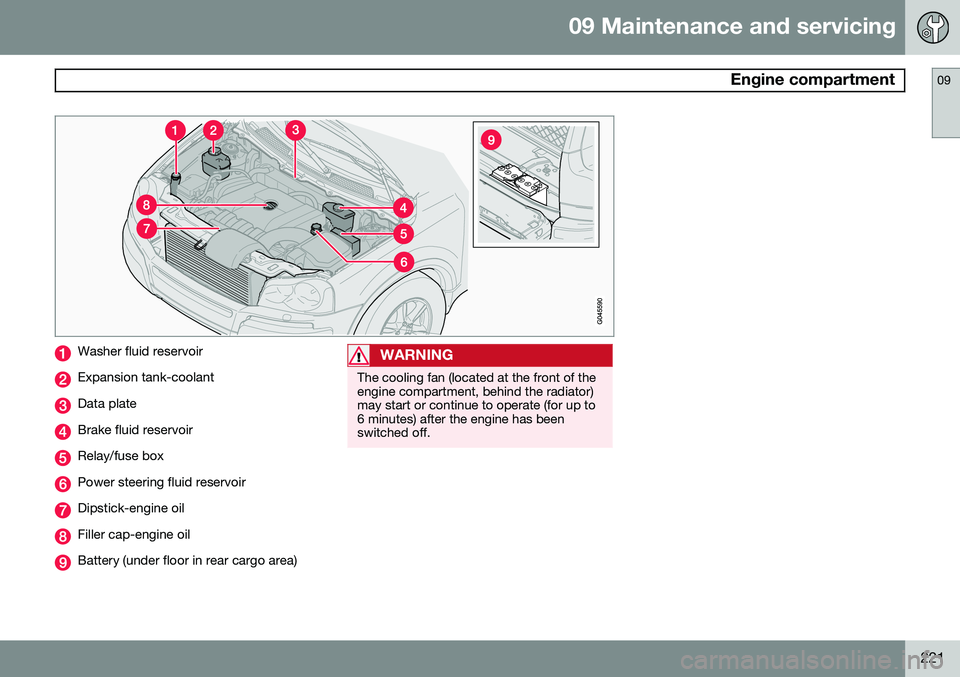
Washer fluid reservoir
Expansion tank-coolant
Data plate
Brake fluid reservoir
Relay/fuse box
Power steering fluid reservoir
Dipstick-engine oil
Filler cap-engine oil
Battery (under floor in rear cargo area)
WARNING
The cooling fan (located at the front of the engine compartment, behind the radiator)may start or continue to operate (for up to6 minutes) after the engine has beenswitched off.
Page 227 of 308
09 Maintenance and servicing
Fluids09
225
WARNING
•Never remove the coolant reservoir cap while the engine is warm. Waituntil the engine cools.
• If it is necessary to top up the coolantwhen the engine is warm, unscrew thecoolant reservoir cap slowly so thatthe overpressure dissipates.
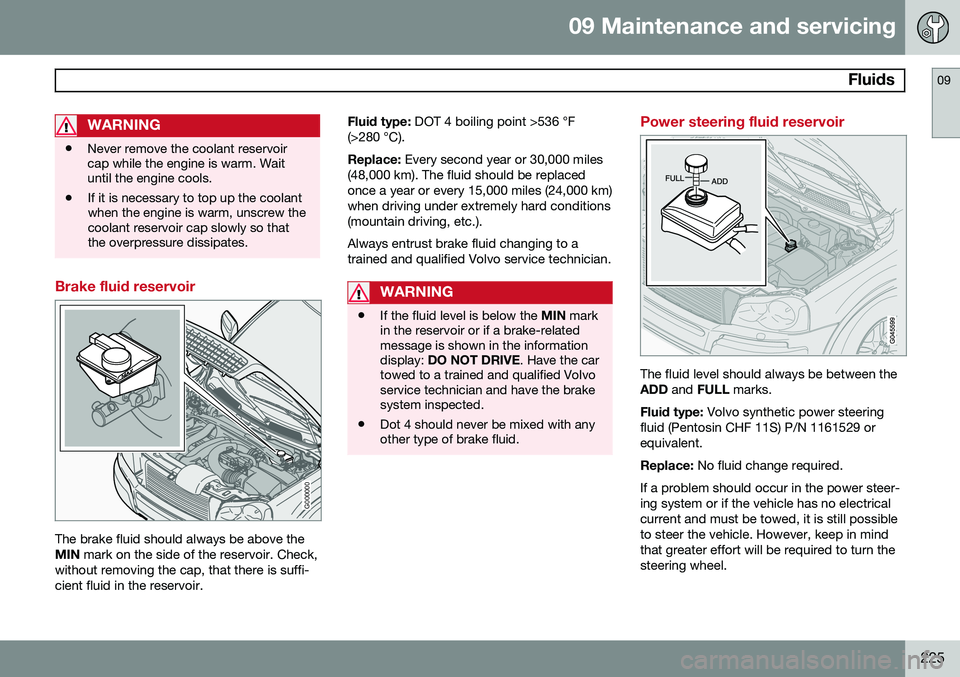
Brake fluid reservoir
G000000
The brake fluid should always be above the MIN
mark on the side of the reservoir. Check,
without removing the cap, that there is suffi-cient fluid in the reservoir. Fluid type:
DOT 4 boiling point >536 °F
(>280 °C). Replace: Every second year or 30,000 miles
(48,000 km). The fluid should be replaced once a year or every 15,000 miles (24,000 km)when driving under extremely hard conditions(mountain driving, etc.). Always entrust brake fluid changing to a trained and qualified Volvo service technician.
WARNING
• If the fluid level is below the
MIN mark
in the reservoir or if a brake-related message is shown in the informationdisplay: DO NOT DRIVE . Have the car
towed to a trained and qualified Volvoservice technician and have the brakesystem inspected.
• Dot 4 should never be mixed with anyother type of brake fluid.
Power steering fluid reservoir
The fluid level should always be between the ADD
and FULL marks.
Fluid type: Volvo synthetic power steering
fluid (Pentosin CHF 11S) P/N 1161529 orequivalent. Replace: No fluid change required.
If a problem should occur in the power steer- ing system or if the vehicle has no electricalcurrent and must be towed, it is still possibleto steer the vehicle. However, keep in mindthat greater effort will be required to turn thesteering wheel.
Page 244 of 308
09 Maintenance and servicing
Fuses 09
242* Option/accessory, for more information, see Introduction.
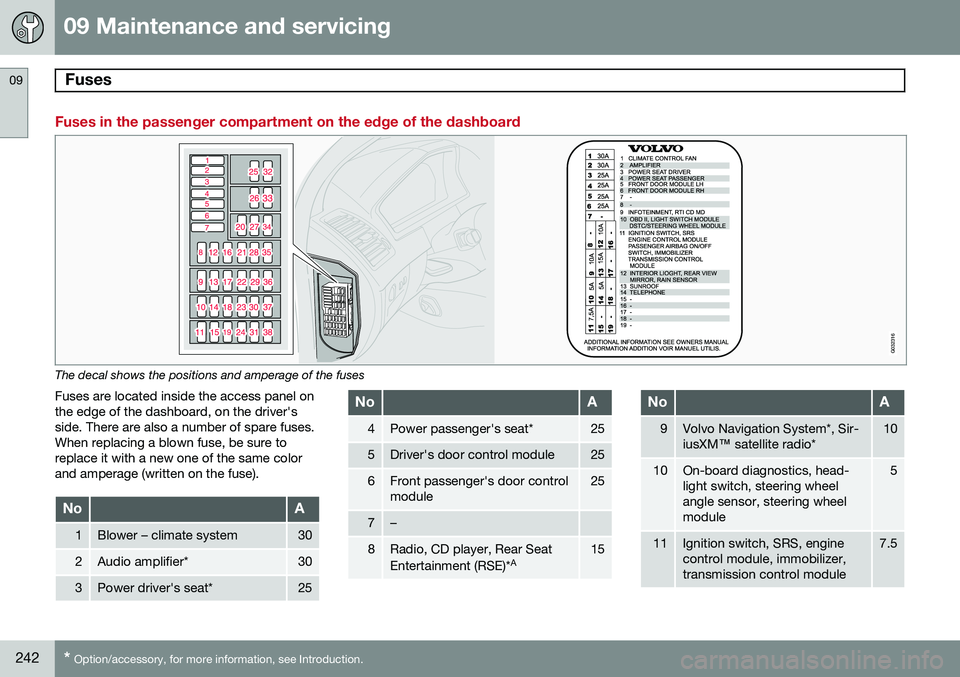
Fuses in the passenger compartment on the edge of the dashboard
G032316
The decal shows the positions and amperage of the fuses
Fuses are located inside the access panel on the edge of the dashboard, on the driver'sside. There are also a number of spare fuses.When replacing a blown fuse, be sure toreplace it with a new one of the same colorand amperage (written on the fuse).
NoA
1Blower – climate system30
2Audio amplifier*30
3Power driver's seat*25
NoA
4Power passenger's seat*25
5Driver's door control module25
6Front passenger's door control module25
7–
8Radio, CD player, Rear Seat Entertainment (RSE)* A15
NoA
9Volvo Navigation System*, Sir- iusXM
™ satellite radio*10
10On-board diagnostics, head- light switch, steering wheelangle sensor, steering wheelmodule5
11Ignition switch, SRS, engine control module, immobilizer,transmission control module7.5
Page 246 of 308
09 Maintenance and servicing
Fuses 09
244* Option/accessory, for more information, see Introduction.
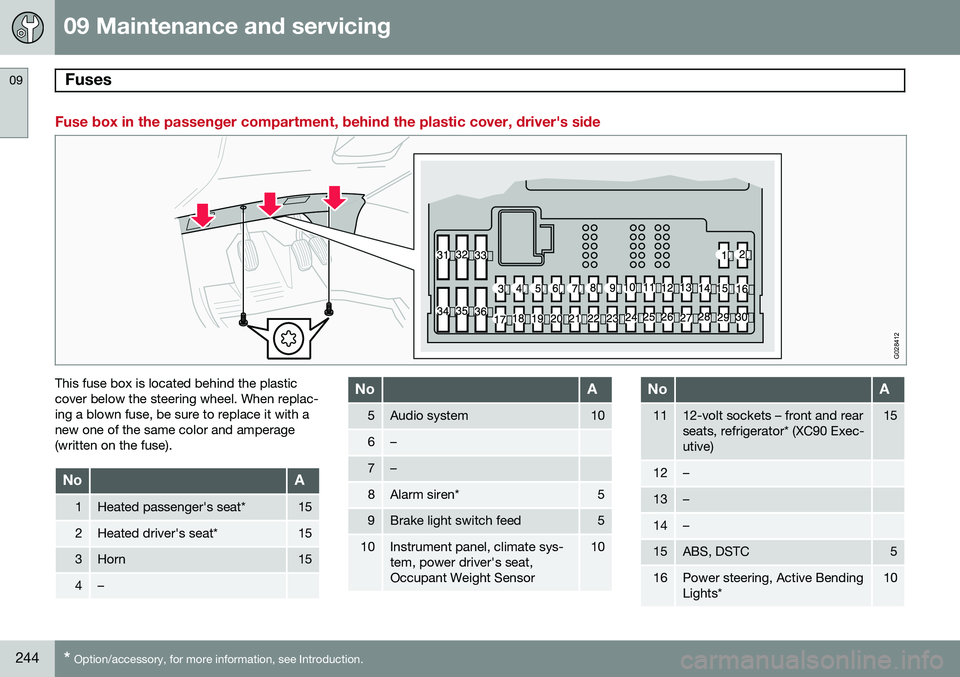
Fuse box in the passenger compartment, behind the plastic cover, driver's side
G028412
This fuse box is located behind the plastic cover below the steering wheel. When replac-ing a blown fuse, be sure to replace it with anew one of the same color and amperage(written on the fuse).
NoA
1Heated passenger's seat*15
2Heated driver's seat*15
3Horn15
4–
NoA
5Audio system10
6–
7–
8Alarm siren*5
9Brake light switch feed5
10Instrument panel, climate sys- tem, power driver's seat,Occupant Weight Sensor10
NoA
1112-volt sockets – front and rear seats, refrigerator* (XC90 Exec-utive)15
12–
13–
14–
15ABS, DSTC5
16Power steering, Active Bending Lights*10
Page 255 of 308
10 Audio
Audio system controls
10
}}
253
Steering wheel keypad
G027135
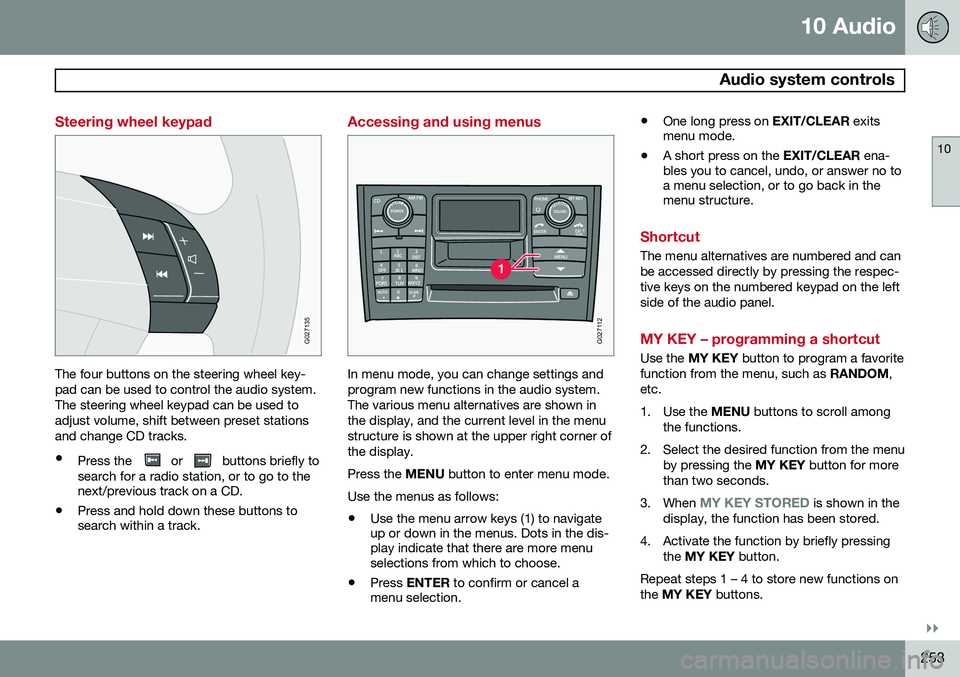
The four buttons on the steering wheel key- pad can be used to control the audio system.The steering wheel keypad can be used toadjust volume, shift between preset stationsand change CD tracks.
• Press the
or buttons briefly to
search for a radio station, or to go to the next/previous track on a CD.
• Press and hold down these buttons tosearch within a track.
Accessing and using menus
G027112
In menu mode, you can change settings and program new functions in the audio system.The various menu alternatives are shown inthe display, and the current level in the menustructure is shown at the upper right corner ofthe display. Press the
MENU button to enter menu mode.
Use the menus as follows:
• Use the menu arrow keys (1) to navigate up or down in the menus. Dots in the dis-play indicate that there are more menuselections from which to choose.
• Press
ENTER to confirm or cancel a
menu selection. •
One long press on
EXIT/CLEAR exits
menu mode.
• A short press on the
EXIT/CLEAR ena-
bles you to cancel, undo, or answer no toa menu selection, or to go back in themenu structure.
Shortcut
The menu alternatives are numbered and can be accessed directly by pressing the respec-tive keys on the numbered keypad on the leftside of the audio panel.
MY KEY – programming a shortcut
Use the MY KEY button to program a favorite
function from the menu, such as RANDOM,
etc.
1. Use the MENU buttons to scroll among
the functions.
2. Select the desired function from the menu by pressing the MY KEY button for more
than two seconds.
3. When
MY KEY STORED is shown in the
display, the function has been stored.
4. Activate the function by briefly pressing the MY KEY button.
Repeat steps 1 – 4 to store new functions on the MY KEY buttons.
Page 257 of 308
10 Audio
Audio system controls
10
* Option/accessory, for more information, see Introduction.255
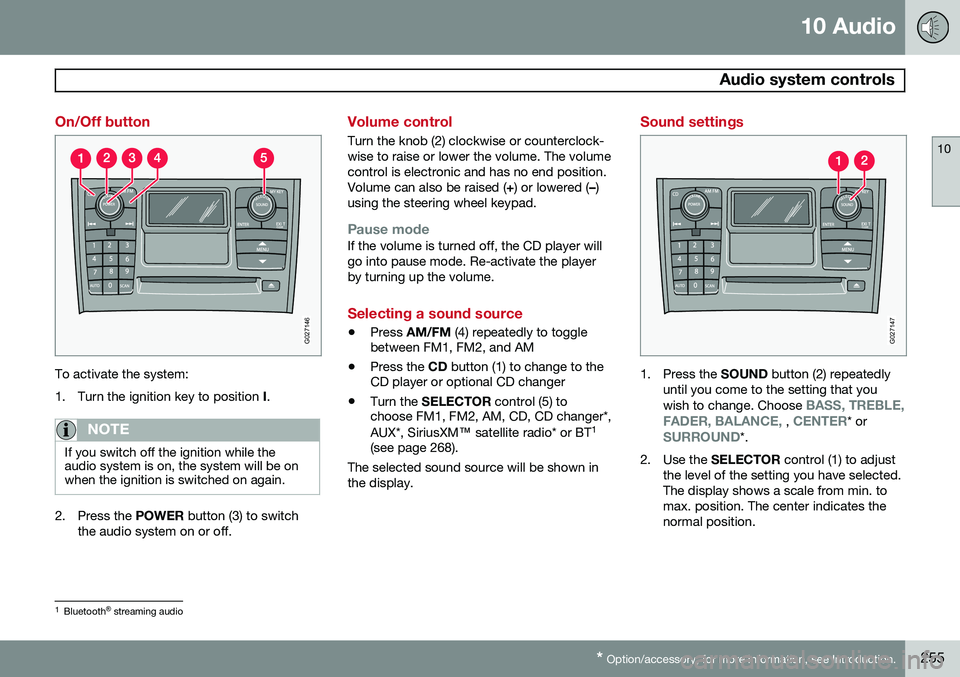
On/Off button
G027146
To activate the system:
1. Turn the ignition key to position I.
NOTE
If you switch off the ignition while the audio system is on, the system will be onwhen the ignition is switched on again.
2. Press the POWER button (3) to switch
the audio system on or off.
Volume control
Turn the knob (2) clockwise or counterclock- wise to raise or lower the volume. The volumecontrol is electronic and has no end position.Volume can also be raised ( +) or lowered ( –)
using the steering wheel keypad.
Pause modeIf the volume is turned off, the CD player will go into pause mode. Re-activate the playerby turning up the volume.
Selecting a sound source
• Press
AM/FM (4) repeatedly to toggle
between FM1, FM2, and AM
• Press the
CD button (1) to change to the
CD player or optional CD changer
• Turn the
SELECTOR control (5) to
choose FM1, FM2, AM, CD, CD changer*, AUX*, SiriusXM ™ satellite radio* or BT 1
(see page 268).
The selected sound source will be shown in the display.
Sound settings
G027147
1. Press the SOUND button (2) repeatedly
until you come to the setting that you wish to change. Choose
BASS, TREBLE,
FADER, BALANCE, , CENTER* orSURROUND*.
2. Use the SELECTOR control (1) to adjust
the level of the setting you have selected. The display shows a scale from min. tomax. position. The center indicates thenormal position.
1 Bluetooth ®
streaming audio
Page 260 of 308
10 Audio
Radio functions
10
258
Station search
G027148
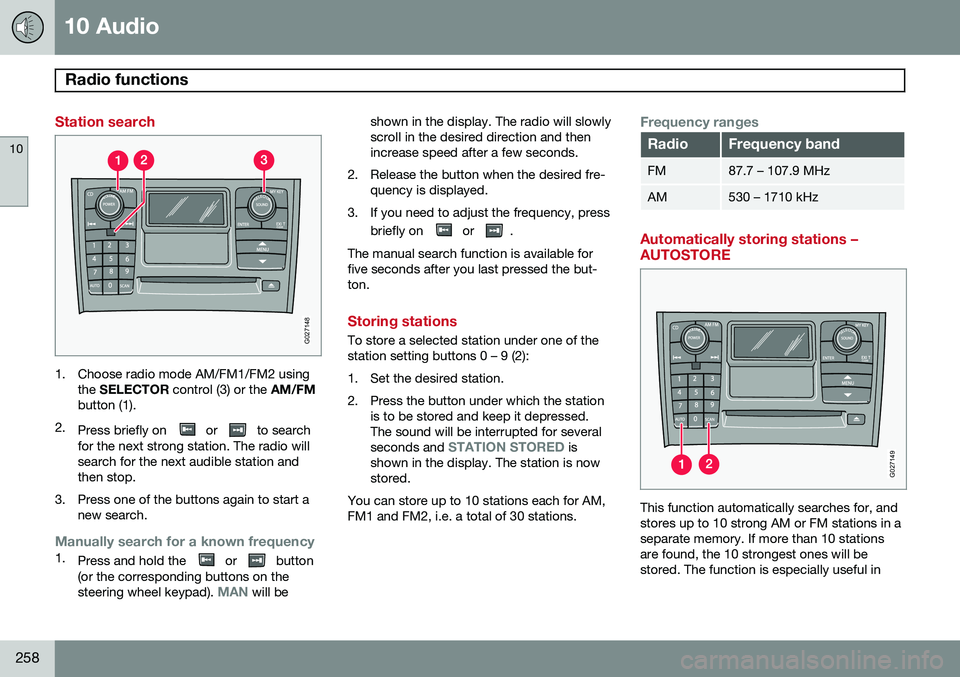
1. Choose radio mode AM/FM1/FM2 usingthe SELECTOR control (3) or the AM/FM
button (1).
2. Press briefly on
or to search
for the next strong station. The radio will search for the next audible station andthen stop.
3. Press one of the buttons again to start a new search.
Manually search for a known frequency1.Press and hold the or button
(or the corresponding buttons on the steering wheel keypad).
MAN will be shown in the display. The radio will slowly scroll in the desired direction and thenincrease speed after a few seconds.
2. Release the button when the desired fre- quency is displayed.
3. If you need to adjust the frequency, press briefly on
or .
The manual search function is available for five seconds after you last pressed the but-ton.
Storing stations
To store a selected station under one of the station setting buttons 0 – 9 (2):
1. Set the desired station.
2. Press the button under which the station is to be stored and keep it depressed. The sound will be interrupted for several seconds and
STATION STORED is
shown in the display. The station is now stored.
You can store up to 10 stations each for AM,FM1 and FM2, i.e. a total of 30 stations.
Frequency ranges
RadioFrequency band
FM87.7 – 107.9 MHz
AM530 – 1710 kHz
Automatically storing stations – AUTOSTORE
G027149
This function automatically searches for, and stores up to 10 strong AM or FM stations in aseparate memory. If more than 10 stationsare found, the 10 strongest ones will bestored. The function is especially useful in
Page 264 of 308
10 Audio
Radio functions
10
262
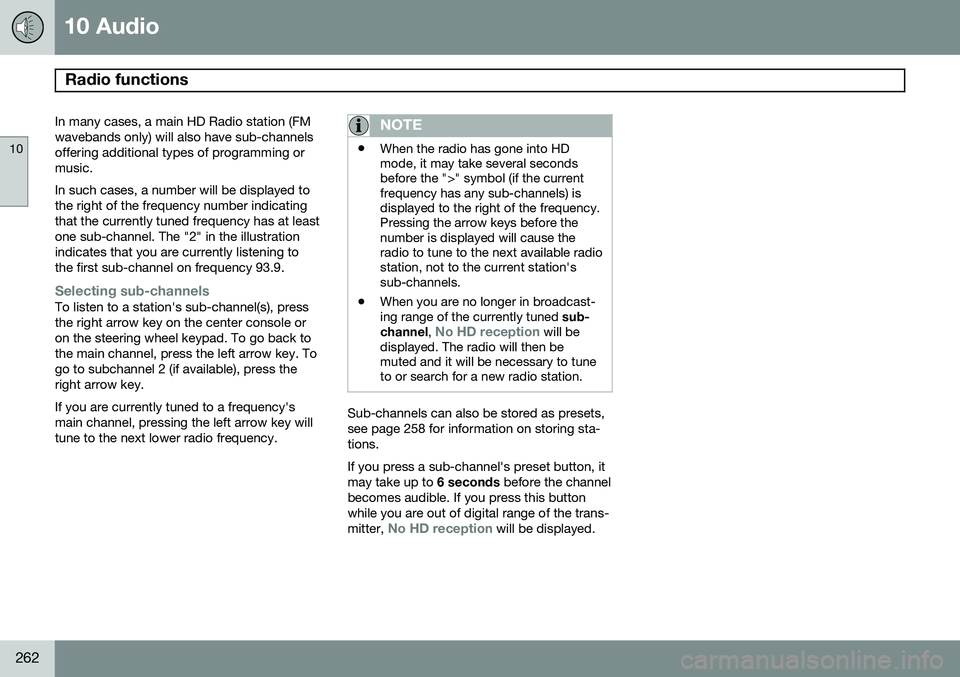
In many cases, a main HD Radio station (FM wavebands only) will also have sub-channelsoffering additional types of programming ormusic. In such cases, a number will be displayed to the right of the frequency number indicatingthat the currently tuned frequency has at leastone sub-channel. The "2" in the illustrationindicates that you are currently listening tothe first sub-channel on frequency 93.9.
Selecting sub-channelsTo listen to a station's sub-channel(s), press the right arrow key on the center console oron the steering wheel keypad. To go back tothe main channel, press the left arrow key. Togo to subchannel 2 (if available), press theright arrow key. If you are currently tuned to a frequency's main channel, pressing the left arrow key willtune to the next lower radio frequency.
NOTE
•When the radio has gone into HD mode, it may take several secondsbefore the ">" symbol (if the currentfrequency has any sub-channels) isdisplayed to the right of the frequency.Pressing the arrow keys before thenumber is displayed will cause theradio to tune to the next available radiostation, not to the current station'ssub-channels.
• When you are no longer in broadcast-ing range of the currently tuned
sub-
channel ,
No HD reception will be
displayed. The radio will then be muted and it will be necessary to tuneto or search for a new radio station.
Sub-channels can also be stored as presets, see page 258 for information on storing sta-tions. If you press a sub-channel's preset button, it may take up to 6 seconds before the channel
becomes audible. If you press this buttonwhile you are out of digital range of the trans- mitter,
No HD reception will be displayed.