steering VOLVO XC90 2014 Owner´s Manual
[x] Cancel search | Manufacturer: VOLVO, Model Year: 2014, Model line: XC90, Model: VOLVO XC90 2014Pages: 308, PDF Size: 13.31 MB
Page 68 of 308
02 Instruments and controls
Steering wheel adjustment
02
66
G026999
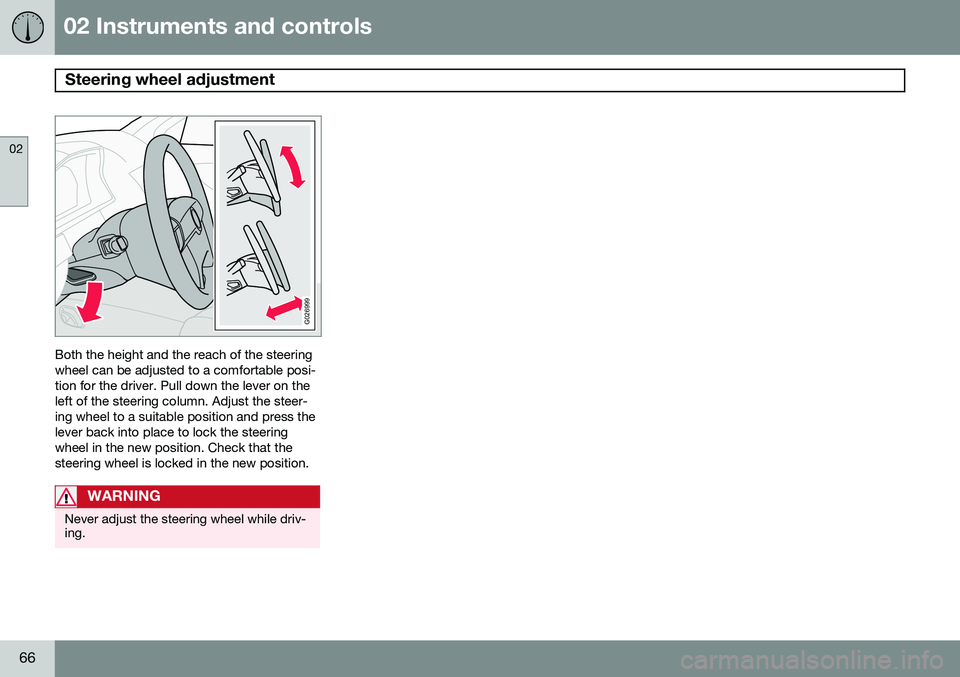
Both the height and the reach of the steering wheel can be adjusted to a comfortable posi-tion for the driver. Pull down the lever on theleft of the steering column. Adjust the steer-ing wheel to a suitable position and press thelever back into place to lock the steeringwheel in the new position. Check that thesteering wheel is locked in the new position.
WARNING
Never adjust the steering wheel while driv- ing.
Page 69 of 308
02 Instruments and controls
Lighting panel
02
}}
* Option/accessory, for more information, see Introduction.67
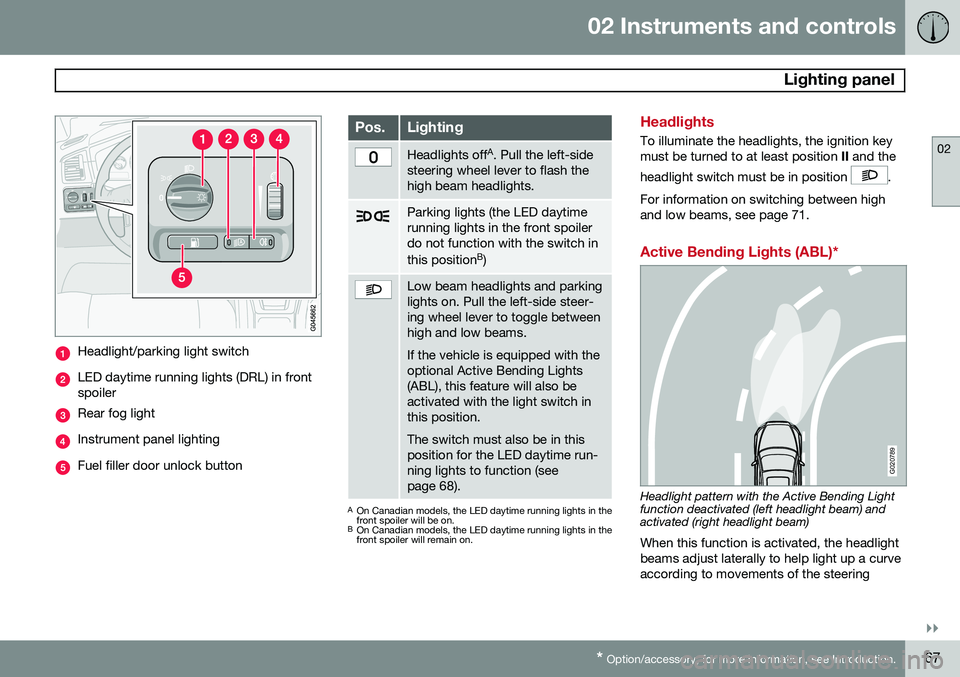
Headlight/parking light switch
LED daytime running lights (DRL) in front spoiler
Rear fog light
Instrument panel lighting
Fuel filler door unlock button
Pos.Lighting
Headlights off A
. Pull the left-side
steering wheel lever to flash the high beam headlights.
Parking lights (the LED daytime running lights in the front spoilerdo not function with the switch in this position B
)
Low beam headlights and parking lights on. Pull the left-side steer-ing wheel lever to toggle betweenhigh and low beams. If the vehicle is equipped with the optional Active Bending Lights(ABL), this feature will also beactivated with the light switch inthis position. The switch must also be in this position for the LED daytime run-ning lights to function (seepage 68).
A On Canadian models, the LED daytime running lights in the front spoiler will be on.
B On Canadian models, the LED daytime running lights in thefront spoiler will remain on.
Headlights
To illuminate the headlights, the ignition key must be turned to at least position II and the
headlight switch must be in position
.
For information on switching between high and low beams, see page 71.
Active Bending Lights (ABL)*
G020789
Headlight pattern with the Active Bending Light function deactivated (left headlight beam) andactivated (right headlight beam) When this function is activated, the headlight beams adjust laterally to help light up a curveaccording to movements of the steering
Page 73 of 308
02 Instruments and controls
Left-side steering wheel lever
02
71
Lever positions
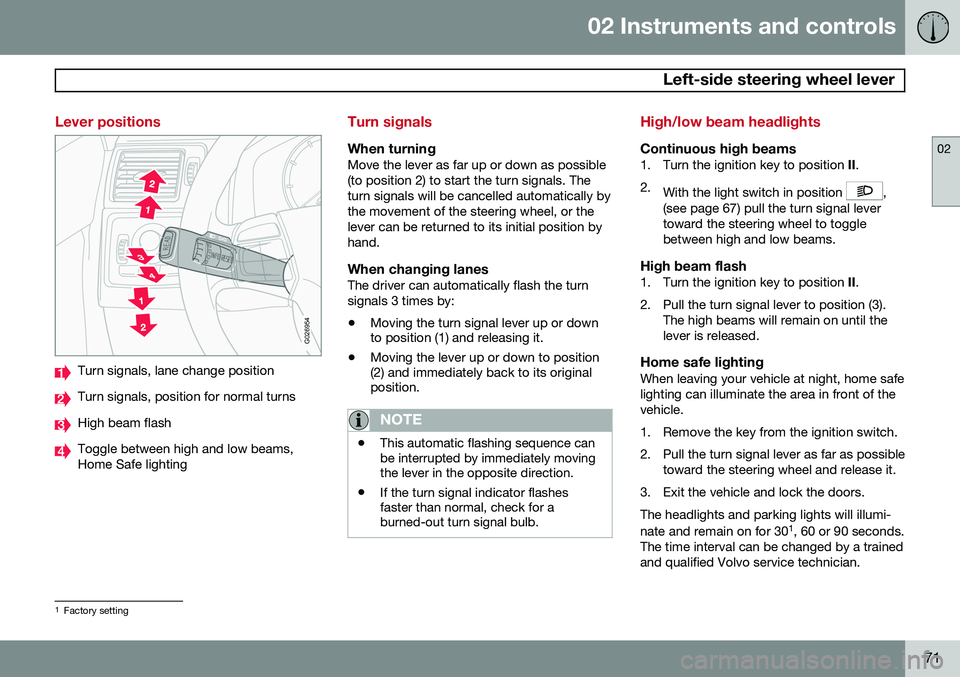
G026954
Turn signals, lane change position
Turn signals, position for normal turns
High beam flash
Toggle between high and low beams, Home Safe lighting
Turn signals
When turningMove the lever as far up or down as possible (to position 2) to start the turn signals. Theturn signals will be cancelled automatically bythe movement of the steering wheel, or thelever can be returned to its initial position byhand.
When changing lanesThe driver can automatically flash the turnsignals 3 times by:• Moving the turn signal lever up or down to position (1) and releasing it.
• Moving the lever up or down to position(2) and immediately back to its originalposition.
NOTE
• This automatic flashing sequence can be interrupted by immediately movingthe lever in the opposite direction.
• If the turn signal indicator flashesfaster than normal, check for aburned-out turn signal bulb.
High/low beam headlights
Continuous high beams1. Turn the ignition key to position
II.
2. With the light switch in position
,
(see page 67) pull the turn signal lever toward the steering wheel to togglebetween high and low beams.
High beam flash1. Turn the ignition key to position II.
2. Pull the turn signal lever to position (3). The high beams will remain on until thelever is released.
Home safe lightingWhen leaving your vehicle at night, home safelighting can illuminate the area in front of thevehicle.
1. Remove the key from the ignition switch.
2. Pull the turn signal lever as far as possibletoward the steering wheel and release it.
3. Exit the vehicle and lock the doors.The headlights and parking lights will illumi- nate and remain on for 30 1
, 60 or 90 seconds.
The time interval can be changed by a trained and qualified Volvo service technician.
1 Factory setting
Page 74 of 308
02 Instruments and controls
Right-side steering wheel lever
02
72
Windshield wipers
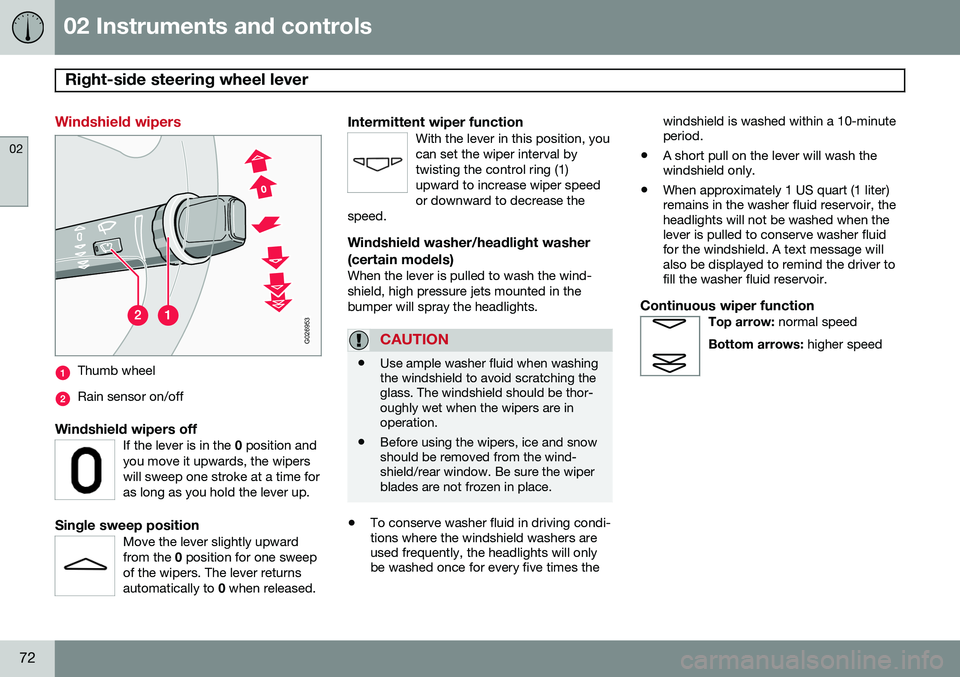
G026953
Thumb wheel
Rain sensor on/off
Windshield wipers offIf the lever is in the 0 position and
you move it upwards, the wipers will sweep one stroke at a time foras long as you hold the lever up.
Single sweep positionMove the lever slightly upward from the 0 position for one sweep
of the wipers. The lever returnsautomatically to 0 when released.
Intermittent wiper functionWith the lever in this position, you can set the wiper interval bytwisting the control ring (1)upward to increase wiper speedor downward to decrease the
speed.
Windshield washer/headlight washer (certain models)
When the lever is pulled to wash the wind- shield, high pressure jets mounted in thebumper will spray the headlights.
CAUTION
• Use ample washer fluid when washing the windshield to avoid scratching theglass. The windshield should be thor-oughly wet when the wipers are inoperation.
• Before using the wipers, ice and snowshould be removed from the wind-shield/rear window. Be sure the wiperblades are not frozen in place.
•
To conserve washer fluid in driving condi- tions where the windshield washers areused frequently, the headlights will onlybe washed once for every five times the windshield is washed within a 10-minuteperiod.
• A short pull on the lever will wash thewindshield only.
• When approximately 1 US quart (1 liter)remains in the washer fluid reservoir, theheadlights will not be washed when thelever is pulled to conserve washer fluidfor the windshield. A text message willalso be displayed to remind the driver tofill the washer fluid reservoir.
Continuous wiper functionTop arrow:
normal speed
Bottom arrows: higher speed
Page 75 of 308
02 Instruments and controls
Right-side steering wheel lever
02
* Option/accessory, for more information, see Introduction.73
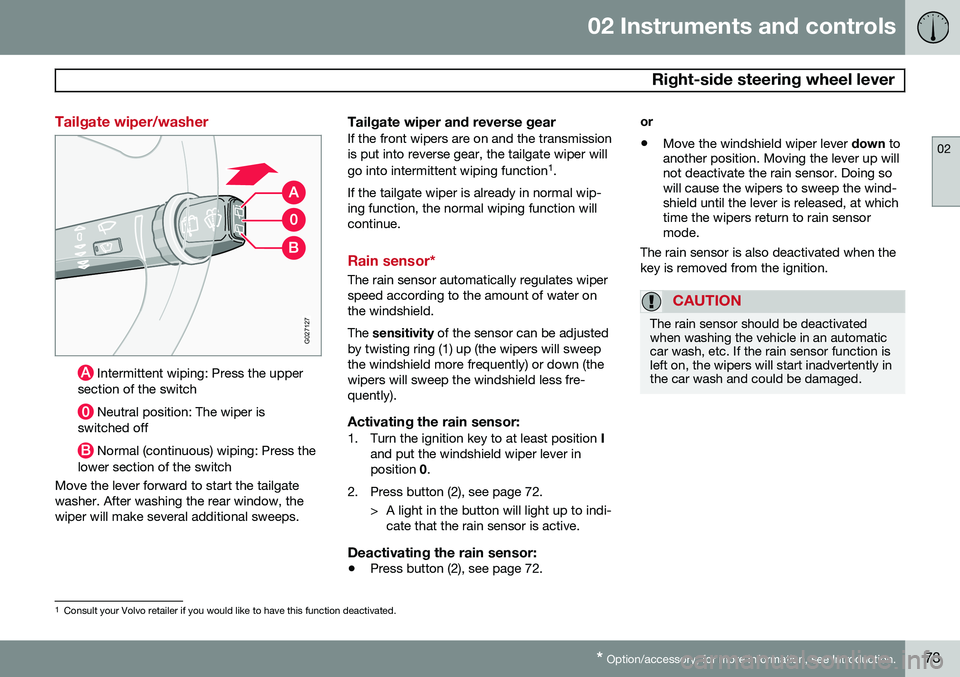
Tailgate wiper/washer
G027127
Intermittent wiping: Press the upper
section of the switch
Neutral position: The wiper is
switched off
Normal (continuous) wiping: Press the
lower section of the switch
Move the lever forward to start the tailgate washer. After washing the rear window, thewiper will make several additional sweeps.
Tailgate wiper and reverse gearIf the front wipers are on and the transmissionis put into reverse gear, the tailgate wiper will go into intermittent wiping function 1
.
If the tailgate wiper is already in normal wip- ing function, the normal wiping function willcontinue.
Rain sensor*
The rain sensor automatically regulates wiper speed according to the amount of water onthe windshield. The sensitivity of the sensor can be adjusted
by twisting ring (1) up (the wipers will sweep the windshield more frequently) or down (thewipers will sweep the windshield less fre-quently).
Activating the rain sensor:1. Turn the ignition key to at least position I
and put the windshield wiper lever inposition 0.
2. Press button (2), see page 72. > A light in the button will light up to indi-cate that the rain sensor is active.
Deactivating the rain sensor:
• Press button (2), see page 72. or •
Move the windshield wiper lever
down to
another position. Moving the lever up will not deactivate the rain sensor. Doing sowill cause the wipers to sweep the wind-shield until the lever is released, at whichtime the wipers return to rain sensormode.
The rain sensor is also deactivated when the key is removed from the ignition.
CAUTION
The rain sensor should be deactivated when washing the vehicle in an automaticcar wash, etc. If the rain sensor function isleft on, the wipers will start inadvertently inthe car wash and could be damaged.
1 Consult your Volvo retailer if you would like to have this function deactivated.
Page 76 of 308
02 Instruments and controls
Right-side steering wheel lever
02
74* Option/accessory, for more information, see Introduction.
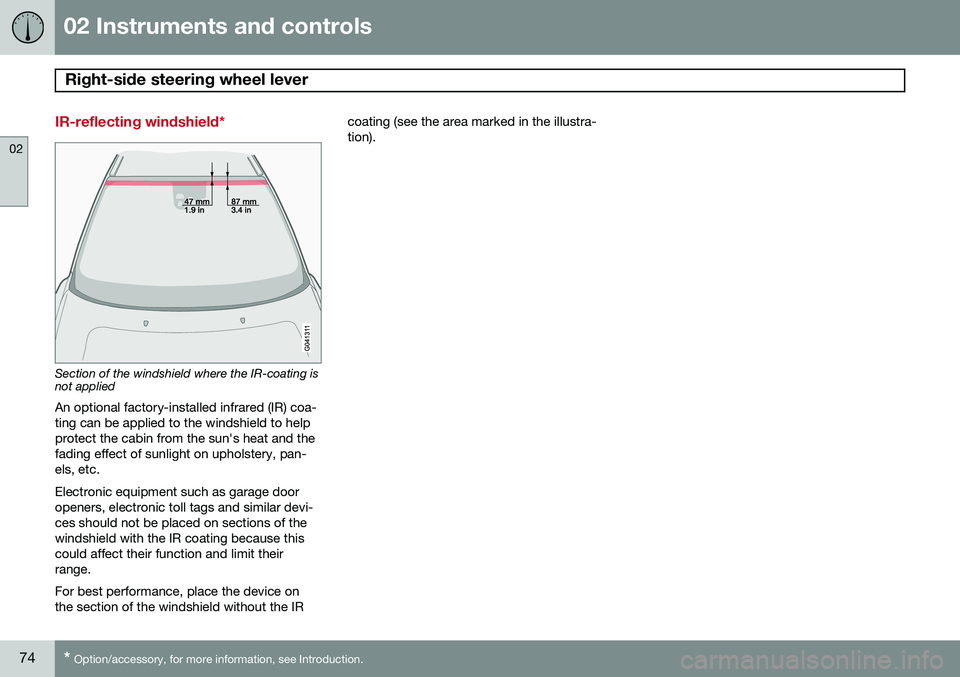
IR-reflecting windshield*
Section of the windshield where the IR-coating is not applied
An optional factory-installed infrared (IR) coa- ting can be applied to the windshield to helpprotect the cabin from the sun's heat and thefading effect of sunlight on upholstery, pan-els, etc. Electronic equipment such as garage door openers, electronic toll tags and similar devi-ces should not be placed on sections of thewindshield with the IR coating because thiscould affect their function and limit theirrange. For best performance, place the device on the section of the windshield without the IR coating (see the area marked in the illustra-tion).
Page 80 of 308
02 Instruments and controls
Cruise control
02
78
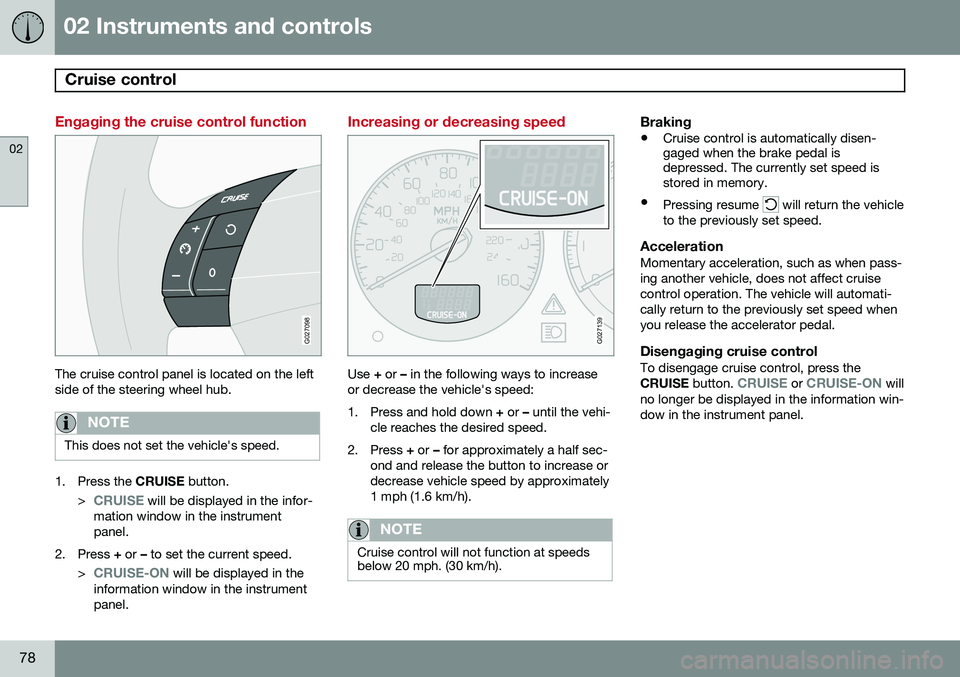
Engaging the cruise control function
G027098
The cruise control panel is located on the left side of the steering wheel hub.
NOTE
This does not set the vehicle's speed.
1. Press the CRUISE button.
>
CRUISE will be displayed in the infor-
mation window in the instrument panel.
2. Press + or – to set the current speed.
>
CRUISE-ON will be displayed in the
information window in the instrument panel.
Increasing or decreasing speed
G027139
Use + or – in the following ways to increase
or decrease the vehicle's speed:
1. Press and hold down + or – until the vehi-
cle reaches the desired speed.
2. Press + or – for approximately a half sec-
ond and release the button to increase or decrease vehicle speed by approximately1 mph (1.6 km/h).
NOTE
Cruise control will not function at speeds below 20 mph. (30 km/h).
Braking
• Cruise control is automatically disen- gaged when the brake pedal isdepressed. The currently set speed isstored in memory.
• Pressing resume
will return the vehicle
to the previously set speed.
AccelerationMomentary acceleration, such as when pass- ing another vehicle, does not affect cruisecontrol operation. The vehicle will automati-cally return to the previously set speed whenyou release the accelerator pedal.
Disengaging cruise controlTo disengage cruise control, press the CRUISE button. CRUISE or CRUISE-ON will
no longer be displayed in the information win- dow in the instrument panel.
Page 132 of 308
05 Locks and alarm
Locking and unlocking
05
130
G029646
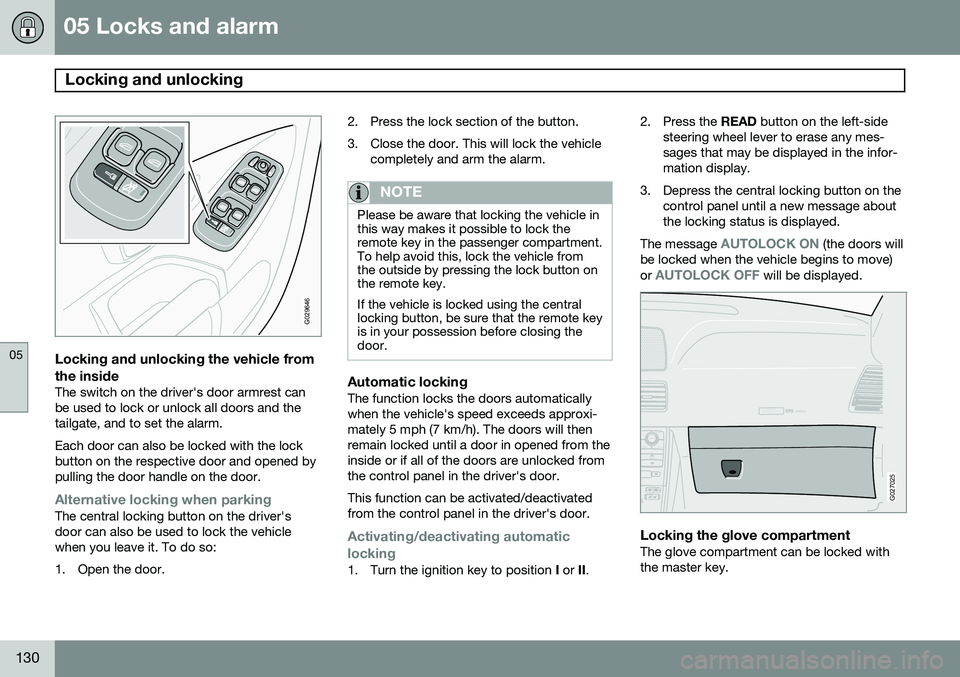
Locking and unlocking the vehicle from
the inside
The switch on the driver's door armrest can be used to lock or unlock all doors and thetailgate, and to set the alarm. Each door can also be locked with the lock button on the respective door and opened bypulling the door handle on the door.
Alternative locking when parkingThe central locking button on the driver's door can also be used to lock the vehiclewhen you leave it. To do so:
1. Open the door. 2. Press the lock section of the button.
3. Close the door. This will lock the vehicle
completely and arm the alarm.
NOTE
Please be aware that locking the vehicle in this way makes it possible to lock theremote key in the passenger compartment.To help avoid this, lock the vehicle fromthe outside by pressing the lock button onthe remote key. If the vehicle is locked using the central locking button, be sure that the remote keyis in your possession before closing thedoor.
Automatic lockingThe function locks the doors automatically when the vehicle's speed exceeds approxi-mately 5 mph (7 km/h). The doors will thenremain locked until a door in opened from theinside or if all of the doors are unlocked fromthe control panel in the driver's door. This function can be activated/deactivated from the control panel in the driver's door.
Activating/deactivating automatic
locking
1. Turn the ignition key to position I or II. 2. Press the
READ button on the left-side
steering wheel lever to erase any mes- sages that may be displayed in the infor-mation display.
3. Depress the central locking button on the control panel until a new message aboutthe locking status is displayed.
The message
AUTOLOCK ON (the doors will
be locked when the vehicle begins to move) or
AUTOLOCK OFF will be displayed.
ATTENTIONPakjdskdl ioiuip kjöpp opoodidåuswi
CSOUND
MENU
80
ENTERLSEEEXITMY KEYRTO
AIRBAG
G027025
Locking the glove compartmentThe glove compartment can be locked with the master key.
Page 138 of 308
136* Option/accessory, for more information, see Introduction. General information............................................................................... 138
Fuel requirements................................................................................. 139Refueling............................................................................................... 141
Starting the vehicle............................................................................... 143
Ignition switch and steering wheel lock................................................ 145
Economical driving................................................................................ 146
Difficult driving conditions..................................................................... 147
Automatic transmission........................................................................ 149Jump starting........................................................................................ 152All Wheel Drive*..................................................................................... 153
Brake system........................................................................................154Parking brake........................................................................................ 157Stability system..................................................................................... 158
Front/rear park assist*........................................................................... 160Towing.................................................................................................. 162Towing a trailer...................................................................................... 164
Detachable trailer hitch......................................................................... 167
Load carriers (accessory)...................................................................... 168
Cold weather precautions..................................................................... 169
Before a long distance trip.................................................................... 170
Blind Spot Information System*............................................................ 171
Page 142 of 308
06 Starting and driving
Fuel requirements
06
140
WARNING
Driving with the tailgate open: Driving
with the tailgate open could lead to poi- sonous exhaust gases entering the pas-senger compartment.
• If the tailgate must be kept open for any reason, proceed as follows:
• Close the windows
• Set the ventilation system control to airflow to floor, windshield and side win-dows and blower control to its highestsetting.
Gasoline containing alcohol and ethers, "Oxygenated fuels"
Some fuel suppliers sell gasoline containing "oxygenates" which are usually alcohols orethers. In some areas, state or local lawsrequire that the service pump be marked indi-cating use of alcohols or ethers. However,there are areas in which the pumps areunmarked. If you are not sure whether there isalcohol or ethers in the gasoline you buy,check with the service station operator. Tomeet seasonal air quality standards, someareas require the use of "oxygenated" fuel. Volvo allows the use of the following "oxy- genated" fuels; however, the octane ratingslisted on page 139 must still be met.
Alcohol – EthanolFuels containing up to 10% ethanol by vol- ume may be used. Ethanol may also be refer-red to as Ethyl alcohol, or "Gasohol". Ethers – MTBE: Fuels containing up to 15% MTBE may be used.
MethanolDo not use gasolines containing methanol(methyl alcohol, wood alcohol). This practicecan result in vehicle performance deteriora-tion and can damage critical parts in the fuelsystem. Such damage may not be coveredunder the New Vehicle Limited Warranty.
Weight distribution affects handlingAt the specified curb weight your vehicle hasa tendency to understeer, which means thatthe steering wheel has to be turned morethan might seem appropriate for the curva-ture of a bend. This ensures good stability and reduces the risk of rear wheel skid. Remember that theseproperties can alter with the vehicle load. The heavier the load in the cargo area, the less the tendency to understeer.
Handling, roadholdingVehicle load, tire design and inflation pres-sure all affect vehicle handling. Therefore,check that the tires are inflated to the recom- mended pressure according to the vehicleload. See "Tire pressure" section. Loads should be distributed so that capacity weight or maximum permissible axle loadsare not exceeded.
Conserving electrical currentKeep the following in mind to help minimizebattery drain:
• When the engine is not running, avoid turning the ignition key to position
II (see
page 145). Many electrical systems (theaudio system, the optional infotainment/navigation systems, power windows, etc)will function with the ignition key in posi-tion I. This position reduces drain on the
battery.
• Please keep in mind that using systems,accessories, etc that consume a greatdeal of current when the engine is notrunning could result in the battery beingcompletely drained. Driving or having theengine running for approximately15 minutes will help keep the batterycharged.
NOTE
A warning message will be displayed in the text window in the instrument panel whenthe battery charge is low.