lock VOLVO XC90 2014 Owner´s Manual
[x] Cancel search | Manufacturer: VOLVO, Model Year: 2014, Model line: XC90, Model: VOLVO XC90 2014Pages: 308, PDF Size: 13.31 MB
Page 203 of 308
07 Wheels and tires
Changing wheels
07
201
the vehicle, check that the jack is still cor- rectly positioned in the attachment.
7. Raise the vehicle until the wheel to be changed is lifted off the ground.
8. Unscrew the wheel bolts completely and carefully remove the wheel so as not todamage the threads on the studs.
NOTE
To avoid excessive wear and the necessity of rebalancing, mark and reinstall wheelsin the same location and position as beforeremoval. To lessen the chance of imbal-ance, each wheel hub is equipped with aguide stud to ensure that a removed wheelcan be reinstalled in its original position (aswhen changing over to winter tires/wheels).
CAUTION
•The vehicle must not be driven with wheels of different dimensions or witha spare tire other than the one thatcame with the vehicle. The use of dif-ferent size wheels can seriously dam-age your vehicle's transmission.
• Correct tightening torque on wheelbolts must be observed.
• The wheel bolts should never begreased or lubricated.
• Extended, chromed wheel bolts mustnot be used with steel rims, as theymake it impossible to fit the hub caps.
Installing the wheel1. Clean the contact surfaces on the wheel
and hub.
2. Lift the wheel and place it on the hub.
3. Install the wheel bolts and tighten hand- tight. Using the lug wrench, tighten cross- wise until all bolts are snug.
4. Lower the vehicle to the ground and alter- nately tighten the bolts crosswise to103 ft.lbs. (140 Nm).
5. Install the wheel cover (where applicable).
WARNING
• The jack must correctly engage the bar in the jack attachment. The vehicle'sweight must not rest on the jackattachment. See illustration "Attachingthe jack" on the previous page.
• Be sure the jack is on a firm, level,non-slippery surface.
• Never allow any part of your body tobe extended under a vehicle suppor-ted by a jack.
• Use the jack intended for the vehiclewhen replacing a wheel. For any otherjob, use stands to support the side ofthe vehicle being worked on.
• Apply the parking brake and put thegear selector in the (
P)ark position.
• Block the wheels standing on theground, use rigid wooden blocks orlarge stones.
• The jack should be kept well-greasedand clean, and should not be dam-aged.
• No objects should be placed betweenthe base of jack and the ground, orbetween the jack and the attachmentbar on the vehicle.
Page 210 of 308
08 Car care
Washing and cleaning the vehicle
08
208
Washing
•The vehicle should be washed at regular intervals since dirt, dust, insects and tarspots adhere to the paint and may causedamage. It is particularly important towash the vehicle frequently in the winter-time to prevent corrosion, when salt hasbeen used on the roads.
• When washing the vehicle, do not exposeit to direct sunlight. Use lukewarm waterto soften the dirt before you wash with asponge, and plenty of water, to avoidscratching.
• Bird droppings: Remove from paintworkas soon as possible. Otherwise the finishmay be permanently damaged.
• A detergent can be used to facilitate thesoftening of dirt and oil.
CAUTION
Chromed wheels
: Clean chrome-plated
wheels using the same detergents used for the body of the vehicle. Aggressive wheelcleaning agents can permanently stainchrome-plated wheels.
• Dry the vehicle with a clean chamois and remember to clean the drain holes in thedoors and rocker panels.
• Tar spots can be removed with tarremover after the vehicle has beenwashed.
• A stiff-bristle brush and lukewarm soapywater can be used to clean the wiperblades. Frequent cleaning of the wind-shield and wiper blades improves visibilityconsiderably and also helps prolong theservice life of the wiper blades.
• Wash off the dirt from the underside(wheel housings, fenders, etc.).
• In areas of high industrial fallout, morefrequent washing is recommended.
Suitable detergentsSpecial vehicle washing detergents should be used. A suitable mixture is about 2.5 fl. oz.(8.5 cl) of detergent to 2.6 US gal. (10 liters) ofwarm water. After washing with a detergentthe vehicle should be well rinsed with cleanwater.
CAUTION
•Avoid waxing or polishing plastic or rubber components
• Polishing chromed strips can wearaway or damage the surface
• Polishes containing abrasive sub-stances should not be used
CAUTION
•Dirt, snow, etc., on the headlights can reduce lighting capacity considerably.Clean the headlights regularly, forexample when refueling.
• During high pressure washing, thespray mouthpiece must never becloser to the vehicle than 13 " (30 cm).Do not spray into the locks.
Special moonroof cautions:
• Always close the moonroof and sunshade before washing your vehicle.
• Never use abrasive cleaning agents onthe moonroof.
• Never use wax on the rubber sealsaround the moonroof.
Page 231 of 308
09 Maintenance and servicing
Battery09
229
4. Disconnect the negative (ground) cable
first.
5. Disconnect the positive cable and pull theventilation hose from the battery.
6. Lift out the old battery and put a new bat- tery into place.
7. Connect the positive cable first.
8. Connect the negative (ground) cable.
9. Be sure that the ventilation hose is securely connected to the battery and that the other end of the hose is properlyrouted through the ventilation opening inthe floor of the battery compartment.
G030884
Ventilation hose
10. Reinstall the cover and retaining bracket and screw it securely in place.
NOTE
After the battery has been disconnected or replaced, lock and unlock the vehicle withthe central locking system's remote key toreactivate such features as the power win-dows, moonroof, courtesy lighting, etc.
WARNING
•The battery generates hydrogen gas, which is flammable and explosive. Thebattery is fitted with a ventilation hosewhich vents hydrogen gas out of thebattery compartment through a venti-lation opening in the bottom of thiscompartment. If the battery must bereplaced, it is essential that the ventila-tion hose is properly connected to thebattery and that it is routed throughthe ventilation opening provided (seeillustration).
• Be sure the ventilation hose is free ofdebris.
• Only use replacement batteries equip-ped with a ventilation hose. Consult atrained and qualified Volvo servicetechnician.
Page 233 of 308
09 Maintenance and servicing
Replacing bulbs09
}}
* Option/accessory, for more information, see Introduction.231
G027083
Location of the bulbs in the headlight housing
G027082
Low/high beam (models with Active Bending Lights)*, Low beam (models withHalogen headlights)
High beam 1
(models with Halogen head-
lights)
Turn signal
Parking light
Side marker light
Replacing the low beam bulb (halogen headlights)
G027088
1. Remove the plastic cover over the bulb by turning it counterclockwise.
2. Pull the connector from the lamp housing.
3. Loosen the bulb's retaining spring by first moving it to the right and then moving it out of the way.
4. Pull out the bulb from the holder.
5. Insert the new bulb (without touching the glass) in the holder.
1This bulb has no function on models with the optional Active Bending Lights.
Page 234 of 308
09 Maintenance and servicing
Replacing bulbs 09
232
6. Move the retaining spring up and push itslightly to the left until it seats properly.
7. Press the bulb holder into place on the headlight housing.
8. Reinstall the plastic cap. The letters "HAUT " on the cap must be upward.
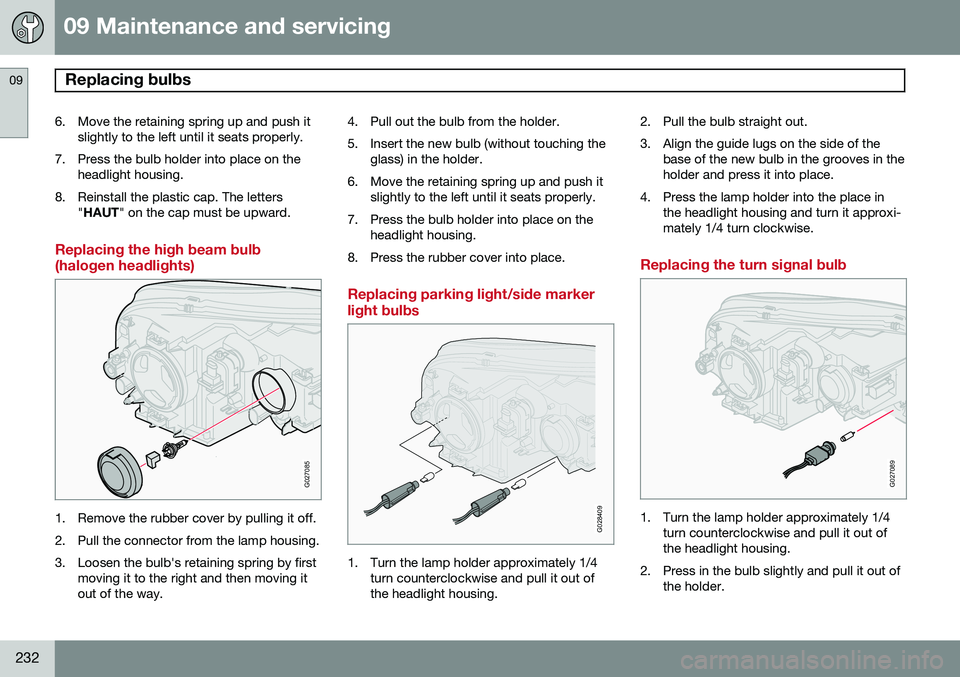
Replacing the high beam bulb (halogen headlights)
G027085
1. Remove the rubber cover by pulling it off.
2. Pull the connector from the lamp housing.
3. Loosen the bulb's retaining spring by first
moving it to the right and then moving it out of the way. 4. Pull out the bulb from the holder.
5. Insert the new bulb (without touching the
glass) in the holder.
6. Move the retaining spring up and push it slightly to the left until it seats properly.
7. Press the bulb holder into place on the headlight housing.
8. Press the rubber cover into place.
Replacing parking light/side marker light bulbs
G028409
1. Turn the lamp holder approximately 1/4 turn counterclockwise and pull it out of the headlight housing. 2. Pull the bulb straight out.
3. Align the guide lugs on the side of the
base of the new bulb in the grooves in the holder and press it into place.
4. Press the lamp holder into the place in the headlight housing and turn it approxi-mately 1/4 turn clockwise.
Replacing the turn signal bulb
G027089
1. Turn the lamp holder approximately 1/4turn counterclockwise and pull it out of the headlight housing.
2. Press in the bulb slightly and pull it out of the holder.
Page 235 of 308
09 Maintenance and servicing
Replacing bulbs09
233
3. Align the guide lugs on the side of the
base of the new bulb in the grooves in the holder. Press it in and turn it slightlyclockwise.
4. Press the lamp holder into the place in the headlight housing and turn it approxi-mately 1/4 turn clockwise.
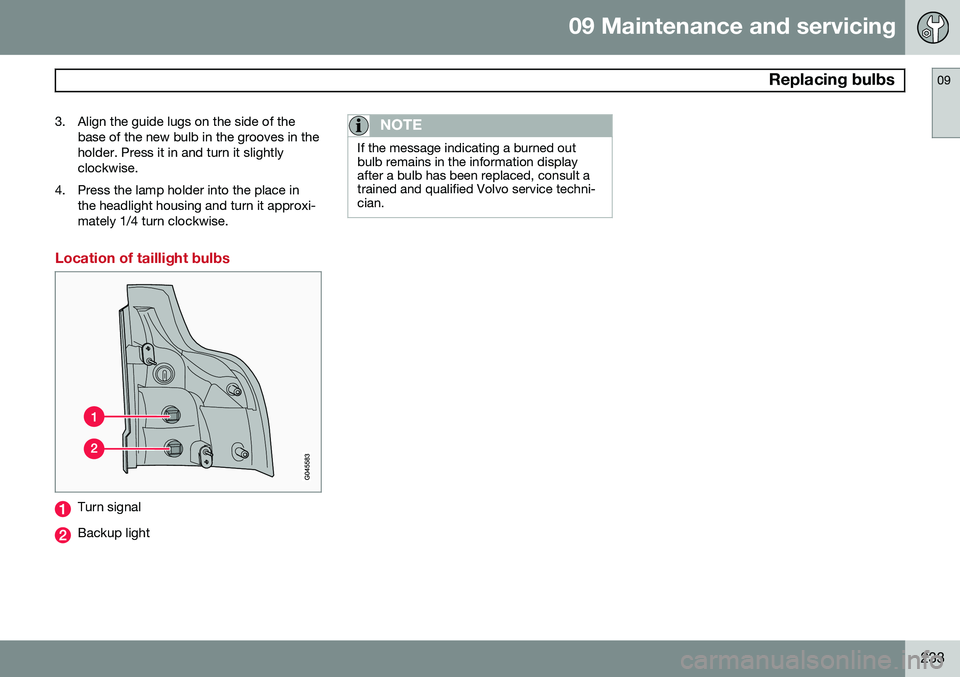
Location of taillight bulbs
Turn signal
Backup light
NOTE
If the message indicating a burned out bulb remains in the information displayafter a bulb has been replaced, consult atrained and qualified Volvo service techni-cian.
Page 236 of 308
09 Maintenance and servicing
Replacing bulbs 09
234
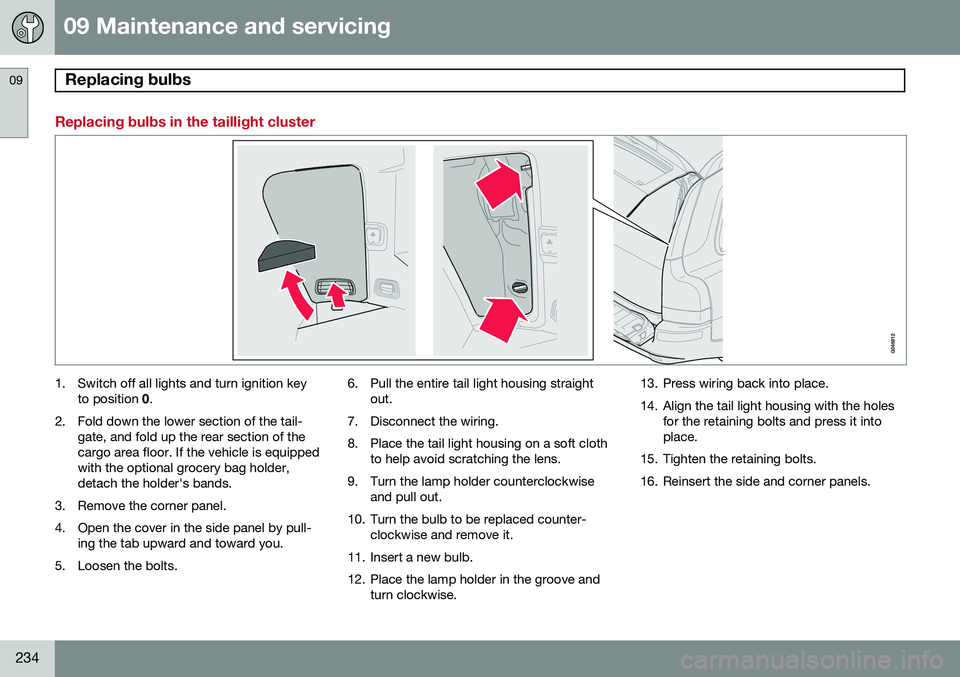
Replacing bulbs in the taillight cluster
1. Switch off all lights and turn ignition keyto position 0.
2. Fold down the lower section of the tail- gate, and fold up the rear section of the cargo area floor. If the vehicle is equippedwith the optional grocery bag holder,detach the holder's bands.
3. Remove the corner panel.
4. Open the cover in the side panel by pull- ing the tab upward and toward you.
5. Loosen the bolts. 6. Pull the entire tail light housing straight
out.
7. Disconnect the wiring.
8. Place the tail light housing on a soft cloth to help avoid scratching the lens.
9. Turn the lamp holder counterclockwise and pull out.
10. Turn the bulb to be replaced counter- clockwise and remove it.
11. Insert a new bulb.
12. Place the lamp holder in the groove and turn clockwise. 13. Press wiring back into place.
14. Align the tail light housing with the holes
for the retaining bolts and press it into place.
15. Tighten the retaining bolts.
16. Reinsert the side and corner panels.
Page 237 of 308

09 Maintenance and servicing
Replacing bulbs09
}}
235
Rear fog light
1. Switch off the ignition.
2. Carefully insert a small screwdriver (seeillustration above).
3. Pry out the lamp housing.
4. Turn the bulb holder counterclockwise and remove it.
5. Turn the bulb counterclockwise and remove it.
6. Insert a new bulb and press the lamp housing back into place.
License plate lights
1. Turn off the lights and switch off the igni-tion.
2. Loosen the retaining screws with a screwdriver.
3. Loosen the bulb housing and pull it out carefully.
4. Pull out the defective bulb and insert a new one.
5. Reinsert the bulb housing and screw it into place.
Front footwell lighting
G027079
The front footwell lights are located under the dashboard on the driver's and passenger'ssides. To replace a bulb:
1. Carefully insert a screwdriver and pry out the lens.
2. Replace the defective bulb.
3. Reinstall the lens.
Page 249 of 308
09 Maintenance and servicing
Fuses09
}}
* Option/accessory, for more information, see Introduction.247
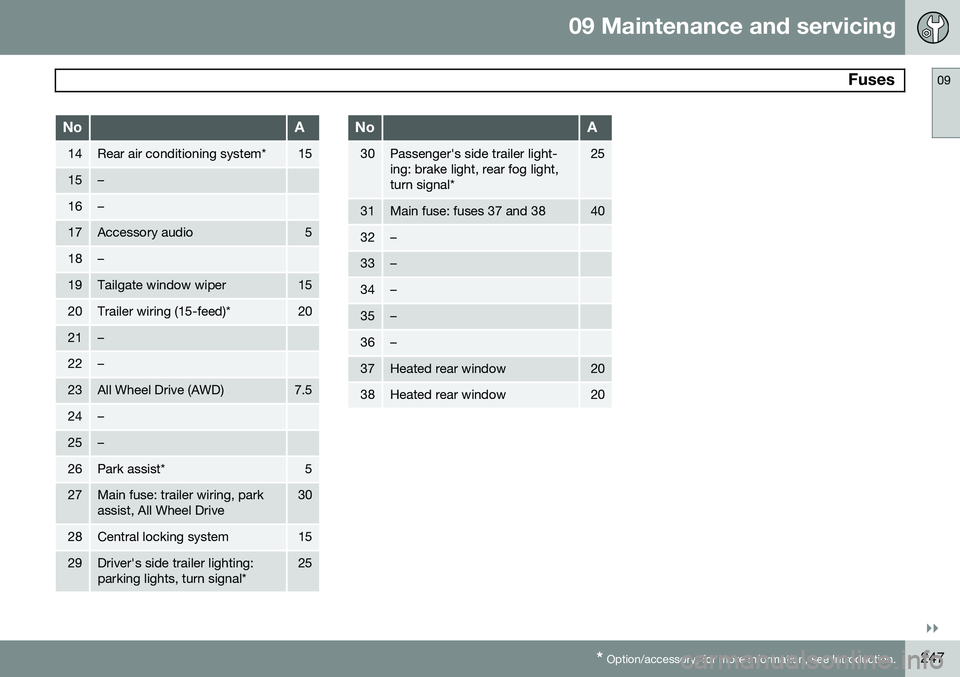
NoA
14Rear air conditioning system*15
15–
16–
17Accessory audio5
18–
19Tailgate window wiper15
20Trailer wiring (15-feed)*20
21–
22–
23All Wheel Drive (AWD)7.5
24–
25–
26Park assist*5
27Main fuse: trailer wiring, park assist, All Wheel Drive30
28Central locking system15
29Driver's side trailer lighting: parking lights, turn signal*25
NoA
30Passenger's side trailer light- ing: brake light, rear fog light,turn signal*25
31Main fuse: fuses 37 and 3840
32–
33–
34–
35–
36–
37Heated rear window20
38Heated rear window20
Page 257 of 308
10 Audio
Audio system controls
10
* Option/accessory, for more information, see Introduction.255
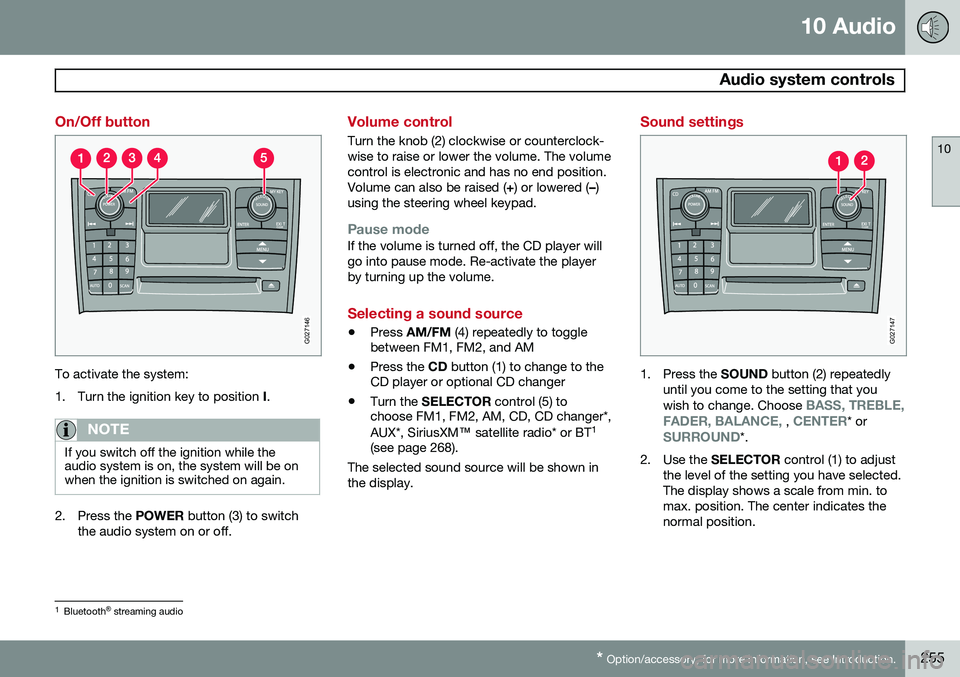
On/Off button
G027146
To activate the system:
1. Turn the ignition key to position I.
NOTE
If you switch off the ignition while the audio system is on, the system will be onwhen the ignition is switched on again.
2. Press the POWER button (3) to switch
the audio system on or off.
Volume control
Turn the knob (2) clockwise or counterclock- wise to raise or lower the volume. The volumecontrol is electronic and has no end position.Volume can also be raised ( +) or lowered ( –)
using the steering wheel keypad.
Pause modeIf the volume is turned off, the CD player will go into pause mode. Re-activate the playerby turning up the volume.
Selecting a sound source
• Press
AM/FM (4) repeatedly to toggle
between FM1, FM2, and AM
• Press the
CD button (1) to change to the
CD player or optional CD changer
• Turn the
SELECTOR control (5) to
choose FM1, FM2, AM, CD, CD changer*, AUX*, SiriusXM ™ satellite radio* or BT 1
(see page 268).
The selected sound source will be shown in the display.
Sound settings
G027147
1. Press the SOUND button (2) repeatedly
until you come to the setting that you wish to change. Choose
BASS, TREBLE,
FADER, BALANCE, , CENTER* orSURROUND*.
2. Use the SELECTOR control (1) to adjust
the level of the setting you have selected. The display shows a scale from min. tomax. position. The center indicates thenormal position.
1 Bluetooth ®
streaming audio