instrument panel VOLVO XC90 2015 Owners Manual
[x] Cancel search | Manufacturer: VOLVO, Model Year: 2015, Model line: XC90, Model: VOLVO XC90 2015Pages: 570, PDF Size: 12.44 MB
Page 435 of 570
NAVIGATION*
* Option/accessory, for more information, see Introduction.
433
StepCenter dis- play/menuAction
5Start navi- gation is
displayed on thescreen.Tap Start navigation.
6A map showingthe route toyour desti-nation isdisplayed.Guidance will begin. Fol- low the directions on theinstrument panel.
Related information
• Using the center display (p. 46)
• Center display overview (p. 29)
Navigation displays and controls
Volvo Sensus Navigation is presented on the instrument panel and head-up display * and con-
trolled using center display on-screen buttons, the right-side steering wheel keypad and voicecommands.
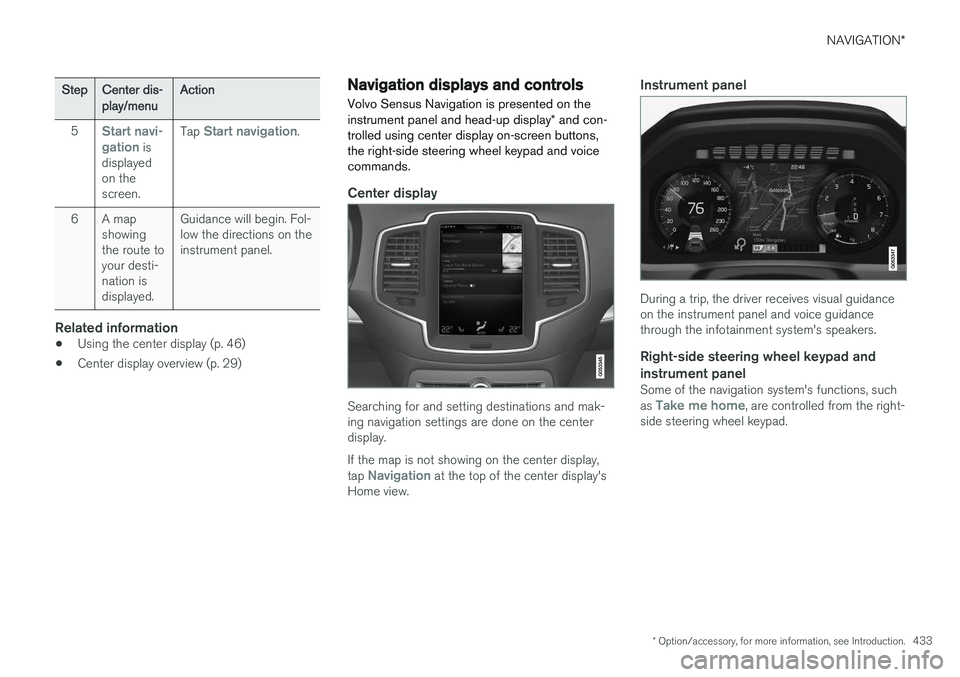
Center display
Searching for and setting destinations and mak- ing navigation settings are done on the centerdisplay. If the map is not showing on the center display, tap
Navigation at the top of the center display's
Home view.
Instrument panel
During a trip, the driver receives visual guidance on the instrument panel and voice guidancethrough the infotainment system's speakers.
Right-side steering wheel keypad and instrument panel
Some of the navigation system's functions, such as Take me home, are controlled from the right-
side steering wheel keypad.
Page 440 of 570
NAVIGATION*
* Option/accessory, for more information, see Introduction.
438
CoordinatesA destination can also be set by entering its map coordinates.
• For example, enter: "N 58.1234 E 12.5678" and tap
Search/.
Map coordinates can be written in different ways, such as:
N 58.1234 E 12.5678 (with spaces)
N 58.1234 E12.5678 (without spaces)
58.1234 N 12.5678 E (with the points on the
compass after the coordinates)
58.1234 -12.5678 (with a hyphen without the
points on the compass)
Both periods [.] and commas [,] can be used.
Related information
• Entering a destination (p. 435)
• Navigation displays and controls (p. 433)
• Using the center display keyboard (p. 32)
• Information cards on the map (p. 446)
Setting a destination using Recent/ Favorites/Library Selecting from a list is one way of setting a des- tination.
To display these lists:
1. Tap
Set dest. in the lower
margin. A keyboard will be dis- played with search alternativesin the upper margin. 2. Continue by selecting one of the lists in the upper margin:
•Recent
•Favorites
•Library
After marking an alternative, it will be added as a destination by tapping the Start navigation orAdd as waypoint buttons.
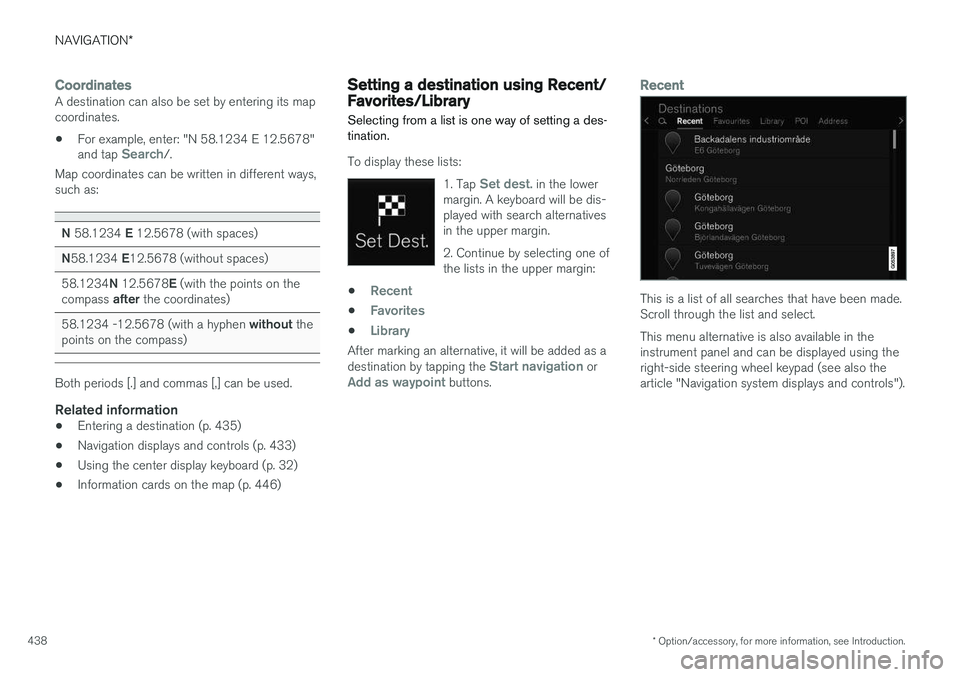
Recent
This is a list of all searches that have been made. Scroll through the list and select. This menu alternative is also available in the instrument panel and can be displayed using theright-side steering wheel keypad (see also thearticle "Navigation system displays and controls").
Page 450 of 570
NAVIGATION*
* Option/accessory, for more information, see Introduction.
448
Traffic information 4
The navigation system constantly receives traffic messages that are broadcast by local radio sta-tions.
See the article "Traffic settings" for the traffic- related settings available to the driver.
Directly on the map
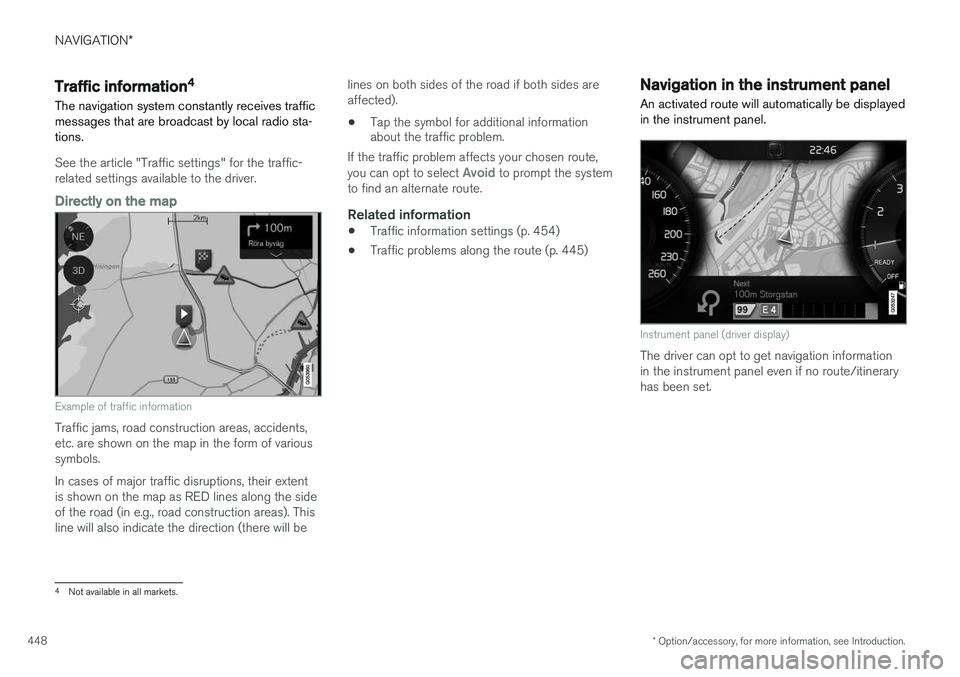
Example of traffic information
Traffic jams, road construction areas, accidents, etc. are shown on the map in the form of varioussymbols. In cases of major traffic disruptions, their extent is shown on the map as RED lines along the sideof the road (in e.g., road construction areas). Thisline will also indicate the direction (there will be lines on both sides of the road if both sides areaffected).
• Tap the symbol for additional information about the traffic problem.
If the traffic problem affects your chosen route, you can opt to select
Avoid to prompt the system
to find an alternate route.
Related information
• Traffic information settings (p. 454)
• Traffic problems along the route (p. 445)
Navigation in the instrument panel An activated route will automatically be displayed in the instrument panel.
Instrument panel (driver display)
The driver can opt to get navigation information in the instrument panel even if no route/itineraryhas been set.
4
Not available in all markets.
Page 451 of 570
NAVIGATION*
* Option/accessory, for more information, see Introduction.
449
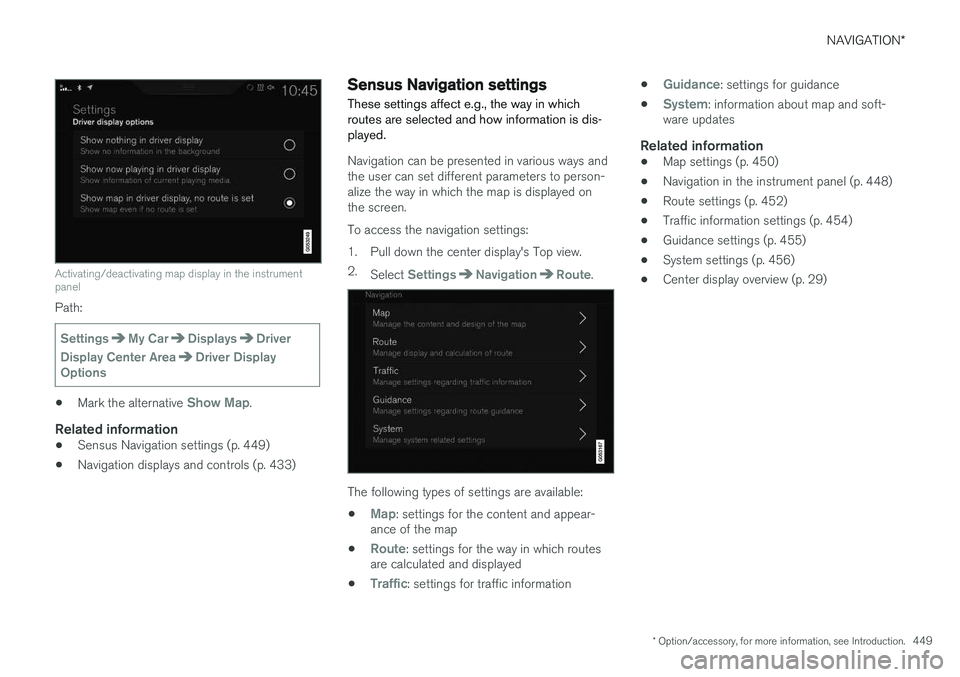
Activating/deactivating map display in the instrument panel
Path:
SettingsMy CarDisplaysDriver
Display Center Area
Driver Display
Options
• Mark the alternative Show Map.
Related information
•Sensus Navigation settings (p. 449)
• Navigation displays and controls (p. 433)
Sensus Navigation settings
These settings affect e.g., the way in which routes are selected and how information is dis-played.
Navigation can be presented in various ways and the user can set different parameters to person-alize the way in which the map is displayed onthe screen. To access the navigation settings:
1. Pull down the center display's Top view. 2. Select
SettingsNavigationRoute.
The following types of settings are available:
•
Map: settings for the content and appear-
ance of the map
•
Route: settings for the way in which routes
are calculated and displayed
•
Traffic: settings for traffic information •
Guidance: settings for guidance
•
System: information about map and soft-
ware updates
Related information
• Map settings (p. 450)
• Navigation in the instrument panel (p. 448)
• Route settings (p. 452)
• Traffic information settings (p. 454)
• Guidance settings (p. 455)
• System settings (p. 456)
• Center display overview (p. 29)
Page 482 of 570

WHEELS AND TIRES
480
CAUTION
•After inflating the tires, always reinstall the valve cap to help avoid damage to thevalve from dirt, gravel, etc.
• Use plastic valve caps only. Metal capscould corrode and become difficult toremove.
Related information
• Wheel bolts (p. 477)
• Jack (p. 476)
Tire Pressure Monitoring System (TPMS) TPMS provides a warning if inflation pressure in one or more tires is too low. It also uses a sym-bol (called a telltale) that will flash for60 seconds and then glow steadily if there is asystem malfunction.
TPMS uses sensors mounted in the tire valves to check inflation pressure levels. When the vehicleis moving at a speed of approximately 20 mph(30 km/h) or faster, these sensors transmit infla-tion pressure data to a receiver located in thevehicle. If inflation pressure is too low, an indica-tor symbol will illuminate in the instrument paneland a text message will be displayed.
SymbolExplanation
The symbol illuminates to indicate low tire inflation pressure. If a malfunction occurs in the sys- tem, the tire pressure warning sym-bol will flash for approximately1 minute and then remain illumi-nated.
Each tire, including the spare (if provided), should be checked monthly when cold and inflated tothe inflation pressure recommended by the vehi-cle manufacturer on the vehicle placard or tireinflation pressure label. (If your vehicle has tires of a different size than the size indicated on thevehicle placard or tire inflation pressure label, youshould determine the proper tire inflation pres-sure for those tires.) As an added safety feature, your vehicle has been equipped with a tire pressure monitoringsystem (TPMS) that illuminates a low tire pres-sure telltale when one or more of your tires issignificantly under-inflated. Accordingly, when thelow tire pressure telltale illuminates, you shouldstop and check your tires as soon as possible,and inflate them to the proper pressure. Driving on a significantly under-inflated tire cau- ses the tire to overheat and can lead to tire fail-ure. Under-inflation also reduces fuel efficiencyand tire tread life, and may affect the vehicle'shandling and stopping ability. Please note thatthe TPMS is not a substitute for proper tire main-tenance, and it is the driver's responsibility tomaintain correct tire pressure, even if under-infla-tion has not reached the level to trigger illumina-tion of the TPMS low tire pressure telltale. Your vehicle has also been equipped with a TPMS malfunction indicator to indicate when thesystem is not operating properly. The TPMS mal-function indicator is combined with the low tirepressure telltale. When the system detects a malfunction, the tell- tale will flash for approximately one minute andthen remain continuously illuminated. Thissequence will continue upon subsequent vehicle
Page 483 of 570

WHEELS AND TIRES
481
start-ups as long as the malfunction exists. When the malfunction indicator is illuminated, the sys-tem may not be able to detect or signal low tirepressure as intended. TPMS malfunctions may occur for a variety of reasons, including the installation of replacementor alternate tires or wheels on the vehicle thatprevent the TPMS from functioning properly.Always check the TPMS malfunction telltale afterreplacing one or more tires or wheels on yourvehicle to ensure that the replacement or alter-nate tires and wheels allow the TPMS to con-tinue to function properly.
Messages in the instrument panelWhen the TPMS symbol illuminates, the following text messages may also be displayed:
•
Tire pressure low: the tire(s) affected will
also be specified.
•
Tire needs air now: the tire(s) affected will
also be specified.
•
Tire pressure system Service required.
If TPMS cannot determine which tire(s) have low inflation pressure, general messages may be dis-played, such as:
•
Tire pressure low Check tires
•Tire needs air now Check tires
TPMS sensors can be installed on the valve hole area, on the factory-installed wheels as well as onoptional ones. If a spare wheel or other wheel without a TPMS sensor is used, a fault message will appear in theinstrument panel after driving for a few minutes. After changing wheels, always check that the new wheels have TPMS sensors to avoid a sys-tem malfunction warning. TPMS does not replace the need for regular tire inspection and maintenance.
RecommendationsTPMS sensors should be mounted on all wheelsused with the vehicle, including winter wheels.
NOTE
• If you change to tires with a different dimension than the factory-installed ones,the TPMS system must be reconfiguredfor these tires. This must be done by atrained and qualified Volvo service techni-cian.
• If a tire is changed, or if the TPMS sensoris moved to another wheel, the rubbervalve and valve core should be replaced.
• When installing TPMS sensors, the vehi-cle must be parked for at least15 minutes with the ignition off. If thevehicle is driven within 15 minutes, aTPMS error message will be displayed.
WARNING
Incorrect inflation pressure could lead to tire failure, resulting in a loss of control of thevehicle.
Turning TPMS off 4TPMS can be turned off in the center display's Top view.
1. Park the vehicle and turn off the engine.2.
Activate ignition mode I.
4
Certain markets only.
Page 485 of 570

WHEELS AND TIRES
483
Related information
•Calibrating the Tire Pressure Monitoring System (TPMS) (p. 484)
• Reinflating tires equipped with the TirePressure Monitoring System (TPMS)(p. 483)
• Tire Pressure Monitoring System (TPMS)(p. 480)
Reinflating tires equipped with the Tire Pressure Monitoring System(TPMS) When low tire pressure has been detected, a message will be displayed in the instrumentpanel and the Tire Pressure Monitoring Systemsymbol will illuminate.
SymbolExplanation
Check and reinflate the tire(s) when the TPMS symbol illuminatesand a message is displayed.
1. Use a tire pressure gauge to check the infla-
tion pressure of the under-inflated tire(s).
2. Re-inflate the tire(s) to the correct pressure (consult the tire pressure placard located on the driver's side B-pillar (the structural mem-ber at the side of the vehicle, at the rear ofthe driver's door opening).
3. In some cases, it may be necessary to drive the vehicle for several minutes at a speed ofat least 20 mph (30 km/h) to erase theTPMS telltale warning and the text message.Please be aware that the TPMS telltalewarning will not go out until the low tire pres-sure has been corrected.
NOTE
To help avoid incorrect tire inflation pressure, if possible only inflate the tires when they arecold. The tires are considered to be coldwhen they have the same temperature as thesurrounding (ambient) air. This temperature isnormally reached after the vehicle has beenparked for at least 3 hours. After driving a dis-tance of approximately 1 mile (1.6 km), thetires are considered to be warm.
CAUTION
When inflating tires with TPMS sensors, press the pump's mouthpiece straight onto thevalve to help avoid bending or otherwise dam-aging the valve.
CAUTION
• After inflating the tires, always reinstall the valve cap to help avoid damage to thevalve from dirt, gravel, etc.
• Use plastic valve caps only. Metal capscould corrode and become difficult toremove.
Page 494 of 570
MAINTENANCE AND SERVICING
492
Before the service can be used
Volvo ID
•The owner (primary driver) must create or have a Volvo ID (see the article "Volvo ID").
• Register your Volvo ID in the vehicle asexplained in the article "Volvo ID". If you havealready registered a Volvo ID, use the sameemail address that you used to create theVolvo ID.
Changing a
Volvo ID email addressIf you would like to register a different email address, open the Volvo ID app and tap Change
Volvo ID. Follow the instructions provided. See
also the article "Volvo ID" for additional informa- tion.
Selecting a Volvo retailerBy default, the retailer where you purchased your vehicle will be your preferred retailer/Volvoauthorized workshop who will perform serviceand repairs on your vehicle. To change the pre-ferred retailer, go to Dealer Locator atvolvocars.com and select a retailer, click "ServiceScheduler" and book an appointment at the newpreferred retailer.
Prerequisites for booking service from the
vehicle
In order to book an appointment from the vehicle, it must be connected to the Internet (see the arti-cle "Internet connected vehicle").
Using the serviceWhen it is time for service or in certain cases ifrepairs are necessary, a message will appear inthe instrument panel and in the center display.This message is triggered by: • the amount of time that has elapsed since the last service
• the number of hours the engine has runsince the last service
• mileage since the last service.
• Specific warnings or fault codes in the vehi-cle
Booking service or repairsSubmit a booking request whenever you need a workshop appointment or when a messageregarding the need for service or repairs hasbeen displayed in the instrument panel and in thecenter display.
Sending an appointment request
1.
Open the Car status app in the center dis-
play's App view.
2. Tap
Appointments. 3.
Under
Appointments, tap Request
appointment.
4. Check that your
Volvo ID is correct.
5. Check that the correct retailer is listed. If you prefer, simply tap the button to initiate a call to the retailer.
6. Tap
Send appointment request. Your
request and vehicle data will be sent to your retailer through the vehicle's Internet con-nection.
> Volvo will send a booking invitation to your email address.
7. Open the email and click the link to the Volvo On-Line Service Scheduler for your retailer and book a workshop appointment at a con-venient time with your preferred service advi-sor. Add any additional preferences and freetext to your booking. At this point in thebooking procedure, you can also change yourpreferred retailer by selecting the second linkin the email, which leads you to the VolvoRetailer Locator where you can selectanother retailer. Click the "Service Appoint-ment" link to start your booking.
8. When you have submitted your workshop booking in the Volvo On-Line Service Sched-uler, your appointment will be confirmedonline in an email and by a message in thecenter display after a short delay.
Page 507 of 570

MAINTENANCE AND SERVICING
505
Fuses in the passenger compartment
The fuses in the passenger compartment help protect electrical components such as the 110-volt socket, displays and door modules.
Positions
• Fuses 1, 3–21, 23–36, 39–53 and 55–59 are called "Micro".
• Fuses 2, 22, 37–38 and 54 are called"MCase" and should only be replaced by atrained and qualified Volvo service technician.FunctionA
––
110-volt socket30
––
Alarm system movement sensor A5
Media player5
FunctionA
Instrument panel5
Center console buttons5
Sun sensor5
––
––
Page 523 of 570
MAINTENANCE AND SERVICING
521
Checking and refilling engine oil The oil level is checked electronically.
Oil filler cap3
It may be necessary to top up engine oil between regularly scheduled services. No action is necessary until a message is dis- played in the instrument panel.
WARNING
•
Do not allow oil to spill onto or come into contact with hot exhaust pipe surfaces.
• If
Engine oil level Service required is
displayed, have the vehicle checked by a trained and qualified Volvo service techni-cian. The oil level may be too high.
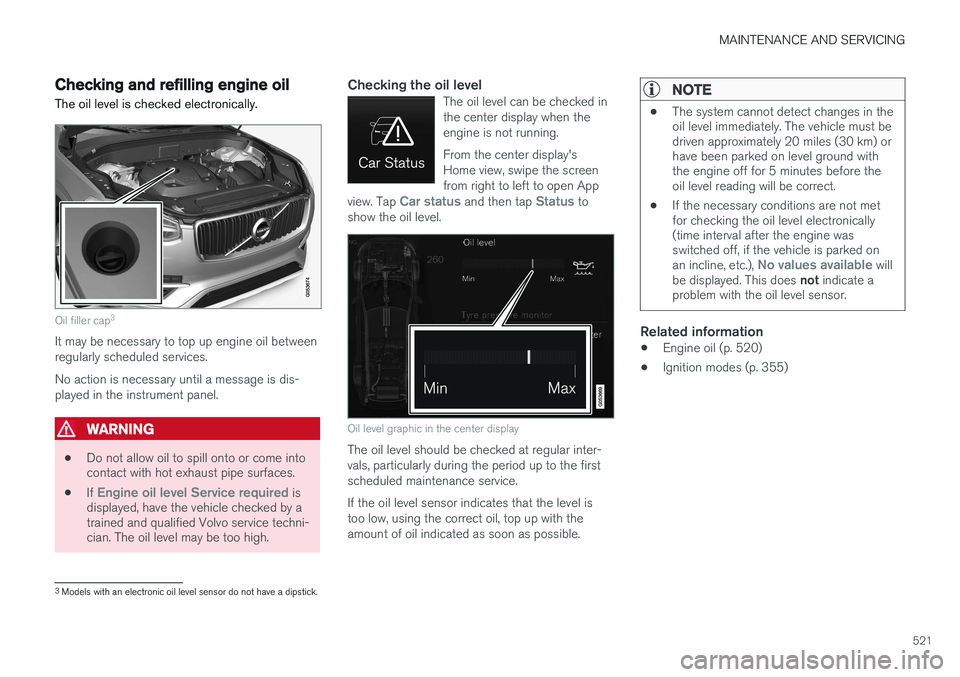
Checking the oil levelThe oil level can be checked in the center display when theengine is not running. From the center display's Home view, swipe the screenfrom right to left to open App
view. Tap
Car status and then tap Status to
show the oil level.
Oil level graphic in the center display
The oil level should be checked at regular inter- vals, particularly during the period up to the firstscheduled maintenance service. If the oil level sensor indicates that the level is too low, using the correct oil, top up with theamount of oil indicated as soon as possible.
NOTE
• The system cannot detect changes in the oil level immediately. The vehicle must bedriven approximately 20 miles (30 km) orhave been parked on level ground withthe engine off for 5 minutes before theoil level reading will be correct.
• If the necessary conditions are not metfor checking the oil level electronically(time interval after the engine wasswitched off, if the vehicle is parked on an incline, etc.),
No values available will
be displayed. This does not indicate a
problem with the oil level sensor.
Related information
• Engine oil (p. 520)
• Ignition modes (p. 355)
3
Models with an electronic oil level sensor do not have a dipstick.