warning VOLVO XC90 2015 Owners Manual
[x] Cancel search | Manufacturer: VOLVO, Model Year: 2015, Model line: XC90, Model: VOLVO XC90 2015Pages: 570, PDF Size: 12.44 MB
Page 483 of 570

WHEELS AND TIRES
481
start-ups as long as the malfunction exists. When the malfunction indicator is illuminated, the sys-tem may not be able to detect or signal low tirepressure as intended. TPMS malfunctions may occur for a variety of reasons, including the installation of replacementor alternate tires or wheels on the vehicle thatprevent the TPMS from functioning properly.Always check the TPMS malfunction telltale afterreplacing one or more tires or wheels on yourvehicle to ensure that the replacement or alter-nate tires and wheels allow the TPMS to con-tinue to function properly.
Messages in the instrument panelWhen the TPMS symbol illuminates, the following text messages may also be displayed:
•
Tire pressure low: the tire(s) affected will
also be specified.
•
Tire needs air now: the tire(s) affected will
also be specified.
•
Tire pressure system Service required.
If TPMS cannot determine which tire(s) have low inflation pressure, general messages may be dis-played, such as:
•
Tire pressure low Check tires
•Tire needs air now Check tires
TPMS sensors can be installed on the valve hole area, on the factory-installed wheels as well as onoptional ones. If a spare wheel or other wheel without a TPMS sensor is used, a fault message will appear in theinstrument panel after driving for a few minutes. After changing wheels, always check that the new wheels have TPMS sensors to avoid a sys-tem malfunction warning. TPMS does not replace the need for regular tire inspection and maintenance.
RecommendationsTPMS sensors should be mounted on all wheelsused with the vehicle, including winter wheels.
NOTE
• If you change to tires with a different dimension than the factory-installed ones,the TPMS system must be reconfiguredfor these tires. This must be done by atrained and qualified Volvo service techni-cian.
• If a tire is changed, or if the TPMS sensoris moved to another wheel, the rubbervalve and valve core should be replaced.
• When installing TPMS sensors, the vehi-cle must be parked for at least15 minutes with the ignition off. If thevehicle is driven within 15 minutes, aTPMS error message will be displayed.
WARNING
Incorrect inflation pressure could lead to tire failure, resulting in a loss of control of thevehicle.
Turning TPMS off 4TPMS can be turned off in the center display's Top view.
1. Park the vehicle and turn off the engine.2.
Activate ignition mode I.
4
Certain markets only.
Page 484 of 570
WHEELS AND TIRES
4823.
Select
SettingsMy CarIntelliSafe
Tire Pressure Monitor in the Top view
and deselect (tap) the button.
> The function will remain off until it is reac- tivated.
Related information
• Checking inflation pressure (p. 482)
• Reinflating tires equipped with the Tire Pressure Monitoring System (TPMS)(p. 483)
• Tire Pressure Monitoring System type appro-val (p. 484)
• Ignition modes (p. 355)
Checking inflation pressure The Tire Pressure Monitoring System makes it possible to view the current inflation pressure ofall four tires.
Checking inflation pressure
Open the Car status app in
the center display's Application view. Tap
Status to see the
current inflation pressure of all four tires.
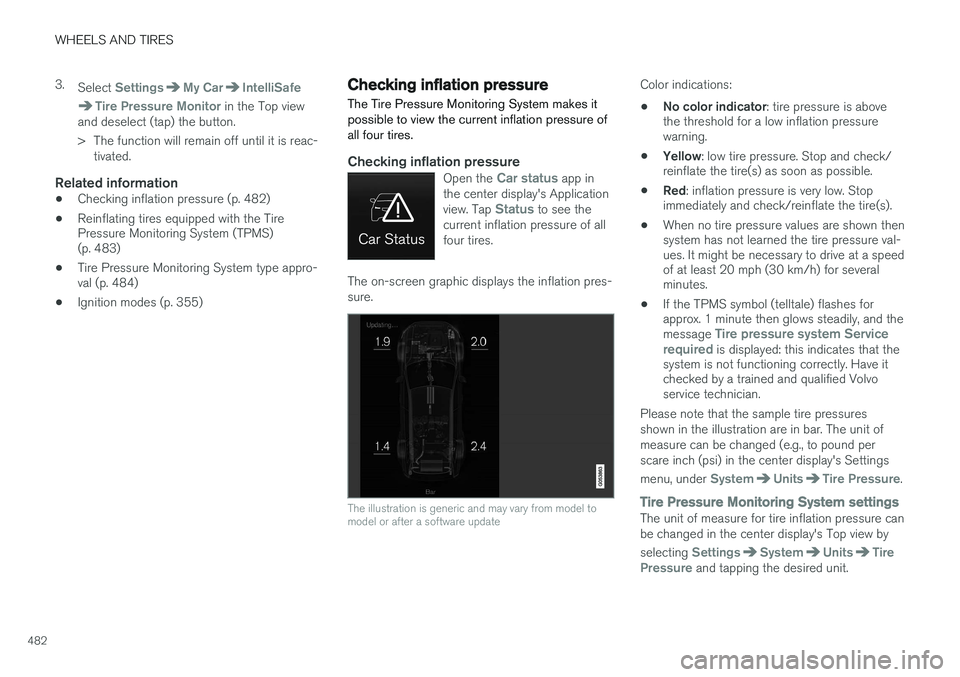
The on-screen graphic displays the inflation pres- sure.
The illustration is generic and may vary from model to model or after a software update
Color indications:
• No color indicator
: tire pressure is above
the threshold for a low inflation pressure warning.
• Yellow
: low tire pressure. Stop and check/
reinflate the tire(s) as soon as possible.
• Red
: inflation pressure is very low. Stop
immediately and check/reinflate the tire(s).
• When no tire pressure values are shown thensystem has not learned the tire pressure val-ues. It might be necessary to drive at a speedof at least 20 mph (30 km/h) for severalminutes.
• If the TPMS symbol (telltale) flashes forapprox. 1 minute then glows steadily, and the message
Tire pressure system Service
required is displayed: this indicates that the
system is not functioning correctly. Have it checked by a trained and qualified Volvoservice technician.
Please note that the sample tire pressures shown in the illustration are in bar. The unit ofmeasure can be changed (e.g., to pound perscare inch (psi) in the center display's Settings menu, under
SystemUnitsTire Pressure.
Tire Pressure Monitoring System settingsThe unit of measure for tire inflation pressure can be changed in the center display's Top view by selecting
SettingsSystemUnitsTire
Pressure and tapping the desired unit.
Page 485 of 570

WHEELS AND TIRES
483
Related information
•Calibrating the Tire Pressure Monitoring System (TPMS) (p. 484)
• Reinflating tires equipped with the TirePressure Monitoring System (TPMS)(p. 483)
• Tire Pressure Monitoring System (TPMS)(p. 480)
Reinflating tires equipped with the Tire Pressure Monitoring System(TPMS) When low tire pressure has been detected, a message will be displayed in the instrumentpanel and the Tire Pressure Monitoring Systemsymbol will illuminate.
SymbolExplanation
Check and reinflate the tire(s) when the TPMS symbol illuminatesand a message is displayed.
1. Use a tire pressure gauge to check the infla-
tion pressure of the under-inflated tire(s).
2. Re-inflate the tire(s) to the correct pressure (consult the tire pressure placard located on the driver's side B-pillar (the structural mem-ber at the side of the vehicle, at the rear ofthe driver's door opening).
3. In some cases, it may be necessary to drive the vehicle for several minutes at a speed ofat least 20 mph (30 km/h) to erase theTPMS telltale warning and the text message.Please be aware that the TPMS telltalewarning will not go out until the low tire pres-sure has been corrected.
NOTE
To help avoid incorrect tire inflation pressure, if possible only inflate the tires when they arecold. The tires are considered to be coldwhen they have the same temperature as thesurrounding (ambient) air. This temperature isnormally reached after the vehicle has beenparked for at least 3 hours. After driving a dis-tance of approximately 1 mile (1.6 km), thetires are considered to be warm.
CAUTION
When inflating tires with TPMS sensors, press the pump's mouthpiece straight onto thevalve to help avoid bending or otherwise dam-aging the valve.
CAUTION
• After inflating the tires, always reinstall the valve cap to help avoid damage to thevalve from dirt, gravel, etc.
• Use plastic valve caps only. Metal capscould corrode and become difficult toremove.
Page 486 of 570

WHEELS AND TIRES
484
WARNING
•Incorrect inflation pressure could lead to tire failure, resulting in a loss of control ofthe vehicle.
• Tire monitoring systems cannot indicatesudden tire damage caused by externalfactors (e.g., a blowout) in advance.
Related information
•
Tire Pressure Monitoring System (TPMS)(p. 480)
• Checking inflation pressure (p. 482)
Calibrating the Tire Pressure Monitoring System (TPMS) 6
In certain situations, a text pertaining to calibra- tion requirements may appear in the center dis-play. This text is generic and does not apply
to North American models .Tire Pressure Monitoring System type approval
NOTE
USA FCC ID: MRXVHSS4 Canada IC:2546A-VHSS4 M :VHSS4This device complies with part 15 of the FCC rules and with licence exempt RSS standardsof Industry Canada. Operation is subject to the following condi- tions: (1) This device may not cause harmful inter- ference, and (2) this device must accept any interference received, including interference that maycause undesired operation.
6
Certain markets only.
Page 487 of 570
WHEELS AND TIRES
485
WARNING
Changes or modifications not expressively approved by the party responsible for compli-ance could void the user's authority to oper-ate the equipment. The term
Page 494 of 570
MAINTENANCE AND SERVICING
492
Before the service can be used
Volvo ID
•The owner (primary driver) must create or have a Volvo ID (see the article "Volvo ID").
• Register your Volvo ID in the vehicle asexplained in the article "Volvo ID". If you havealready registered a Volvo ID, use the sameemail address that you used to create theVolvo ID.
Changing a
Volvo ID email addressIf you would like to register a different email address, open the Volvo ID app and tap Change
Volvo ID. Follow the instructions provided. See
also the article "Volvo ID" for additional informa- tion.
Selecting a Volvo retailerBy default, the retailer where you purchased your vehicle will be your preferred retailer/Volvoauthorized workshop who will perform serviceand repairs on your vehicle. To change the pre-ferred retailer, go to Dealer Locator atvolvocars.com and select a retailer, click "ServiceScheduler" and book an appointment at the newpreferred retailer.
Prerequisites for booking service from the
vehicle
In order to book an appointment from the vehicle, it must be connected to the Internet (see the arti-cle "Internet connected vehicle").
Using the serviceWhen it is time for service or in certain cases ifrepairs are necessary, a message will appear inthe instrument panel and in the center display.This message is triggered by: • the amount of time that has elapsed since the last service
• the number of hours the engine has runsince the last service
• mileage since the last service.
• Specific warnings or fault codes in the vehi-cle
Booking service or repairsSubmit a booking request whenever you need a workshop appointment or when a messageregarding the need for service or repairs hasbeen displayed in the instrument panel and in thecenter display.
Sending an appointment request
1.
Open the Car status app in the center dis-
play's App view.
2. Tap
Appointments. 3.
Under
Appointments, tap Request
appointment.
4. Check that your
Volvo ID is correct.
5. Check that the correct retailer is listed. If you prefer, simply tap the button to initiate a call to the retailer.
6. Tap
Send appointment request. Your
request and vehicle data will be sent to your retailer through the vehicle's Internet con-nection.
> Volvo will send a booking invitation to your email address.
7. Open the email and click the link to the Volvo On-Line Service Scheduler for your retailer and book a workshop appointment at a con-venient time with your preferred service advi-sor. Add any additional preferences and freetext to your booking. At this point in thebooking procedure, you can also change yourpreferred retailer by selecting the second linkin the email, which leads you to the VolvoRetailer Locator where you can selectanother retailer. Click the "Service Appoint-ment" link to start your booking.
8. When you have submitted your workshop booking in the Volvo On-Line Service Sched-uler, your appointment will be confirmedonline in an email and by a message in thecenter display after a short delay.
Page 497 of 570
MAINTENANCE AND SERVICING
495
Climate system serviceService and repairs on the air conditioning sys- tem should only be done by a trained and quali-fied Volvo service technician.
Troubleshooting and repairsThe air conditioning system contains a floures- cent tracer substance. Ultraviolet light is used tosearch for leaks in the system.
Refrigerant R134a
WARNING
The air conditioning system contains the refrigerant R134a under pressure. Serviceand repairs on the system should only bedone by a trained and qualified Volvo servicetechnician.
Related information
• Climate control system (p. 176)
Start battery
The start (main) battery is used to power the starter motor and other electrical componentsand systems. The start battery should only be replaced by a trained and qualified Volvo service technician.
The vehicle has an alternating current generator. The start battery is called an Absorbed Glass Mat (AGM) 12-volt battery that is dimensioned foruse in vehicles with carbon dioxide-reducingfunctions such as Start/Stop and regenerativecharging, and to support the vehicle's variouselectrical systems and functions. The service life of a battery is affected by factors such as driving conditions/style, the number ofstarts, climate, etc. Extreme cold may also furtherdecrease the battery
Page 501 of 570
MAINTENANCE AND SERVICING
499
Related information
•Start battery (p. 495)
• Start/Stop (p. 364)
• Conditions for Start/Stop (p. 365)
Battery symbols
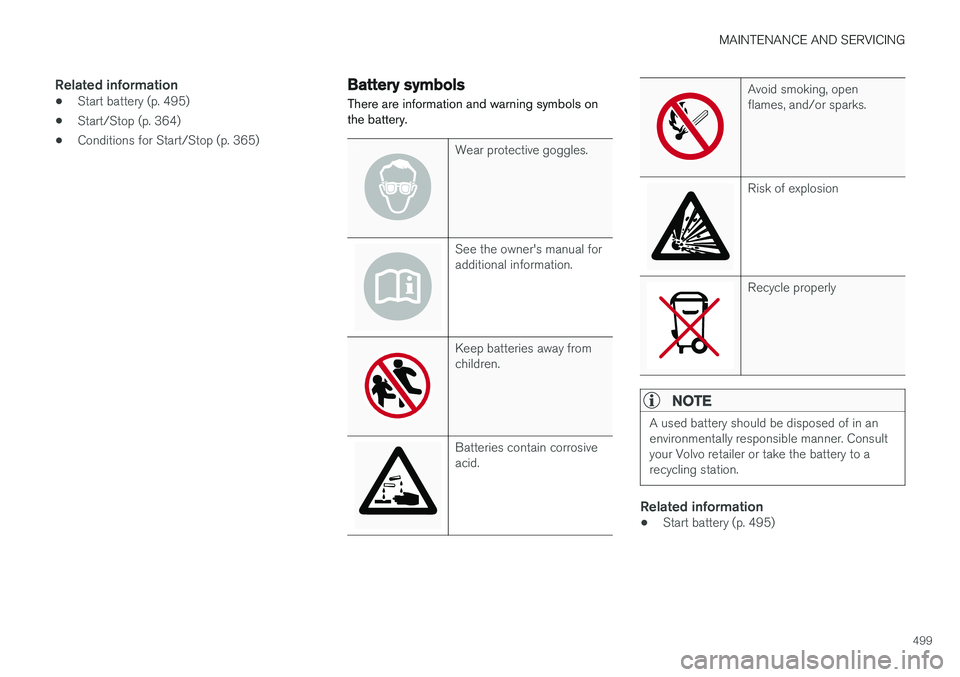
There are information and warning symbols on the battery.
Wear protective goggles.
See the owner's manual for additional information.
Keep batteries away from children.
Batteries contain corrosive acid.
Avoid smoking, open flames, and/or sparks.
Risk of explosion
Recycle properly
NOTE
A used battery should be disposed of in an environmentally responsible manner. Consultyour Volvo retailer or take the battery to arecycling station.
Related information
• Start battery (p. 495)
Page 502 of 570
MAINTENANCE AND SERVICING
500
Fuses The fuses help protect the vehicle's electrical components from overloading or short circuits.
WARNING
Never use metal objects or fuses with higher amperage than those stated on the lists offuses. Doing so could seriously damage oroverload the vehicle's electrical system.
If an electrical component fails to function, this may be due to a blown fuse. If the same fuseblows repeatedly, this indicates a problem withthe component, which should be inspected by atrained and qualified Volvo service technician.
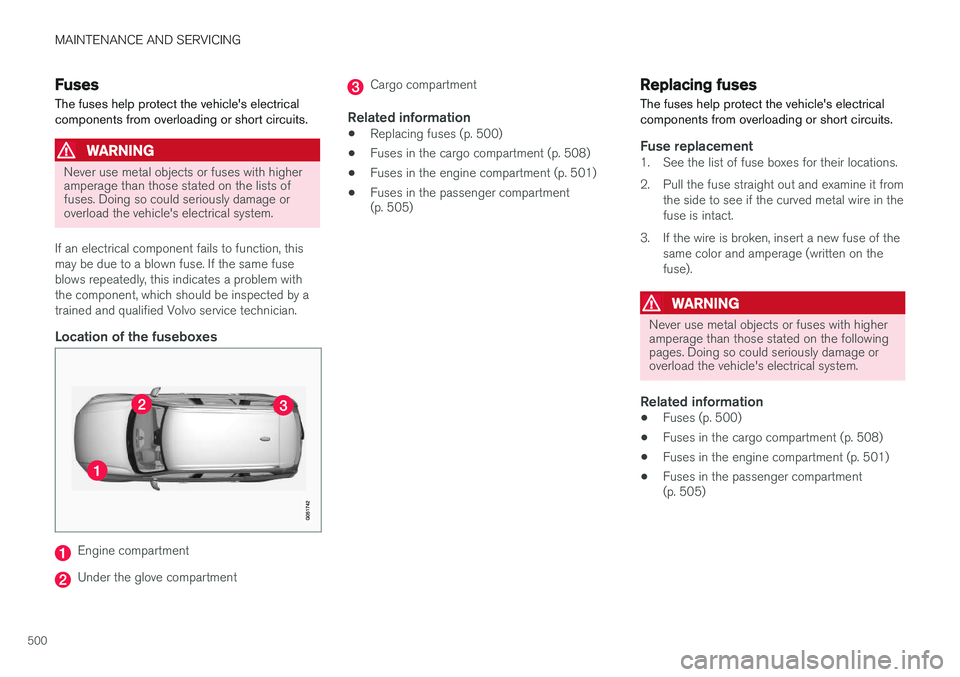
Location of the fuseboxes
Engine compartment
Under the glove compartment
Cargo compartment
Related information
• Replacing fuses (p. 500)
• Fuses in the cargo compartment (p. 508)
• Fuses in the engine compartment (p. 501)
• Fuses in the passenger compartment (p. 505)
Replacing fuses The fuses help protect the vehicle's electrical components from overloading or short circuits.
Fuse replacement1. See the list of fuse boxes for their locations.
2. Pull the fuse straight out and examine it from
the side to see if the curved metal wire in the fuse is intact.
3. If the wire is broken, insert a new fuse of the same color and amperage (written on thefuse).
WARNING
Never use metal objects or fuses with higher amperage than those stated on the followingpages. Doing so could seriously damage oroverload the vehicle's electrical system.
Related information
• Fuses (p. 500)
• Fuses in the cargo compartment (p. 508)
• Fuses in the engine compartment (p. 501)
• Fuses in the passenger compartment (p. 505)
Page 513 of 570
MAINTENANCE AND SERVICING
511
WARNING
•The ignition should be switched off com- pletely (be in ignition mode
0) when
replacing bulbs.
• If the engine has been running just prior to replacing bulbs in the headlight hous-ing, please keep in mind that componentsin the engine compartment will be hot.
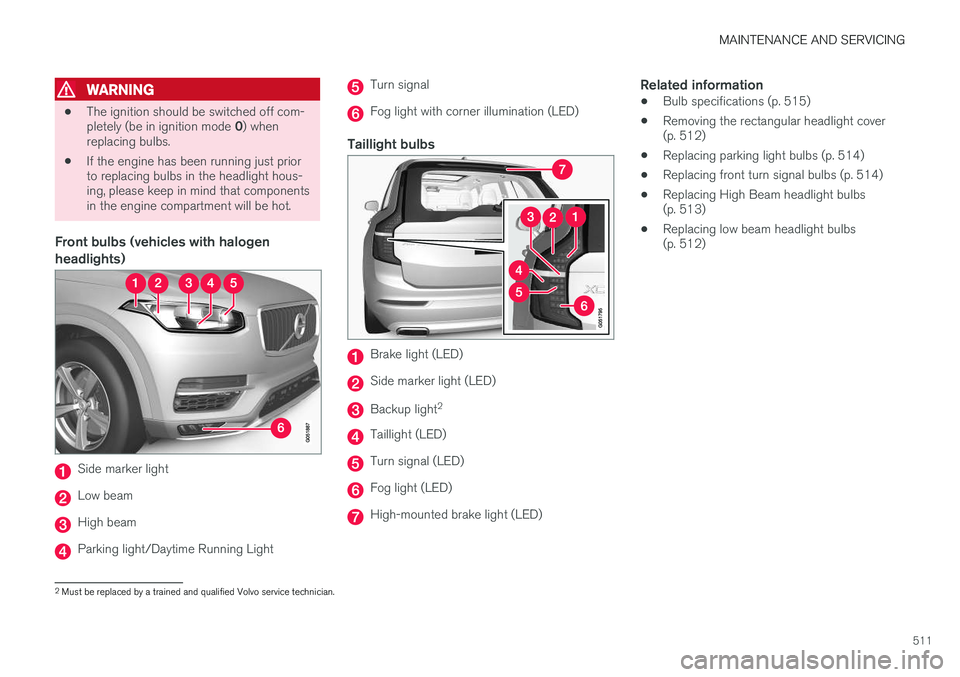
Front bulbs (vehicles with halogen headlights)
Side marker light
Low beam
High beam
Parking light/Daytime Running Light
Turn signal
Fog light with corner illumination (LED)
Taillight bulbs
Brake light (LED)
Side marker light (LED)
Backup light 2
Taillight (LED)
Turn signal (LED)
Fog light (LED)
High-mounted brake light (LED)
Related information
•
Bulb specifications (p. 515)
• Removing the rectangular headlight cover (p. 512)
• Replacing parking light bulbs (p. 514)
• Replacing front turn signal bulbs (p. 514)
• Replacing High Beam headlight bulbs(p. 513)
• Replacing low beam headlight bulbs(p. 512)
2
Must be replaced by a trained and qualified Volvo service technician.