ECO mode VOLVO XC90 2015 User Guide
[x] Cancel search | Manufacturer: VOLVO, Model Year: 2015, Model line: XC90, Model: VOLVO XC90 2015Pages: 570, PDF Size: 12.44 MB
Page 76 of 570

SAFETY
74
WARNING
A child seat should never be used in the front passenger seat of any vehicle with a frontpassenger airbag – not even if the "Passen-ger airbag off" symbol near the rear-view mir-ror is illuminated (on vehicles equipped withOccupant Weight Sensor). If the severity of anaccident were to cause the airbag to inflate,this could lead to serious injury or death to achild seated in this position.
Related information
•Child restraints (p. 65)
• ISOFIX/LATCH lower anchors (p. 72)
• Occupant weight sensor (p. 78)
Top tether anchors
Your Volvo is equipped with child restraint top tether anchorages in the rear seat. They arelocated on the rear side of the backrests.
Child restraint anchorages
Top tether anchors and symbols on the rear side of the second row backrests
Securing a child seat1. Place the child restraint on the rear seat.
2. Route the top tether strap under the head restraint and attach it to the anchor.
3. Attach lower tether straps to the lower ISO- FIX/LATCH anchors. If the child restraint is not equipped with lower tether straps, or therestraint is used in the center seating posi-tion, follow instructions for securing a childrestraint using the Automatic LockingRetractor seat belt.
–Firmly tension all straps.
Refer also to the child seat manufacturer's instructions for information on securing the childseat.
NOTE
On models equipped with the optional cargo area cover, this cover should be removedbefore a child seat is attached to the childrestraint anchors.
WARNING
• Always refer to the recommendations made by the child restraint manufacturer.
• Volvo recommends that the top tetheranchors be used when installing a for-ward-facing child restraint.
• Never route a top tether strap over thetop of the head restraint. The strapshould be routed beneath the headrestraint.
• Child restraint anchorages are designedto withstand only those loads imposed bycorrectly fitted child restraints. Under nocircumstances are they to be used foradult seat belts or harnesses. The ancho-rages are not able to withstand excessiveforces on them in the event of collision iffull harness seat belts or adult seat beltsare installed to them. An adult who uses a
Page 102 of 570
INSTRUMENTS AND CONTROLS
* Option/accessory, for more information, see Introduction.
100
Adjusting the power door mirrors
The control on the driver's door is used to adjust the position of the door mirrors.
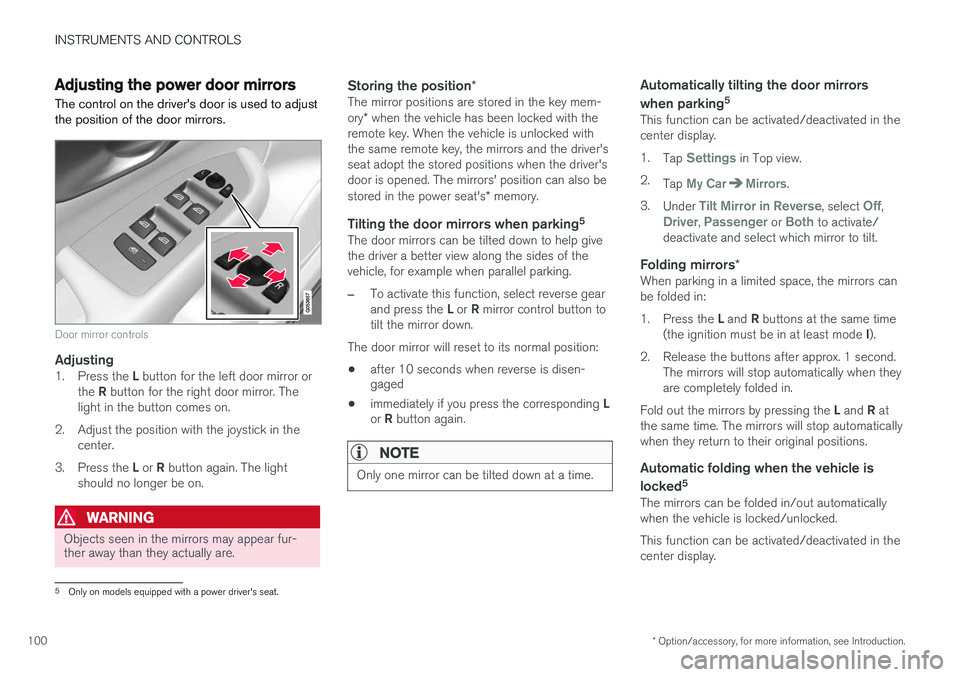
Door mirror controls
Adjusting1. Press the L button for the left door mirror or
the R button for the right door mirror. The
light in the button comes on.
2. Adjust the position with the joystick in the center.
3. Press the L or R button again. The light
should no longer be on.
WARNING
Objects seen in the mirrors may appear fur- ther away than they actually are.
Storing the position *The mirror positions are stored in the key mem- ory* when the vehicle has been locked with the
remote key. When the vehicle is unlocked with the same remote key, the mirrors and the driver'sseat adopt the stored positions when the driver'sdoor is opened. The mirrors' position can also be stored in the power seat's * memory.
Tilting the door mirrors when parking 5The door mirrors can be tilted down to help give the driver a better view along the sides of thevehicle, for example when parallel parking.
–To activate this function, select reverse gear and press the
L or R mirror control button to
tilt the mirror down.
The door mirror will reset to its normal position:
• after 10 seconds when reverse is disen- gaged
• immediately if you press the corresponding
L
or R button again.
NOTE
Only one mirror can be tilted down at a time.
Automatically tilting the door mirrors when parking 5
This function can be activated/deactivated in the center display. 1.
Tap
Settings in Top view.
2. Tap
My CarMirrors.
3. Under
Tilt Mirror in Reverse, select Off,Driver, Passenger or Both to activate/
deactivate and select which mirror to tilt.
Folding mirrors *When parking in a limited space, the mirrors can be folded in: 1.
Press the L and R buttons at the same time
(the ignition must be in at least mode I).
2. Release the buttons after approx. 1 second. The mirrors will stop automatically when they are completely folded in.
Fold out the mirrors by pressing the L and R at
the same time. The mirrors will stop automaticallywhen they return to their original positions.
Automatic folding when the vehicle is
locked 5
The mirrors can be folded in/out automaticallywhen the vehicle is locked/unlocked. This function can be activated/deactivated in the center display.
5
Only on models equipped with a power driver's seat.
Page 104 of 570
INSTRUMENTS AND CONTROLS
* Option/accessory, for more information, see Introduction.
102
Operating the laminated panoramic roof *
When opened automatically, the sun shade and roof open completely. In the ventilation position, the rear edge of the front section of the roof is raised.
Operation
WARNING
• During manual closing, if the laminated panoramic roof is obstructed, immediatelyopen it again.
• Never open or close the laminated panor-amic roof if it is obstructed in any way.
• Never allow a child to operate the lamina-ted panoramic roof.
• Never leave a child alone in a vehicle.
• When leaving the vehicle, ensure that the ignition is in mode
0. Never leave a
remote key in the vehicle.
• Never extend any object or body part though the open laminated panoramicroof, even if the vehicle's ignition is com-pletely switched off.
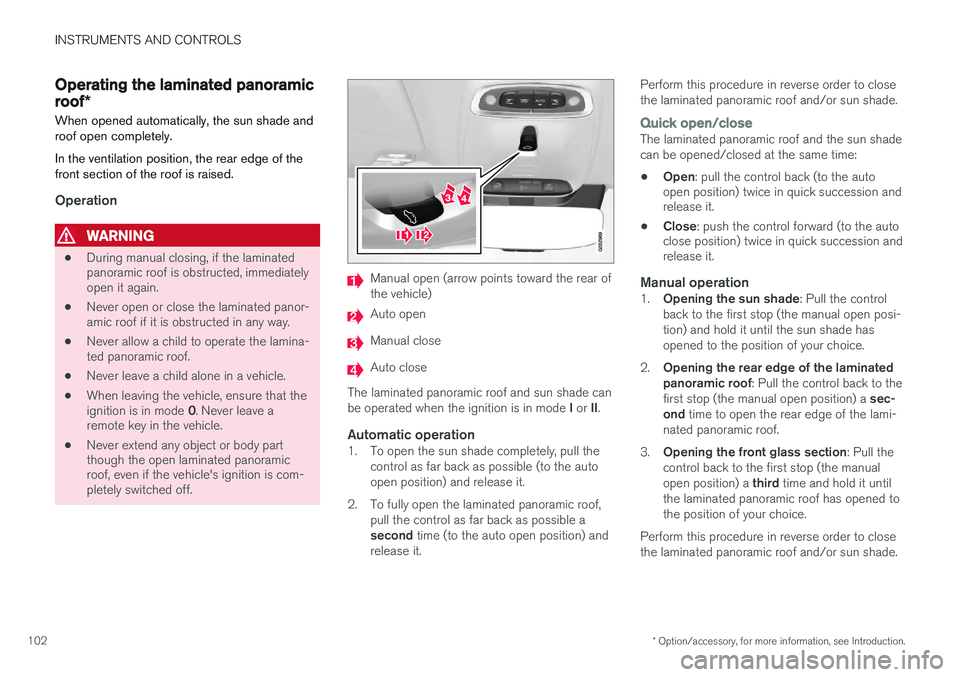
Manual open (arrow points toward the rear of the vehicle)
Auto open
Manual close
Auto close
The laminated panoramic roof and sun shade can be operated when the ignition is in mode I or II.
Automatic operation1. To open the sun shade completely, pull the
control as far back as possible (to the auto open position) and release it.
2. To fully open the laminated panoramic roof, pull the control as far back as possible a second time (to the auto open position) and
release it. Perform this procedure in reverse order to close the laminated panoramic roof and/or sun shade.
Quick open/closeThe laminated panoramic roof and the sun shade can be opened/closed at the same time: •
Open
: pull the control back (to the auto
open position) twice in quick succession and release it.
• Close
: push the control forward (to the auto
close position) twice in quick succession andrelease it.
Manual operation1. Opening the sun shade : Pull the control
back to the first stop (the manual open posi- tion) and hold it until the sun shade hasopened to the position of your choice.
2. Opening the rear edge of the laminatedpanoramic roof : Pull the control back to the
first stop (the manual open position) a sec-
ond time to open the rear edge of the lami-
nated panoramic roof.
3. Opening the front glass section : Pull the
control back to the first stop (the manual open position) a third time and hold it until
the laminated panoramic roof has opened to the position of your choice.
Perform this procedure in reverse order to closethe laminated panoramic roof and/or sun shade.
Page 109 of 570
INSTRUMENTS AND CONTROLS
107
Sub-categoriesSettings
Gracenote®Personal
VideoPersonal
Communication
Sub-categoriesSettings
Phone–
Text Messages–
Bluetooth–
Wi-FiGlobal
Vehicle Wi-Fi HotspotGlobal
Vehicle Modem InternetGlobal
Volvo On Call–
Volvo Service NetworksGlobal
Climate
The main category Climate has no sub-catego-
ries. All settings in this category are personal.
System
Sub-categoriesSettings
Driver ProfilePersonal
Date & Time–
LanguagePersonal
Sub-categoriesSettings
Keyboard LayoutsGlobal
Voice ControlPersonal
UnitsPersonal
Storage–
Software Updates–
Global Reset–
Services–
Related information
• Center display overview (p. 29)
• Navigating in the center display's views (p. 39)
• Using the center display (p. 46)
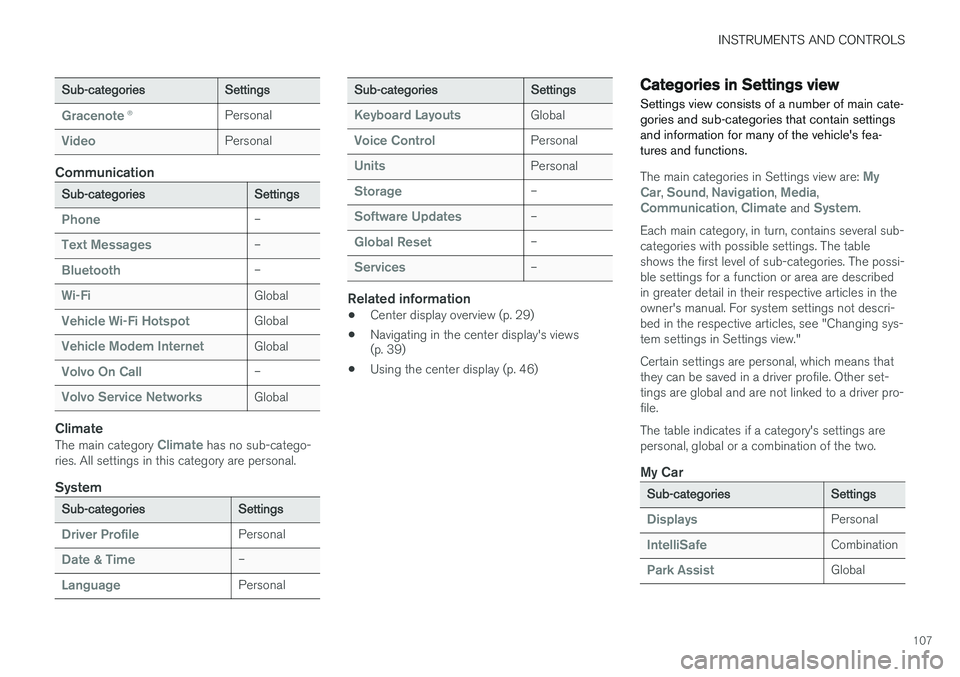
Categories in Settings view
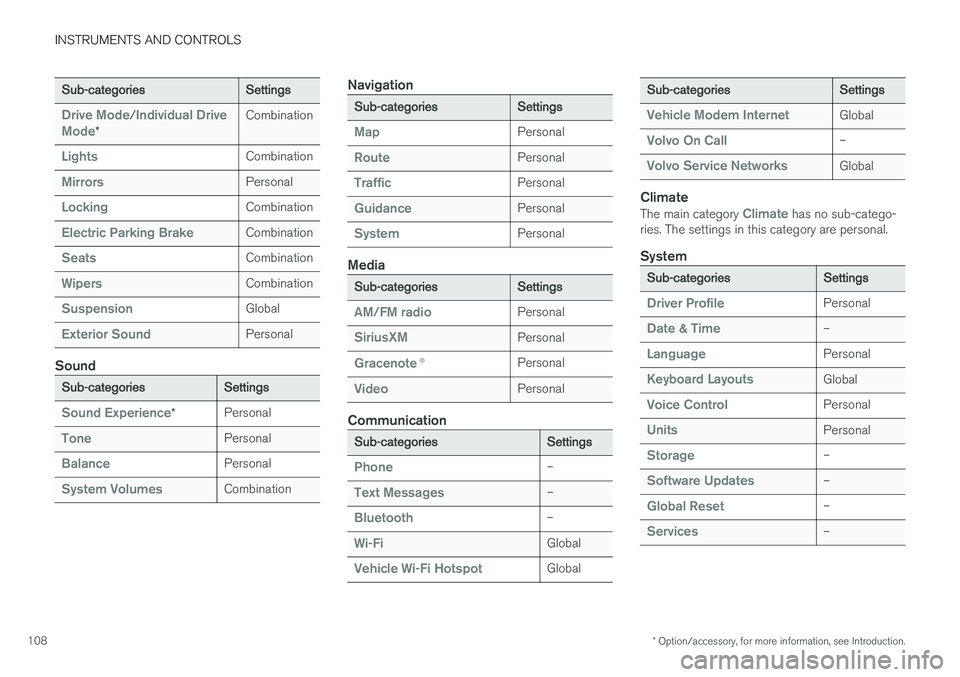
Settings view consists of a number of main cate- gories and sub-categories that contain settingsand information for many of the vehicle's fea-tures and functions.
The main categories in Settings view are: My
Car, Sound, Navigation, Media,Communication, Climate and System.
Each main category, in turn, contains several sub- categories with possible settings. The tableshows the first level of sub-categories. The possi-ble settings for a function or area are describedin greater detail in their respective articles in theowner's manual. For system settings not descri-bed in the respective articles, see "Changing sys-tem settings in Settings view." Certain settings are personal, which means that they can be saved in a driver profile. Other set-tings are global and are not linked to a driver pro-file. The table indicates if a category's settings are personal, global or a combination of the two.
My Car
Sub-categoriesSettings
DisplaysPersonal
IntelliSafeCombination
Park AssistGlobal
Page 110 of 570
INSTRUMENTS AND CONTROLS
* Option/accessory, for more information, see Introduction.
108
Sub-categoriesSettings
Drive Mode/Individual Drive
Mode*
Combination
LightsCombination
MirrorsPersonal
LockingCombination
Electric Parking BrakeCombination
SeatsCombination
WipersCombination
SuspensionGlobal
Exterior SoundPersonal
Sound
Sub-categoriesSettings
Sound Experience*Personal
TonePersonal
BalancePersonal
System VolumesCombination
Navigation
Sub-categoriesSettings
MapPersonal
RoutePersonal
TrafficPersonal
GuidancePersonal
SystemPersonal
Media
Sub-categoriesSettings
AM/FM radioPersonal
SiriusXMPersonal
Gracenote ®Personal
VideoPersonal
Communication
Sub-categoriesSettings
Phone–
Text Messages–
Bluetooth–
Wi-FiGlobal
Vehicle Wi-Fi HotspotGlobal
Sub-categoriesSettings
Vehicle Modem InternetGlobal
Volvo On Call–
Volvo Service NetworksGlobal
Climate
The main category Climate has no sub-catego-
ries. The settings in this category are personal.
System
Sub-categoriesSettings
Driver ProfilePersonal
Date & Time–
LanguagePersonal
Keyboard LayoutsGlobal
Voice ControlPersonal
UnitsPersonal
Storage–
Software Updates–
Global Reset–
Services–
Page 130 of 570

INSTRUMENTS AND CONTROLS
128
Related information
•Instrument panel (p. 128)
• Warning symbols in the instrument panel (p. 134)
• Door and seat belt reminders (p. 61)
Instrument panel
The instrument panel displays vehicle- and driv- ing-related information.
Gauges, indicators and symbols in the
instrument panel
Left side
• Speedometer
• Trip odometer
• Odometer
• Cruise control/speed limiter information
• Road sign information
Center
•
Indicator and warning symbols
• Ambient temperature sensor
• Clock •
Messages (and in certain cases also graph- ics)
• Distance to empty tank
• Door and seat belt status
• Compass and altimeter
• Media player
• Navigation system map
• Cell phone
• Voice control
Right side
• Tachometer
• Fuel gauge
• Gear shift indicator
• Current driving mode
• ECO gauge
• Start/Stop function's status
• Current fuel consumption
• App menu (activated using the right-side steering wheel keypad)
Page 140 of 570
INSTRUMENTS AND CONTROLS
* Option/accessory, for more information, see Introduction.
138
Lighting panel and controls
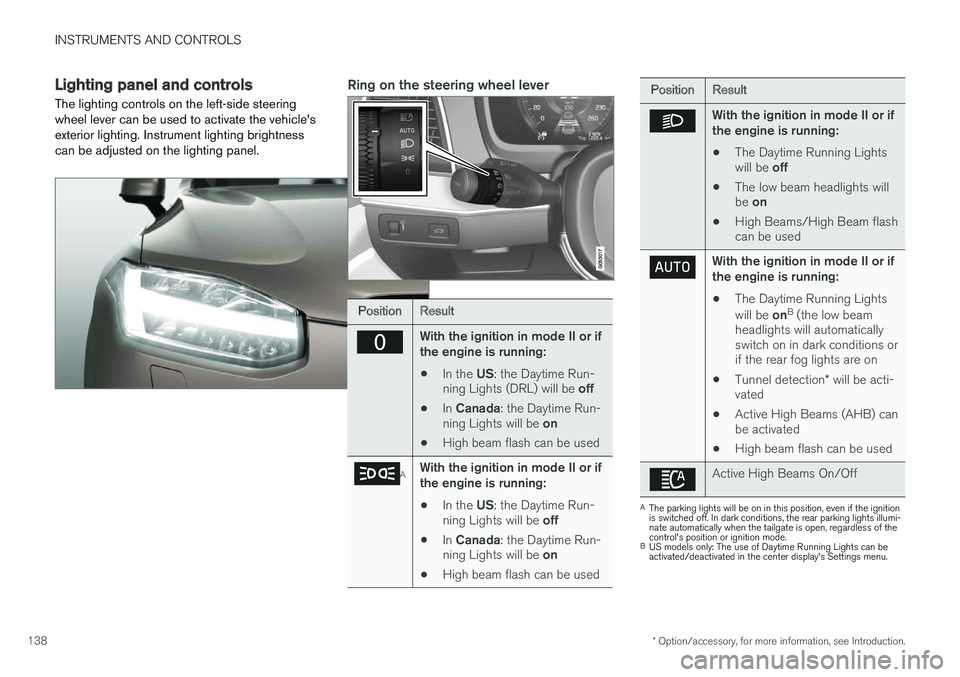
The lighting controls on the left-side steering wheel lever can be used to activate the vehicle'sexterior lighting. Instrument lighting brightnesscan be adjusted on the lighting panel.Ring on the steering wheel lever
PositionResult
With the ignition in mode II or if the engine is running:
• In the
US: the Daytime Run-
ning Lights (DRL) will be off
• In
Canada : the Daytime Run-
ning Lights will be on
• High beam flash can be used
AWith the ignition in mode II or if the engine is running:
• In the
US: the Daytime Run-
ning Lights will be off
• In
Canada : the Daytime Run-
ning Lights will be on
• High beam flash can be used
PositionResult
With the ignition in mode II or if the engine is running:
• The Daytime Running Lights will be
off
• The low beam headlights willbe
on
• High Beams/High Beam flash can be used
With the ignition in mode II or if the engine is running:
• The Daytime Running Lights will be
onB
(the low beam
headlights will automatically switch on in dark conditions orif the rear fog lights are on
• Tunnel detection
* will be acti-
vated
• Active High Beams (AHB) canbe activated
• High beam flash can be used
Active High Beams On/Off
A
The parking lights will be on in this position, even if the ignition is switched off. In dark conditions, the rear parking lights illumi-nate automatically when the tailgate is open, regardless of thecontrol's position or ignition mode.
B US models only: The use of Daytime Running Lights can beactivated/deactivated in the center display's Settings menu.
Page 141 of 570
INSTRUMENTS AND CONTROLS
139
NOTE
The use of Daytime Running Lights is recom- mended in the United States and is manda-
tory in Canada .
Volvo recommends using the position
whenever possible.
WARNING
• Daytime Running Lights are a driving aid designed to help make the vehicle visibleto other roads users.
• The driver is always responsible foradapting the use of Daytime RunningLights/headlights according to ambientlighting and weather conditions.
Lighting panel
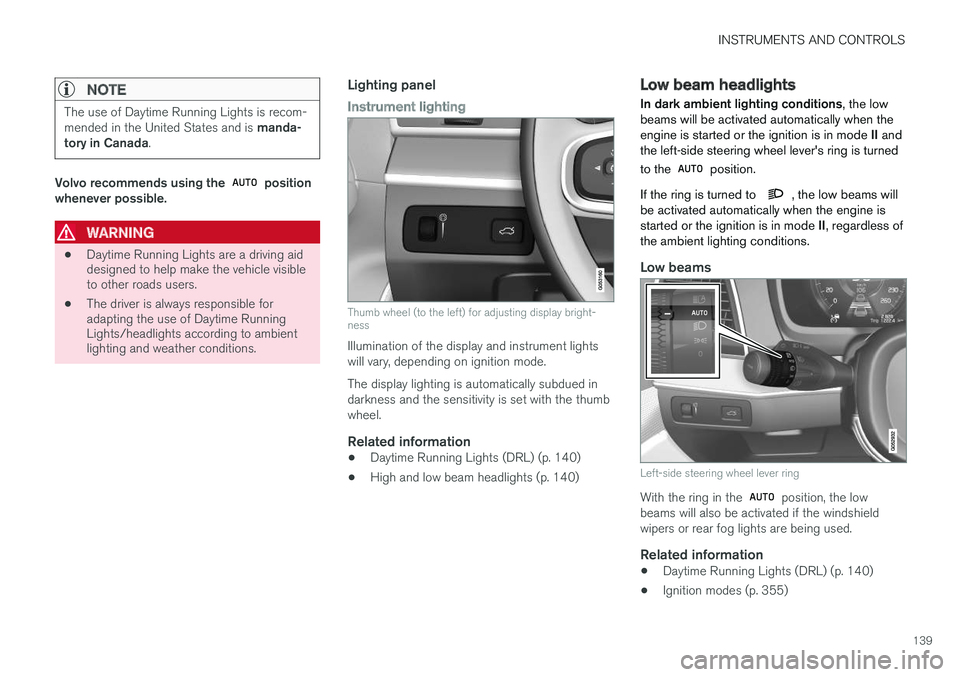
Instrument lighting
Thumb wheel (to the left) for adjusting display bright- ness
Illumination of the display and instrument lights will vary, depending on ignition mode. The display lighting is automatically subdued in darkness and the sensitivity is set with the thumbwheel.
Related information
• Daytime Running Lights (DRL) (p. 140)
• High and low beam headlights (p. 140)
Low beam headlights In dark ambient lighting conditions
, the low
beams will be activated automatically when the engine is started or the ignition is in mode II and
the left-side steering wheel lever's ring is turned to the
position.
If the ring is turned to
, the low beams will
be activated automatically when the engine is started or the ignition is in mode II, regardless of
the ambient lighting conditions.
Low beams
Left-side steering wheel lever ring
With the ring in the position, the low
beams will also be activated if the windshield wipers or rear fog lights are being used.
Related information
• Daytime Running Lights (DRL) (p. 140)
• Ignition modes (p. 355)
Page 142 of 570
INSTRUMENTS AND CONTROLS
140
Daytime Running Lights (DRL)
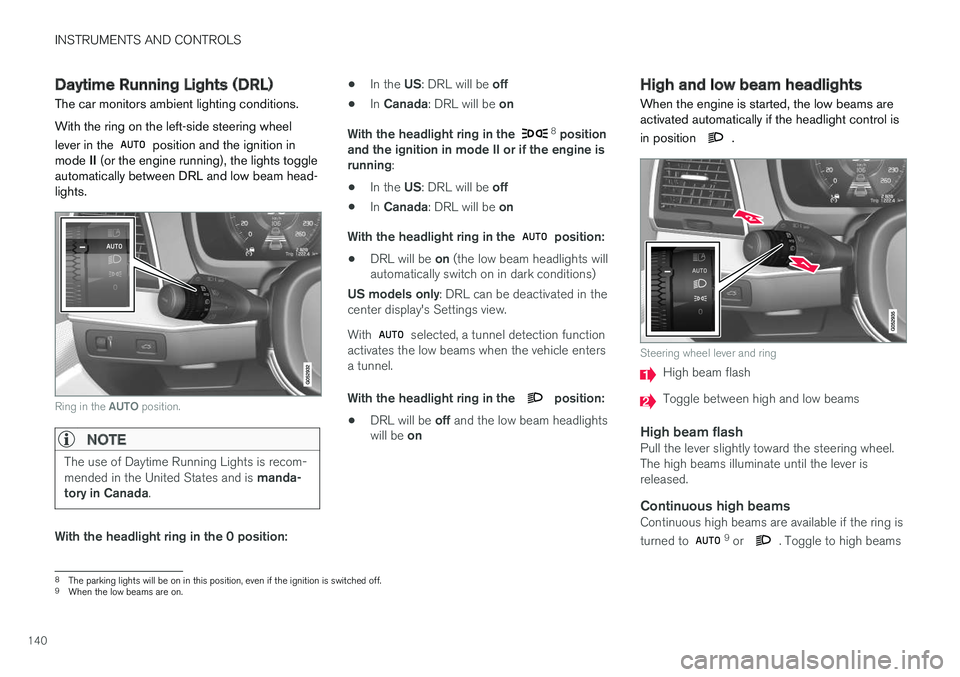
The car monitors ambient lighting conditions. With the ring on the left-side steering wheel lever in the
position and the ignition in
mode II (or the engine running), the lights toggle
automatically between DRL and low beam head- lights.
Ring in the AUTO position.
NOTE
The use of Daytime Running Lights is recom- mended in the United States and is manda-
tory in Canada .
With the headlight ring in the 0 position: •
In the
US: DRL will be off
• In
Canada : DRL will be on
With the headlight ring in the
8
position
and the ignition in mode II or if the engine is running :
• In the
US: DRL will be off
• In
Canada : DRL will be on
With the headlight ring in the
position:
• DRL will be
on (the low beam headlights will
automatically switch on in dark conditions)
US models only : DRL can be deactivated in the
center display's Settings view. With
selected, a tunnel detection function
activates the low beams when the vehicle enters a tunnel. With the headlight ring in the
position:
• DRL will be
off and the low beam headlights
will be on
High and low beam headlights
When the engine is started, the low beams are activated automatically if the headlight control is in position
.
Steering wheel lever and ring
High beam flash
Toggle between high and low beams
High beam flashPull the lever slightly toward the steering wheel. The high beams illuminate until the lever isreleased.
Continuous high beamsContinuous high beams are available if the ring is turned to 9 or . Toggle to high beams
8 The parking lights will be on in this position, even if the ignition is switched off.
9 When the low beams are on.
Page 146 of 570
INSTRUMENTS AND CONTROLS
144
Rear fog lights
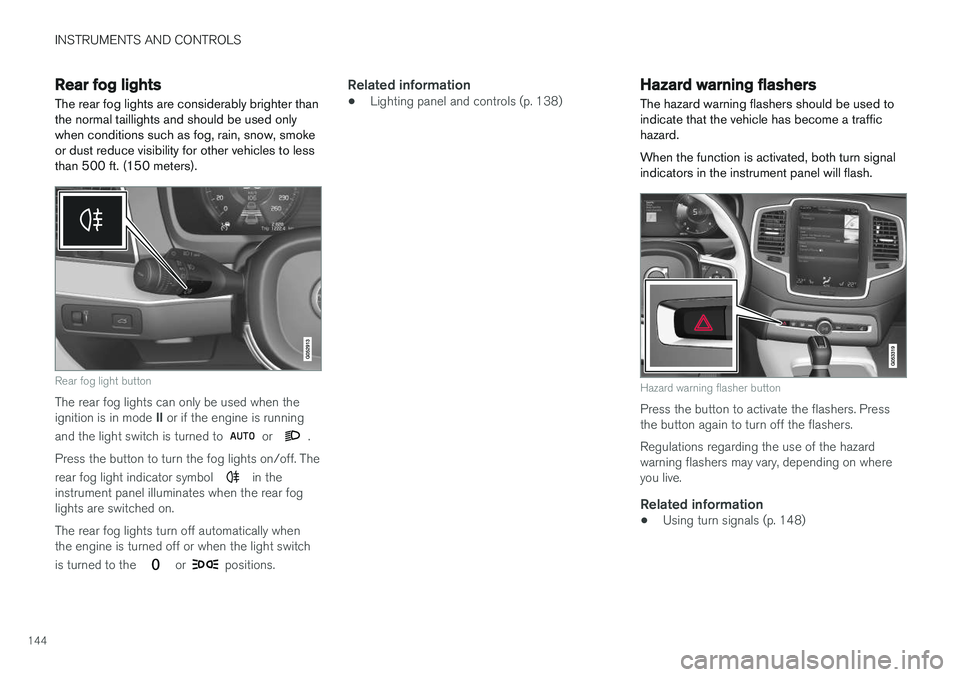
The rear fog lights are considerably brighter than the normal taillights and should be used onlywhen conditions such as fog, rain, snow, smokeor dust reduce visibility for other vehicles to lessthan 500 ft. (150 meters).
Rear fog light button
The rear fog lights can only be used when the ignition is in mode II or if the engine is running
and the light switch is turned to
or .
Press the button to turn the fog lights on/off. The rear fog light indicator symbol
in the
instrument panel illuminates when the rear fog lights are switched on. The rear fog lights turn off automatically when the engine is turned off or when the light switch is turned to the
or positions.
Related information
• Lighting panel and controls (p. 138)
Hazard warning flashers
The hazard warning flashers should be used to indicate that the vehicle has become a traffichazard. When the function is activated, both turn signal indicators in the instrument panel will flash.
Hazard warning flasher button
Press the button to activate the flashers. Press the button again to turn off the flashers. Regulations regarding the use of the hazard warning flashers may vary, depending on whereyou live.
Related information
• Using turn signals (p. 148)