ECO mode VOLVO XC90 2015 Owner's Guide
[x] Cancel search | Manufacturer: VOLVO, Model Year: 2015, Model line: XC90, Model: VOLVO XC90 2015Pages: 570, PDF Size: 12.44 MB
Page 238 of 570

LOCKS AND ALARM
* Option/accessory, for more information, see Introduction.
236
–Press the button 13
on the lower edge of
the tailgate.
> The tailgate will close automatically but will not be locked .
–Press the button13
on the lower edge of
the tailgate.
> The tailgate will close automatically. The tailgate and doors will also be locked and
the alarm will be armed.
If the remote key is not close enough to the tail- gate, automatic locking/unlocking/opening/clos-ing will not be possible. Three short audible sig-nals will sound.
Interrupting opening/closing
–This can be done in five ways: • Press the button on the lighting panel
• Press the button on the remote key
• Press either of the buttons on the lower edge of the tailgate
• Press lightly on the rubber-covered buttonunder the tailgate's outside handle
• Move your foot under a sensor beneath the rear bumper
*
> The tailgate will stop moving
Programming the tailgate's maximum opening angle
The tailgate's maximum opening angle can be programmed, for example, if the tailgate has to beopened in a garage with a low ceiling. Programming the opening angle:
–Open the tailgate manually to the desired angle and press and hold the closing buttonon the tailgate's lower edge for at least 3seconds. Release the tailgate.
> Two audible signals will sound to indicate that the selected opening angle has been stored.
Erasing tailgate programming
–Open the tailgate manually to its highest position and press and hold the closing but-ton on the tailgate's lower edge for at least 3seconds. Release the tailgate.
> Two audible signals will sound to indicate that the programmed opening angle has been erased.
NOTE
If the tailgate has been opened and closed continuously too long, the automatic functionwill be deactivated to avoid overloading theelectrical system. The automatic function canbe used again after approximately 2 minutes. If the vehicle's battery has been discharged or disconnected, or if the tailgate has been openfor more than 24 hours, the tailgate must beopened and closed once manually to resetthe system.
Pinch protectionIf the tailgate is obstructed when being opened/ closed, a pinch protection mechanism is acti-vated.
• While opening: the tailgate will stop moving and an audible signal will sound.
• While closing: the tailgate will stop andreturn to the maximum programmable open-ing position. An audible signal will sound.
WARNING
Be sure that no one is near the tailgate when it is opened or closed automatically. The tail-gate should never be obstructed in any waywhen it is operated.
13
Models equipped with the optional Passive Entry system have a button to close the tailgate and a button to close and lock the tailgate.
Page 256 of 570

DRIVER SUPPORT
* Option/accessory, for more information, see Introduction.
254
Head-up-display *
A flashing light alerts the driver
A flashing icon will appear in the head-up dis- play* to alert the driver of a collision risk.
WARNING
Adaptive Cruise Control only warns of vehicles detected by the radar sensor. In some casesthere may be no warning or the warning maybe delayed. The driver should always apply thebrakes when necessary.
Related information
• Adaptive Cruise Control (ACC) - fault tracing (p. 271)
• Starting and activating Adaptive CruiseControl (ACC) (p. 254)
• Adaptive cruise control passing assistance(p. 270) •
Setting an Adaptive Cruise Control timeinterval (p. 258)
• Changing Adaptive Cruise Control (ACC)speed (p. 257)
• Deactivating/resuming Adaptive CruiseControl (ACC) (p. 255)
• Adaptive Cruise Control (ACC) symbols andmessages (p. 272)
Starting and activating Adaptive Cruise Control (ACC)
ACC must first be put in active mode before it can be started in order to regulate speed or aset time interval to the vehicle ahead.
Starting ACC (putting it in standby mode)
Function buttons and symbols
–Press ◀ (2) or ▶ (3) to scroll to the ACC
(
) function. The symbol (4) will be dis-
played in the instrument panel.
> The symbol indicates that ACC has been
started and is in standby mode . In
standby mode, the vehicle will not main-
tain a set speed or a time interval to the vehicle ahead.
Activating ACC (putting it in active mode and setting a speed)
Before ACC can be put in active mode:
Page 257 of 570
DRIVER SUPPORT
* Option/accessory, for more information, see Introduction.255
•
The driver's seat belt must be buckled and the driver's door must be closed.
• There must be a vehicle ahead (a target vehi-cle) or your vehicle's current speed must beat least 10 mph (15 km/h).
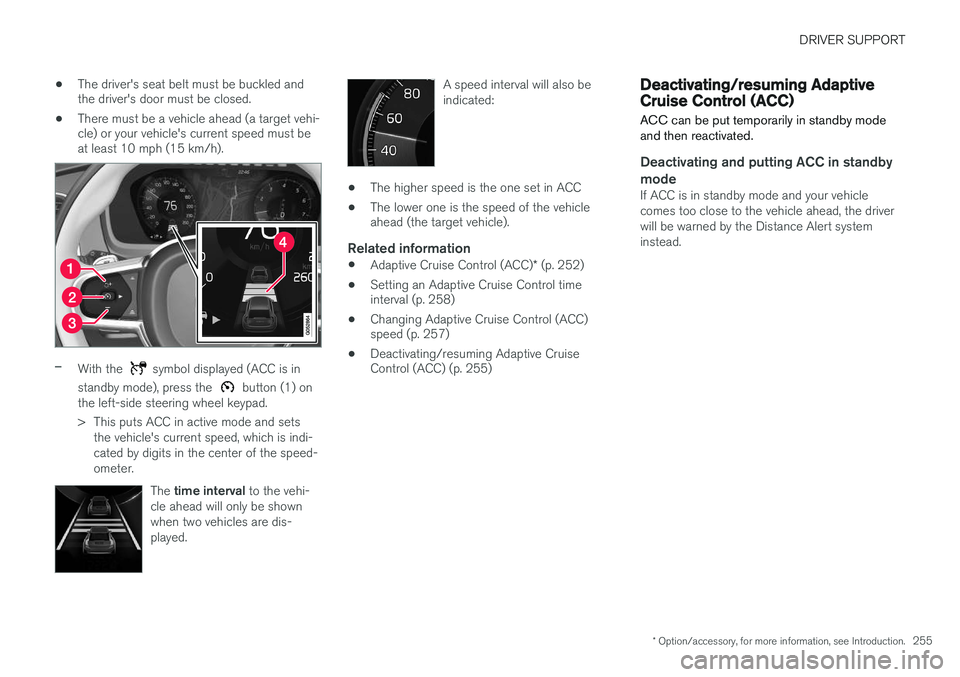
–With the symbol displayed (ACC is in
standby mode), press the
button (1) on
the left-side steering wheel keypad.
> This puts ACC in active mode and sets the vehicle's current speed, which is indi- cated by digits in the center of the speed-ometer.
The time interval to the vehi-
cle ahead will only be shownwhen two vehicles are dis-played.
A speed interval will also be indicated:
• The higher speed is the one set in ACC
• The lower one is the speed of the vehicle ahead (the target vehicle).
Related information
•
Adaptive Cruise Control (ACC)
* (p. 252)
• Setting an Adaptive Cruise Control timeinterval (p. 258)
• Changing Adaptive Cruise Control (ACC)speed (p. 257)
• Deactivating/resuming Adaptive CruiseControl (ACC) (p. 255)
Deactivating/resuming Adaptive Cruise Control (ACC)
ACC can be put temporarily in standby mode and then reactivated.
Deactivating and putting ACC in standby mode
If ACC is in standby mode and your vehicle comes too close to the vehicle ahead, the driverwill be warned by the Distance Alert systeminstead.
Page 260 of 570
DRIVER SUPPORT
* Option/accessory, for more information, see Introduction.
258
Related information
• Adaptive Cruise Control (ACC)
* (p. 252)
• Starting and activating Pilot Assist (p. 262)
• Setting an Adaptive Cruise Control time interval (p. 258)
Setting an Adaptive Cruise Control time interval
ACC makes it possible to set various time inter- vals to the vehicle ahead.
Different time intervals to the vehicle ahead can be selectedand are shown in the instru-ment panel as 1–5 horizontalbars. The greater the number ofbars, the longer the time inter-val. One bar between the vehi-
cles represents a time interval of approximately1 second; 5 bars is approximately 3 seconds. The same symbol appears if Distance Alert is activated.
• If the symbol shows two vehicle's, ACC is actively following the vehicle ahead.
• If only one vehicle is displayed, ACC is
not
actively following another vehicle.
Changing a time interval
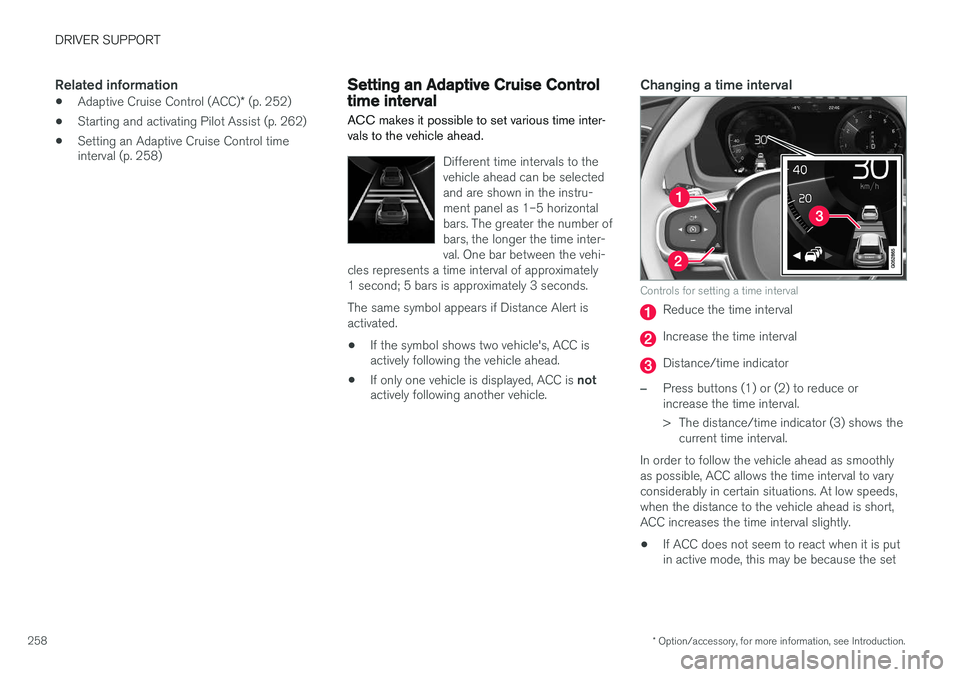
Controls for setting a time interval
Reduce the time interval
Increase the time interval
Distance/time indicator
–Press buttons (1) or (2) to reduce or increase the time interval.
> The distance/time indicator (3) shows the
current time interval.
In order to follow the vehicle ahead as smoothly as possible, ACC allows the time interval to varyconsiderably in certain situations. At low speeds,when the distance to the vehicle ahead is short,ACC increases the time interval slightly. • If ACC does not seem to react when it is put in active mode, this may be because the set
Page 261 of 570

DRIVER SUPPORT
* Option/accessory, for more information, see Introduction.259
time interval to the vehicle ahead does not allow an increase in speed.
• The higher the speed, the greater the dis-tance to the vehicle ahead for a given timeinterval.
• Only use time intervals permitted by localtraffic regulations.
WARNING
•
Only use a time interval that is suitable in current traffic conditions.
• A short time interval gives the driver lim-ited reaction time if an unexpected situa-tion occurs in traffic.
Related information
•
Adaptive Cruise Control (ACC)
* (p. 252)
• Starting and activating Adaptive CruiseControl (ACC) (p. 254)
• Deactivating/resuming Adaptive CruiseControl (ACC) (p. 255)
• Adaptive cruise control passing assistance(p. 270)
• Adaptive Cruise Control (ACC) symbols andmessages (p. 272)
Pilot Assist
*
The Pilot Assist feature helps keep the vehicle in its current traffic lane, at a set speed and a settime interval to the vehicle ahead.
FunctionThe vehicle's camera monitors the traffic lane's side marker lines and a distance monitor helpsmaintain the set time interval to the vehicleahead. Pilot Assist helps provide more relaxed driving in heavy, slow-moving traffic at speeds up to30 mph (50 km/h) on highways and major roads.
Function overview
Windshield module containing the camera/ radar sensor
Monitoring distance
Monitoring side marker lines The driver sets the desired time interval to the vehicle ahead. Pilot Assist monitors that vehicleand the traffic lane's side market lines using thecamera and radar sensor mounted in the upper,center section of the windshield. It helps maintainthe set time interval by automatically adjustingspeed and by providing steering assistance tohelp keep your vehicle in the lane. Pilot Assist's steering assistance is based on monitoring the direction of the vehicle ahead andthe traffic lane's side marker lines. The driver canalways override Pilot Assist and steer the vehicleto e.g., change lanes, etc. If the camera and radar sensor cannot detect the lane's side marker lines or a vehicle ahead, PilotAssist goes into standby mode. When Pilot Assist is in standby mode and your vehicle comes too close to the vehicle ahead, thedriver will be alerted by the Distance Alert func-tion.
Page 267 of 570
DRIVER SUPPORT
* Option/accessory, for more information, see Introduction.265
Setting a Pilot Assist time interval
Different time intervals to the vehicle ahead can be selected and are shown in the instrumentpanel as 1–5 horizontal bars.
Changing the time intervalThe greater the number of bars, the longer the time interval.One bar between the vehiclesrepresents a time interval ofapproximately 1 second; 5 barsis approximately 3 seconds.
The same symbol appears if Distance Alert isactivated.
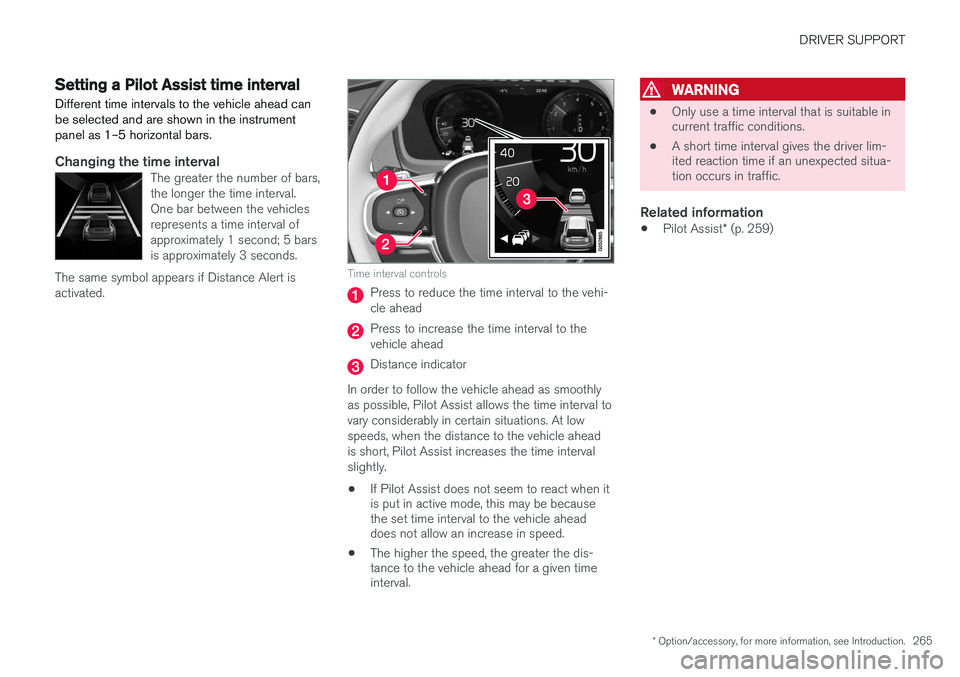
Time interval controls
Press to reduce the time interval to the vehi- cle ahead
Press to increase the time interval to the vehicle ahead
Distance indicator
In order to follow the vehicle ahead as smoothly as possible, Pilot Assist allows the time interval tovary considerably in certain situations. At lowspeeds, when the distance to the vehicle aheadis short, Pilot Assist increases the time intervalslightly.
• If Pilot Assist does not seem to react when it is put in active mode, this may be becausethe set time interval to the vehicle aheaddoes not allow an increase in speed.
• The higher the speed, the greater the dis-tance to the vehicle ahead for a given timeinterval.
WARNING
• Only use a time interval that is suitable in current traffic conditions.
• A short time interval gives the driver lim-ited reaction time if an unexpected situa-tion occurs in traffic.
Related information
•
Pilot Assist
* (p. 259)
Page 268 of 570
DRIVER SUPPORT
* Option/accessory, for more information, see Introduction.
266
Pilot Assistauto-hold brake function
At certain speeds, Pilot Assist provides braking effect.
Stop-and-go drivingDuring brief stops in slow-moving traffic or att traffic lights where the vehicle is not stopped formore than 3 seconds, driving will resume auto-matically. If it takes more than 3 seconds for thevehicle ahead to begin moving again, Pilot Assistwill go into standby mode and the auto-holdbrake function will activate. The driver will then have to reactivate Pilot Assist as follows:
–• Press the button
• Press the accelerator pedal
> Pilot Assist will resume following the vehi- cle ahead if it begins to move within approx. 6 seconds.
NOTE
• Pilot Assist can keep the vehicle station- ary for max. 5 minutes, after which theparking brake will be set and Pilot Assistwill go into standby mode.
• The parking brake must be releasedbefore Pilot Assist can be reactivated.
Deactivating the auto-hold brake functionIn certain situations, auto-hold will be deactivated when the vehicle is at a standstill and Pilot Assistwill go into standby mode. This means that the brakes will be released and the vehicle can begin to roll. The driver must actively apply the brakes to keep the vehicle at a standstill. This can occur in the following situations: • the driver presses the brake pedal
• the parking brake is set
• the gear selector is moved to the
P, N or R
positions
• the driver puts Pilot Assist in standby mode
Automatically setting the parking brakeIn certain situations, the parking brake is set automatically to help keep the vehicle at a stand-still. This occurs if:
• the driver unbuckles the seat belt or opens the door
• Pilot Assist has kept the vehicle at a stand-still for more than approx. 5 minutes
• the engine is turned off
• the brakes overheat
Related information
•
Pilot Assist
* (p. 259)
Pilot Assist limitations
Pilot Assist functionality may be limited in certain situations.
Page 270 of 570
DRIVER SUPPORT
268
Other Adaptive Cruise Control (ACC) functionsACC is an optional system designed to assist
the driver by maintaining a set speed or a set time interval to the vehicle ahead.
ACC has several supplementary functions:
• Changing target vehicles
• Automatic standby mode when changing tar- gets
• Auto-hold brake function
• Deactivation of the auto-hold brake function
• Automatically setting the parking brake
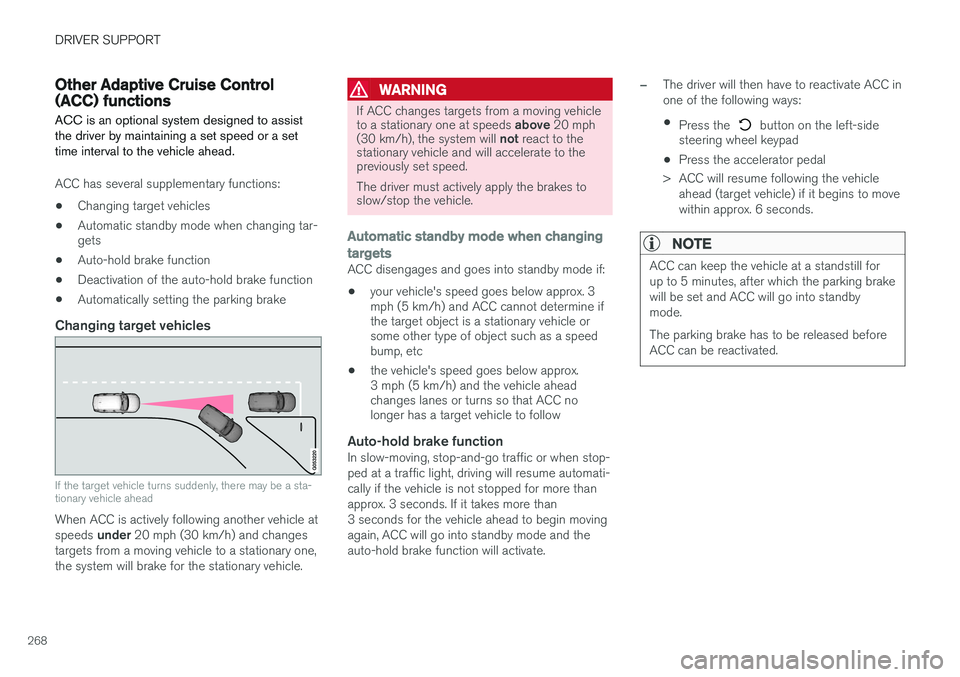
Changing target vehicles
If the target vehicle turns suddenly, there may be a sta- tionary vehicle ahead
When ACC is actively following another vehicle at speeds
under 20 mph (30 km/h) and changes
targets from a moving vehicle to a stationary one, the system will brake for the stationary vehicle.
WARNING
If ACC changes targets from a moving vehicle to a stationary one at speeds above 20 mph
(30 km/h), the system will not react to the
stationary vehicle and will accelerate to the previously set speed. The driver must actively apply the brakes to slow/stop the vehicle.
Automatic standby mode when changing targets
ACC disengages and goes into standby mode if:
• your vehicle's speed goes below approx. 3 mph (5 km/h) and ACC cannot determine ifthe target object is a stationary vehicle orsome other type of object such as a speedbump, etc
• the vehicle's speed goes below approx.3 mph (5 km/h) and the vehicle aheadchanges lanes or turns so that ACC nolonger has a target vehicle to follow
Auto-hold brake functionIn slow-moving, stop-and-go traffic or when stop- ped at a traffic light, driving will resume automati-cally if the vehicle is not stopped for more thanapprox. 3 seconds. If it takes more than3 seconds for the vehicle ahead to begin movingagain, ACC will go into standby mode and theauto-hold brake function will activate.
–The driver will then have to reactivate ACC in one of the following ways:
• Press the
button on the left-side
steering wheel keypad
• Press the accelerator pedal
> ACC will resume following the vehicle ahead (target vehicle) if it begins to move
within approx. 6 seconds.
NOTE
ACC can keep the vehicle at a standstill for up to 5 minutes, after which the parking brakewill be set and ACC will go into standbymode. The parking brake has to be released before ACC can be reactivated.
Page 310 of 570

DRIVER SUPPORT
* Option/accessory, for more information, see Introduction.
308
Adjustable steering force *
Steering force increases with the speed of the vehicle to give the driver an enhanced sense ofcontrol and stability. At low speed the vehicle iseasier to steer in order to facilitate parking, etc.
Changing the steering force level1.
Tap Settings in the center display's Top
view.
2. Tap
My CarDrive ModeSteering
force.
3. Select
Low, Medium or High to set the
desired level.
NOTE
• This steering force level menu function cannot be accessed when the vehicle isin motion.
• In certain situations, the power steeringfunction may become too hot and mustbe temporarily cooled. During cooling,power steering effect will be reduced andmore force may be necessary to turn thesteering wheel and a message will bedisplayed in the instrument panel.
Related information
•
Driver support systems (p. 240)
Electronic Stability Control (ESC)
Electronic Stability Control (ESC) helps reduce wheel spin, counteract skidding and to generallyhelp improve directional stability.
A pulsating sound will be audi- ble when the system is activelyoperating and is normal. Accel-eration may also be slightlyslower than normal.
WARNING
ESC is a supplementary aid and cannot deal with all situations or road conditions. The driver is always responsible for operating the vehicle in a safe manner in accordancewith current traffic regulations.
ESC consists of the following functions: • Traction control
• Spin control
• Active Yaw Control
• Engine Drag Control
• Trailer Stability Assist
Traction controlThis function is designed to help reduce wheel spin by transferring power from a drive wheel that begins to lose traction to the wheel on the oppo-site side of the vehicle (on the same axle).
Spin controlThis function is designed to help prevent thedrive wheels from spinning while the vehicle isaccelerating.
Active Yaw ControlAt low speeds, this function helps maintain direc-tional stability by braking one or more of thewheels if the vehicle shows a tendency to skid orslide laterally.
Engine Drag Control EDCEDC helps keep the engine running if the wheelsshow a tendency to lock, e.g., when shifting downin the manual shifting mode or while using theengine's braking function on a slippery surface. Ifthe wheels were to lock, the vehicle wouldbecome more difficult to steer.
Trailer Stability Assist
*7TSA helps stabilize a vehicle that is towing atrailer when the vehicle and trailer have begun tosway. This system is automatically deactivated if the driver selects
Sport mode.
Related information
•Detachable trailer hitch (p. 353)
• Driving with a trailer (p. 351)
7
This function is included if the vehicle is equipped with a Volvo original trailer hitch.
Page 312 of 570
DRIVER SUPPORT
310
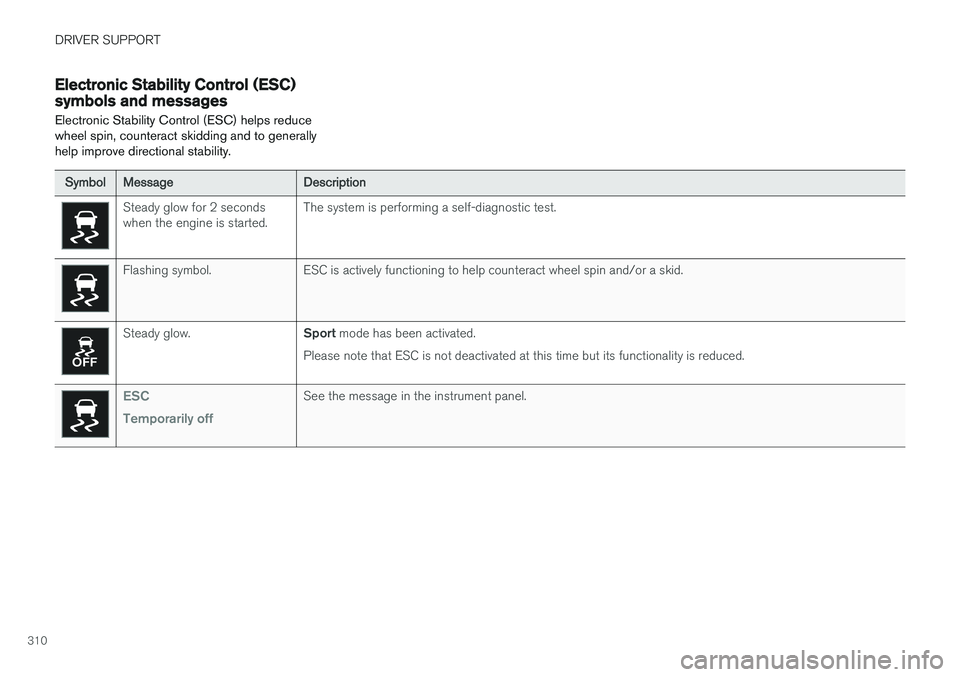
Electronic Stability Control (ESC) symbols and messages Electronic Stability Control (ESC) helps reduce wheel spin, counteract skidding and to generallyhelp improve directional stability.
SymbolMessageDescription
Steady glow for 2 seconds when the engine is started.The system is performing a self-diagnostic test.
Flashing symbol.ESC is actively functioning to help counteract wheel spin and/or a skid.
Steady glow.Sport mode has been activated.
Please note that ESC is not deactivated at this time but its functionality is reduced.
ESC Temporarily offSee the message in the instrument panel.