ECO mode VOLVO XC90 2015 Service Manual
[x] Cancel search | Manufacturer: VOLVO, Model Year: 2015, Model line: XC90, Model: VOLVO XC90 2015Pages: 570, PDF Size: 12.44 MB
Page 325 of 570
DRIVER SUPPORT
* Option/accessory, for more information, see Introduction.323
Driving lane assistance
The
Lane Departure Warning (LDW) and Lane
Keeping Aid (LKA) * functions are designed to
help reduce the risk of accidents in situations where the vehicle unintentionally leaves its laneon highways or other major roads.
Driving lane assistance systems: LDW or
LKA
There are two versions of the driving lane assis- tance system:
• LDW (
Lane Departure Warning): provides
an audible signal or vibrations in the steering wheel.
• LKA (
Lane Keeping Aid): actively steers the
vehicle to help keep it in its traffic lane and/or alerts the driver using an audible sig-nal or through vibrations in the steeringwheel.
The driving lane assistance systems are active at speeds from approx. 40 mph (65 km/h) up to thevehicle's permitted top speed on roads withclearly visible traffic lane marker lines. On narrow roads, the systems may not function and will go into standby mode. They will return toactive mode if the road becomes sufficientlywide.
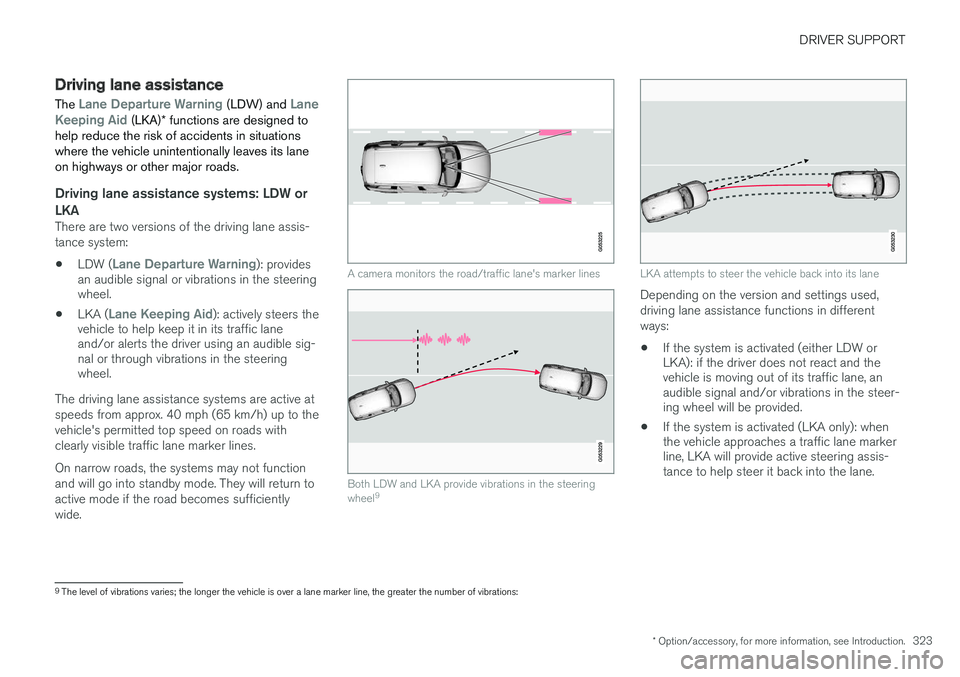
A camera monitors the road/traffic lane's marker lines
Both LDW and LKA provide vibrations in the steering wheel 9
LKA attempts to steer the vehicle back into its lane
Depending on the version and settings used, driving lane assistance functions in differentways:
• If the system is activated (either LDW or LKA): if the driver does not react and thevehicle is moving out of its traffic lane, anaudible signal and/or vibrations in the steer-ing wheel will be provided.
• If the system is activated (LKA only): whenthe vehicle approaches a traffic lane markerline, LKA will provide active steering assis-tance to help steer it back into the lane.
9
The level of vibrations varies; the longer the vehicle is over a lane marker line, the greater the number of vibrations:
Page 326 of 570
DRIVER SUPPORT
* Option/accessory, for more information, see Introduction.
324
NOTE
If the turn signal is used, neither of the driving lane assistance systems (LDW or LKA) willprovide an alert or steering assistance.
WARNING
This feature is only intended to assist the driver and does not function in all driving,weather, traffic or road conditions. As the driver, you have full responsibility for operating the vehicle in a safe manner.
Steering assistance (LKA only)In order for LKA's steering assistance to function, the driver's hands must be on the steering wheel,which the system monitors continuously.
If this is not the case, this sym-bol will illuminate in the instru- ment panel and
Lane Keeping
Aid Apply steering will appear
to alert the driver to actively steer the vehicle.
If the driver does not take action, an audible sig- nal will sound and LKA will go into standby mode.The function will not become available again untilthe driver actively steers the vehicle.
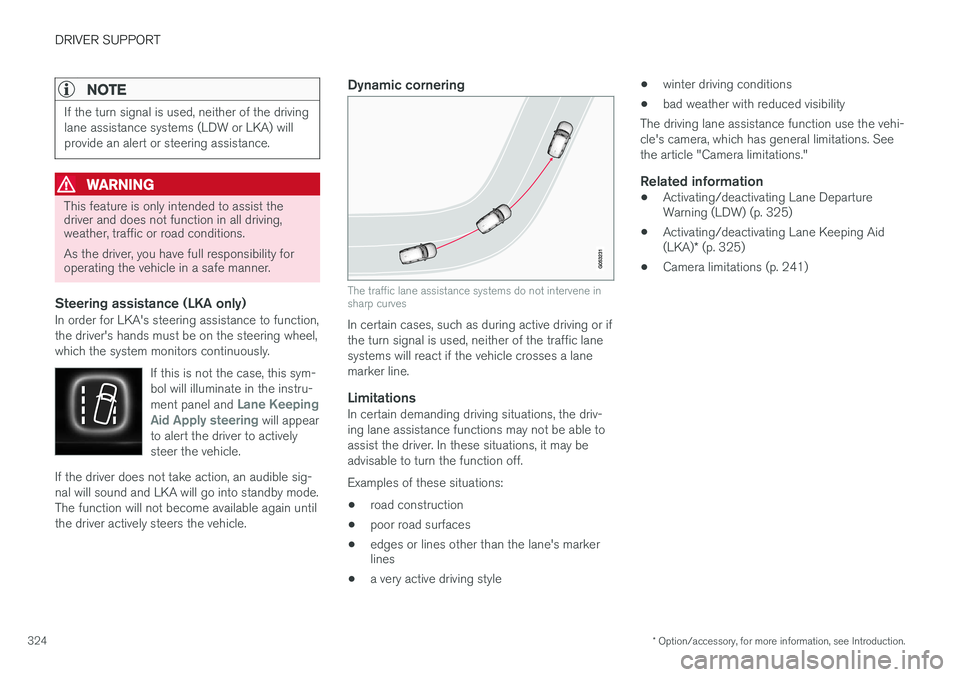
Dynamic cornering
The traffic lane assistance systems do not intervene in sharp curves
In certain cases, such as during active driving or if the turn signal is used, neither of the traffic lanesystems will react if the vehicle crosses a lanemarker line.
LimitationsIn certain demanding driving situations, the driv-ing lane assistance functions may not be able toassist the driver. In these situations, it may beadvisable to turn the function off. Examples of these situations: • road construction
• poor road surfaces
• edges or lines other than the lane's marker lines
• a very active driving style •
winter driving conditions
• bad weather with reduced visibility
The driving lane assistance function use the vehi- cle's camera, which has general limitations. Seethe article "Camera limitations."
Related information
• Activating/deactivating Lane Departure Warning (LDW) (p. 325)
• Activating/deactivating Lane Keeping Aid (LKA)
* (p. 325)
• Camera limitations (p. 241)
Page 335 of 570
STARTING AND DRIVING
333
When Auto-hold is off, Hill Start Assist (HSA) will be activated to help prevent the vehicle from roll-ing backwards when starting up a hill.
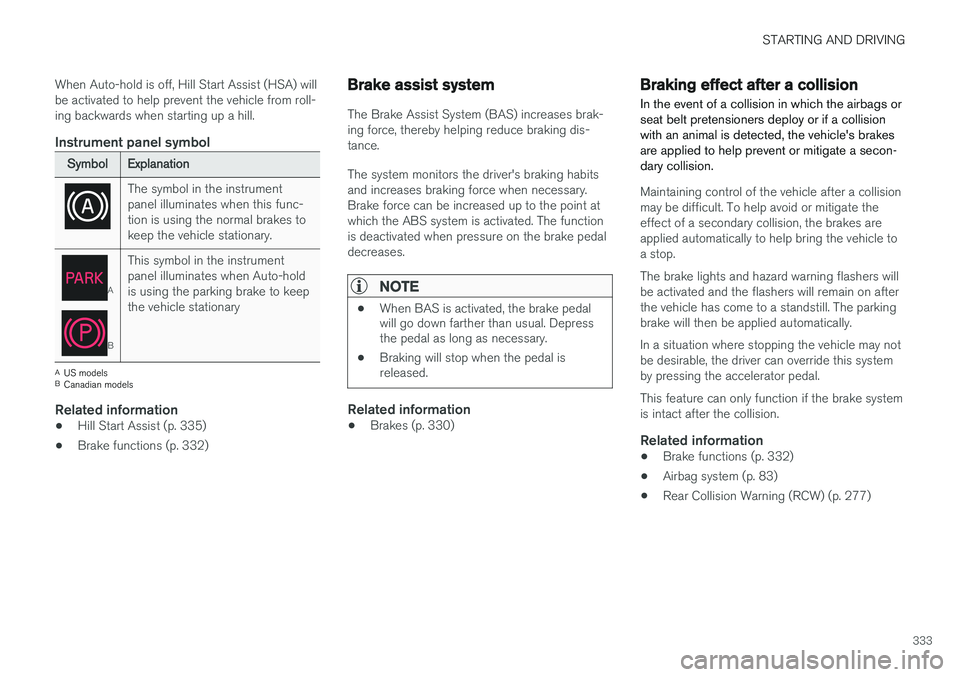
Instrument panel symbol
SymbolExplanation
The symbol in the instrument panel illuminates when this func-tion is using the normal brakes tokeep the vehicle stationary.
A
B
This symbol in the instrument panel illuminates when Auto-holdis using the parking brake to keepthe vehicle stationary
A
US models
B Canadian models
Related information
• Hill Start Assist (p. 335)
• Brake functions (p. 332)
Brake assist system
The Brake Assist System (BAS) increases brak- ing force, thereby helping reduce braking dis-tance. The system monitors the driver's braking habits and increases braking force when necessary.Brake force can be increased up to the point atwhich the ABS system is activated. The functionis deactivated when pressure on the brake pedaldecreases.
NOTE
•When BAS is activated, the brake pedal will go down farther than usual. Depressthe pedal as long as necessary.
• Braking will stop when the pedal isreleased.
Related information
•Brakes (p. 330)
Braking effect after a collision
In the event of a collision in which the airbags or seat belt pretensioners deploy or if a collisionwith an animal is detected, the vehicle's brakesare applied to help prevent or mitigate a secon-dary collision.
Maintaining control of the vehicle after a collision may be difficult. To help avoid or mitigate theeffect of a secondary collision, the brakes areapplied automatically to help bring the vehicle toa stop. The brake lights and hazard warning flashers will be activated and the flashers will remain on afterthe vehicle has come to a standstill. The parkingbrake will then be applied automatically. In a situation where stopping the vehicle may not be desirable, the driver can override this systemby pressing the accelerator pedal. This feature can only function if the brake system is intact after the collision.
Related information
• Brake functions (p. 332)
• Airbag system (p. 83)
• Rear Collision Warning (RCW) (p. 277)
Page 337 of 570
STARTING AND DRIVING
* Option/accessory, for more information, see Introduction.335
Related information
•Brake functions (p. 332)
• Low Speed Control (LSC) (p. 371)
• Drive modes
* (p. 359)
Hill Start Assist
Hill Start Assist (HSA) helps prevent the vehicle from rolling backwards when starting up a hill. Ifyou are backing up a hill, HSA helps prevent thevehicle from rolling forward.
HSA makes it easier to start or back up on a hill by retaining pressure on the brake pedal for sev-eral seconds after the pedal has been released inorder to keep the vehicle at a standstill. The brakes will be released after several seconds or when the driver presses the accelerator pedal. HSA is available even if the Auto-hold braking function is turned off.
Related information
• Brake functions (p. 332)
• Auto-hold brake function (p. 332)
Parking brake The electric parking brake helps to keep the vehicle stationary when it is parked.
Page 342 of 570
STARTING AND DRIVING
340•
Remove snow tires when threat of snow or ice has ended.
• Note that roof racks, ski racks, etc, increaseair resistance and also fuel consumption.
• At highway driving speeds, fuel consumptionwill be lower with the air conditioning on andthe windows closed than with the air condi-tioning off and the windows open.
• Using the onboard trip computer's fuel con-sumption modes can help you learn how todrive more economically.
Other factors that decrease gas mileage are:
• Dirty air cleaner
• Dirty engine oil and clogged oil filter
• Dragging brakes
• Incorrect front end alignment
Some of the above mentioned items and others are checked at the standard maintenance inter-vals.
Handling and roadholding
• Vehicle load, tire design and inflation pres- sure all affect vehicle handling. Therefore,check that the tires are inflated to the rec-ommended pressure according to the vehicleload. Loads should be distributed so thatcapacity weight or maximum permissible axleloads are not exceeded.
• At the specified curb weight your vehicle hasa tendency to understeer, which means thatthe steering wheel has to be turned more than might seem appropriate for the curva-ture of a bend. This ensures good stabilityand reduces the risk of rear wheel skid.Remember that these properties can alterwith the vehicle load. The heavier the load inthe cargo compartment, the less the ten-dency to understeer.
Driving through standing water
The vehicle should be driven with extreme cau- tion if it is necessary to drive through standingwater.
The vehicle can be driven through water up to a depth of approximately 17.7 in. (45 cm) at walk-ing speed to help prevent water from enteringthe differential and the transmission. Thisreduces the oil's lubricating capacity and mayshorten the service life of these components.
• Take particular care when driving through flowing water.
• After driving through water, apply the brakesand check that they are functioning correctly.
• Clean the electrical connections for trailerwiring after driving in mud or water.
• When driving through water, maintain lowspeed and do not stop in the water.
Page 346 of 570

STARTING AND DRIVING
344
Towing recommendations
Always check with state and local authorities before attempting to tow another vehiclebecause this type of towing is subject to regula-tions regarding maximum towing speed, lengthand type of towing device, lighting, etc.
Towing your vehicle behind another
vehicle
1. After securely attaching the towing line to both vehicles, put the gear selector in posi- tion N and release the parking brake.
2. Put the ignition in mode II by turning the
start knob to START (without depressing
the brake pedal) and hold it in this position
for approx. 4 seconds. Release the knob.
3. Put the gear selector in position N and
release the parking brake.
4. The towing vehicle can now begin driving.
5. Keep the tow rope taut when the towing vehicle slows down by applying light pressure on the brake pedal. This will help prevent jar-ring movements of the vehicle being towed.
6. Be prepared to apply the brakes to stop the vehicle being towed.
CAUTION
General towing precautions:
• If the vehicle's battery is dead, an auxiliary battery will be necessary to provide cur-rent for releasing the electric parkingbrake and to move the gear selector from the
P position to N. If this is not possible,
use the shiftlock override procedure tomanually release the gear selector from P
and move it to N.
• Maximum speed: 50 mph (80 km/h). Do not exceed the maximum allowable tow-ing speed.
• Maximum distance with front wheels onground: 50 miles (80 km).
• The vehicle should only be towed in theforward direction.
WARNING
• When the vehicle is being towed, the igni- tion should be in mode
II (in mode I, all of
the vehicle's airbags are deactivated).
• The remote key must remain inside the vehicle.
• The power brakes and power steering willnot function when the engine is not run-ning. Approximately 5 times more pres-sure will be required on the brake pedaland the steering wheel will be considera-bly harder to turn.
• The towing eyelets must not be used forpulling the vehicle out of a ditch or forany similar purpose involving severestrain.
Page 348 of 570

STARTING AND DRIVING
346
WARNING
•Do not connect the jumper cable to any part of the fuel system or to any movingparts. Avoid touching hot manifolds.
• Batteries generate hydrogen gas, whichis flammable and explosive.
• Battery fluid contains sulfuric acid. Do notallow battery fluid to contact eyes, skin,fabrics or painted surfaces. If contactoccurs, flush the affected area immedi-ately with water. Obtain medical helpimmediately if eyes are affected.
• Never expose the battery to open flameor electric spark.
• Do not smoke near the battery.
• Failure to follow the instructions for jumpstarting can lead to injury.
Related information
• Towing eyelet (p. 343)
• Jump starting (p. 350)
• Parking brake (p. 335)
• Ignition modes (p. 355)
Fuel Volvo recommends the use of detergent gaso- line to control engine deposits.
Deposit control gasoline (detergent
additives)
Detergent gasoline is effective in keeping injec- tors and intake valves clean. Consistent use ofdeposit control gasolines will help ensure gooddrivability and fuel economy. If you are not surewhether the gasoline contains deposit controladditives, check with the service station operator.
NOTE
Volvo does not recommend the use of exter- nal fuel injector cleaning systems.
Unleaded fuelEach Volvo has a three-way catalytic converter and must use only unleaded gasoline. U.S. andCanadian regulations require that pumps deliver-ing unleaded gasoline be labeled "UNLEADED".Only these pumps have nozzles which fit yourvehicle's filler inlet. It is unlawful to dispense lea-ded fuel into a vehicle labeled "unleaded gaso-line only". Leaded gasoline damages the three-way catalytic converter and the heated oxygensensor system. Repeated use of leaded gasolinewill lessen the effectiveness of the emission con-trol system and could result in loss of emissionwarranty coverage. State and local vehicle inspection programs will make detection of mis-fueling easier, possibly resulting in emission testfailure for misfueled vehicles.
NOTE
Some U.S. and Canadian gasolines contain an octane enhancing additive called methyl-cyclopentadienyl manganese tricarbonyl(MMT). If such fuels are used, your EmissionControl System performance may be affected,and the Check Engine Light (malfunctionindicator light) located on your instrumentpanel may light. If this occurs, please returnyour vehicle to a trained and qualified Volvoservice technician for service.
Gasoline containing alcohol and ethers, "Oxygenated fuels"
Some fuel suppliers sell gasoline containing "oxygenates" which are usually alcohols orethers. In some areas, state or local laws requirethat the service pump be marked indicating useof alcohols or ethers. However, there are areas inwhich the pumps are unmarked. If you are notsure whether there is alcohol or ethers in thegasoline you buy, check with the service stationoperator. To meet seasonal air quality standards,some areas require the use of "oxygenated" fuel. Volvo allows the use of the following "oxygen- ated" fuels; however, the octane ratings listedmust still be met.
Page 353 of 570
STARTING AND DRIVING
351
WARNING
•Do not connect the jumper cable to any part of the fuel system or to any movingparts. Avoid touching hot manifolds.
• Batteries generate hydrogen gas, whichis flammable and explosive.
• Battery fluid contains sulfuric acid. Do notallow battery fluid to contact eyes, skin,fabrics or painted surfaces. If contactoccurs, flush the affected area immedi-ately with water. Obtain medical helpimmediately if eyes are affected.
• Never expose the battery to open flameor electric spark.
• Do not smoke near the battery.
• Failure to follow the instructions for jumpstarting can lead to injury.
Related information
• Ignition modes (p. 355)
• Starting the engine (p. 356)
• Turning the engine off (p. 359)
Driving with a trailer
When towing a trailer, always observe the legal requirements of the state/province.
• All Volvo models are equipped with energy- absorbing shock-mounted bumpers. Trailerhitch installation should not interfere with theproper operation of this bumper system.
Trailer towing does not normally present any par- ticular problems, but take into consideration:
• Increase tire pressure to recommended full pressure.
• When your vehicle is new, avoid towing heavytrailers during the first 620 miles (1,000 km).
• Maximum speed when towing a trailer:50 mph (80 km/h).
• Engine and transmission are subject toincreased loads. Therefore, engine coolanttemperature should be closely watched whendriving in hot climates or hilly terrain. Use alower gear and turn off the air conditioner ifthe temperature gauge needle enters the redrange.
• If the automatic transmission begins to over-heat, a message will be displayed in the textwindow.
• Avoid overload and other abusive operation.
• Hauling a trailer affects handling, durability,and economy.
• It is necessary to balance trailer brakes withthe towing vehicle brakes to provide a safe stop (check and observe state/local regula-tions).
• Do not connect the trailer's brake systemdirectly to the vehicle's brake system.
• More frequent vehicle maintenance isrequired.
• Remove the ball holder when the hitch is notbeing used.
NOTE
• When parking the vehicle with a trailer on a hill, apply the parking brake before put- ting the gear selector in
P. Always follow
the trailer manufacturer's recommenda- tions for wheel chocking.
• When starting on a hill, put the gear selector in
D before releasing the parking
brake.
• If you use the manual (Geartronic) shift positions while towing a trailer, make surethe gear you select does not put toomuch strain on the engine (using toohigh a gear).
• The drawbar assembly/trailer hitch maybe rated for trailers heavier than the vehi-cle is designed to tow. Please adhere toVolvo's recommended trailer weights.
• Avoid driving with a trailer on inclines ofmore than 15%.
Page 357 of 570
STARTING AND DRIVING
* Option/accessory, for more information, see Introduction.355
Ignition modes
The vehicle's ignition can be put in various modes (levels) to make different functions availa-ble.
The vehicle's ignition has 3 modes: 0, I, and II
that can be used to operate various functions without starting the engine. The following tableshows examples of which functions are availablein the respective modes.
ModeFunctions available
0• The odometer, clock and tem- perature gauge are illuminated
• Power seats
* can be adjusted
• The power windows can be oper-ated
• The 12-volt socket in the cargocompartment can be used
• The center display is activatedand can be used
• The infotainment system can beused for a limited time
In this mode, certain functions can only be used for a limited time to helpminimize battery drain
I• The laminated panoramic roof
*,
power seats */windows,12-volt
sockets in the passenger com- partment, Bluetooth, navigation system *, climate system blower,
windshield wipers can be oper- ated
• The infotainment system will start(if it was started when the ignitionwas switched off)
ModeFunctions available
II• The headlights illuminate
• Warning/indicator lights illumi- nate for 5 seconds
• A number of other functions willalso be activated. However, the heated seats
* and heated rear
window functions can only be activated when the engine is run-ning.
This mode should only be used for very short periods to help avoiddraining the battery.
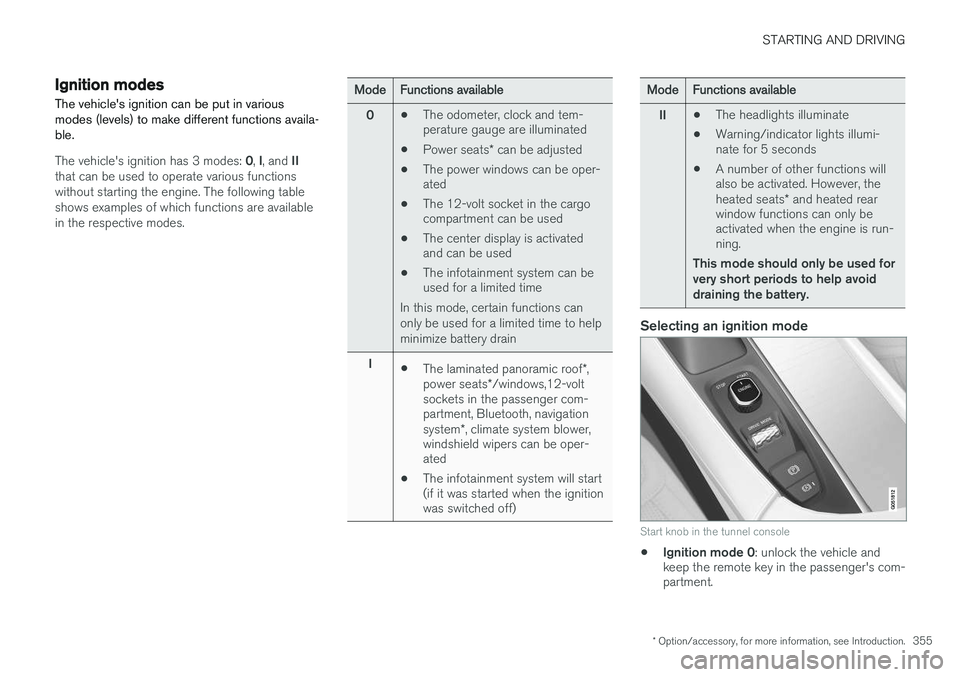
Selecting an ignition mode
Start knob in the tunnel console
• Ignition mode 0
: unlock the vehicle and
keep the remote key in the passenger's com- partment.
Page 358 of 570
STARTING AND DRIVING
356
NOTE
To access ignition modes I or II without star-
ting the engine, the brake pedal must not be
depressed when these modes are selected.
• Ignition mode I
: Turn the start knob to
START and release it. The knob will return
automatically to its original position.
• Ignition mode II
: Turn the start knob to
START and hold it there for approx.
4 seconds. Release the knob.
• Returning to ignition mode 0
: To return to
mode 0 from mode II or I, turn the start knob
to STOP and release it.
Related information
•Starting the engine (p. 356)
• Turning the engine off (p. 359)
Battery drain Your vehicle's electrical functions drain the bat- tery to varying extents.
Avoid using ignition mode
II as much as posssi-
ble, or electrical functions that require a great deal of electrical current when the engine is notrunning. Using ignition mode I whenever possible con-
sumes less electrical current. Functions that require a great deal of electrical current include:
• the climate system blower
• headlights
• wipers
• infotainment system (especially at high vol- ume).
If the battery's charge level is low, a text message will appear in the instrument panel. The vehicle'senergy-saving function will then turn off orreduce certain functions that are currently con-suming electrical current. If the battery needs to be recharged, start the engine and let it idle for at least 15 minutes ordrive the vehicle (driving charges the batteryfaster than letting the engine idle).
Related information
• Ignition modes (p. 355)
Starting the engine
The engine can be started using the start knob on the tunnel console if there is a remote key inthe passenger compartment.