light VOLVO XC90 2015 User Guide
[x] Cancel search | Manufacturer: VOLVO, Model Year: 2015, Model line: XC90, Model: VOLVO XC90 2015Pages: 570, PDF Size: 12.44 MB
Page 45 of 570
INTRODUCTION
43
Swipe the screen from left to right to access Function view from Home view. From Functionview, you can activate/deactivate various vehicle functions such as
Drive Modes, Speed limit
adaptation and Park Assist.
When applicable, swipe upward to scroll in the list of functions (depending on the number of func-tions). Activate/deactivate a function by tapping its but- ton. Certain functions will open in their own win-dows. To move a function button, press and hold it. It will become slightly smaller and transparent andcan then be dragged to the desired position andreleased.
Related information
• Using the center display (p. 46)
• Center display overview (p. 29)
• Function view buttons (p. 37)
• Symbols in the center display status bar (p. 44)
• Changing settings in different types of apps(p. 45)
• Climate system controls (p. 180)
Page 52 of 570
INTRODUCTION
50
Using the owner's manualReading your owner's manual is a good way of familiarizing yourself with the features and sys-tems in your vehicle.
On-board owner's manualReading the owner's manual is a good way to become familiar with your vehicle and to learn toutilize the features and functions that it offers.Pay particular attention to the warnings provided. Volvo reserves the right to make model changes at any time, or to change specifications or designwithout notice and without incurring obligation. © Volvo Car Corporation
IllustrationsSome of the illustrations used in your owner's information may be generic and will give a gen-eral view of a certain feature or function. Forexample, some illustrations describing climatesystem functions may display a temperature indegrees Celsius but the same information appliesto Fahrenheit.
Options and accessoriesOptional or accessory equipment described inthis manual is indicated by an asterisk. Optional or accessory equipment may not be available in all countries or markets. Please note that some vehicles may be equipped differently,depending on special legal requirements. Contact your Volvo retailer for additional informa- tion.
FootnotesThis owner's information contains supplementary information indicated by an information symbol:
5
.
Tap the symbol to open a window showing the information.
MessagesThere are several displays in the vehicle thatshow messages generated by various systemsand functions in the vehicle. The appearance ofthese texts differs slightly from normal texts (for example:
Phone, Accept).
DecalsThere are various types of decals in the vehicle whose purpose is to provide important informa-tion in a clear and concise way. The importanceof these decals is explained as follows, indescending order of importance.
Risk of injury
Black ISO symbols on a yellow warning back- ground, white text/image on a black background.Decals of this type are used to indicate potentialdanger. Ignoring a warning of this type couldresult in serious injury or death.
5 Example of supplementary information
Page 54 of 570
INTRODUCTION
52
Related information
•Owner's manual in mobile devices (p. 21)
• Additional information about your vehicle (p. 14)
On-board digital owner's manual
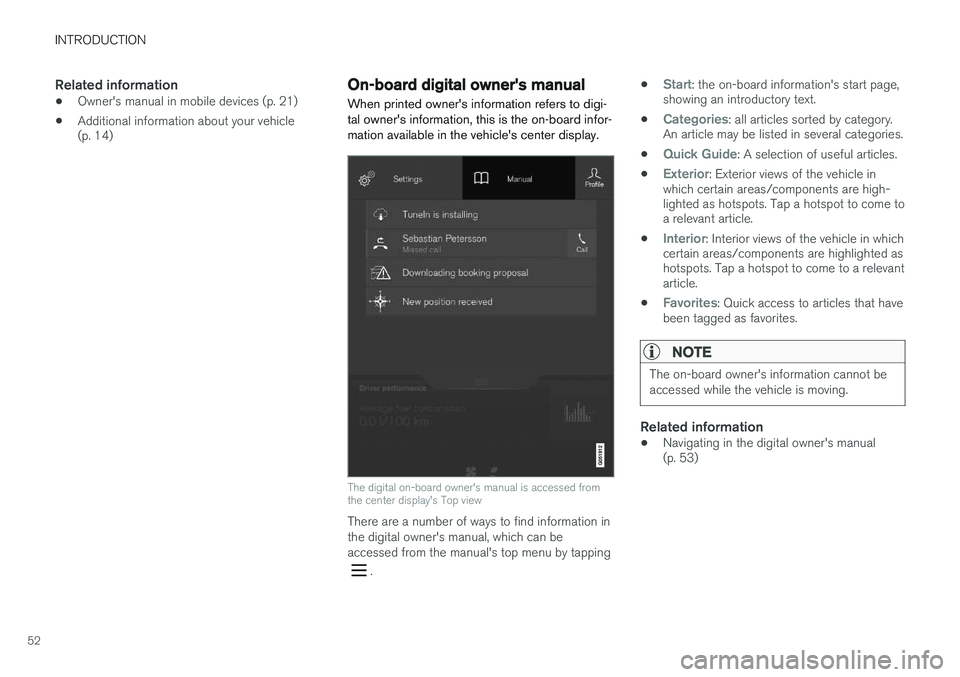
When printed owner's information refers to digi- tal owner's information, this is the on-board infor-mation available in the vehicle's center display.
The digital on-board owner's manual is accessed from the center display's Top view
There are a number of ways to find information in the digital owner's manual, which can beaccessed from the manual's top menu by tapping
. •
Start: the on-board information's start page,
showing an introductory text.
•
Categories: all articles sorted by category.
An article may be listed in several categories.
•
Quick Guide: A selection of useful articles.
•
Exterior: Exterior views of the vehicle in
which certain areas/components are high- lighted as hotspots. Tap a hotspot to come toa relevant article.
•
Interior: Interior views of the vehicle in which
certain areas/components are highlighted as hotspots. Tap a hotspot to come to a relevantarticle.
•
Favorites: Quick access to articles that have
been tagged as favorites.
NOTE
The on-board owner's information cannot be accessed while the vehicle is moving.
Related information
• Navigating in the digital owner's manual (p. 53)
Page 56 of 570

INTRODUCTION
* Option/accessory, for more information, see Introduction.
54
Saving/deleting favoritesSave an article as a favorite by tapping the star (
) at the upper right when an article is open.
The star symbol will be filled in (
) when its arti-
cle has been saved as a favorite. To delete a favorite, tap its star again.
Using the search function1. Tap the magnifying glass icon () in the
owner's manual's upper menu. A keyboard will appear at the bottom of the screen.
2. Enter a word, e.g., "seat belt." > Suggested articles will be displayed asmore characters are entered.
3. Confirm by tapping the article. To leave search mode tap the up-arrow next to thesearch box.
Related information
• On-board digital owner's manual (p. 52)
• Using the center display keyboard (p. 32)
Glass
Laminated glass
The windshield and panoramic roof
* are made of
laminated glass, which is reinforced to help pre- vent break-ins and to provide additional sound-proofing. Laminated glass is optional for theother side windows.
Laminated glass symbol 6
Related information
•
Laminated panoramic roof
* (p. 101)
• Power windows (p. 104)
• Defrosting windows and mirrors (p. 187)
• Using sun shades (p. 106)
• Rearview mirror (p. 105)
• Power windows (p. 104)
• Head-up display (HUD)
* (p. 117)
• Activating/deactivating the rain sensor (p. 155)
• Windshield and headlight washers (p. 156)
• Tailgate window wiper and washer (p. 157)
Technician certification
In addition to Volvo factory training, Volvo sup- ports certification by the National Institute forAutomotive Service Excellence (A.S.E.).
Certified technicians have demonstrated a high degree of competence in specific areas. Besidespassing exams, each technician must also haveworked in the field for two or more years before acertificate is issued. These professional techni-cians are best able to analyze vehicle problemsand perform the necessary maintenance proce-dures to keep your Volvo at peak operating con-dition.
6 This symbol is not shown on the windshield or panoramic roof.
Page 58 of 570
SAFETY
56
General safety information The vehicle is equipped with a number of safety systems for the driver and passengers.
Warning symbol in the instrument panelThe warning symbol in the instrument panel illuminates when the ignition is in mode II or higher. It will go out after
approx. 6 seconds if no faults are
detected in the airbag system.
WARNING
• If the SRS warning light stays on after the engine has started or if it illuminateswhile you are driving, have the vehicleinspected by a trained and qualified Volvoservice technician as soon as possible.
• Never try to repair any component or partof the SRS yourself. Any interference inthe system could cause malfunction andserious injury. All work on these systemsshould be performed by a trained andqualified Volvo service technician.
Related information
• Safety during pregnancy (p. 62)
• Seat belts (p. 58)
• Safety systems (p. 83)
• Airbag system (p. 83)
Occupant safety Safety is Volvo's cornerstone.
Volvo's concern for safetyOur concern for safety dates back to 1927 when the first Volvo rolled off the production line.Three-point seat belts (a Volvo invention), safetycages, and energy-absorbing impact zones weredesigned into Volvo vehicles long before it wasfashionable or required by government regulation. We will not compromise our commitment to safety. We continue to seek out new safety fea-tures and to refine those already in our vehicles.You can help. We would appreciate hearing yoursuggestions about improving automobile safety.We also want to know if you ever have a safetyconcern with your vehicle. Call us in the U.S. at:1-800-458-1552 or in Canada at:1-800-663-8255.
Occupant safety remindersHow safely you drive doesn't depend on how old you are but rather on:
• How well you see.
• Your ability to concentrate.
• How quickly you make decisions under stress to avoid an accident.
The following suggestions are intended to help you cope with the ever changing traffic environ-ment. •
Never drink and drive.
• If you are taking any medication, consult your physician about its potential effects on yourdriving abilities.
• Take a driver-retraining course.
• Have your eyes checked regularly.
• Keep your windshield and headlights clean.
• Replace wiper blades when they start toleave streaks.
• Take into account the traffic, road, andweather conditions, particularly with regard tostopping distance.
• Never send text messages while driving.
• Refrain from using or minimize the use of acell phone while driving.
Related information
• Recall information (p. 58)
• Reporting safety defects (p. 57)
Page 60 of 570
SAFETY
58
Recall information
On our website, select the tab YOUR VOLVO and the heading RECALL INFORMATION will be dis-played at the lower left side of the screen. Enteryour Vehicle Identification Number for your vehi-cle (found at the base of the windshield). If yourvehicle has any open Recalls, they will be dis-played on this page.
Volvo customers in CanadaFor any questions regarding open recalls for your vehicle, please contact your authorized Volvoretailer. If your retailer is unable to answer yourquestions, please contact Volvo Customer Rela-tions at 905 695-9626, Monday through Friday,8:30 A.M. to 5:00 P.M. EST or by e-mail [email protected]. You may also write us at: Volvo Cars of CanadaNational Customer Service9130 Leslie Street, Suite 101Richmond Hill, Ontario L4B 0B9
Related information
•Occupant safety (p. 56)
• Reporting safety defects (p. 57)
Seat belts
Seat belts should always be worn by all occu- pants of your vehicle. Children should be prop-erly restrained, using an infant, car, or boosterseat determined by age, weight and height.
Most states and provinces make it mandatory for occupants of a vehicle to use seat belts.
Occupant Safe PositioningOccupant Safe Positioning (OSP) is a system inthe front seats that pulls the seat belts slightlytaut prior to a collision. OSP helps position thefront seat occupants to help improve the effectsof other safety systems, e.g., the airbag system.
Seat belt maintenanceCheck periodically that the seat belts are in goodcondition. Use water and a mild detergent forcleaning. Check seat belt mechanism function asfollows: attach the seat belt and pull rapidly onthe strap.
WARNING
• Never repair the belt yourself; have this work done by a trained and qualifiedVolvo service technician only.
• Any device used to induce slack into theshoulder belt portion of the three-pointbelt system will have a detrimental effecton the amount of protection available toyou in the event of a collision.
• The seat back should not be tilted too farback. The shoulder belt must be taut inorder to function properly.
• Do not use child safety seats or childbooster cushions/backrests in the frontpassenger's seat. We also recommendthat children who have outgrown thesedevices sit in the rear seat with the seatbelt properly fastened.
Related information
• Buckling and unbuckling seat belts (p. 59)
• Door and seat belt reminders (p. 61)
• Seat belt pretensioners (p. 59)
Page 64 of 570
SAFETY
62
Seat belt reminder
Seat belt reminder light in ceiling console
The seat belt reminder consists of an audible signal, an indicator light nearthe rearview mirror and a symbol in theinstrument panel that alert all occu-
pants of the vehicle to buckle their seat belts.
The audible signal is speed-dependent and will sound for several seconds. If the driver's or a passenger's seat belt is not buckled, this will be indicated in the instrumentpanel. Child seats are not included in the seat belt reminder system.
Front seatsAn audible signal and an indicator light will remind the driver and front seat passenger tobuckle their seat belts.
Rear seatsThe rear seat belt reminder has two functions.
• It indicates which seat belts are buckled in the rear seats. This will also be displayed inan instrument panel graphic.
• It also provides audio and visual reminders ifa rear seat belt is unbuckled while the vehi-cle is in motion. The reminders will disappearwhen the seat belt has been buckled again or can be erased by pressing the
O button
on the steering wheel keypad.
Door/hood/tailgate/fuel filler door
reminder
If a door, the hood, tailgate or fuel filler door is/are not properly closed, this will be indicated ina graphic in the instrument panel. Stop the vehi-cle safely and close the source of the reminder.
If the vehicle is moving at a speedunder approx.6 mph (10 km/h), theinformation symbol will illuminate in theinstrument panel.
At speeds above approx. 6 mph (10 km/h), the warning symbol will illu-minate in the instrument panel.
Related information
•Seat belts (p. 58)
• Buckling and unbuckling seat belts (p. 59)
Safety during pregnancy The seat belt should always be worn during pregnancy. However, it is crucial that it be worncorrectly.
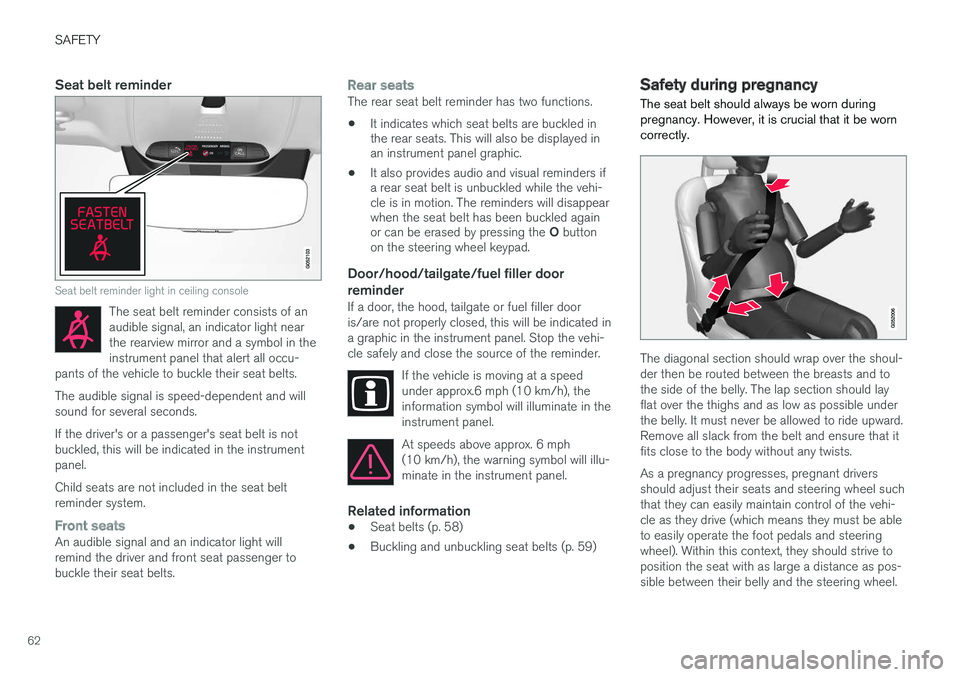
The diagonal section should wrap over the shoul- der then be routed between the breasts and tothe side of the belly. The lap section should layflat over the thighs and as low as possible underthe belly. It must never be allowed to ride upward.Remove all slack from the belt and ensure that itfits close to the body without any twists. As a pregnancy progresses, pregnant drivers should adjust their seats and steering wheel suchthat they can easily maintain control of the vehi-cle as they drive (which means they must be ableto easily operate the foot pedals and steeringwheel). Within this context, they should strive toposition the seat with as large a distance as pos-sible between their belly and the steering wheel.
Page 80 of 570

SAFETY
* Option/accessory, for more information, see Introduction.
78
Press down on the center of the booster cushion to return it to the stowed position.
NOTE
The booster cushion must be in the stowed position before the rear seat backrests arefolded down.
CAUTION
Be sure there are no loose objects under the booster cushion before it is stowed.
WARNING
DEATH or SERIOUS INJURY can occur Follow all instructions on the booster cushion and in the vehicle's owner'smanual. MAKE SURE THE BOOSTER CUSHION IS SECURELY LOCKEDBEFORE THE CHILD IS SEATED. • Use this booster cushion only with chil- dren whose height and weight are withinthe permitted limits.
• In the event of a collision while the inte-grated booster cushion was occupied, theentire booster cushion and seat belt mustbe replaced. The booster cushion shouldalso be replaced if it is badly worn ordamaged in any way. This work should beperformed by a trained and qualifiedVolvo service technician only.
Related information
•
Integrated booster cushion
* (p. 75)
• Raising the integrated booster cushion
*
(p. 76)
Occupant weight sensor
The Occupant Weight Sensor (OWS) is designed to meet the regulatory requirements ofFederal Motor Vehicle Safety Standard (FMVSS)208 and is designed to disable (will not inflate)the passenger's side front airbag under certainconditions.
Occupant Weight Sensor (OWS) indicator light
Disabling the passenger's side front airbag
Volvo recommends that ALL occupants (adults and children) shorter than 4 feet 7 inches(140 cm) be seated in the back seat of any vehi-cle with a front passenger side airbag and beproperly restrained for their size and weight. The OWS works with sensors that are part of the front passenger's seat and seat belt. The sensorsare designed to detect the presence of a properly
Page 81 of 570

SAFETY
79
seated occupant and determine if the passeng- er's side front airbag should be enabled (mayinflate) or disabled (will not inflate). The OWS will disable (will not inflate) the pas- senger's side front airbag when:
• the front passenger's seat is unoccupied, or has small/medium objects in the front seat,
• the system determines that an infant is pres-ent in a rear-facing infant seat that is instal-led according to the manufacturer's instruc-tions,
• the system determines that a small child ispresent in a forward-facing child restraintthat is installed according to the manufactur-er's instructions,
• the system determines that a small child ispresent in a booster seat,
• a front passenger takes his/her weight off ofthe seat for a period of time,
• a child or a small person occupies the frontpassenger's seat.
The OWS uses a PASSENGER AIRBAG OFF
indicator lamp which will illuminate and stay on to remind you that the passenger's side front airbagis disabled. The PASSENGER AIRBAG OFF indi-cator lamp is located in the overhead console,near the base of the rearview mirror.
NOTE
When the ignition is switched on, the OWS indicator light will go on for up to 10 secondswhile the system performs a self-diagnostictest.
However, if a fault is detected in the system:
• The OWS indicator light will stay on
• The SRS warning light will come on and stay on
• The message
Pass. Airbag OFF Service
urgent will be displayed in the information
display.
WARNING
If a fault in the system is detected and indi- cated as described, be aware that the pas-senger's side front airbag will not deploy inthe event of a collision. In this case, the SRSsystem and Occupant Weight Sensor shouldbe inspected by a trained and qualified Volvoservice technician as soon as possible.
WARNING
• Never try to open, remove, or repair any components in the OWS system. Thiscould result in system malfunction. Main-tenance or repairs should only be carriedout by an a trained and qualified Volvoservice technician.
• The front passenger's seat should not bemodified in any way. This could reducepressure on the seat cushion, whichmight interfere with the OWS system'sfunction.
Passenger's seat occu-pancy statusOWS indi- cator lightstatusPassenger's side front air-bag status
Seat unoccu- piedOWS indi- cator lightlights up.Passenger's side front air-bag disabled
Seat occupied by low weightoccupant/ object AOWS indi- cator lightlights upPassenger's side front air-bag disabled
Seat occupied by heavyoccupant/objectOWS indi- cator light is not
litPassenger's side front air-bag enabled
A
Volvo recommends that children always be properly restrained in appropriate child restraints in the rear seats. Do not assume
Page 85 of 570

SAFETY
83
Safety systems In addition to seat belts and airbags, your vehi- cle is also equipped with a number of othersafety systems.
In the event of an accident, there are a number of sensors in the vehicle that react and triggersafety systems such as Roll Stability Control, air-bags, seat belt pretensioners, etc., depending onthe severity of the collision. There are alsomechanical systems such as the WhiplashProtection System.
Related information
•General safety information (p. 56)
• Whiplash protection system (p. 89)
• Rollover protection system (p. 89)
• Airbag system (p. 83)
• Seat belts (p. 58)
• Seat belt pretensioners (p. 59)
Airbag system As an enhancement to the three-point seat belts, your vehicle is equipped with an airbag system.
WARNING
• If the airbag warning light stays on after the engine has started or if it illuminateswhile you are driving, have the vehicleinspected by a trained and qualified Volvoservice technician as soon as possible.
• Never try to repair any component or partof the airbag systems yourself. Any inter-ference in the system could cause mal-function and serious injury. All work onthese systems should be performed by atrained and qualified Volvo service techni-cian.
WARNING
If your vehicle has become flood-damaged in any way (e.g., soaked carpeting/standingwater on the floor of the vehicle), do notattempt to start the vehicle. This may causeairbag deployment which could result in seri-ous injury. Have the vehicle towed to a trainedand qualified Volvo service technician forrepairs. Before attempting to tow the vehicle:
1. Switch off the ignition for at least
10 minutes and disconnect the battery.
2. Follow the instructions for manually over- riding the shiftlock system.
Deployed airbags
WARNING
If any of the airbags have deployed:
• Do not attempt to drive the vehicle. Have it towed to a qualified repair facility.
• If necessary seek medical attentIon.