ad blue VOLVO XC90 2015 Owner's Manual
[x] Cancel search | Manufacturer: VOLVO, Model Year: 2015, Model line: XC90, Model: VOLVO XC90 2015Pages: 570, PDF Size: 12.44 MB
Page 400 of 570

INFOTAINMENT
* Option/accessory, for more information, see Introduction.
398
Streaming media through a Bluetooth connection The media player is equipped with Bluetooth ®
for streaming audio files from external Bluetooth ®
-enabled devices.
Related information
• Connecting a Bluetooth ®
device (p. 393)
• Playing media (p. 395)
• Voice control for radio and media (p. 122)
• Media player (p. 393)
• Ignition modes (p. 355)
• Media player technical data (p. 400)
Media sound settings
Sound settings for the media player can be per- sonalized.
1. Tap Settings in the center display's Top
view.
2. Tap
Sound and select among the following:
•
Sound Experience* : this feature offers sev-
eral ways of adapting media sound settings to replicate e.g., a concert hall or a recordingstudio. These settings override any of theones below that may have been adjusted.
•
Tone: personal settings for bass, treble,
equalizer, etc.
•
Balance: adjust the front/rear and left/right
sound settings in the passenger compart- ment.
System volumes for mediaOpen the center display's Top view and tap
SettingsSoundSystem Volumes:
•
AUX: an external device (e.g., an mp3 player,
an iPod, etc.) connected to the AUX socket may have a different volume level than theone set for the infotainment system (e.g., forthe radio). This setting enables you to adjustthe AUX socket's volume. Please note that ifthis volume is set too high, sound quality maybe affected.
•
Speed/Volume Compensation: the info-
tainment system will compensate for disrupt- ing noises in the passenger compartment by increasing media volume in relation to thevehicle's speed. This can be set to one ofseveral different levels.
Related information
•
Playing media (p. 395)
• Sound settings (p. 376)
Page 403 of 570
INFOTAINMENT
* Option/accessory, for more information, see Introduction.401
Max. number
Tracks in a playlist1,000
SubfoldersNo limit
Related information
•CD (media) player
* (p. 394)
Internet connected vehicle
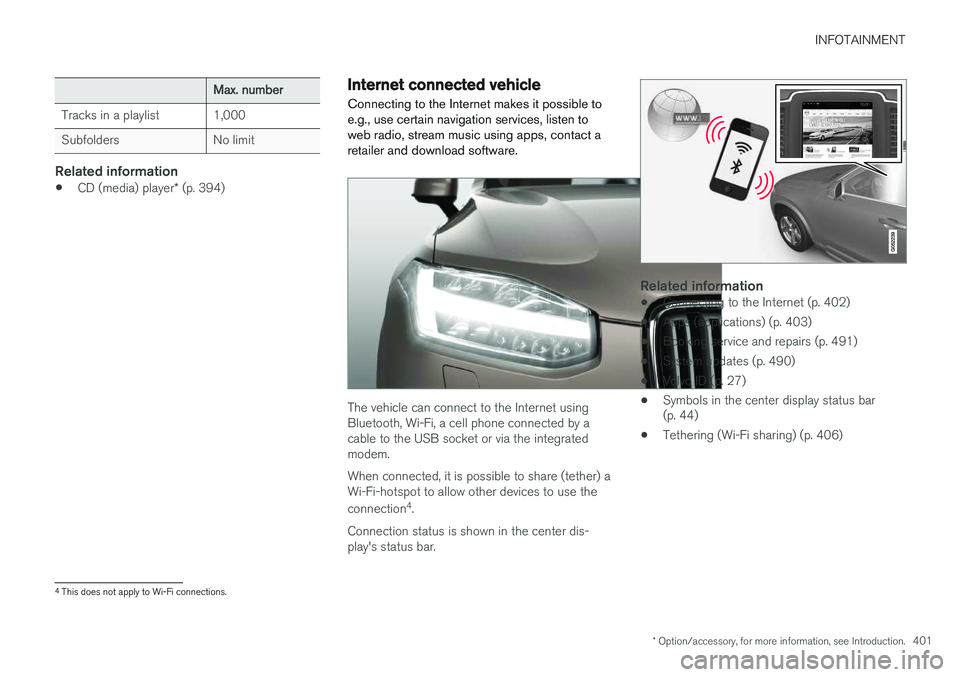
Connecting to the Internet makes it possible to e.g., use certain navigation services, listen toweb radio, stream music using apps, contact aretailer and download software.
The vehicle can connect to the Internet using Bluetooth, Wi-Fi, a cell phone connected by acable to the USB socket or via the integratedmodem. When connected, it is possible to share (tether) a Wi-Fi-hotspot to allow other devices to use the connection 4
.
Connection status is shown in the center dis- play's status bar.
Related information
• Connecting to the Internet (p. 402)
• Apps (applications) (p. 403)
• Booking service and repairs (p. 491)
• System updates (p. 490)
• Volvo ID (p. 27)
• Symbols in the center display status bar (p. 44)
• Tethering (Wi-Fi sharing) (p. 406)
4
This does not apply to Wi-Fi connections.
Page 404 of 570
INFOTAINMENT
402
Connecting to the Internet
Connect the vehicle to the Internet using
Bluetooth, Wi-Fi, by connecting a phone through a cable to the USB socket or via the vehicle'sintegrated modem.
The cell phone and the network service provider must support Internet sharing (tethering) and thesubscription must included data transfer.
Connect using BluetoothSee the article "Pairing a cell phone."
Connect using Wi-Fi
1. Activate tethering/personal hotspot in the cell phone.
2. Tap
Settings in the center display's Top
view.
3. Tap
CommunicationWi-Fi.
4. Tap Wi-Fi to activate/deactivate.
5. Tap the name of the network to be used.
6. Enter the network password. 7. If a different connection was used previously,
confirm the connection change.
> The vehicle will connect to the network.
When a phone is connected to the vehicle, it is saved for future use. When a max. number of 50have been saved, the first one connected will bedeleted. To show the list of saved networks or to manually delete a network, tap
SettingsWi-Fi
Saved networks.
See the article "Wi-Fi technology and security" for network connection requirements.
Connect using a cable-connected to the
USB socket
1. Connect the phone via a cable to the USB socket in the tunnel console storage com-partment.
2. Activate USB tethering in the cell phone.
3. If a different connection was used previously, confirm the connection change.
> The vehicle will connect to the network.
Connect using the vehicle's integrated modem
When the vehicle is connected using the modem, Volvo On Call services will use the connection. 1. Insert a personal SIM card in the holder.
2.
Tap Settings in the center display's Top
view.
3. Tap
CommunicationVehicle Modem
Internet.
4. Tap
Vehicle modem Internet to activate/
deactivate.
5. If a different connection was used previously, confirm the connection change.
6. Enter the SIM card's PIN code. > The vehicle will connect to the network.
Related information
• Pairing a cell phone (p. 387)
• Connecting/disconnecting a cell phone (p. 389)
Page 406 of 570
INFOTAINMENT
404
Bluetooth settingsThe following settings apply to a Bluetooth-con- nected cell phone.
Bluetooth1. Tap Settings in the center display's Top
view.
2. Tap
CommunicationBluetooth and
select among the following settings:
•
Previously paired devices: lists the
devices that are paired and connected to the vehicle.
•
Internet connection: select to connect
to the Internet using the device's Bluetooth connection.
•
Add device: begin the procedure to pair
a new device.
•
Remove device: remove a paired device.
•
Allowed services for this device: select
the services that the device will be used for.
Bluetooth complianceUnited States FCC CAUTION Changes or modifications not expressly approved by the party responsible for compliance couldvoid the user's authority to operate the equip-ment. This transmitter must not be co-located or operated in conjunction with any other antennaor transmitter. Canada This device complies with Industry Canada licence-exempt RSS standard(s). Operation issubject to the following two conditions: (1) this device may not cause interference, and(2) this device must accept any interference, including interference that may cause undesiredoperation of the device.
Related information
•
Internet connected vehicle (p. 401)
• Pairing a cell phone (p. 387)
• Phone (p. 387)
• Media player (p. 393)
• Connecting/disconnecting a cell phone (p. 389)
Downloading, updating and uninstalling apps
Apps can be added (downloaded), kept up-to- date or deleted.
NOTE
Downloading data may affect other services that transfer data such as web radio, stream-ing music, etc. If this occurs, a download inprogress can be cancelled or the other serv-ice can be temporarily turned off.
Apps are managed via theRemote update service in
the center display's App view. To download, update or delete apps, the vehicle must be con-nected to the Internet.
Downloading an app
1. Open the Remote update service app.
2. Select
Explore to open a list of apps that
are available but which are not installed in the vehicle. Tap anywhere in a line for an appto expand the list for additional information.
Page 430 of 570
NAVIGATION*
* Option/accessory, for more information, see Introduction.
428
Sensus Navigation
Sensus Navigation enables you to set itineraries, search for certain types of points of interestalong your route, store special destinations,obtain traffic information en route, etc.
Sensus Navigation shows the vehicle's exact location and if you deviate from the set route, thesystem can make the necessary adjustments toguide you to your destination. Being familiar with the contents of this manual will help you to fully utilize the features and func-tions offered by Sensus Navigation. By enabling you to reach your destination quickly and by the most direct route, Sensus Navigationalso helps contribute to improving the environ-ment.
Related information
• Getting started with Sensus Navigation (p. 432)
• Buttons and information on the map (p. 428)
Buttons and information on the map
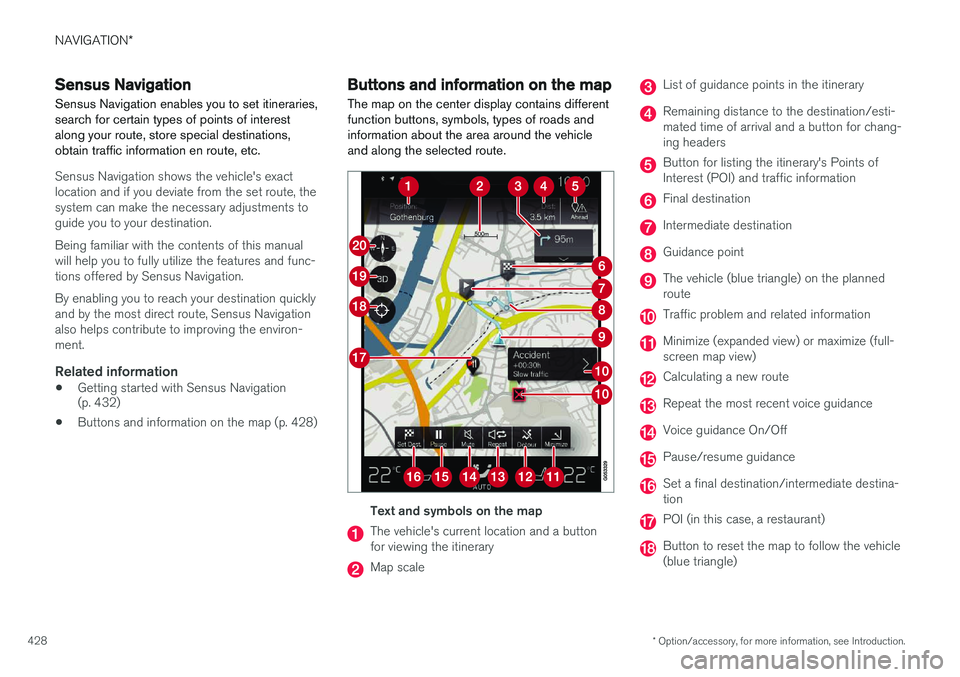
The map on the center display contains different function buttons, symbols, types of roads andinformation about the area around the vehicleand along the selected route.
Text and symbols on the map
The vehicle's current location and a button for viewing the itinerary
Map scale
List of guidance points in the itinerary
Remaining distance to the destination/esti- mated time of arrival and a button for chang-ing headers
Button for listing the itinerary's Points of Interest (POI) and traffic information
Final destination
Intermediate destination
Guidance point
The vehicle (blue triangle) on the planned route
Traffic problem and related information
Minimize (expanded view) or maximize (full- screen map view)
Calculating a new route
Repeat the most recent voice guidance
Voice guidance On/Off
Pause/resume guidance
Set a final destination/intermediate destina- tion
POI (in this case, a restaurant)
Button to reset the map to follow the vehicle (blue triangle)
Page 431 of 570
NAVIGATION*
* Option/accessory, for more information, see Introduction.
429
Button for toggling between 2D/3D map views
Compass and button for north at the top of the map/current direction at the top of themap
Related information
•Sensus Navigation (p. 428)
• Using the center display (p. 46)
• Center display overview (p. 29)
Common navigation system features
The most common features of the navigation system are described here.
• Where am I?
• Direction at the top of the map/North at the top of the map
• 2D for 3D view
• Zoom
• Scroll
• Find the vehicle symbol on the map
• Change the headers displayed
• Go back to the map view
• "Wrong" language in illustrations
Where am I?Where is the vehicle's current location?
• Click the vehicle symbol (blue triangle) forinformation directly on the map.
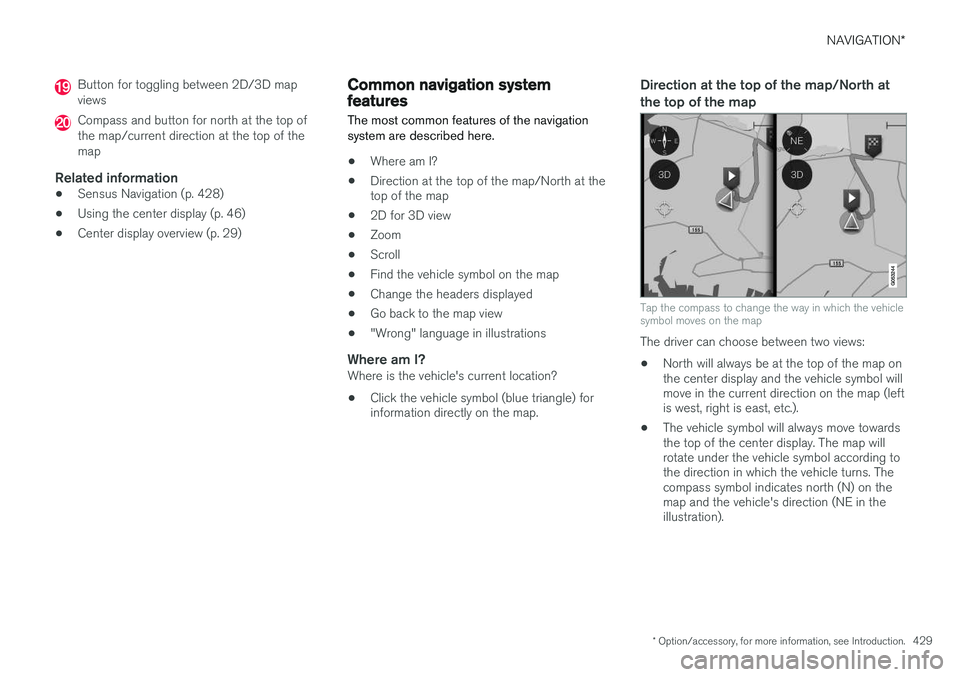
Direction at the top of the map/North at the top of the map
Tap the compass to change the way in which the vehicle symbol moves on the map
The driver can choose between two views: •
North will always be at the top of the map on the center display and the vehicle symbol willmove in the current direction on the map (leftis west, right is east, etc.).
• The vehicle symbol will always move towardsthe top of the center display. The map willrotate under the vehicle symbol according tothe direction in which the vehicle turns. Thecompass symbol indicates north (N) on themap and the vehicle's direction (NE in theillustration).
Page 434 of 570
NAVIGATION*
* Option/accessory, for more information, see Introduction.
432
Getting started with Sensus Navigation The vehicle's electrical system (including the navigation system) is activated automaticallywhen the driver's door is opened.
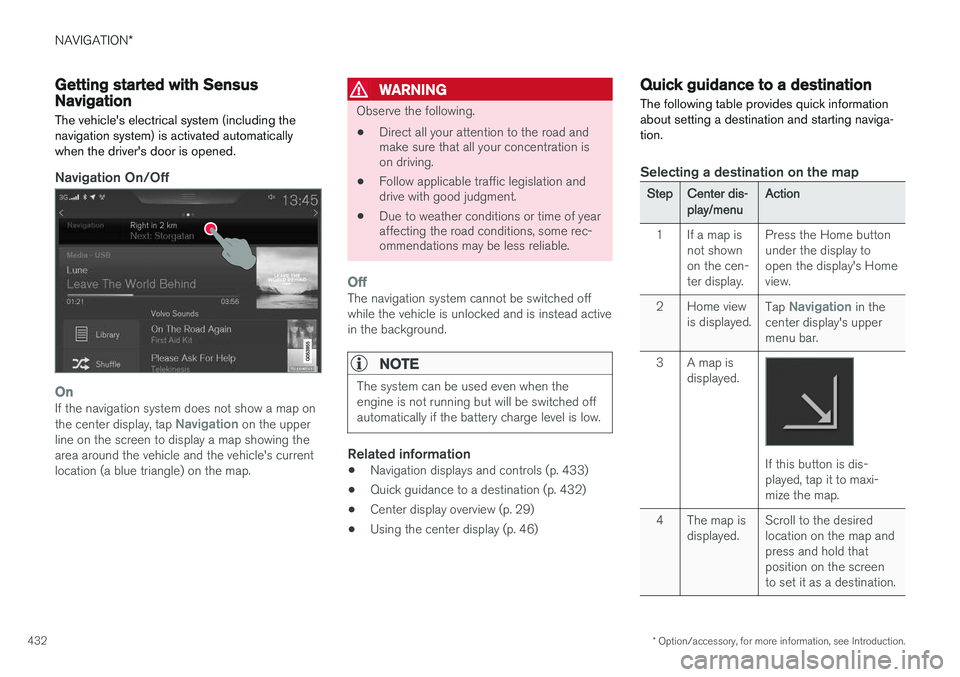
Navigation On/Off
OnIf the navigation system does not show a map on the center display, tap Navigation on the upper
line on the screen to display a map showing the area around the vehicle and the vehicle's currentlocation (a blue triangle) on the map.
WARNING
Observe the following.
• Direct all your attention to the road and make sure that all your concentration ison driving.
• Follow applicable traffic legislation anddrive with good judgment.
• Due to weather conditions or time of yearaffecting the road conditions, some rec-ommendations may be less reliable.
OffThe navigation system cannot be switched off while the vehicle is unlocked and is instead activein the background.
NOTE
The system can be used even when the engine is not running but will be switched offautomatically if the battery charge level is low.
Related information
• Navigation displays and controls (p. 433)
• Quick guidance to a destination (p. 432)
• Center display overview (p. 29)
• Using the center display (p. 46)
Quick guidance to a destination The following table provides quick information about setting a destination and starting naviga-tion.
Selecting a destination on the map
StepCenter dis- play/menuAction
1If a map is not shownon the cen-ter display.Press the Home button under the display toopen the display's Homeview.
2Home view is displayed.Tap Navigation in the
center display's upper menu bar.
3A map is displayed.
If this button is dis- played, tap it to maxi-mize the map.
4The map is displayed.Scroll to the desired location on the map andpress and hold thatposition on the screento set it as a destination.
Page 441 of 570
NAVIGATION*
* Option/accessory, for more information, see Introduction.
439
Favorites
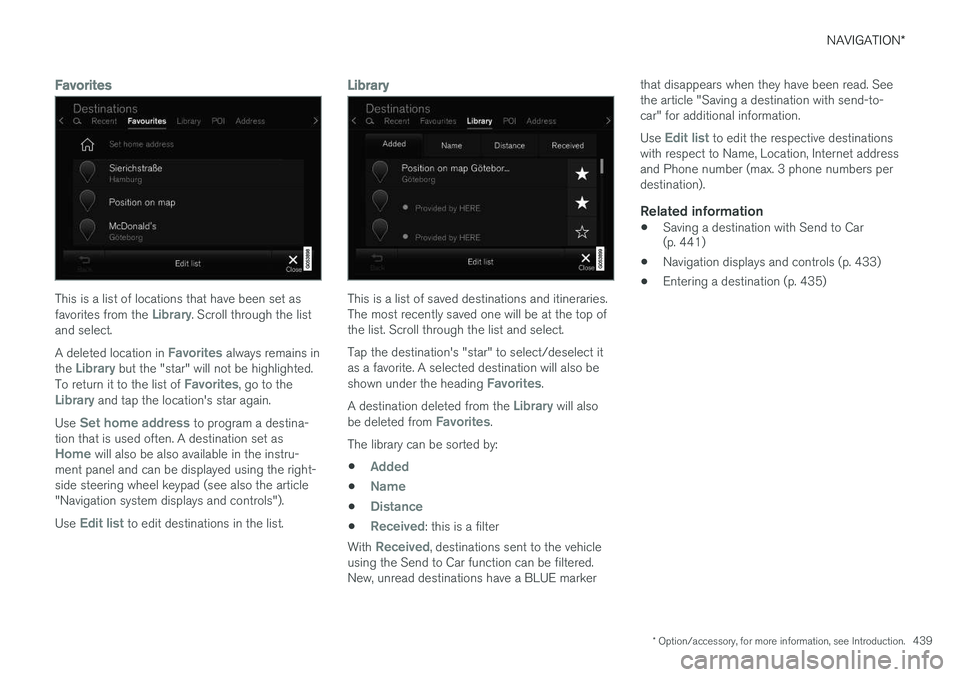
This is a list of locations that have been set as favorites from the Library. Scroll through the list
and select. A deleted location in
Favorites always remains in
the Library but the "star" will not be highlighted.
To return it to the list of Favorites, go to theLibrary and tap the location's star again.
Use
Set home address to program a destina-
tion that is used often. A destination set as
Home will also be also available in the instru-
ment panel and can be displayed using the right- side steering wheel keypad (see also the article"Navigation system displays and controls"). Use
Edit list to edit destinations in the list.
Library
This is a list of saved destinations and itineraries. The most recently saved one will be at the top ofthe list. Scroll through the list and select. Tap the destination's "star" to select/deselect it as a favorite. A selected destination will also be shown under the heading
Favorites.
A destination deleted from the
Library will also
be deleted from Favorites.
The library can be sorted by:
•
Added
•Name
•Distance
•Received: this is a filter
With
Received, destinations sent to the vehicle
using the Send to Car function can be filtered. New, unread destinations have a BLUE marker that disappears when they have been read. Seethe article "Saving a destination with send-to-car" for additional information. Use
Edit list to edit the respective destinations
with respect to Name, Location, Internet address and Phone number (max. 3 phone numbers perdestination).
Related information
• Saving a destination with Send to Car (p. 441)
• Navigation displays and controls (p. 433)
• Entering a destination (p. 435)
Page 444 of 570
NAVIGATION*
* Option/accessory, for more information, see Introduction.
442
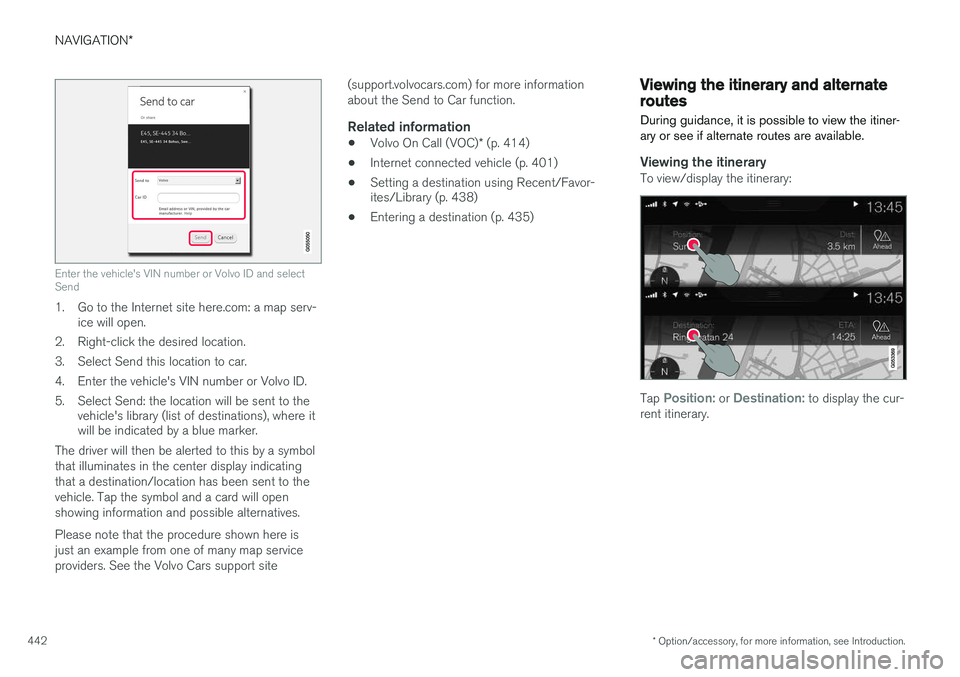
Enter the vehicle's VIN number or Volvo ID and select Send
1. Go to the Internet site here.com: a map serv-
ice will open.
2. Right-click the desired location.
3. Select Send this location to car.
4. Enter the vehicle's VIN number or Volvo ID.
5. Select Send: the location will be sent to the vehicle's library (list of destinations), where it will be indicated by a blue marker.
The driver will then be alerted to this by a symbol that illuminates in the center display indicatingthat a destination/location has been sent to thevehicle. Tap the symbol and a card will openshowing information and possible alternatives. Please note that the procedure shown here is just an example from one of many map serviceproviders. See the Volvo Cars support site (support.volvocars.com) for more informationabout the Send to Car function.
Related information
•
Volvo On Call (VOC)
* (p. 414)
• Internet connected vehicle (p. 401)
• Setting a destination using Recent/Favor- ites/Library (p. 438)
• Entering a destination (p. 435)
Viewing the itinerary and alternate routes
During guidance, it is possible to view the itiner- ary or see if alternate routes are available.
Viewing the itineraryTo view/display the itinerary:
Tap Position: or Destination: to display the cur-
rent itinerary.
Page 459 of 570
NAVIGATION*
* Option/accessory, for more information, see Introduction.
457
QuestionAnswer
How big is an update?This varies from market to market. Consult a Volvoretailer.
Updating has not worked.What shouldI do?Try the Volvo Cars support site (support.volvocars.com) orcontact a Volvo retailer.
Related information
•Remote map updates (p. 457)
• Map updates from a computer with a USB flash drive (p. 458)
• Sensus Navigation troubleshooting (p. 462)
• Copyright (p. 462)
• Navigation license agreements (p. 460)
• System updates (p. 490)
• Internet connected vehicle (p. 401)
• Connecting to the Internet (p. 402)
• System settings (p. 456)
Remote map updates
Some preparation is necessary before a remote update can be made through the vehicle's cellphone Internet connection.
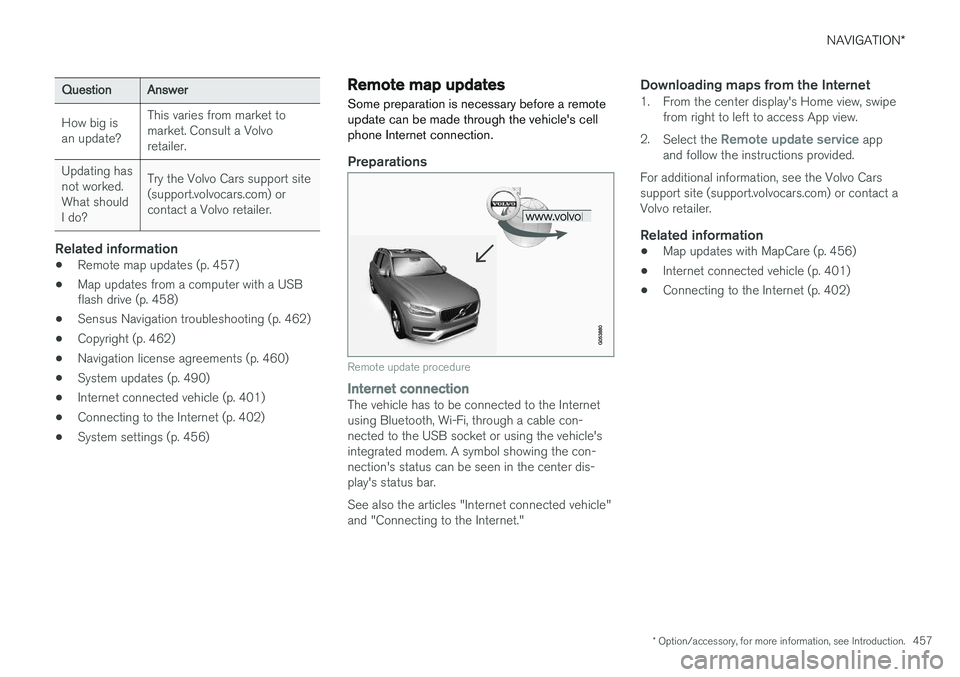
Preparations
Remote update procedure
Internet connectionThe vehicle has to be connected to the Internet using Bluetooth, Wi-Fi, through a cable con-nected to the USB socket or using the vehicle'sintegrated modem. A symbol showing the con-nection's status can be seen in the center dis-play's status bar. See also the articles "Internet connected vehicle" and "Connecting to the Internet."
Downloading maps from the Internet1. From the center display's Home view, swipe from right to left to access App view.
2. Select the
Remote update service app
and follow the instructions provided.
For additional information, see the Volvo Cars support site (support.volvocars.com) or contact aVolvo retailer.
Related information
• Map updates with MapCare (p. 456)
• Internet connected vehicle (p. 401)
• Connecting to the Internet (p. 402)