alarm VOLVO XC90 2015 Owner's Manual
[x] Cancel search | Manufacturer: VOLVO, Model Year: 2015, Model line: XC90, Model: VOLVO XC90 2015Pages: 570, PDF Size: 12.44 MB
Page 235 of 570
LOCKS AND ALARM
233
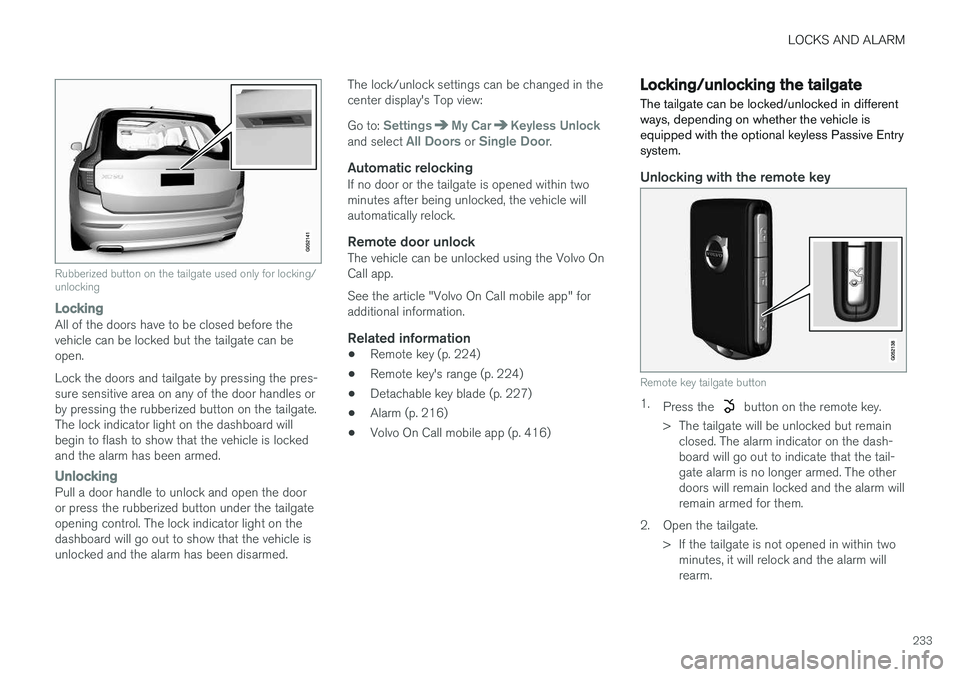
Rubberized button on the tailgate used only for locking/ unlocking
LockingAll of the doors have to be closed before the vehicle can be locked but the tailgate can beopen. Lock the doors and tailgate by pressing the pres- sure sensitive area on any of the door handles orby pressing the rubberized button on the tailgate.The lock indicator light on the dashboard willbegin to flash to show that the vehicle is lockedand the alarm has been armed.
UnlockingPull a door handle to unlock and open the door or press the rubberized button under the tailgateopening control. The lock indicator light on thedashboard will go out to show that the vehicle isunlocked and the alarm has been disarmed.The lock/unlock settings can be changed in thecenter display's Top view: Go to:
SettingsMy CarKeyless Unlockand select All Doors or Single Door.
Automatic relockingIf no door or the tailgate is opened within two minutes after being unlocked, the vehicle willautomatically relock.
Remote door unlockThe vehicle can be unlocked using the Volvo OnCall app. See the article "Volvo On Call mobile app" for additional information.
Related information
•
Remote key (p. 224)
• Remote key's range (p. 224)
• Detachable key blade (p. 227)
• Alarm (p. 216)
• Volvo On Call mobile app (p. 416)
Locking/unlocking the tailgate The tailgate can be locked/unlocked in different ways, depending on whether the vehicle isequipped with the optional keyless Passive Entrysystem.
Unlocking with the remote key
Remote key tailgate button
1.
Press the button on the remote key.
> The tailgate will be unlocked but remain closed. The alarm indicator on the dash- board will go out to indicate that the tail-gate alarm is no longer armed. The otherdoors will remain locked and the alarm willremain armed for them.
2. Open the tailgate. > If the tailgate is not opened in within twominutes, it will relock and the alarm willrearm.
Page 236 of 570
LOCKS AND ALARM
* Option/accessory, for more information, see Introduction.
234
Keyless unlocking *
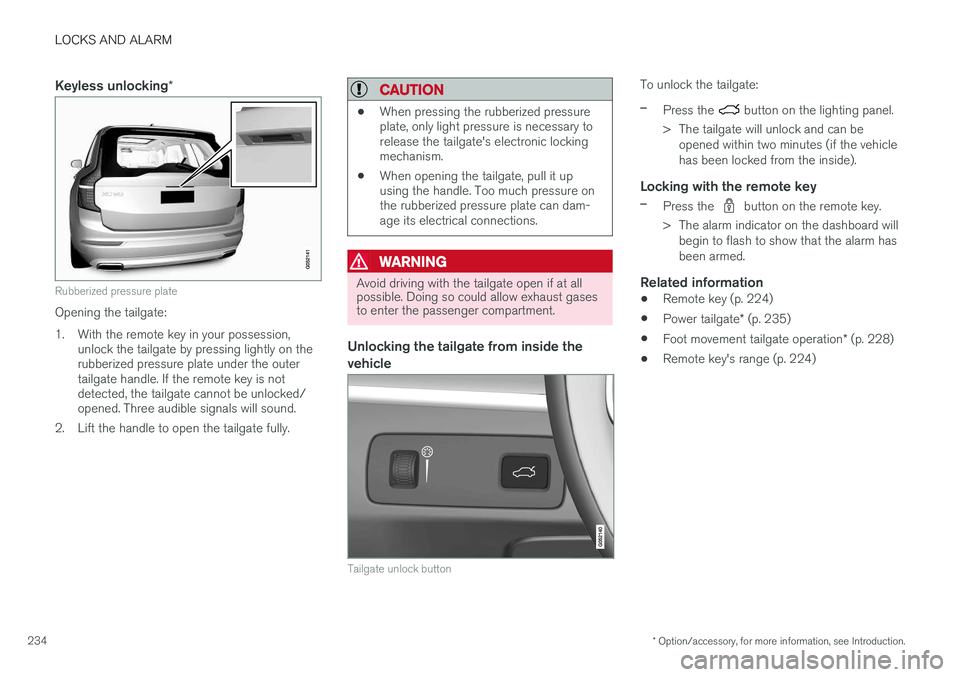
Rubberized pressure plate
Opening the tailgate:
1. With the remote key in your possession,
unlock the tailgate by pressing lightly on the rubberized pressure plate under the outertailgate handle. If the remote key is notdetected, the tailgate cannot be unlocked/opened. Three audible signals will sound.
2. Lift the handle to open the tailgate fully.
CAUTION
• When pressing the rubberized pressure plate, only light pressure is necessary torelease the tailgate's electronic lockingmechanism.
• When opening the tailgate, pull it upusing the handle. Too much pressure onthe rubberized pressure plate can dam-age its electrical connections.
WARNING
Avoid driving with the tailgate open if at all possible. Doing so could allow exhaust gasesto enter the passenger compartment.
Unlocking the tailgate from inside the vehicle
Tailgate unlock button
To unlock the tailgate:
–Press the button on the lighting panel.
> The tailgate will unlock and can be opened within two minutes (if the vehicle has been locked from the inside).
Locking with the remote key
–Press the button on the remote key.
> The alarm indicator on the dashboard will begin to flash to show that the alarm has been armed.
Related information
• Remote key (p. 224)
• Power tailgate
* (p. 235)
• Foot movement tailgate operation
* (p. 228)
• Remote key's range (p. 224)
Page 237 of 570

LOCKS AND ALARM
* Option/accessory, for more information, see Introduction.235
Power tailgate*
The optional power tailgate can be opened/ closed in several ways.
The power tailgate can be opened/closed using the
button on the lighting panel in the pas-
senger compartment, the
on the remote key
or by moving your foot under a sensor under the rear bumper *.
Buttons in the lower edge of the tailgate
Button on the lighting panel in the passenger compart- ment
Opening the tailgateThe power tailgate can be opened electrically by:
• Pressing and holding the
button on the
lighting panel until the tailgate begins to open.
• Pressing and holding the
button on the
remote key until the tailgate begins to open.
• Pressing lightly on the rubber-covered button under the tailgate's outside handle.
• Moving your foot under a sensor under the rear bumper
*.
Closing the tailgateThe tailgate can be closed by moving your foot under a sensor beneath the rear bumper *, by
pressing the button on the lighting panel, with the remote key or by pressing the button on the lower edge of the tailgate *13
To close the tailgate 14
:
–Press the button on the lighting panel
or on the
button on the remote key.
> The tailgate will close automatically and audible signal will sound. This will not
lock the tailgate.
Buttons on the lower edge of the tailgate
13 Models equipped with the optional Passive Entry system have a button to close the tailgate and a button to close and lock the tailgate.
14 See also the article "Foot movement tailgate opening/closing."
Page 238 of 570

LOCKS AND ALARM
* Option/accessory, for more information, see Introduction.
236
–Press the button 13
on the lower edge of
the tailgate.
> The tailgate will close automatically but will not be locked .
–Press the button13
on the lower edge of
the tailgate.
> The tailgate will close automatically. The tailgate and doors will also be locked and
the alarm will be armed.
If the remote key is not close enough to the tail- gate, automatic locking/unlocking/opening/clos-ing will not be possible. Three short audible sig-nals will sound.
Interrupting opening/closing
–This can be done in five ways: • Press the button on the lighting panel
• Press the button on the remote key
• Press either of the buttons on the lower edge of the tailgate
• Press lightly on the rubber-covered buttonunder the tailgate's outside handle
• Move your foot under a sensor beneath the rear bumper
*
> The tailgate will stop moving
Programming the tailgate's maximum opening angle
The tailgate's maximum opening angle can be programmed, for example, if the tailgate has to beopened in a garage with a low ceiling. Programming the opening angle:
–Open the tailgate manually to the desired angle and press and hold the closing buttonon the tailgate's lower edge for at least 3seconds. Release the tailgate.
> Two audible signals will sound to indicate that the selected opening angle has been stored.
Erasing tailgate programming
–Open the tailgate manually to its highest position and press and hold the closing but-ton on the tailgate's lower edge for at least 3seconds. Release the tailgate.
> Two audible signals will sound to indicate that the programmed opening angle has been erased.
NOTE
If the tailgate has been opened and closed continuously too long, the automatic functionwill be deactivated to avoid overloading theelectrical system. The automatic function canbe used again after approximately 2 minutes. If the vehicle's battery has been discharged or disconnected, or if the tailgate has been openfor more than 24 hours, the tailgate must beopened and closed once manually to resetthe system.
Pinch protectionIf the tailgate is obstructed when being opened/ closed, a pinch protection mechanism is acti-vated.
• While opening: the tailgate will stop moving and an audible signal will sound.
• While closing: the tailgate will stop andreturn to the maximum programmable open-ing position. An audible signal will sound.
WARNING
Be sure that no one is near the tailgate when it is opened or closed automatically. The tail-gate should never be obstructed in any waywhen it is operated.
13
Models equipped with the optional Passive Entry system have a button to close the tailgate and a button to close and lock the tailgate.
Page 239 of 570
LOCKS AND ALARM
* Option/accessory, for more information, see Introduction.237
Related information
•Remote key's range (p. 224)
• Locking/unlocking from outside the vehicle (p. 232)
• Foot movement tailgate operation
* (p. 228)
Locking/unlocking with the detachable key blade
The detachable key blade can be used to e.g., unlock the driver's door from the outside if, forexample, the remote key's battery is weak.
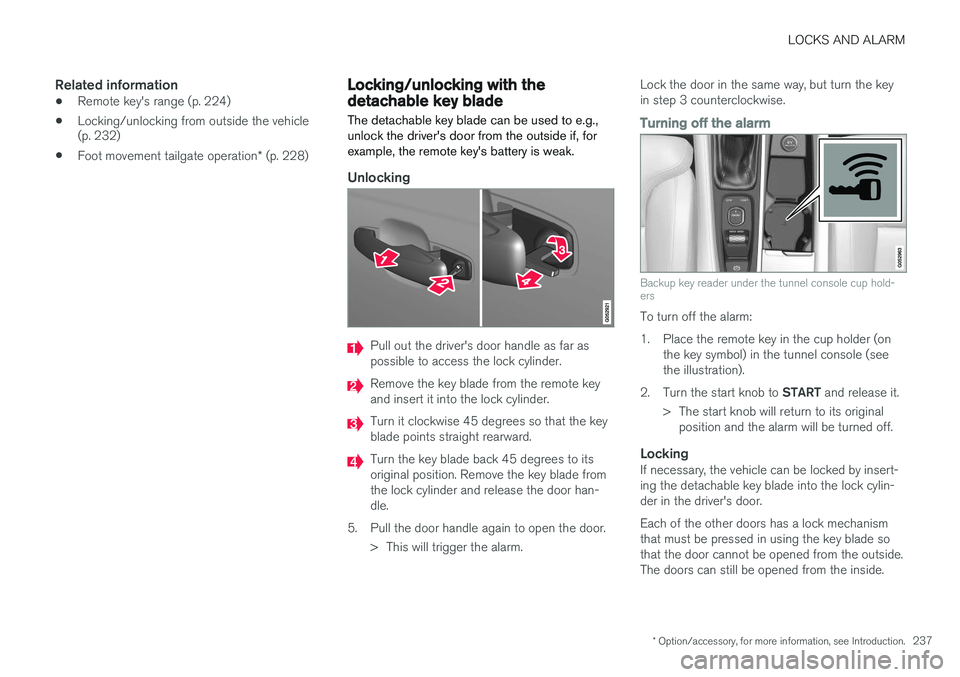
Unlocking
Pull out the driver's door handle as far as possible to access the lock cylinder.
Remove the key blade from the remote key and insert it into the lock cylinder.
Turn it clockwise 45 degrees so that the key blade points straight rearward.
Turn the key blade back 45 degrees to its original position. Remove the key blade fromthe lock cylinder and release the door han-dle.
5. Pull the door handle again to open the door. > This will trigger the alarm. Lock the door in the same way, but turn the keyin step 3 counterclockwise.
Turning off the alarm
Backup key reader under the tunnel console cup hold- ers
To turn off the alarm:
1. Place the remote key in the cup holder (on
the key symbol) in the tunnel console (see the illustration).
2. Turn the start knob to START and release it.
> The start knob will return to its original position and the alarm will be turned off.
LockingIf necessary, the vehicle can be locked by insert-ing the detachable key blade into the lock cylin-der in the driver's door. Each of the other doors has a lock mechanism that must be pressed in using the key blade sothat the door cannot be opened from the outside.The doors can still be opened from the inside.
Page 240 of 570
LOCKS AND ALARM
238
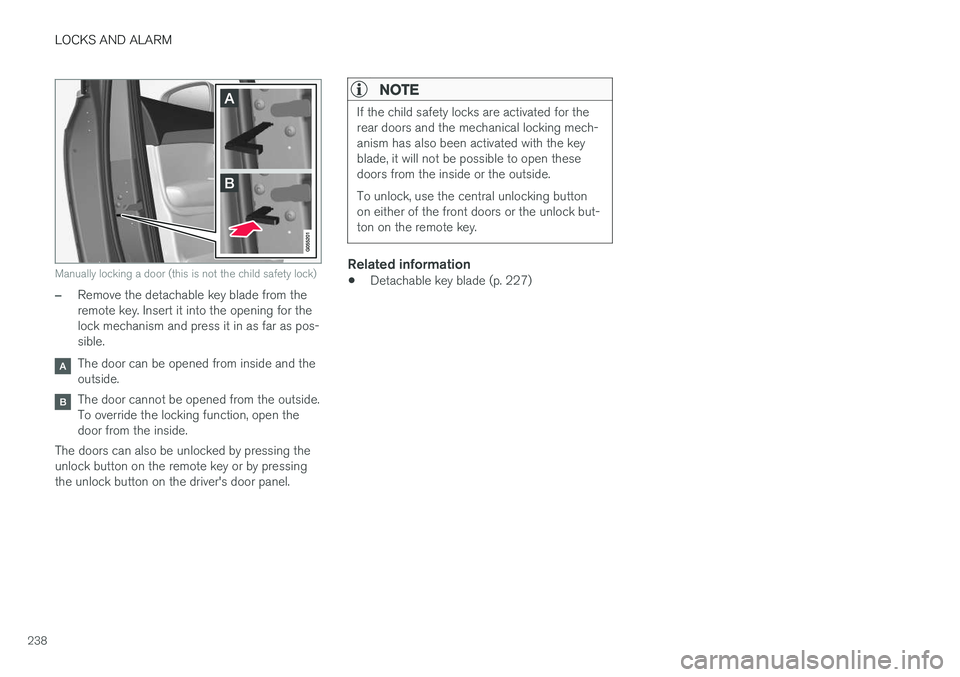
Manually locking a door (this is not the child safety lock)
–Remove the detachable key blade from the remote key. Insert it into the opening for thelock mechanism and press it in as far as pos-sible.
The door can be opened from inside and the outside.
The door cannot be opened from the outside. To override the locking function, open thedoor from the inside.
The doors can also be unlocked by pressing theunlock button on the remote key or by pressingthe unlock button on the driver's door panel.
NOTE
If the child safety locks are activated for the rear doors and the mechanical locking mech-anism has also been activated with the keyblade, it will not be possible to open thesedoors from the inside or the outside. To unlock, use the central unlocking button on either of the front doors or the unlock but-ton on the remote key.
Related information
• Detachable key blade (p. 227)
Page 416 of 570
VOLVO ON CALL WITH SENSUS CONNECT *
* Option/accessory, for more information, see Introduction.
414
Volvo On Call (VOC) *
VOC is an integrated, subscription-based sys-
tem that provides emergency, roadside assis- tance and security services.
VOC is connected to the vehicle's airbag and alarm systems. The vehicle has an integratedGlobal System for Mobile Communications(GSM) module that handles communicationbetween the vehicle and the VOC customer serv-ice center.
AvailabilityVOC uses the Global Navigation Satellite System(GNSS) to locate the vehicle and its integratedGSM module to enable communication with theVOC customer service center and the VOCmobile app. From the time that the remote key has been removed from the vehicle, VOC's functionsremain available for 5 full days and subsequentlyonce an hour for the following 17 days. Afterthree weeks have elapsed, the system will remainswitched off until the engine is started.
WARNING
The system can only function in areas where there is adequate cellular network coverage. Just as in the case of cell phones, atmos- pheric disturbances or areas with relativelyfew GSM transmitters can make it impossiblefor VOC to make a connection, for example, inrural areas.
SubscriptionsA free, limited-time trial subscription is initiated when the vehicle is purchased and VOC is acti-vated. The subscription can be extended by con-tacting your Volvo retailer.
Information on the InternetFor additional information about Volvo On Call, goto: United States http://www.volvocars.com/us/support Canada English: http://support.volvocars.com/en-CA French: http://support.volvocars.com/fr-CA
Related information
• Volvo On Call convenience services (p. 416)
• Volvo On Call safety services (p. 424)
• Volvo On Call security services (p. 425)
• Using Volvo On Call (p. 414)
• Volvo ID (p. 27)
Using Volvo On Call
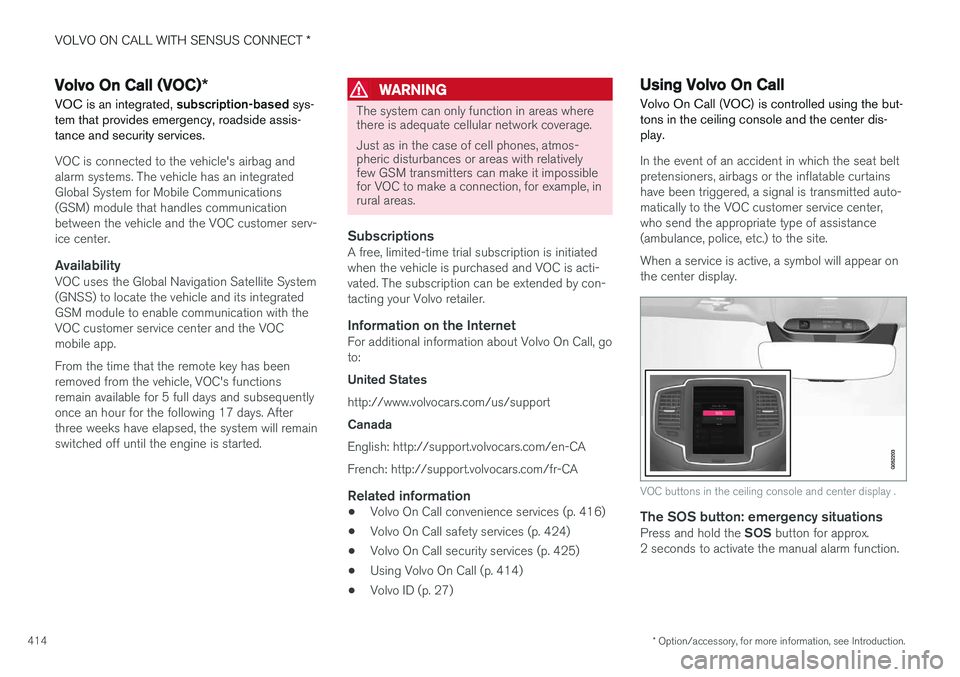
Volvo On Call (VOC) is controlled using the but- tons in the ceiling console and the center dis-play.
In the event of an accident in which the seat belt pretensioners, airbags or the inflatable curtainshave been triggered, a signal is transmitted auto-
matically to the VOC customer service center,who send the appropriate type of assistance(ambulance, police, etc.) to the site. When a service is active, a symbol will appear on the center display.
VOC buttons in the ceiling console and center display .
The SOS button: emergency situationsPress and hold the SOS button for approx.
2 seconds to activate the manual alarm function.
Page 417 of 570
VOLVO ON CALL WITH SENSUS CONNECT *
* Option/accessory, for more information, see Introduction.
415
The ON CALL button: roadside assistancePress the ON CALL button for approx. 2 seconds
to activate the roadside assistance functions.
Alternative to the ON CALL button
In the center display's Phone view, tap On Call.
Select Call in the pop-up window that opens.
NOTE
The SOS button should only be used in an
emergency situation such as an accident, ill- ness or in the event of a threat to the occu-pants of the vehicle. Misusing this buttoncould result in extra charges. The ON CALL button can be used for all of
the other VOC services, including roadside assistance.
Canceling a callA service call that has been initiated can be can- celled within 10 seconds by pressing the EXIT
button on the steering wheel keypad.
SettingsSettings and selections can be made in the cen- ter display by going to s
Settings
CommunicationVolvo On Call. These set-
tings include activating/deactivating a subscrip- tion, button lock, etc.
Related information
• Volvo On Call (VOC)
* (p. 414)
• Volvo On Call (VOC) functions (p. 415)
• Volvo On Call manual safety service (p. 424)
• Volvo On Call roadside assistance (p. 425)
Volvo On Call (VOC) functions
The following table provides an overview of the functions that are available from the VOC cus-tomer service center and the mobile app.
Please note that these functions are subject to change. For up-to-date information about therange of Volvo On Call functions and services,contact your Volvo retailer or go to: United States http://www.volvocars.com/us/support Canada English: http://support.volvocars.com/en-CA French: http://support.volvocars.com/fr-CA
FunctionCus-
tomer
service centerApp A
Automatic alarmX
Manual alarmX
Roadside assistanceXX
Theft notificationXX
Remote Door UnlockXX
Remote Vehicle Immobil- izerX
Page 419 of 570
VOLVO ON CALL WITH SENSUS CONNECT *
* Option/accessory, for more information, see Introduction.
417
Locating the vehicleThe vehicle's location is shown on a map and directions to the vehicle can be provided. There isalso a digital compass to help show the ownerthe right direction. When you are within approx.100 yards/meters of the vehicle, you can activateits horn and turn signals to help locate it.
The vehicle's instrument panelThis function provides information such as: thefuel level, range on the remaining fuel, averagefuel consumption, average speed and odometer/trip odometer readings.
Vehicle "checkup"The mobile app monitors the vehicle's conditionand provides information about bulbs and the lev-els of brake fluid, coolant and engine oil.
Driving logbookDetailed information about each trip made duringthe past 40 days can be saved and downloaded.All or part of this information can be exportedfrom the mobile app to a spreadsheet format andsent to an email address. This is very useful fore.g., keeping track of business-related driving. This function can be deactivated, in which case the vehicle will not transmit logbook informationat the end of each trip.
Vehicle informationBasic information such as model, license platenumber and VIN number are readily accessible.
Theft notificationIf the vehicle's alarm is triggered, the owner willbe informed via his/her cell phone.
Remote door unlockThe status of all doors and windows is provided.The owner can lock/unlock the vehicle fromanother location but for security reasons, theapp's password is always required before thevehicle can be unlocked.
Engine remote start (ERS)*1ERS makes it possible to remotely start theengine using the remote key to enable the cli-mate system to cool or heat the passenger com-partment before driving. When the engine starts, the climate and infotain- ment systems will restart using the same settingsas when the engine was switched off. You can choose to let the engine run for between 1 and 15 minutes before it automati-cally switches off again. After 2 ERS starts, theengine must be started in the normal way beforeERS can be used again.
WARNING
Keep the following in mind before using ERS:
• The vehicle should be in view.
• The vehicle should be unoccupied.
• The vehicle must not be parked indoors or in an enclosed area. Exhaust fumes areharmful to the health.
NOTE
Always observe applicable state, province and/or local laws regarding engine idlingwhen using ERS.
Related information
•Volvo On Call convenience services (p. 416)
• Volvo On Call (VOC)
* (p. 414)
• Volvo ID (p. 27)
• Starting the engine (p. 356)
• Volvo On Call (VOC) functions (p. 415)
1
Certain models only.
Page 426 of 570
VOLVO ON CALL WITH SENSUS CONNECT *
* Option/accessory, for more information, see Introduction.
424
Changing ownership of a vehicle with Volvo On Call
If the vehicle changes owners, the Volvo On Call (VOC) service should be cancelled.
Cancelling the VOC serviceIf your vehicle changes owners, contact your Volvo retailer to cancel the VOC service. The sub-scription will be terminated and the service his-tory will be erased. When the vehicle changes owners, all personal settings should be reset to the factory defaults,see the owner's manual supplement.
Starting the VOC serviceIf you purchase a previously owned Volvo withVOC: The new owner should contact his/her Volvo retailer to transfer the remaining period of theVOC subscription. All contact information mustbe updated in order for VOC to function and toensure that the previous owner is no longerauthorized to use VOC services in the vehicle.The new owner will be given a 4-digit personalcode, which is used to identify him/her as beingauthorized to approve certain VOC services.
Related information
• Volvo On Call (VOC)
* (p. 414)
• Volvo On Call PIN code (p. 418)
• Resetting user data when the vehicle changes owners (p. 112)
Volvo On Call manual safety service Contact the Volvo On Call (VOC) customer service center in emergency situations.
To contact the VOC customer service center manually: 1.
Press SOS to contact the customer service
center for help in emergency situations such as illness, injury, a threat, etc.
2. An emergency signal is transmitted to the VOC customer service center with informa-tion about the vehicle's location.
3. The VOC customer service center attempts to establish voice contact with the driver todetermine the extent of the accident and/orthe need for assistance.
If voice contact is not possible, the VOC cus- tomer service then contacts the emergency serv-ices for appropriate action.
Related information
• Volvo On Call safety services (p. 424)
• Volvo On Call roadside assistance (p. 425)
• Using Volvo On Call (p. 414)
Volvo On Call safety services
The Volvo On Call (VOC) manual or automatic safety services are intended for use in emer-gency situations.
Automatic alarmIn the event of certain types of accidents, a signal is transmitted automatically to the VOC customerservice center, who take appropriate actionaccording to the information that they receive. The following occurs if the seat belt pretension- ers, airbags or the inflatable curtains have beentriggered:
1. A signal is transmitted automatically to the VOC customer service center with informa- tion about the vehicle's location and that anairbag, etc., has been triggered.
2. The VOC customer service center attempts to establish voice contact with the driver todetermine the extent of the accident and theneed for assistance.
3. The VOC customer service center then con- tacts the appropriate emergency service(police, ambulance, towing, etc.).
If voice contact is not possible, the VOC cus- tomer service then contacts the emergency serv-ices for appropriate action.
Manual alarmPress SOS to contact the customer service cen-
ter for help in emergency situations, see also thearticle "VOC manual safety service."