engine VOLVO XC90 2015 Workshop Manual
[x] Cancel search | Manufacturer: VOLVO, Model Year: 2015, Model line: XC90, Model: VOLVO XC90 2015Pages: 570, PDF Size: 12.44 MB
Page 277 of 570
DRIVER SUPPORT
275
City Safety warning level settingsCity Safety is always activated but the function's warning distance can be adjusted.
NOTE
City Safety cannot be turned off and activates automatically each time the engine is started.
Setting a warning level (distance)The distance set for warnings determines the system's responsiveness and sets the distance atwhich visual, audible and tangible (haptic) warn-ings will be triggered. If the driver feels that warnings are given too often, the warning level can be lowered. Thismeans that warnings will be provided later, result-ing in fewer warnings being given. To do so:1. Tap
Settings in the center display's Top
view.
2. Tap
My CarIntelliSafeCity Safety.
3. Choose among
Earlier, Normal or Later.
Begin by choosing
Earlier. If too many warnings
are given, change to Normal.
The setting
Later should only used in exceptional
circumstances, e.g., for a more dynamic driving style.
WARNING
• No automatic system can be guaranteed to function 100% correctly in all situa-tions. For that reason, never test CitySafety by driving toward a person orobject. This could result in serious injuryor death.
• Even if the setting
Earlier has been
selected, warnings may be perceived as being given late, e.g., if the difference inspeed is great or if the vehicle aheadbrakes suddenly.
• City Safety can provide a warning for apotential collision but it can never shortenthe driver's reaction time.
• To help make City Safety as effective as possible, always using the setting
Earlieris recommended.
Related information
•City Safety limitations (p. 278)
• City Safety
™ (p. 273)
• Rear Collision Warning (RCW) (p. 277)
Detecting cyclists and pedestrians with City Safety
City Safety can detect vehicles, cyclists and pedestrians.
VehiclesCity Safety detects most types of vehicles that are either stationary, moving in the same direc-tion as your vehicle or approaching when you areabout to turn left. In order for City Safety to detect a vehicle in darkness, its headlights and taillights must be onand clearly visible.
Cyclists
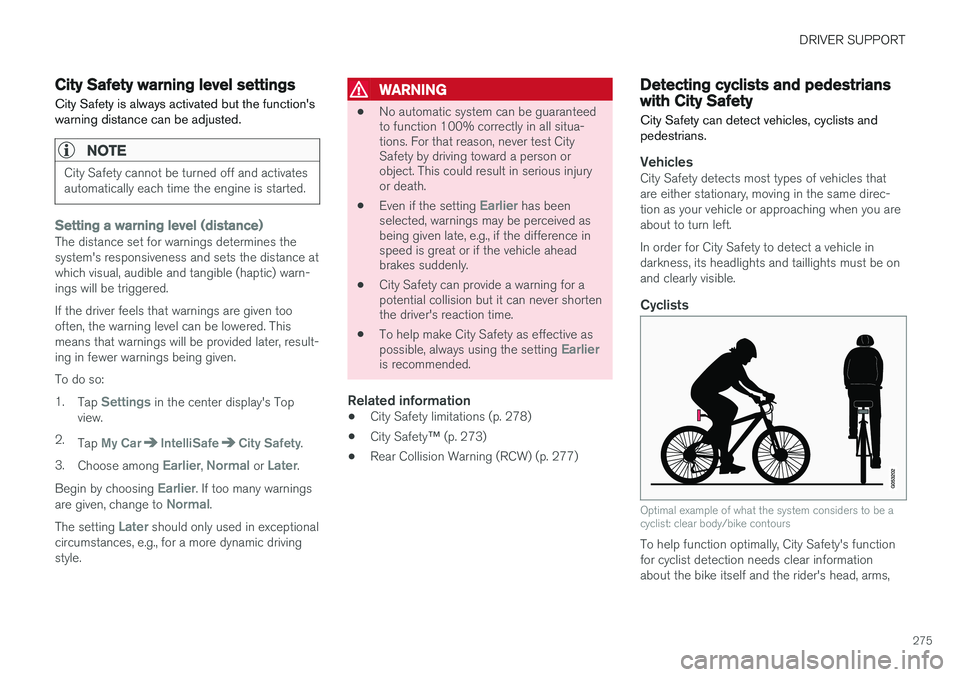
Optimal example of what the system considers to be a cyclist: clear body/bike contours
To help function optimally, City Safety's function for cyclist detection needs clear informationabout the bike itself and the rider's head, arms,
Page 279 of 570
DRIVER SUPPORT
277
City Safety in crossing traffic
City Safety can help the driver when making a left turn in an intersection.
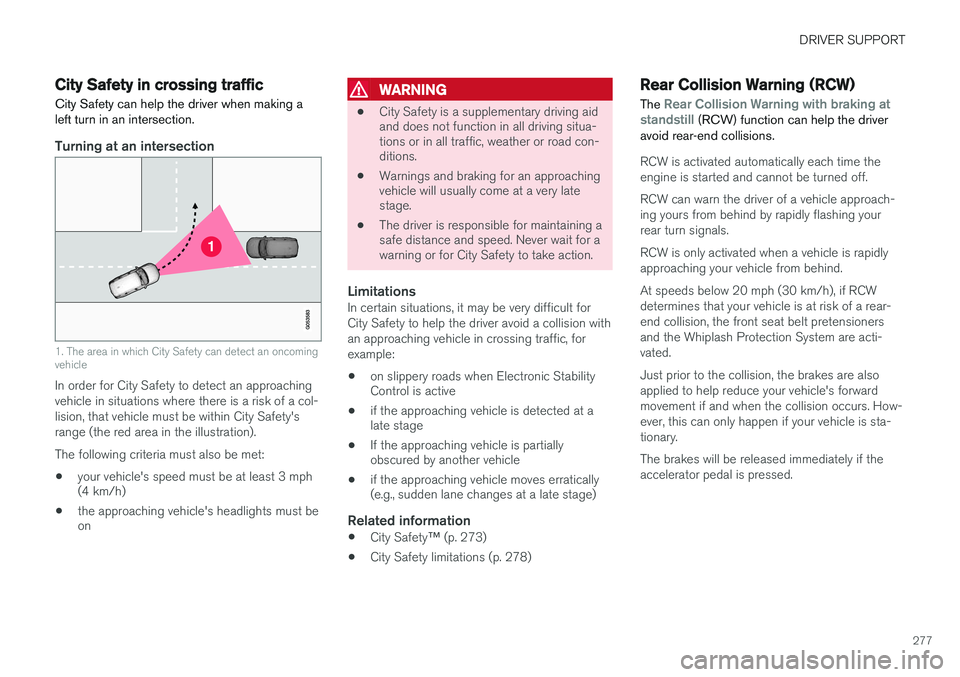
Turning at an intersection
1. The area in which City Safety can detect an oncoming vehicle
In order for City Safety to detect an approaching vehicle in situations where there is a risk of a col-lision, that vehicle must be within City Safety'srange (the red area in the illustration). The following criteria must also be met:
• your vehicle's speed must be at least 3 mph (4 km/h)
• the approaching vehicle's headlights must beon
WARNING
•
City Safety is a supplementary driving aid and does not function in all driving situa-tions or in all traffic, weather or road con-ditions.
• Warnings and braking for an approachingvehicle will usually come at a very latestage.
• The driver is responsible for maintaining asafe distance and speed. Never wait for awarning or for City Safety to take action.
LimitationsIn certain situations, it may be very difficult for City Safety to help the driver avoid a collision withan approaching vehicle in crossing traffic, forexample:
• on slippery roads when Electronic Stability Control is active
• if the approaching vehicle is detected at alate stage
• If the approaching vehicle is partiallyobscured by another vehicle
• if the approaching vehicle moves erratically(e.g., sudden lane changes at a late stage)
Related information
•
City Safety
™ (p. 273)
• City Safety limitations (p. 278)
Rear Collision Warning (RCW)
The
Rear Collision Warning with braking at
standstill (RCW) function can help the driver
avoid rear-end collisions.
RCW is activated automatically each time the engine is started and cannot be turned off. RCW can warn the driver of a vehicle approach- ing yours from behind by rapidly flashing yourrear turn signals. RCW is only activated when a vehicle is rapidly approaching your vehicle from behind. At speeds below 20 mph (30 km/h), if RCW determines that your vehicle is at risk of a rear-end collision, the front seat belt pretensionersand the Whiplash Protection System are acti-vated. Just prior to the collision, the brakes are also applied to help reduce your vehicle's forwardmovement if and when the collision occurs. How-ever, this can only happen if your vehicle is sta-tionary. The brakes will be released immediately if the accelerator pedal is pressed.
Page 281 of 570

DRIVER SUPPORT
279
HeatIf the temperature in the passenger compartment is very high, the camera and radar sensor may betemporarily turned off for approx. 15 minutesafter the engine has been started to protect theirelectronic components. When the temperaturehas cooled sufficiently, the camera and radarsensor will restart automatically. The visual warning signal may also be temporarily disabled due to high passenger compartmenttemperatures caused by strong sunlight. Warnings may not be given if the distance to the vehicle ahead is short and the driver is activelyoperating the vehicle (clearly depressing a pedalor turning the steering wheel).
Reduced visibilityCity Safety's functions may be greatly impeded or deactivated by e.g., intense snowfall or rain, indense fog, in very dusty conditions or if there isblowing snow in front of the vehicle. Condensa-tion, ice, snow or dirt on the windshield may alsoreduce the system's functionality.
NOTE
•Keep the windshield in front of the radar sensor free of ice, snow, dirt, etc.
• Snow or ice on the hood deeper than2 inches (5 cm) may obstruct the sensor.Keep the hood free of ice and snow.
• Do not mount or in any way attach any-thing on the windshield that couldobstruct the radar sensor.
Camera and radar sensor's field of visionThe camera and radar sensor have limited fields of vision. In some situations they may detect avehicle, pedestrian or cyclist later than expectedor not detect them at all. Other vehicles that are dirty may be detected later than others and in dark conditions, motorcy-cles may be detected late or not at all. If a text message is displayed in the instrument panel indicates that the camera or radar sensorare blocked, it may be difficult for City Safety todetect a vehicle, pedestrian or cyclist and thesystem's functionality may be reduced. Camera and radar sensor components should only be serviced or replaced by a trained andqualified Volvo service technician.
Other limitations
WARNING
• Warnings and braking may be delayed or not occur at all if traffic, weather or otherconditions prevent the camera and/orradar sensor from detecting pedestrians,cyclists or other vehicles correctly.
• Other vehicles can only be detected indarkness if their headlights and taillightsare clearly visible.
• The sensors have a limited range forpedestrians and cyclists. The systemfunctions best at speeds up to 30 mph(50 km/h). For stationary or slow-movingvehicles, the system functions best atspeeds up to approx. 43 mph (70 km/h).
• Warnings for stationary or slow-movingvehicles may be impeded by darkness orpoor visibility.
• Warnings and braking for pedestrians andcyclists will not be provided at speedsabove approx. 50 mph (80 km/h).
• Do not place, attach or mount any objectson the inside or outside of the windshieldnear or over the sensor. This could affectthe camera-based functions.
Page 286 of 570
DRIVER SUPPORT
* Option/accessory, for more information, see Introduction.
284
Starting and activating the Speed Limiter (SL) *
The Speed Limiter (SL) is a feature that helps prevent the driver from exceeding a preset maxi-mum speed.
Starting SL (putting it in standby mode)
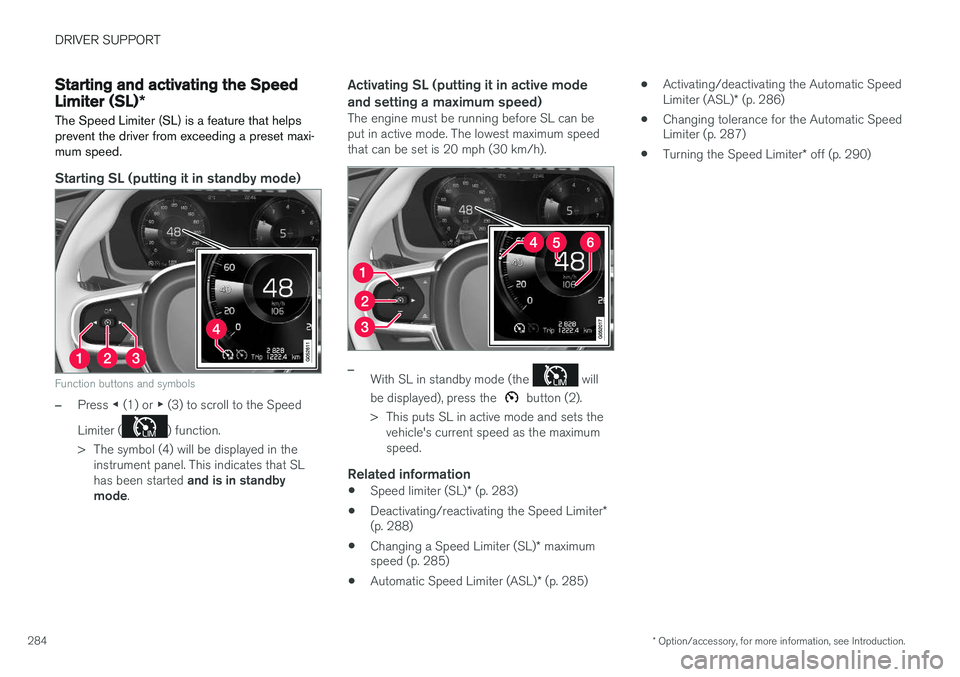
Function buttons and symbols
–Press ◀ (1) or ▶ (3) to scroll to the Speed
Limiter (
) function.
> The symbol (4) will be displayed in the instrument panel. This indicates that SL has been started and is in standby
mode .
Activating SL (putting it in active mode and setting a maximum speed)
The engine must be running before SL can be put in active mode. The lowest maximum speedthat can be set is 20 mph (30 km/h).
–With SL in standby mode (the will
be displayed), press the
button (2).
> This puts SL in active mode and sets the vehicle's current speed as the maximum speed.
Related information
• Speed limiter (SL)
* (p. 283)
• Deactivating/reactivating the Speed Limiter
*
(p. 288)
• Changing a Speed Limiter (SL)
* maximum
speed (p. 285)
• Automatic Speed Limiter (ASL)
* (p. 285) •
Activating/deactivating the Automatic Speed Limiter (ASL)
* (p. 286)
• Changing tolerance for the Automatic Speed Limiter (p. 287)
• Turning the Speed Limiter
* off (p. 290)
Page 294 of 570

DRIVER SUPPORT
* Option/accessory, for more information, see Introduction.
292
Park Assist *
The Park Assist system is designed to assist you
when driving into parking spaces, garages, etc. An audible signal and symbols in the instrumentpanel and center display indicate the distance tothe object.
Display view showing object zones and sensor sectors
The center display shows an overview of the vehi- cle in relation to objects that have been detected. The highlighted sector shows which of the sen- sors has detected the object. The closer the vehi-cle symbol is to the highlighted sector, the closerthe actual object is to your vehicle. The Park Assist system uses an intermittent tone that pulses faster as you come closer to anobject. Sound from the infotainment system willbe temporarily turned down. The tone becomes constant when you are withinapproximately 1 ft (30 cm) of an object and theactive sensor fields will be completely filled in. Ifthere are objects within this distance both behindand in front of the vehicle, the tone alternatesbetween front and rear speakers. While an audible signal is being given, its volume level can be raised/lowered using the
>II control
in the center console.
WARNING
Park Assist is an information system, NOT a safety system. This system is designed to bea supplementary aid when parking the vehicle.It is not, however, intended to replace the driv-er's attention and judgement.
Rear park assist
The system's rear sensors are activated automat- ically when the engine is started and are active ifthe vehicle rolls rearward with the gear selector in N or if R has been selected.
The distance monitored behind the vehicle is approximately 5 ft (1.5 m). The audible signalcomes from the rear speakers. The rear sensors will be deactivated automatically when towing a trailer if Volvo genuine trailer wir-ing is used. If a non-Volvo trailer hitch is beingused, it may be necessary to switch off the sys-tem manually.
Side park assist
The system's side sensors are activated automat- ically when the engine is started and are active atspeeds below approximately 6 mph (10 km/h).
Page 295 of 570

DRIVER SUPPORT
* Option/accessory, for more information, see Introduction.293
The distance monitored along the sides of the vehicle is approximately 1 ft (0.3 m). The audiblesignal comes from the side speakers.
Front park assist
The system's front sensors are activated auto- matically when the engine is started and areactive at speeds below approximately 6 mph(10 km/h). The distance monitored in front of the vehicle is approximately 2.5 ft (0.8 m). The audible signalcomes from the front speakers. Front Park Assist is deactivated if the driver presses the brake pedal or if the gear selector is put in
P.
When installing auxiliary headlights, be sure that they do not obstruct the front sensors. Otherwise,these lights could trigger a Park Assist warning.
Related information
• Activating/deactivating Park Assist (p. 293)
• Park Assist limitations (p. 294)
• Park assist symbols and messages (p. 295)
Activating/deactivating Park Assist
The Park Assist system can be turned on or off.
On/OffPark Assist's front and side sensors are activated automatically when the engine is started. Therear sensors activate if the vehicle rolls rearward in N or if P is selected.
This function can be activated/ deactivated in the center dis-play's Function view.
–Tap the Park Assist button.
> Green indicator: the function is active. Gray indicator: the function is deactivated.
Related information
• Park Assist
* (p. 292)
• Park Assist limitations (p. 294)
• Park assist symbols and messages (p. 295)
Page 304 of 570

DRIVER SUPPORT
* Option/accessory, for more information, see Introduction.
302
Perpendicular parking
Procedure for perpendicular parking
PAP helps park the vehicle as follows:
1. The system searches for and measures a
possible parking space. While this is being done, the vehicle's speed may not exceedapprox. 12 mph ( 20 km/h).
2. The vehicle is steered as it backs into the parking space and its position is adjusted inthe space by moving forward and rearward.
WARNING
• PAP does not function in all situations and is only intended to assist the driverduring parallel or perpendicular parking.
• As the driver, you have full responsibilityfor parking the vehicle in a safe manner.
Related information
•
Using Park Assist Pilot (PAP)
* (p. 302)
• Park Assist Pilot (PAP)
* limitations (p. 305)
• Park Assist Pilot (PAP)
* symbols and mes-
sages (p. 307)
Using Park Assist Pilot (PAP) *
Park Assist Pilot (PAP) gives the driver instruc- tions during the parking procedure.
Symbols, images and text in the center display indicate when the various steps in the parkingprocedure will be carried out. PAP can be activated if the following conditions are met after the engine has started:
• The vehicle may not be towing a trailer.
• The vehicle's speed must be below approx. 30 mph (50 km/h).
NOTE
If a trailer hitch is configured in the vehicle's electrical system, PAP will take the trailerhitch into consideration when determining thenecessary size of a parking space.
ParkingProcedure for parking:
1. The system searches for and measures a
possible parking space.
2. The vehicle is steered while it is backing into the parking space.
3. The vehicle's position is adjusted in the park- ing space by moving forward and rearward.
Page 310 of 570

DRIVER SUPPORT
* Option/accessory, for more information, see Introduction.
308
Adjustable steering force *
Steering force increases with the speed of the vehicle to give the driver an enhanced sense ofcontrol and stability. At low speed the vehicle iseasier to steer in order to facilitate parking, etc.
Changing the steering force level1.
Tap Settings in the center display's Top
view.
2. Tap
My CarDrive ModeSteering
force.
3. Select
Low, Medium or High to set the
desired level.
NOTE
• This steering force level menu function cannot be accessed when the vehicle isin motion.
• In certain situations, the power steeringfunction may become too hot and mustbe temporarily cooled. During cooling,power steering effect will be reduced andmore force may be necessary to turn thesteering wheel and a message will bedisplayed in the instrument panel.
Related information
•
Driver support systems (p. 240)
Electronic Stability Control (ESC)
Electronic Stability Control (ESC) helps reduce wheel spin, counteract skidding and to generallyhelp improve directional stability.
A pulsating sound will be audi- ble when the system is activelyoperating and is normal. Accel-eration may also be slightlyslower than normal.
WARNING
ESC is a supplementary aid and cannot deal with all situations or road conditions. The driver is always responsible for operating the vehicle in a safe manner in accordancewith current traffic regulations.
ESC consists of the following functions: • Traction control
• Spin control
• Active Yaw Control
• Engine Drag Control
• Trailer Stability Assist
Traction controlThis function is designed to help reduce wheel spin by transferring power from a drive wheel that begins to lose traction to the wheel on the oppo-site side of the vehicle (on the same axle).
Spin controlThis function is designed to help prevent thedrive wheels from spinning while the vehicle isaccelerating.
Active Yaw ControlAt low speeds, this function helps maintain direc-tional stability by braking one or more of thewheels if the vehicle shows a tendency to skid orslide laterally.
Engine Drag Control EDCEDC helps keep the engine running if the wheelsshow a tendency to lock, e.g., when shifting downin the manual shifting mode or while using theengine's braking function on a slippery surface. Ifthe wheels were to lock, the vehicle wouldbecome more difficult to steer.
Trailer Stability Assist
*7TSA helps stabilize a vehicle that is towing atrailer when the vehicle and trailer have begun tosway. This system is automatically deactivated if the driver selects
Sport mode.
Related information
•Detachable trailer hitch (p. 353)
• Driving with a trailer (p. 351)
7
This function is included if the vehicle is equipped with a Volvo original trailer hitch.
Page 311 of 570
DRIVER SUPPORT
309
•
Trailer Stability Assist (TSA) (p. 354)
• Electronic Stability Control (ESC) sport mode (p. 309)
• Electronic Stability Control (ESC) symbolsand messages (p. 310)
Electronic Stability Control (ESC) sport mode
ESC is always activated and cannot be switched off.
However, the driver can select Sport mode,
which offers more active driving characteristics. In Sport mode, the engine management system
monitors movement of the accelerator pedal and steering wheel for sportier driving and allowsmore lateral movement of the rear wheels beforeESC is triggered. Under certain circumstances, such as when driv- ing with snow chains, or driving in deep snow orloose sand, it may be advisable to temporarily use Sport mode for maximum tractive force.
If the driver releases pressure on the accelerator pedal, ETC will also activate to help stabilize thevehicle.
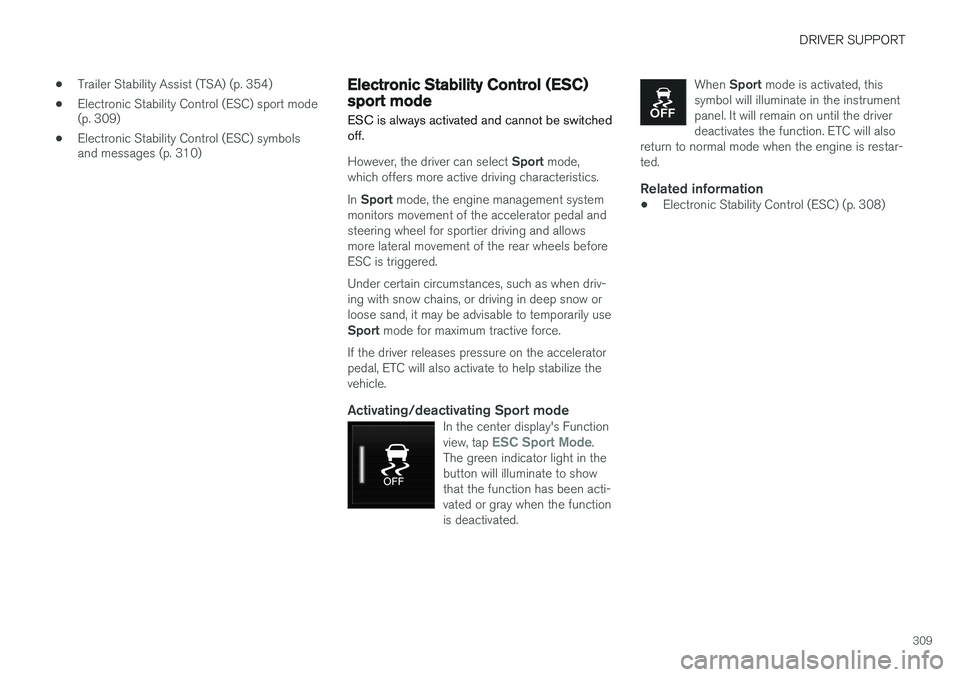
Activating/deactivating Sport modeIn the center display's Function view, tap ESC Sport Mode.
The green indicator light in the button will illuminate to showthat the function has been acti-vated or gray when the functionis deactivated.
When Sport mode is activated, this
symbol will illuminate in the instrument panel. It will remain on until the driverdeactivates the function. ETC will also
return to normal mode when the engine is restar-ted.
Related information
• Electronic Stability Control (ESC) (p. 308)
Page 312 of 570
DRIVER SUPPORT
310
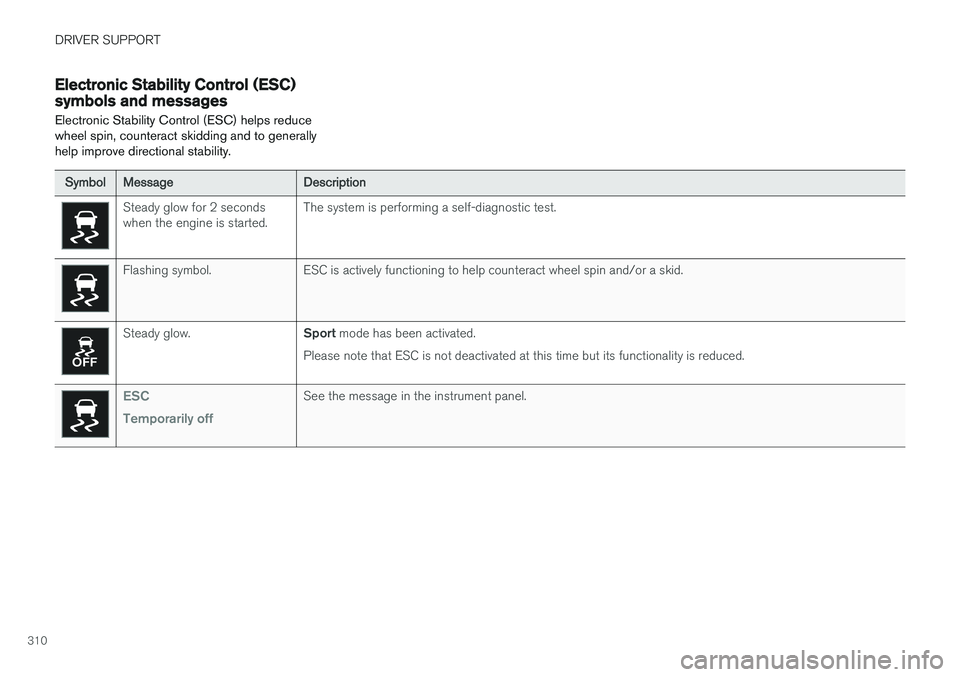
Electronic Stability Control (ESC) symbols and messages Electronic Stability Control (ESC) helps reduce wheel spin, counteract skidding and to generallyhelp improve directional stability.
SymbolMessageDescription
Steady glow for 2 seconds when the engine is started.The system is performing a self-diagnostic test.
Flashing symbol.ESC is actively functioning to help counteract wheel spin and/or a skid.
Steady glow.Sport mode has been activated.
Please note that ESC is not deactivated at this time but its functionality is reduced.
ESC Temporarily offSee the message in the instrument panel.