instrument panel VOLVO XC90 2015 Workshop Manual
[x] Cancel search | Manufacturer: VOLVO, Model Year: 2015, Model line: XC90, Model: VOLVO XC90 2015Pages: 570, PDF Size: 12.44 MB
Page 258 of 570

DRIVER SUPPORT
* Option/accessory, for more information, see Introduction.
256 To temporarily deactivate and put Adaptive Cruise Control in standby mode:
Function buttons and symbols
–Press the button (2).
> The
symbol in the instrument panel
will change colors from WHITE to GRAY and the set speed in the center of thespeedometer will change from BEIGE toGRAY.
Standby mode due to action by the driverACC is temporarily deactivated and put in standby mode if:
• the brakes are applied
• The gear selector is moved to
N
• the vehicle is driven faster than the set speed for more than 1 minute. In these cases, the driver will have to regulate the vehicle's speed. A temporary increase in speed, such as when passing another vehicle, does not affect the ACCset speed. The vehicle will return to the set speedwhen the accelerator pedal is released.
Automatic standby modeACC interacts with other systems, such as Electronic Stability Control. If any of these othersystems are not functioning properly, ACC willturn off automatically.
WARNING
If this happens, the driver will be alerted by an audible signal and a message in the instru-ment panel. The driver will have to adapt thevehicle's speed, apply the brakes when nec-essary and keep a safe distance to the vehicleahead.
ACC switches automatically to standby mode if: • the vehicle's speed goes below approx. 3 mph (5 km/h) and ACC cannot determineif the vehicle ahead is stationary or is anobject such as a speed bump, etc
• the vehicle's speed goes below approx.3 mph (5 km/h) and the vehicle aheadchanges lanes or turns so that ACC nolonger has a target vehicle to follow
• the driver opens the door
• the driver unbuckles the seat belt •
engine speed (rpm) is too high/low
• the wheels lose traction
• the parking brake is applied
• the stability system's
ESC Sport Mode is
activated
• the
Off Road drive mode is selected
• The radar sensor is covered by e.g., wet snow or if heavy rain interferes with radar waves
Reactivating ACC from standby modeTo reactivate ACC after it has temporarily been put in standby mode:
–Press the button (1).
> The vehicle will then return to the most
recently set speed .
WARNING
There may be a significant increase in speed after the
button has been pressed.
Related information
•Adaptive Cruise Control (ACC)
* (p. 252)
• Starting and activating Adaptive Cruise Control (ACC) (p. 254)
• Changing Adaptive Cruise Control (ACC)speed (p. 257)
• Setting an Adaptive Cruise Control timeinterval (p. 258)
Page 263 of 570
DRIVER SUPPORT
* Option/accessory, for more information, see Introduction.261
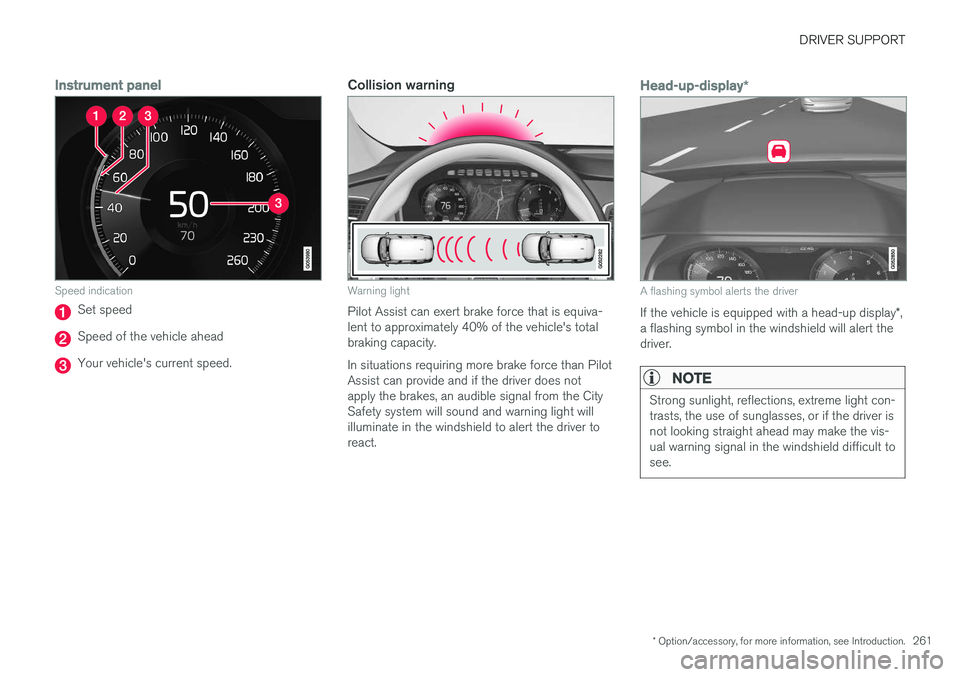
Instrument panel
Speed indication
Set speed
Speed of the vehicle ahead
Your vehicle's current speed.
Collision warning
Warning light
Pilot Assist can exert brake force that is equiva- lent to approximately 40% of the vehicle's totalbraking capacity. In situations requiring more brake force than Pilot Assist can provide and if the driver does notapply the brakes, an audible signal from the CitySafety system will sound and warning light willilluminate in the windshield to alert the driver toreact.
Head-up-display*
A flashing symbol alerts the driver
If the vehicle is equipped with a head-up display *,
a flashing symbol in the windshield will alert the driver.
NOTE
Strong sunlight, reflections, extreme light con- trasts, the use of sunglasses, or if the driver isnot looking straight ahead may make the vis-ual warning signal in the windshield difficult tosee.
Page 265 of 570

DRIVER SUPPORT
* Option/accessory, for more information, see Introduction.263
rain or snow, in poor visibility, on winding roads or on highway on- or off-ramps.
• Pilot Assist uses the vehicle's cameraand radar sensor, which have limitations.
Pilot Assist may deactivate or not function optimally if:
• the lane's side market lines are missing, badly faded or cross each other.
• the division of lanes is not clear, e.g.,when a line divides or merges withanother, at exits or if there are many roadsigns/markers.
• if there are edges or other lines on ornear the lane, e.g., curbs, cracks, repairedareas, sharp shadows, etc.
• the lane is narrow or winding.
• the weather conditions (rain, snow, fog,slush, poor visibility, backlighting, etc).
The driver should also be aware that Pilot Assist has the following limitations: • High curbs, barriers and temporary obsta- cles (cones, barriers etc) may not bedetected or could be detected incorrectlyas side marker lines, which may create arisk of collision. The driver must ensure asafe distance to these obstacles.
• The camera or radar sensor may not beable to detect objects if there are pot-holes or if there are stationary objectspartially or completely blocking the road.• Pilot Assist does not "see" pedestrians, animals, etc.
• Pilot Assist's steering capacity is limitedand may not always be able to help thedriver keep the vehicle in the lane.
Hands on the steering wheelPilot Assist only functions when the driver's hands are on the steering wheel
, which is con-
tinuously monitored by the system. If this is notthe case, the driver will be alerted by a text mes-sage in the instrument panel. If the driver's handsare not returned to the steering wheel, an audiblesignal will sound. If the driver does not return his/her hands to the steering wheel after the audible signal, PilotAssist will go into standby mode and must be reactivated by pressing
.
Related information
• Pilot Assist
* (p. 259)
Deactivating/resuming Pilot Assist
Putting Pilot Assist in standby mode
Function buttons and symbols
1.
Press the button (1).
> Pilot Assist will go into standby mode.
2. Press the ◀ button (2).
> Pilot Assist will be turned off and shift to ACC in standby mode.
or
–Press the ◀ button (2).
> Pilot Assist will be turned off and switch to ACC in active mode.
Page 267 of 570
DRIVER SUPPORT
* Option/accessory, for more information, see Introduction.265
Setting a Pilot Assist time interval
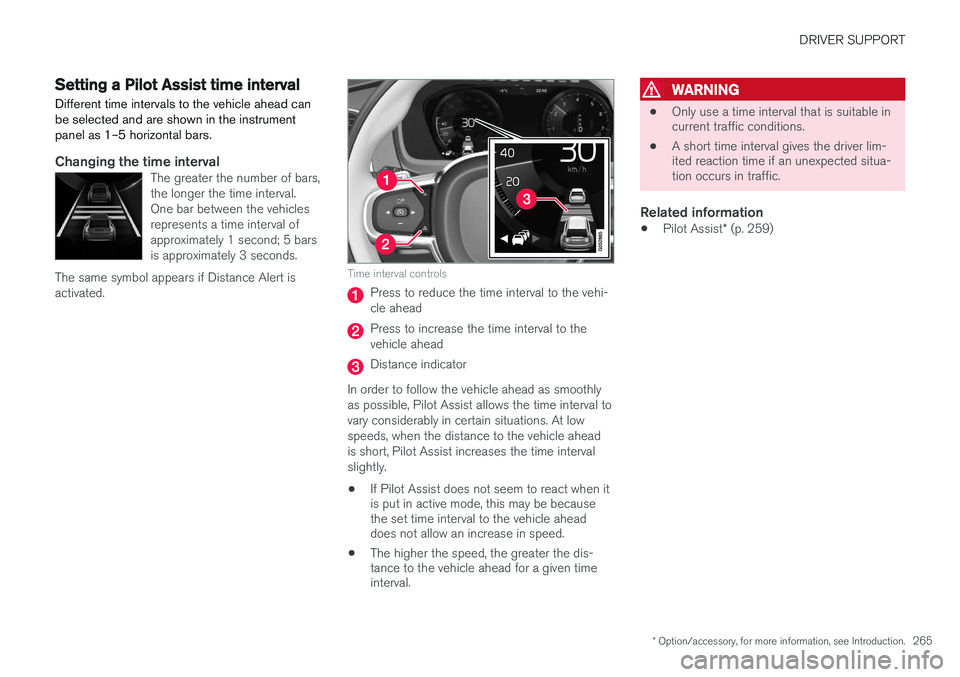
Different time intervals to the vehicle ahead can be selected and are shown in the instrumentpanel as 1–5 horizontal bars.
Changing the time intervalThe greater the number of bars, the longer the time interval.One bar between the vehiclesrepresents a time interval ofapproximately 1 second; 5 barsis approximately 3 seconds.
The same symbol appears if Distance Alert isactivated.
Time interval controls
Press to reduce the time interval to the vehi- cle ahead
Press to increase the time interval to the vehicle ahead
Distance indicator
In order to follow the vehicle ahead as smoothly as possible, Pilot Assist allows the time interval tovary considerably in certain situations. At lowspeeds, when the distance to the vehicle aheadis short, Pilot Assist increases the time intervalslightly.
• If Pilot Assist does not seem to react when it is put in active mode, this may be becausethe set time interval to the vehicle aheaddoes not allow an increase in speed.
• The higher the speed, the greater the dis-tance to the vehicle ahead for a given timeinterval.
WARNING
• Only use a time interval that is suitable in current traffic conditions.
• A short time interval gives the driver lim-ited reaction time if an unexpected situa-tion occurs in traffic.
Related information
•
Pilot Assist
* (p. 259)
Page 276 of 570
DRIVER SUPPORT
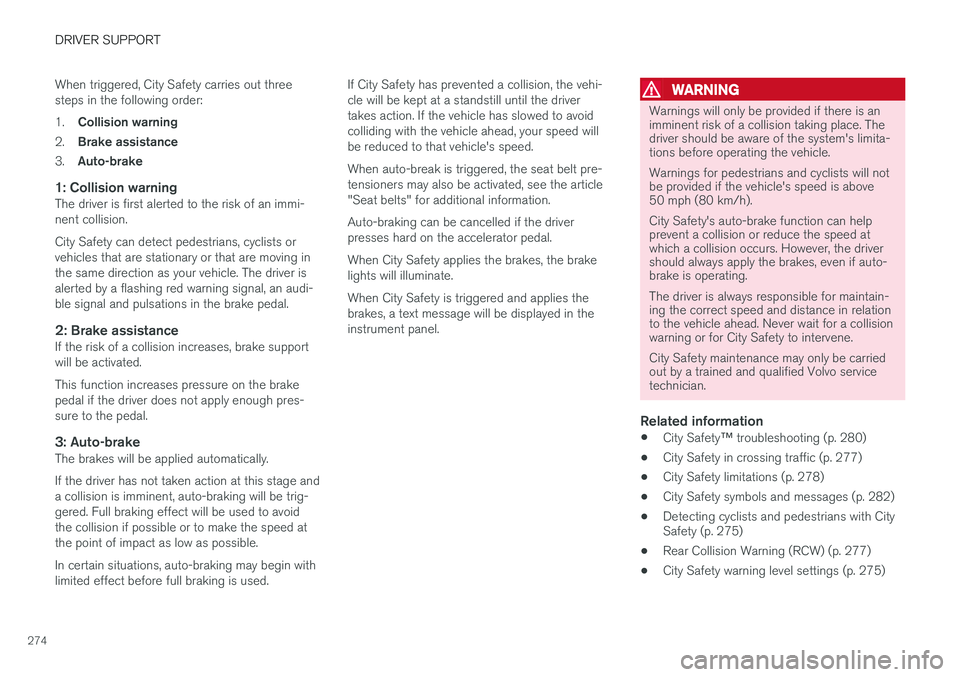
274When triggered, City Safety carries out three steps in the following order: 1.
Collision warning
2. Brake assistance
3. Auto-brake
1: Collision warningThe driver is first alerted to the risk of an immi- nent collision. City Safety can detect pedestrians, cyclists or vehicles that are stationary or that are moving inthe same direction as your vehicle. The driver isalerted by a flashing red warning signal, an audi-ble signal and pulsations in the brake pedal.
2: Brake assistanceIf the risk of a collision increases, brake supportwill be activated. This function increases pressure on the brake pedal if the driver does not apply enough pres-sure to the pedal.
3: Auto-brakeThe brakes will be applied automatically. If the driver has not taken action at this stage and a collision is imminent, auto-braking will be trig-gered. Full braking effect will be used to avoidthe collision if possible or to make the speed atthe point of impact as low as possible. In certain situations, auto-braking may begin with limited effect before full braking is used. If City Safety has prevented a collision, the vehi-cle will be kept at a standstill until the drivertakes action. If the vehicle has slowed to avoidcolliding with the vehicle ahead, your speed willbe reduced to that vehicle's speed. When auto-break is triggered, the seat belt pre- tensioners may also be activated, see the article"Seat belts" for additional information. Auto-braking can be cancelled if the driver presses hard on the accelerator pedal. When City Safety applies the brakes, the brake lights will illuminate. When City Safety is triggered and applies the brakes, a text message will be displayed in theinstrument panel.
WARNING
Warnings will only be provided if there is an imminent risk of a collision taking place. Thedriver should be aware of the system's limita-tions before operating the vehicle. Warnings for pedestrians and cyclists will not be provided if the vehicle's speed is above50 mph (80 km/h). City Safety's auto-brake function can help prevent a collision or reduce the speed atwhich a collision occurs. However, the drivershould always apply the brakes, even if auto-brake is operating. The driver is always responsible for maintain- ing the correct speed and distance in relationto the vehicle ahead. Never wait for a collisionwarning or for City Safety to intervene. City Safety maintenance may only be carried out by a trained and qualified Volvo servicetechnician.
Related information
•
City Safety
™ troubleshooting (p. 280)
• City Safety in crossing traffic (p. 277)
• City Safety limitations (p. 278)
• City Safety symbols and messages (p. 282)
• Detecting cyclists and pedestrians with City Safety (p. 275)
• Rear Collision Warning (RCW) (p. 277)
• City Safety warning level settings (p. 275)
Page 281 of 570

DRIVER SUPPORT
279
HeatIf the temperature in the passenger compartment is very high, the camera and radar sensor may betemporarily turned off for approx. 15 minutesafter the engine has been started to protect theirelectronic components. When the temperaturehas cooled sufficiently, the camera and radarsensor will restart automatically. The visual warning signal may also be temporarily disabled due to high passenger compartmenttemperatures caused by strong sunlight. Warnings may not be given if the distance to the vehicle ahead is short and the driver is activelyoperating the vehicle (clearly depressing a pedalor turning the steering wheel).
Reduced visibilityCity Safety's functions may be greatly impeded or deactivated by e.g., intense snowfall or rain, indense fog, in very dusty conditions or if there isblowing snow in front of the vehicle. Condensa-tion, ice, snow or dirt on the windshield may alsoreduce the system's functionality.
NOTE
•Keep the windshield in front of the radar sensor free of ice, snow, dirt, etc.
• Snow or ice on the hood deeper than2 inches (5 cm) may obstruct the sensor.Keep the hood free of ice and snow.
• Do not mount or in any way attach any-thing on the windshield that couldobstruct the radar sensor.
Camera and radar sensor's field of visionThe camera and radar sensor have limited fields of vision. In some situations they may detect avehicle, pedestrian or cyclist later than expectedor not detect them at all. Other vehicles that are dirty may be detected later than others and in dark conditions, motorcy-cles may be detected late or not at all. If a text message is displayed in the instrument panel indicates that the camera or radar sensorare blocked, it may be difficult for City Safety todetect a vehicle, pedestrian or cyclist and thesystem's functionality may be reduced. Camera and radar sensor components should only be serviced or replaced by a trained andqualified Volvo service technician.
Other limitations
WARNING
• Warnings and braking may be delayed or not occur at all if traffic, weather or otherconditions prevent the camera and/orradar sensor from detecting pedestrians,cyclists or other vehicles correctly.
• Other vehicles can only be detected indarkness if their headlights and taillightsare clearly visible.
• The sensors have a limited range forpedestrians and cyclists. The systemfunctions best at speeds up to 30 mph(50 km/h). For stationary or slow-movingvehicles, the system functions best atspeeds up to approx. 43 mph (70 km/h).
• Warnings for stationary or slow-movingvehicles may be impeded by darkness orpoor visibility.
• Warnings and braking for pedestrians andcyclists will not be provided at speedsabove approx. 50 mph (80 km/h).
• Do not place, attach or mount any objectson the inside or outside of the windshieldnear or over the sensor. This could affectthe camera-based functions.
Page 282 of 570

DRIVER SUPPORT
280
Action by the driver
Backing upCity Safety is temporarily deactivated while the vehicle is backing up.
Low speedCity Safety is not activated at very low speeds (under approx. 3 mph (4 km/h). This means thatthe system will not be triggered if your vehicleapproaches a vehicle ahead, such as when park-ing.
Active driverAction by the driver always has priority. For this reason, City Safety may not react or react laterthan expected in situations in which the driver isactively operating the vehicle, even if a collision isimminent. This is also done to help eliminateexcessive warnings.
Related information
•City Safety
™ (p. 273)
City Safety ™ troubleshooting
Messages pertaining to any possible problems with City Safety will be displayed in the instru-ment panel.
Troubleshooting and remedial action
Location of the camera and the radar sensor
If a message is displayed in the instrument panel saying that the camera/radar sensor is blocked,
City Safety cannot detect vehicles, cyclists orpedestrians ahead of you, which means that thesystem is not functioning properly. However, this message will not be displayed in all situations in which the camera/radar sensor isobstructed. For this reason, the driver mustensure that the area of the windshield in front ofthe camera/radar sensor is always kept clean. The following table shows some of the situationsthat can cause the message to be displayed andsuggested actions.
CauseAction
The area of the wind- shield in front of thecamera/radar sensor isdirty or covered by ice orsnow.Clean the wind- shield or removethe ice/ snow.
Thick fog or heavy rain/ snow blocks reduces thecamera/radar sensor'srange of visibility.No action. The driver should beextra alert in condi-tions of this type.
There is dirt between the inside of the wind-shield and the camera/radar sensor.Have the area of the windshieldcleaned by atrained and quali-fied Volvo servicetechnician.
Page 283 of 570

DRIVER SUPPORT
* Option/accessory, for more information, see Introduction.281
CAUTION
•Service and maintenance on City Safety may only be carried out by a trained andqualified Volvo service technician.
• If a crack, scratch or stone chip shouldoccur in the section of the windshield infront the camera/radar sensor, contact atrained and qualified Volvo service techni-cian to repair or replace the windshield.Failing to do so may result in reducedCity Safety functionality.
To help prevent limited or reduced functional- ity, please also observe the following:
• Volvo recommends that cracks, scratches or stone chips on the windshield in front of the camera/radar sensor should
not
be repaired; in such cases, the entire windshield should be replaced.
• Before the windshield is replaced, con-tact a Volvo retailer to ensure that thecorrect windshield is ordered and instal-led. If the wrong type of windshield isused, this may cause City Safety to func-tion improperly or not at all.
• Volvo recommends the use of only Genu-ine Volvo Replacement Windshields.
• When replacing windshield wipers, usethe same type or ones approved by Volvo.
After the windshield has been replaced, the camera/radar sensor will have to be recalibra-ted by a trained and qualified Volvo servicetechnician to help ensure proper function ofall of the vehicle's camera-/radar-based sys-tems.
MaintenanceIn order for City Safety to function properly, the area of the windshield must be kept free of dirt,ice, snow, etc.
Other vehicle functionsIf a message is displayed in the instrument panel,this means that the other systems using the cam-era/radar sensor (see the list below) will not havefull functionality or may not function at all. The radar sensor is used by the following func- tions:
• Distance Alert
*
• Driver Alert Control
*
• Adaptive Cruise Control
*
• Pilot Assist
*
• Road Sign Information
*
• Active High Beams
*
• Lane Keeping Aid
*
Do not mount or in any way attach anything onthe windshield that could obstruct the camera/radar sensor.
WARNING
• The camera has the same type of limita- tions as the human eye, i.e., it cannot seeas well in heavy snowfall or rain, thick fogor in heavy blowing dust or snow. In suchconditions, systems depending on thecamera may experience greatly reducedfunctionality or may be temporarily deacti-vated.
• Never place any objects, decals, etc., onthe windshield in front of the camera. Thiscould reduce or block the camera
Page 284 of 570
DRIVER SUPPORT
282
City Safety symbols and messages
A number of City Safety-related messages may be displayed in the instrument panel.
SymbolMessageExplanation
City Safety City Safety was activatedWhen City Safety is braking or has applied the brakes, one of more symbols may illuminate in the instrument panel and a text message will be displayed.
City Safety Reduced functionality Service requiredThe system is not functioning properly. Contact a trained and authorized Volvo service technician.
Related information
• City Safety
™ (p. 273)
Page 286 of 570
DRIVER SUPPORT
* Option/accessory, for more information, see Introduction.
284
Starting and activating the Speed Limiter (SL) *
The Speed Limiter (SL) is a feature that helps prevent the driver from exceeding a preset maxi-mum speed.
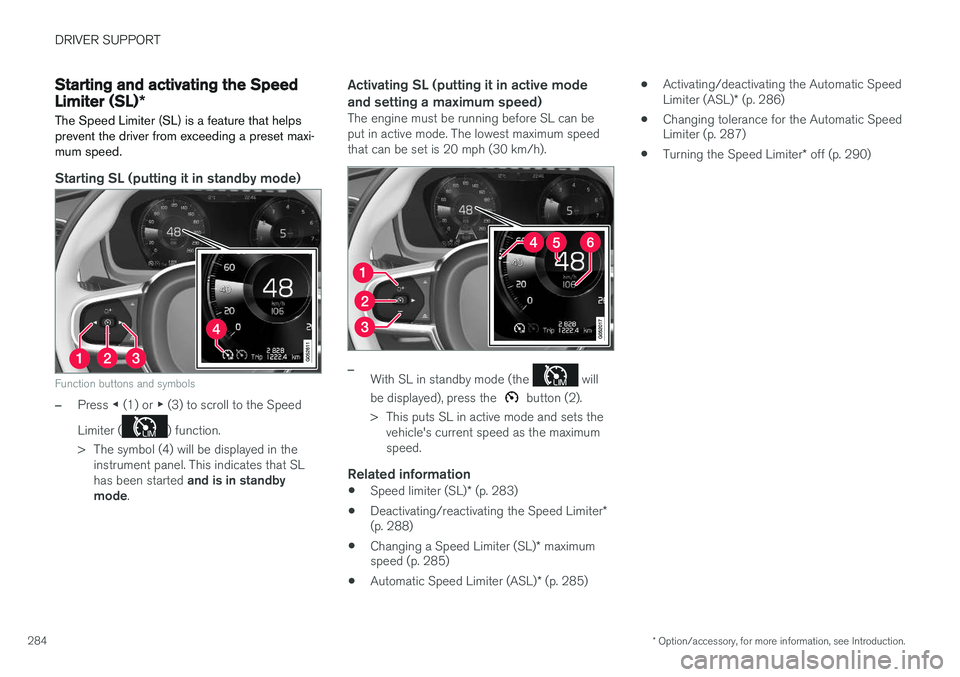
Starting SL (putting it in standby mode)
Function buttons and symbols
–Press ◀ (1) or ▶ (3) to scroll to the Speed
Limiter (
) function.
> The symbol (4) will be displayed in the instrument panel. This indicates that SL has been started and is in standby
mode .
Activating SL (putting it in active mode and setting a maximum speed)
The engine must be running before SL can be put in active mode. The lowest maximum speedthat can be set is 20 mph (30 km/h).
–With SL in standby mode (the will
be displayed), press the
button (2).
> This puts SL in active mode and sets the vehicle's current speed as the maximum speed.
Related information
• Speed limiter (SL)
* (p. 283)
• Deactivating/reactivating the Speed Limiter
*
(p. 288)
• Changing a Speed Limiter (SL)
* maximum
speed (p. 285)
• Automatic Speed Limiter (ASL)
* (p. 285) •
Activating/deactivating the Automatic Speed Limiter (ASL)
* (p. 286)
• Changing tolerance for the Automatic Speed Limiter (p. 287)
• Turning the Speed Limiter
* off (p. 290)