head-up VOLVO XC90 2015 Owners Manual
[x] Cancel search | Manufacturer: VOLVO, Model Year: 2015, Model line: XC90, Model: VOLVO XC90 2015Pages: 570, PDF Size: 12.44 MB
Page 5 of 570

3
Starting or moving a vehicle in safety mode82
Safety systems 83
Airbag system 83
Driver/passenger side airbags 84
Inflatable curtains 87
Side impact airbags 88
Rollover protection system 89
Whiplash protection system 89
INSTRUMENTS AND CONTROLS
Trip computer92
Displaying trip computer information 92
Displaying trip statistics 94
HomeLink ®
Wireless Control System *94
Programming the HomeLink ®
Wire-
less Control System * 95
Instruments and controls 98
Adjusting the power door mirrors 100
Laminated panoramic roof *
101
Operating the laminated panoramic roof *
102
Power windows 104
Operating the power windows 104
Rearview mirror 105
Using sun shades 106
Settings view 106
Categories in Settings view 107
Changing system settings in Set- tings view 109
Linking a remote key to a driver profile 110
Changing settings in apps 111
Resetting the settings view 111
Resetting user data when the vehiclechanges owners 112
Driver profiles 112
Editing a driver profile 114
Importing/exporting a driver profile from/to a USB flash drive115
Ambient temperature sensor 116
Clock 116
Head-up display (HUD) *
117
Voice control 120
Using voice commands 121
Voice control for cell phones 121
Voice control for radio and media 122
Climate system voice commands 122
Navigation system voice commands 124
Voice control settings 125
Indicator symbols in the instrument panel 126
Instrument panel 128
Instrument panel App menu 129
Instrument panel licenses 130
Warning symbols in the instrument panel 134
Compass 136
Calibrating the compass 137
Lighting panel and controls 138
Low beam headlights 139
Daytime Running Lights (DRL) 140
High and low beam headlights 140
Active Bending Lights *
142
Page 21 of 570
INTRODUCTION
* Option/accessory, for more information, see Introduction.19
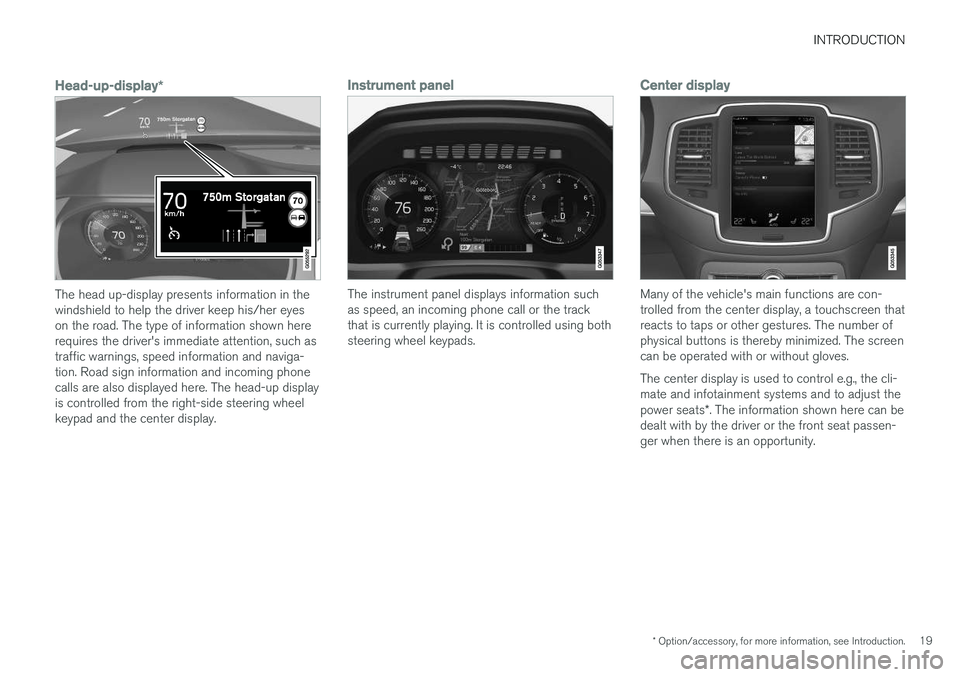
Head-up-display*
The head up-display presents information in the windshield to help the driver keep his/her eyeson the road. The type of information shown hererequires the driver's immediate attention, such astraffic warnings, speed information and naviga-tion. Road sign information and incoming phonecalls are also displayed here. The head-up displayis controlled from the right-side steering wheelkeypad and the center display.
Instrument panel
The instrument panel displays information such as speed, an incoming phone call or the trackthat is currently playing. It is controlled using bothsteering wheel keypads.
Center display
Many of the vehicle's main functions are con- trolled from the center display, a touchscreen thatreacts to taps or other gestures. The number ofphysical buttons is thereby minimized. The screencan be operated with or without gloves. The center display is used to control e.g., the cli- mate and infotainment systems and to adjust the power seats*. The information shown here can be
dealt with by the driver or the front seat passen- ger when there is an opportunity.
Page 22 of 570
INTRODUCTION
* Option/accessory, for more information, see Introduction.
20
Voice control systemThe voice control system ena- bles the driver to operate cer-tain vehicle functions withoutremoving his/her hands fromthe steering wheel and itunderstands natural speech.Use voice commands to e.g.,
play a track on the infotainment system, make aphone call, raise the passenger compartmenttemperature or to read a text message.
For additional information about all of the func- tions/system, see the respective articles in theon-board owner's manual or the printed supple-ment.
Related information
• Using the center display (p. 46)
• Center display overview (p. 29)
• Navigating in the center display's views (p. 39)
• Head-up display (HUD)
* (p. 117)
• Instrument panel (p. 128)
• Voice control (p. 120)
Page 32 of 570

INTRODUCTION
* Option/accessory, for more information, see Introduction.
30
Function view: vehicle functions can be acti- vated/deactivated by tapping. Certain func-tions are called "trigger functions", which open settings windows, e.g.,
Camera and
parking functions. Settings for the head-up display * are also started from Function view
but the actual interaction is controlled from the steering wheel keypad buttons and theinstrument panel.
Home view: the initial view shown when the center display is started.
App (Application) view: shows apps that have been downloaded (third-party apps) as well as ones for integrated functions such as
FM
radio. Tap an icon to open the app.
Status bar: vehicle activities are shown at the top of the screen. Network/connection infor-mation is shown on the left side of the bar.Media-related information, the clock andinformation about background activities areshown to the right.
Top view: pull down the tab to open Top view. From here, you can access Settings,Owner's manual, Driver Profile and stored
messages.
Navigation: leads to map navigation. Tap the sub-view to expand it.
Media: the most recently used media-related apps. Tap the sub-view to expand it.
Phone: used to access phone-related func- tions. Tap the sub-view to expand it.
The extra sub-view: the most recently used apps/vehicle functions that do not belong inany of the other sub-views are listed here.Tap the sub-view to expand it.
Climate bar: information and direct access to settings such as temperature, seat heating *
and blower speed. Tap the symbol at the center of the Climate bar to open Climateview for additional settings.
Related information
• Using the center display (p. 46)
• Function view buttons (p. 37)
• Symbols in the center display status bar (p. 44)
• Settings view (p. 106)
• Media player (p. 393)
• Phone (p. 387)
• Climate system controls in the center display(p. 180)
• Cleaning the center display (p. 529)
Page 39 of 570
INTRODUCTION
37
Function view buttons
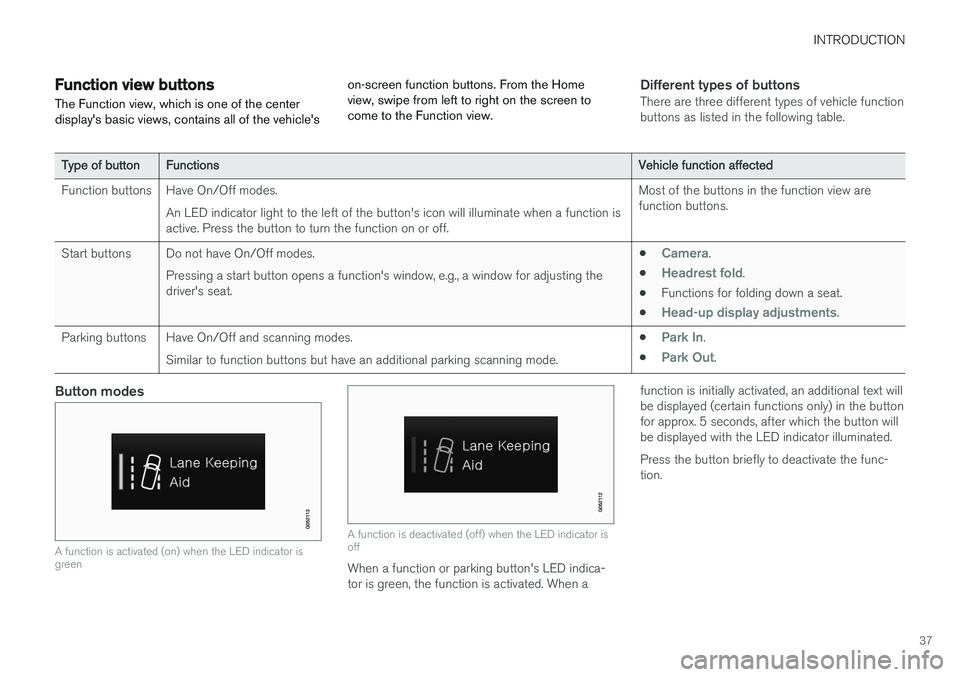
The Function view, which is one of the center display's basic views, contains all of the vehicle's on-screen function buttons. From the Homeview, swipe from left to right on the screen tocome to the Function view.Different types of buttonsThere are three different types of vehicle function buttons as listed in the following table.
Type of buttonFunctionsVehicle function affected
Function buttonsHave On/Off modes. An LED indicator light to the left of the button's icon will illuminate when a function is active. Press the button to turn the function on or off.Most of the buttons in the function view are function buttons.
Start buttonsDo not have On/Off modes. Pressing a start button opens a function's window, e.g., a window for adjusting the driver's seat.•Camera.
•
Headrest fold.
• Functions for folding down a seat.
•
Head-up display adjustments.
Parking buttonsHave On/Off and scanning modes. Similar to function buttons but have an additional parking scanning mode.•Park In.
•
Park Out.
Button modes
A function is activated (on) when the LED indicator is green
A function is deactivated (off) when the LED indicator is off
When a function or parking button's LED indica- tor is green, the function is activated. When a function is initially activated, an additional text willbe displayed (certain functions only) in the buttonfor approx. 5 seconds, after which the button willbe displayed with the LED indicator illuminated. Press the button briefly to deactivate the func- tion.
Page 56 of 570

INTRODUCTION
* Option/accessory, for more information, see Introduction.
54
Saving/deleting favoritesSave an article as a favorite by tapping the star (
) at the upper right when an article is open.
The star symbol will be filled in (
) when its arti-
cle has been saved as a favorite. To delete a favorite, tap its star again.
Using the search function1. Tap the magnifying glass icon () in the
owner's manual's upper menu. A keyboard will appear at the bottom of the screen.
2. Enter a word, e.g., "seat belt." > Suggested articles will be displayed asmore characters are entered.
3. Confirm by tapping the article. To leave search mode tap the up-arrow next to thesearch box.
Related information
• On-board digital owner's manual (p. 52)
• Using the center display keyboard (p. 32)
Glass
Laminated glass
The windshield and panoramic roof
* are made of
laminated glass, which is reinforced to help pre- vent break-ins and to provide additional sound-proofing. Laminated glass is optional for theother side windows.
Laminated glass symbol 6
Related information
•
Laminated panoramic roof
* (p. 101)
• Power windows (p. 104)
• Defrosting windows and mirrors (p. 187)
• Using sun shades (p. 106)
• Rearview mirror (p. 105)
• Power windows (p. 104)
• Head-up display (HUD)
* (p. 117)
• Activating/deactivating the rain sensor (p. 155)
• Windshield and headlight washers (p. 156)
• Tailgate window wiper and washer (p. 157)
Technician certification
In addition to Volvo factory training, Volvo sup- ports certification by the National Institute forAutomotive Service Excellence (A.S.E.).
Certified technicians have demonstrated a high degree of competence in specific areas. Besidespassing exams, each technician must also haveworked in the field for two or more years before acertificate is issued. These professional techni-cians are best able to analyze vehicle problemsand perform the necessary maintenance proce-dures to keep your Volvo at peak operating con-dition.
6 This symbol is not shown on the windshield or panoramic roof.
Page 101 of 570
INSTRUMENTS AND CONTROLS
* Option/accessory, for more information, see Introduction.99
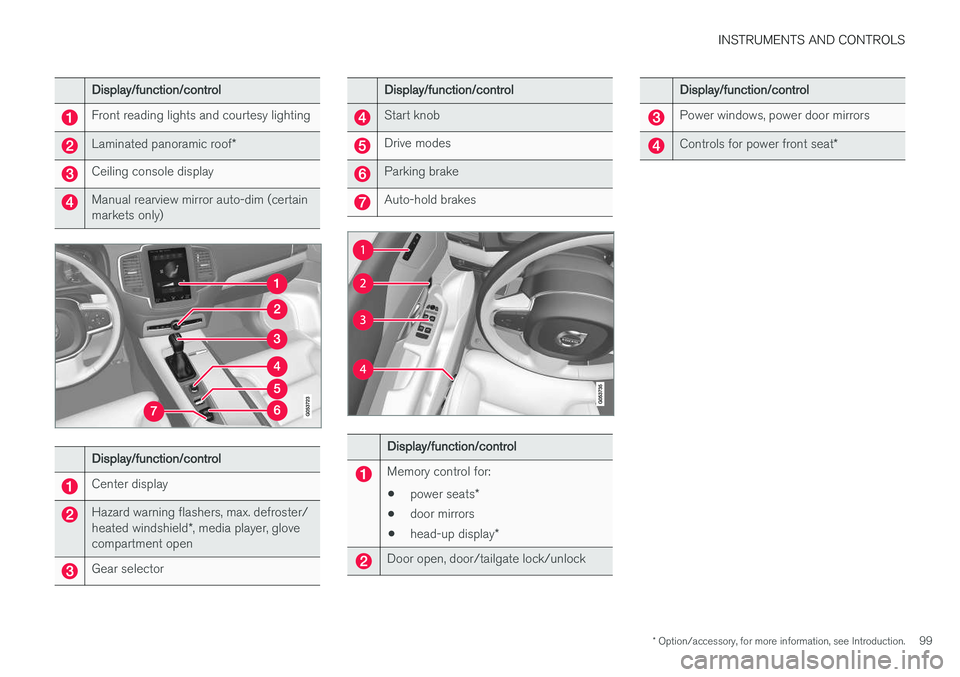
Display/function/control
Front reading lights and courtesy lighting
Laminated panoramic roof*
Ceiling console display
Manual rearview mirror auto-dim (certain markets only)
Display/function/control
Center display
Hazard warning flashers, max. defroster/ heated windshield*, media player, glove
compartment open
Gear selector
Display/function/control
Start knob
Drive modes
Parking brake
Auto-hold brakes
Display/function/control
Memory control for:
• power seats
*
• door mirrors
• head-up display
*
Door open, door/tailgate lock/unlock
Display/function/control
Power windows, power door mirrors
Controls for power front seat *
Page 111 of 570
INSTRUMENTS AND CONTROLS
* Option/accessory, for more information, see Introduction.109
Related information
•Driver profiles (p. 112)
• Settings view (p. 106)
• Changing system settings in Settings view (p. 109)
Changing system settings in Settings view
Settings view's main category
System contains
general settings and information, such as lan- guage, units of measure, etc.
The system settings under Driver Profile, Date
& Time, Keyboard Layouts, Voice Control,Software Updates, Global Reset andServices are described in their respective arti-
cles in the owner's manual.
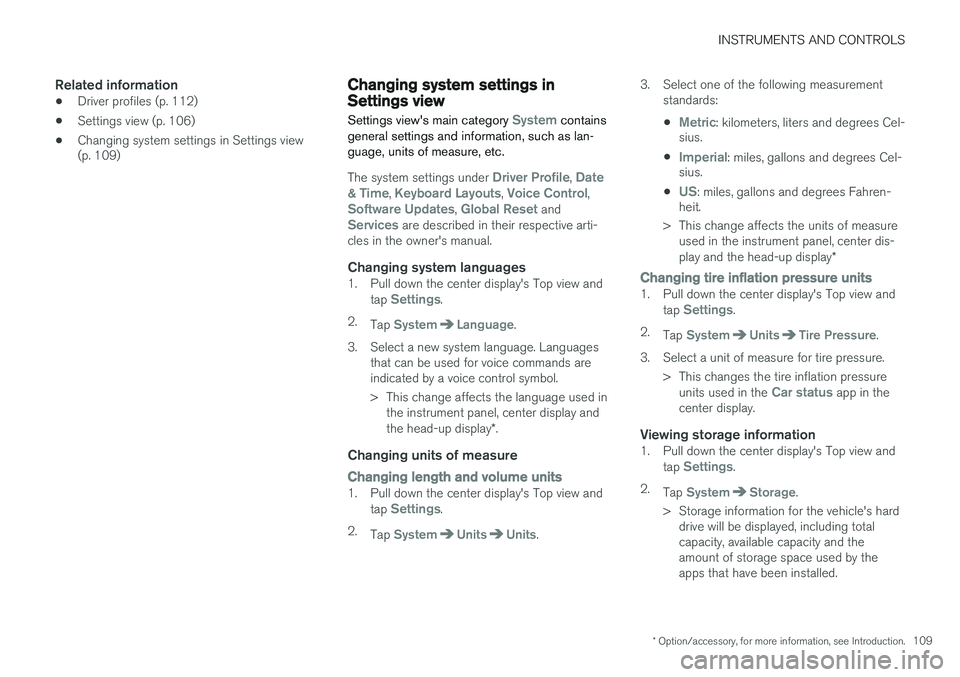
Changing system languages1. Pull down the center display's Top view and
tap Settings.
2. Tap
SystemLanguage.
3. Select a new system language. Languages that can be used for voice commands are indicated by a voice control symbol.
> This change affects the language used inthe instrument panel, center display and the head-up display *.
Changing units of measure
Changing length and volume units1. Pull down the center display's Top view and
tap Settings.
2. Tap
SystemUnitsUnits. 3. Select one of the following measurement
standards:
•
Metric: kilometers, liters and degrees Cel-
sius.
•
Imperial: miles, gallons and degrees Cel-
sius.
•
US: miles, gallons and degrees Fahren-
heit.
> This change affects the units of measure used in the instrument panel, center dis- play and the head-up display *
Changing tire inflation pressure units1. Pull down the center display's Top view and
tap Settings.
2. Tap
SystemUnitsTire Pressure.
3. Select a unit of measure for tire pressure. > This changes the tire inflation pressureunits used in the
Car status app in the
center display.
Viewing storage information1. Pull down the center display's Top view and
tap Settings.
2. Tap
SystemStorage.
> Storage information for the vehicle's hard drive will be displayed, including total capacity, available capacity and theamount of storage space used by theapps that have been installed.
Page 115 of 570
INSTRUMENTS AND CONTROLS
113
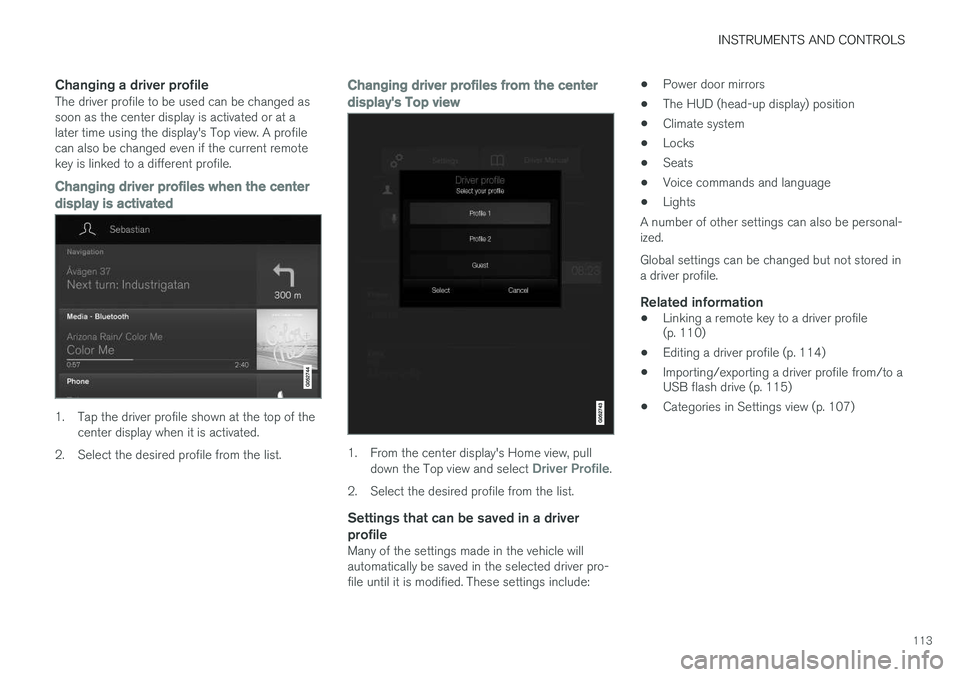
Changing a driver profileThe driver profile to be used can be changed as soon as the center display is activated or at alater time using the display's Top view. A profilecan also be changed even if the current remotekey is linked to a different profile.
Changing driver profiles when the center
display is activated
1. Tap the driver profile shown at the top of the center display when it is activated.
2. Select the desired profile from the list.
Changing driver profiles from the center display's Top view
1. From the center display's Home view, pull down the Top view and select Driver Profile.
2. Select the desired profile from the list.
Settings that can be saved in a driver profile
Many of the settings made in the vehicle will automatically be saved in the selected driver pro-file until it is modified. These settings include: •
Power door mirrors
• The HUD (head-up display) position
• Climate system
• Locks
• Seats
• Voice commands and language
• Lights
A number of other settings can also be personal-ized. Global settings can be changed but not stored in a driver profile.
Related information
• Linking a remote key to a driver profile (p. 110)
• Editing a driver profile (p. 114)
• Importing/exporting a driver profile from/to aUSB flash drive (p. 115)
• Categories in Settings view (p. 107)
Page 119 of 570
INSTRUMENTS AND CONTROLS
* Option/accessory, for more information, see Introduction.117
Automatic time
The function Automatic Time is also available,
which adjusts the time zone automatically, depending on the vehicle's location. If
Automatic
Time has not been selected, set the date and
time manually by tapping the up or down arrows on the center display.
Daylight savings timeIn certain countries, an automatic change to day- light savings time can be selected by activating
Auto. If the automatic change is not available,
change to daylight savings time by selecting Onor Off.
Related information
• Instrument panel (p. 128)
• Center display overview (p. 29)
• Using the center display (p. 46)
Head-up display (HUD)
*
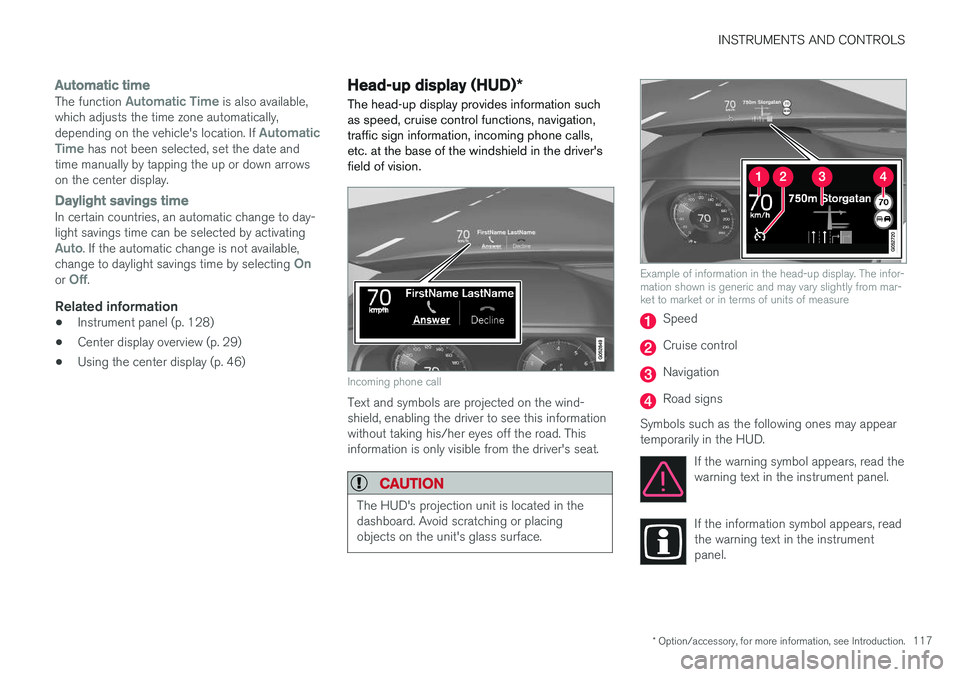
The head-up display provides information such as speed, cruise control functions, navigation,traffic sign information, incoming phone calls,etc. at the base of the windshield in the driver'sfield of vision.
Incoming phone call
Text and symbols are projected on the wind- shield, enabling the driver to see this informationwithout taking his/her eyes off the road. Thisinformation is only visible from the driver's seat.
CAUTION
The HUD's projection unit is located in the dashboard. Avoid scratching or placingobjects on the unit's glass surface.
Example of information in the head-up display. The infor- mation shown is generic and may vary slightly from mar-ket to market or in terms of units of measure
Speed
Cruise control
Navigation
Road signs
Symbols such as the following ones may appear temporarily in the HUD. If the warning symbol appears, read thewarning text in the instrument panel.
If the information symbol appears, read the warning text in the instrumentpanel.