messages VOLVO XC90 2017 Owner´s Manual
[x] Cancel search | Manufacturer: VOLVO, Model Year: 2017, Model line: XC90, Model: VOLVO XC90 2017Pages: 560, PDF Size: 9.97 MB
Page 155 of 560
INSTRUMENTS AND CONTROLS
153
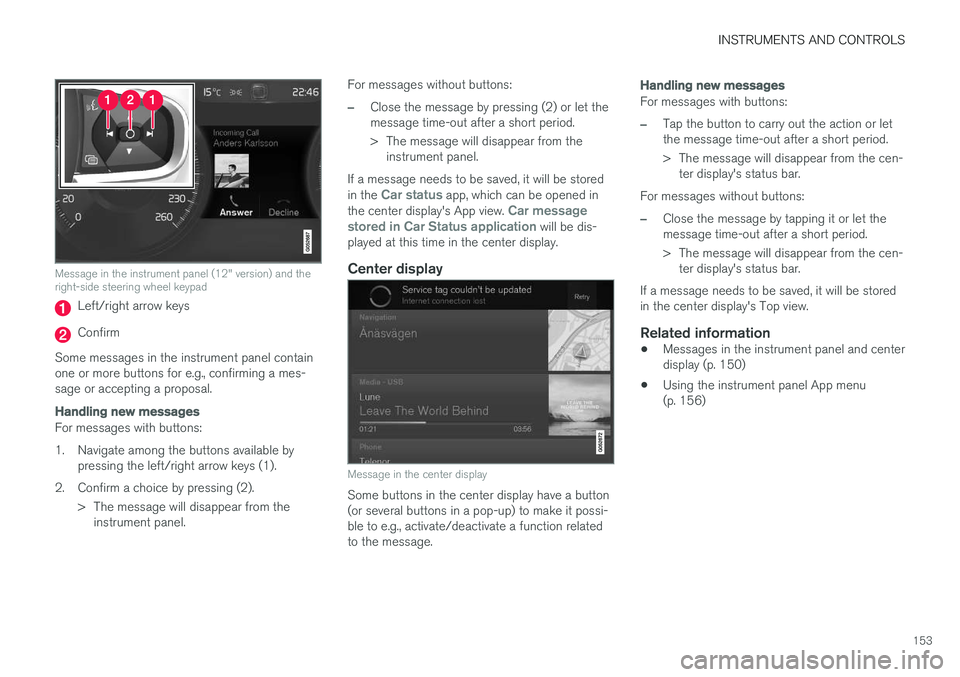
Message in the instrument panel (12" version) and the right-side steering wheel keypad
Left/right arrow keys
Confirm
Some messages in the instrument panel contain one or more buttons for e.g., confirming a mes-sage or accepting a proposal.
Handling new messages
For messages with buttons:
1. Navigate among the buttons available by pressing the left/right arrow keys (1).
2. Confirm a choice by pressing (2). > The message will disappear from theinstrument panel. For messages without buttons:
–Close the message by pressing (2) or let the message time-out after a short period.
> The message will disappear from the
instrument panel.
If a message needs to be saved, it will be stored in the
Car status app, which can be opened in
the center display's App view. Car message
stored in Car Status application will be dis-
played at this time in the center display.
Center display
Message in the center display
Some buttons in the center display have a button (or several buttons in a pop-up) to make it possi-ble to e.g., activate/deactivate a function relatedto the message.
Handling new messages
For messages with buttons:
–Tap the button to carry out the action or let the message time-out after a short period.
> The message will disappear from the cen- ter display's status bar.
For messages without buttons:
–Close the message by tapping it or let the message time-out after a short period.
> The message will disappear from the cen- ter display's status bar.
If a message needs to be saved, it will be stored in the center display's Top view.
Related information
• Messages in the instrument panel and centerdisplay (p. 150)
• Using the instrument panel App menu(p. 156)
Page 156 of 560
INSTRUMENTS AND CONTROLS
154
Handling messages stored from the instrument panel and center display
Messages saved from the instrumentpanel
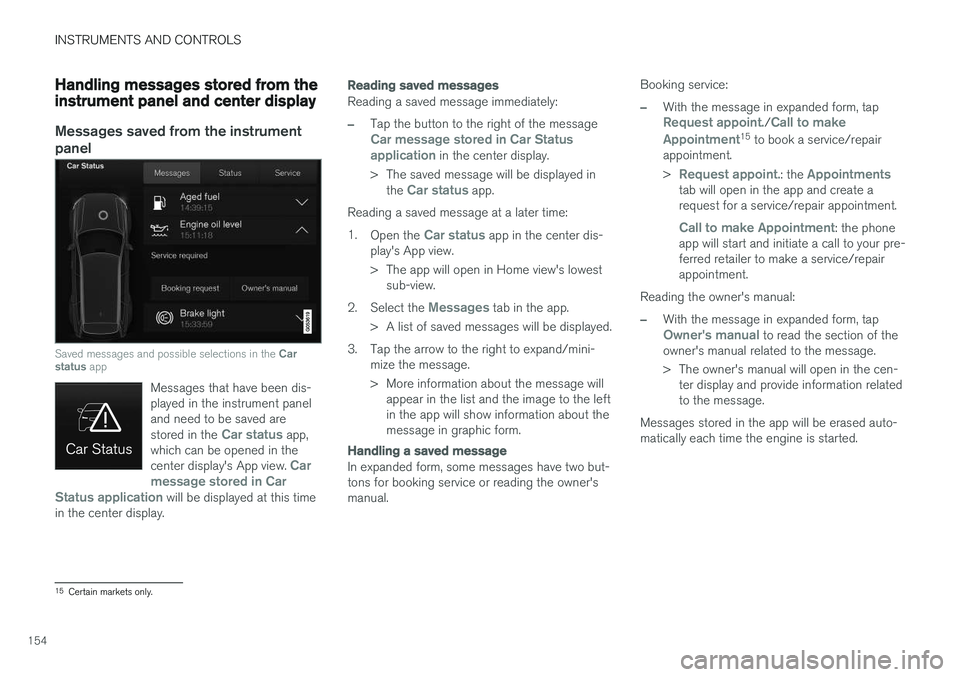
Saved messages and possible selections in the Car
status app
Messages that have been dis- played in the instrument paneland need to be saved are stored in the
Car status app,
which can be opened in the center display's App view.
Car
message stored in Car
Status application
will be displayed at this time
in the center display.
Reading saved messages
Reading a saved message immediately:
–Tap the button to the right of the messageCar message stored in Car Status application in the center display.
> The saved message will be displayed in the
Car status app.
Reading a saved message at a later time: 1. Open the
Car status app in the center dis-
play's App view.
> The app will open in Home view's lowest sub-view.
2. Select the
Messages tab in the app.
> A list of saved messages will be displayed.
3. Tap the arrow to the right to expand/mini- mize the message.
> More information about the message willappear in the list and the image to the left in the app will show information about themessage in graphic form.
Handling a saved message
In expanded form, some messages have two but- tons for booking service or reading the owner'smanual. Booking service:
–With the message in expanded form, tapRequest appoint./Call to make
Appointment15 to book a service/repair
appointment. >
Request appoint.: the Appointmentstab will open in the app and create a request for a service/repair appointment.
Call to make Appointment: the phone
app will start and initiate a call to your pre- ferred retailer to make a service/repairappointment.
Reading the owner's manual:
–With the message in expanded form, tapOwner's manual to read the section of the
owner's manual related to the message.
> The owner's manual will open in the cen- ter display and provide information related to the message.
Messages stored in the app will be erased auto-matically each time the engine is started.
15 Certain markets only.
Page 157 of 560
INSTRUMENTS AND CONTROLS
}}
155
Messages saved from the center display
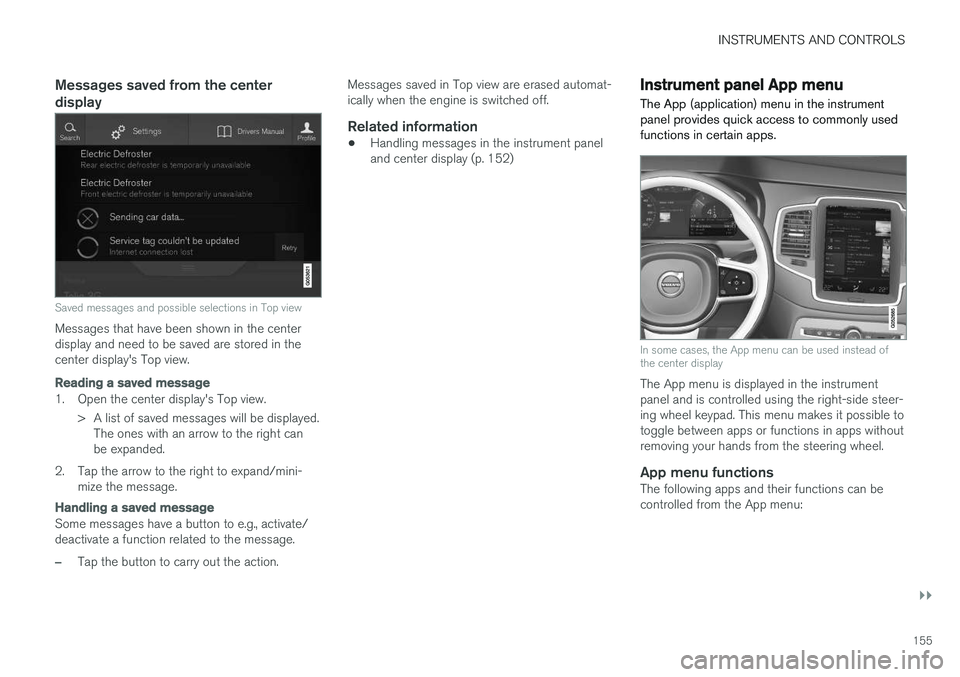
Saved messages and possible selections in Top view
Messages that have been shown in the center display and need to be saved are stored in thecenter display's Top view.
Reading a saved message
1. Open the center display's Top view.> A list of saved messages will be displayed.The ones with an arrow to the right can be expanded.
2. Tap the arrow to the right to expand/mini- mize the message.
Handling a saved message
Some messages have a button to e.g., activate/ deactivate a function related to the message.
–Tap the button to carry out the action. Messages saved in Top view are erased automat- ically when the engine is switched off.
Related information
•
Handling messages in the instrument paneland center display (p. 152)
Instrument panel App menu The App (application) menu in the instrument panel provides quick access to commonly usedfunctions in certain apps.
In some cases, the App menu can be used instead of the center display
The App menu is displayed in the instrument panel and is controlled using the right-side steer-ing wheel keypad. This menu makes it possible totoggle between apps or functions in apps withoutremoving your hands from the steering wheel.
App menu functionsThe following apps and their functions can becontrolled from the App menu:
Page 158 of 560
||
INSTRUMENTS AND CONTROLS
156
AppFunctions
Trip com- puter Select a trip odometer, makeinstrument panel display set-tings, etc.
Mediaplayer Select the active source for themedia player.
Phone Call a contact from the call list.
Navigation Pause guidance, start guidance to a recently set destination, etc.
Related information
•Instrument panel (p. 124)
• Center display overview (p. 28)
• Using the instrument panel App menu (p. 156)
Using the instrument panel App menu
The App (application) menu in the instrument panel is controlled using the right-side steeringwheel keypad.
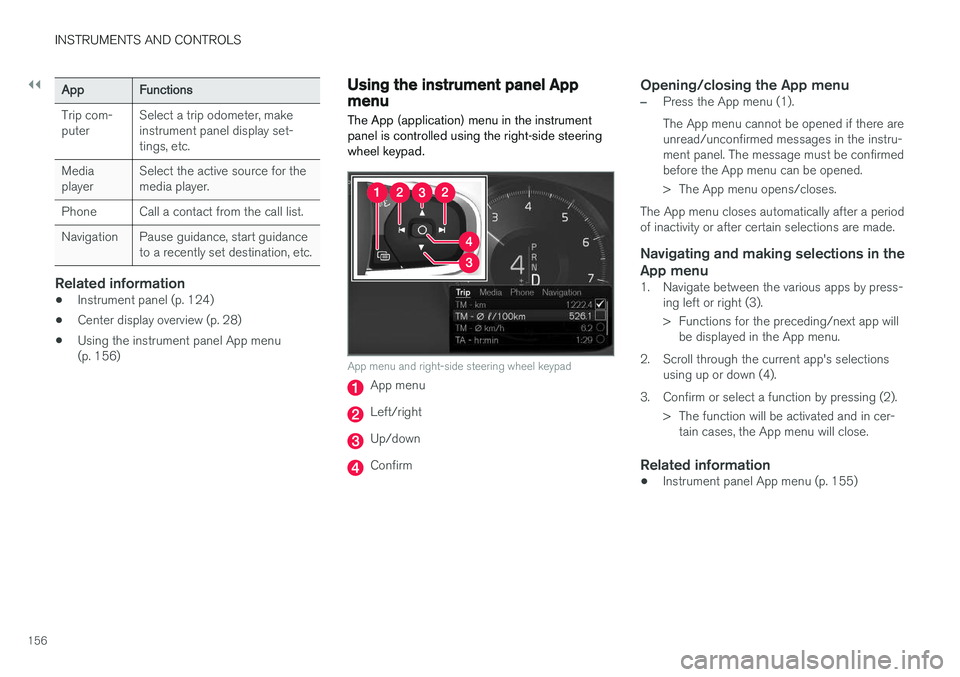
App menu and right-side steering wheel keypad
App menu
Left/right
Up/down
Confirm
Opening/closing the App menu
–Press the App menu (1). The App menu cannot be opened if there are unread/unconfirmed messages in the instru-ment panel. The message must be confirmedbefore the App menu can be opened.
> The App menu opens/closes.
The App menu closes automatically after a period of inactivity or after certain selections are made.
Navigating and making selections in the App menu
1. Navigate between the various apps by press- ing left or right (3).
> Functions for the preceding/next app willbe displayed in the App menu.
2. Scroll through the current app's selections using up or down (4).
3. Confirm or select a function by pressing (2). > The function will be activated and in cer-tain cases, the App menu will close.
Related information
• Instrument panel App menu (p. 155)
Page 162 of 560
||
INSTRUMENTS AND CONTROLS
* Option/accessory.
160
Tailgate wiper and reverse gear1.
In the center display, select SettingsMy
Car
Wipers.
2. Activate/deactivate by selecting/deselecting the
Auto Rear Wiper box.
If the windshield wipers are on and the transmis- sion is put into reverse gear, the tailgate wiperwill start. This function is deactivated when a dif-ferent gear is selected.
Related information
• Using the windshield wipers (p. 157)
• Windshield and headlight washers (p. 158)
• Refilling the windshield washer fluid reservoir(p. 521)
• Activating/deactivating the rain sensor(p. 157)
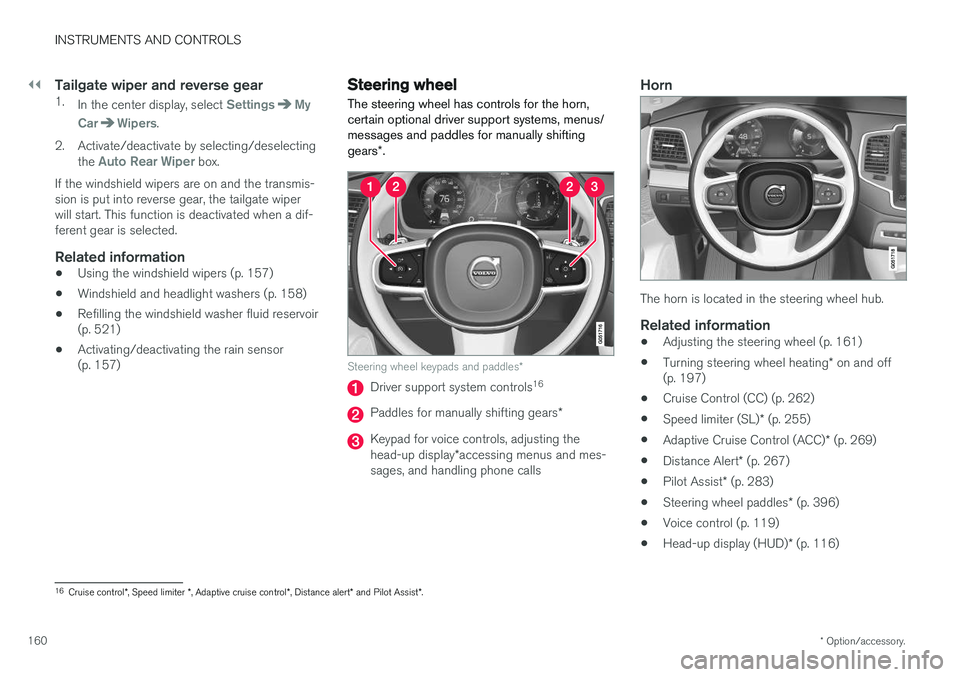
Steering wheel The steering wheel has controls for the horn, certain optional driver support systems, menus/messages and paddles for manually shifting gears
*.
Steering wheel keypads and paddles *
Driver support system controls16
Paddles for manually shifting gears
*
Keypad for voice controls, adjusting the head-up display*accessing menus and mes-
sages, and handling phone calls
Horn
The horn is located in the steering wheel hub.
Related information
• Adjusting the steering wheel (p. 161)
• Turning steering wheel heating
* on and off
(p. 197)
• Cruise Control (CC) (p. 262)
• Speed limiter (SL)
* (p. 255)
• Adaptive Cruise Control (ACC)
* (p. 269)
• Distance Alert
* (p. 267)
• Pilot Assist
* (p. 283)
• Steering wheel paddles
* (p. 396)
• Voice control (p. 119)
• Head-up display (HUD)
* (p. 116)
16
Cruise control *, Speed limiter *, Adaptive cruise control *, Distance alert * and Pilot Assist *.
Page 254 of 560
||
DRIVER SUPPORT
* Option/accessory.
252
Related information
• Detachable trailer hitch
* (p. 378)
• Driving with a trailer (p. 376)
• Trailer Stability Assist (TSA) (p. 379)
• Electronic Stability Control (ESC) sport mode (p. 252)
• Electronic Stability Control (ESC) symbolsand messages (p. 253)
Electronic Stability Control (ESC) sport mode
ESC is always activated and cannot be switched off.
However, the driver can select Sport mode,
which offers more active driving characteristics. In Sport mode, the engine management system
monitors movement of the accelerator pedal and steering wheel for sportier driving and allowsmore lateral movement of the rear wheels beforeESC is triggered. Under certain circumstances, such as when driv- ing with snow chains, or driving in deep snow orloose sand, it may be advisable to temporarily use Sport mode for maximum tractive force.
If the driver releases pressure on the accelerator pedal, ETC will also activate to help stabilize thevehicle.
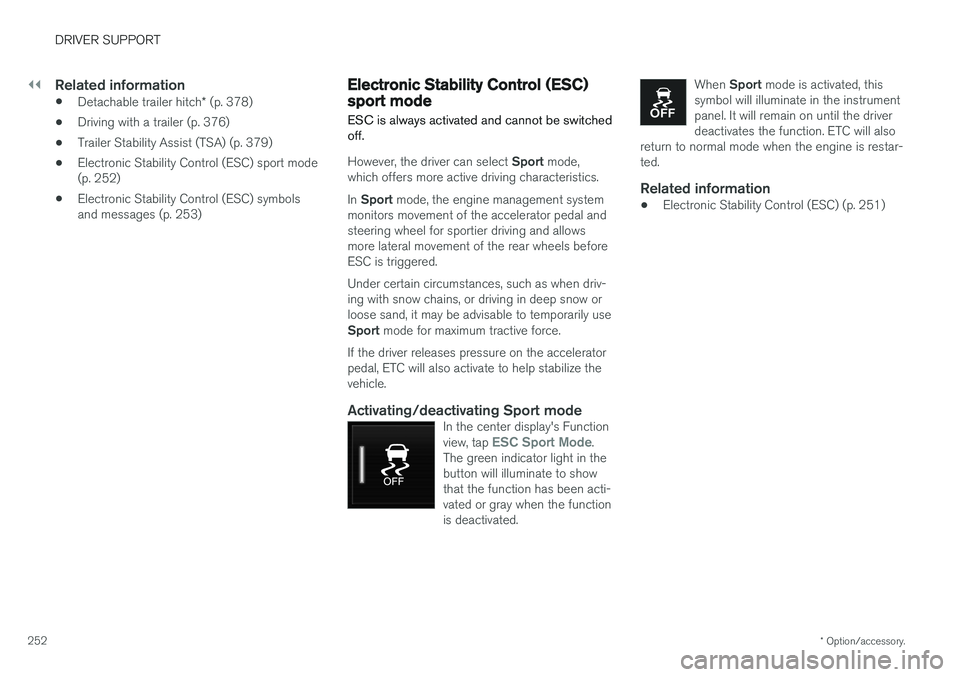
Activating/deactivating Sport modeIn the center display's Function view, tap ESC Sport Mode.
The green indicator light in the button will illuminate to showthat the function has been acti-vated or gray when the functionis deactivated.
When Sport mode is activated, this
symbol will illuminate in the instrument panel. It will remain on until the driverdeactivates the function. ETC will also
return to normal mode when the engine is restar-ted.
Related information
• Electronic Stability Control (ESC) (p. 251)
Page 255 of 560
DRIVER SUPPORT
}}
253
Electronic Stability Control (ESC) symbols and messages
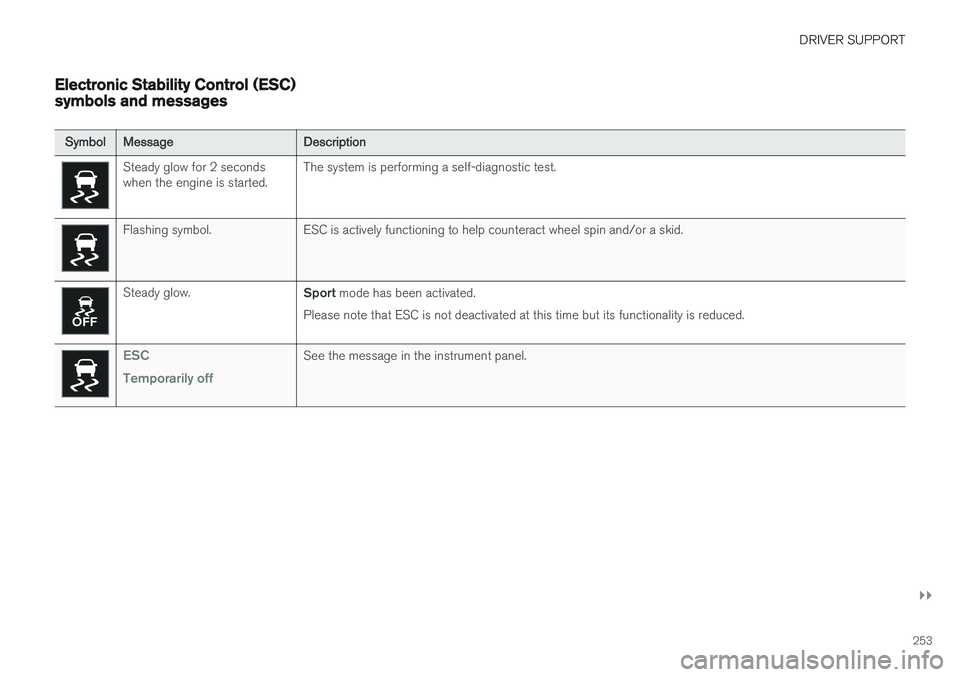
SymbolMessage Description
Steady glow for 2 seconds when the engine is started.The system is performing a self-diagnostic test.
Flashing symbol. ESC is actively functioning to help counteract wheel spin and/or a skid.
Steady glow.
Sport mode has been activated.
Please note that ESC is not deactivated at this time but its functionality is reduced.
ESC Temporarily offSee the message in the instrument panel.
Page 273 of 560
DRIVER SUPPORT
}}
271
Controls
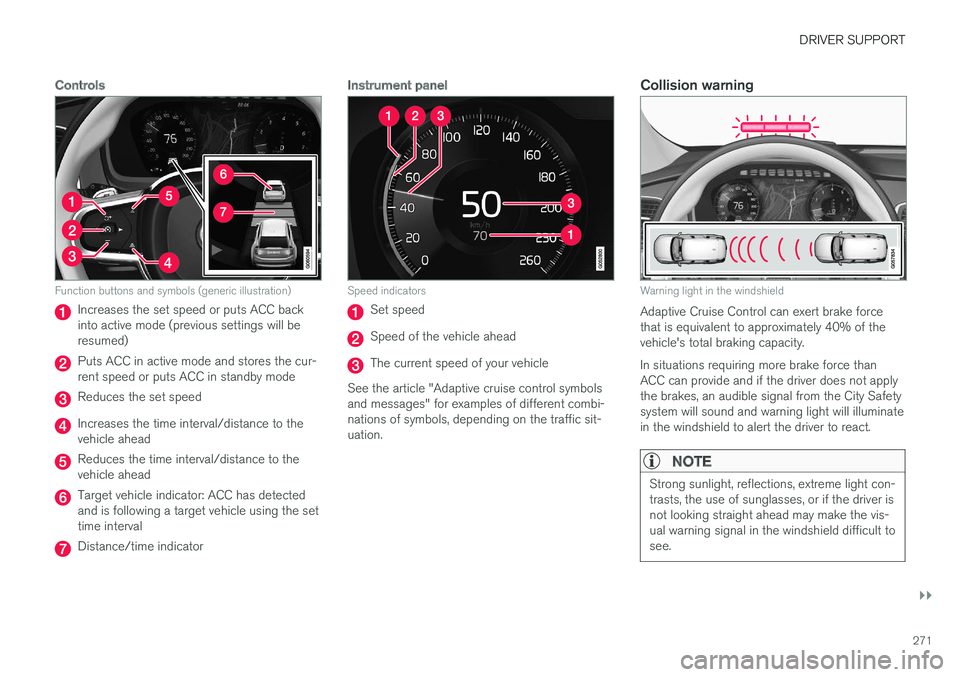
Function buttons and symbols (generic illustration)
Increases the set speed or puts ACC back into active mode (previous settings will beresumed)
Puts ACC in active mode and stores the cur- rent speed or puts ACC in standby mode
Reduces the set speed
Increases the time interval/distance to the vehicle ahead
Reduces the time interval/distance to the vehicle ahead
Target vehicle indicator: ACC has detected and is following a target vehicle using the settime interval
Distance/time indicator
Instrument panel
Speed indicators
Set speed
Speed of the vehicle ahead
The current speed of your vehicle
See the article "Adaptive cruise control symbols and messages" for examples of different combi-nations of symbols, depending on the traffic sit-uation.
Collision warning
Warning light in the windshield
Adaptive Cruise Control can exert brake force that is equivalent to approximately 40% of thevehicle's total braking capacity. In situations requiring more brake force than ACC can provide and if the driver does not applythe brakes, an audible signal from the City Safetysystem will sound and warning light will illuminatein the windshield to alert the driver to react.
NOTE
Strong sunlight, reflections, extreme light con- trasts, the use of sunglasses, or if the driver isnot looking straight ahead may make the vis-ual warning signal in the windshield difficult tosee.
Page 274 of 560
||
DRIVER SUPPORT
* Option/accessory.
272
WARNING
Adaptive Cruise Control only warns of vehicles detected by the radar sensor. In some casesthere may be no warning or the warning maybe delayed. The driver should always apply thebrakes when necessary.
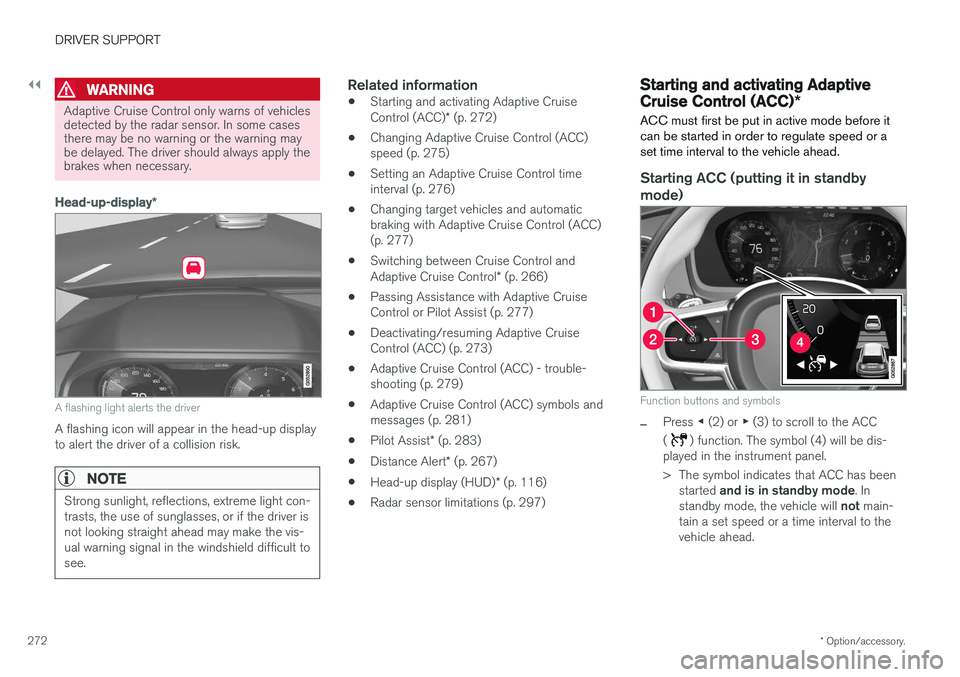
Head-up-display *
A flashing light alerts the driver
A flashing icon will appear in the head-up display to alert the driver of a collision risk.
NOTE
Strong sunlight, reflections, extreme light con- trasts, the use of sunglasses, or if the driver isnot looking straight ahead may make the vis-ual warning signal in the windshield difficult tosee.
Related information
•Starting and activating Adaptive Cruise Control (ACC)
* (p. 272)
• Changing Adaptive Cruise Control (ACC) speed (p. 275)
• Setting an Adaptive Cruise Control timeinterval (p. 276)
• Changing target vehicles and automaticbraking with Adaptive Cruise Control (ACC)(p. 277)
• Switching between Cruise Control and Adaptive Cruise Control
* (p. 266)
• Passing Assistance with Adaptive Cruise Control or Pilot Assist (p. 277)
• Deactivating/resuming Adaptive CruiseControl (ACC) (p. 273)
• Adaptive Cruise Control (ACC) - trouble-shooting (p. 279)
• Adaptive Cruise Control (ACC) symbols andmessages (p. 281)
• Pilot Assist
* (p. 283)
• Distance Alert
* (p. 267)
• Head-up display (HUD)
* (p. 116)
• Radar sensor limitations (p. 297)
Starting and activating Adaptive Cruise Control (ACC)
*
ACC must first be put in active mode before it can be started in order to regulate speed or aset time interval to the vehicle ahead.
Starting ACC (putting it in standby
mode)
Function buttons and symbols
–Press ◀ (2) or ▶ (3) to scroll to the ACC
(
) function. The symbol (4) will be dis-
played in the instrument panel.
> The symbol indicates that ACC has been
started and is in standby mode . In
standby mode, the vehicle will not main-
tain a set speed or a time interval to the vehicle ahead.
Page 277 of 560
DRIVER SUPPORT
* Option/accessory.275
•
Passing Assistance with Adaptive Cruise Control or Pilot Assist (p. 277)
• Adaptive Cruise Control (ACC) symbols andmessages (p. 281)
• Distance Alert
* (p. 267)
Changing Adaptive Cruise Control (ACC) speed
ACC makes it possible to set various speeds.
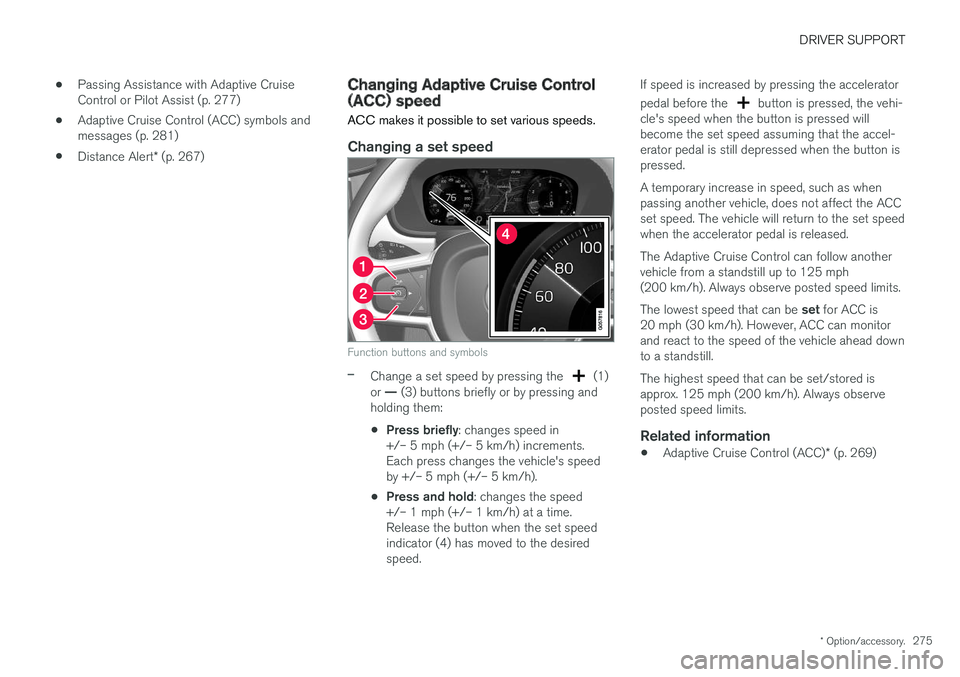
Changing a set speed
Function buttons and symbols
–Change a set speed by pressing the (1)
or — (3) buttons briefly or by pressing and
holding them:
• Press briefly
: changes speed in
+/– 5 mph (+/– 5 km/h) increments. Each press changes the vehicle's speedby +/– 5 mph (+/– 5 km/h).
• Press and hold
: changes the speed
+/– 1 mph (+/– 1 km/h) at a time.Release the button when the set speedindicator (4) has moved to the desiredspeed. If speed is increased by pressing the accelerator pedal before the
button is pressed, the vehi-
cle's speed when the button is pressed will become the set speed assuming that the accel-erator pedal is still depressed when the button ispressed. A temporary increase in speed, such as when passing another vehicle, does not affect the ACCset speed. The vehicle will return to the set speedwhen the accelerator pedal is released. The Adaptive Cruise Control can follow another vehicle from a standstill up to 125 mph(200 km/h). Always observe posted speed limits. The lowest speed that can be set for ACC is
20 mph (30 km/h). However, ACC can monitor and react to the speed of the vehicle ahead downto a standstill. The highest speed that can be set/stored is approx. 125 mph (200 km/h). Always observeposted speed limits.
Related information
• Adaptive Cruise Control (ACC)
* (p. 269)