Mirrors VOLVO XC90 2018 Owner´s Manual
[x] Cancel search | Manufacturer: VOLVO, Model Year: 2018, Model line: XC90, Model: VOLVO XC90 2018Pages: 666, PDF Size: 11.32 MB
Page 349 of 666
DRIVER SUPPORT
}}
347
given, the indicator light will become brighter and begin flashing.
NOTE
The light illuminates on the side of the vehicle where the system has detected the vehicle. Ifthe vehicle is passed on both sides simulta-neously, both lights come on.
WARNING
•
The BLIS function is supplementary driver support intended to facilitate driving andhelp make it safer – it cannot handle allsituations in all traffic, weather and roadconditions.
• The responsibility for changing lanessafely and using good judgment alwaysrests with the driver.
• BLIS is not a substitute for the driver'sattention and judgment. The driver isalways responsible for ensuring the vehi-cle is driven in a safe manner, at theappropriate speed, with an appropriatedistance to other vehicles, and in accord-ance with current traffic rules and regula-tions.
Related information
• Activating/deactivating BLIS (p. 347)
• BLIS limitations (p. 348) •
Recommended maintenance for BLIS(p. 349)
• BLIS messages (p. 350)
Activating/deactivating BLIS The BLIS 80
function can be activated/deacti-
vated.
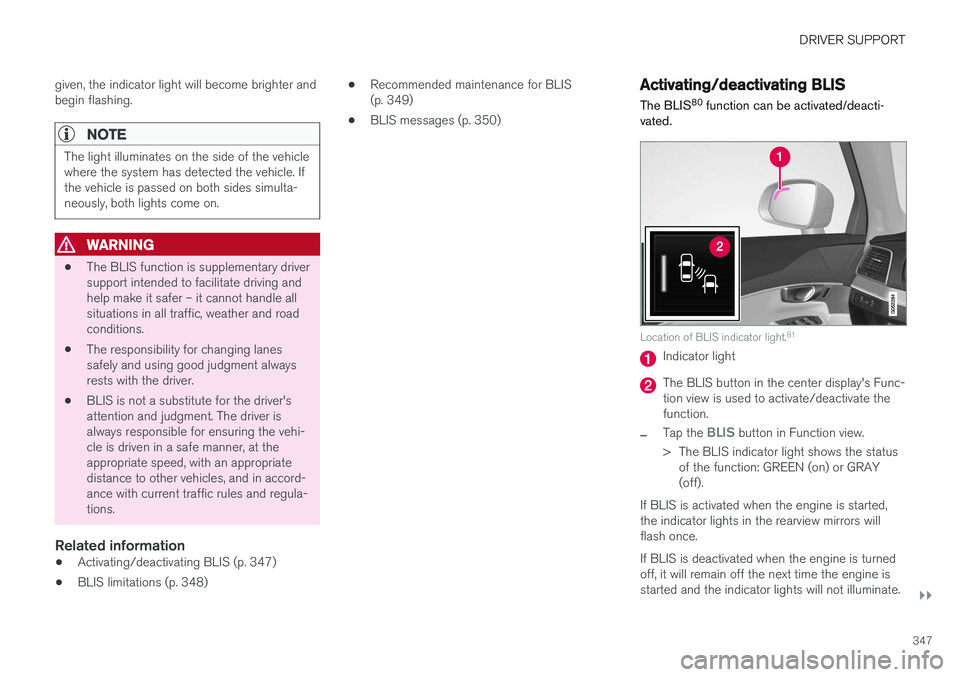
Location of BLIS indicator light. 81
Indicator light
The BLIS button in the center display's Func- tion view is used to activate/deactivate thefunction.
–Tap the BLIS button in Function view.
> The BLIS indicator light shows the status of the function: GREEN (on) or GRAY (off).
If BLIS is activated when the engine is started,the indicator lights in the rearview mirrors willflash once. If BLIS is deactivated when the engine is turned off, it will remain off the next time the engine isstarted and the indicator lights will not illuminate.
Page 388 of 666
||
DRIVER SUPPORT
* Option/accessory.
386
Side cameras
The side cameras 120
are located in the rearview mirrors.
The side cameras can show views along each side of the vehicle.
Related information
• Park Assist Camera
* (p. 384)
Park Assist Camera trajectory lines
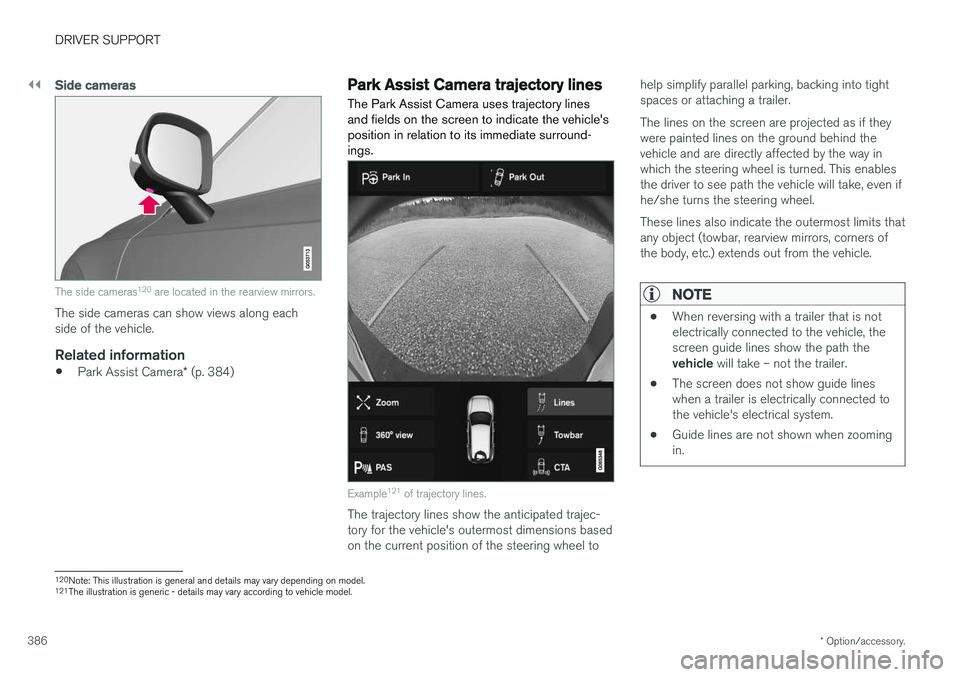
The Park Assist Camera uses trajectory lines and fields on the screen to indicate the vehicle'sposition in relation to its immediate surround-ings.
Example 121
of trajectory lines.
The trajectory lines show the anticipated trajec- tory for the vehicle's outermost dimensions basedon the current position of the steering wheel to help simplify parallel parking, backing into tightspaces or attaching a trailer. The lines on the screen are projected as if they were painted lines on the ground behind thevehicle and are directly affected by the way inwhich the steering wheel is turned. This enablesthe driver to see path the vehicle will take, even ifhe/she turns the steering wheel. These lines also indicate the outermost limits that any object (towbar, rearview mirrors, corners ofthe body, etc.) extends out from the vehicle.
NOTE
•
When reversing with a trailer that is not electrically connected to the vehicle, thescreen guide lines show the path the vehicle
will take – not the trailer.
• The screen does not show guide lines when a trailer is electrically connected tothe vehicle's electrical system.
• Guide lines are not shown when zoomingin.
120
Note: This illustration is general and details may vary depending on model.
121 The illustration is generic - details may vary according to vehicle model.
Page 437 of 666
STARTING AND DRIVING
}}
* Option/accessory.435
Leveling control settings *
The vehicle can be lowered or raised to make it easier to load or for passengers to get in andout. Turn off leveling control before lifting the vehicle with a jack to help avoid problems with thepneumatic suspension.
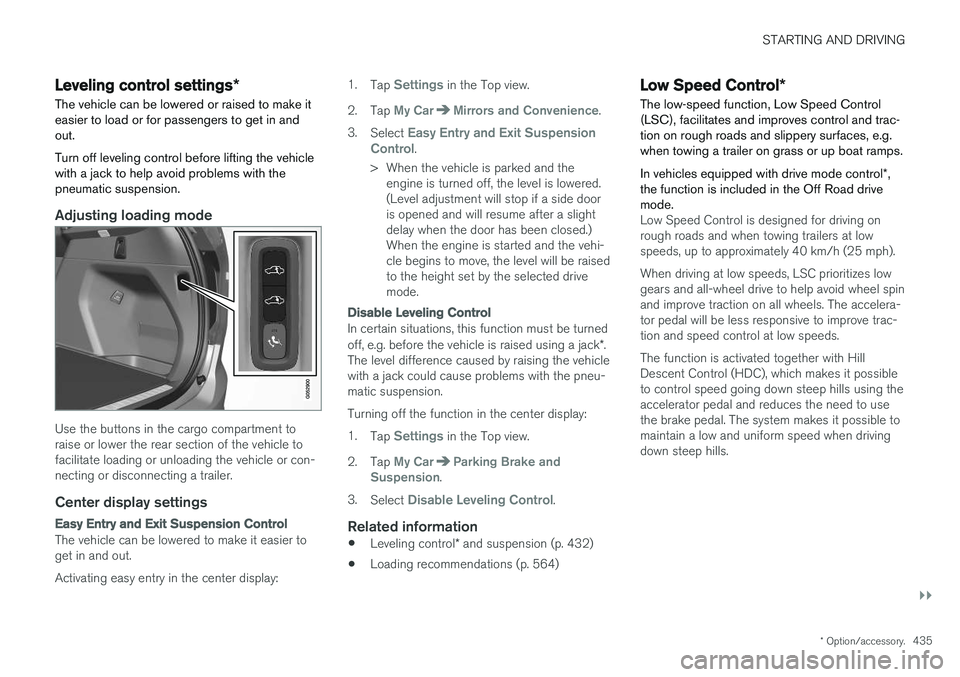
Adjusting loading mode
Use the buttons in the cargo compartment to raise or lower the rear section of the vehicle tofacilitate loading or unloading the vehicle or con-necting or disconnecting a trailer.
Center display settings
Easy Entry and Exit Suspension Control
The vehicle can be lowered to make it easier to get in and out. Activating easy entry in the center display: 1.
Tap
Settings in the Top view.
2. Tap
My CarMirrors and Convenience.
3. Select
Easy Entry and Exit Suspension
Control.
> When the vehicle is parked and the engine is turned off, the level is lowered. (Level adjustment will stop if a side dooris opened and will resume after a slightdelay when the door has been closed.)When the engine is started and the vehi-cle begins to move, the level will be raisedto the height set by the selected drivemode.
Disable Leveling Control
In certain situations, this function must be turned off, e.g. before the vehicle is raised using a jack *.
The level difference caused by raising the vehicle with a jack could cause problems with the pneu-matic suspension. Turning off the function in the center display:1. Tap
Settings in the Top view.
2. Tap
My CarParking Brake and
Suspension.
3. Select
Disable Leveling Control.
Related information
• Leveling control
* and suspension (p. 432)
• Loading recommendations (p. 564)
Low Speed Control
*
The low-speed function, Low Speed Control (LSC), facilitates and improves control and trac-tion on rough roads and slippery surfaces, e.g.when towing a trailer on grass or up boat ramps. In vehicles equipped with drive mode control *,
the function is included in the Off Road drive mode.
Low Speed Control is designed for driving on rough roads and when towing trailers at lowspeeds, up to approximately 40 km/h (25 mph). When driving at low speeds, LSC prioritizes low gears and all-wheel drive to help avoid wheel spinand improve traction on all wheels. The accelera-tor pedal will be less responsive to improve trac-tion and speed control at low speeds. The function is activated together with Hill Descent Control (HDC), which makes it possibleto control speed going down steep hills using theaccelerator pedal and reduces the need to usethe brake pedal. The system makes it possible tomaintain a low and uniform speed when drivingdown steep hills.
Page 625 of 666
MAINTENANCE AND SERVICE
623
Automatic car washes The vehicle should be washed as soon as it becomes dirty. This makes the vehicle easier toclean because dirt does not attach as strongly. Italso reduces the risk of scratches and keeps thevehicle looking new.
Automatic car washesAn automatic car wash is a fast and easy way to keep your vehicle clean, but it does not reach allareas of the vehicle. For best results, Volvo rec-ommends hand washing your vehicle or supple-menting automatic car washes with a hand wash.
NOTE
Volvo recommends not washing the vehicle in an automatic car wash during the first fewmonths; the paintwork on new vehicles takessome time to fully harden.
CAUTION
Before driving the vehicle into a car wash, deactivate the Automatic Braking when Sta-tionary and Automatic Parking Brake Applica-tion functions. If the functions are not deacti-vated, the brake system will seize when thevehicle is stationary and the vehicle will not beable to roll.
CAUTION
For automatic car washes in which the vehicle is pulled forward on rolling wheels:
1. Before washing the vehicle, make surethat the automatic rain sensor is deacti- vated. If it is not deactivated and inadver-tently starts, the wiper arms could bedamaged.
2. To help prevent damage from the auto- matic car wash machinery, make surethat the door mirrors are folded in, anten-nas retracted or removed, and any auxili-ary lights secured.
3. Drive into the automatic car wash.
4. Turn off the "Automatic Braking when Stationary" function using the switch in the tunnel console.
5. Turn off the "Automatic Parking Brake Application" function in the center dis-play's Top view.
6. Turn off the engine by turning the start knob in the tunnel console clockwise.Hold the knob in position for at least2 seconds.
The vehicle is now ready for the automatic carwash.
Related information
• Cleaning the exterior (p. 620)
• Polishing and waxing (p. 621)
• Hand washing (p. 621)
• High-pressure washing (p. 624)
• Cleaning the wiper blades (p. 624)
• Cleaning exterior plastic, rubber and trim components (p. 625)
• Cleaning rims (p. 626)
• Corrosion protection (p. 626)
Page 642 of 666
||
SPECIFICATIONS
640
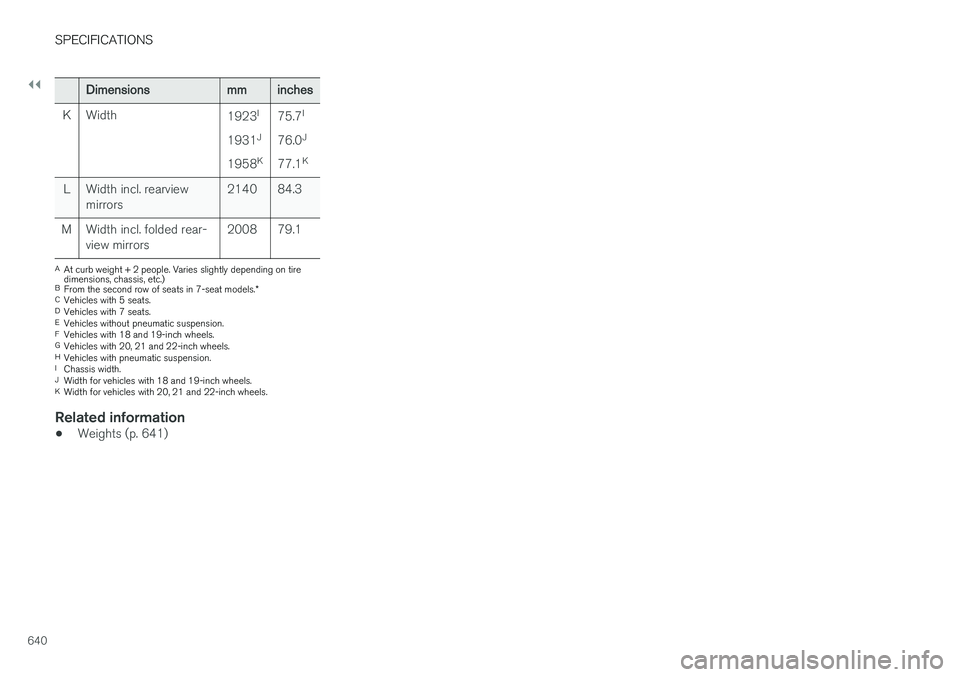
Dimensionsmminches
K Width 1923I
1931 J
1958 K75.7
I
76.0 J
77.1 K
L Width incl. rearview mirrors 2140 84.3
M Width incl. folded rear- view mirrors 2008 79.1
A
At curb weight + 2 people. Varies slightly depending on tire dimensions, chassis, etc.)
B From the second row of seats in 7-seat models. *
C Vehicles with 5 seats.
D Vehicles with 7 seats.
E Vehicles without pneumatic suspension.
F Vehicles with 18 and 19-inch wheels.
G Vehicles with 20, 21 and 22-inch wheels.
H Vehicles with pneumatic suspension.
I Chassis width.
J Width for vehicles with 18 and 19-inch wheels.
K Width for vehicles with 20, 21 and 22-inch wheels.
Related information
• Weights (p. 641)
Page 654 of 666
INDEX
652CZIP (Clean Zone Interior Package) 210
D
Data
recording 33 transferring between vehicle and work-
shop 578
Data sharing 514
Daytime running lights 156Decals location of 636
Defrosting 225
Detection of cyclist 337
Dimensions 639
Dipstick, electronic 588
Direction of rotation 530
Disengaging the shiftlock 421
Display lighting 167
Distance Alert 289, 290, 291 limitations 292
DivX ®
490
Door mirrors 173, 175 compass 459, 460
dimming 174
outer 173, 175
power folding 175
resetting 175
Driveline transmission 417
Drive mode 423 changing 425
Driver Alert Control 360 operation 361, 362
Driver Alert Control limitations 362
Driver performance 92, 93
Driver profile 139 edit 141
select 140
Driver support system 270 Driving cooling system 446
with a trailer 449
Driving economy 438
Driving through standing water 441 driving with a trailer towball load 642
towing capacity 642E
ECO climate 426
ECO mode 426
activate with function button 428
Economical driving 426, 438
Electrical outlet 560 use 562
Electrical system 598
Electric parking brake 411
Electronic immobilizer 250
emergency brake lights 163
Emission inspection readiness 576 Engine overheating 446
start 404
Start/Stop 428
turn off 406
Engine braking, automatic 437 Engine compartment coolant 590
engine oil 587
overview 587
Engine drag control 272
Engine oil 587 filling 588
Page 659 of 666
INDEX
657
P
Paddle at steering wheel 203 Paintcolor code 628
paint damage and touch-up 627, 628
Panoramic roof opening and closing 177
pinch protection 170
sun shade 176, 179
ventilation position 178
PAP – Park Assist Pilot 393, 394, 397, 398, 400, 401
Park Assist Camera 384, 385, 386, 388, 389, 391, 392
settings 389
Park Assist Camera limitations 389
Park Assist Pilot 393, 394, 397, 398, 400, 401
function 393, 394, 398, 400, 401
limitations 398
operation 394, 397
Symbols and messages 401
Park Assist Pilot – PAP 393, 394, 397, 398, 400, 401
parking on hills 414
Parking Assist 379, 380, 381, 382, 383
function 379, 380, 381
Parking brake 411 activate and deactivate 412
automatic activation 413
Low battery charge level 414
Passenger compartment filter 211
Passenger compartment interior 558 center console 559
electrical outlet 560
glove compartment 563
sun visor 564
Passenger compartment lighting 165, 167 auto switch 165
Passing assistance 302, 303, 319
personal information (Privacy Policy) 34
Phone 498 changing to another 502
connect 499
connect automatically 501
connect manually 501
delete 503
disconnect 502
phone call 503, 505
text message 504
voice control 149Pilot Assist 309, 312, 313, 314, 315, 317, 319, 320, 321, 322
pass 319
pinch protection 170 resetting 171
PIN code 511
Polishing 621
Position lights 156
Power 643
Power folding door mirrors 175
Power panoramic roof 176
Power save mode 447
Power seats 189
Power tailgate 259
Power windows 171, 172 pinch protection 170
Pressure wash 624
Privacy Policy 34
Private locking 264 activation/deactivation 265
PROPOSITION 65 WARNING 447
Page 660 of 666
INDEX
658
R
Radar sensor 296, 324limitations 325
Radar unit 324
Radio 468 changing radio waveband and radio sta-
tion 469
HD radio 472
RBDS 472
search radio station 470
settings 471 SiriusXM ®
Satellite radio 476, 477, 478
start 469
voice control 150
Radio favorites 471
Rain sensor 181, 182
Rain sensor's memory function 182
Raise the rear end 565
Rear camera 384, 385, 386, 388, 389, 391, 392
Rear door sun shade 173
Rear seat adjusting backrest tilt 200
blower 229
climate 217
folding backrest 196, 202
getting in/getting out 201
head restraint 198
heating 220
moving forward/rearward 199
temperature 231
Rear sensors 379, 380, 381, 382, 383 Rearview/door mirrors dimming 174
heating 227
interior 173
Rearview mirror 173 dimming 174
Rear window heating 227
washers 184, 185
wipers 184, 185
Recalls 45
Recommendations when driving 439
Recommendations when loading 564
Recovery 455
Red Key 246 settings 247
Refrigerant 586 climate system 646
Refueling filling 442
fuel filler door, fuel flap 441Remote immobilizer 250
Remote key 237battery replacement 242
connecting to driver profile 141
detachable key blade 248
loss 246
Range 241
Remote updates 579
Reporting safety defects 44
Resetting door mirrors 175
Resetting settings 137 change of owner 136
Driver profile 141
Resetting trip odometer 92
Road Sign Information 355, 356, 357 limitations 359
operation 356, 357, 358, 359
Road trip 439
Roll Stability Control 271
Roof load, max. weight 641
RSC (Roll Stability Control) 271
Run-off Mitigation 371, 372