change time VOLVO XC90 T8 2016 Owner´s Manual
[x] Cancel search | Manufacturer: VOLVO, Model Year: 2016, Model line: XC90 T8, Model: VOLVO XC90 T8 2016Pages: 546, PDF Size: 10.26 MB
Page 188 of 546
CLIMATE
* Option/accessory, for more information, see Introduction.
186
Air quality
The materials used in the passenger compart- ment have been selected and designed to bepleasant and comfortable, even for people withasthma or other types of allergies.
Materials in the passenger compartment
The materials used have been developed to help minimize the amount of dust and make the cabineasier to keep clean. All floor mats can be easily removed for cleaning. Use car cleaning products recommended byVolvo. Only use cleaning agents and car care products recommended by Volvo. Clean regularly and fol-low the instructions included with the car careproduct.
Air filtering systemsIn addition to the passenger compartment filter, the Clean Zone Interior Package * and the Interior
Air Quality System * contribute to a cleaner pas-
senger compartment environment.
Related information
• Passenger compartment air filter (p. 187)
• Interior Air Quality System (IAQS)
* (p. 186)
• Clean Zone Interior Package (CZIP)
*
(p. 186)
• Cleaning the interior (p. 513)
Clean Zone Interior Package (CZIP)
*
The Clean Zone Interior Package includes a number of features that help further reduce aller-genic substances in the passenger compart-ment.
CZIP includes the following:
• An enhanced blower function that starts the blower when the vehicle is unlocked with theremote key to fill the passenger compart-ment with fresh air. This function starts auto-matically when required and shuts off auto-matically after a short period or if one thedoors is opened. The time for which theblower operates decreases gradually due toreduced need until the vehicle is four yearsold.
• The Interior Air Quality System (IAQS).
NOTE
In order to retain the CZIP standard, the IAQS filter must be replaced at the specified inter-vals. Consult your Volvo retailer.
Interior Air Quality System (IAQS)
*
The Interior Air Quality System uses a multifilter and an air quality sensor to remove gases, parti-cles and other contaminants from the air enter-ing the passenger compartment.
The IAQS air quality sensor monitors increased levels of contaminants in the outside air and ifcontaminants are detected, the air intake closesand the air inside the passenger compartment isrecirculated, i.e., no outside air enters the vehicle.The filter also cleans recirculated passengercompartment air.
NOTE
• The air quality sensor should always be engaged in order to obtain the best air inthe passenger compartment.
• Recirculation is limited in cold weather toavoid fogging.
• If the insides of the windows start fog-ging, disengage the air quality sensor.Use the defroster function to increaseairflow to the front, side, and rear win-dows.
Activating/deactivating IAQSTo change the setting for IAQS activation/deacti- vation:
1. In the center display's Settings view, go to
Climate.
Page 245 of 546
LOCKS AND ALARM
}}
* Option/accessory, for more information, see Introduction.243
Related information
•Locking/unlocking from outside the vehicle (p. 243)
• Child safety locks (p. 228)
Locking/unlocking from outside the vehicle The buttons on the remote key can be used to lock or unlock all doors and the tailgate at thesame time. This can also be done without press-ing the remote key buttons on models equippedwith the optional keyless Passive Entry system. The power tailgate
* can also be opened/closed
by moving your foot under a sensor beneath therear bumper *.
The lock/unlock settings can be changed in the center display's Top view. Go to:
SettingsMy CarRemote Unlockand select Unlock All Doors or Driver Door
Only.
In order to lock the vehicle, the driver's door must be closed. If the tailgate or any of the other doorsare open, they will be locked and the alarm will bearmed when they are closed.
NOTE
Be sure the remote key is outside of the vehi- cle before the other doors/tailgate are closedto help avoid locking the remote inside thevehicle.
If the locks repeatedly do not react when the unlock button is pressed, it may be necessary toreplace the battery in the remote. In this case, the driver's door can be unlocked with the detacha-ble key blade.
Keyless Passive Entry
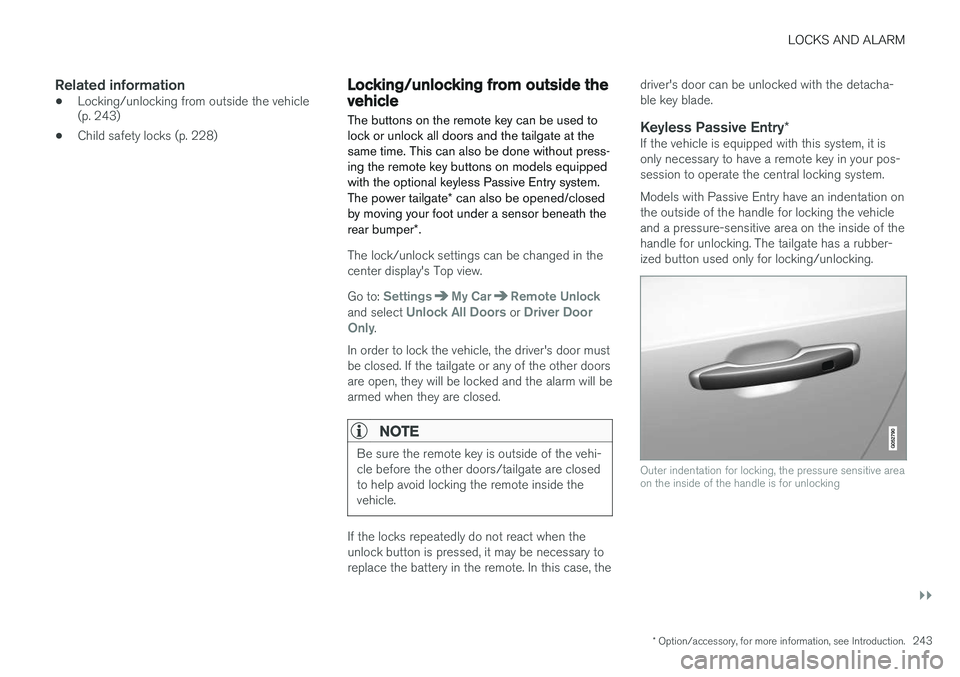
*If the vehicle is equipped with this system, it isonly necessary to have a remote key in your pos-session to operate the central locking system. Models with Passive Entry have an indentation on the outside of the handle for locking the vehicleand a pressure-sensitive area on the inside of thehandle for unlocking. The tailgate has a rubber-ized button used only for locking/unlocking.
Outer indentation for locking, the pressure sensitive area on the inside of the handle is for unlocking
Page 267 of 546
DRIVER SUPPORT
* Option/accessory, for more information, see Introduction.265
Switching between Cruise Control (CC) and Adaptive Cruise Control (ACC)*
In models equipped with the optional ACC, the driver can toggle between CC and ACC.
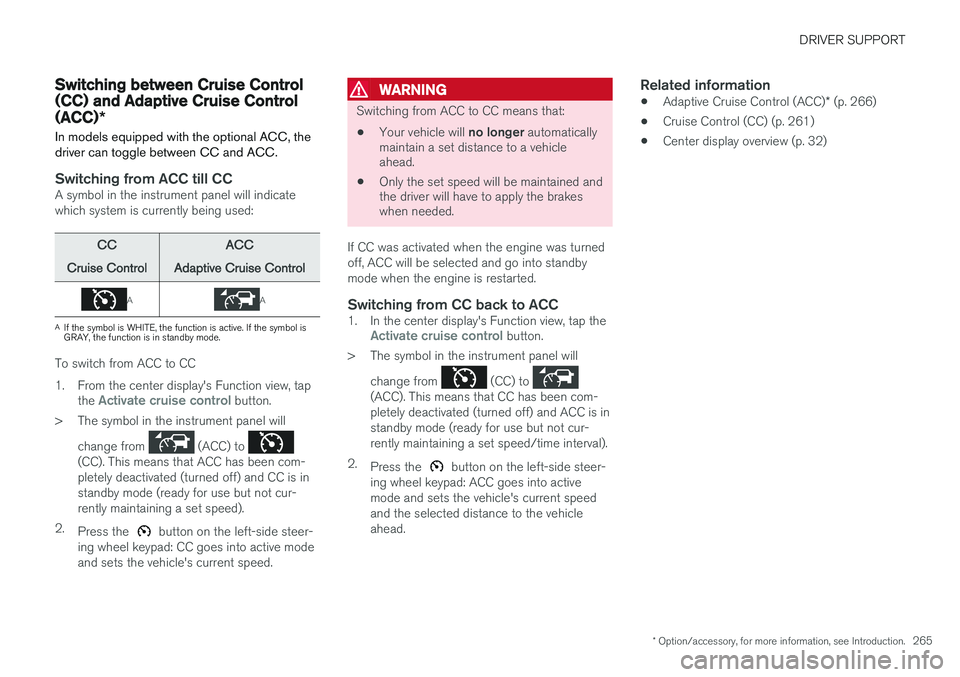
Switching from ACC till CCA symbol in the instrument panel will indicate which system is currently being used:
CC
Cruise ControlACC
Adaptive Cruise Control
AA
A If the symbol is WHITE, the function is active. If the symbol is GRAY, the function is in standby mode.
To switch from ACC to CC
1. From the center display's Function view, tap
the
Activate cruise control button.
> The symbol in the instrument panel will
change from
(ACC) to (CC). This means that ACC has been com- pletely deactivated (turned off) and CC is instandby mode (ready for use but not cur-rently maintaining a set speed).
2. Press the
button on the left-side steer-
ing wheel keypad: CC goes into active mode and sets the vehicle's current speed.
WARNING
Switching from ACC to CC means that:
• Your vehicle will
no longer automatically
maintain a set distance to a vehicle ahead.
• Only the set speed will be maintained andthe driver will have to apply the brakeswhen needed.
If CC was activated when the engine was turned off, ACC will be selected and go into standbymode when the engine is restarted.
Switching from CC back to ACC1. In the center display's Function view, tap theActivate cruise control button.
> The symbol in the instrument panel will
change from
(CC) to (ACC). This means that CC has been com- pletely deactivated (turned off) and ACC is instandby mode (ready for use but not cur-rently maintaining a set speed/time interval).
2. Press the
button on the left-side steer-
ing wheel keypad: ACC goes into active mode and sets the vehicle's current speedand the selected distance to the vehicleahead.
Related information
• Adaptive Cruise Control (ACC)
* (p. 266)
• Cruise Control (CC) (p. 261)
• Center display overview (p. 32)
Page 272 of 546
||
DRIVER SUPPORT
* Option/accessory, for more information, see Introduction.
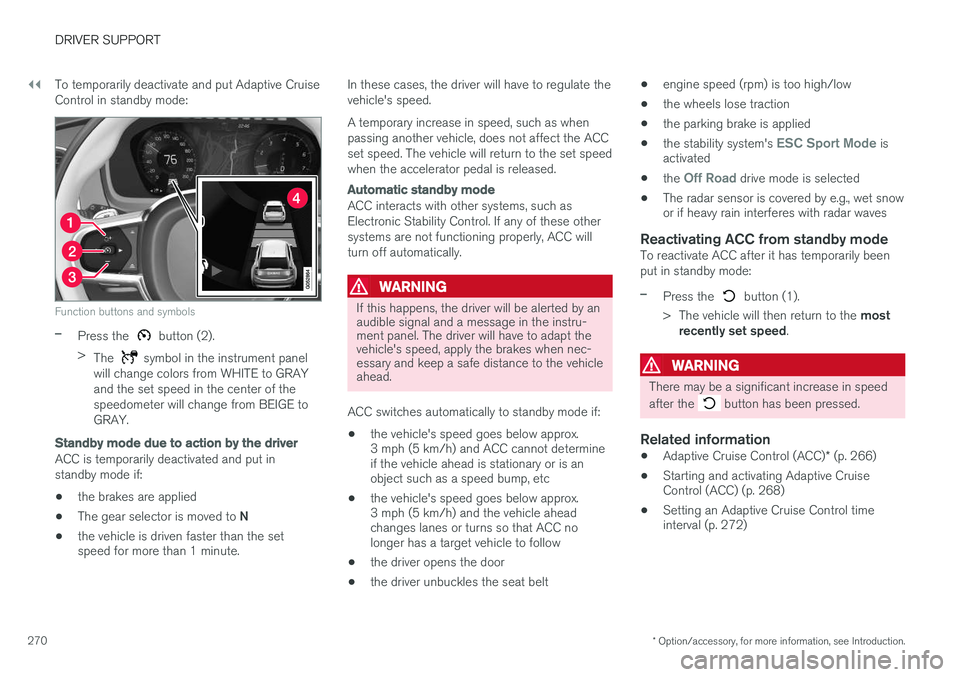
270 To temporarily deactivate and put Adaptive Cruise Control in standby mode:
Function buttons and symbols
–Press the button (2).
> The
symbol in the instrument panel
will change colors from WHITE to GRAY and the set speed in the center of thespeedometer will change from BEIGE toGRAY.
Standby mode due to action by the driver
ACC is temporarily deactivated and put in standby mode if:
• the brakes are applied
• The gear selector is moved to
N
• the vehicle is driven faster than the set speed for more than 1 minute. In these cases, the driver will have to regulate the vehicle's speed. A temporary increase in speed, such as when passing another vehicle, does not affect the ACCset speed. The vehicle will return to the set speedwhen the accelerator pedal is released.
Automatic standby mode
ACC interacts with other systems, such as Electronic Stability Control. If any of these othersystems are not functioning properly, ACC willturn off automatically.
WARNING
If this happens, the driver will be alerted by an audible signal and a message in the instru-ment panel. The driver will have to adapt thevehicle's speed, apply the brakes when nec-essary and keep a safe distance to the vehicleahead.
ACC switches automatically to standby mode if: • the vehicle's speed goes below approx. 3 mph (5 km/h) and ACC cannot determineif the vehicle ahead is stationary or is anobject such as a speed bump, etc
• the vehicle's speed goes below approx.3 mph (5 km/h) and the vehicle aheadchanges lanes or turns so that ACC nolonger has a target vehicle to follow
• the driver opens the door
• the driver unbuckles the seat belt •
engine speed (rpm) is too high/low
• the wheels lose traction
• the parking brake is applied
• the stability system's
ESC Sport Mode is
activated
• the
Off Road drive mode is selected
• The radar sensor is covered by e.g., wet snow or if heavy rain interferes with radar waves
Reactivating ACC from standby modeTo reactivate ACC after it has temporarily been put in standby mode:
–Press the button (1).
> The vehicle will then return to the most
recently set speed .
WARNING
There may be a significant increase in speed after the
button has been pressed.
Related information
•Adaptive Cruise Control (ACC)
* (p. 266)
• Starting and activating Adaptive Cruise Control (ACC) (p. 268)
• Setting an Adaptive Cruise Control timeinterval (p. 272)
Page 273 of 546
DRIVER SUPPORT
}}
271
•
Adaptive cruise control passing assistance (p. 284)
• Adaptive Cruise Control (ACC) symbols andmessages (p. 286)
Changing Adaptive Cruise Control (ACC) speed
ACC makes it possible to set various speeds.
Changing a set speed
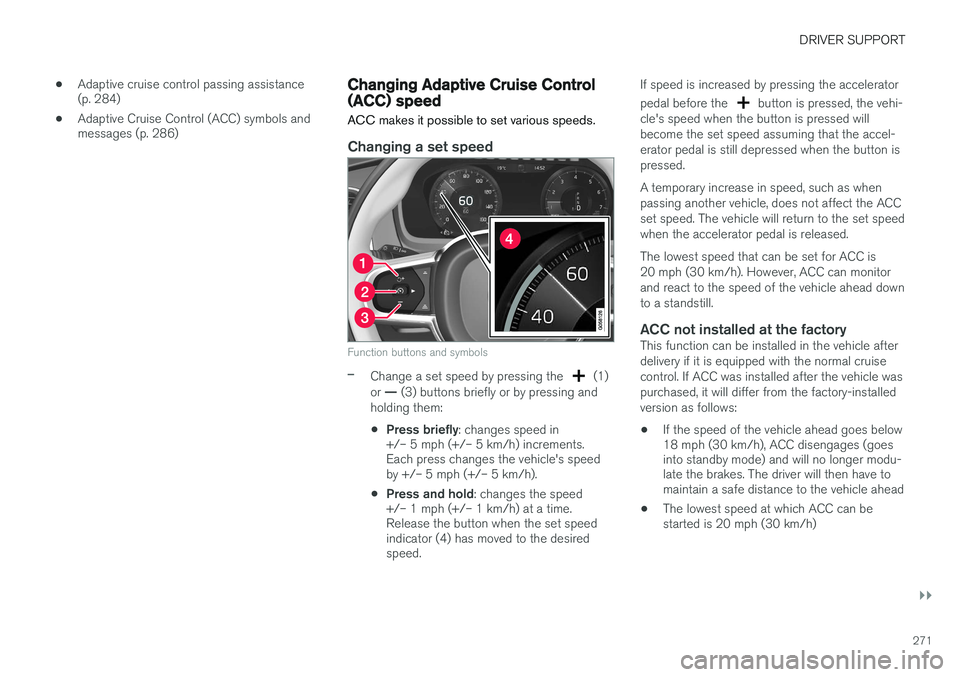
Function buttons and symbols
–Change a set speed by pressing the (1)
or — (3) buttons briefly or by pressing and
holding them:
• Press briefly
: changes speed in
+/– 5 mph (+/– 5 km/h) increments. Each press changes the vehicle's speedby +/– 5 mph (+/– 5 km/h).
• Press and hold
: changes the speed
+/– 1 mph (+/– 1 km/h) at a time.Release the button when the set speedindicator (4) has moved to the desiredspeed. If speed is increased by pressing the accelerator pedal before the
button is pressed, the vehi-
cle's speed when the button is pressed will become the set speed assuming that the accel-erator pedal is still depressed when the button ispressed. A temporary increase in speed, such as when passing another vehicle, does not affect the ACCset speed. The vehicle will return to the set speedwhen the accelerator pedal is released. The lowest speed that can be set for ACC is 20 mph (30 km/h). However, ACC can monitorand react to the speed of the vehicle ahead downto a standstill.
ACC not installed at the factoryThis function can be installed in the vehicle afterdelivery if it is equipped with the normal cruisecontrol. If ACC was installed after the vehicle waspurchased, it will differ from the factory-installedversion as follows:
• If the speed of the vehicle ahead goes below 18 mph (30 km/h), ACC disengages (goesinto standby mode) and will no longer modu-late the brakes. The driver will then have tomaintain a safe distance to the vehicle ahead
• The lowest speed at which ACC can bestarted is 20 mph (30 km/h)
Page 275 of 546
DRIVER SUPPORT
}}
* Option/accessory, for more information, see Introduction.273
time interval to the vehicle ahead does not allow an increase in speed.
• The higher the speed, the greater the dis-tance to the vehicle ahead for a given timeinterval.
• Only use time intervals permitted by localtraffic regulations.
WARNING
•
Only use a time interval that is suitable in current traffic conditions.
• A short time interval gives the driver lim-ited reaction time if an unexpected situa-tion occurs in traffic.
Related information
•
Adaptive Cruise Control (ACC)
* (p. 266)
• Starting and activating Adaptive CruiseControl (ACC) (p. 268)
• Deactivating/resuming Adaptive CruiseControl (ACC) (p. 269)
• Adaptive cruise control passing assistance(p. 284)
• Adaptive Cruise Control (ACC) symbols andmessages (p. 286)
Pilot Assist
*
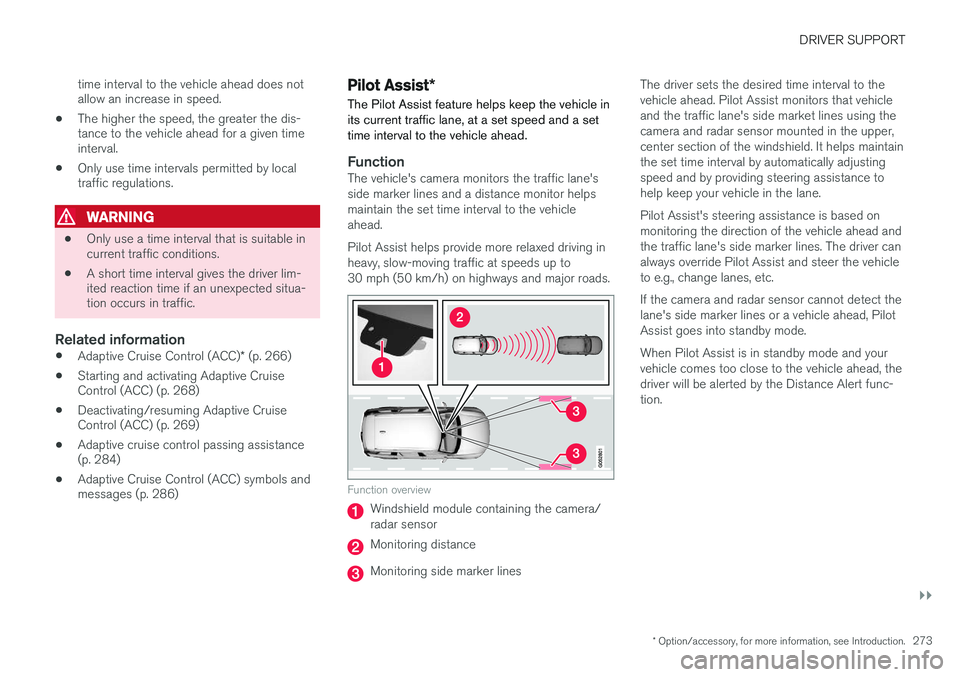
The Pilot Assist feature helps keep the vehicle in its current traffic lane, at a set speed and a settime interval to the vehicle ahead.
FunctionThe vehicle's camera monitors the traffic lane's side marker lines and a distance monitor helpsmaintain the set time interval to the vehicleahead. Pilot Assist helps provide more relaxed driving in heavy, slow-moving traffic at speeds up to30 mph (50 km/h) on highways and major roads.
Function overview
Windshield module containing the camera/ radar sensor
Monitoring distance
Monitoring side marker lines The driver sets the desired time interval to the vehicle ahead. Pilot Assist monitors that vehicleand the traffic lane's side market lines using thecamera and radar sensor mounted in the upper,center section of the windshield. It helps maintainthe set time interval by automatically adjustingspeed and by providing steering assistance tohelp keep your vehicle in the lane. Pilot Assist's steering assistance is based on monitoring the direction of the vehicle ahead andthe traffic lane's side marker lines. The driver canalways override Pilot Assist and steer the vehicleto e.g., change lanes, etc. If the camera and radar sensor cannot detect the lane's side marker lines or a vehicle ahead, PilotAssist goes into standby mode. When Pilot Assist is in standby mode and your vehicle comes too close to the vehicle ahead, thedriver will be alerted by the Distance Alert func-tion.
Page 276 of 546
||
DRIVER SUPPORT
274
WARNING
•Pilot Assist is designed to be a supple- mentary driving aid and cannot cover alldriving situations, traffic, weather and/orroad conditions.
• The driver should be familiar with all ofthe information in this article regardingPilot Assist, including its limitations.
• Pilot Assist is not intended to replace thedriver's attention and judgement.
• Pilot Assist must only be used wherethere are clearly visible traffic lane sidemarker lines on both sides of the currenttraffic lane. In other circumstances thereis an increased risk of collision with sur-rounding obstacles that are not detectedby the system.
• The driver is always responsible for steer-ing the vehicle and maintaining a suitablespeed and distance to the vehicle aheadand must intervene if necessary, even ifPilot Assist is being used.
Pilot Assist is designed to regulate speed smoothly but in situations calling for fast braking,the driver must apply the brakes. This applies tosituations where there are considerable differen-ces in speed or if the vehicle ahead brakes sud-denly. Due to the limitations of the camera andradar sensor, the system may apply the brakes inyour vehicle suddenly or not at all. The default speed for Pilot Assist is preset toapprox. 30 mph (50 km/h) and cannot bechanged. If the vehicle ahead increases speed toover 30 mph (50 km/h) and pulls away from yourvehicle, Pilot Assist will go into standby mode.
NOTE
•
Pilot Assist maintenance should only be carried out by a trained and qualifiedVolvo service technician.
• Pilot Assist regulates your vehicle'sspeed using the accelerator pedal andthe brakes. Please be aware that theremay be a faint sound from the brakeswhen the system is using them.
WARNING
•Pilot Assist does not react to people or animals, or small vehicles such as bicy-cles and motorcycles. It also does notreact to low trailers, slow moving, parkedor approaching vehicles, or stationaryobjects.
• Do not use Pilot Assist in demandingdriving conditions such as city driving orother heavy traffic situations, in slipperyconditions, when there is a great deal ofwater or slush on the road, during heavyrain or snow, in poor visibility, on windingroads or on highway on- or off-ramps.
Pilot Assist overview
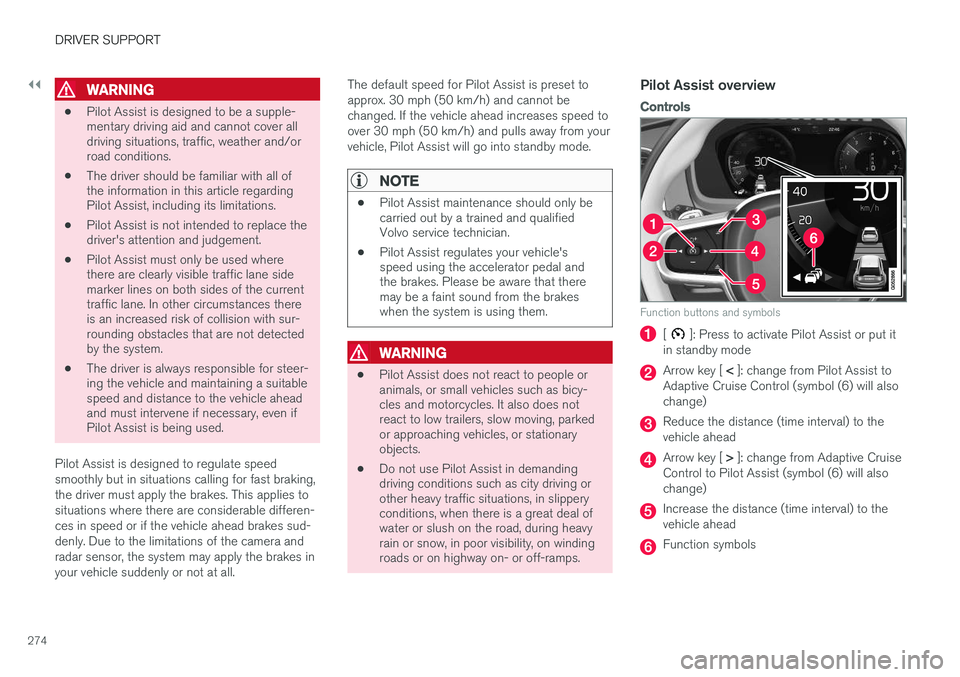
Controls
Function buttons and symbols
[]: Press to activate Pilot Assist or put it
in standby mode
Arrow key [ < ]: change from Pilot Assist to
Adaptive Cruise Control (symbol (6) will also change)
Reduce the distance (time interval) to the vehicle ahead
Arrow key [ > ]: change from Adaptive Cruise
Control to Pilot Assist (symbol (6) will also change)
Increase the distance (time interval) to the vehicle ahead
Function symbols
Page 291 of 546
DRIVER SUPPORT
}}}}
289
When City Safety applies the brakes, the brake lights will illuminate. When City Safety is triggered and applies the brakes, a text message will be displayed in theinstrument panel.
Related information
•
City Safety
™ troubleshooting (p. 295)
• City Safety in crossing traffic (p. 291)
• City Safety limitations (p. 293)
• City Safety symbols and messages (p. 297)
• Detecting cyclists and pedestrians with City Safety (p. 290)
• Rear Collision Warning (RCW) (p. 292)
• City Safety warning level settings (p. 289)
• City Safety in crossing traffic (p. 291)
• Seat belts (p. 64)
City Safety warning level settings
City Safety is always activated but the function's warning distance can be adjusted.
NOTE
City Safety cannot be turned off and activates automatically each time the engine/electricmotor is started.
Setting a warning level (distance)
The distance set for warnings determines the system's responsiveness and sets the distance atwhich visual, audible and tangible (haptic) warn-ings will be triggered. To do so:1. Tap
Settings in the center display's Top
view.
2. Tap
My CarIntelliSafeCity Safety.
3. Choose among
Earlier, Normal or Later.
Begin by choosing
Earlier. If too many warnings
are given, change to Normal.
If the driver feels that warnings are given too often, the warning level can be lowered. Thismeans that warnings will be provided later, result-ing in fewer warnings being given. The setting
Later should only used in exceptional
circumstances, e.g., for a more dynamic driving style.
WARNING
• No automatic system can be guaranteed to function 100% correctly in all situa-tions. For that reason, never test CitySafety by driving toward a person orobject. This could result in serious injuryor death.
• Even if the setting
Earlier has been
selected, warnings may be perceived as being given late, e.g., if the difference inspeed is great or if the vehicle aheadbrakes suddenly.
• City Safety can provide a warning for apotential collision but it can never shortenthe driver's reaction time.
• To help make City Safety as effective as possible, always using the setting
Earlieris recommended.
NOTE
•Due to local traffic regulations in certain markets, RCW will
not activate the rear
turn signals. That part of the function will be deactivated.
• The use of the rear turn signals will alsobe deactivated if the City Safety warning level is set at
Later. See also the section
"Setting a warning level (distance)" in the article "City Safety settings."
• If RCW detects a vehicle approachingfrom behind, the seat belt pretensioners
Page 294 of 546
||
DRIVER SUPPORT
292
WARNING
•City Safety is a supplementary driving aid and does not function in all driving situa-tions or in all traffic, weather or road con-ditions.
• Warnings and braking for an approachingvehicle will usually come at a very latestage.
• The driver is responsible for maintaining asafe distance and speed. Never wait for awarning or for City Safety to take action.
LimitationsIn certain situations, it may be very difficult for City Safety to help the driver avoid a collision withan approaching vehicle in crossing traffic, forexample:
• on slippery roads when Electronic Stability Control is active
• if the approaching vehicle is detected at alate stage
• If the approaching vehicle is partiallyobscured by another vehicle
• if the approaching vehicle moves erratically(e.g., sudden lane changes at a late stage)
Related information
•
City Safety
™ (p. 287)
• City Safety limitations (p. 293)
Rear Collision Warning (RCW)
The
Rear Collision Warning with braking at
standstill (RCW) function can help the driver
avoid rear-end collisions.
RCW is activated automatically each time the engine is started and cannot be turned off. RCW can warn the driver of a vehicle approach- ing yours from behind by rapidly flashing yourrear turn signals. RCW is only activated when a vehicle is rapidly approaching your vehicle from behind. At speeds below 20 mph (30 km/h), if RCW determines that your vehicle is at risk of a rear-end collision, the front seat belt pretensionersand the Whiplash Protection System are acti-vated. Just prior to the collision, the brakes are also applied to help reduce your vehicle's forwardmovement if and when the collision occurs. How-ever, this can only happen if your vehicle is sta-tionary. The brakes will be released immediately if the accelerator pedal is pressed.
NOTE
• Due to local traffic regulations in certain markets, RCW will
not activate the rear
turn signals. That part of the function will be deactivated.
• The use of the rear turn signals will alsobe deactivated if the City Safety warning level is set at
Later. See also the section
"Setting a warning level (distance)" in the article "City Safety settings."
• If RCW detects a vehicle approachingfrom behind, the seat belt pretensionersand Whiplash Protection System will beactivated.
LimitationsIn some circumstances, it may be difficult for RCW to help the driver if there is a risk of a colli-sion, such as: •
In slippery conditions when Electronic Stability Control is active
• If the vehicle approaching from the rear isdetected at a late stage
• If the vehicle approaching from the rearchanges lanes at a late stage
• If the vehicle approaching from the rear ismoving at a speed above approx. 50 mph(80 km/h)
Page 301 of 546
DRIVER SUPPORT
}}
* Option/accessory, for more information, see Introduction.299
Starting and activating the Speed Limiter (SL)*
The Speed Limiter (SL) is a feature that has to be selected and activated in order to set a maxi-mum speed.
Selecting SL (putting it in standby mode)
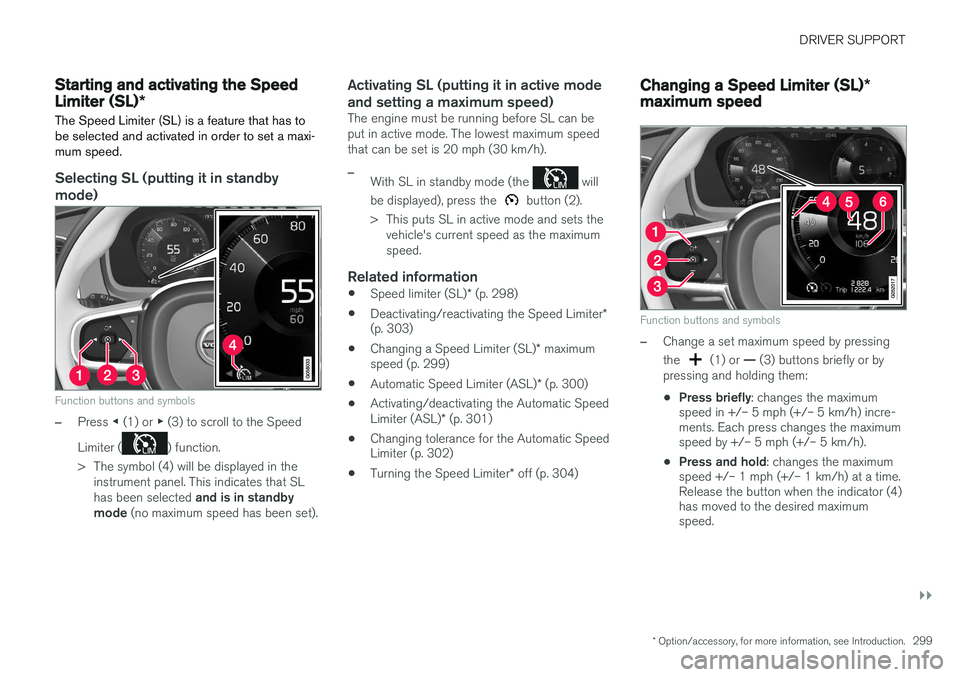
Function buttons and symbols
–Press ◀ (1) or ▶ (3) to scroll to the Speed
Limiter (
) function.
> The symbol (4) will be displayed in the instrument panel. This indicates that SL has been selected and is in standby
mode (no maximum speed has been set).
Activating SL (putting it in active mode and setting a maximum speed)
The engine must be running before SL can be put in active mode. The lowest maximum speedthat can be set is 20 mph (30 km/h).
–With SL in standby mode (the will
be displayed), press the
button (2).
> This puts SL in active mode and sets the vehicle's current speed as the maximum speed.
Related information
• Speed limiter (SL)
* (p. 298)
• Deactivating/reactivating the Speed Limiter
*
(p. 303)
• Changing a Speed Limiter (SL)
* maximum
speed (p. 299)
• Automatic Speed Limiter (ASL)
* (p. 300)
• Activating/deactivating the Automatic Speed Limiter (ASL)
* (p. 301)
• Changing tolerance for the Automatic Speed Limiter (p. 302)
• Turning the Speed Limiter
* off (p. 304)
Changing a Speed Limiter (SL) *
maximum speed
Function buttons and symbols
–Change a set maximum speed by pressing the
(1) or — (3) buttons briefly or by
pressing and holding them: • Press briefly
: changes the maximum
speed in +/– 5 mph (+/– 5 km/h) incre- ments. Each press changes the maximumspeed by +/– 5 mph (+/– 5 km/h).
• Press and hold
: changes the maximum
speed +/– 1 mph (+/– 1 km/h) at a time.Release the button when the indicator (4)has moved to the desired maximumspeed.