navigation system VOLVO XC90 T8 2016 Owner´s Manual
[x] Cancel search | Manufacturer: VOLVO, Model Year: 2016, Model line: XC90 T8, Model: VOLVO XC90 T8 2016Pages: 546, PDF Size: 10.26 MB
Page 5 of 546
3
Starting or moving a vehicle in safety mode88
Airbag system 89
Driver/passenger side airbags 89
Inflatable curtains 92
Side impact airbags 93
INSTRUMENTS AND CONTROLS
Trip computer96
Displaying trip computer information 97
Displaying trip statistics 98
HomeLink ®
Wireless Control System *99
Programming the HomeLink ®
Wire-
less Control System * 100
Instruments and controls 103
Adjusting the power door mirrors 105
Laminated panoramic roof *
106
Operating the laminated panoramic roof *
107
Power windows 109
Operating the power windows 109
Rearview mirror 110
Using sun shades 111
Settings view 111
Categories in Settings view 112
Changing system settings in Set- tings view 114
Changing settings in apps 115
Resetting the settings view 115
Resetting user data when the vehiclechanges owners 116
Ambient temperature sensor 116
Clock 117
Head-up display (HUD) *
117
Voice control
120
Using voice commands 121
Voice control for cell phones 122
Voice control for radio and media 122
Climate system voice commands 123
Navigation system voice commands 124
Voice control settings 125
Indicator symbols in the instrument panel 125
Instrument panel 127
Instrument panel App menu 129
Hybrid-related information in the instrument panel 130
Instrument panel licenses 132
Warning symbols in the instrument panel 137
Compass 139
Calibrating the compass 139
Lighting panel and controls 140
Low beam headlights 142
Daytime Running Lights (DRL) 142
High and low beam headlights 143
Active Bending Lights *
145
Brake lights 146
Rear fog lights 146
Hazard warning flashers 147
Parking lights 147
Page 16 of 546
INTRODUCTION
14
Contacting Volvo
Use the following contact information if you would like to get in touch with Volvo in the Uni-ted States or Canada.
In the USA: Volvo Cars of North America, LLC Customer Care Center1 Volvo Drive,P.O. Box 914Rockleigh, New Jersey 076471-800-458-1552www.volvocars.com/us In Canada: Volvo Cars of Canada National Customer Service9130 Leslie Street, Suite 101Richmond Hill, Ontario L4B 0B91-800-663-8255www.volvocars.com/ca
Volvo On Call Roadside Assistance Your new Volvo comes with a four year ON CALL roadside assistance.
Additional information, features, and benefits of this program are described in a separate informa-tion package in your glove compartment. If you require assistance, dial: In the U.S. 1-800-638-6586 (1-800-63-
VOLVO)In Canada 1-800-263-0475
NOTE
Some vehicles may be equipped with Volvo On Call with Sensus Connect , which
will allow access to the call center and addi- tional features directly from the vehicle. Thisis in addition to the Volvo On Call RoadsideAssistance program mentioned above. Volvo On Call with Sensus Connect will be
a customer pay subscription offer after an ini- tial complimentary trial period.
Additional information about your vehicle Volvo Cars' website and support site provide additional information about your vehicle.
Support on the Internet
Go to support.volvocars.com or use the QR code below to visit the site, which is available in mostmarkets.
QR code to the support site
The information on the support site is searchable and is grouped into different categories. Itincludes support for e.g., Internet-based servicesand functions, Volvo On Call (VOC), the naviga-tion system and apps. Video and step-by-stepinstructions explain various procedures such ashow to connect the vehicle to the Internet via acell phone.
Downloadable information
Maps
Sensus Navigation system maps can be down- loaded from the support site.
Page 30 of 546
||
INTRODUCTION
28
Related information
•Owner's manual in mobile devices (p. 25)
• Navigating in the digital owner's manual (p. 56)
• On-board digital owner's manual (p. 55)
Driver distraction
Please keep the following warnings in mind when operating/servicing your vehicle.
A driver has a responsibility to do everything pos- sible to ensure his or her own safety and thesafety of passengers in the vehicle and otherssharing the roadway. Avoiding distractions is partof that responsibility. Driver distraction results from driver activities that are not directly related to controlling the vehiclein the driving environment. Your new Volvo is, orcan be, equipped with many feature-rich enter-tainment and communication systems. Theseinclude hands-free cellular telephones, navigationsystems, and multipurpose audio systems. Youmay also own other portable electronic devicesfor your own convenience. When used properlyand safely, they enrich the driving experience.Improperly used, any of these could cause a dis-traction. For all of these systems, we want to provide the following warning that reflects the strong Volvoconcern for your safety. Never use these devicesor any feature of your vehicle in a way that dis-tracts you from the task of driving safely. Distrac-tion can lead to a serious accident. In addition tothis general warning, we offer the following guid-ance regarding specific newer features that maybe found in your vehicle:
WARNING
• Never use a hand-held cellular telephone while driving. Some jurisdictions prohibitcellular telephone use by a driver whilethe vehicle is moving.
• If your vehicle is equipped with a naviga-tion system, set and make changes toyour travel itinerary only with the vehicleparked.
• Never program your audio system whilethe vehicle is moving. Program radio pre-sets with the vehicle parked, and use yourprogrammed presets to make radio usequicker and simpler.
• Never use portable computers or per-sonal digital assistants while the vehicleis moving.
Accessory installation
•We strongly recommend that Volvo ownersinstall only genuine, Volvo-approved acces-sories, and that accessory installations beperformed only by a trained and qualifiedVolvo service technician.
• Genuine Volvo accessories are tested toensure compatibility with the performance,safety, and emission systems in your vehicle.Additionally, a trained and qualified Volvoservice technician knows where accessoriesmay and may not be safely installed in yourVolvo. In all cases, please consult a trained
Page 35 of 546
INTRODUCTION
* Option/accessory, for more information, see Introduction.33
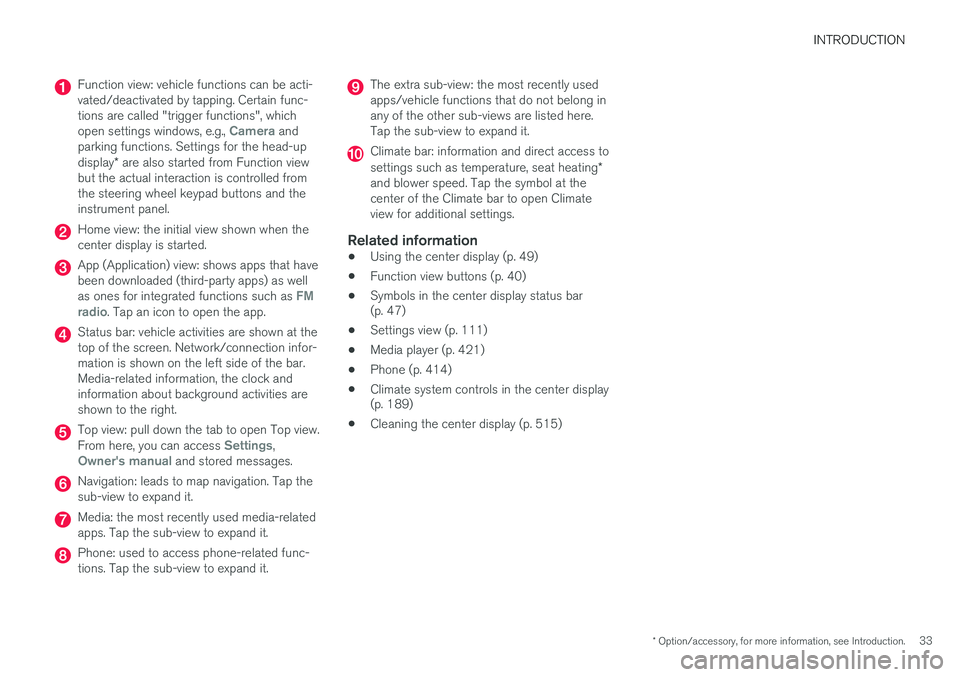
Function view: vehicle functions can be acti- vated/deactivated by tapping. Certain func-tions are called "trigger functions", which open settings windows, e.g.,
Camera and
parking functions. Settings for the head-up display * are also started from Function view
but the actual interaction is controlled from the steering wheel keypad buttons and theinstrument panel.
Home view: the initial view shown when the center display is started.
App (Application) view: shows apps that have been downloaded (third-party apps) as well as ones for integrated functions such as
FM
radio. Tap an icon to open the app.
Status bar: vehicle activities are shown at the top of the screen. Network/connection infor-mation is shown on the left side of the bar.Media-related information, the clock andinformation about background activities areshown to the right.
Top view: pull down the tab to open Top view. From here, you can access Settings,Owner's manual and stored messages.
Navigation: leads to map navigation. Tap the sub-view to expand it.
Media: the most recently used media-related apps. Tap the sub-view to expand it.
Phone: used to access phone-related func- tions. Tap the sub-view to expand it.
The extra sub-view: the most recently used apps/vehicle functions that do not belong inany of the other sub-views are listed here.Tap the sub-view to expand it.
Climate bar: information and direct access to settings such as temperature, seat heating *
and blower speed. Tap the symbol at the center of the Climate bar to open Climateview for additional settings.
Related information
• Using the center display (p. 49)
• Function view buttons (p. 40)
• Symbols in the center display status bar (p. 47)
• Settings view (p. 111)
• Media player (p. 421)
• Phone (p. 414)
• Climate system controls in the center display(p. 189)
• Cleaning the center display (p. 515)
Page 37 of 546
INTRODUCTION
}}
35
Using the center display keyboard A keyboard can be used on the center display to enter characters and search for e.g., destina-tions using the navigation system, adding con-tacts in phone book, etc. It is also possible touse handwriting on the screen.
Entering text using the keyboardThe keyboard will only appear at the bottom of the center display in situations when it is possibleto write on the screen.
Page 39 of 546
INTRODUCTION
}}
37
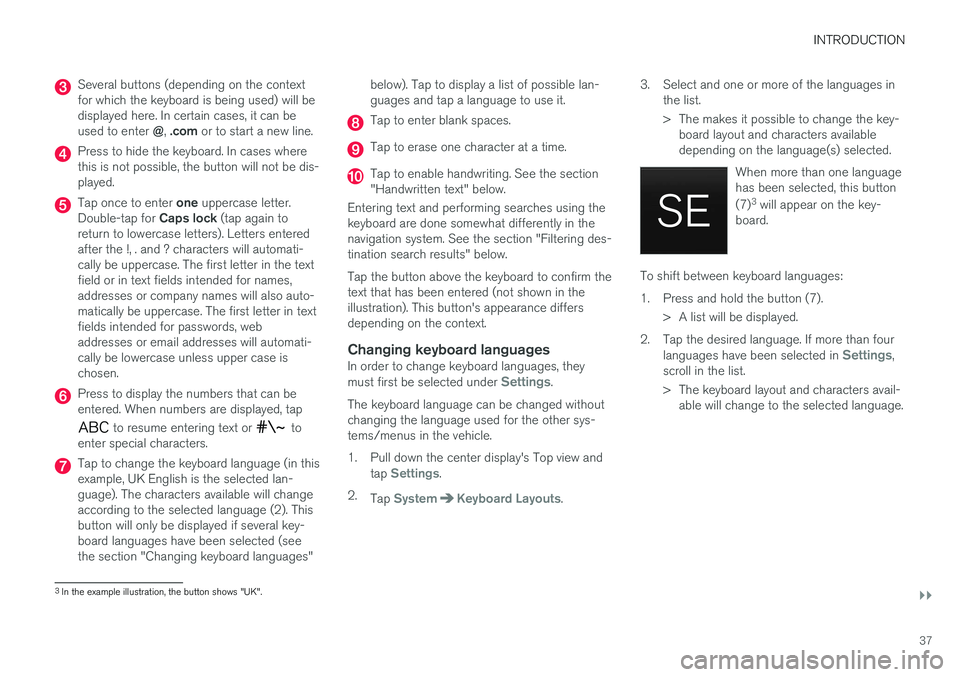
Several buttons (depending on the context for which the keyboard is being used) will bedisplayed here. In certain cases, it can be used to enter @, .com or to start a new line.
Press to hide the keyboard. In cases where this is not possible, the button will not be dis-played.
Tap once to enter one uppercase letter.
Double-tap for Caps lock (tap again to
return to lowercase letters). Letters entered after the !, . and ? characters will automati-cally be uppercase. The first letter in the textfield or in text fields intended for names,addresses or company names will also auto-matically be uppercase. The first letter in textfields intended for passwords, webaddresses or email addresses will automati-cally be lowercase unless upper case ischosen.
Press to display the numbers that can be entered. When numbers are displayed, tap
to resume entering text or to
enter special characters.
Tap to change the keyboard language (in this example, UK English is the selected lan-guage). The characters available will changeaccording to the selected language (2). Thisbutton will only be displayed if several key-board languages have been selected (seethe section "Changing keyboard languages" below). Tap to display a list of possible lan-guages and tap a language to use it.
Tap to enter blank spaces.
Tap to erase one character at a time.
Tap to enable handwriting. See the section "Handwritten text" below.
Entering text and performing searches using thekeyboard are done somewhat differently in thenavigation system. See the section "Filtering des-tination search results" below. Tap the button above the keyboard to confirm the text that has been entered (not shown in theillustration). This button's appearance differsdepending on the context.
Changing keyboard languagesIn order to change keyboard languages, they must first be selected under Settings.
The keyboard language can be changed without changing the language used for the other sys-tems/menus in the vehicle.
1. Pull down the center display's Top view and tap
Settings.
2. Tap
SystemKeyboard Layouts. 3. Select and one or more of the languages in
the list.
> The makes it possible to change the key-board layout and characters available depending on the language(s) selected.
When more than one languagehas been selected, this button (7)3
will appear on the key-
board.
To shift between keyboard languages:
1. Press and hold the button (7).
> A list will be displayed.
2. Tap the desired language. If more than four languages have been selected in
Settings,
scroll in the list.
> The keyboard layout and characters avail- able will change to the selected language.
3In the example illustration, the button shows "UK".
Page 100 of 546
||
INSTRUMENTS AND CONTROLS
* Option/accessory, for more information, see Introduction.
98 3. Scroll to the selection buttons in the lines
below TA and select the trip odometer to be displayed.
• Current fuel consumption
• Distance to empty
• Odometer
• Trip odometers TM, TA or none
• Tourist (alternative speedometer).
• Distance to discharged battery
Select or deselect an alternative using thecenter button (4). The change will be madeimmediately.
Resetting a trip odometer
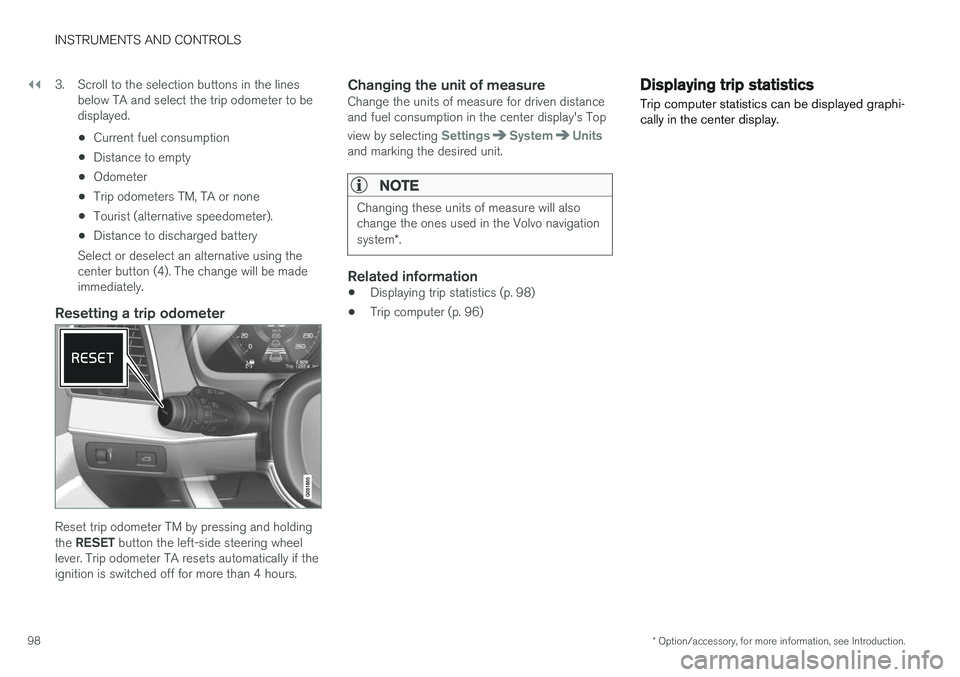
Reset trip odometer TM by pressing and holding the RESET button the left-side steering wheel
lever. Trip odometer TA resets automatically if the ignition is switched off for more than 4 hours.
Changing the unit of measureChange the units of measure for driven distanceand fuel consumption in the center display's Top view by selecting
SettingsSystemUnitsand marking the desired unit.
NOTE
Changing these units of measure will also change the ones used in the Volvo navigation system *.
Related information
• Displaying trip statistics (p. 98)
• Trip computer (p. 96)
Displaying trip statistics Trip computer statistics can be displayed graphi- cally in the center display.
Page 114 of 546
||
INSTRUMENTS AND CONTROLS
* Option/accessory, for more information, see Introduction.
112
Changing a setting
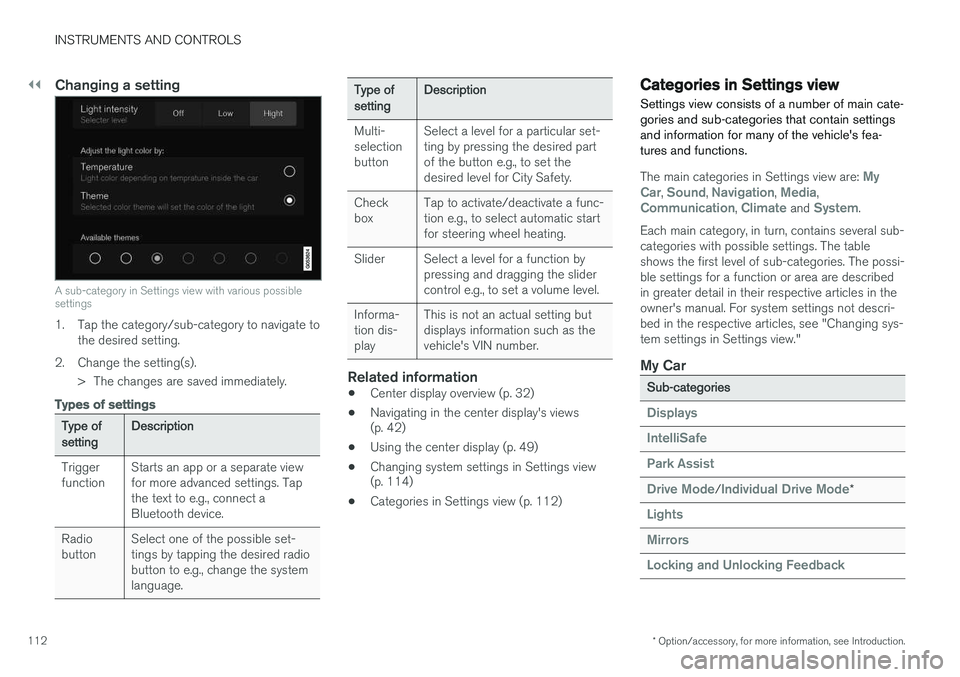
A sub-category in Settings view with various possible settings
1. Tap the category/sub-category to navigate to
the desired setting.
2. Change the setting(s). > The changes are saved immediately.
Types of settings
Type of settingDescription
Trigger functionStarts an app or a separate view for more advanced settings. Tapthe text to e.g., connect aBluetooth device.
Radio buttonSelect one of the possible set- tings by tapping the desired radiobutton to e.g., change the systemlanguage.
Type of settingDescription
Multi- selectionbuttonSelect a level for a particular set- ting by pressing the desired partof the button e.g., to set thedesired level for City Safety.
Check boxTap to activate/deactivate a func- tion e.g., to select automatic startfor steering wheel heating.
SliderSelect a level for a function by pressing and dragging the slidercontrol e.g., to set a volume level.
Informa- tion dis-playThis is not an actual setting but displays information such as thevehicle's VIN number.
Related information
• Center display overview (p. 32)
• Navigating in the center display's views (p. 42)
• Using the center display (p. 49)
• Changing system settings in Settings view(p. 114)
• Categories in Settings view (p. 112)
Categories in Settings view
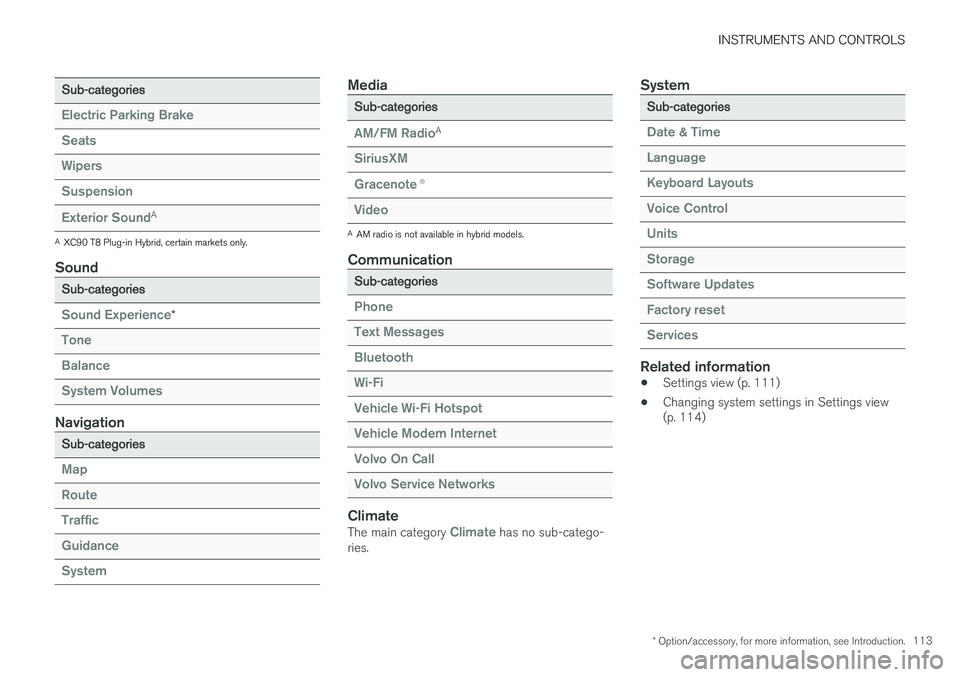
Settings view consists of a number of main cate- gories and sub-categories that contain settingsand information for many of the vehicle's fea-tures and functions.
The main categories in Settings view are: My
Car, Sound, Navigation, Media,Communication, Climate and System.
Each main category, in turn, contains several sub- categories with possible settings. The tableshows the first level of sub-categories. The possi-ble settings for a function or area are describedin greater detail in their respective articles in theowner's manual. For system settings not descri-bed in the respective articles, see "Changing sys-tem settings in Settings view."
My Car
Sub-categories
Displays
IntelliSafe
Park Assist
Drive Mode/Individual Drive Mode*
Lights
Mirrors
Locking and Unlocking Feedback
Page 115 of 546
INSTRUMENTS AND CONTROLS
* Option/accessory, for more information, see Introduction.113
Sub-categories
Electric Parking Brake
Seats
Wipers
Suspension
Exterior SoundA
A
XC90 T8 Plug-in Hybrid, certain markets only.
Sound
Sub-categories
Sound Experience*
Tone
Balance
System Volumes
Navigation
Sub-categories
Map
Route
Traffic
Guidance
System
Media
Sub-categories
AM/FM RadioA
SiriusXM
Gracenote ®
Video
A
AM radio is not available in hybrid models.
Communication
Sub-categories
Phone
Text Messages
Bluetooth
Wi-Fi
Vehicle Wi-Fi Hotspot
Vehicle Modem Internet
Volvo On Call
Volvo Service Networks
ClimateThe main category Climate has no sub-catego-
ries.
System
Sub-categories
Date & Time
Language
Keyboard Layouts
Voice Control
Units
Storage
Software Updates
Factory reset
Services
Related information
• Settings view (p. 111)
• Changing system settings in Settings view (p. 114)
Page 119 of 546
INSTRUMENTS AND CONTROLS
}}
* Option/accessory, for more information, see Introduction.117
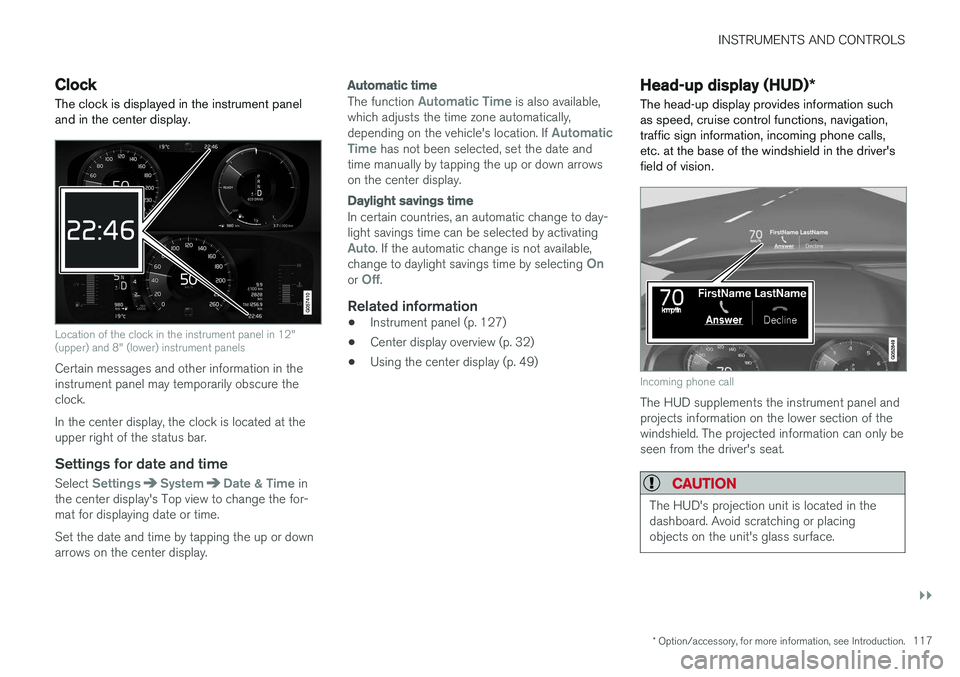
Clock The clock is displayed in the instrument panel and in the center display.
Location of the clock in the instrument panel in 12" (upper) and 8" (lower) instrument panels
Certain messages and other information in the instrument panel may temporarily obscure theclock. In the center display, the clock is located at the upper right of the status bar.
Settings for date and time
Select SettingsSystemDate & Time in
the center display's Top view to change the for- mat for displaying date or time. Set the date and time by tapping the up or down arrows on the center display.
Automatic time
The function Automatic Time is also available,
which adjusts the time zone automatically, depending on the vehicle's location. If
Automatic
Time has not been selected, set the date and
time manually by tapping the up or down arrows on the center display.
Daylight savings time
In certain countries, an automatic change to day- light savings time can be selected by activating
Auto. If the automatic change is not available,
change to daylight savings time by selecting Onor Off.
Related information
• Instrument panel (p. 127)
• Center display overview (p. 32)
• Using the center display (p. 49)
Head-up display (HUD)
*
The head-up display provides information such as speed, cruise control functions, navigation,traffic sign information, incoming phone calls,etc. at the base of the windshield in the driver'sfield of vision.
Incoming phone call
The HUD supplements the instrument panel and projects information on the lower section of thewindshield. The projected information can only beseen from the driver's seat.
CAUTION
The HUD's projection unit is located in the dashboard. Avoid scratching or placingobjects on the unit's glass surface.