brake light VOLVO XC90 T8 2017 Owner´s Manual
[x] Cancel search | Manufacturer: VOLVO, Model Year: 2017, Model line: XC90 T8, Model: VOLVO XC90 T8 2017Pages: 580, PDF Size: 10.37 MB
Page 394 of 580
||
STARTING AND DRIVING
392
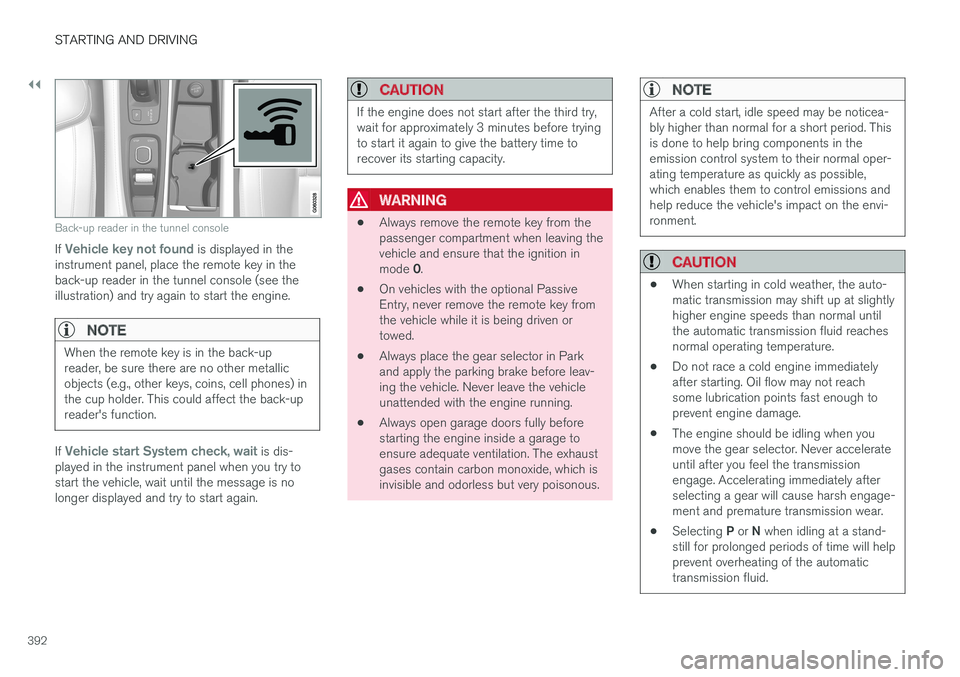
Back-up reader in the tunnel console
If Vehicle key not found is displayed in the
instrument panel, place the remote key in the back-up reader in the tunnel console (see theillustration) and try again to start the engine.
NOTE
When the remote key is in the back-up reader, be sure there are no other metallicobjects (e.g., other keys, coins, cell phones) inthe cup holder. This could affect the back-upreader's function.
If Vehicle start System check, wait is dis-
played in the instrument panel when you try to start the vehicle, wait until the message is nolonger displayed and try to start again.
CAUTION
If the engine does not start after the third try, wait for approximately 3 minutes before tryingto start it again to give the battery time torecover its starting capacity.
WARNING
• Always remove the remote key from the passenger compartment when leaving thevehicle and ensure that the ignition in mode
0.
• On vehicles with the optional Passive Entry, never remove the remote key fromthe vehicle while it is being driven ortowed.
• Always place the gear selector in Parkand apply the parking brake before leav-ing the vehicle. Never leave the vehicleunattended with the engine running.
• Always open garage doors fully beforestarting the engine inside a garage toensure adequate ventilation. The exhaustgases contain carbon monoxide, which isinvisible and odorless but very poisonous.
NOTE
After a cold start, idle speed may be noticea- bly higher than normal for a short period. Thisis done to help bring components in theemission control system to their normal oper-ating temperature as quickly as possible,which enables them to control emissions andhelp reduce the vehicle's impact on the envi-ronment.
CAUTION
•
When starting in cold weather, the auto- matic transmission may shift up at slightlyhigher engine speeds than normal untilthe automatic transmission fluid reachesnormal operating temperature.
• Do not race a cold engine immediatelyafter starting. Oil flow may not reachsome lubrication points fast enough toprevent engine damage.
• The engine should be idling when youmove the gear selector. Never accelerateuntil after you feel the transmissionengage. Accelerating immediately afterselecting a gear will cause harsh engage-ment and premature transmission wear.
• Selecting
P or N when idling at a stand-
still for prolonged periods of time will helpprevent overheating of the automatictransmission fluid.
Page 404 of 580
||
STARTING AND DRIVING
402
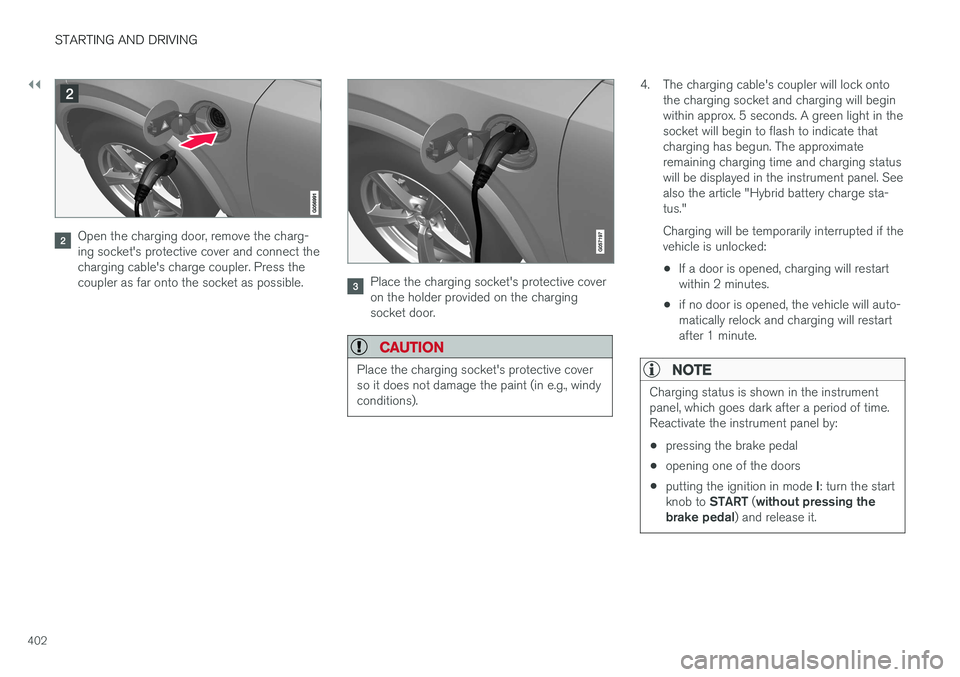
Open the charging door, remove the charg- ing socket's protective cover and connect thecharging cable's charge coupler. Press thecoupler as far onto the socket as possible.
Place the charging socket's protective cover on the holder provided on the chargingsocket door.
CAUTION
Place the charging socket's protective cover so it does not damage the paint (in e.g., windyconditions).
4. The charging cable's coupler will lock ontothe charging socket and charging will begin within approx. 5 seconds. A green light in thesocket will begin to flash to indicate thatcharging has begun. The approximateremaining charging time and charging statuswill be displayed in the instrument panel. Seealso the article "Hybrid battery charge sta-tus." Charging will be temporarily interrupted if the vehicle is unlocked: •If a door is opened, charging will restart within 2 minutes.
• if no door is opened, the vehicle will auto-matically relock and charging will restartafter 1 minute.
NOTE
Charging status is shown in the instrument panel, which goes dark after a period of time.Reactivate the instrument panel by: •
pressing the brake pedal
• opening one of the doors
• putting the ignition in mode
I: turn the start
knob to START (without pressing the
brake pedal ) and release it.
Page 407 of 580
STARTING AND DRIVING
405
LEDindica- tor light'scolorExplanation
White Courtesy light
Yellow Standby mode (e.g., after a door has been opened or if the charger coupling is not lockedin position in the chargingsocket): waiting for charging tobegin
Flashinggreen Charging is in progress (theslower the light flashes, thecloser the battery is to beingfully charged)
Green Charging completed (the light will go out after a short time)
Red A fault has occurred
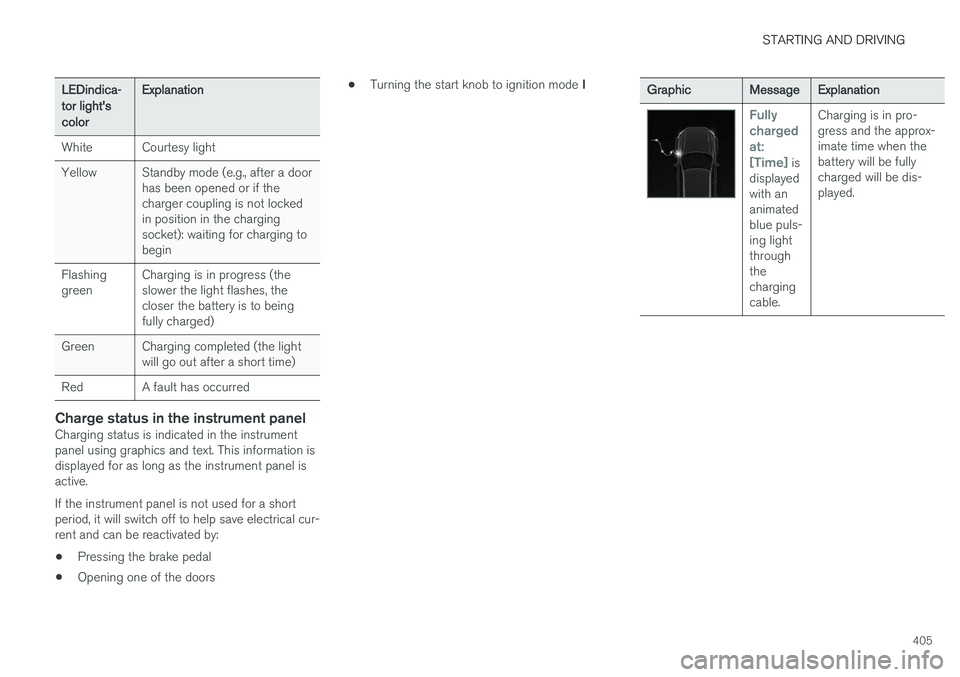
Charge status in the instrument panelCharging status is indicated in the instrument panel using graphics and text. This information isdisplayed for as long as the instrument panel isactive. If the instrument panel is not used for a short period, it will switch off to help save electrical cur-rent and can be reactivated by:
• Pressing the brake pedal
• Opening one of the doors •
Turning the start knob to ignition mode
I
GraphicMessageExplanation
Fully chargedat:[Time]
is
displayed with ananimatedblue puls-ing lightthroughthechargingcable. Charging is in pro-gress and the approx-imate time when thebattery will be fullycharged will be dis-played.
Page 414 of 580
||
STARTING AND DRIVING
412
HYBRID
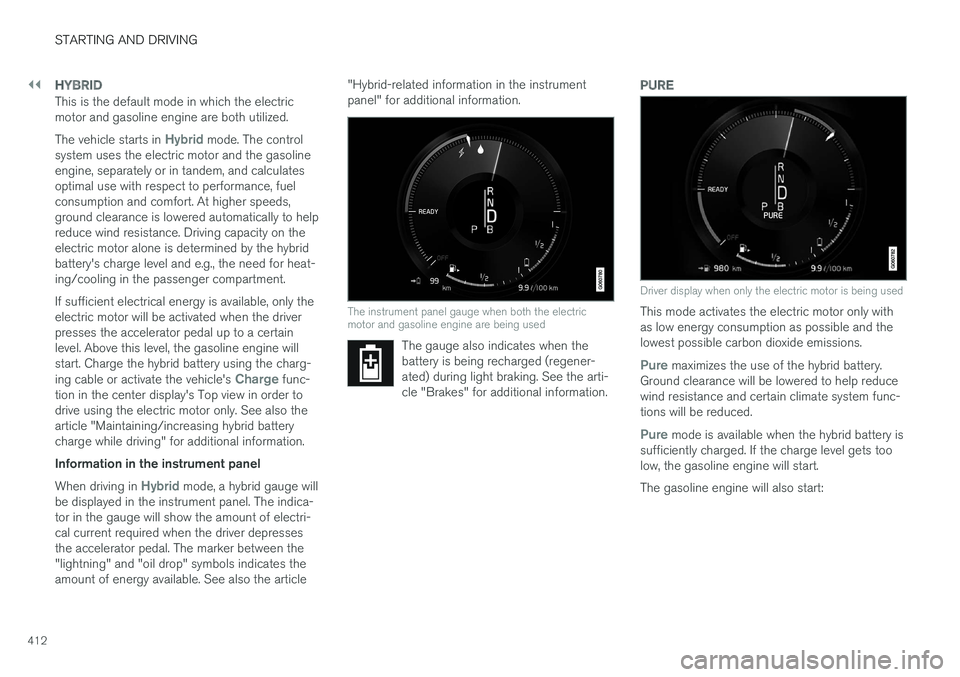
This is the default mode in which the electric motor and gasoline engine are both utilized. The vehicle starts in
Hybrid mode. The control
system uses the electric motor and the gasoline engine, separately or in tandem, and calculatesoptimal use with respect to performance, fuelconsumption and comfort. At higher speeds,ground clearance is lowered automatically to helpreduce wind resistance. Driving capacity on theelectric motor alone is determined by the hybridbattery's charge level and e.g., the need for heat-ing/cooling in the passenger compartment. If sufficient electrical energy is available, only the electric motor will be activated when the driverpresses the accelerator pedal up to a certainlevel. Above this level, the gasoline engine willstart. Charge the hybrid battery using the charg- ing cable or activate the vehicle's
Charge func-
tion in the center display's Top view in order to drive using the electric motor only. See also thearticle "Maintaining/increasing hybrid batterycharge while driving" for additional information. Information in the instrument panel When driving in
Hybrid mode, a hybrid gauge will
be displayed in the instrument panel. The indica- tor in the gauge will show the amount of electri-cal current required when the driver depressesthe accelerator pedal. The marker between the"lightning" and "oil drop" symbols indicates theamount of energy available. See also the article "Hybrid-related information in the instrumentpanel" for additional information.
The instrument panel gauge when both the electric motor and gasoline engine are being used
The gauge also indicates when the battery is being recharged (regener-ated) during light braking. See the arti-cle "Brakes" for additional information.
PURE
Driver display when only the electric motor is being used
This mode activates the electric motor only with as low energy consumption as possible and thelowest possible carbon dioxide emissions.
Pure maximizes the use of the hybrid battery.
Ground clearance will be lowered to help reduce wind resistance and certain climate system func-tions will be reduced.
Pure mode is available when the hybrid battery is
sufficiently charged. If the charge level gets too low, the gasoline engine will start. The gasoline engine will also start:
Page 516 of 580
![VOLVO XC90 T8 2017 Owner´s Manual ||
MAINTENANCE AND SERVICING
* Option/accessory.
514
Function [A]
– –
Horn 20
Alarm siren* 5
Brake system control module (valves, parking brake) 40
Windshield wipers 30
Tailgate window washer 25
H](/img/45/36380/w960_36380-515.png "VOLVO XC90 T8 2017 Owner´s Manual ||
MAINTENANCE AND SERVICING
* Option/accessory.
514
Function [A]
– –
Horn 20
Alarm siren* 5
Brake system control module (valves, parking brake) 40
Windshield wipers 30
Tailgate window washer 25
H")
||
MAINTENANCE AND SERVICING
* Option/accessory.
514
Function [A]
– –
Horn 20
Alarm siren* 5
Brake system control module (valves, parking brake) 40
Windshield wipers 30
Tailgate window washer 25
Heated windshield
*, passenger
side 40
– –
Brake system control module (ABS pump)
40
– –
Heated windshield
*, passenger
side Shunt
Feed when ignition is switched on to: engine control module,transmission components, elec-trical power steering, centralelectrical module 5
Exterior vehicle sound (certain markets)
5
Function
[A]
Passenger side headlight 7,5
– –
– –
– –
Air bags; Occupant Weight Sen- sor (OWS) 5
Driver side headlight Driver's side headlight, certain LED models7.5
15
Accelerator pedal sensor 5
Transmission control module; Gear selector control module 15
Engine control module 5
– –
– –
– –
– –
Engine control module; Actuator; Turbo-charger valve20
Function
[A]
Solenoids; Valves; Engine cool- ing system thermostat 10
Vacuum regulators; Valve 7.5
Spoiler shutter control module; Radiator shutter control module;Fuel leakage detection 5
– –
Heated oxygen sensors (front and rear)
15
Oil pump solenoid; A/C mag- netic coupling; heated oxygensensor (center)15
– –
Engine control module 20
Ignition coils; Spark plugs 15
– –
– –
Transmission oil pump control module
30
Vacuum pump control module 40
Transmission actuator 25
Page 520 of 580

||
MAINTENANCE AND SERVICING
* Option/accessory.
518
Positions
• Fuses 1, 3–21, 23–36, 39–53 and 55–59 are called "Micro".
• Fuses 2, 22, 37–38 and 54 are called"MCase" and should only be replaced by atrained and qualified Volvo service technician.
Function
A
– –
– –
– –
Alarm system movement sensorA
5
Media player 5
Instrument panel 5
Center console buttons 5
Sun sensor 5
– –
– –
Steering wheel module 5
Module for start knob and parking brake 5
Heated steering wheel
* module 15
Function
A
– –
– –
– –
– –
Climate system control module 10
– –
On-board diagnostics (OBDII) 10
Center display 5
Climate system blower module (front)40
– –
Instrument lighting; Courtesy light- ing; Auto-dim rearview mirror; Rainand light sensor; Rear tunnel con- sole keypad
*B
; Power front seats *;
Power rear seats C
; Display for rear
seat convenience functions *; Rear
seat massage function *; Rear door
control panels 7.5
Control module for driver support functions
5
Function
A
Panorama roof and sun shade*20
Head-up display
* 5
Courtesy lighting 5
– –
Ceiling console display (seat belt reminder, front passenger side air-bag indicator) 5
– –
Humidity sensor 5
Rear passenger-side door module 20
Fuses in the cargo compartment 10
Internet connection control module; Volvo On Call control module
5
Rear driver-side door module 20
Infotainment control module (amplifier)40
Climate system blower module (rear)
* 40
Multi-band antenna module 5
Front seat massage function 5
Page 528 of 580
||
MAINTENANCE AND SERVICING
526
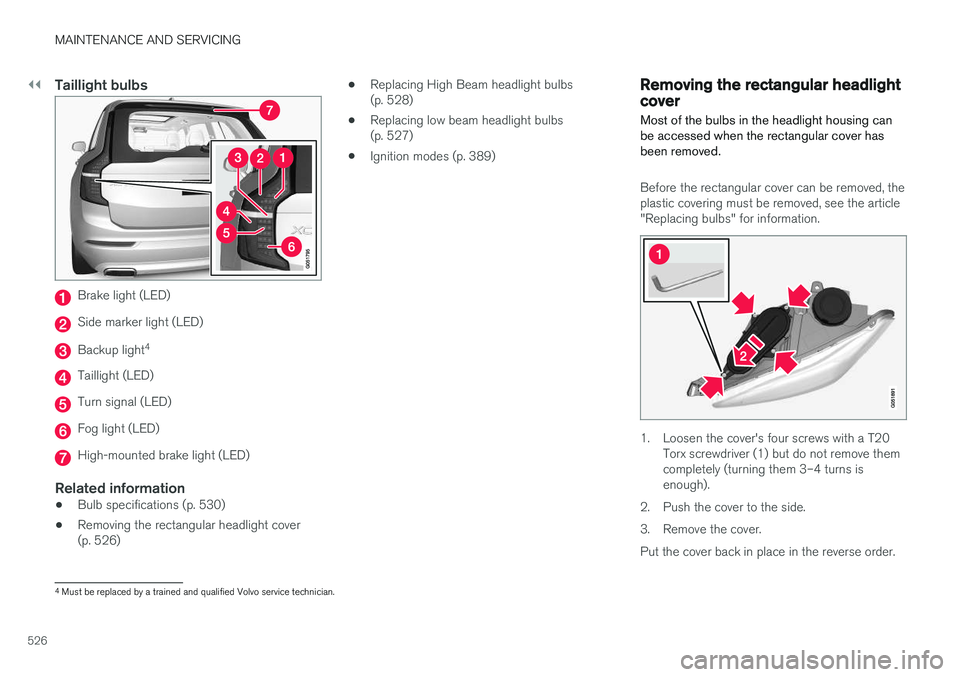
Taillight bulbs
Brake light (LED)
Side marker light (LED)
Backup light4
Taillight (LED)
Turn signal (LED)
Fog light (LED)
High-mounted brake light (LED)
Related information
•
Bulb specifications (p. 530)
• Removing the rectangular headlight cover (p. 526) •
Replacing High Beam headlight bulbs(p. 528)
• Replacing low beam headlight bulbs(p. 527)
• Ignition modes (p. 389)
Removing the rectangular headlight cover
Most of the bulbs in the headlight housing can be accessed when the rectangular cover hasbeen removed.
Before the rectangular cover can be removed, the plastic covering must be removed, see the article"Replacing bulbs" for information.
1. Loosen the cover's four screws with a T20 Torx screwdriver (1) but do not remove them completely (turning them 3–4 turns isenough).
2. Push the cover to the side.
3. Remove the cover.Put the cover back in place in the reverse order.
4 Must be replaced by a trained and qualified Volvo service technician.
Page 537 of 580
MAINTENANCE AND SERVICING
}}
535
any components in the engine compart- ment.
• The distributor ignition system operatesat very high voltages. Special safety pre-cautions must be followed to prevent injury. Always turn the ignition
off when
replacing distributor ignition components e.g. plugs, coil, etc.
• Do not touch any part of the distributorignition system while the engine is run-ning. This may result in unintended move-ments and body injury.
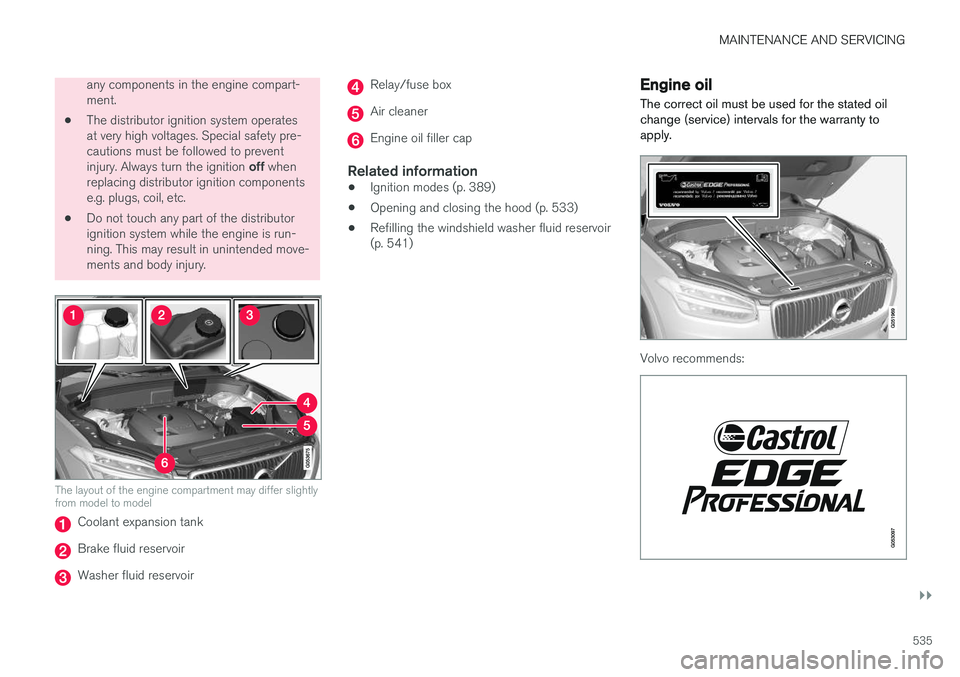
The layout of the engine compartment may differ slightly from model to model
Coolant expansion tank
Brake fluid reservoir
Washer fluid reservoir
Relay/fuse box
Air cleaner
Engine oil filler cap
Related information
•Ignition modes (p. 389)
• Opening and closing the hood (p. 533)
• Refilling the windshield washer fluid reservoir (p. 541)
Engine oil
The correct oil must be used for the stated oil change (service) intervals for the warranty toapply.
Volvo recommends:
Page 548 of 580
||
MAINTENANCE AND SERVICING
546
WARNING
•Never use more than one floor mat at a time on the driver's floor. Before driving,remove the original mat from the driver'sseat floor before using any other type offloor mat. Any mat used in this positionshould be securely and properly anchoredin the attaching pins. An extra mat on thedriver's floor can cause the acceleratorand/or brake pedal to catch. Check thatthe movement of these pedals is notimpeded.
• Volvo's floor mats are specially manufac-tured for your car. They must be firmlysecured in the clips on the floor so thatthey cannot slide and become trappedunder the pedals on the driver's side.
Related information
• Cleaning the center display (p. 546)
Cleaning the center display
Marks, stains, etc., on the center display may affect its performance and readability. Clean itregularly with a microfiber cloth.
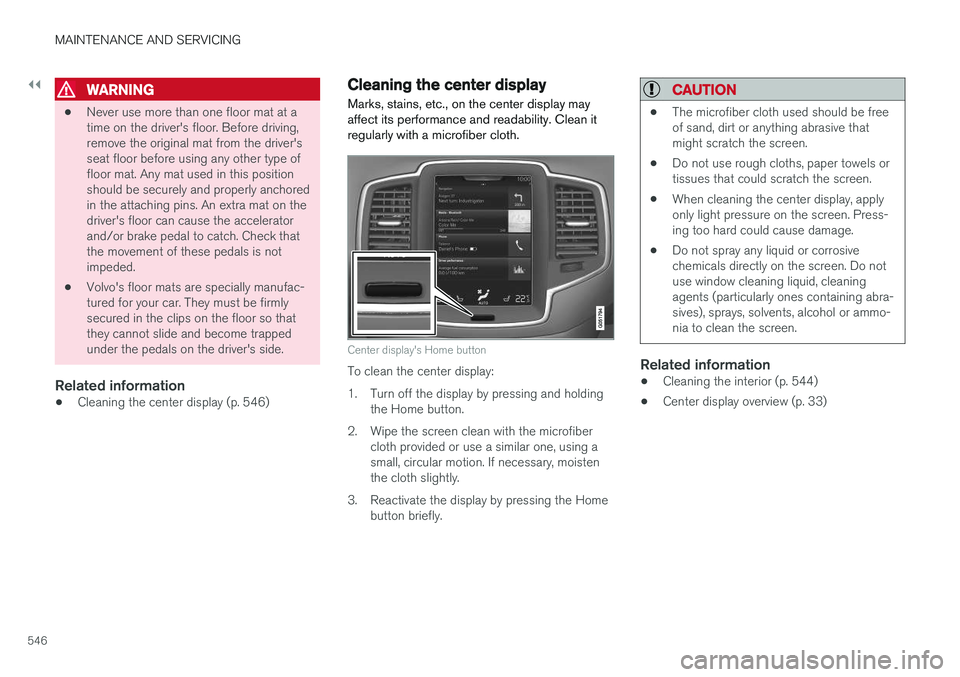
Center display's Home button
To clean the center display:
1. Turn off the display by pressing and holding the Home button.
2. Wipe the screen clean with the microfiber cloth provided or use a similar one, using a small, circular motion. If necessary, moistenthe cloth slightly.
3. Reactivate the display by pressing the Home button briefly.
CAUTION
• The microfiber cloth used should be free of sand, dirt or anything abrasive thatmight scratch the screen.
• Do not use rough cloths, paper towels ortissues that could scratch the screen.
• When cleaning the center display, applyonly light pressure on the screen. Press-ing too hard could cause damage.
• Do not spray any liquid or corrosivechemicals directly on the screen. Do notuse window cleaning liquid, cleaningagents (particularly ones containing abra-sives), sprays, solvents, alcohol or ammo-nia to clean the screen.
Related information
•Cleaning the interior (p. 544)
• Center display overview (p. 33)
Page 567 of 580
INDEX
565
A
A/C (air conditioning) 207
Accessory installation warning 26, 29
Active high beams 147
Active yaw control 259
Adaptive brake lights 366
Adaptive cruise control 277, 280, 281,283, 284, 285, 289
passing assistance 285
pilot assist 303
Adaptive Cruise Control fault tracing 287
limitations 288
Airbags disconnecting the front passenger