mode VOLVO XC90 T8 2017 Owner´s Manual
[x] Cancel search | Manufacturer: VOLVO, Model Year: 2017, Model line: XC90 T8, Model: VOLVO XC90 T8 2017Pages: 580, PDF Size: 10.37 MB
Page 4 of 580
2
INTRODUCTION
Contacting Volvo14
Volvo On Call Roadside Assistance 14
Additional information about your vehicle 14
General information about Twin Engine Plug-in Hybrid vehicles 16
Volvo and the environment 20
Owner's manual and the environment 21
IntelliSafe —driver support
21
Sensus 22
Owner's manual in mobile devices 25
Options, accessories and the On-board Diagnostic (OBDII) socket 26
Finding owner's information 28
Driver distraction 29
Volvo Structural Parts Statement 30
Crash event data 31
Volvo ID 32
Center display overview 33
Changing center display settings 35
Using the center display keyboard 36
Function view buttons 41
Navigating in the center display's views 43
Symbols in the center display status bar 48
Changing settings in different typesof apps 48
Using the center display
49
Using the owner's manual 53
On-board digital owner's manual 55
Navigating in the digital owner's manual 56
Glass 58
Technician certification 58
SAFETY
General safety information60
Occupant safety 60
Reporting safety defects 61
Recall information 62
Safety during pregnancy 62
Whiplash protection system 63
Seat belts 64
Seat belt pretensioners 65
Buckling and unbuckling seat belts 66
Door and seat belt reminders 68
Airbag system 69
Driver/passenger side airbags 70
Occupant weight sensor 73
Side impact airbags 76
Inflatable curtains 77
Safety mode 78
Starting or moving a vehicle in safety mode 78
Child safety 79
Child restraints 81
Infant seats 83
Convertible seats 85
Booster cushions 88
ISOFIX/LATCH lower anchors 89
Lower child seat attachment points 90
TABLE OF CONTENTS
Page 5 of 580
3
Top tether anchors91
Integrated booster cushion *
92
Raising the integrated booster cushion *
93
Stowing the integrated booster cushion *
95
INSTRUMENTS AND CONTROLS
Instruments and controls
98
Trip computer 99
Displaying trip computer information 100
Displaying trip statistics 102
HomeLink ®
Wireless Control System *102
Programming the HomeLink ®
Wire-
less Control System * 103
Adjusting the power door mirrors 106
Laminated panoramic roof *
108
Operating the laminated panoramic roof *
109
Power windows 111
Operating the power windows 111
Rearview mirror 112
Using sun curtains *
113
Settings view 113
Categories in Settings view 114
Changing system settings in Set- tings view 116
Changing settings in apps 117
Resetting the settings view 117
Resetting user data when the vehiclechanges owners 118
Ambient temperature sensor 118
Clock 119
Head-up display (HUD) *
120
Voice control
123
Using voice commands 123
Voice control for cell phones 124
Voice control for radio and media 125
Climate system voice commands 126
Navigation system voice commands 127
Voice control settings 128
Instrument panel 128
Instrument panel settings 130
Indicator symbols in the instrument panel 131
Hybrid-related information in the instrument panel 133
Instrument panel licenses 135
Warning symbols in the instrument panel 140
Compass 141
Calibrating the compass 142
Lighting panel and controls 143
Parking lights 145
Daytime Running Lights (DRL) 145
Low beam headlights 146
High and low beam headlights 147
Active Bending Lights *
148
Rear fog lights (certain models only) 149
Brake lights 150
Hazard warning flashers 150
Page 8 of 580
6
Start and lock system type designations256
DRIVER SUPPORT
Driver support systems258
Adjustable steering force *
258
Electronic Stability Control (ESC) 259
Electronic Stability Control (ESC) sport mode 260
Electronic Stability Control (ESC)symbols and messages 261
Roll stability control (RSC) 263
Speed limiter (SL) *
263
Starting and activating the Speed Limiter (SL) * 264
Changing a Speed Limiter (SL) *
maximum speed 265
Automatic Speed Limiter (ASL) *
265
Activating/deactivating theAutomatic Speed Limiter (ASL) *267
Changing tolerance for the Automatic Speed Limiter 267
Deactivating/reactivating the Speed Limiter * 268
Turning the Speed Limiter * off
269
Cruise Control (CC) 270
Starting and activating Cruise Control 270
Changing Cruise Control speed 271
Deactivating/resuming Cruise Control (CC) 272
Turning Cruise Control off 273
Switching between Cruise Control and Adaptive Cruise Control*274
Distance Alert *
275
Using Distance Alert *
276
Distance Alert * limitations
277
Adaptive Cruise Control (ACC) *
277
Starting and activating AdaptiveCruise Control (ACC) * 280
Deactivating/resuming Adaptive Cruise Control (ACC) 281
Changing Adaptive Cruise Control(ACC) speed 283
Setting an Adaptive Cruise Controltime interval 284
Passing Assistance with AdaptiveCruise Control or Pilot Assist 285
Changing target vehicles and auto-matic braking with Adaptive CruiseControl (ACC) 285
Adaptive Cruise Control (ACC) -troubleshooting 287
Adaptive Cruise Control (ACC) - limi-tations 288
Adaptive Cruise Control (ACC) sym-bols and messages 289
Pilot Assist *
291
Starting and activating Pilot Assist 294
Changing Pilot Assist speed 296
Page 10 of 580
8
STARTING AND DRIVING
Starting and driving362
Brakes 362
Brake functions 364
Auto-hold brake function 365
Brake assist system 365
Braking effect after a collision 366
Emergency brake lights 366
Hill Descent Control (HDC) 366
Low Speed Control (LSC) 367
Hill Start Assist 368
Parking brake 369
Using the parking brake 369
Parking brake malfunctions 371
Before a long distance trip 372
Driving economically 372
Driving through standing water 374
Overheating the engine and transmission 375
Winter driving 376
Towing eyelet 376
Towing recommendations 377
Fuel 378
Octane rating 379
Opening/closing the fuel filler door 380
Emission controls 381
Jump starting382
Driving with a trailer 384
Detachable trailer hitch *
387
Trailer Stability Assist (TSA) 388
Ignition modes 389
Battery drain 390
Starting the engine 390
Turning the engine off 393
Driving systems 393
Hybrid battery charging cable 394
Hybrid charging cable circuit breaker 396
Hybrid-related symbols and messages 397
Preparations for charging the hybrid battery 399
Stopping hybrid battery charging 400
Initiating hybrid battery charging 401
Charging the hybrid battery 403
Hybrid battery charge status 404
Charger status indicators 406
Hybrid battery charging current 407
Long-term storage of a vehicle witha hybrid battery 408
Using the electric motor in city driving 408
Maintaining/increasing the hybridbattery's charge while driving 410
Drive modes
411
Automatic transmission 414
Shiftlock 415
Gear shift indicator 415
Gear selector positions 416
Steering wheel paddles *
418
All Wheel Drive (AWD) 419
Leveling control * and suspension
419
Page 11 of 580
9
INFOTAINMENT
The infotainment system422
Apps (applications) 422
Sound settings 423
Radio 424
Radio settings 424
RBDS radio 424
Changing and searching for radio stations 425
HD Radio ™reception
426
Switching HD Radio on and off 427
HD Radio sub-channels 428
HD Radio limitations 429
SiriusXM ®
Satellite radio * 429
Using SiriusXM ®
Satellite radio *430
SiriusXM ®
Satellite radio * settings 432
SiriusXM Travel Link *
433
SiriusXM Travel Link - Weather 434
SiriusXM Travel Link - Alerts 435
SiriusXM Travel Link - Fuel 436
SiriusXM Travel Link - Sports 437
Phone 438
Pairing a cell phone 439
Connecting/disconnecting a cell phone 440
Handling phone calls 441
Managing the phone book443
Handling text messages 444
Phone settings 445
Text message settings 445
Connecting a Bluetooth ®
device 445
Connecting a device via the AUX/USB socket 446
Media player 446
Apple CarPlay 447
Apple CarPlay settings 449
Android auto *
449
Android Auto * settings
451
CD (media) player *
451
Playing media 452
Media searches 454
Playing media through theAUX/USB sockets 454
Streaming media through a Blue-tooth connection 455
Media sound settings 455
Gracenote 456
Video 456
Media player technical data 457
Internet connected vehicle 458
Connecting to the Internet 459
Bluetooth settings460
Downloading, updating and uninstal- ling apps 461
Internet connection troubleshooting 462
Tethering (Wi-Fi sharing) 462
Deleting Wi-Fi networks 463
Wi-Fi technology and security 463
Vehicle modem settings 464
Infotainment system license information 464
Terms, conditions and confidentiality 469
Page 17 of 580
INTRODUCTION
15
Mobile apps
Beginning with model year 2014, the owner's manual is available in the form of an app for cer-tain Volvo models. The Volvo On Call app canalso be found here.
Owner's manuals for earlier model Volvos
Owner's manuals for earlier model Volvos are available in PDF format. Quick Guides and sup-plements can also be found on the support site.Select a model and a model year and downloadthe desired information.
ContactContact information for customer support and thenearest Volvo retailer are available on the site.
Related information
•Using the owner's manual (p. 53)
• On-board digital owner's manual (p. 55)
• Volvo ID (p. 32)
Page 20 of 580
||
INTRODUCTION
18
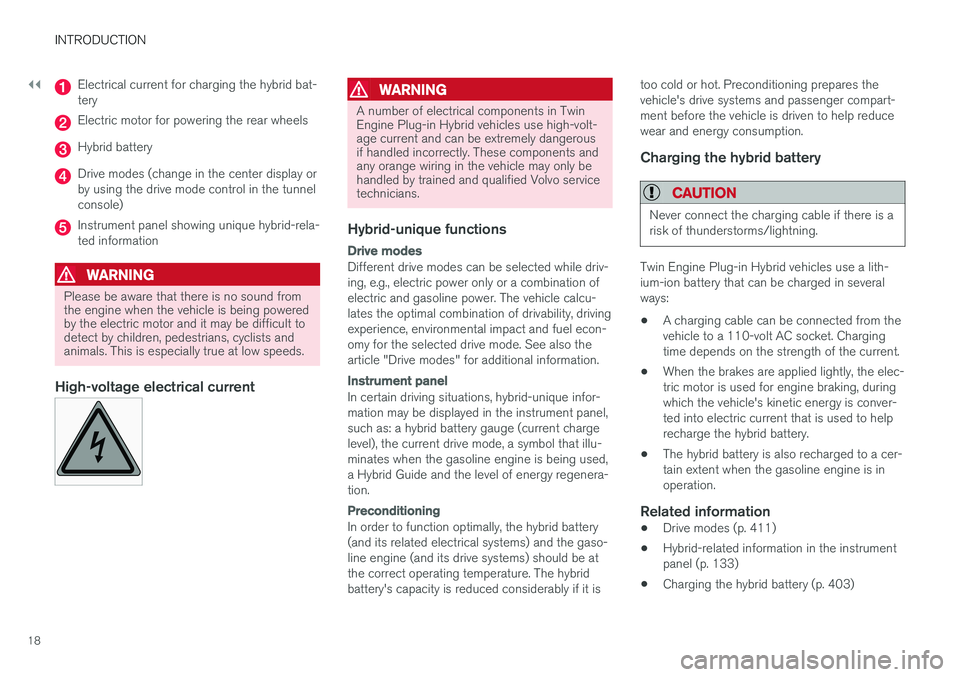
Electrical current for charging the hybrid bat- tery
Electric motor for powering the rear wheels
Hybrid battery
Drive modes (change in the center display or by using the drive mode control in the tunnelconsole)
Instrument panel showing unique hybrid-rela- ted information
WARNING
Please be aware that there is no sound from the engine when the vehicle is being poweredby the electric motor and it may be difficult todetect by children, pedestrians, cyclists andanimals. This is especially true at low speeds.
High-voltage electrical current
WARNING
A number of electrical components in Twin Engine Plug-in Hybrid vehicles use high-volt-age current and can be extremely dangerousif handled incorrectly. These components andany orange wiring in the vehicle may only behandled by trained and qualified Volvo servicetechnicians.
Hybrid-unique functions
Drive modes
Different drive modes can be selected while driv- ing, e.g., electric power only or a combination ofelectric and gasoline power. The vehicle calcu-lates the optimal combination of drivability, drivingexperience, environmental impact and fuel econ-omy for the selected drive mode. See also thearticle "Drive modes" for additional information.
Instrument panel
In certain driving situations, hybrid-unique infor- mation may be displayed in the instrument panel,such as: a hybrid battery gauge (current chargelevel), the current drive mode, a symbol that illu-minates when the gasoline engine is being used,a Hybrid Guide and the level of energy regenera-tion.
Preconditioning
In order to function optimally, the hybrid battery (and its related electrical systems) and the gaso-line engine (and its drive systems) should be atthe correct operating temperature. The hybridbattery's capacity is reduced considerably if it istoo cold or hot. Preconditioning prepares thevehicle's drive systems and passenger compart-ment before the vehicle is driven to help reducewear and energy consumption.
Charging the hybrid battery
CAUTION
Never connect the charging cable if there is a risk of thunderstorms/lightning.
Twin Engine Plug-in Hybrid vehicles use a lith- ium-ion battery that can be charged in severalways:
• A charging cable can be connected from thevehicle to a 110-volt AC socket. Chargingtime depends on the strength of the current.
• When the brakes are applied lightly, the elec-tric motor is used for engine braking, duringwhich the vehicle's kinetic energy is conver-ted into electric current that is used to helprecharge the hybrid battery.
• The hybrid battery is also recharged to a cer-tain extent when the gasoline engine is inoperation.
Related information
•
Drive modes (p. 411)
• Hybrid-related information in the instrumentpanel (p. 133)
• Charging the hybrid battery (p. 403)
Page 22 of 580
INTRODUCTION
20
Volvo and the environment Volvo is committed to the well-being of its cus- tomers. As a natural part of this commitment, wecare about the environment in which we all live.Concern for the environment means an everydayinvolvement in reducing our environmentalimpact.
Volvo's environmental activities are based on a holistic view, which means we consider the over-all environmental impact of a product throughoutits complete life cycle. In this context, design, pro-duction, product use, and recycling are all impor-tant considerations. In production, Volvo haspartly or completely phased out several chemicalsincluding CFCs, lead chromates, asbestos, andcadmium; and reduced the number of chemicalsused in our plants 50% since 1991. Volvo was the first in the world to introduce into production a three-way catalytic converter with aLambda sond, now called the heated oxygen sen-sor, in 1976. The current version of this highlyefficient system reduces emissions of harmfulsubstances (CO, HC, NOx) from the exhaust pipeby approximately 95 – 99% and the search toeliminate the remaining emissions continues.Volvo is the only automobile manufacturer tooffer CFC-free retrofit kits for the air conditioningsystem of all models as far back as the 1975model 240. Advanced electronic engine controlsand cleaner fuels are bringing us closer to ourgoal. In addition to continuous environmentalrefinement of conventional gasoline-poweredinternal combustion engines, Volvo is activelylooking at advanced technology alternative-fuelvehicles. When you drive a Volvo, you become our partner in the work to lessen the car's impact on theenvironment. To reduce your vehicle's environ-mental impact, you can:
• Maintain proper air pressure in your tires.Tests have shown decreased fuel economywith improperly inflated tires.
• Follow the recommended maintenanceschedule in your Warranty and ServiceRecords Information booklet.
• Drive at a constant speed whenever possible.
• See a trained and qualified Volvo servicetechnician as soon as possible for inspectionif the check engine (malfunction indicator)light illuminates, or stays on after the vehiclehas started.
• Properly dispose of any vehicle-related wastesuch as used motor oil, used batteries, brakepads, etc.
• When cleaning your vehicle, please use gen-uine Volvo car care products. All Volvo carcare products are formulated to be environ-mentally friendly.
Twin Engine Plug-in Hybrid vehicles
• If possible, precondition the vehicle with thecharging cable before driving.
• If preconditioning is not possible in coldweather, use the seat and steering wheelheating primarily. Avoid heating the entirepassenger compartment, which reduces thehybrid battery's charge level.
• Choose the
Pure drive mode to help mini-
mize electric power consumption.
• In hilly terrain, put the gear selector in mode B
to utilize the electric motor's braking func-
tion when the accelerator pedal is released. This helps charge the hybrid battery.
Related information
• Driving economically (p. 372)
Page 27 of 580
INTRODUCTION
25
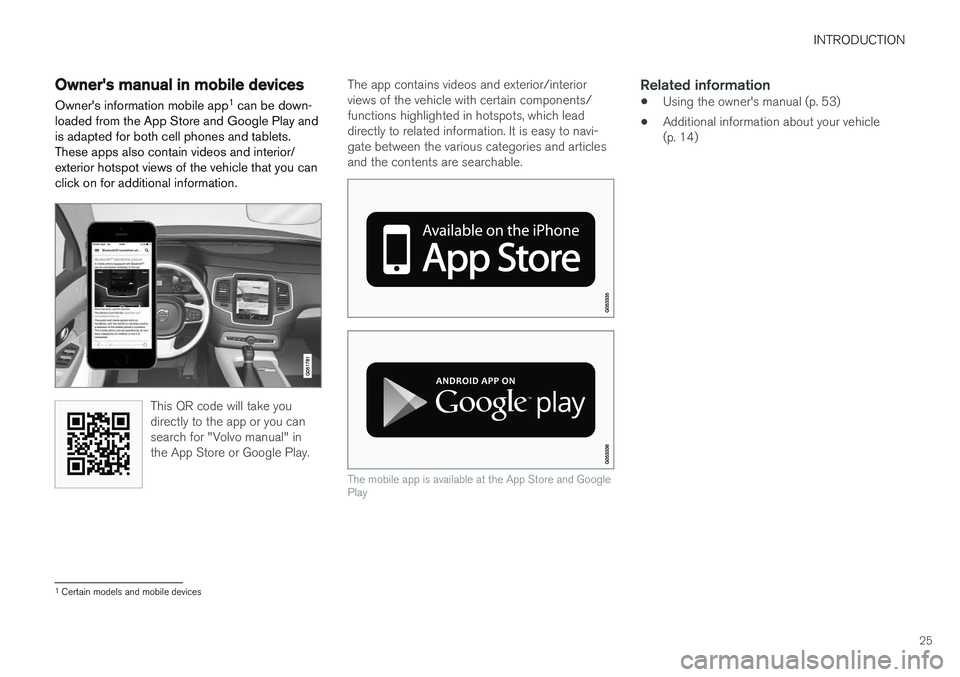
Owner's manual in mobile devicesOwner's information mobile app 1
can be down-
loaded from the App Store and Google Play and is adapted for both cell phones and tablets.These apps also contain videos and interior/exterior hotspot views of the vehicle that you canclick on for additional information.
This QR code will take you directly to the app or you cansearch for "Volvo manual" inthe App Store or Google Play.
The app contains videos and exterior/interior views of the vehicle with certain components/functions highlighted in hotspots, which leaddirectly to related information. It is easy to navi-gate between the various categories and articlesand the contents are searchable.
The mobile app is available at the App Store and Google Play
Related information
• Using the owner's manual (p. 53)
• Additional information about your vehicle (p. 14)
1
Certain models and mobile devices
Page 28 of 580

INTRODUCTION
26
Options, accessories and the On- board Diagnostic (OBDII) socket We strongly recommend that Volvo owners install only genuine, Volvo-approved accesso-ries, and that accessory installations be per-formed only by a trained and qualified Volvoservice technician.
Optional or accessory equipment described in this manual is indicated by an asterisk. Optional or accessory equipment may not be available in all countries or markets. Please notethat some vehicles may be equipped differently,depending on special legal requirements. Contact your Volvo retailer for additional informa- tion.
NOTE
• Do not export your Volvo to another country before investigating that coun-try's applicable safety and exhaust emis-sion requirements. In some cases it maybe difficult or impossible to comply withthese requirements. Modifications to theemission control system(s) may renderyour Volvo not certifiable for legal opera-tion in the U.S., Canada and other coun-tries.
• All information, illustrations and specifica-tions contained in this manual are basedon the latest product information availa-ble at the time of publication. Please notethat some vehicles may be equipped dif-ferently, depending on market-specificadaptations or special legal requirements.Optional equipment described in thismanual may not be available in all mar-kets.
• Some of the illustrations shown aregeneric and are intended as examplesonly, and may not depict the exact modelfor which this owner's information isintended.
• Volvo reserves the right to make modeland product changes at any time, or tochange specifications or design withoutnotice and without incurring obligation.
WARNING
If your vehicle is involved in an accident, unseen damage may affect its drivability andsafety.
WARNING
CALIFORNIA proposition 65 Engine exhaust, some of its constituents, and certain vehicle components contain or emitchemicals known to the state of California tocause cancer, and birth defects or otherreproductive harm. In addition, certain fluidscontained in vehicles and certain products ofcomponent wear contain or emit chemicalsknown to the State of California to cause can-cer, and birth defects or other reproductiveharm.
WARNING
Certain components of this vehicle such as air bag modules, seat belt pretensioners, adap-tive steering columns, and button cell batter-ies may contain Perchlorate material. Specialhandling may apply for service or vehicle endof life disposal. See www.dtsc.ca.gov/hazardouswaste/ perchlorate.
• Genuine Volvo accessories are tested to ensure compatibility with the performance,safety, and emission systems in your vehicle.