wheel VOLVO XC90 TWIN ENGINE 2018 Owners Manual
[x] Cancel search | Manufacturer: VOLVO, Model Year: 2018, Model line: XC90 TWIN ENGINE, Model: VOLVO XC90 TWIN ENGINE 2018Pages: 686, PDF Size: 17 MB
Page 459 of 686
STARTING AND DRIVING
}}
457
Driving
• Choose the Pure drive mode to help mini-
mize electric power consumption.
• Maintain a steady speed and a generous fol-
lowing distance to traffic ahead to minimize
braking. This drive mode has the lowest
power consumption.
• Balance energy requirements using the
accelerator pedal. Use the indicator on the
instrument panel to see available electric
power and avoid starting the combustion
engine unnecessarily. The electric motor is
more effective than the combustion engine,
especially at low speeds.
• When braking is necessary, brake gently
using the brake pedal. This will recharge the
hybrid battery. A regenerative function is
integrated in the brake pedal and can be
augmented by the electric motor's braking
capacity when the gear selector is in mode
B.
• Higher speeds increase energy consumption
- air resistance increases with speed.
• Activate the
Hold function in the Function
view at high speeds when traveling farther
than is possible using the hybrid battery's
capacity.
• Whenever possible, avoid using the Charge
function to charge the hybrid battery. Charg-
ing the battery using the combustion engine increases fuel consumption and carbon diox-
ide emissions.
• In a cold climate, reduce heating of the wind-
shield/rear window, mirrors, seats and the
steering wheel.
• Maintain the correct pressure in the tires and
check pressure regularly.
• The type of tires used could affect energy
consumption - consult a retailer for advice on
suitable tires.
• Remove unnecessary items from the vehicle
- the heavier the load, the higher the fuel
consumption.
• Roof loads increase air resistance and
increase fuel consumption. Remove roof
boxes, ski racks, etc. that are not in use.
• Avoid driving with the windows open.
• Do not keep the vehicle still on an upward
gradient by using the accelerator pedal. Use
the brakes instead.
Related information
•
Drive-E
‒
purer driving pleasure (p. 27)
• Factors affecting electric motor range
(p. 458)
• Using the electric motor only (p. 457)
• Hybrid gauge (p. 87)
• Checking tire pressure (p. 557) Using the electric motor only
When using the electric motor, Volvo Twin
Engine provides a combination of good fuel
economy, low emissions and high performance.
For energy-efficient driving:
• Select the Pure drive mode to help maximize
driving range using only the electric motor.
• Balance energy requirements using the
accelerator pedal. Use the indicator on the
instrument panel's hybrid gauge to see avail-
able electric power and avoid starting the
combustion engine unnecessarily.
• When braking is necessary, brake gently
using the brake pedal. This will recharge the
hybrid battery.
• Activate the
Hold function in the Function
view at high speeds when traveling farther
than is possible using the hybrid battery's
capacity.
• Reduce current consumption in the passen-
ger compartment by reducing e.g. fan speed,
electric heating, or air conditioning use.
Also follow the general economical driving advice
regarding speed, tires and load to maximize
range.
Related information
• General information about Twin Engine
(p. 406)
• Economical driving (p. 456)
Page 463 of 686
STARTING AND DRIVING
461
•
Speed limiter (p. 278)
• Tire sealing system (p. 572) Winter driving
It is important to check the vehicle before driving
in cold/snowy conditions to make sure it can be
driven safely.
Before the cold season arrives:• Make sure the engine coolant contains 50%
antifreeze. This mixture helps protect the
engine from frost erosion down to
approx. -35 °C (-31 °F). Do not mix different
types of antifreeze as this could pose a
health risk.
• Keep the fuel tank well filled to prevent con-
densation from forming.
• Check the viscosity of the engine oil. Oil with
low viscosity (thinner oil) improves cold-
weather starting and reduces fuel consump-
tion when driving with a cold engine.
CAUTION Low-viscosity oil should not be used with hard
driving or in hot weather.
•
Check the condition and charge level of the
start battery. Cold weather places greater
demands on the start battery and reduces its
capacity.
• Use washer fluid containing antifreeze to
help prevent ice from forming in the washer
fluid reservoir.
Slippery driving conditionsFor optimal traction and roadholding, Volvo rec-
ommends using snow tires on all wheels when-
ever there is a risk of snow or ice on the road.
NOTE Certain countries require use of winter tires
by law. Not all countries permit the use of
studded tires.
Practice driving on slippery surfaces under con-
trolled conditions to learn how the vehicle reacts.
Related information
•
Snow tires (p. 571)
• Snow chains (p. 571)
• Braking on salted roads (p. 431)
• Braking on wet roads (p. 431)
• Filling washer fluid (p. 650)
• Start battery (p. 615)
• Replacing windshield wiper blades (p. 648)
• Changing rear window wipers (p. 647)
• Refilling coolant (p. 612)
Page 473 of 686
STARTING AND DRIVING
}}
* Option/accessory. 471•
If contact occurs, flush the affected area
immediately with water. Obtain medical
help immediately if eyes are affected.
• Never expose the battery to open flame
or electric spark. Do not smoke near the
battery. Failure to follow the instructions
for jump starting can lead to injury.
NOTE The vehicle cannot be started if the hybrid
battery is discharged.
Related information
•
Starting the vehicle (p. 424)
• Ignition modes (p. 427)
• Adjusting the steering wheel (p. 199)
• Selecting ignition mode (p. 428) Detachable towbar*
Volvo recommends the use of Volvo towbars
that are specially designed for the vehicle.
NOTE The optional detachable trailer hitch may not
be available in all markets or on all models.
Consult your Volvo retailer.
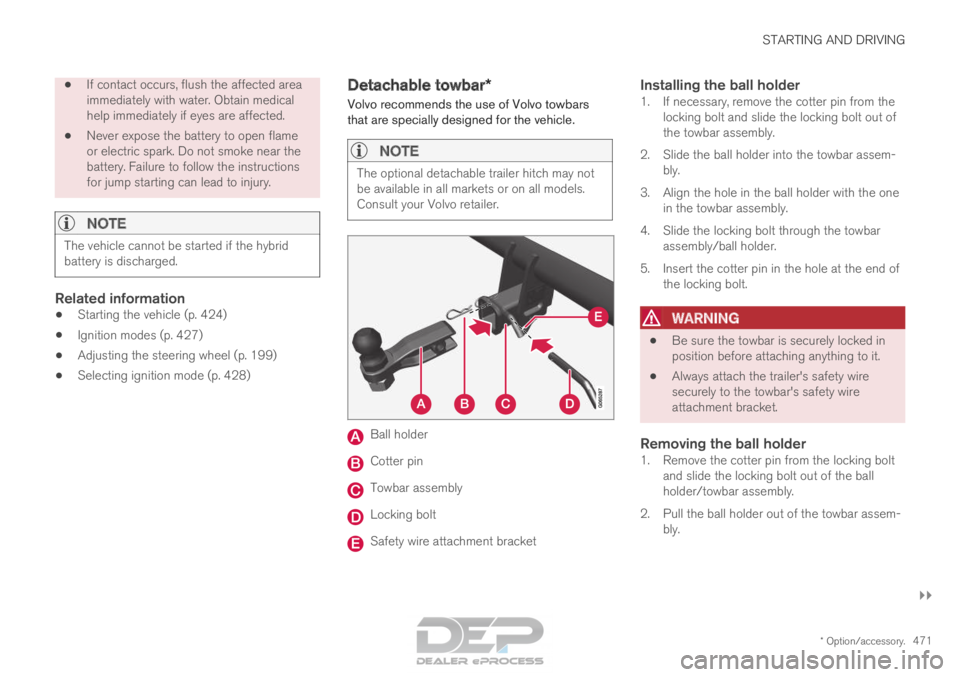
Ball holder
Cotter pin
Towbar assembly
Locking bolt
Safety wire attachment bracket
Installing the ball holder1. If necessary, remove the cotter pin from the
locking bolt and slide the locking bolt out of
the towbar assembly.
2. Slide the ball holder into the towbar assem- bly.
3. Align the hole in the ball holder with the one in the towbar assembly.
4. Slide the locking bolt through the towbar assembly/ball holder.
5. Insert the cotter pin in the hole at the end of the locking bolt.
WARNING •
Be sure the towbar is securely locked in
position before attaching anything to it.
• Always attach the trailer's safety wire
securely to the towbar's safety wire
attachment bracket.
Removing the ball holder1. Remove the cotter pin from the locking bolt
and slide the locking bolt out of the ball
holder/towbar assembly.
2. Pull the ball holder out of the towbar assem- bly.
Page 475 of 686

STARTING AND DRIVING
* Option/accessory.473
CAUTION•
Bumper-attached trailer hitches must not
be used on Volvos, nor should safety
chains be attached to the bumper.
• Trailer hitches attaching to the vehicle
rear axle must not be used.
• Never connect a trailer's hydraulic brake
system directly to the vehicle brake sys-
tem, nor a trailer's lighting system directly
to the vehicle lighting system. Consult
your nearest authorized Volvo retailer for
correct installation.
• When towing a trailer, the trailer's safety
chains or wire must be correctly fastened
to the attachment points provided in the
trailer hitch on the vehicle. The safety
chain or wire must never be fastened to
or wound around the towing ball.
NOTE The optional detachable trailer hitch may not
be available in all markets or on all models.
Consult your Volvo retailer.
NOTE
Extreme weather conditions, towing a trailer,
driving at high altitudes and fuel quality are
factors that significantly increase a vehicle's
fuel consumption.
Trailer weights
WARNING Please adhere to the recommendations provi-
ded for trailer weight. If the recommendations
are not followed, the vehicle and trailer may
be difficult to control during evasive maneu-
vers and braking.
NOTE
The specified maximum trailer weights are
those permitted by Volvo. National vehicle
regulations may set additional restrictions on
trailer weight and speed. The trailer hitches
may be certified for higher towing weights
than the vehicle is permitted to tow.
Self-leveling suspension*The vehicle's self-leveling system attempts to
keep the vehicle at a constant level, regardless of
load (up to the maximum permitted weight).
When the vehicle is stationary, the rear end of the
vehicle will be slightly lowered, which is normal.
Driving in hilly terrain or hot weatherIn certain conditions, there is a risk of overheat-
ing when driving with a trailer. If overheating of
the engine and drive system is detected, a warn-
ing symbol will illuminate in the instrument panel
along with a message.The automatic transmission selects the optimal
gear for the current load and engine speed.
Steep inclines
Do not lock the automatic transmission into a
higher gear than what the engine can handle ‒ it
is not always preferable to drive in high gears at
low rpm.
Parking on a hill
1. Depress the brake pedal.
2. Apply the parking brake.
3. Put the gear selector in P.
4. Release the brake pedal.
Put chocks behind the wheels when the vehicle
is parked on a hill with a trailer attached.
Starting on a hill
1. Depress the brake pedal.
2. Put the gear selector in D.
3. Release the parking brake.
4. Release the brake pedal and start driving.
Related information
• Trailer Stability Assist* (p. 474)
• Checking trailer lights (p. 475)
• Towing capacity and tongue weight (p. 660)
• Overheating of engine and transmission
(p. 468)
Page 476 of 686

STARTING AND DRIVING
* Option/accessory.
474 Trailer Stability Assist*
Trailer Stability Assist (TSA 8
) is a function
designed to help stabilize a vehicle that is tow-
ing a trailer when the vehicle and trailer have
begun to sway. The function is part of the Elec-
tronic Stability Control system ESC 9
.
Reasons for swayingA vehicle towing a trailer may begin to sway for
various reasons. Normally this only occurs at high
speeds. However, if the trailer is overloaded or
unevenly distributed, e.g. too far back, there is a
risk of swaying even at low speeds.
Swaying may be caused by factors such as:
• The vehicle and trailer are hit by a sudden,
strong crosswind.
• The vehicle and trailer are traveling on an
uneven road or over a bump.
• Sudden movements of the steering wheel.
Once swaying has begun, it can be difficult or
impossible to stop it. This makes the vehicle and
trailer difficult to control and there is a risk of
swerving into oncoming traffic or driving off the
road.
Trailer Stability Assist functionTrailer Stability Assist continuously monitors the
vehicle's movements, particularly lateral move- ments. If swaying is detected, the brakes are
applied individually on the front wheels, which has
a stabilizing effect on the vehicle and trailer. This
is often enough to enable the driver to regain
control of the vehicle.
If the Trailer Stability Assist function's first
attempt is not adequate to stop the swaying
motion, the brakes are applied on all wheels and
engine power is temporarily reduced. As the
swaying motion begins to decrease and the vehi-
cle and trailer have once again become stable,
TSA stops regulating the brakes/engine power
and the driver regains control of the vehicle.
NOTE
Trailer Stability Assist is deactivated if the
driver selects the sport mode by deactivating
ESC in the center display's menu system. Trailer Stability Assist may not intervene if the
driver tries to compensate for the swaying motion
by moving the steering wheel rapidly, because
the system will then not be able to determine if it
is the trailer or the driver causing the swaying. When Trailer Stability Assist is
activated, the ESC symbol is
displayed in the instrument
panel.
Related information
•
Driving with a trailer (p. 472)
• Electronic Stability Control (p. 274) 8
Trailer Stability Assist
9 Electronic Stability Control
Page 477 of 686

STARTING AND DRIVING
* Option/accessory.475
Checking trailer lights
When connecting a trailer, make sure that all of
the lights on the trailer are functioning before
starting to drive.
Trailer turn signals and brake lightsIf one or more of the turn signals or brake lights
on the trailer is not working, a symbol and mes-
sage will be displayed in the instrument panel.
The other lights on the trailer must be checked
manually by the driver before the vehicle is driven. Symbol
Message •
Trailer turn indicator Right
turn indicator malfunction
• Trailer turn indicator Left
turn indicator malfunction •
Trailer brake light Malfunc-
tion If any of the trailer's turn signal lights is not work-
ing, the turn signal symbol in the instrument
panel will also flash more quickly than normal.
Trailer rear fog lightWhen a trailer is connected, the vehicle's rear fog
light may not illuminate and rear fog light func-
tionality is instead transferred to the trailer. If this
is the case, check to see if the trailer is equipped
with a rear fog light before activating the vehicle's fog lights when driving with a trailer to help
ensure safe operation.
Checking trailer lights*
Automatic check
When the trailer has been connected to the vehi-
cle's electrical system, its lights can be checked
by automatically activating them. This function
helps the driver check that the trailer's lights are
functioning correctly before starting to drive.
In order to perform this check, the engine must
be turned off.
1. When a trailer is connected to the towbar, the message Automatic Trailer Lamp
Check will appear in the instrument panel.
2.
Acknowledge the message by pressing the
O button on the right-side steering wheel
keypad.
> The light check will begin.
3. Get out of the vehicle to perform the check. > All of the lights on the trailer will beginflashing, and then illuminate separately
one at a time.
4. Visually check that all of the trailer's lights are functioning correctly.
5. After a short time, all of the trailer's lights will start flashing again.
> The light check is completed.
Disabling the automatic check
The automatic light check can be disabled in the
center display.
1.Tap Settings in the Top view.
2.
Tap My Car Lights and Lighting
.
3. Deselect Automatic Trailer Lamp Check.
Manual check
If the automatic check has been disabled, the
check can be started manually.
1.
Tap Settings in the Top view.
2.
Tap My Car Lights and Lighting
.
3. Select Manual Trailer Lamp Check.
>
The light check will begin. Get out of the
vehicle to perform the check.
Related information
• Driving with a trailer (p. 472)
Page 478 of 686
STARTING AND DRIVING
476Towing using a towline
This section refers to one vehicle being towed
behind another using a towline.
Twin Engine vehicles may not be towed behind
another vehicle due to the risk of damage to the
electric motor. If the vehicle cannot be driven and
needs to be moved, it must be transported on a
tow truck with all four wheels on the bed of the
truck.
Towing another vehicleTowing another vehicle requires a lot of power -
use the AWD drive mode. This helps charge the
hybrid battery and improve the vehicle's driving
and roadholding characteristics.
Before towing another vehicle, check applicable
speed limit regulations.
Jump startingDo not tow the vehicle to start the engine. Use an
auxiliary battery if the start battery's charge level
is so low that the engine cannot be started.
CAUTION Attempts to tow-start the vehicle could cause
damage to the electrical drive motor and
three-way catalytic converter.
Related information
•
Attaching and removing the towing eyelet
(p. 476)
• Hazard warning flashers (p. 161)
• Recovery (p. 477)
• Jump starting using another battery (p. 469)
• Selecting ignition mode (p. 428) Attaching and removing the towing
eyelet
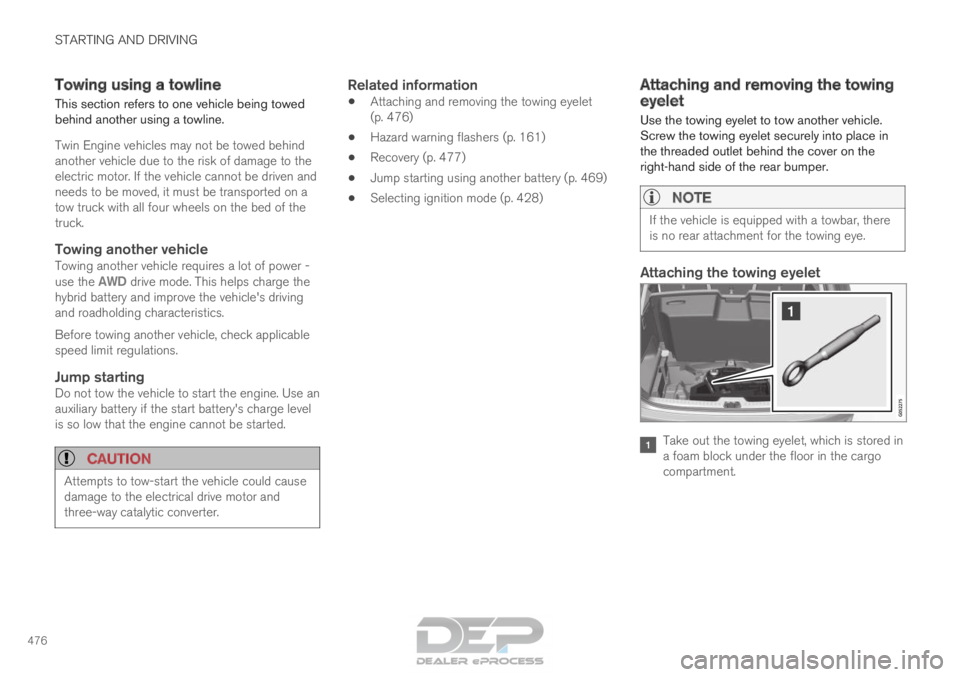
Use the towing eyelet to tow another vehicle.
Screw the towing eyelet securely into place in
the threaded outlet behind the cover on the
right-hand side of the rear bumper.
NOTE If the vehicle is equipped with a towbar, there
is no rear attachment for the towing eye.
Attaching the towing eyelet
Take out the towing eyelet, which is stored in
a foam block under the floor in the cargo
compartment.
Page 479 of 686

STARTING AND DRIVING
}}
* Option/accessory. 477Remove the cover - press the marker with
your finger while prying open the opposite
side/corner open with a coin or similar.
>
The cover turns along its center line and
can then be removed. 3. Screw in the towing eyelet until it reaches its
stop. Fasten the eyelet securing by, for exam-
ple, inserting a lug wrench* through it and
using this as a lever.
CAUTION It is important that the towing eye is screwed
in securely as far as possible.
Removing the towing eyelet:
–
After use, unscrew the towing eyelet and
return it to its storage location.
Replace the cover on the bumper.
Related information
• Towing using a towline (p. 476)
• Recovery (p. 477)
• Tool kit (p. 564) Recovery
This section refers to transporting the vehicle
with a tow truck or similar vehicle. Call a professional towing service for assistance.
In certain conditions, the towing eyelet can be
used to pull the vehicle onto a flatbed tow truck.
CAUTION Note that vehicles with Twin Engine must
always be towed raised with all wheels on the
tow truck.
For vehicles equipped with leveling control*:
If the vehicle is equipped with pneumatic suspen-
sion, this feature must be turned off before the
vehicle is lifted onto a tow truck. Turning off the
function in the center display.
1. Tap Settings in the Top view.
2.
Tap My Car Parking Brake and
Suspension .
3. Select Disable Leveling Control.
The vehicle's location and ground clearance
determine if it can be lifted onto a tow truck. If
the incline of the tow truck is too steep or if the
ground clearance under the vehicle is insufficient,
attempting to pull it up may result in damage. In
this case, the vehicle should only be lifted with
the tow truck's lifting equipment.
Page 488 of 686
AUDIO, MEDIA AND INTERNET
* Option/accessory.
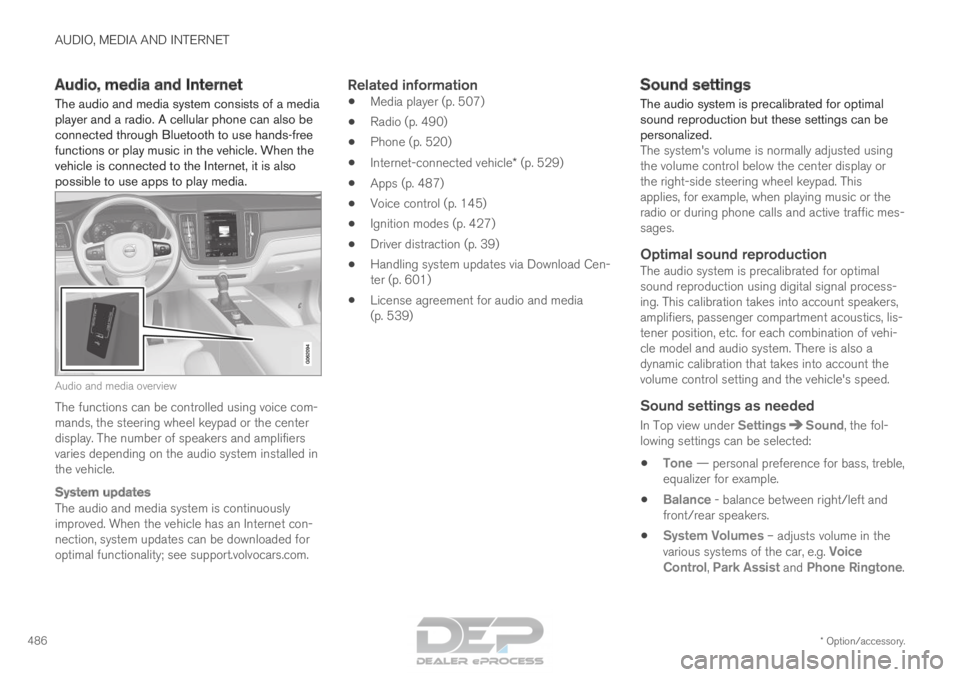
486 Audio, media and Internet
The audio and media system consists of a media
player and a radio. A cellular phone can also be
connected through Bluetooth to use hands-free
functions or play music in the vehicle. When the
vehicle is connected to the Internet, it is also
possible to use apps to play media. Audio and media overview
The functions can be controlled using voice com-
mands, the steering wheel keypad or the center
display. The number of speakers and amplifiers
varies depending on the audio system installed in
the vehicle.
System updates
The audio and media system is continuously
improved. When the vehicle has an Internet con-
nection, system updates can be downloaded for
optimal functionality; see support.volvocars.com.
Related information
•
Media player (p. 507)
• Radio (p. 490)
• Phone (p. 520)
• Internet-connected vehicle* (p. 529)
• Apps (p. 487)
• Voice control (p. 145)
• Ignition modes (p. 427)
• Driver distraction (p. 39)
• Handling system updates via Download Cen-
ter (p. 601)
• License agreement for audio and media
(p. 539) Sound settings
The audio system is precalibrated for optimal
sound reproduction but these settings can be
personalized.
The system's volume is normally adjusted using
the volume control below the center display or
the right-side steering wheel keypad. This
applies, for example, when playing music or the
radio or during phone calls and active traffic mes-
sages.
Optimal sound reproductionThe audio system is precalibrated for optimal
sound reproduction using digital signal process-
ing. This calibration takes into account speakers,
amplifiers, passenger compartment acoustics, lis-
tener position, etc. for each combination of vehi-
cle model and audio system. There is also a
dynamic calibration that takes into account the
volume control setting and the vehicle's speed.
Sound settings as needed
In Top view under Settings Sound, the fol-
lowing settings can be selected:
• Tone — personal preference for bass, treble,
equalizer for example.
• Balance - balance between right/left and
front/rear speakers.
• System Volumes – adjusts volume in the
various systems of the car, e.g.
Voice
Control, Park Assist and Phone Ringtone.
Page 492 of 686

AUDIO, MEDIA AND INTERNET
* Option/accessory.
490 Deleting apps
When the vehicle is connected to the Internet, it
is possible to uninstall apps. If the app is being used, it must be closed before
it can be uninstalled.
1. Open the Download Center app in App
view. 2.
Select Application updates to open a list
of all installed apps.
3. Find the desired app and select Uninstall to
begin uninstalling the app.
>
When the app has been uninstalled, it will
be removed from the list.
Related information
• Apps (p. 487)
• Download apps (p. 488)
• Updating apps (p. 489)
• Handling system updates via Download Cen-
ter (p. 601)
• Internet-connected vehicle* (p. 529) Radio
The radio can receive broadcasting from the FM
waveband with HD Radio™ Technology and
SiriusXM
®
Satellite radio *. When the vehicle has
an Internet connection, it is also possible to lis-
ten to web radio. The radio can be controlled
using voice commands, the
right-side steering wheel key-
pad or the center display.
Related information
•
Starting the radio (p. 491)
• Changing waveband and radio station
(p. 491)
• Storing radio favorites (p. 493)
• Radio settings (p. 493) •
RBDS (p. 494)
• HD Radio™ (p. 494)
• SiriusXM ®
Satellite radio* (p. 498)
• Internet-connected vehicle* (p. 529)
• Voice control for radio and media (p. 148)
• Media player (p. 507)