air conditioning VOLVO XC90 TWIN ENGINE 2018 User Guide
[x] Cancel search | Manufacturer: VOLVO, Model Year: 2018, Model line: XC90 TWIN ENGINE, Model: VOLVO XC90 TWIN ENGINE 2018Pages: 686, PDF Size: 17 MB
Page 226 of 686
CLIMATE CONTROL
224Automatically activating and
deactivating the heated rear window
and door mirrors
The heated rear window and door mirrors are
used to quickly remove condensation and ice
from the glass.
It is possible to select whether rear window and
door mirror heating should be automatically acti-
vated or deactivated when the engine is started.
With automatic start activated, heating will be
activated when there is a risk of ice or condensa-
tion on the windows or mirrors. Heating is auto-
matically switched off when the window or door
mirror is sufficiently warm and the condensation
or ice is gone.
1. Tap Settings in the Top view in the center
display.
2. Tap Climate.
3. Select Auto Rear Defroster to activate/
deactivate automatic rear window and door
heating.
Related information
• Activating and deactivating the heated rear
window and door mirrors (p. 223) Setting the blower speed for the
front seats
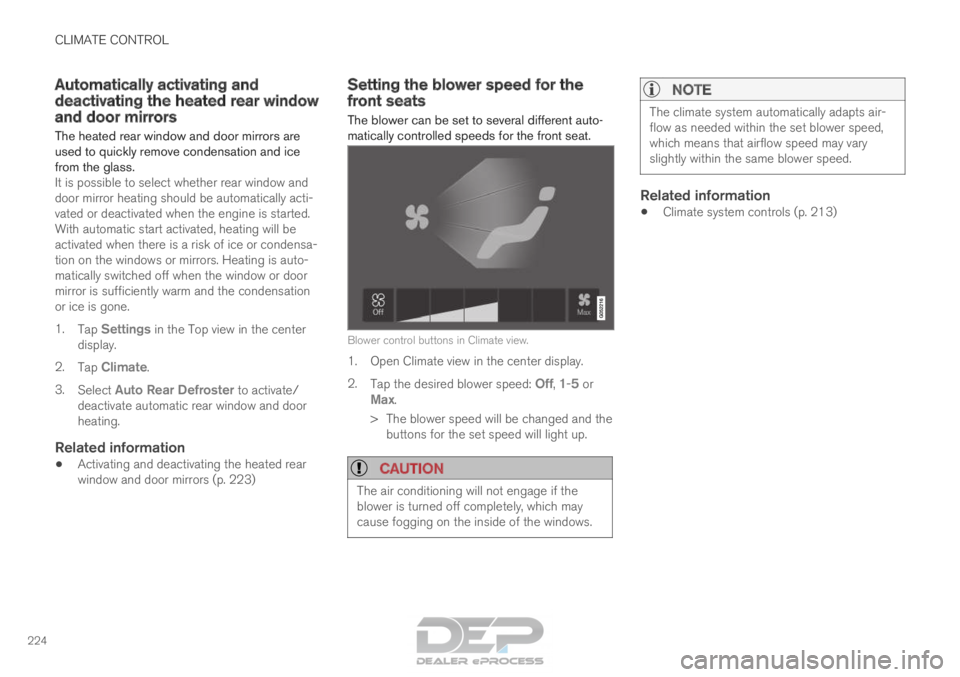
The blower can be set to several different auto-
matically controlled speeds for the front seat.
Blower control buttons in Climate view.
1. Open Climate view in the center display.
2.
Tap the desired blower speed: Off, 1-5 or
Max.
>
The blower speed will be changed and the
buttons for the set speed will light up.
CAUTION The air conditioning will not engage if the
blower is turned off completely, which may
cause fogging on the inside of the windows.
NOTE The climate system automatically adapts air-
flow as needed within the set blower speed,
which means that airflow speed may vary
slightly within the same blower speed.
Related information
•
Climate system controls (p. 213)
Page 230 of 686
CLIMATE CONTROL
* Option/accessory.
228 Synchronize temperature
The temperature in the different climate zones of
the vehicle can be synchronized with the tem-
perature set for the driver's side. Synchronization button on the driver's side temperature
control.
1. Tap the driver's side temperature button in
the center display's climate bar to open the
control.
2. Tap Synchronize temperature .
>
The temperature for all of the vehicle's cli-
mate zones will be synchronized with the
one set for the driver's side and the syn-
chronization symbol will be displayed next
to the temperature button.
Synchronization is stopped with another press on Synchronize temperature or by changing the
temperature setting for a climate zone other than
the driver's.
Related information
• Climate system controls (p. 213) Activating and deactivating air
conditioning
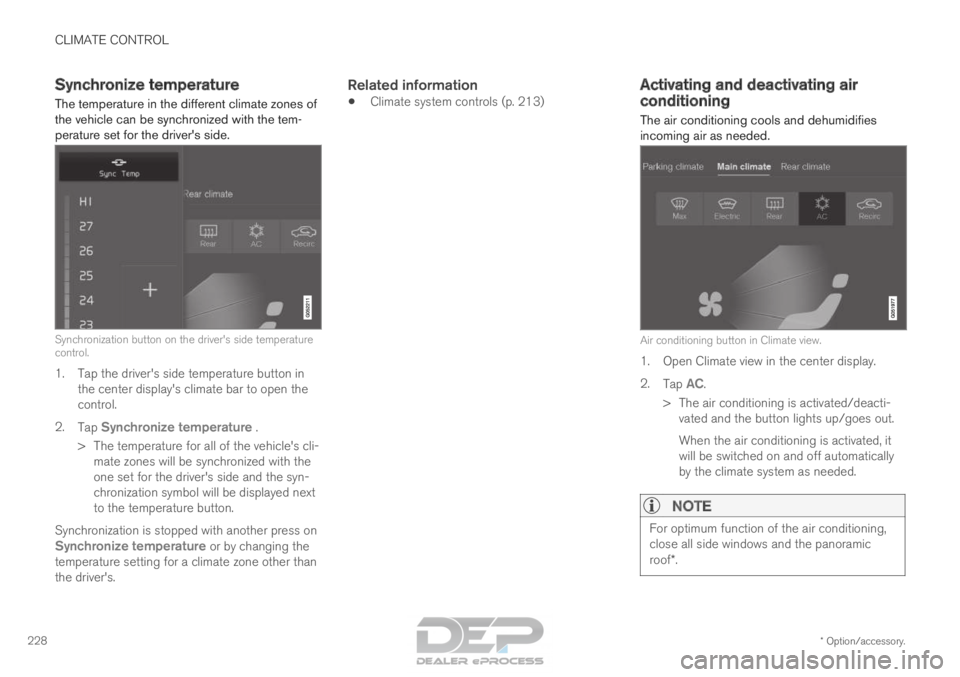
The air conditioning cools and dehumidifies
incoming air as needed. Air conditioning button in Climate view.
1. Open Climate view in the center display.
2.
Tap AC.
>
The air conditioning is activated/deacti-
vated and the button lights up/goes out.
When the air conditioning is activated, it
will be switched on and off automatically
by the climate system as needed.
NOTE For optimum function of the air conditioning,
close all side windows and the panoramic
roof*.
Page 231 of 686

CLIMATE CONTROL
* Option/accessory.229
NOTEThe air conditioning cannot be activated when
the fan speed is set to
Off.
Related information
•Climate system controls (p. 213) Activating and deactivating climate
control for the third-row seats*
The air conditioning cools and dehumidifies
incoming air as needed. Air conditioning button in the Rear climate tab in Cli-
mate view.
1. Open Climate view in the center display and select the Rear climate tab.
2. Tap 3rd row climate.
>
The air conditioning is activated/deacti-
vated and the button lights up/goes out.
NOTE The air conditioning for the third row of seats
is automatically activated if any of the third
row seat belts are buckled.
It is not possible to manually activate air con-
ditioning for the third row of seats if the main
air conditioning system is deactivated or the
climate system for the second row of seats is
deactivated.
Related information
•
Climate system controls (p. 213)
Page 232 of 686

CLIMATE CONTROL
* Option/accessory.
230 Parking climate
The passenger compartment climate can be pre-
conditioned or maintained when the vehicle is
parked. For full functionality, the vehicle's charg-
ing cable must be plugged in. Preconditioning and the climate comfort retaining func-
tion are controlled from the Parking climate tab in the
center display's Climate view.
Related information
•
Climate (p. 202)
• Preconditioning (p. 230)
• Climate comfort retaining function (p. 234)
• Parking climate symbols and messages
(p. 236) Preconditioning
Preconditioning the vehicle before driving can
help reduce wear and reduce energy consump-
tion during a trip.
Preconditioning can be started immediately or
started at a preset time using a timer.
The function utilizes several of the vehicle's sys-
tems:
• In cold weather, the high-voltage coolant
heater (HVCH) heats the passenger com-
partment to a comfortable temperature.
• In warm weather, air conditioning cools the
passenger compartment to a comfortable
temperature.
• The electrically heated steering wheel* and
seats* can be activated.
• Heating for the windshield, rear window and
door mirrors are automatically activated as
needed.
During preconditioning in a hot climate, conden-
sation from the air conditions may drip under the
vehicle. This is normal.
Page 234 of 686
||CLIMATE CONTROL
* Option/accessory.
232
NOTE Preconditioning is only available when the car
is connected to an electrical outlet. A charg-
ing post that is not always active, for example
because of a timer, can cause loss of function
for preconditioning.
If the car is not connected to an electrical
socket it is still possible in a warm climate to
achieve brief cooling of the passenger com-
partment by direct starting preconditioning.
NOTE
The vehicle doors and windows should be
closed during preconditioning of the passen-
ger compartment.
Starting from app*
A device with the Volvo On Call* app can be used
to start preconditioning or check settings. Pre-
conditioning heats or cools the passenger com-
partment (using the vehicle's air conditioning) to
a comfortable temperature.
The passenger compartment can also be precon-
ditioned using the Engine Remote Start (ERS) 3
function using the Volvo On Call* app.
Related information
• Parking climate (p. 230)
• Preconditioning (p. 230)
• Preconditioning timer settings (p. 232) Preconditioning timer settings
The timer can be set to finish preconditioning at
a predetermined time.
The timer can store up to 8 preset times for:
• A time on a particular date
• A time on one or more days of the week, with
or without the repeat function.
NOTE Preconditioning is only available when the car
is connected to an electrical outlet. A charg-
ing post that is not always active, for example
because of a timer, can cause loss of function
for preconditioning.
If the car is not connected to an electrical
socket it is still possible in a warm climate to
achieve brief cooling of the passenger com-
partment by direct starting preconditioning.
Related information
•
Preconditioning (p. 230)
• Adding and editing timer setting for precon-
ditioning (p. 233)
• Activating and deactivating preconditioning
timer settings (p. 233)
• Deleting preconditioning timer settings
(p. 234) 3
Certain markets only.
Page 236 of 686

CLIMATE CONTROL
234Deleting preconditioning timer
settings
The button for editing a list/deleting a timer setting in
the Parking climate tab in Climate view.
1. Open Climate view in the center display.
2.
Select the Parking climate tab.
3. Tap Edit list.
4.
Tap the editing icon to the right in the list.
> The icon will change to the text Delete.
5. Tap Delete to confirm.
>
The timer setting will be deleted from the
list. Climate comfort retaining function
The climate in the passenger compartment can
be maintained when the vehicle is parked, e.g. if
the engine is turned off but the driver or passen-
gers remain in the vehicle. This function can only be direct-started.
The function utilizes several of the vehicle's sys-
tems:
• Residual heat from the engine is used to
help heat the passenger compartment to a
comfortable temperature.
• In warm weather, the ventilation system cools
the passenger compartment by blowing air in
from outside.
NOTE Climate comfort maintenance will be deacti-
vated if the vehicle is locked from the outside
in order to avoid using residual engine heat
unnecessarily. This function is intended to be
used to maintain climate comfort when the
driver or a passenger remains in the vehicle
after the engine is turned off.
Related information
•
Parking climate (p. 230)
• Switching on and off the climate retaining
function when parking (p. 234) Switching on and off the climate
retaining function when parking
The climate retaining function maintains the cli-
mate settings in the vehicle after the engine has
been switched off. The function can be activated
in the center display. Button for retaining climate comfort in the Parking
climate tab in Climate view.
1. Open Climate view in the center display.
2.
Select the Parking climate tab.
3. Tap Keep climate comfort.
>
The climate comfort retaining function will
be activated/deactivated and the button
light will go on/off.
Page 445 of 686
STARTING AND DRIVING
}}
443
All Wheel Drive (AWD)
All-wheel drive, All Wheel Drive (AWD), also
called four-wheel drive, means that power is dis-
tributed to all four wheels, which improves trac-
tion.
The electric motor that powers the rear wheels
enables electronic all-wheel drive functionality.
To achieve the best traction, power is automati-
cally directed to the wheels that have the best
grip. The system continuously calculates the
need for torque to the rear wheels, and can
immediately redistribute up to half of the engine's
torque to the rear wheels.
All-wheel drive also has a stabilizing effect at
higher speeds. In normal driving conditions, most
of the engine's power is directed to the front
wheels. When the vehicle is stationary, all-wheel
drive is always activated in preparation for maxi-
mum traction during acceleration.
All-wheel drive reacts differently depending on
which drive mode is selected.
Related information
• Drive modes (p. 445)
• Low Speed Control (p. 453)
• Transmission (p. 438) Drive systems
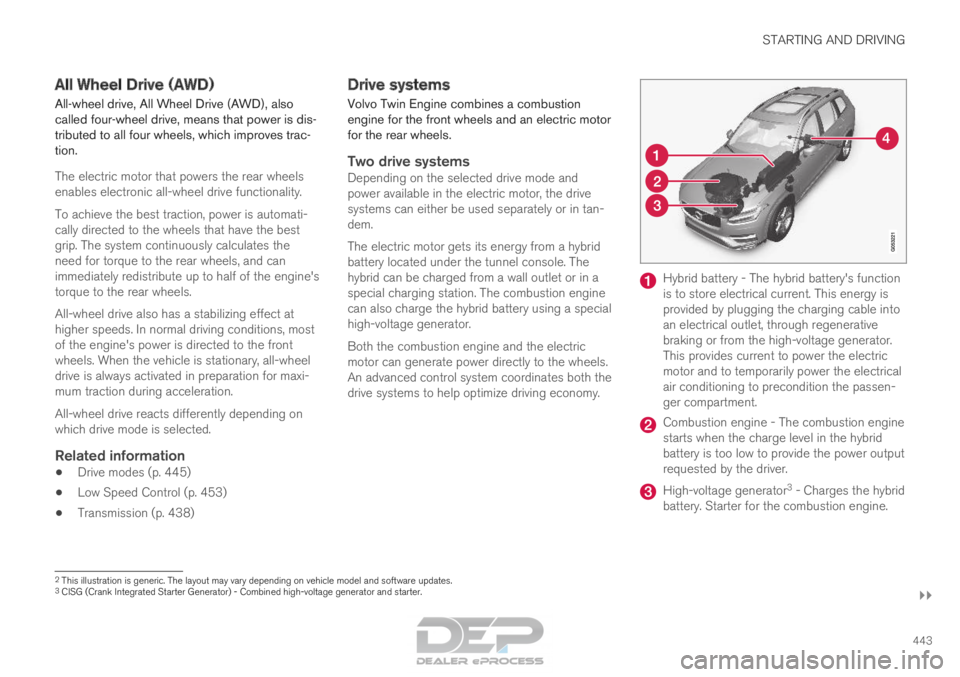
Volvo Twin Engine combines a combustion
engine for the front wheels and an electric motor
for the rear wheels.
Two drive systemsDepending on the selected drive mode and
power available in the electric motor, the drive
systems can either be used separately or in tan-
dem.
The electric motor gets its energy from a hybrid
battery located under the tunnel console. The
hybrid can be charged from a wall outlet or in a
special charging station. The combustion engine
can also charge the hybrid battery using a special
high-voltage generator.
Both the combustion engine and the electric
motor can generate power directly to the wheels.
An advanced control system coordinates both the
drive systems to help optimize driving economy. Hybrid battery - The hybrid battery's function
is to store electrical current. This energy is
provided by plugging the charging cable into
an electrical outlet, through regenerative
braking or from the high-voltage generator.
This provides current to power the electric
motor and to temporarily power the electrical
air conditioning to precondition the passen-
ger compartment.
Combustion engine - The combustion engine
starts when the charge level in the hybrid
battery is too low to provide the power output
requested by the driver.
High-voltage generator
3
- Charges the hybrid
battery. Starter for the combustion engine. 2
This illustration is generic. The layout may vary depending on vehicle m\
odel and software updates.
3 CISG (Crank Integrated Starter Generator) - Combined high-voltage gene\
rator and starter.
Page 458 of 686

||STARTING AND DRIVING
456
Related information
•
Hill Descent Control (p. 454)
• Changing drive mode (p. 449) Economical driving
Drive economically and environmentally con-
scious by thinking ahead, avoiding rapid starts
and stops and adapting driving style and speed
to the current traffic conditions.
Planning for electric drivingIt is important to plan electric motor use carefully
to achieve the best possible mileage:
Charge
• Charge the vehicle regularly by plugging it
into an electrical outlet. Make it a habit to
always begin trips with the hybrid battery fully
charged.
• Locate charging stations along your route.
• If possible, choose parking spots with charg-
ing stations.
NOTE Charge the vehicle from the electricity grid as
often as possible!
Preconditioning
•
Whenever possible, precondition the vehicle
before driving by connecting the charging
cable to an electrical outlet.
• Avoid parking the vehicle somewhere where
the interior will become too hot or too cold
while the vehicle is parked. If possible, park
the vehicle in a climate-controlled garage. •
During a short drive after passenger com-
partment preconditioning, turn off the pas-
senger compartment fan or the air condition-
ing in a hot climate.
• If preconditioning is not possible when it is
cold outside, use seat and steering wheel
heating first. Avoid heating the entire pas-
senger compartment to reduce the amount
of current being taken from the hybrid bat-
tery.
Page 459 of 686
STARTING AND DRIVING
}}
457
Driving
• Choose the Pure drive mode to help mini-
mize electric power consumption.
• Maintain a steady speed and a generous fol-
lowing distance to traffic ahead to minimize
braking. This drive mode has the lowest
power consumption.
• Balance energy requirements using the
accelerator pedal. Use the indicator on the
instrument panel to see available electric
power and avoid starting the combustion
engine unnecessarily. The electric motor is
more effective than the combustion engine,
especially at low speeds.
• When braking is necessary, brake gently
using the brake pedal. This will recharge the
hybrid battery. A regenerative function is
integrated in the brake pedal and can be
augmented by the electric motor's braking
capacity when the gear selector is in mode
B.
• Higher speeds increase energy consumption
- air resistance increases with speed.
• Activate the
Hold function in the Function
view at high speeds when traveling farther
than is possible using the hybrid battery's
capacity.
• Whenever possible, avoid using the Charge
function to charge the hybrid battery. Charg-
ing the battery using the combustion engine increases fuel consumption and carbon diox-
ide emissions.
• In a cold climate, reduce heating of the wind-
shield/rear window, mirrors, seats and the
steering wheel.
• Maintain the correct pressure in the tires and
check pressure regularly.
• The type of tires used could affect energy
consumption - consult a retailer for advice on
suitable tires.
• Remove unnecessary items from the vehicle
- the heavier the load, the higher the fuel
consumption.
• Roof loads increase air resistance and
increase fuel consumption. Remove roof
boxes, ski racks, etc. that are not in use.
• Avoid driving with the windows open.
• Do not keep the vehicle still on an upward
gradient by using the accelerator pedal. Use
the brakes instead.
Related information
•
Drive-E
‒
purer driving pleasure (p. 27)
• Factors affecting electric motor range
(p. 458)
• Using the electric motor only (p. 457)
• Hybrid gauge (p. 87)
• Checking tire pressure (p. 557) Using the electric motor only
When using the electric motor, Volvo Twin
Engine provides a combination of good fuel
economy, low emissions and high performance.
For energy-efficient driving:
• Select the Pure drive mode to help maximize
driving range using only the electric motor.
• Balance energy requirements using the
accelerator pedal. Use the indicator on the
instrument panel's hybrid gauge to see avail-
able electric power and avoid starting the
combustion engine unnecessarily.
• When braking is necessary, brake gently
using the brake pedal. This will recharge the
hybrid battery.
• Activate the
Hold function in the Function
view at high speeds when traveling farther
than is possible using the hybrid battery's
capacity.
• Reduce current consumption in the passen-
ger compartment by reducing e.g. fan speed,
electric heating, or air conditioning use.
Also follow the general economical driving advice
regarding speed, tires and load to maximize
range.
Related information
• General information about Twin Engine
(p. 406)
• Economical driving (p. 456)
Page 586 of 686

LOADING, STORAGE AND PASSENGER COMPARTMENT
* Option/accessory.
584 Using the electrical outlets
The 12 V outlet can be used for devices
intended for this such as MP3 players, coolers
and cellular phones.
The high-voltage outlet* can be used for devices
intended for this, such as chargers, laptops, etc. The ignition must be in at least mode I for the
outlets to supply current. The outlets will then be
active as long as there is sufficient charge in the
start battery.
If the engine is turned off and the vehicle is
locked, the outlets will be deactivated. If the
engine is turned off and the vehicle remains
unlocked, the sockets will remain active for up to
7 minutes.
NOTE Bear in mind that using the electrical outlets
when the engine is off could cause the starter
battery to have too low of a charge level,
which could limit other functionality.
Accessories connected to the electrical out-
lets can be activated even when the vehicle
electrical system is off or if preconditioning is
used. For this reason, disconnect plugs when
they are not in use to prevent the starter bat-
tery from becoming discharged.
WARNING •
Do not use accessories with large or
heavy plugs – they could damage the out-
let or come loose while you are driving.
• Do not use accessories that could cause
disruptions to e.g. the vehicle's radio
receiver or electrical system.
• Position the accessory so that there is no
risk of it injuring the driver or passengers
in the event of heavy braking or a colli-
sion.
• Pay attention to connected accessories
as they can generate heat that could burn
passengers or the interior.
Using 12 V outlets1. Remove the stopper (tunnel console) or fold
down the cover (trunk/cargo compartment)
over the socket and plug in the device.
2. Unplug the device and put the stopper back in (tunnel console) or fold up the cover
(trunk/cargo compartment) when the socket
is not in use or left unattended.
CAUTION The maximum power is 120 W (10 A) per
outlet.
Using high-voltage outletsThe ignition must be in at least mode I for outlets
to supply current. The outlets will then be active
as long as there is sufficient charge in the start
battery.
1. Slide down the cover over the outlet and plug
in the device.
>
The LED 2
light on the outlet will indicate
its status.
2. The outlet is supplying electrical current when the light is glowing steadily green.
3. Disconnect the device by pulling out the plug (do not pull on the cord).
Pull up the cover when the outlet is not in
use or is left unattended.
CAUTION The maximum power is 150 W.
WARNING
Do not attempt to alter or repair the high-volt-
age outlet on your own. Volvo recommends
contacting an authorized Volvo workshop.
2
LED (Light Emitting Diode)