height VOLVO XC90 TWIN ENGINE 2018 User Guide
[x] Cancel search | Manufacturer: VOLVO, Model Year: 2018, Model line: XC90 TWIN ENGINE, Model: VOLVO XC90 TWIN ENGINE 2018Pages: 686, PDF Size: 17 MB
Page 146 of 686
DISPLAYS AND VOICE CONTROL
* Option/accessory.
144 Activating and deactivating the
head-up display*
The head-up display can be activated and deac-
tivated when the vehicle has been started.
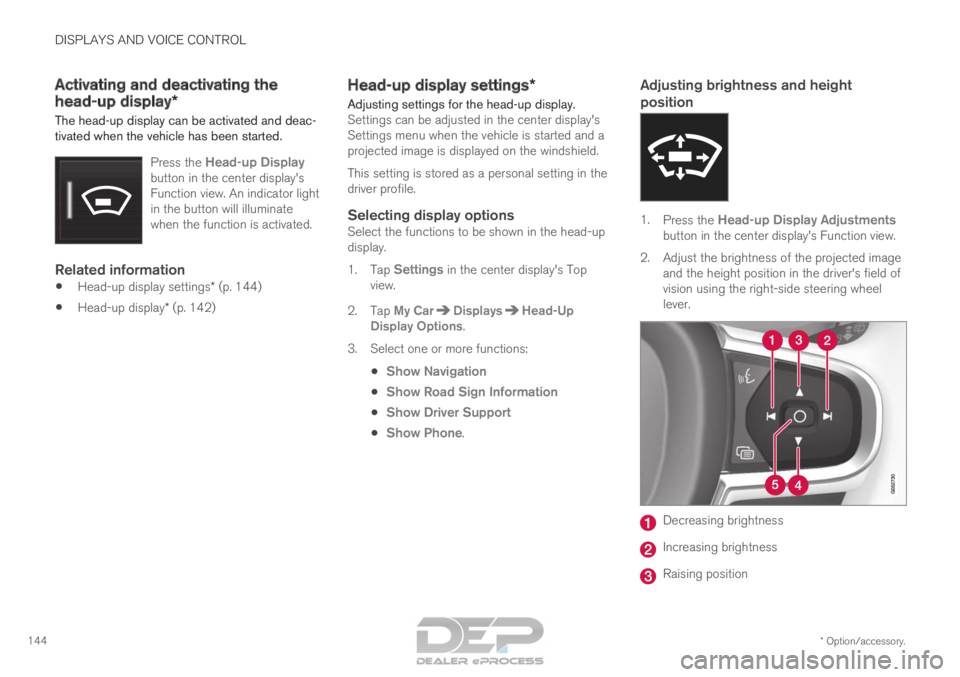
Press the Head-up Displaybutton in the center display's
Function view. An indicator light
in the button will illuminate
when the function is activated.
Related information
• Head-up display settings* (p. 144)
• Head-up display* (p. 142) Head-up display settings*
Adjusting settings for the head-up display. Settings can be adjusted in the center display's
Settings menu when the vehicle is started and a
projected image is displayed on the windshield.
This setting is stored as a personal setting in the
driver profile.
Selecting display optionsSelect the functions to be shown in the head-up
display.
1. Tap Settings in the center display's Top
view.
2.
Tap My Car Displays Head-Up
Display Options .
3.
Select one or more functions:
• Show Navigation
• Show Road Sign Information
• Show Driver Support
• Show Phone.
Adjusting brightness and height
position 1.
Press the Head-up Display Adjustments
button in the center display's Function view.
2.
Adjust the brightness of the projected image
and the height position in the driver's field of
vision using the right-side steering wheel
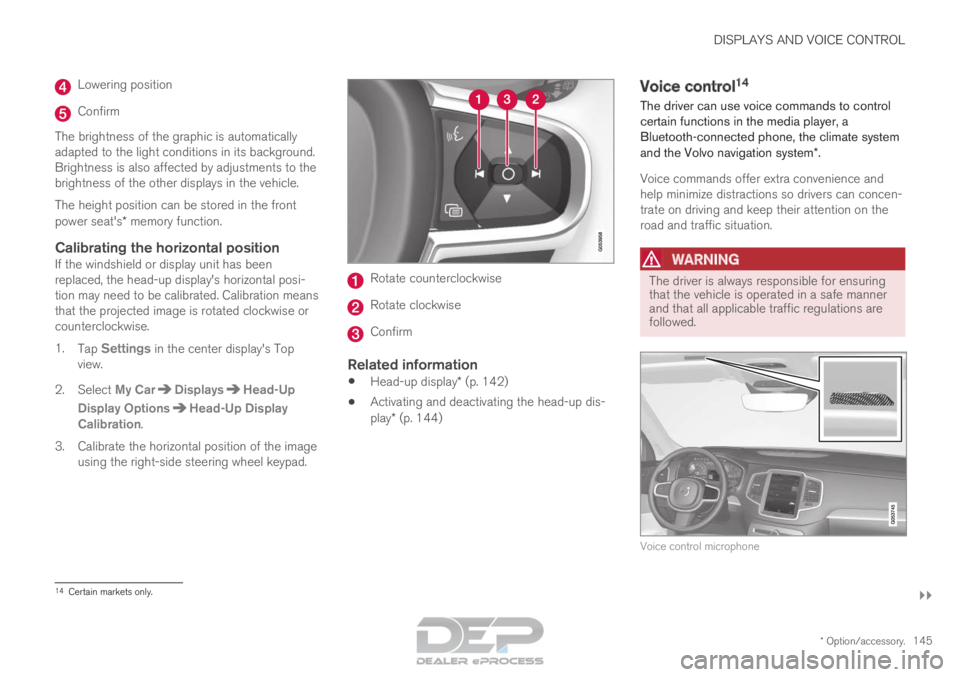
lever. Decreasing brightness
Increasing brightness
Raising position
Page 147 of 686
DISPLAYS AND VOICE CONTROL
}}
* Option/accessory. 145Lowering position
Confirm
The brightness of the graphic is automatically
adapted to the light conditions in its background.
Brightness is also affected by adjustments to the
brightness of the other displays in the vehicle.
The height position can be stored in the front
power seat's* memory function.
Calibrating the horizontal positionIf the windshield or display unit has been
replaced, the head-up display's horizontal posi-
tion may need to be calibrated. Calibration means
that the projected image is rotated clockwise or
counterclockwise.
1. Tap Settings in the center display's Top
view.
2.
Select My Car Displays Head-Up
Display Options Head-Up Display
Calibration .
3.
Calibrate the horizontal position of the image
using the right-side steering wheel keypad. Rotate counterclockwise
Rotate clockwise
Confirm
Related information
•
Head-up display* (p. 142)
• Activating and deactivating the head-up dis-
play* (p. 144) Voice control
14
The driver can use voice commands to control
certain functions in the media player, a
Bluetooth-connected phone, the climate system
and the Volvo navigation system*.
Voice commands offer extra convenience and
help minimize distractions so drivers can concen-
trate on driving and keep their attention on the
road and traffic situation.
WARNING The driver is always responsible for ensuring
that the vehicle is operated in a safe manner
and that all applicable traffic regulations are
followed.
Voice control microphone
14
Certain markets only.
Page 173 of 686
WINDOWS, GLASS AND MIRRORS
}}
* Option/accessory. 171
Adjusting the door mirrors
To improve visibility to the rear, the door mirrors
need to be adjusted to the driver's height and
seating position. There are several automatic
settings that can also be connected to the mem-
ory function buttons for the power seat*.
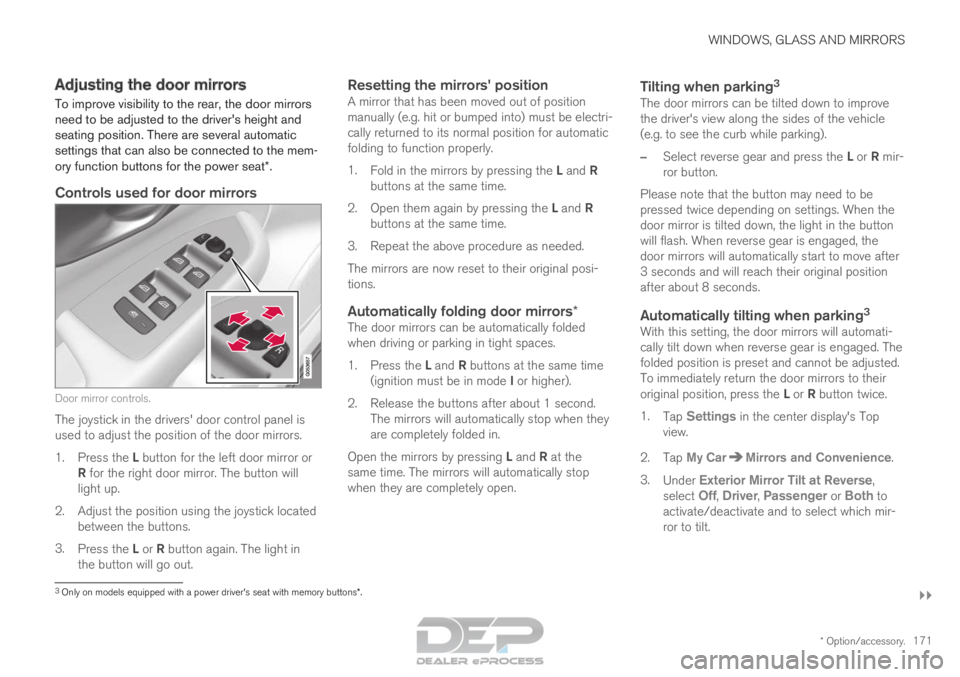
Controls used for door mirrors Door mirror controls.
The joystick in the drivers' door control panel is
used to adjust the position of the door mirrors.
1.
Press the L button for the left door mirror or
R for the right door mirror. The button will
light up.
2.
Adjust the position using the joystick located
between the buttons.
3. Press the L or R button again. The light in
the button will go out.
Resetting the mirrors' positionA mirror that has been moved out of position
manually (e.g. hit or bumped into) must be electri-
cally returned to its normal position for automatic
folding to function properly.
1. Fold in the mirrors by pressing the L and R
buttons at the same time.
2. Open them again by pressing the L and R
buttons at the same time.
3. Repeat the above procedure as needed.
The mirrors are now reset to their original posi-
tions.
Automatically folding door mirrors*The door mirrors can be automatically folded
when driving or parking in tight spaces.
1. Press the L and R buttons at the same time
(ignition must be in mode I or higher).
2. Release the buttons after about 1 second. The mirrors will automatically stop when they
are completely folded in.
Open the mirrors by pressing L and R at the
same time. The mirrors will automatically stop
when they are completely open.
Tilting when parking 3The door mirrors can be tilted down to improve
the driver's view along the sides of the vehicle
(e.g. to see the curb while parking).
–
Select reverse gear and press the L or R mir-
ror button.
Please note that the button may need to be
pressed twice depending on settings. When the
door mirror is tilted down, the light in the button
will flash. When reverse gear is engaged, the
door mirrors will automatically start to move after
3 seconds and will reach their original position
after about 8 seconds.
Automatically tilting when parking 3With this setting, the door mirrors will automati-
cally tilt down when reverse gear is engaged. The
folded position is preset and cannot be adjusted.
To immediately return the door mirrors to their
original position, press the L or R button twice.
1. Tap Settings in the center display's Top
view.
2.
Tap My Car Mirrors and Convenience
.
3. Under Exterior Mirror Tilt at Reverse ,
select
Off, Driver, Passenger or Both to
activate/deactivate and to select which mir-
ror to tilt.
3 Only on models equipped with a power driver's seat with memory button\
s*.
Page 187 of 686
SEATS AND STEERING WHEEL
}}
* Option/accessory. 185
Power front seats*
The power front seats can be adjusted in a num-
ber of different ways for optimal comfort and
ergonomics. The power seats can be moved for-
ward/backward and up/down. The height and
length* of the seat cushion and the tilt of the
backrest can be adjusted. Lumbar support can
be adjusted up, down, forward and backward.
The power seats have an overload protector that
is triggered if a seat is blocked by any object. If
this occurs, remove the object and attempt to
adjust the seat again.
The power seats can be adjusted for a certain
period of time after the door is unlocked without
the engine running. The seats can always be
adjusted while the engine is running. They can
also be adjusted for a short period after the
engine is turned off.
Related information
• Manual front seats (p. 184)
• Adjusting the power front seats* (p. 185)
• Storing memory settings in power front
seats* (p. 186)
• Using stored memory in a powered front seat
(p. 187)
• Adjusting front seat massage settings*
(p. 188)
• Adjusting front seat cushion length (p. 189)
• Front seat massage settings* (p. 188) •
Adjusting front seat side bolster settings*
(p. 190)
• Adjusting front seat lumbar support* (p. 190)
• Adjusting the passenger seat from the driv-
er's seat* (p. 191) Adjusting the power front seats*
Set the desired sitting position using the control
on the front seat's seating section. To activate
the multifunction control and set the various con-
venience functions, turn the control upward/
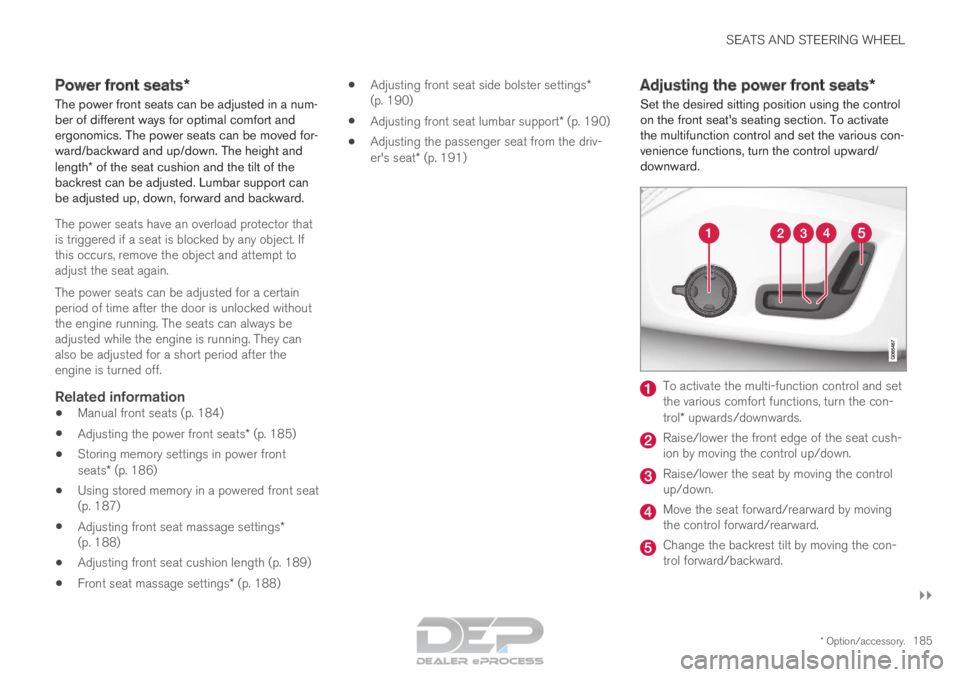
downward. To activate the multi-function control and set
the various comfort functions, turn the con-
trol* upwards/downwards.
Raise/lower the front edge of the seat cush-
ion by moving the control up/down.
Raise/lower the seat by moving the control
up/down.
Move the seat forward/rearward by moving
the control forward/rearward.
Change the backrest tilt by moving the con-
trol forward/backward.
Page 196 of 686

||SEATS AND STEERING WHEEL
* Option/accessory.
194
WARNING Make sure that the rear seat backrest and
head restraint are locked securely in place
after the seat is folded up.
The head restraints at the outer seats must
always be raised when there is a passenger in
one of these spots of the rear seat.
WARNING
The head restraints on the outboard second-
row seats must always be folded up when
there are passengers in the third row of
seats*.
Related information
•
Adjusting the second row head restraints
(p. 194)
• Moving the second row seats forward/rear-
ward* (p. 195)
• Adjusting the second row backrest tilt
(p. 196)
• Getting into and out of the third row of
seats* (p. 197)
• Folding the third row backrests* (p. 198) Adjusting the second row head
restraints
Adjust the center head restraint in the rear seat
to the seat occupant's height. Fold down the
outboard head restraints* to improve rear visibil-
ity.
Adjusting the center head restraint The center head restraint should be adjusted to
suit the passenger's height. The entire back of
the head should be covered if possible. Manually
move the restraint up or down as needed. To lower the restraint, press and hold the button
(located between the backrest and the head
restraint, see illustration) while carefully lowering
the head restraint.
WARNING
The center seat head restraint must be in its
lowest position when the seat is not occupied.
When the center seat is occupied, the head
restraint must be correctly adjusted to the
passenger's height, covering the entire back
of the head if possible.
Page 201 of 686
SEATS AND STEERING WHEEL
}}
* Option/accessory. 199
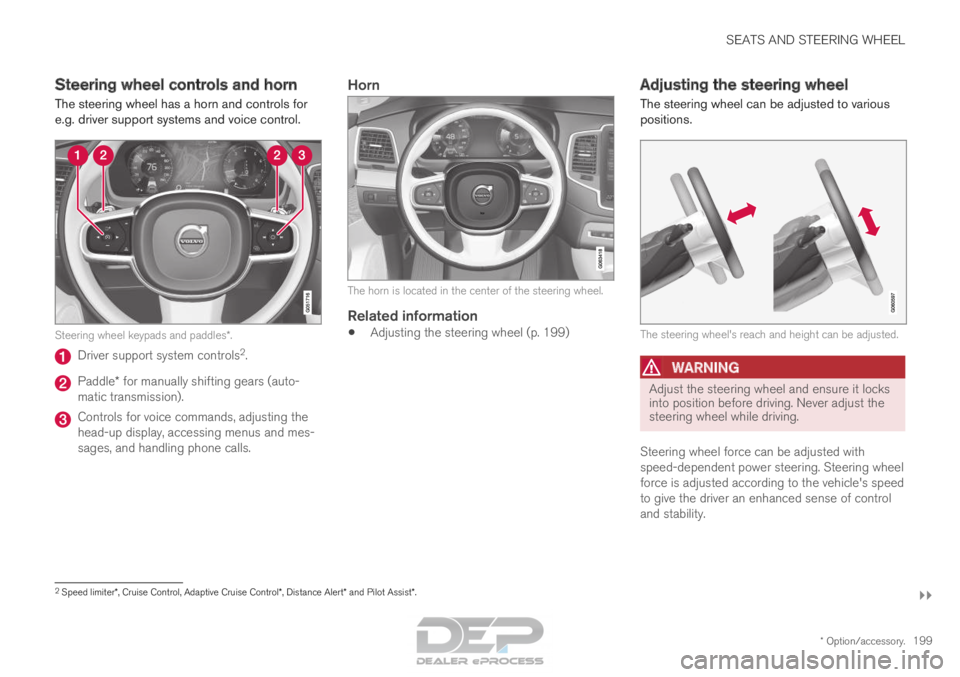
Steering wheel controls and horn
The steering wheel has a horn and controls for
e.g. driver support systems and voice control.
Steering wheel keypads and paddles*.
Driver support system controls
2
. Paddle* for manually shifting gears (auto-
matic transmission). Controls for voice commands, adjusting the
head-up display, accessing menus and mes-
sages, and handling phone calls.
Horn The horn is located in the center of the steering wheel.
Related information
•
Adjusting the steering wheel (p. 199) Adjusting the steering wheel
The steering wheel can be adjusted to various
positions. The steering wheel's reach and height can be adjusted.
WARNING
Adjust the steering wheel and ensure it locks
into position before driving. Never adjust the
steering wheel while driving.
Steering wheel force can be adjusted with
speed-dependent power steering. Steering wheel
force is adjusted according to the vehicle's speed
to give the driver an enhanced sense of control
and stability. 2
Speed limiter*, Cruise Control, Adaptive Cruise Control*, Distance Alert* and Pilot Assist*.
Page 266 of 686
||KEY, LOCKS AND ALARM
* Option/accessory.
264
Related information
• Setting a maximum height for the power tail-
gate* (p. 264)
• Foot movement tailgate operation* (p. 265)
• Remote key range (p. 243) Setting a maximum height for the
power tailgate*
The tailgate can be set to stop opening at a cer-
tain height, for example if the tailgate needs to
be opened in a garage with a low ceiling.
Setting maximum opening height:
1.
Open the tailgate to the desired opening
height.
NOTE It is not possible to program an opening posi-
tion lower than half-open tailgate.
2.
Press the button on the lower edge of
the tailgate and hold for at least 3 seconds.
>
Two brief audio signals will sound to indi-
cate that the position has been stored.
Resetting to maximum opening position:
– Move the tailgate manually to its highest
possible position and press the button
on the tailgate for at least 3 seconds.
>
Two audio signals will sound to indicate
that the stored position has been erased.
The tailgate can then be opened to its
maximum position.
NOTE •
If the system has been working continu-
ously for a prolonged period of time, it will
be switched off to avoid overload. It can
be used again after approximately
2 minutes.
Related information
•
Opening and closing the power tailgate*
(p. 261)
Page 346 of 686

DRIVER SUPPORT
344City Safety limitations
City Safety functionality may be reduced in cer-
tain situations.
Surroundings
Low objects
Hanging objects, such as flags for overhanging
loads or accessories such as auxiliary lights or
front protective grids that extend beyond the
height of the hood, may limit City Safety function-
ality.
Slippery road conditions
The extended braking distance on slippery roads
may reduce City Safety's capacity to help avoid a
collision. In these types of situations, the Anti-
lock Braking System and Electronic Stability Con-
trol (ESC 77
) will help provide optimal braking
power with maintained stability.
Backlighting
The visual warning signal in the windshield may
be difficult to detect in bright sunlight, if there are
reflections, or if the driver is wearing sunglasses
or not looking straight ahead.
Heat
If the temperature in the passenger compartment
is high due to e.g. bright sunlight, the visual warn-
ing signal in the windshield may be temporarily
disabled.
Camera and radar sensor's field of vision
The camera's field of vision is limited and in cer-
tain situations, it may be unable to detect pedes-
trians, large animals, cyclists or vehicles, or it may
detect them later than expected.
Vehicles that are dirty may be detected later than
clean vehicles, and in dark conditions, motorcy-
cles may be detected late or not at all.
If a text message displayed in the instrument
panel indicates that the camera/radar sensor is
obstructed, it may be difficult for City Safety to
detect pedestrians, large animals, cyclists, vehi-
cles or lane markings in front of the vehicle. City
Safety functionality may therefore be reduced.
Text messages may not be displayed for all situa-
tions in which the windshield sensors are
blocked. The driver must therefore always keep
the windshield in front of the camera/radar sen-
sor clean.
CAUTION Maintenance and replacement of City Safety
components may only be performed by a
workshop – an authorized Volvo workshop is
recommended.
Driver intervention
Backing up
City Safety is temporarily deactivated when the
vehicle is backing up.
Low speed
City Safety is not activated at very low speeds
under 4 km/h (3 mph). The system will therefore
not intervene in situations in which your vehicle is
approaching another vehicle very slowly, such as
when parking.
Active driver
Action by the driver always has priority. City
Safety will therefore not react or will react at a
later stage with a warning or intervention in situa-
tions in which the driver is clearly steering and
operating the accelerator pedal, even if a collision
is unavoidable.
An active and aware driving style may therefore
delay collision warnings and intervention in order
to minimize unnecessary warnings.
77
Electronic Stability Control
Page 452 of 686

STARTING AND DRIVING
* Option/accessory.
450 Leveling control* and suspension
The vehicle's leveling control system adjusts the
suspension and shock absorbers automatically
to help provide good comfort and control while
driving. Leveling can also be controlled manually
to facilitate loading or getting in and out of the
vehicle.
Pneumatic suspension and shock
absorbers
The system is adapted to the selected drive
mode and vehicle speed. The pneumatic suspen-
sion reduces the vehicle's ground clearance at
higher speeds to reduce air resistance and
increase stability. The shock absorbers are nor-
mally set to provide the best possible comfort and are adjusted continuously according to the
road surface and the vehicle's acceleration, brak-
ing and cornering.
The instrument panel indicates
when the suspension level is
being adjusted. The level cannot be adjusted when any of the
side doors or the tailgate is open.
ParkingWhen parking, make sure that there is adequate
space above and below the vehicle since ground
clearance may vary depending on e.g. ambient
temperature, how the vehicle is loaded, if loading
mode is used, which drive mode is selected after
the engine is started, etc.
The level may also be adjusted a period after the
vehicle is parked. This is to compensate for any
height changes that may occur due to tempera-
ture changes in the air springs when the vehicle
cools.
TransportingWhen transporting the vehicle on a ferry, train or
truck, only secure (lash) the vehicle around the
tires, not using any other parts of the chassis.
Changes in the pneumatic suspension may occur
during transport, which could adversely affect the
lashing and result in damage.
Page 454 of 686

||STARTING AND DRIVING
* Option/accessory.
452 Symbol
Message MeaningSuspension
Slow down Vehicle too high
A fault has occurred. If the message appears while driving, contact a wo\
rkshop
A
. Suspension
Auto adjusting vehicle level
Level control to target height is in progress.A
An authorized Volvo workshop is recommended.
Related information
• Leveling control settings* (p. 453)
• Drive modes (p. 445)