roof VOLVO XC90 TWIN ENGINE 2018 User Guide
[x] Cancel search | Manufacturer: VOLVO, Model Year: 2018, Model line: XC90 TWIN ENGINE, Model: VOLVO XC90 TWIN ENGINE 2018Pages: 686, PDF Size: 17 MB
Page 174 of 686
||WINDOWS, GLASS AND MIRRORS
* Option/accessory.
172
Automatic folding when the vehicle is
locked*
The door mirrors automatically fold in when the
vehicle is locked and open when the vehicle is
unlocked using the remote key.
1.
Tap Settings in the center display's Top
view.
2.
Tap My Car Mirrors and Convenience
.
3. Select Fold Mirror When Locked to acti-
vate/deactivate.
Related information
• Rearview/door mirrors (p. 169)
• Adjusting the rearview mirror dimming func-
tion (p. 170)
• Storing memory settings in power front
seats* (p. 186)
• Activating and deactivating the heated rear
window and door mirrors (p. 223) Panoramic roof*
The panoramic roof is divided into two glass
sections. The front section can be opened verti-
cally at the rear edge (ventilation position) or hor-
izontally (open position). The rear section cannot
be moved.
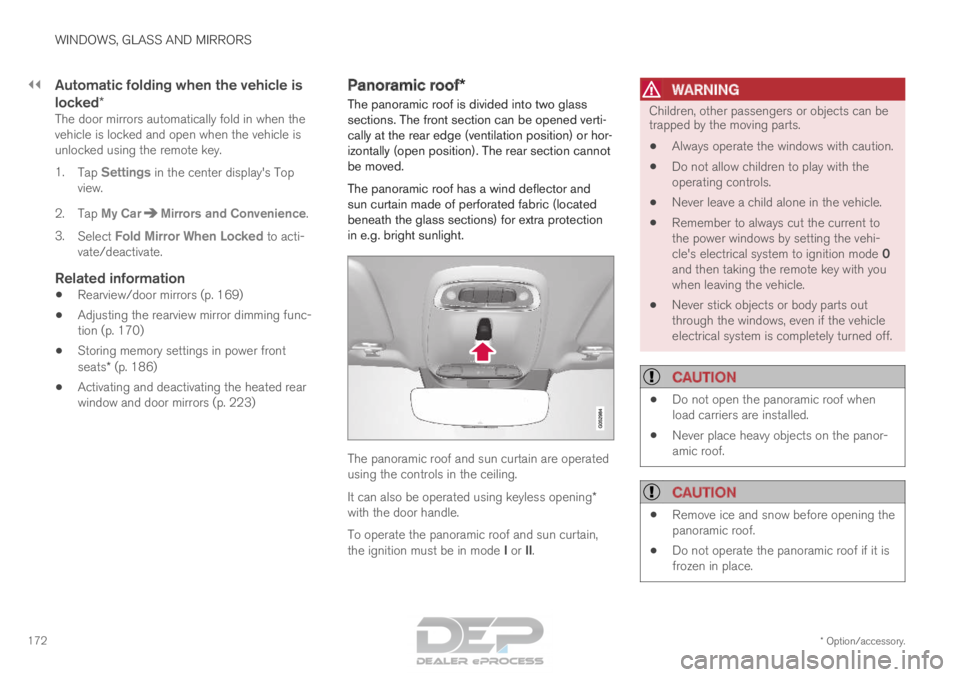
The panoramic roof has a wind deflector and
sun curtain made of perforated fabric (located
beneath the glass sections) for extra protection
in e.g. bright sunlight. The panoramic roof and sun curtain are operated
using the controls in the ceiling.
It can also be operated using keyless opening*
with the door handle.
To operate the panoramic roof and sun curtain,
the ignition must be in mode I or II.
WARNING Children, other passengers or objects can be
trapped by the moving parts.
• Always operate the windows with caution.
• Do not allow children to play with the
operating controls.
• Never leave a child alone in the vehicle.
• Remember to always cut the current to
the power windows by setting the vehi-
cle's electrical system to ignition mode 0
and then taking the remote key with you
when leaving the vehicle.
• Never stick objects or body parts out
through the windows, even if the vehicle
electrical system is completely turned off.
CAUTION •
Do not open the panoramic roof when
load carriers are installed.
• Never place heavy objects on the panor-
amic roof.
CAUTION •
Remove ice and snow before opening the
panoramic roof.
• Do not operate the panoramic roof if it is
frozen in place.
Page 175 of 686
WINDOWS, GLASS AND MIRRORS
}}
* Option/accessory. 173
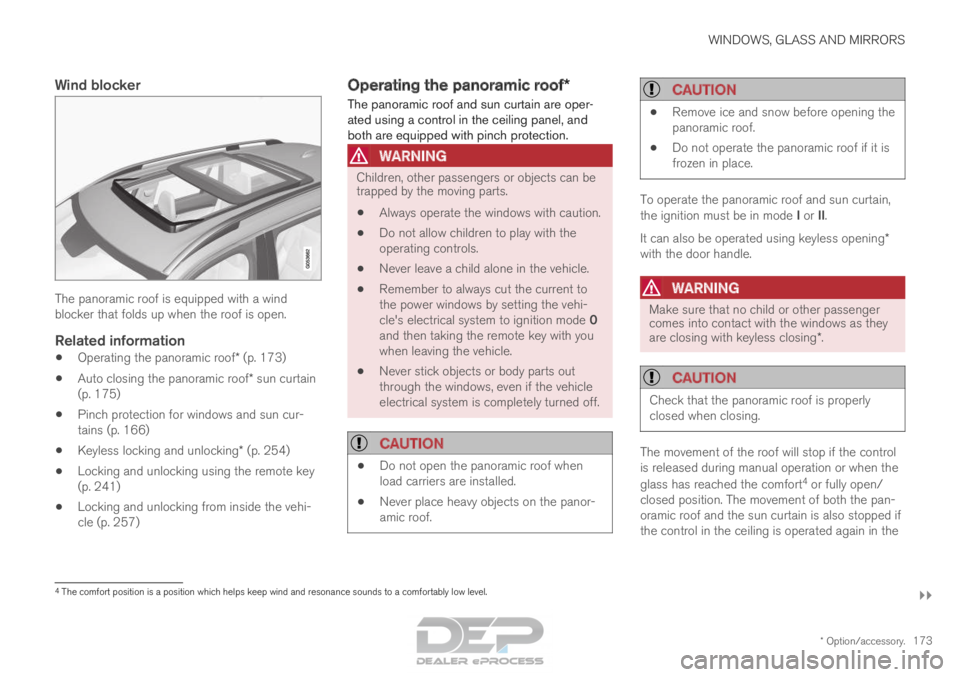
Wind blockerThe panoramic roof is equipped with a wind
blocker that folds up when the roof is open.
Related information
•
Operating the panoramic roof* (p. 173)
• Auto closing the panoramic roof* sun curtain
(p. 175)
• Pinch protection for windows and sun cur-
tains (p. 166)
• Keyless locking and unlocking* (p. 254)
• Locking and unlocking using the remote key
(p. 241)
• Locking and unlocking from inside the vehi-
cle (p. 257) Operating the panoramic roof*
The panoramic roof and sun curtain are oper-
ated using a control in the ceiling panel, and
both are equipped with pinch protection.
WARNING Children, other passengers or objects can be
trapped by the moving parts.
• Always operate the windows with caution.
• Do not allow children to play with the
operating controls.
• Never leave a child alone in the vehicle.
• Remember to always cut the current to
the power windows by setting the vehi-
cle's electrical system to ignition mode 0
and then taking the remote key with you
when leaving the vehicle.
• Never stick objects or body parts out
through the windows, even if the vehicle
electrical system is completely turned off.
CAUTION •
Do not open the panoramic roof when
load carriers are installed.
• Never place heavy objects on the panor-
amic roof.
CAUTION •
Remove ice and snow before opening the
panoramic roof.
• Do not operate the panoramic roof if it is
frozen in place. To operate the panoramic roof and sun curtain,
the ignition must be in mode I or II.
It can also be operated using keyless opening*
with the door handle.
WARNING Make sure that no child or other passenger
comes into contact with the windows as they
are closing with keyless closing*.
CAUTION
Check that the panoramic roof is properly
closed when closing.
The movement of the roof will stop if the control
is released during manual operation or when the
glass has reached the comfort
4
or fully open/
closed position. The movement of both the pan-
oramic roof and the sun curtain is also stopped if
the control in the ceiling is operated again in the 4
The comfort position is a position which helps keep wind and resonance s\
ounds to a comfortably low level.
Page 176 of 686

||WINDOWS, GLASS AND MIRRORS
174
direction opposite that of the current direction of
movement.
The panoramic roof and sun curtain are also
equipped with pinch protection.
NOTE
For manual opening, the sun curtain must be
completely open before the panoramic roof
can be opened. For the reverse procedure,
the panoramic roof must be completely
closed before the sun curtain can be com-
pletely closed.
Opening and closing ventilation
position
Ventilation position, rear edge raised.
Open by pushing the control upward once.
Close by pushing the control downward
once.
When ventilation mode is selected, the rear edge
of the front section of the roof is raised. If the sun
curtain is fully closed when ventilation position is
selected, it will automatically open approx. 50 mm
(approx. 2 inches).
If the panoramic roof is closed from the ventila-
tion position, the sun curtain will also automati-
cally close.Fully opening and closing the
panoramic roof with the control in the
ceiling Operation, manual mode
Operation, automatic mode
Manual operation
1. To open the sun curtain, pull the control
backward to the manual open mode.
2. To open the panoramic roof to the comfort position, pull the control backward a second
time to the manual opening position.
3. To open the panoramic roof fully, pull the control backward a third time to the manual
opening position.
Close by repeating the above procedure in
reverse - push the control forward/down to the
manual closing position.
Page 177 of 686
WINDOWS, GLASS AND MIRRORS
}}
* Option/accessory. 175
Auto operation
1. To open the sun curtain to the fully open
position, pull the control backward to the
auto open mode and release.
2. To open the panoramic roof to the comfort position, pull the control backward a second
time to the automatic opening position and
release.
3. To open the panoramic roof fully, pull the control backward a third time to the auto-
matic opening position and release.
Close by repeating the above procedure in
reverse - push the control forward/down to the
auto close position.
Automatic operation - rapid opening or
closing
The panoramic roof and sun curtain can be
opened or closed simultaneously:
– Open - press the control backward twice to
the automatic operation position and release.
– Close - press the control forward/down twice
to the automatic operation position and
release.
Related information
• Panoramic roof* (p. 172)
• Auto closing the panoramic roof* sun curtain
(p. 175)
• Pinch protection for windows and sun cur-
tains (p. 166) •
Keyless locking and unlocking* (p. 254)
• Locking and unlocking using the remote key
(p. 241)
• Locking and unlocking from inside the vehi-
cle (p. 257) Auto closing the panoramic roof*
sun curtain
With this function, the sun curtain closes auto-
matically 15 minutes after the car has been
locked if it is parked in hot weather. This is done
to lower the passenger compartment tempera-
ture and protect the upholstery against being
bleached by the sun. The function is deactivated as the default factory
setting and can be activated or deactivated using
the center display.
1. Tap Settings in the Top view in the center
display.
2.
Tap My Car Locking
.
Select Auto Close Sunroof Curtain to
activate/deactivate.
NOTE The sun curtain also closes when all windows
are closed with keyless closing*.
Related information
•
Panoramic roof* (p. 172)
• Operating the panoramic roof* (p. 173)
• Pinch protection for windows and sun cur-
tains (p. 166)
• Keyless locking and unlocking* (p. 254)
Page 207 of 686
CLIMATE CONTROL
* Option/accessory.205
•
Interior Air Quality System* (p. 206)
• Passenger compartment air filter (p. 207) Clean Zone*
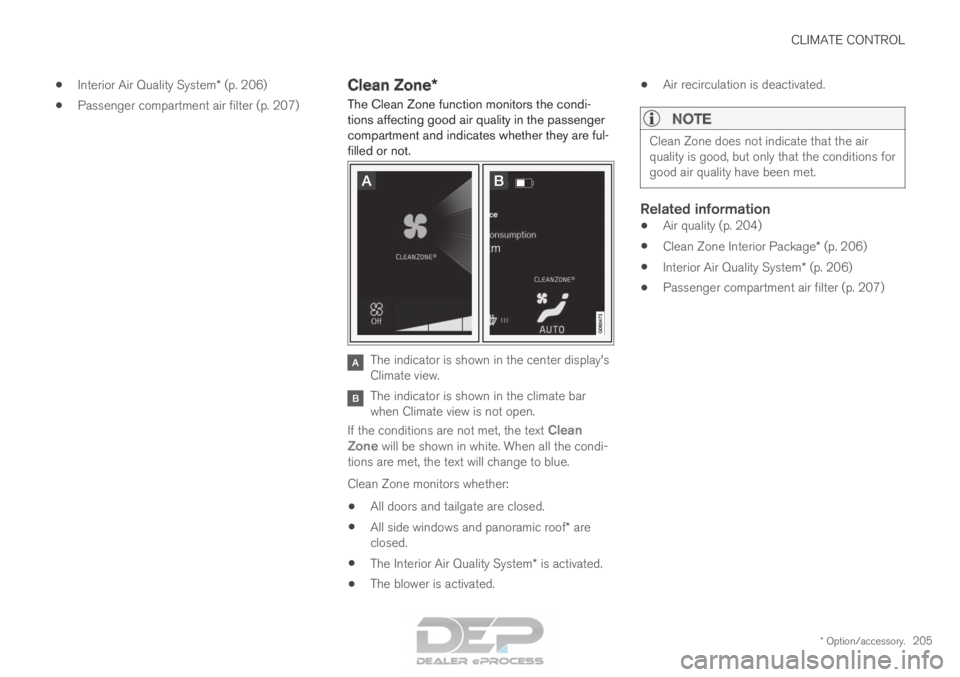
The Clean Zone function monitors the condi-
tions affecting good air quality in the passenger
compartment and indicates whether they are ful-
filled or not. The indicator is shown in the center display's
Climate view.
The indicator is shown in the climate bar
when Climate view is not open.
If the conditions are not met, the text Clean
Zone will be shown in white. When all the condi-
tions are met, the text will change to blue.
Clean Zone monitors whether:
• All doors and tailgate are closed.
• All side windows and panoramic roof* are
closed.
• The Interior Air Quality System* is activated.
• The blower is activated. •
Air recirculation is deactivated.
NOTE Clean Zone does not indicate that the air
quality is good, but only that the conditions for
good air quality have been met.
Related information
•
Air quality (p. 204)
• Clean Zone Interior Package* (p. 206)
• Interior Air Quality System* (p. 206)
• Passenger compartment air filter (p. 207)
Page 230 of 686
CLIMATE CONTROL
* Option/accessory.
228 Synchronize temperature
The temperature in the different climate zones of
the vehicle can be synchronized with the tem-
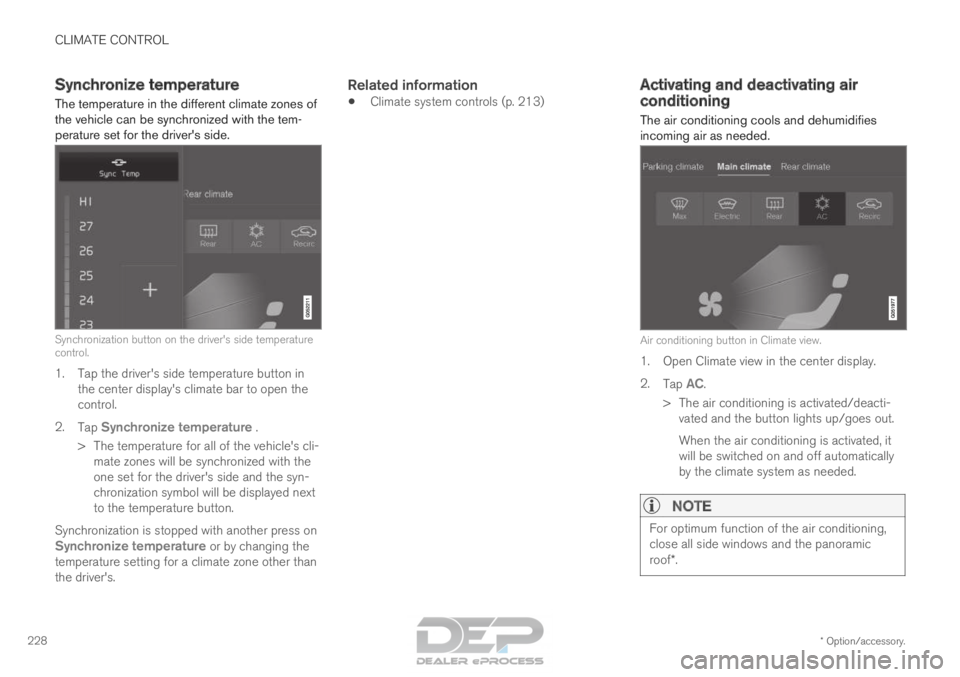
perature set for the driver's side. Synchronization button on the driver's side temperature
control.
1. Tap the driver's side temperature button in
the center display's climate bar to open the
control.
2. Tap Synchronize temperature .
>
The temperature for all of the vehicle's cli-
mate zones will be synchronized with the
one set for the driver's side and the syn-
chronization symbol will be displayed next
to the temperature button.
Synchronization is stopped with another press on Synchronize temperature or by changing the
temperature setting for a climate zone other than
the driver's.
Related information
• Climate system controls (p. 213) Activating and deactivating air
conditioning
The air conditioning cools and dehumidifies
incoming air as needed. Air conditioning button in Climate view.
1. Open Climate view in the center display.
2.
Tap AC.
>
The air conditioning is activated/deacti-
vated and the button lights up/goes out.
When the air conditioning is activated, it
will be switched on and off automatically
by the climate system as needed.
NOTE For optimum function of the air conditioning,
close all side windows and the panoramic
roof*.
Page 242 of 686
||KEY, LOCKS AND ALARM
* Option/accessory.
240 The keyless system for locking/unlocking the
doors and tailgate (Passive Entry*) is available as
an option. This system has a range in a semicircle
with a radius of approximately 1.5 meter (5 feet)
out from the driver's door and approx. 1 meter
(3 feet) out from the tailgate.
With keyless start in combination with keyless
locking and unlocking, the remote key can be
located anywhere in the passenger compartment
or cargo compartment in order to start the
engine.
Each remote key supplied with the vehicle can be
linked to a driver profile with unique settings for
the vehicle. When a key with a specific profile is
used, the vehicle settings are adjusted according
to that profile.
Buttonless key, Key TagFor vehicles equipped with keyless locking and
unlocking*, a smaller, lighter and button-less key
(Key Tag 3
) is also provided. It works the same
way as the regular remote key as regard keyless
start and keyless locking and unlocking 4
. It does
not have a detachable key blade and its battery
cannot be replaced.
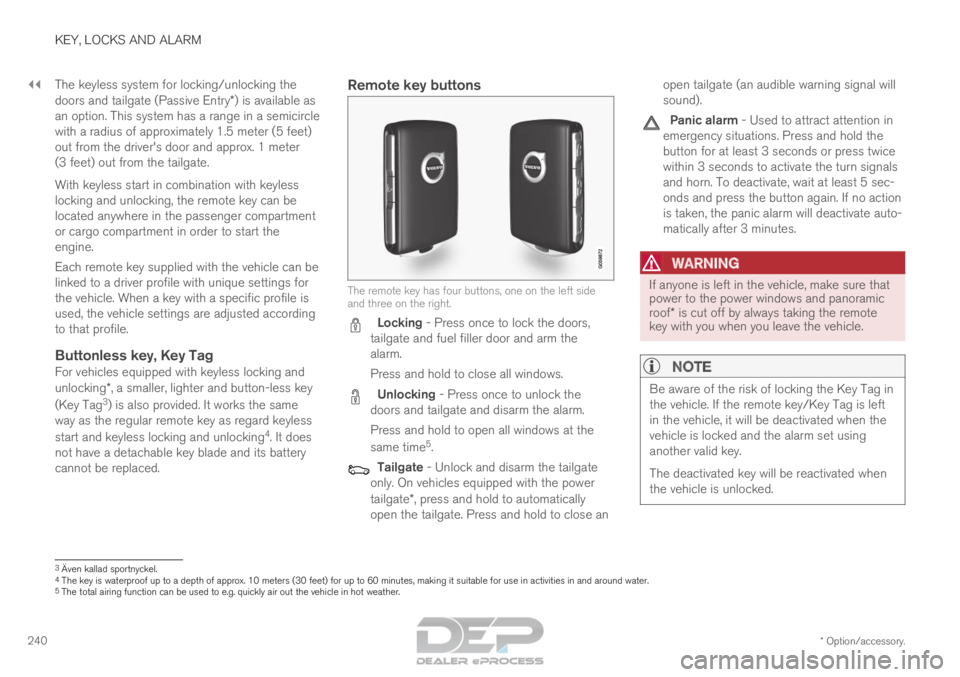
Remote key buttons The remote key has four buttons, one on the left side
and three on the right.
Locking - Press once to lock the doors,
tailgate and fuel filler door and arm the
alarm.
Press and hold to close all windows. Unlocking - Press once to unlock the
doors and tailgate and disarm the alarm.
Press and hold to open all windows at the
same time 5
. Tailgate - Unlock and disarm the tailgate
only. On vehicles equipped with the power
tailgate*, press and hold to automatically
open the tailgate. Press and hold to close an open tailgate (an audible warning signal will
sound). Panic alarm - Used to attract attention in
emergency situations. Press and hold the
button for at least 3 seconds or press twice
within 3 seconds to activate the turn signals
and horn. To deactivate, wait at least 5 sec-
onds and press the button again. If no action
is taken, the panic alarm will deactivate auto-
matically after 3 minutes.
WARNING If anyone is left in the vehicle, make sure that
power to the power windows and panoramic
roof* is cut off by always taking the remote
key with you when you leave the vehicle.
NOTE Be aware of the risk of locking the Key Tag in
the vehicle. If the remote key/Key Tag is left
in the vehicle, it will be deactivated when the
vehicle is locked and the alarm set using
another valid key.
The deactivated key will be reactivated when
the vehicle is unlocked.
3
Även kallad sportnyckel.
4 The key is waterproof up to a depth of approx. 10 meters (30 feet) for\
up to 60 minutes, making it suitable for use in activities in and aroun\
d water.
5 The total airing function can be used to e.g. quickly air out the vehicl\
e in hot weather.
Page 429 of 686
STARTING AND DRIVING
}}
* Option/accessory. 427
•
Jump starting using another battery (p. 469)
• Selecting ignition mode (p. 428) Ignition modes
The vehicle's ignition can be put in various
modes (levels) to make different functions availa-
ble.
To enable the use of a limited number of func-
tions when the engine is not running, the ignition
can be put in one of three different levels: 0, I
and II. These levels are referred to as "ignition
modes" in the Owner's Manual.
The following table shows which functions are
available in each ignition mode: Mode
Functions
0 •The odometer, clock and tem-
perature gauge are illuminated A
.
• The power seats* can be
adjusted.
• The power windows can be used.
• The center display is activated
and can be used A
.
• The 12 V outlet in the cargo com-
partment* can be used.
• The infotainment system can be
used A
.
In this ignition mode, the functions are
available for a limited time and then
switch off automatically.
I •The panoramic roof, power win-
dows, 12 V outlet in passenger
compartment, Bluetooth, naviga-
tion, phone, blower and wind-
shield wipers can be used.
• The power seats can be adjusted.
• The 12 V outlet in the cargo com-
partment can be used.
Electrical current will be taken
from the battery in this ignition
mode.
Page 459 of 686
STARTING AND DRIVING
}}
457
Driving
• Choose the Pure drive mode to help mini-
mize electric power consumption.
• Maintain a steady speed and a generous fol-
lowing distance to traffic ahead to minimize
braking. This drive mode has the lowest
power consumption.
• Balance energy requirements using the
accelerator pedal. Use the indicator on the
instrument panel to see available electric
power and avoid starting the combustion
engine unnecessarily. The electric motor is
more effective than the combustion engine,
especially at low speeds.
• When braking is necessary, brake gently
using the brake pedal. This will recharge the
hybrid battery. A regenerative function is
integrated in the brake pedal and can be
augmented by the electric motor's braking
capacity when the gear selector is in mode
B.
• Higher speeds increase energy consumption
- air resistance increases with speed.
• Activate the
Hold function in the Function
view at high speeds when traveling farther
than is possible using the hybrid battery's
capacity.
• Whenever possible, avoid using the Charge
function to charge the hybrid battery. Charg-
ing the battery using the combustion engine increases fuel consumption and carbon diox-
ide emissions.
• In a cold climate, reduce heating of the wind-
shield/rear window, mirrors, seats and the
steering wheel.
• Maintain the correct pressure in the tires and
check pressure regularly.
• The type of tires used could affect energy
consumption - consult a retailer for advice on
suitable tires.
• Remove unnecessary items from the vehicle
- the heavier the load, the higher the fuel
consumption.
• Roof loads increase air resistance and
increase fuel consumption. Remove roof
boxes, ski racks, etc. that are not in use.
• Avoid driving with the windows open.
• Do not keep the vehicle still on an upward
gradient by using the accelerator pedal. Use
the brakes instead.
Related information
•
Drive-E
‒
purer driving pleasure (p. 27)
• Factors affecting electric motor range
(p. 458)
• Using the electric motor only (p. 457)
• Hybrid gauge (p. 87)
• Checking tire pressure (p. 557) Using the electric motor only
When using the electric motor, Volvo Twin
Engine provides a combination of good fuel
economy, low emissions and high performance.
For energy-efficient driving:
• Select the Pure drive mode to help maximize
driving range using only the electric motor.
• Balance energy requirements using the
accelerator pedal. Use the indicator on the
instrument panel's hybrid gauge to see avail-
able electric power and avoid starting the
combustion engine unnecessarily.
• When braking is necessary, brake gently
using the brake pedal. This will recharge the
hybrid battery.
• Activate the
Hold function in the Function
view at high speeds when traveling farther
than is possible using the hybrid battery's
capacity.
• Reduce current consumption in the passen-
ger compartment by reducing e.g. fan speed,
electric heating, or air conditioning use.
Also follow the general economical driving advice
regarding speed, tires and load to maximize
range.
Related information
• General information about Twin Engine
(p. 406)
• Economical driving (p. 456)
Page 500 of 686
AUDIO, MEDIA AND INTERNET
* Option/accessory.
498 SiriusXM
®
Satellite radio*
The SiriusXM ®
Satellite system broadcasts from
of a number of high elevation satellites in geo-
synchronous orbit.
Listening to satellite radioThe digital signals from the satellites are line-of-
sight, which means that physical obstructions
such as bridges, tunnels, etc, may temporarily
interfere with signal reception.
Avoid any obstructions, such as metallic objects
transported on roof racks or in a ski box, or other
antennas that may impede signals from the
SiriusXM ®
satellites.
Selecting SiriusXM ®
Satellite radio
mode
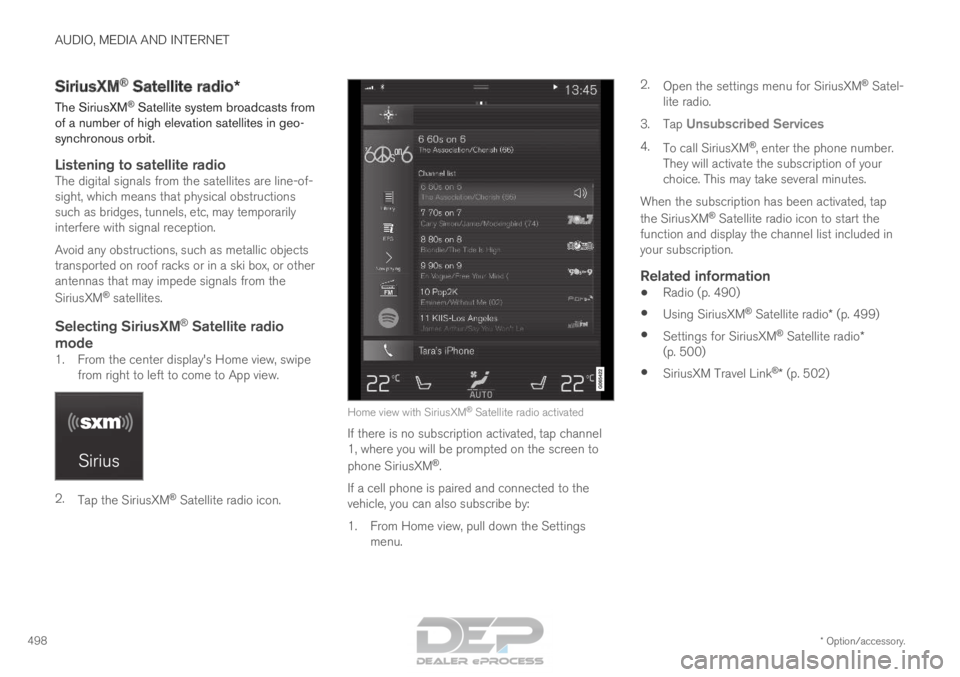
1. From the center display's Home view, swipe from right to left to come to App view. 2.
Tap the SiriusXM ®
Satellite radio icon. Home view with SiriusXM
®
Satellite radio activated
If there is no subscription activated, tap channel
1, where you will be prompted on the screen to
phone SiriusXM ®
.
If a cell phone is paired and connected to the
vehicle, you can also subscribe by:
1.
From Home view, pull down the Settings
menu. 2.
Open the settings menu for SiriusXM ®
Satel-
lite radio.
3. Tap Unsubscribed Services
4. To call SiriusXM ®
, enter the phone number.
They will activate the subscription of your
choice. This may take several minutes.
When the subscription has been activated, tap
the SiriusXM ®
Satellite radio icon to start the
function and display the channel list included in
your subscription.
Related information
• Radio (p. 490)
• Using SiriusXM ®
Satellite radio* (p. 499)
• Settings for SiriusXM ®
Satellite radio*
(p. 500)
• SiriusXM Travel Link ®
* (p. 502)