center console VOLVO XC90 TWIN ENGINE 2018 Owners Manual
[x] Cancel search | Manufacturer: VOLVO, Model Year: 2018, Model line: XC90 TWIN ENGINE, Model: VOLVO XC90 TWIN ENGINE 2018Pages: 686, PDF Size: 17 MB
Page 15 of 686
13
LOADING, STORAGE AND
PASSENGER COMPARTMENT
Passenger compartment interior580
Tunnel console581
Electrical outlets582
Using the electrical outlets584
Using the glove compartment585
Sun visors586
Cargo compartment586
Loading recommendations586
Roof loads and load carriers588
Grocery bag holders588
Load anchoring eyelets589
Installing and removing the cargocompartment cover*589
Operating the cargo compartment cover*590
Installing and removing the steelcargo grid*592
Installing and removing the cargo net*593
MAINTENANCE AND SERVICE
Volvo's service program598
Data transfer between vehicle andworkshop over Wi-Fi600
Download Center601
Handling system updates via Down-load Center601
Vehicle status602
Scheduling service and repairs603
Sending vehicle information to theworkshop604
Hoisting the vehicle605
Opening and closing the hood607
Climate control system service608
Replacing a windshield with head-updisplay*608
Engine compartment overview609
Engine oil610
Checking and filling engine oil611
Refilling coolant612
Replacing bulbs613
Bulb specifications614
Start battery615
Hybrid battery619
Battery symbols620
Fuses and fuseboxes620
Replacing fuses621
Fuses in the engine compartment622
Fuses under the glove compartment626
Fuses in the cargo compartment629
Cleaning the interior633
Cleaning the center display633
Cleaning the head-up display*634
Cleaning fabric upholstery and ceil-ing liner635
Cleaning the seat belt635
Cleaning floor mats and inlay mats635
Cleaning leather upholstery636
Cleaning the leather steering wheel637
Cleaning interior plastic, metal andwood surfaces638
Cleaning the exterior638
Polishing and waxing639
Hand washing639
Automatic car washes641
High-pressure washing642
Cleaning the wiper blades642
Cleaning exterior plastic, rubber andtrim components643
Cleaning rims644
Corrosion protection644
Paintwork645
Page 61 of 686
SAFETY
59
WARNING
•No objects that add to the total weight onthe seat should be placed on the frontpassenger's seat. If a child is seated inthe front passenger's seat with any addi-tional weight, this extra weight couldcause the OWS system to enable the air-bag, which might cause it to deploy in theevent of a collision, thereby injuring thechild.
•The seat belt should never be wrappedaround an object on the front passeng-er's seat. This could interfere with theOWS system's function.
•The front passenger's seat belt shouldnever be used in a way that exerts morepressure on the passenger than normal.This could increase the pressure exertedon the weight sensor by a child, andcould result in the airbag being enabled,which might cause it to deploy in theevent of a collision, thereby injuring thechild.
WARNING
•Keep the following points in mind withrespect to the OWS system. Failure tofollow these instructions could adverselyaffect the system's function and result inserious injury to the occupant of the frontpassenger's seat:
•The full weight of the front seat passen-ger should always be on the seat cushion.The passenger should never lift him/herself off the seat cushion using thearmrest in the door or the center console,by pressing the feet on the floor, by sit-ting on the edge of the seat cushion, orby pressing against the backrest in a waythat reduces pressure on the seat cush-ion. This could cause OWS to disable thefront, passenger's side airbag.
WARNING
•Do not place any type of object on thefront passenger's seat in such a way thatjamming, pressing, or squeezing occursbetween the object and the front seat,other than as a direct result of the correctuse of the Automatic Locking Retractor/Emergency Locking Retractor (ALR/ELR)seat belt.
•No objects should be placed under thefront passenger's seat. This could inter-fere with the OWS system's function.
Related information
•Driver/passenger-side airbags (p. 53)
Page 84 of 686
DISPLAYS AND VOICE CONTROL
* Option/accessory.
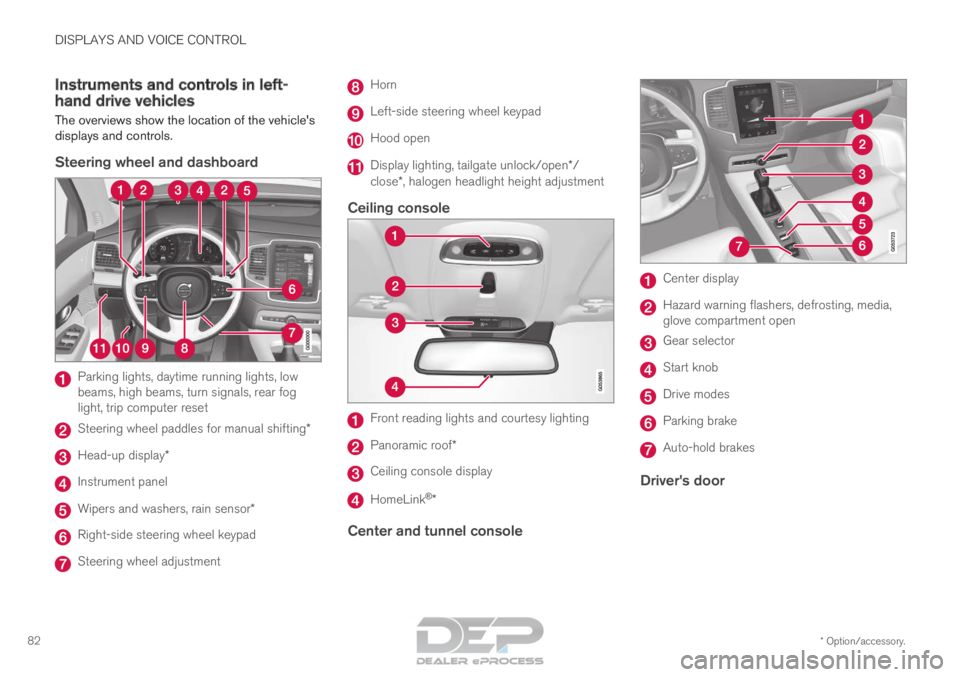
82 Instruments and controls in left-
hand drive vehicles
The overviews show the location of the vehicle's
displays and controls.
Steering wheel and dashboard Parking lights, daytime running lights, low
beams, high beams, turn signals, rear fog
light, trip computer reset
Steering wheel paddles for manual shifting*
Head-up display*
Instrument panel
Wipers and washers, rain sensor*
Right-side steering wheel keypad
Steering wheel adjustment Horn
Left-side steering wheel keypad
Hood open
Display lighting, tailgate unlock/open*/
close*, halogen headlight height adjustment
Ceiling console Front reading lights and courtesy lighting
Panoramic roof*
Ceiling console display
HomeLink
®
*
Center and tunnel console Center display
Hazard warning flashers, defrosting, media,
glove compartment open
Gear selector
Start knob
Drive modes
Parking brake
Auto-hold brakes
Driver's door
Page 142 of 686
||DISPLAYS AND VOICE CONTROL
140
4.
Pull down Top view again and tap SettingsSystem Driver Profiles Edit
Profile .
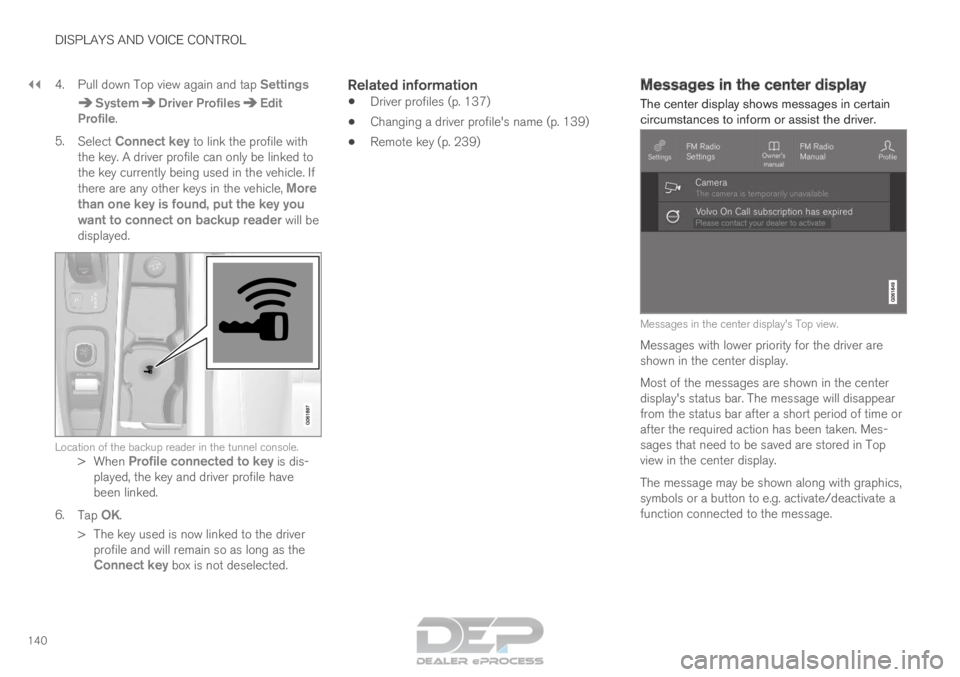
5. Select Connect key to link the profile with
the key. A driver profile can only be linked to
the key currently being used in the vehicle. If
there are any other keys in the vehicle, More
than one key is found, put the key you
want to connect on backup reader will be
displayed. Location of the backup reader in the tunnel console.
>When Profile connected to key is dis-
played, the key and driver profile have
been linked.
6. Tap OK.
>
The key used is now linked to the driver
profile and will remain so as long as the
Connect key box is not deselected.
Related information
• Driver profiles (p. 137)
• Changing a driver profile's name (p. 139)
• Remote key (p. 239) Messages in the center display
The center display shows messages in certain
circumstances to inform or assist the driver. Messages in the center display's Top view.
Messages with lower priority for the driver are
shown in the center display.
Most of the messages are shown in the center
display's status bar. The message will disappear
from the status bar after a short period of time or
after the required action has been taken. Mes-
sages that need to be saved are stored in Top
view in the center display.
The message may be shown along with graphics,
symbols or a button to e.g. activate/deactivate a
function connected to the message.
Page 165 of 686
LIGHTING
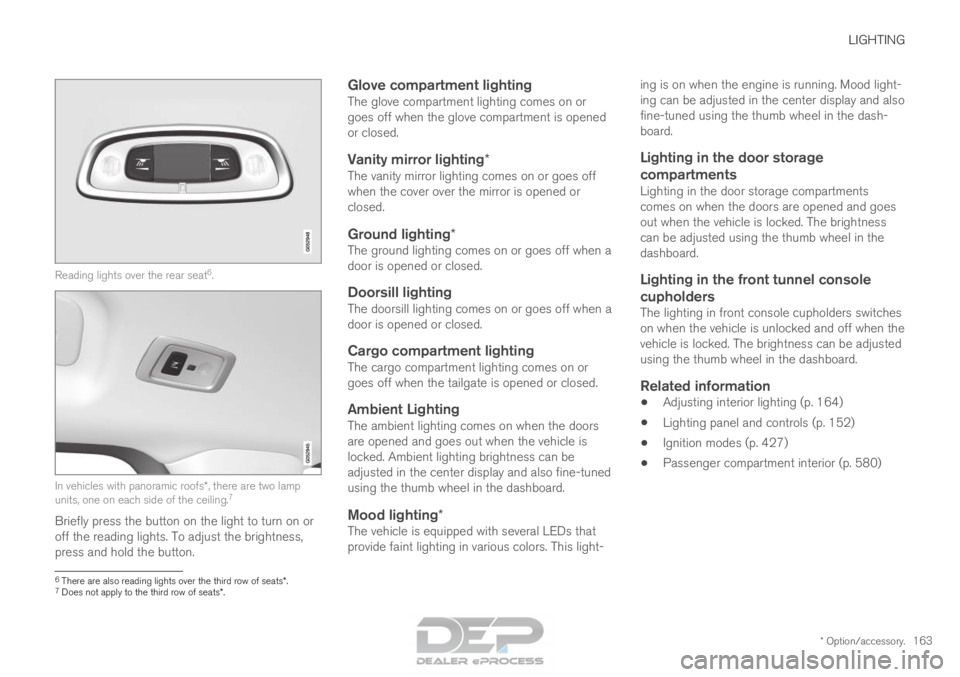
* Option/accessory.163Reading lights over the rear seat
6
. In vehicles with panoramic roofs*, there are two lamp
units, one on each side of the ceiling. 7
Briefly press the button on the light to turn on or
off the reading lights. To adjust the brightness,
press and hold the button.
Glove compartment lightingThe glove compartment lighting comes on or
goes off when the glove compartment is opened
or closed.
Vanity mirror lighting*The vanity mirror lighting comes on or goes off
when the cover over the mirror is opened or
closed.
Ground lighting*The ground lighting comes on or goes off when a
door is opened or closed.
Doorsill lightingThe doorsill lighting comes on or goes off when a
door is opened or closed.
Cargo compartment lightingThe cargo compartment lighting comes on or
goes off when the tailgate is opened or closed.
Ambient LightingThe ambient lighting comes on when the doors
are opened and goes out when the vehicle is
locked. Ambient lighting brightness can be
adjusted in the center display and also fine-tuned
using the thumb wheel in the dashboard.
Mood lighting*The vehicle is equipped with several LEDs that
provide faint lighting in various colors. This light- ing is on when the engine is running. Mood light-
ing can be adjusted in the center display and also
fine-tuned using the thumb wheel in the dash-
board.
Lighting in the door storage
compartments
Lighting in the door storage compartments
comes on when the doors are opened and goes
out when the vehicle is locked. The brightness
can be adjusted using the thumb wheel in the
dashboard.
Lighting in the front tunnel console
cupholders
The lighting in front console cupholders switches
on when the vehicle is unlocked and off when the
vehicle is locked. The brightness can be adjusted
using the thumb wheel in the dashboard.
Related information
• Adjusting interior lighting (p. 164)
• Lighting panel and controls (p. 152)
• Ignition modes (p. 427)
• Passenger compartment interior (p. 580) 6
There are also reading lights over the third row of seats*.
7 Does not apply to the third row of seats*.
Page 204 of 686
CLIMATE CONTROL
* Option/accessory.
202 Climate
The vehicle is equipped with electronic climate
control. The climate system cools, heats and
dehumidifies the air in the passenger compart-
ment. All of the climate system functions are controlled
from the center display and the buttons on the
center console.
Certain rear seat functions can also be controlled
from the climate controls* on the rear of the tun-
nel console.
Related information
• Climate zones (p. 202)
• Climate control sensors (p. 202)
• Perceived temperature (p. 203)
• Climate control system voice commands
(p. 203)
• Parking climate (p. 230)
• Air quality (p. 204)
• Air distribution (p. 207)
• Climate system controls (p. 213) Climate zones
The vehicle is divided into climate zones to make
it possible to set different temperatures for dif-
ferent parts of the passenger compartment.
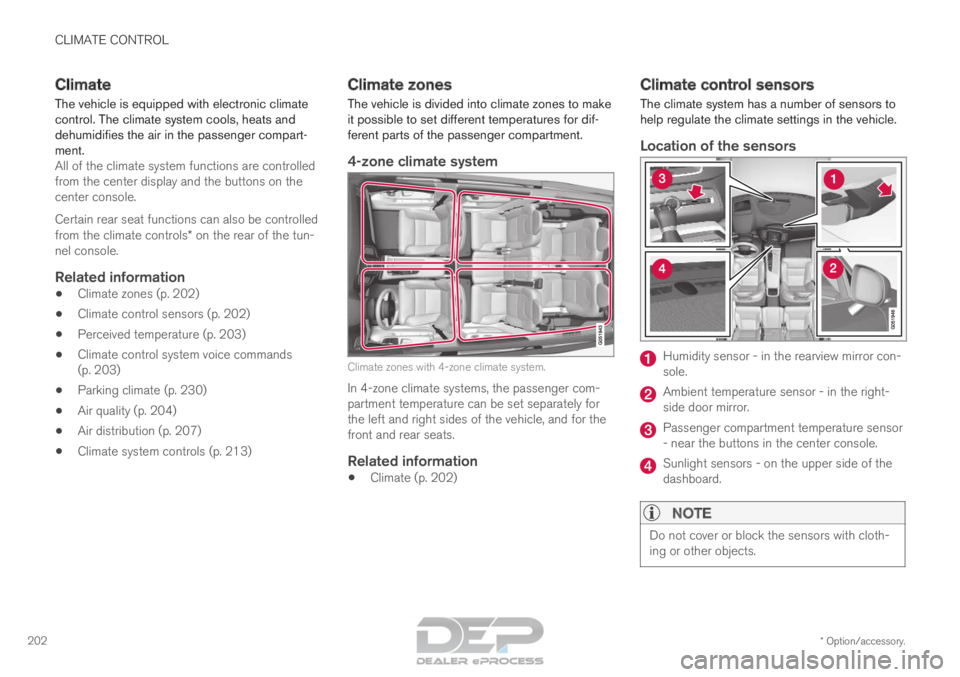
4-zone climate system Climate zones with 4-zone climate system.
In 4-zone climate systems, the passenger com-
partment temperature can be set separately for
the left and right sides of the vehicle, and for the
front and rear seats.
Related information
• Climate (p. 202) Climate control sensors
The climate system has a number of sensors to
help regulate the climate settings in the vehicle.
Location of the sensors Humidity sensor - in the rearview mirror con-
sole.
Ambient temperature sensor - in the right-
side door mirror.
Passenger compartment temperature sensor
- near the buttons in the center console.
Sunlight sensors - on the upper side of the
dashboard.
NOTE
Do not cover or block the sensors with cloth-
ing or other objects.
Page 209 of 686
CLIMATE CONTROL
}}
* Option/accessory. 207
Activating and deactivating the air
quality sensor*
The air quality sensor is part of the fully automa-
ted Interior Air Quality System (IAQS).
The air quality sensor can be switched on or off.
1.
Tap Settings in the Top view in the center
display.
2. Tap Climate.
3. Select Air Quality Sensor to activate/deac-
tivate the air quality sensor.
Related information
• Interior Air Quality System* (p. 206) Passenger compartment air filter
All air entering the passenger compartment
through the climate control system intake is fil-
tered.
Replacing the passenger compartment
filter
To maintain the high performance of the climate
control system, the filter must be replaced regu-
larly. Follow Volvo's service schedule for recom-
mended replacement intervals. When driving in
areas with a lot of smog, dust, etc., the filter may
need to be changed more frequently.
NOTE There are two types of passenger compart-
ment filters. Make sure that the correct filter
is installed.
Related information
•
Air quality (p. 204)
• Clean Zone* (p. 205)
• Clean Zone Interior Package* (p. 206)
• Interior Air Quality System* (p. 206) Air distribution
The climate system distributes incoming air
through a number of vents in the passenger
compartment.
Automatic and manual air distributionWhen the auto-climate feature is on, air distribu-
tion is regulated automatically. Air distribution can
also be controlled manually.
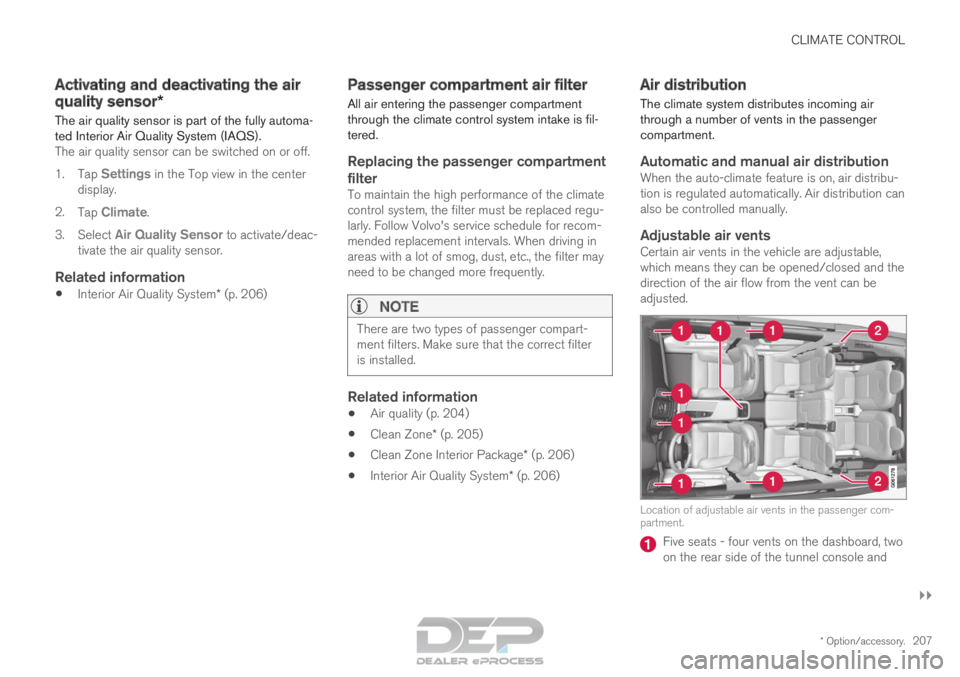
Adjustable air ventsCertain air vents in the vehicle are adjustable,
which means they can be opened/closed and the
direction of the air flow from the vent can be
adjusted. Location of adjustable air vents in the passenger com-
partment.
Five seats - four vents on the dashboard, two
on the rear side of the tunnel console and
Page 215 of 686

CLIMATE CONTROL
}}
* Option/accessory. 213
Climate system controls
The climate system functions are controlled from
physical buttons on the center console, the cen-
ter display, and the climate panel on the rear
side of the tunnel console.
Physical buttons in the center console Button for heated windshield* and max
defroster. Button for heated rear window and door mir-
rors.
Climate bar in the center displayThe most common climate system functions can
be controlled from the climate bar. Temperature control for the driver and pas-
senger sides.
Control for heated* and ventilated* driver and
passenger seats, and heated steering
wheel*. Button for opening Climate view. The graphic
in the button shows activated climate system
settings.
Climate view in the center displayTap the center button on the climate bar to open
Climate view. Climate view is divided into the fol-
lowing tabs:
• Main climate
• Rear climate
• Parking climate Toggle between the tabs by swiping the screen
to the left/right or by tapping the desired head-
ing.
Page 217 of 686
CLIMATE CONTROL
}}
* Option/accessory. 215
Climate controls on the rear side of the
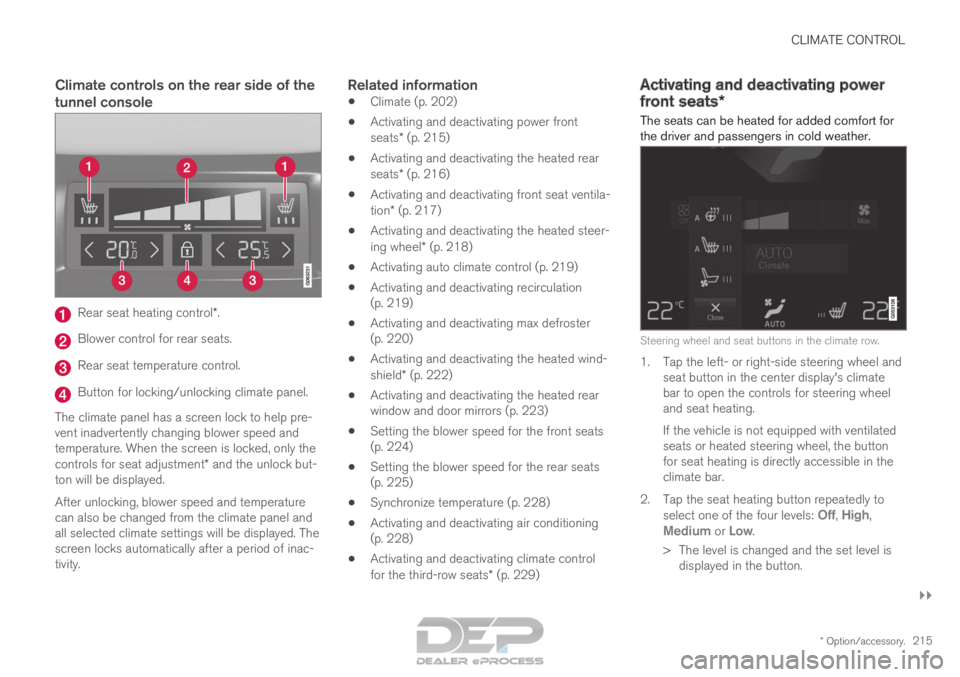
tunnel consoleRear seat heating control*.
Blower control for rear seats.
Rear seat temperature control.
Button for locking/unlocking climate panel.
The climate panel has a screen lock to help pre-
vent inadvertently changing blower speed and
temperature. When the screen is locked, only the
controls for seat adjustment* and the unlock but-
ton will be displayed.
After unlocking, blower speed and temperature
can also be changed from the climate panel and
all selected climate settings will be displayed. The
screen locks automatically after a period of inac-
tivity.Related information
• Climate (p. 202)
• Activating and deactivating power front
seats* (p. 215)
• Activating and deactivating the heated rear
seats* (p. 216)
• Activating and deactivating front seat ventila-
tion* (p. 217)
• Activating and deactivating the heated steer-
ing wheel* (p. 218)
• Activating auto climate control (p. 219)
• Activating and deactivating recirculation
(p. 219)
• Activating and deactivating max defroster
(p. 220)
• Activating and deactivating the heated wind-
shield* (p. 222)
• Activating and deactivating the heated rear
window and door mirrors (p. 223)
• Setting the blower speed for the front seats
(p. 224)
• Setting the blower speed for the rear seats
(p. 225)
• Synchronize temperature (p. 228)
• Activating and deactivating air conditioning
(p. 228)
• Activating and deactivating climate control
for the third-row seats* (p. 229) Activating and deactivating power
front seats*
The seats can be heated for added comfort for
the driver and passengers in cold weather. Steering wheel and seat buttons in the climate row.
1. Tap the left- or right-side steering wheel and
seat button in the center display's climate
bar to open the controls for steering wheel
and seat heating.
If the vehicle is not equipped with ventilated
seats or heated steering wheel, the button
for seat heating is directly accessible in the
climate bar.
2.
Tap the seat heating button repeatedly to
select one of the four levels: Off,
High,
Medium or Low.
>
The level is changed and the set level is
displayed in the button.
Page 219 of 686
CLIMATE CONTROL
* Option/accessory.217
Activating and deactivating the heated
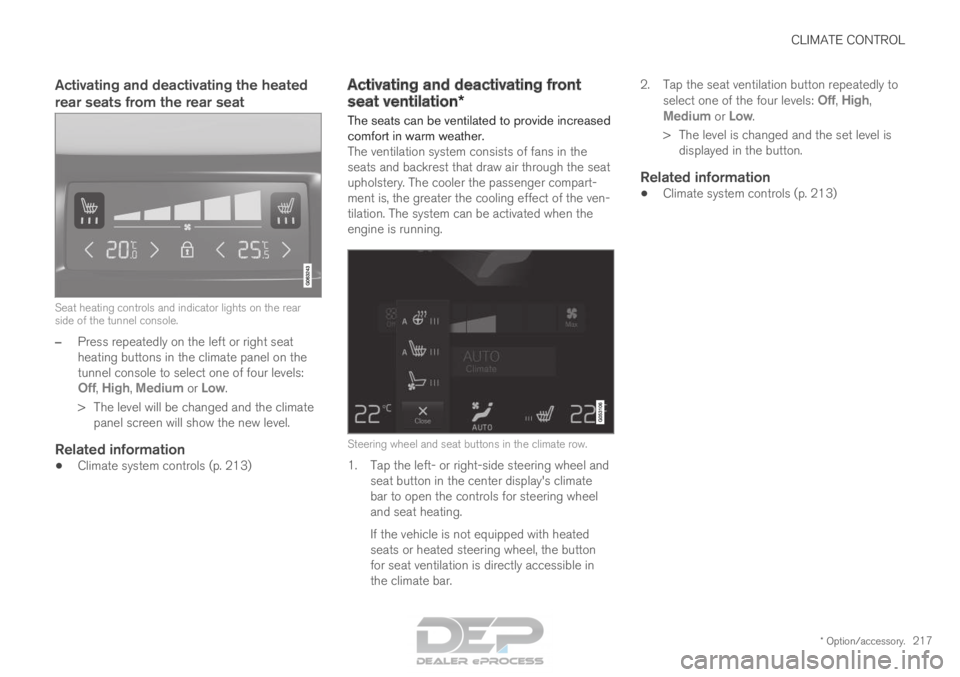
rear seats from the rear seatSeat heating controls and indicator lights on the rear
side of the tunnel console.
–
Press repeatedly on the left or right seat
heating buttons in the climate panel on the
tunnel console to select one of four levels:
Off
, High, Medium or Low.
>
The level will be changed and the climate
panel screen will show the new level.
Related information
• Climate system controls (p. 213) Activating and deactivating front
seat ventilation*
The seats can be ventilated to provide increased
comfort in warm weather.
The ventilation system consists of fans in the
seats and backrest that draw air through the seat
upholstery. The cooler the passenger compart-
ment is, the greater the cooling effect of the ven-
tilation. The system can be activated when the
engine is running.
Steering wheel and seat buttons in the climate row.
1. Tap the left- or right-side steering wheel and
seat button in the center display's climate
bar to open the controls for steering wheel
and seat heating.
If the vehicle is not equipped with heated
seats or heated steering wheel, the button
for seat ventilation is directly accessible in
the climate bar. 2.
Tap the seat ventilation button repeatedly to
select one of the four levels: Off,
High,
Medium or Low.
>
The level is changed and the set level is
displayed in the button.
Related information
• Climate system controls (p. 213)