ignition VOLVO XC90 TWIN ENGINE 2018 Owner's Manual
[x] Cancel search | Manufacturer: VOLVO, Model Year: 2018, Model line: XC90 TWIN ENGINE, Model: VOLVO XC90 TWIN ENGINE 2018Pages: 686, PDF Size: 17 MB
Page 174 of 686
||WINDOWS, GLASS AND MIRRORS
* Option/accessory.
172
Automatic folding when the vehicle is
locked*
The door mirrors automatically fold in when the
vehicle is locked and open when the vehicle is
unlocked using the remote key.
1.
Tap Settings in the center display's Top
view.
2.
Tap My Car Mirrors and Convenience
.
3. Select Fold Mirror When Locked to acti-
vate/deactivate.
Related information
• Rearview/door mirrors (p. 169)
• Adjusting the rearview mirror dimming func-
tion (p. 170)
• Storing memory settings in power front
seats* (p. 186)
• Activating and deactivating the heated rear
window and door mirrors (p. 223) Panoramic roof*
The panoramic roof is divided into two glass
sections. The front section can be opened verti-
cally at the rear edge (ventilation position) or hor-
izontally (open position). The rear section cannot
be moved.
The panoramic roof has a wind deflector and
sun curtain made of perforated fabric (located
beneath the glass sections) for extra protection
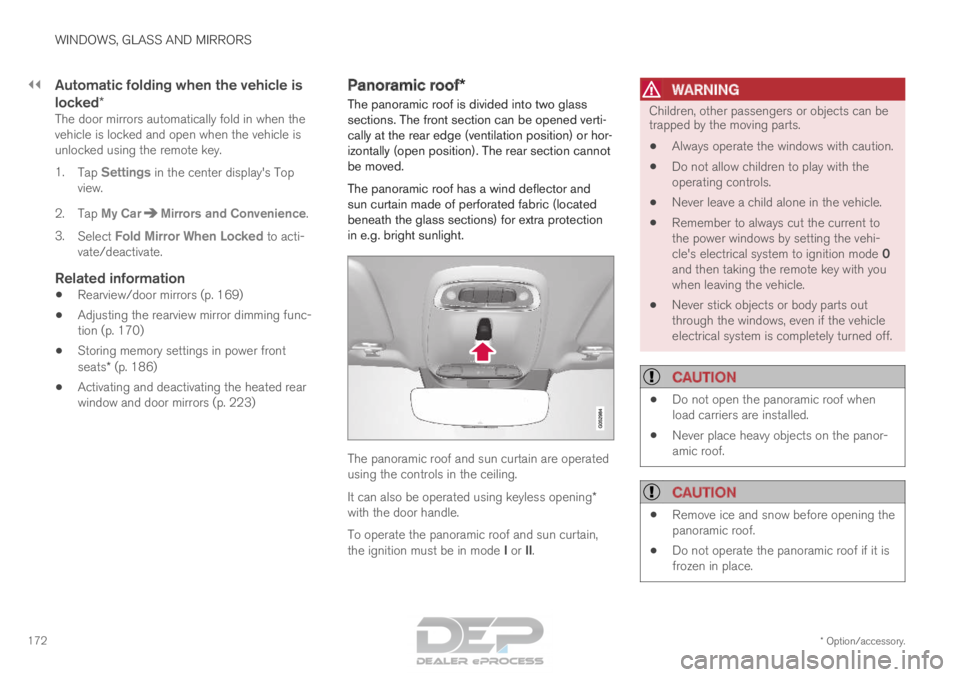
in e.g. bright sunlight. The panoramic roof and sun curtain are operated
using the controls in the ceiling.
It can also be operated using keyless opening*
with the door handle.
To operate the panoramic roof and sun curtain,
the ignition must be in mode I or II.
WARNING Children, other passengers or objects can be
trapped by the moving parts.
• Always operate the windows with caution.
• Do not allow children to play with the
operating controls.
• Never leave a child alone in the vehicle.
• Remember to always cut the current to
the power windows by setting the vehi-
cle's electrical system to ignition mode 0
and then taking the remote key with you
when leaving the vehicle.
• Never stick objects or body parts out
through the windows, even if the vehicle
electrical system is completely turned off.
CAUTION •
Do not open the panoramic roof when
load carriers are installed.
• Never place heavy objects on the panor-
amic roof.
CAUTION •
Remove ice and snow before opening the
panoramic roof.
• Do not operate the panoramic roof if it is
frozen in place.
Page 175 of 686
WINDOWS, GLASS AND MIRRORS
}}
* Option/accessory. 173
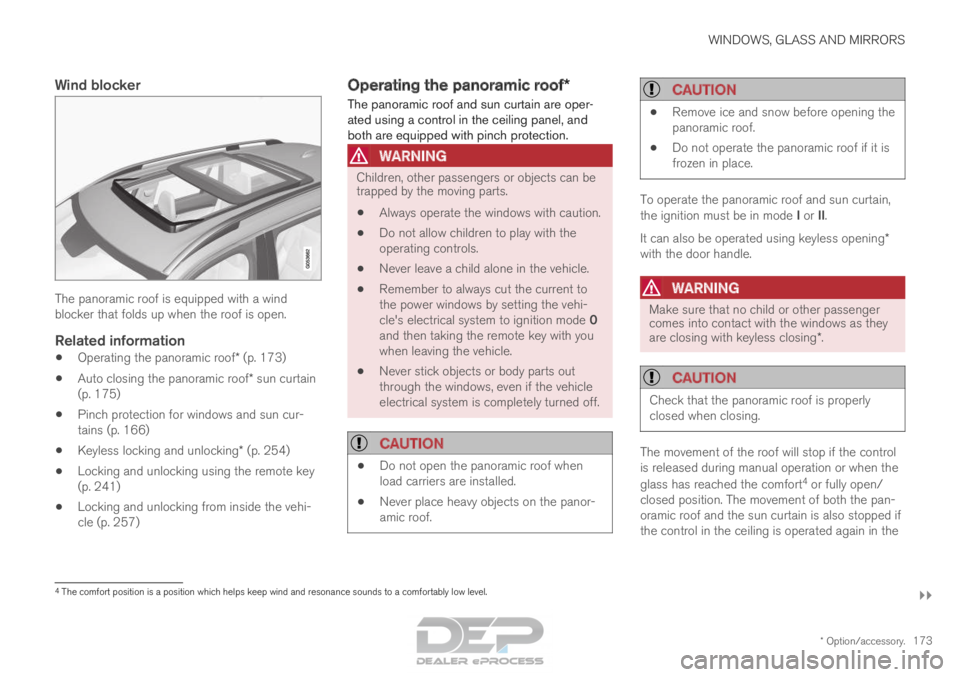
Wind blockerThe panoramic roof is equipped with a wind
blocker that folds up when the roof is open.
Related information
•
Operating the panoramic roof* (p. 173)
• Auto closing the panoramic roof* sun curtain
(p. 175)
• Pinch protection for windows and sun cur-
tains (p. 166)
• Keyless locking and unlocking* (p. 254)
• Locking and unlocking using the remote key
(p. 241)
• Locking and unlocking from inside the vehi-
cle (p. 257) Operating the panoramic roof*
The panoramic roof and sun curtain are oper-
ated using a control in the ceiling panel, and
both are equipped with pinch protection.
WARNING Children, other passengers or objects can be
trapped by the moving parts.
• Always operate the windows with caution.
• Do not allow children to play with the
operating controls.
• Never leave a child alone in the vehicle.
• Remember to always cut the current to
the power windows by setting the vehi-
cle's electrical system to ignition mode 0
and then taking the remote key with you
when leaving the vehicle.
• Never stick objects or body parts out
through the windows, even if the vehicle
electrical system is completely turned off.
CAUTION •
Do not open the panoramic roof when
load carriers are installed.
• Never place heavy objects on the panor-
amic roof.
CAUTION •
Remove ice and snow before opening the
panoramic roof.
• Do not operate the panoramic roof if it is
frozen in place. To operate the panoramic roof and sun curtain,
the ignition must be in mode I or II.
It can also be operated using keyless opening*
with the door handle.
WARNING Make sure that no child or other passenger
comes into contact with the windows as they
are closing with keyless closing*.
CAUTION
Check that the panoramic roof is properly
closed when closing.
The movement of the roof will stop if the control
is released during manual operation or when the
glass has reached the comfort
4
or fully open/
closed position. The movement of both the pan-
oramic roof and the sun curtain is also stopped if
the control in the ceiling is operated again in the 4
The comfort position is a position which helps keep wind and resonance s\
ounds to a comfortably low level.
Page 179 of 686

WINDOWS, GLASS AND MIRRORS
}}
* Option/accessory. 177
•
Filling washer fluid (p. 650)
• Windshield wipers in the service position
(p. 649)
• Replacing windshield wiper blades (p. 648)
• Changing rear window wipers (p. 647) Heated windshield washer nozzles*
The washer nozzles are heated automatically in
cold weather to prevent the washer fluid from
freezing.
Related information
• Using the rain sensor (p. 177)
• Using the windshield and headlight washers
(p. 179)
• Using automatic rear window wiping when
backing up (p. 181)
• Using the rain sensor's memory function
(p. 178)
• Using the rear window wiper/washer
(p. 180)
• Filling washer fluid (p. 650)
• Windshield wipers in the service position
(p. 649)
• Replacing windshield wiper blades (p. 648)
• Changing rear window wipers (p. 647)
• Using the windshield wipers (p. 176) Using the rain sensor
The rain sensor monitors the amount of water on
the windshield and automatically starts the wind-
shield wipers. Rain sensor sensitivity can be
adjusted using the thumb wheel on the right-
hand steering wheel lever.
Right-hand steering wheel lever.
Rain sensor button
Thumb wheel, sensitivity/interval wiper speed
When the rain sensor is activated, the rain
sensor symbol will be displayed in the instrument
panel.
Activating the rain sensorWhen the rain sensor is activated, the engine
must be running or the ignition must be in mode I
or II. The windshield wiper lever must also be in
position 0 or in the single sweep position.
Page 180 of 686

||WINDOWS, GLASS AND MIRRORS
* Option/accessory.
178 Activate the rain sensor by pressing the rain sen-
sor button .
If the lever is pressed down, the wipers will make
additional sweeps across the windshield.
Turn the thumb wheel upward for increased sen-
sitivity and downward for decreased sensitivity.
The wipers will make one extra sweep when the
thumb wheel is turned upward.
Deactivate the rain sensor
Deactivate the rain sensor by pressing the rain sensor button or moving the lever upward to
another wiper mode.
The rain sensor is automatically deactivated in
ignition mode 0 or when the engine is switched
off.
The rain sensor is also automatically deactivated
when the wiper blades are put in the service
position. The rain sensor will reactivate when
service mode is switched off.
CAUTION The windshield wipers may start inadvertently
and be damaged in automatic car washes.
Deactivate the rain sensor when the engine is
running or when the ignition is in mode I or II.
The symbol in the instrument panel will go
out.
Related information
• Using the windshield and headlight washers
(p. 179)
• Using automatic rear window wiping when
backing up (p. 181)
• Heated windshield washer nozzles* (p. 177)
• Using the rain sensor's memory function
(p. 178)
• Using the rear window wiper/washer
(p. 180)
• Filling washer fluid (p. 650)
• Windshield wipers in the service position
(p. 649)
• Replacing windshield wiper blades (p. 648)
• Changing rear window wipers (p. 647)
• Using the windshield wipers (p. 176) Using the rain sensor's memory
function
The rain sensor monitors the amount of water on
the windshield and automatically starts the wind-
shield wipers.
Activating/deactivating memory
function
The rain sensor's memory function can be set to
activate so that the rain sensor button does not
need to be pressed each time the engine is
started:
1.
Tap Settings in the Top view in the center
display.
2.
Tap My Car Wipers
.
3. Select Rain Sensor Memory to activate/
deactivate the memory function.
Related information
• Using the rain sensor (p. 177)
• Using the windshield and headlight washers
(p. 179)
• Using automatic rear window wiping when
backing up (p. 181)
• Heated windshield washer nozzles* (p. 177)
• Using the rear window wiper/washer
(p. 180)
• Filling washer fluid (p. 650)
Page 189 of 686

SEATS AND STEERING WHEEL
* Option/accessory.187
Using stored memory in a powered
front seat
The memory function can be used to store the
settings for the seat, door mirrors and head-up
display*.
Using a stored positionA stored position can be used with the front door
open or closed:
Front door open
– Briefly press one of the memory buttons
(1-3). The seat, door mirrors and head-up
display will move and stop at the positions
stored in that button.
Front door closed
– Press and hold one of the memory buttons
(1-3) until the seat, door mirrors and head-
up display stop in the positions stored in that
memory button.
If the memory button is released, the seat, door
mirrors and head-up display will stop moving.
WARNING •
Because the front seats can be adjusted
with the ignition off, children should never
be left unattended in the vehicle.
• Movement of the seat can be STOPPED
at any time by pressing any button on the
power seat control panel.
• Do not adjust the seat while driving.
• The seat should be adjusted so that the
brake pedal can be depressed fully. In
addition, position the seat as far rearward
as comfort and control allow.
• The seat rails on the floor must not be
obstructed in any way when the seat is in
motion.
Related information
• Manual front seats (p. 184)
• Power front seats* (p. 185)
• Adjusting the power front seats* (p. 185)
• Storing memory settings in power front
seats* (p. 186)
• Adjusting front seat massage settings*
(p. 188)
• Adjusting front seat cushion length (p. 189)
• Front seat massage settings* (p. 188)
• Adjusting front seat side bolster settings*
(p. 190) •
Adjusting front seat lumbar support* (p. 190)
• Adjusting the passenger seat from the driv-
er's seat* (p. 191)
Page 241 of 686
KEY, LOCKS AND ALARM
}}
* Option/accessory. 239
In rear door*Lock button with indicator light in rear door.
Illuminated indicator lights in each door indicate
that that particular door is locked. If any door is
unlocked and opened, the indicator light in that
door will go out. The lights in the other doors will
remain illuminated.
Related information
•
Lock confirmation settings (p. 239)
• Welcome Light (p. 161)
• Using home safe lighting (p. 161) Lock confirmation settings
Settings for how the vehicle confirms locking
and unlocking can be adjusted in the center dis-
play's Settings menu.
1.
Tap Settings in the center display's Top
view.
2.
Tap My Car Locking
.
3. Tap Visible Locking Feedback to deacti-
vate the function or to select when the vehi-
cle should provide a visible response: during
Lock, Unlock or Both.
4.
Select to receive an audible response when
locking the vehicle by marking Audible
Locking Feedback.
Folding door mirrors* confirmation
1. Tap Settings in the center display's Top
view.
2.
Tap My Car Mirrors and Convenience
.
3. Select Fold Mirror When Locked to acti-
vate or deactivate the function.
Related information
• Lock indication (p. 238) Remote key
The remote key is used to lock and unlock doors
and the tailgate. The remote key must be in the
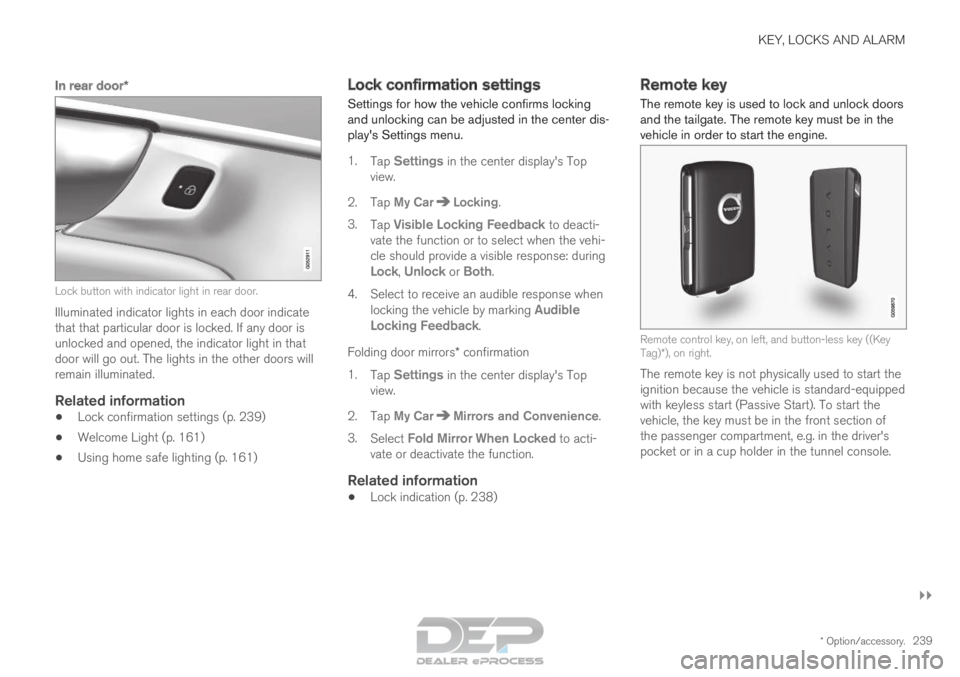
vehicle in order to start the engine. Remote control key, on left, and button-less key ((Key
Tag)*), on right.
The remote key is not physically used to start the
ignition because the vehicle is standard-equipped
with keyless start (Passive Start). To start the
vehicle, the key must be in the front section of
the passenger compartment, e.g. in the driver's
pocket or in a cup holder in the tunnel console.
Page 261 of 686
KEY, LOCKS AND ALARM
}}
* Option/accessory. 259
Unlocking the tailgate from inside
the vehicle
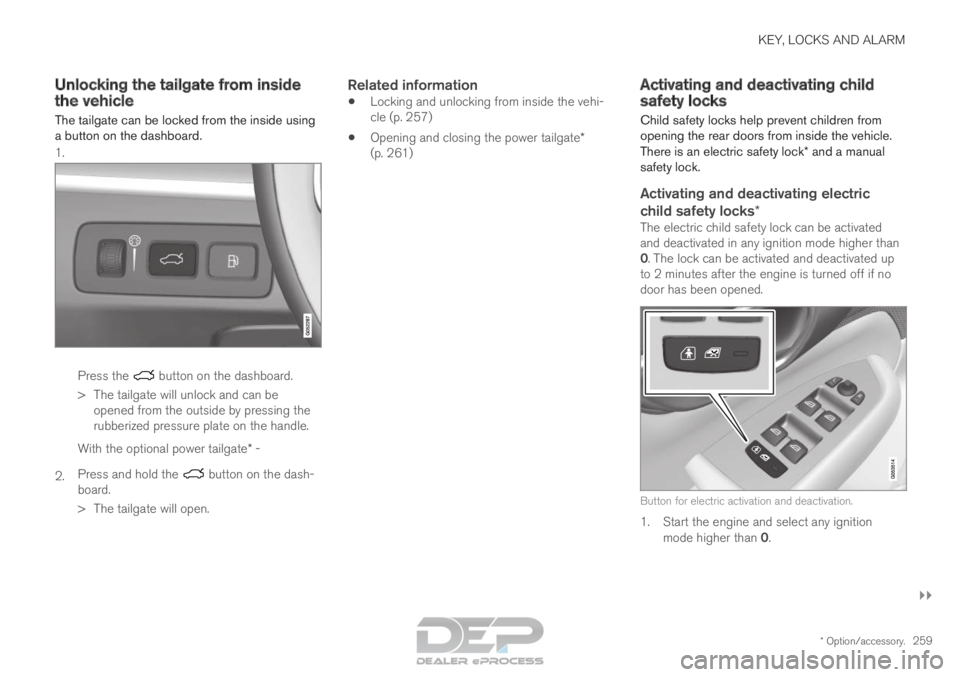
The tailgate can be locked from the inside using
a button on the dashboard. 1. Press the button on the dashboard.
>
The tailgate will unlock and can be
opened from the outside by pressing the
rubberized pressure plate on the handle.
2. With the optional power tailgate* -
Press and hold the button on the dash-
board.
>
The tailgate will open.
Related information
• Locking and unlocking from inside the vehi-
cle (p. 257)
• Opening and closing the power tailgate*
(p. 261) Activating and deactivating child
safety locks
Child safety locks help prevent children from
opening the rear doors from inside the vehicle.
There is an electric safety lock* and a manual
safety lock.
Activating and deactivating electric
child safety locks*
The electric child safety lock can be activated
and deactivated in any ignition mode higher than
0. The lock can be activated and deactivated up
to 2 minutes after the engine is turned off if no
door has been opened. Button for electric activation and deactivation.
1. Start the engine and select any ignition
mode higher than 0.
Page 269 of 686
KEY, LOCKS AND ALARM
}}
* Option/accessory. 267
Activating and deactivating private
locking
Private locking is activated using the function
button in the center display and a PIN code.
NOTE For the valet lock function to be activated the
car must be in at least ignition mode I.
Entering security code before initial useThe first time the function is used, a security
code must be selected. This code can then be
used to deactivate private locking if the selected
PIN code has been lost or forgotten. The security
code functions as a PUK (security) code for all
PIN codes used for private locking.
Save the security code in a safe place.
To create a security code:
1. Tap the button for private locking in Function
view. > A pop-up window will appear. 2.
Enter your security code.
> The security code is saved. The private locking function is now ready for activa-
tion.
If the system has been reset, the above proce-
dure will need to be repeated.
Activating private locking1. Tap the button for private locking in Function view. > A pop-up window will appear.
2.
Enter the code you would like to use to
unlock the glove compartment and the tail-
gate and tap Confirm.
>
The glove compartment and tailgate will
lock. A green indicator light will illuminate
next to the button in Function view to con-
firm locked status.
Deactivating private locking1. Tap the button for private locking in Function view. > A pop-up window will appear.
2.
Enter the code used for locking and tap
Confirm.
>
The glove compartment and tailgate will
unlock. The green indicator light next to
the button in Function view will go out to
confirm unlocked status.
NOTE If you have forgotten or lost your PIN code or
if the PIN code has been entered incorrectly
more than three times, the security code can
be used to deactivate private locking.
NOTE
If private locking is activated and the vehicle
is unlocked using Volvo On Call* or the Volvo
On Call* app, private locking will be deacti-
vated automatically.
Page 270 of 686
||KEY, LOCKS AND ALARM
268
Related information
•
Private Locking (p. 266) Alarm
The alarm emits sound and light signals if any-
one without a valid remote key attempts to break
into the vehicle or interferes with the start battery
or alarm siren.
When armed, the alarm will be triggered if:
• the hood, tailgate or any door is opened.
• a battery cable is disconnected
• the alarm siren is disconnected.
Alarm signalsThe following occurs if the alarm is triggered:
• A siren will sound for 30 seconds or until the
alarm is turned off.
• All turn signals will flash for 5 minutes or
until the alarm is turned off.
If the reason the alarm was triggered is not recti-
fied, the alarm cycle will repeat up to 10 times 20
.
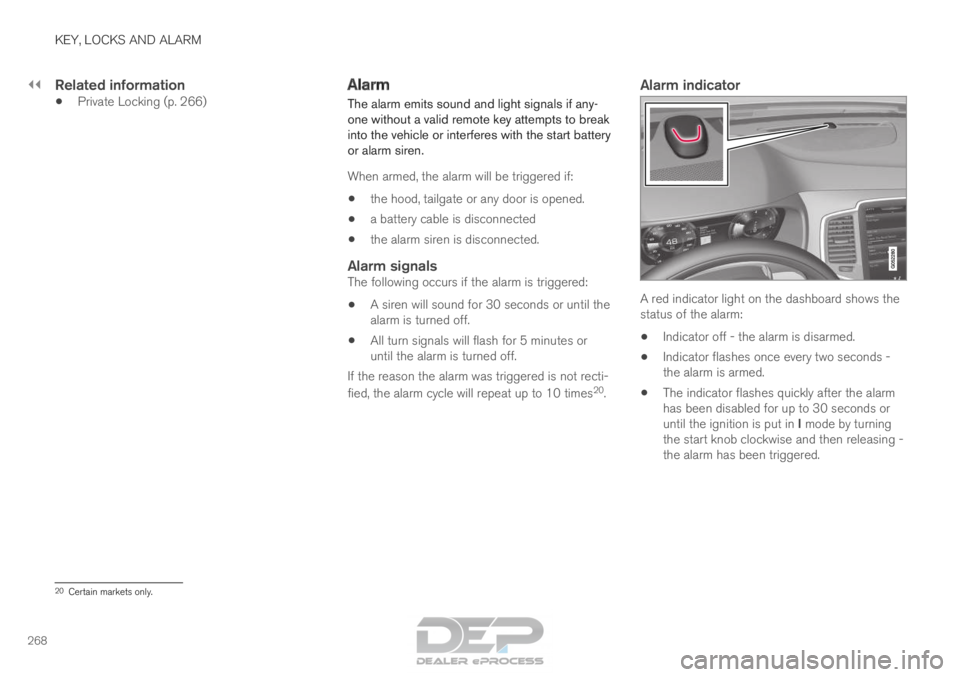
Alarm indicator A red indicator light on the dashboard shows the
status of the alarm:
• Indicator off - the alarm is disarmed.
• Indicator flashes once every two seconds -
the alarm is armed.
• The indicator flashes quickly after the alarm
has been disabled for up to 30 seconds or
until the ignition is put in I mode by turning
the start knob clockwise and then releasing -
the alarm has been triggered. 20
Certain markets only.
Page 272 of 686
||KEY, LOCKS AND ALARM
* Option/accessory.
270
Disarming the alarm without a functioning
remote key
The vehicle can be unlocked and disarmed even
if the remote key is not functioning, e.g. if the
battery is discharged.
1. Open the driver's door using the detachable
key blade.
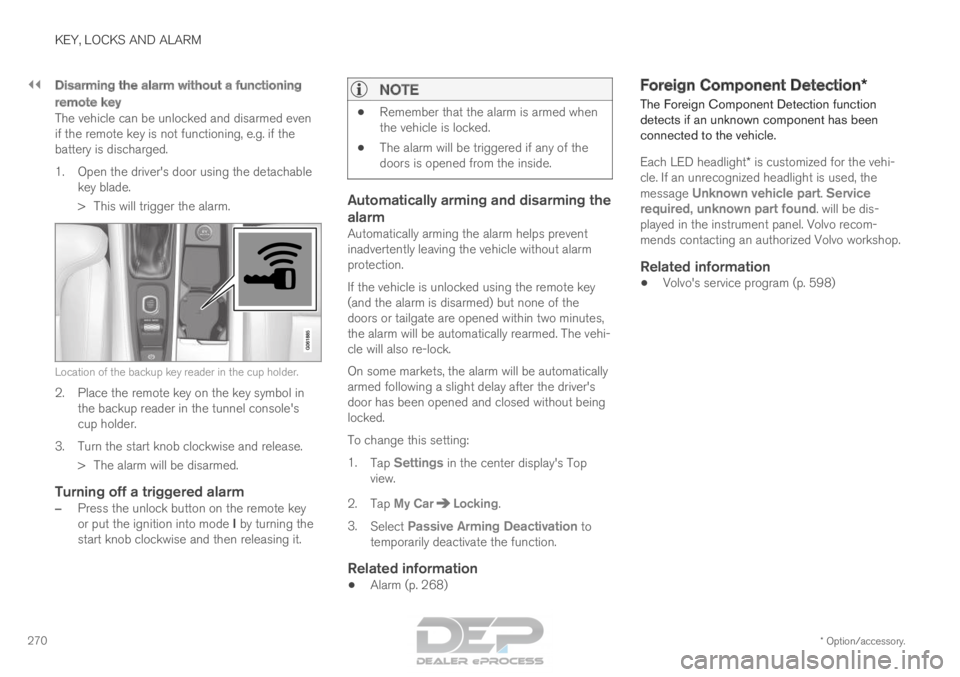
> This will trigger the alarm. Location of the backup key reader in the cup holder.
2. Place the remote key on the key symbol in
the backup reader in the tunnel console's
cup holder.
3.
Turn the start knob clockwise and release.
> The alarm will be disarmed.
Turning off a triggered alarm
– Press the unlock button on the remote key
or put the ignition into mode I by turning the
start knob clockwise and then releasing it.
NOTE •
Remember that the alarm is armed when
the vehicle is locked.
• The alarm will be triggered if any of the
doors is opened from the inside.
Automatically arming and disarming the
alarm
Automatically arming the alarm helps prevent
inadvertently leaving the vehicle without alarm
protection.
If the vehicle is unlocked using the remote key
(and the alarm is disarmed) but none of the
doors or tailgate are opened within two minutes,
the alarm will be automatically rearmed. The vehi-
cle will also re-lock.
On some markets, the alarm will be automatically
armed following a slight delay after the driver's
door has been opened and closed without being
locked.
To change this setting:
1.
Tap Settings in the center display's Top
view.
2.
Tap My Car Locking
.
3. Select Passive Arming Deactivation to
temporarily deactivate the function.
Related information
• Alarm (p. 268) Foreign Component Detection*
The Foreign Component Detection function
detects if an unknown component has been
connected to the vehicle.
Each LED headlight* is customized for the vehi-
cle. If an unrecognized headlight is used, the
message Unknown vehicle part. Service
required, unknown part found. will be dis- played in the instrument panel. Volvo recom-
mends contacting an authorized Volvo workshop.
Related information
• Volvo's service program (p. 598)