ignition VOLVO XC90 TWIN ENGINE 2018 Service Manual
[x] Cancel search | Manufacturer: VOLVO, Model Year: 2018, Model line: XC90 TWIN ENGINE, Model: VOLVO XC90 TWIN ENGINE 2018Pages: 686, PDF Size: 17 MB
Page 442 of 686

||STARTING AND DRIVING
* Option/accessory.
440 Help functions
The system will automatically shift to P:
• if the ignition is switched off while D or R is
selected.
• if the driver unbuckles the seat belt and
opens the driver's door while the vehicle is
running with the gear selector in a gear other
than P.
To park a vehicle with an unbuckled seat belt and
open door – end P mode by shifting to R or D
again.
Reverse - R
Select R when backing up. The vehicle must be
stationary when Reverse is selected.
Neutral - N
No gear is selected and the engine can be
started. Apply the parking brake if the vehicle is
stationary with the gear selector in N.
To move the gear selector from Neutral to
another gear, the brake pedal must be depressed
and the ignition in mode II.
D drive mode
D is the normal driving gear position. The trans-
mission shifts up or down automatically depend-
ing on acceleration and speed. The vehicle must
be stationary when the gear selector is moved
from R to D.
Brake - B
B can be selected at any time during a drive. In B
mode, the engine braking function is activated
when the accelerator pedal is released, which
helps charge the hybrid battery. This offers addi-
tional opportunities to recharge the hybrid bat-
tery, since the battery is charged even when the
brake pedal is not depressed. B mode in the instrument panel.
From B mode, it is possible to manually shift to
lower gears. The currently selected gear (1-8) will
be displayed in the instrument panel.
• Pull the gear selector backward once to shift
down one gear.
• Pull the gear selector backward again to shift
down to lower gears.
To shift manually to a higher gear, the vehicle
must be equipped with steering wheel paddles*. •
Push the gear selector forward to return to D
mode.
For smooth shifting and engine performance, the
transmission will shift down automatically if the
vehicle's speed becomes too low for the selected
gear.
Related information
• Shiftlock (p. 442)
• Using the steering wheel paddles* to shift
(p. 441)
• The kickdown function (p. 442)
• Gear indicator* (p. 442)
Page 444 of 686

STARTING AND DRIVING
* Option/accessory.
442 Shiftlock
The automatic transmission's shiftlock function
helps prevent inadvertently moving the gear
selector between different positions.
Automatic shiftlockThe automatic shiftlock has a separate safety
system.
From Park - P
To move the gear selector from the P position,
the brake pedal must be depressed and the igni-
tion in mode II.
From Neutral - N
If the gear selector is in N and the vehicle has
been stationary for at least 3 seconds (with or
without the engine running), the gear selector will
be locked in that position.
To move the gear selector from N to another
gear, the brake pedal must be depressed and the
ignition in mode II.
Messages in the instrument panelIf the gear selector is locked in position, a mes-
sage will appear in the instrument panel, e.g.
Gear lever Press brake pedal to activate
gear lever.
There is no mechanical shiftlock function.
Related information
• Gear selector positions for automatic trans-
missions (p. 439) The kickdown function
Kickdown is used when maximum acceleration is
needed, e.g. when passing. When the accelerator pedal is depressed all the
way to the floor (past the normal full accelerator
position), the transmission will automatically
engage kickdown, i.e. immediately shift down to a
lower gear.
If the accelerator pedal is released from the kick-
down position, the transmission will automatically
shift up again.
Safety function
The transmission control module is equipped with
a downshift protection feature to help prevent the
engine from overheating.
In some conditions, the transmission will prevent
downshifting/kickdown if this would lead to such
high engine speed (rpm) that the engine could
be damaged. If the driver still attempts downshift-
ing or kickdown at a high rpm, nothing will hap-
pen and the original gear will remain selected.
With kickdown, the vehicle can downshift one or
more steps at a time depending on the engine
speed. The vehicle upshifts when the engine rea-
ches its maximum rpm to prevent engine dam-
age.
Related information
• Gear selector positions for automatic trans-
missions (p. 439) Gear indicator*
The gear indicator in the instrument panel shows
the gear currently being used for manual shifting
and indicates when another gear should be
selected to optimize fuel economy. For eco-friendly driving when manually shifting, it
is important to use the correct gear and to shift
gears in good time.
The gear indicator in the instrument panel shows
the gear currently being used and indicates with
an upward-facing arrow if a higher gear should
be selected. The gear indicator is shown in gear
B. Gear indicator in instrument panel
2
.
Related information
• Gear selector positions for automatic trans-
missions (p. 439)
Page 469 of 686

STARTING AND DRIVING
467
WARNINGCarbon monoxide is a poisonous, colorless,
and odorless gas. It is present in all exhaust
gases. If you ever smell exhaust fumes inside
the vehicle, make sure the passenger com-
partment is ventilated, and immediately return
the vehicle to a trained and qualified Volvo
service technician for correction.
Demanding drivingIn demanding driving conditions, e.g. when driving
in a hot climates, driving with a trailer or driving
for longer periods at higher altitudes (mountain
landscapes) than normal, it is recommended
switching to a higher octane fuel than AKI 91
6
or
changing gasoline brand to take full advantage of
your car's engine capacity and obtain the opti-
mum driving force.
Related information
• Fuel (p. 464)
• Emission controls (p. 467) Emission controls
Three-way catalytic converter
•
Keep your engine properly tuned. Certain
engine malfunctions, particularly involving the
electrical, fuel or distributor ignition systems,
may cause unusually high three-way catalytic
converter temperatures. Do not continue to
operate your vehicle if you detect engine
misfire, noticeable loss of power or other
unusual operating conditions, such as engine
overheating or backfiring. A properly tuned
engine will help avoid malfunctions that
could damage the three-way catalytic con-
verter.
• Do not park your vehicle over combustible
materials, such as grass or leaves, which can
come into contact with the hot exhaust sys-
tem and cause such materials to ignite under
certain wind and weather conditions.
• Excessive starter cranking (in excess of one
minute), or an intermittently firing or flooded
engine can cause three-way catalytic con-
verter or exhaust system overheating.
• Remember that tampering or unauthorized
modifications to the engine, the Engine Con-
trol Module, or the vehicle may be illegal and
can cause three-way catalytic converter or
exhaust system overheating. This includes:
altering fuel injection settings or compo-
nents, altering emission system components or location or removing components, and/or
repeated use of leaded fuel.NOTE Unleaded fuel is required for vehicles with
three-way catalytic converters.
Heated oxygen sensorsThe heated oxygen sensors monitor the oxygen
content of the exhaust gases. Readings are fed
into a control module that continuously monitors
engine functions and controls fuel injection. The
ratio of fuel to air into the engine is continuously
adjusted for efficient combustion to help reduce
harmful emissions.
Related information
•
Octane rating (p. 465)
• Fuel (p. 464) 6
AKI (Anti Knock Index) is an average value of RON (Research Octane Nu\
mber) and MON (Motor Octane Number) - (RON)+(MON)/2
Page 471 of 686
STARTING AND DRIVING
}}
469
Battery drain
The electrical functions in the vehicle drain the
battery to varying degrees. Avoid using ignition
mode II when the engine is switched off. Use
ignition mode I instead, as this uses less electri-
cal current.
Note that certain accessories may also drain
power from the electrical system. Do not use
functions that use a lot of electrical current when
the engine is turned off. Examples of such func-
tions are: • blower
• headlights
• windshield wipers
• audio system (especially at high volume).
If the starter battery voltage is low, a message is
shown in the driver display. The vehicle's energy-
saving function will then turn off or reduce certain
functions, such as the blower and/or the audio
system.
– Charge the battery by starting the engine
and let it run for at least 15 minutes (driving
charges the battery faster than letting the
engine idle).
Related information
• Start battery (p. 615)
• Ignition modes (p. 427) Jump starting using another battery
If the start battery is discharged, current from
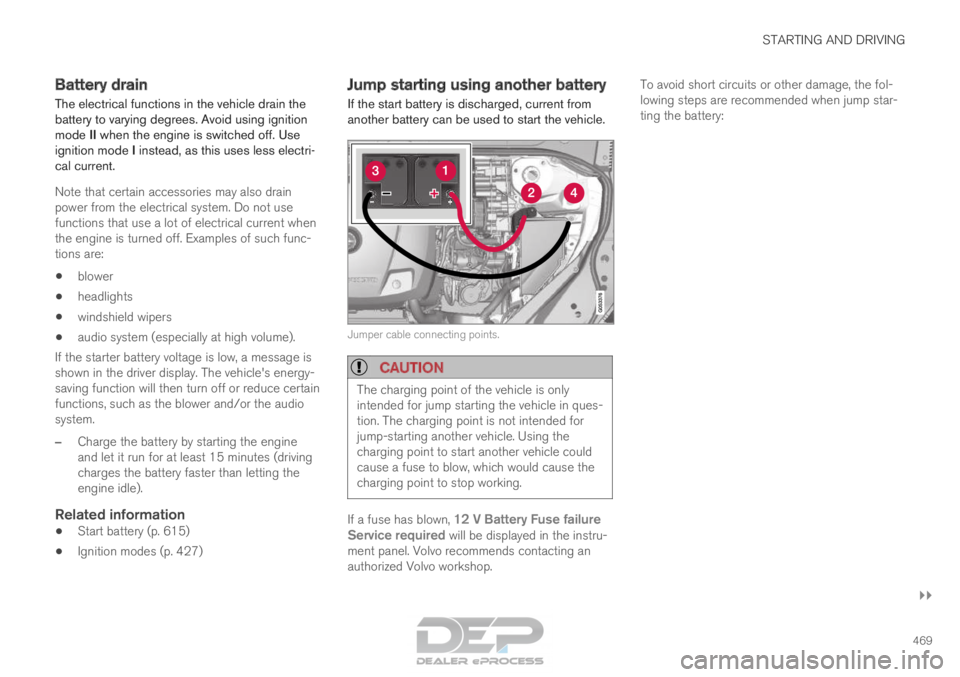
another battery can be used to start the vehicle. Jumper cable connecting points.
CAUTION
The charging point of the vehicle is only
intended for jump starting the vehicle in ques-
tion. The charging point is not intended for
jump-starting another vehicle. Using the
charging point to start another vehicle could
cause a fuse to blow, which would cause the
charging point to stop working.
If a fuse has blown, 12 V Battery Fuse failure
Service required will be displayed in the instru-
ment panel. Volvo recommends contacting an
authorized Volvo workshop. To avoid short circuits or other damage, the fol-
lowing steps are recommended when jump star-
ting the battery:
Page 472 of 686
||STARTING AND DRIVING
470
1.
Put the ignition in mode 0.
2. Make sure the auxiliary battery (the battery used to jump start the discharged battery)
has a voltage of 12 volts.
3. If the auxiliary battery is in another vehicle, turn off that vehicle's engine and make sure
that the vehicles are not touching each other.
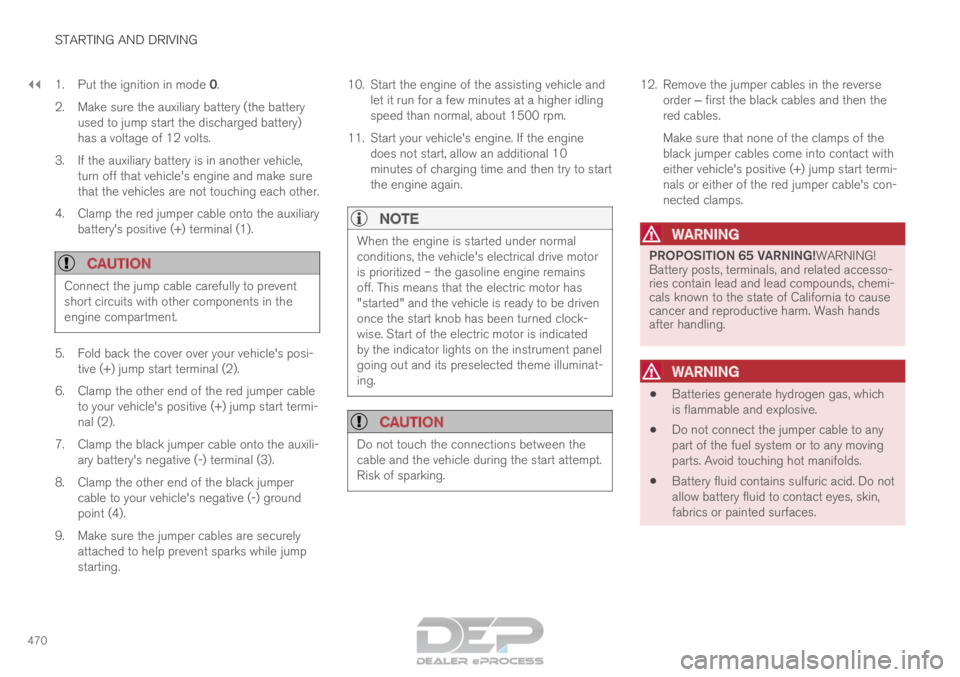
4. Clamp the red jumper cable onto the auxiliary battery's positive (+) terminal (1).
CAUTION Connect the jump cable carefully to prevent
short circuits with other components in the
engine compartment.
5. Fold back the cover over your vehicle's posi-
tive (+) jump start terminal (2).
6.
Clamp the other end of the red jumper cable
to your vehicle's positive (+) jump start termi-
nal (2).
7. Clamp the black jumper cable onto the auxili- ary battery's negative (-) terminal (3).
8. Clamp the other end of the black jumper cable to your vehicle's negative (-) ground
point (4).
9. Make sure the jumper cables are securely attached to help prevent sparks while jump
starting. 10. Start the engine of the assisting vehicle and
let it run for a few minutes at a higher idling
speed than normal, about 1500 rpm.
11. Start your vehicle's engine. If the engine does not start, allow an additional 10
minutes of charging time and then try to start
the engine again.
NOTE When the engine is started under normal
conditions, the vehicle's electrical drive motor
is prioritized – the gasoline engine remains
off. This means that the electric motor has
"started" and the vehicle is ready to be driven
once the start knob has been turned clock-
wise. Start of the electric motor is indicated
by the indicator lights on the instrument panel
going out and its preselected theme illuminat-
ing.
CAUTION
Do not touch the connections between the
cable and the vehicle during the start attempt.
Risk of sparking. 12. Remove the jumper cables in the reverse
order ‒ first the black cables and then the
red cables.
Make sure that none of the clamps of the
black jumper cables come into contact with
either vehicle's positive (+) jump start termi-
nals or either of the red jumper cable's con-
nected clamps.
WARNING PROPOSITION 65 VARNING!WARNING!
Battery posts, terminals, and related accesso-
ries contain lead and lead compounds, chemi-
cals known to the state of California to cause
cancer and reproductive harm. Wash hands
after handling.
WARNING
•
Batteries generate hydrogen gas, which
is flammable and explosive.
• Do not connect the jumper cable to any
part of the fuel system or to any moving
parts. Avoid touching hot manifolds.
• Battery fluid contains sulfuric acid. Do not
allow battery fluid to contact eyes, skin,
fabrics or painted surfaces.
Page 473 of 686
STARTING AND DRIVING
}}
* Option/accessory. 471•
If contact occurs, flush the affected area
immediately with water. Obtain medical
help immediately if eyes are affected.
• Never expose the battery to open flame
or electric spark. Do not smoke near the
battery. Failure to follow the instructions
for jump starting can lead to injury.
NOTE The vehicle cannot be started if the hybrid
battery is discharged.
Related information
•
Starting the vehicle (p. 424)
• Ignition modes (p. 427)
• Adjusting the steering wheel (p. 199)
• Selecting ignition mode (p. 428) Detachable towbar*
Volvo recommends the use of Volvo towbars
that are specially designed for the vehicle.
NOTE The optional detachable trailer hitch may not
be available in all markets or on all models.
Consult your Volvo retailer.
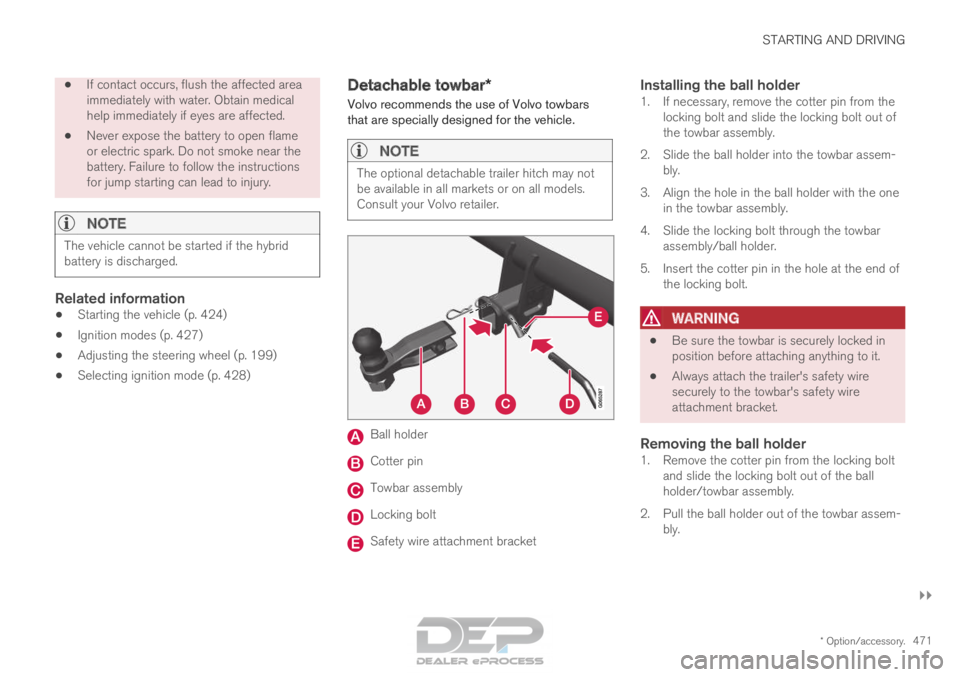
Ball holder
Cotter pin
Towbar assembly
Locking bolt
Safety wire attachment bracket
Installing the ball holder1. If necessary, remove the cotter pin from the
locking bolt and slide the locking bolt out of
the towbar assembly.
2. Slide the ball holder into the towbar assem- bly.
3. Align the hole in the ball holder with the one in the towbar assembly.
4. Slide the locking bolt through the towbar assembly/ball holder.
5. Insert the cotter pin in the hole at the end of the locking bolt.
WARNING •
Be sure the towbar is securely locked in
position before attaching anything to it.
• Always attach the trailer's safety wire
securely to the towbar's safety wire
attachment bracket.
Removing the ball holder1. Remove the cotter pin from the locking bolt
and slide the locking bolt out of the ball
holder/towbar assembly.
2. Pull the ball holder out of the towbar assem- bly.
Page 478 of 686
STARTING AND DRIVING
476Towing using a towline
This section refers to one vehicle being towed
behind another using a towline.
Twin Engine vehicles may not be towed behind
another vehicle due to the risk of damage to the
electric motor. If the vehicle cannot be driven and
needs to be moved, it must be transported on a
tow truck with all four wheels on the bed of the
truck.
Towing another vehicleTowing another vehicle requires a lot of power -
use the AWD drive mode. This helps charge the
hybrid battery and improve the vehicle's driving
and roadholding characteristics.
Before towing another vehicle, check applicable
speed limit regulations.
Jump startingDo not tow the vehicle to start the engine. Use an
auxiliary battery if the start battery's charge level
is so low that the engine cannot be started.
CAUTION Attempts to tow-start the vehicle could cause
damage to the electrical drive motor and
three-way catalytic converter.
Related information
•
Attaching and removing the towing eyelet
(p. 476)
• Hazard warning flashers (p. 161)
• Recovery (p. 477)
• Jump starting using another battery (p. 469)
• Selecting ignition mode (p. 428) Attaching and removing the towing
eyelet
Use the towing eyelet to tow another vehicle.
Screw the towing eyelet securely into place in
the threaded outlet behind the cover on the
right-hand side of the rear bumper.
NOTE If the vehicle is equipped with a towbar, there
is no rear attachment for the towing eye.
Attaching the towing eyelet
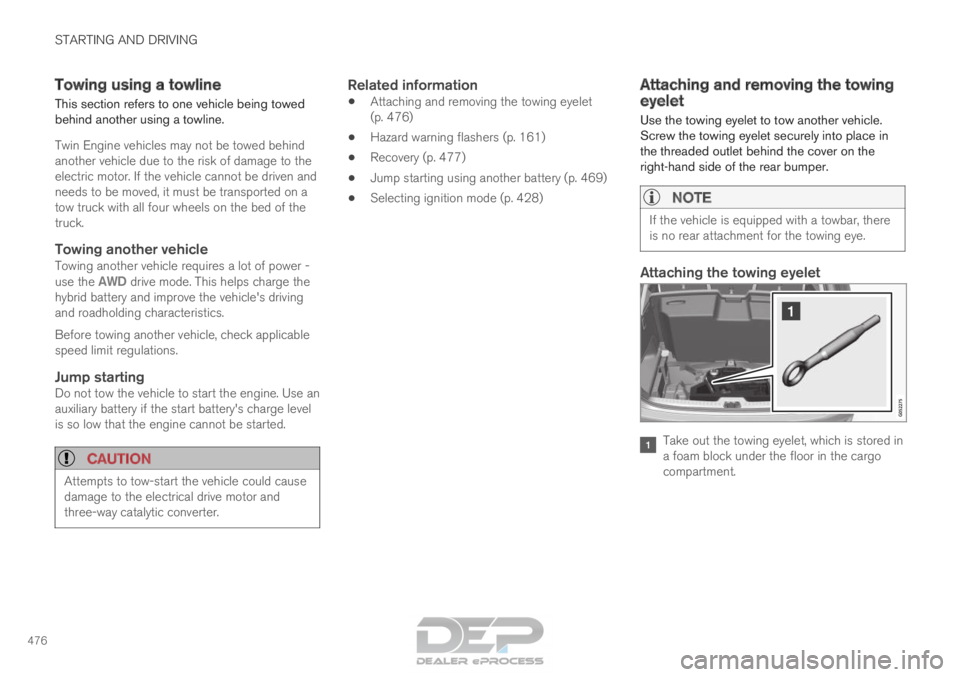
Take out the towing eyelet, which is stored in
a foam block under the floor in the cargo
compartment.
Page 481 of 686

STARTING AND DRIVING
}}
* Option/accessory. 479
Programming HomeLink
®
*12
Follow these instructions to program
HomeLink ®
, reset all programming, or program
individual buttons.
NOTE In some vehicles, the ignition must be on or in
the "accessory position" before HomeLink
®
can be programmed or used. It can be a good
idea to put new batteries in the remote con-
trol being replaced by HomeLink ®
for faster
programming and better radio signal trans-
mission. The HomeLink ®
buttons should be
reset before programming.
WARNING While HomeLink
®
is being programmed, the
garage door or gate being programmed may
be activated. Make sure that no one is near
the door or gate during programming. When
programming a garage door opener, it is
advised to park outside of the garage. 1.
Point the remote control at the HomeLink ®
button to be programmed and hold it about
2-8 cm (1-3 inches) from the button. Do not
obstruct the HomeLink ®
indicator light.
Note: Some remote controls are more effec-
tive at programming HomeLink ®
from a dis-
tance of about 15-20 cm (6-12 inches). Try
moving the remote control closer or further
away if you are experiencing any difficulties
programming.
2.
Press and hold both the remote control but-
ton and the HomeLink ®
button to be pro-
grammed.
3. Do not release the buttons until the indicator light has stopped flashing slowly (about once
a second) and either flashes quickly (about
10 times a second) or glows steadily.
>Steady glow: Indication that program-
ming is complete. Press the programmed
button twice to activate.
Flashing quickly: The device being pro-
grammed with HomeLink ®
may have a
security function that requires an extra
step. Try pressing the programmed button
twice to see whether the programming
works. Otherwise, continue with the fol-
lowing steps. 4. Locate the "training" button
13
on the
receiver for the e.g. garage door opener. It is
usually located near the antenna bracket on
the receiver.
5.
Press and release the "training" button once.
Programming must be completed within 30
seconds after pressing the button.
6. Press and release the HomeLink ®
button to
be programmed. Repeat the press/hold/
release sequence a second time. For some
receivers, the sequence may need to be
repeated a third time.
> Programming is now completed and the garage door, gate, etc. should now be
activated when the programmed button is
pressed.
If you experience any difficulties programming,
please contact HomeLink ®
at: 12
Certain markets only.
13 The name and color of the button varies depending on the manufacturer.
Page 482 of 686

||STARTING AND DRIVING
* Option/accessory.
480 www.HomeLink.com, www.youtube.com/
HomeLinkGentex or call 1-800-355-3515.
Programming individual buttons
To program an individual HomeLink
®
button:
1. Press and hold the desired button for about 20 seconds.
2. When the indicator light on HomeLink ®
starts flashing slowly, it is possible to pro-
gram as usual.
Note: If the button you are reprogramming
does not program with a new device, it will
return to the previously saved programming.
Resetting the HomeLink ®
buttons
It is only possible to reset all HomeLink ®
buttons
at once. It is not possible to reset individual but-
tons. Individual buttons can only be reprogram-
med.
– Press and hold the outer buttons (1 and 3)
on HomeLink ®
for about 10 seconds.
>
When the indicator light goes from a
steady glow to flashing, the buttons have
been reset and are ready for reprogram-
ming.
Related information
• Using HomeLink (p. 480)
• HomeLink ®
* (p. 478)
• Type approval for HomeLink ®
* (p. 481) Using HomeLink
Once HomeLink ®
is programmed, it can be
used instead of the separate remote controls.
Press and hold the programming button. The
garage door, gate, alarm system, etc. will be acti-
vated (this may take several seconds). If the but-
ton is held down for more than 20 seconds,
reprogramming will begin. The indicator light will
glow steadily or flash when the button has been
pressed. The original remote controls may be
used concurrently with HomeLink ®
if desired.
NOTE If the ignition is off, HomeLink
®
works for
30 minutes after the driver's door has been
opened.
WARNING •
If you use HomeLink ®
to open a garage
door or gate, be sure no one is near the
gate or door while it is in motion.
• Do not use HomeLink ®
with any garage
door opener that lacks safety stop and
reverse features as required by US fed-
eral safety standards (this includes any
garage door opener model manufactured
before April 1, 1982). A garage door that
cannot detect an object - signaling the
door to stop and reverse - does not meet
current U.S. federal safety standards. For
more information, contact HomeLink at:
www.homelink.com.
Related information
• HomeLink ®
* (p. 478)
• Programming HomeLink ®
* (p. 479)
• Type approval for HomeLink ®
* (p. 481)
Page 488 of 686
AUDIO, MEDIA AND INTERNET
* Option/accessory.
486 Audio, media and Internet
The audio and media system consists of a media
player and a radio. A cellular phone can also be
connected through Bluetooth to use hands-free
functions or play music in the vehicle. When the
vehicle is connected to the Internet, it is also
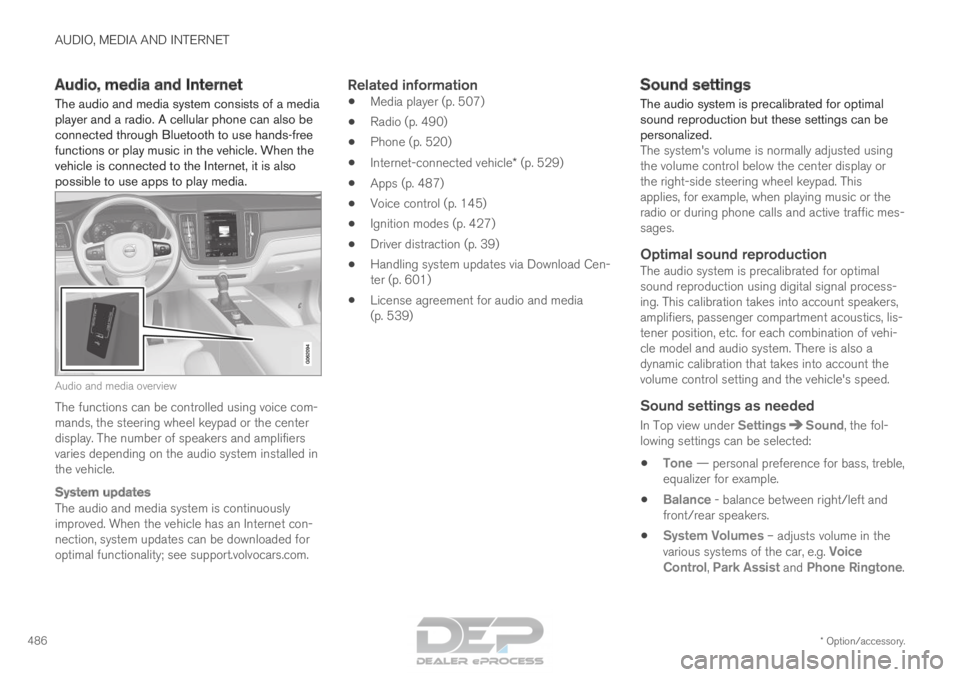
possible to use apps to play media. Audio and media overview
The functions can be controlled using voice com-
mands, the steering wheel keypad or the center
display. The number of speakers and amplifiers
varies depending on the audio system installed in
the vehicle.
System updates
The audio and media system is continuously
improved. When the vehicle has an Internet con-
nection, system updates can be downloaded for
optimal functionality; see support.volvocars.com.
Related information
•
Media player (p. 507)
• Radio (p. 490)
• Phone (p. 520)
• Internet-connected vehicle* (p. 529)
• Apps (p. 487)
• Voice control (p. 145)
• Ignition modes (p. 427)
• Driver distraction (p. 39)
• Handling system updates via Download Cen-
ter (p. 601)
• License agreement for audio and media
(p. 539) Sound settings
The audio system is precalibrated for optimal
sound reproduction but these settings can be
personalized.
The system's volume is normally adjusted using
the volume control below the center display or
the right-side steering wheel keypad. This
applies, for example, when playing music or the
radio or during phone calls and active traffic mes-
sages.
Optimal sound reproductionThe audio system is precalibrated for optimal
sound reproduction using digital signal process-
ing. This calibration takes into account speakers,
amplifiers, passenger compartment acoustics, lis-
tener position, etc. for each combination of vehi-
cle model and audio system. There is also a
dynamic calibration that takes into account the
volume control setting and the vehicle's speed.
Sound settings as needed
In Top view under Settings Sound, the fol-
lowing settings can be selected:
• Tone — personal preference for bass, treble,
equalizer for example.
• Balance - balance between right/left and
front/rear speakers.
• System Volumes – adjusts volume in the
various systems of the car, e.g.
Voice
Control, Park Assist and Phone Ringtone.