lock VOLVO XC90 TWIN ENGINE 2018 Owner's Manual
[x] Cancel search | Manufacturer: VOLVO, Model Year: 2018, Model line: XC90 TWIN ENGINE, Model: VOLVO XC90 TWIN ENGINE 2018Pages: 686, PDF Size: 17 MB
Page 86 of 686
DISPLAYS AND VOICE CONTROL
* Option/accessory.
84 Instrument panel
The instrument panel displays information rela-
ted to the vehicle and driving. The instrument panel contains gauges, indicators
and monitoring and warning symbols. What is
shown in the instrument panel varies depending
on the equipment, settings and functions cur-
rently active.
The instrument panel is activated as soon as a
door is opened, i.e. in ignition mode 0. The panel
will power down after a short period of time if it is
not used. To reactivate it, do one of the following:
• Depress the brake pedal.
• Activate ignition mode I. •
Open one of the doors.
WARNING If the instrument panel is not functioning
properly, information about brakes, airbags or
other safety-related systems may not be dis-
played. The driver will then not be able to
check the status of the vehicle systems or
receive relevant warnings and information.
WARNING
If the instrument panel turns off, does not
activate when the ignition is switched on, or
part/all of the panel cannot be read, do not
drive the vehicle. Consult a workshop immedi-
ately. Volvo recommends an authorized Volvo
workshop.
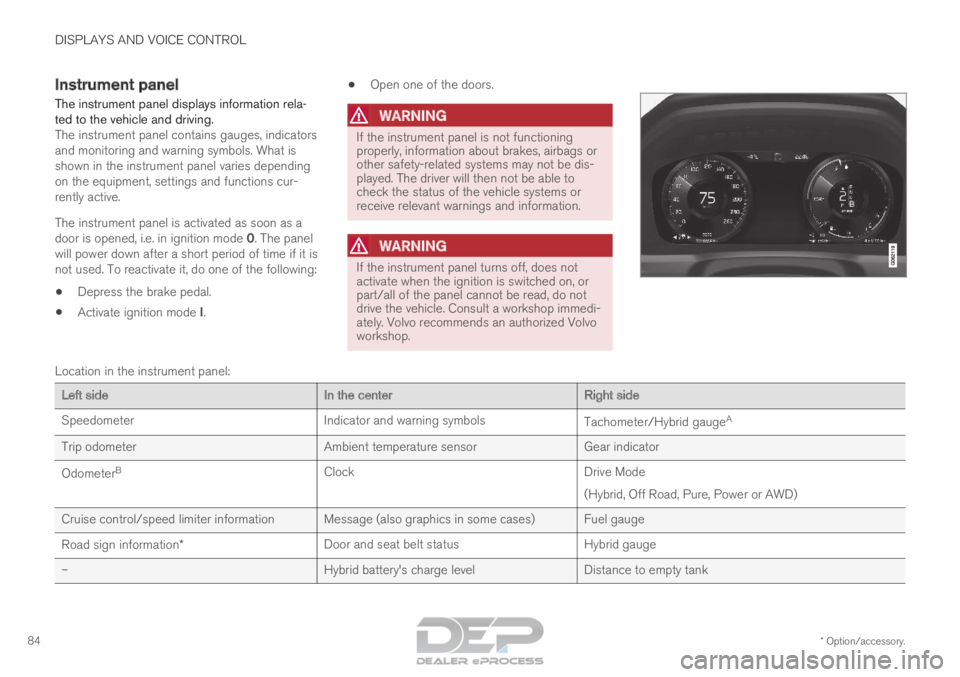
Location in the instrument panel:
Left side
In the centerRight side
Speedometer
Indicator and warning symbols Tachometer/Hybrid gaugeA
Trip odometer Ambient temperature sensorGear indicator
Odometer B
Clock Drive Mode
(Hybrid, Off Road, Pure, Power or AWD)
Cruise control/speed limiter information Message (also graphics in some cases) Fuel gauge
Road sign information* Door and seat belt status
Hybrid gauge
– Hybrid battery's charge levelDistance to empty tank
Page 95 of 686
DISPLAYS AND VOICE CONTROL
93
Related information
•Displaying trip statistics in the center display
(p. 92)
• Trip computer (p. 89)
• Resetting the trip odometer (p. 91) Date and time
The clock is displayed in both the instrument
panel and the center display.
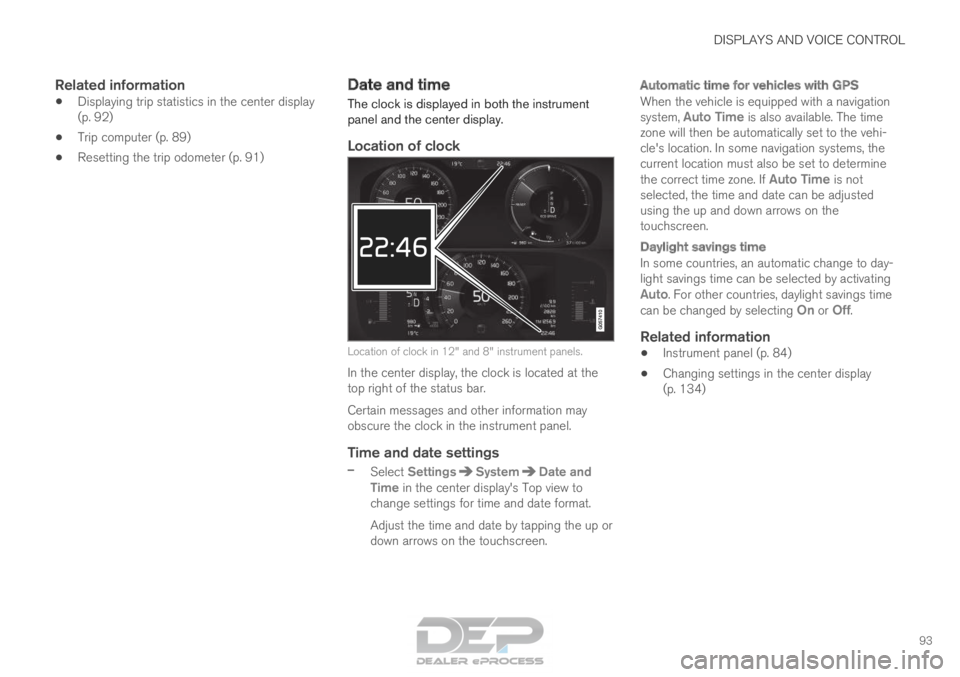
Location of clock Location of clock in 12" and 8" instrument panels.
In the center display, the clock is located at the
top right of the status bar.
Certain messages and other information may
obscure the clock in the instrument panel.
Time and date settings
– Select Settings System Date and
Time in the center display's Top view to
change settings for time and date format.
Adjust the time and date by tapping the up or
down arrows on the touchscreen.
Automatic time for vehicles with GPS
When the vehicle is equipped with a navigation
system, Auto Time is also available. The time
zone will then be automatically set to the vehi-
cle's location. In some navigation systems, the
current location must also be set to determine
the correct time zone. If Auto Time is not selected, the time and date can be adjusted
using the up and down arrows on the
touchscreen.
Daylight savings time
In some countries, an automatic change to day-
light savings time can be selected by activating
Auto. For other countries, daylight savings time
can be changed by selecting On or
Off.
Related information
• Instrument panel (p. 84)
• Changing settings in the center display
(p. 134)
Page 98 of 686
||DISPLAYS AND VOICE CONTROL
96
Symbol
Meaning Active high beams off
This symbol lights up in white when
the active high beams are off.
Parking lights are on.
High beams on
This symbol illuminates when the
high beams and parking lights are
on.
Rear fog light on
This symbol illuminates when the
rear fog light is on.
Rain sensor on
This symbol illuminates when the
rain sensor is on.
Preconditioning on
This symbol illuminates when the
engine block/passenger compart-
ment heater or air conditioning are
preconditioning the vehicle.
Stability system
This symbol flashes when the sta-
bility system is actively working to
stabilize the vehicle. If the symbol
glows steadily, there is a fault in
the system. Symbol
Meaning Stability system, Sport mode
This symbol illuminates when Sport
mode is activated. Sport mode
offers a more active driving experi-
ence.
Lane Keeping Aid
White symbol: Lane Keeping Aid is
on and lane marker lines are
detected.
Gray symbol: Lane Keeping Aid is
on but no lane marker lines are
detected.
Amber symbol: Lane Keeping Aid
is alerting/intervening.
Lane Keeping Aid and rain sen-
sor
White symbol: Lane Keeping Aid is
on and lane marker lines are
detected. The rain sensor is on.
Gray symbol: Lane Keeping Aid is
on but no lane marker lines are
detected. The rain sensor is on.
A
Canadian models.
B US models.
Related information
• Instrument panel (p. 84)
• Warning symbols in the instrument panel
(p. 97)
Page 113 of 686
DISPLAYS AND VOICE CONTROL
* Option/accessory.111
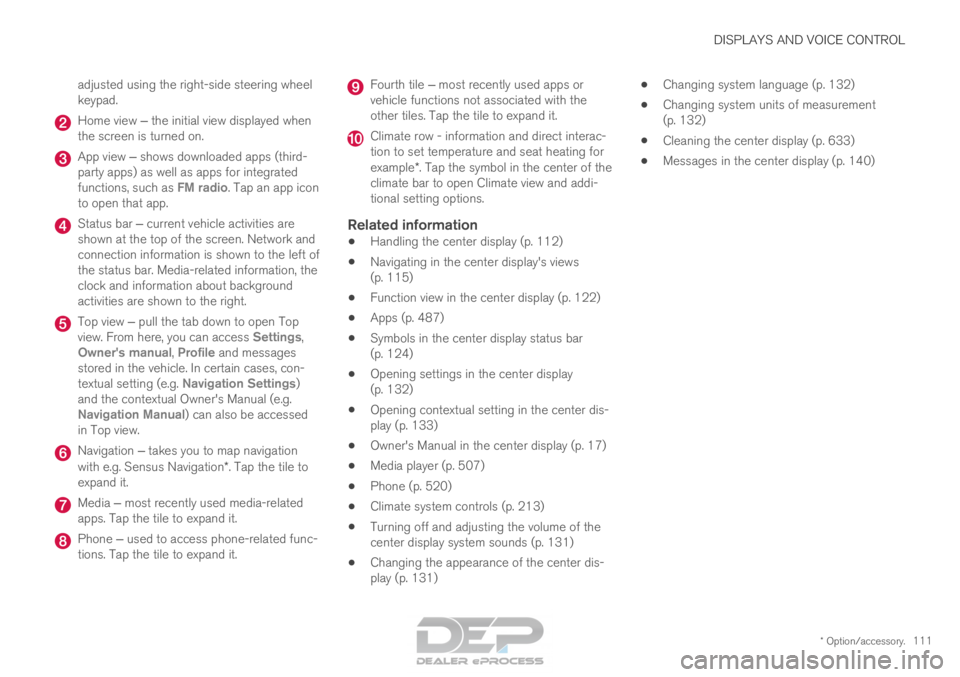
adjusted using the right-side steering wheel
keypad.
Home view ‒ the initial view displayed when
the screen is turned on. App view ‒ shows downloaded apps (third-
party apps) as well as apps for integrated
functions, such as FM radio
. Tap an app icon
to open that app. Status bar ‒ current vehicle activities are
shown at the top of the screen. Network and
connection information is shown to the left of
the status bar. Media-related information, the
clock and information about background
activities are shown to the right. Top view ‒ pull the tab down to open Top
view. From here, you can access Settings
,
Owner's manual, Profile and messages
stored in the vehicle. In certain cases, con-
textual setting (e.g. Navigation Settings
)
and the contextual Owner's Manual (e.g.
Navigation Manual) can also be accessed
in Top view. Navigation ‒ takes you to map navigation
with e.g. Sensus Navigation*. Tap the tile to
expand it. Media ‒ most recently used media-related
apps. Tap the tile to expand it. Phone ‒ used to access phone-related func-
tions. Tap the tile to expand it. Fourth tile ‒ most recently used apps or
vehicle functions not associated with the
other tiles. Tap the tile to expand it. Climate row - information and direct interac-
tion to set temperature and seat heating for
example*. Tap the symbol in the center of the
climate bar to open Climate view and addi-
tional setting options.
Related information
• Handling the center display (p. 112)
• Navigating in the center display's views
(p. 115)
• Function view in the center display (p. 122)
• Apps (p. 487)
• Symbols in the center display status bar
(p. 124)
• Opening settings in the center display
(p. 132)
• Opening contextual setting in the center dis-
play (p. 133)
• Owner's Manual in the center display (p. 17)
• Media player (p. 507)
• Phone (p. 520)
• Climate system controls (p. 213)
• Turning off and adjusting the volume of the
center display system sounds (p. 131)
• Changing the appearance of the center dis-
play (p. 131) •
Changing system language (p. 132)
• Changing system units of measurement
(p. 132)
• Cleaning the center display (p. 633)
• Messages in the center display (p. 140)
Page 118 of 686
||DISPLAYS AND VOICE CONTROL
* Option/accessory.
116
NOTE In Home view's standard mode – short press
on the Home button. An animation describing
access to the various views is shown on the
screen.
NOTE
When the vehicle is moving:
• Certain functions (e.g. using the center
display's keyboard) may be deactivated.
• Certain texts (e.g. those generated by
apps) will be shortened to three rows.
Tap the
Read out button to have the
entire message read aloud.
• The message will be shortened to one
row. Tap the
Read out button to have
the entire message read aloud.
Status barCurrent vehicle activities are shown at the top of
the screen in the status bar. Network and con-
nection information is shown to the left of the
status bar. Media-related information, the clock
and information about background activities are
shown to the right.
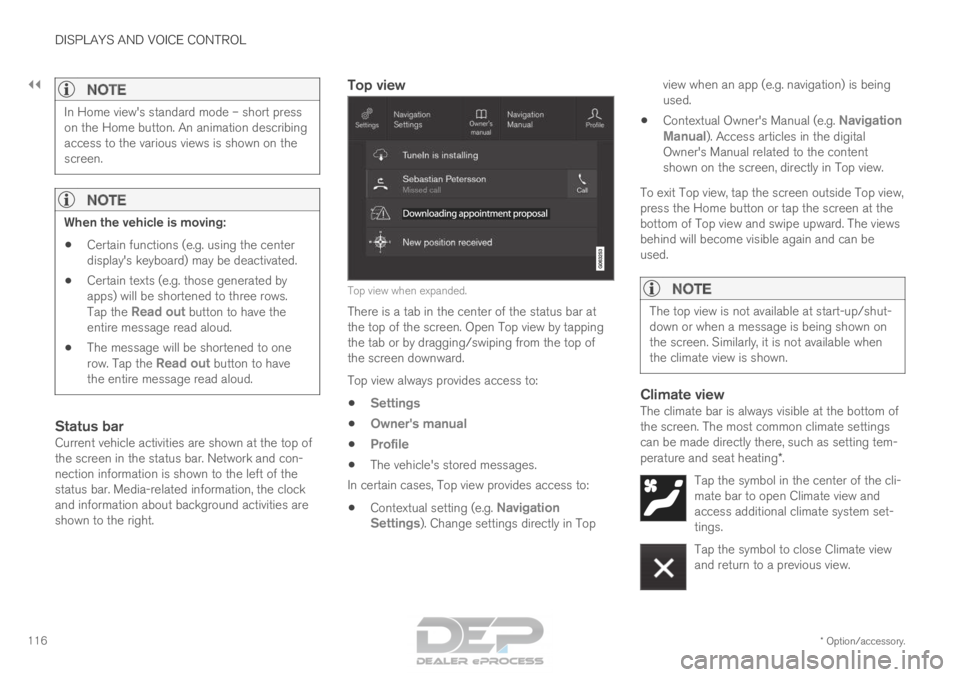
Top view Top view when expanded.
There is a tab in the center of the status bar at
the top of the screen. Open Top view by tapping
the tab or by dragging/swiping from the top of
the screen downward.
Top view always provides access to:
• Settings
• Owner's manual
• Profile
• The vehicle's stored messages.
In certain cases, Top view provides access to:
• Contextual setting (e.g. Navigation
Settings ). Change settings directly in Top view when an app (e.g. navigation) is being
used.
• Contextual Owner's Manual (e.g.
Navigation
Manual). Access articles in the digital
Owner's Manual related to the content
shown on the screen, directly in Top view.
To exit Top view, tap the screen outside Top view,
press the Home button or tap the screen at the
bottom of Top view and swipe upward. The views
behind will become visible again and can be
used.
NOTE The top view is not available at start-up/shut-
down or when a message is being shown on
the screen. Similarly, it is not available when
the climate view is shown.
Climate viewThe climate bar is always visible at the bottom of
the screen. The most common climate settings
can be made directly there, such as setting tem-
perature and seat heating*.
Tap the symbol in the center of the cli-
mate bar to open Climate view and
access additional climate system set-
tings. Tap the symbol to close Climate view
and return to a previous view.
Page 127 of 686

DISPLAYS AND VOICE CONTROL
125Symbol
Meaning Tethering activated (Wi-Fi hotspot).
This means that the vehicle shares
an available Internet connection.
Vehicle modem activated.
USB sharing active.
Action in progress.
Timer for preconditioning active.
AAudio source being played.
Audio source paused.
Phone call in progress.
Audio source muted.
News broadcasts from current radio
station.
B Traffic information being received.
BClock.
A
Only hybrid models.
B Not available in all markets.
Related information
• Navigating in the center display's views
(p. 115)
• Messages in the center display (p. 140)
Page 130 of 686
||DISPLAYS AND VOICE CONTROL
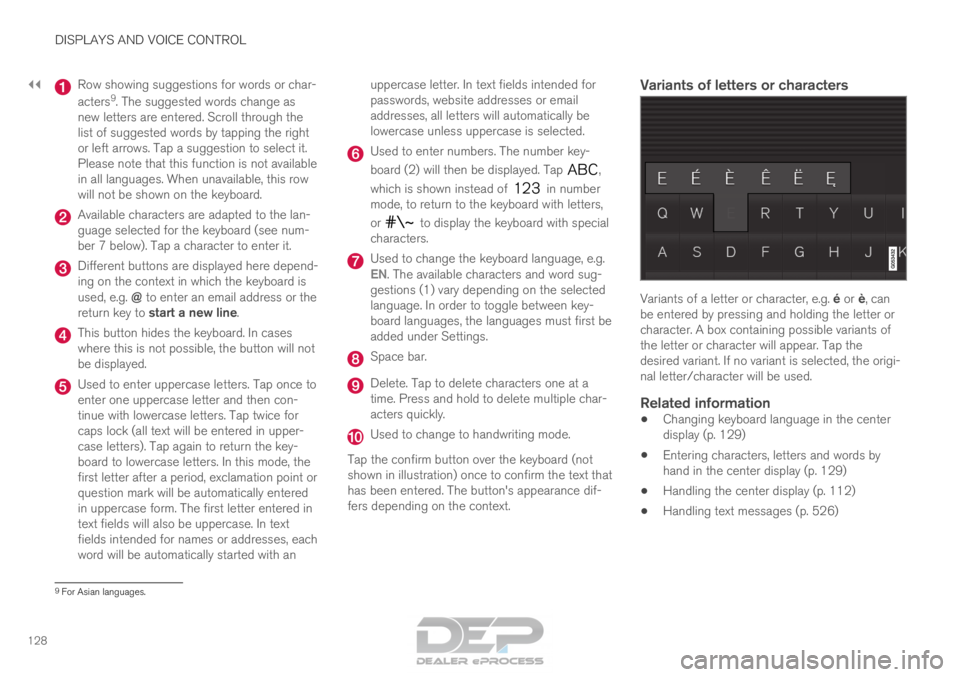
128 Row showing suggestions for words or char-
acters
9
. The suggested words change as
new letters are entered. Scroll through the
list of suggested words by tapping the right
or left arrows. Tap a suggestion to select it.
Please note that this function is not available
in all languages. When unavailable, this row
will not be shown on the keyboard. Available characters are adapted to the lan-
guage selected for the keyboard (see num-
ber 7 below). Tap a character to enter it.
Different buttons are displayed here depend-
ing on the context in which the keyboard is
used, e.g. @ to enter an email address or the
return key to start a new line. This button hides the keyboard. In cases
where this is not possible, the button will not
be displayed.
Used to enter uppercase letters. Tap once to
enter one uppercase letter and then con-
tinue with lowercase letters. Tap twice for
caps lock (all text will be entered in upper-
case letters). Tap again to return the key-
board to lowercase letters. In this mode, the
first letter after a period, exclamation point or
question mark will be automatically entered
in uppercase form. The first letter entered in
text fields will also be uppercase. In text
fields intended for names or addresses, each
word will be automatically started with an uppercase letter. In text fields intended for
passwords, website addresses or email
addresses, all letters will automatically be
lowercase unless uppercase is selected. Used to enter numbers. The number key-
board (2) will then be displayed. Tap
,
which is shown instead of in number
mode, to return to the keyboard with letters,
or to display the keyboard with special
characters. Used to change the keyboard language, e.g.
EN
. The available characters and word sug-
gestions (1) vary depending on the selected
language. In order to toggle between key-
board languages, the languages must first be
added under Settings. Space bar.
Delete. Tap to delete characters one at a
time. Press and hold to delete multiple char-
acters quickly.
Used to change to handwriting mode.
Tap the confirm button over the keyboard (not
shown in illustration) once to confirm the text that
has been entered. The button's appearance dif-
fers depending on the context.
Variants of letters or characters Variants of a letter or character, e.g. é or è, can
be entered by pressing and holding the letter or
character. A box containing possible variants of
the letter or character will appear. Tap the
desired variant. If no variant is selected, the origi-
nal letter/character will be used.
Related information
• Changing keyboard language in the center
display (p. 129)
• Entering characters, letters and words by
hand in the center display (p. 129)
• Handling the center display (p. 112)
• Handling text messages (p. 526) 9
For Asian languages.
Page 138 of 686
||DISPLAYS AND VOICE CONTROL
* Option/accessory.
136 Type of
setting
Description
Slider
Select a level for a function by
pressing and dragging the slider
control, e.g. to set volume level.
Informa-
tion dis-
play This is not an actual setting, but
instead displays information such
as the vehicle's VIN number.
Related information
•
Center display overview (p. 109) Table of settings in the center
display
The center display's Settings menu has a num-
ber of main categories and sub-categories that
contain settings and information for many of the
vehicle's features and functions.
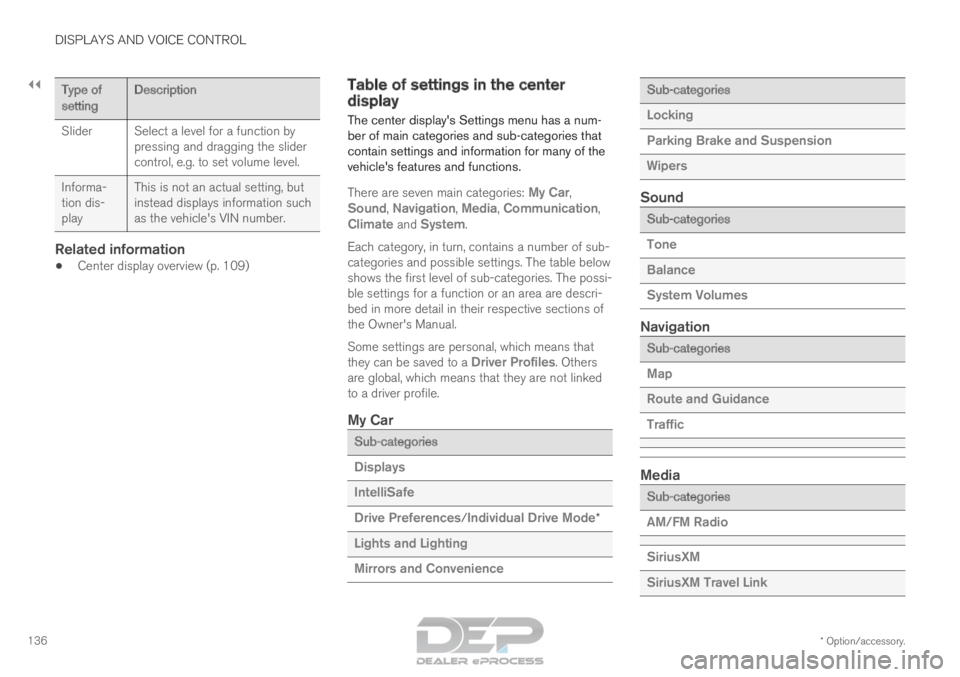
There are seven main categories:
My Car,
Sound, Navigation, Media, Communication,
Climate and System.
Each category, in turn, contains a number of sub-
categories and possible settings. The table below
shows the first level of sub-categories. The possi-
ble settings for a function or an area are descri-
bed in more detail in their respective sections of
the Owner's Manual.
Some settings are personal, which means that
they can be saved to a Driver Profiles. Others
are global, which means that they are not linked
to a driver profile.
My Car Sub-categories
Displays
IntelliSafe
Drive Preferences/Individual Drive Mode*
Lights and Lighting
Mirrors and Convenience Sub-categories
Locking
Parking Brake and Suspension
Wipers
Sound
Sub-categories
Tone
Balance
System Volumes
Navigation
Sub-categories
Map
Route and Guidance
Traffic
Media
Sub-categories
AM/FM Radio
SiriusXM
SiriusXM Travel Link
Page 140 of 686
||DISPLAYS AND VOICE CONTROL
138
Global settings
Global settings and parameters do not change
when driver profiles are changed. They remain
the same regardless of which driver profile is cur-
rently active.
Keyboard layout is an example of a global setting.
If driver profile X is used to add additional key-
board languages, these languages will also be
available for driver profile Y. The settings for key-
board layout are not saved to a specific driver
profile - the settings are global.
Personal settings
If driver profile X has been used to e.g., set the
brightness for the center display, driver profile Y
will not be affected by this setting. It will only be
saved to driver profile X because brightness set-
ting is a personal setting.
Related information
•
Selecting a driver profile (p. 138)
• Changing a driver profile's name (p. 139)
• Resetting driver profile settings (p. 139)
• Linking a remote key to a driver profile
(p. 139)
• Table of settings in the center display
(p. 136) Selecting a driver profile
When the center display starts up, the selected
driver profile will be shown at the top of the
screen. The most recently used driver profile will
be active the next time the vehicle is unlocked. A
different driver profile can be selected once the
vehicle has been unlocked. However, if the
remote key has been linked to a driver profile,
this profile will be used instead.
There are two options for switching between
driver profiles.
Option 1:
1.
Tap the name of the driver profile shown at
the top of the center display when the dis-
play starts up.
> A list will appear, showing driver profiles that can be selected.
2. Select desired driver profile.
3. Tap Confirm.
>
The driver profile has now been selected
and the system will load the settings
stored in that profile.
Option 2:
1. Pull down Top view in the center display.
2. Tap Profile.
>
The same list as in option 1 will be dis-
played.
3. Select desired driver profile. 4.
Tap Confirm.
>
The driver profile has now been selected
and the system will load the settings
stored in that profile.
Related information
• Driver profiles (p. 137)
• Navigating in the center display's views
(p. 115)
• Changing a driver profile's name (p. 139)
• Linking a remote key to a driver profile
(p. 139)
Page 141 of 686
DISPLAYS AND VOICE CONTROL
}}
139
Changing a driver profile's name
It is possible to change the names of the differ-
ent driver profiles used in the vehicle. 1. Tap Settings in the Top view in the center
display.
2.
Tap System Driver Profiles
.
3. Select Edit Profile.
>
A menu will open in which the driver pro-
file can be changed.
4. Tap the Profile Name box.
>
A keyboard will be displayed and can be
used to change the name. Tap to
close the keyboard.
5. Save the name change by pressing Back or
Close.
>
The name has now been changed.
NOTE Profile names may not begin with a space. If a
space is entered first, the profile name will not
be saved.
Related information
•
Selecting a driver profile (p. 138)
• Using the center display keyboard (p. 126) Resetting driver profile settings
Settings that have been saved for one or more
driver profiles can be reset when the vehicle is
stationary.
NOTE Factory Reset is only possible when the
vehicle is stationary. 1.
Tap Settings in the Top view.
2.
Tap System Factory Reset Reset
Personal Settings .
3. Select option Reset for the active profile,
Reset for all profiles or Cancel.
Related information
• Driver profiles (p. 137)
• Resetting center display settings (p. 135) Linking a remote key to a driver
profile
A remote key can be linked to a driver profile.
This driver profile and all of its settings will then
automatically be selected every time the vehicle
is used with that particular remote key.
The first time the remote key is used, it is not
linked to any specific driver profile. The
Guest
profile is automatically activated when the ignition
is switched on.
A driver profile can also be selected manually
without linking it to any key. When the vehicle is
unlocked, the last active driver profile will be acti-
vated. If the key has ever been linked to a driver
profile, it is not necessary to manually select a
driver profile when using that particular key.Linking a remote key to a specific driver
profile
First select the profile you would like to link to
the key (if that profile is not already active). The
active profile can then be linked to the key.
1. Tap Settings in the Top view in the center
display.
2.
Tap System Driver Profiles
.
3. Mark the desired profile. The display will return to Home view. The Guest profile can-not be linked to a remote key.