mirror VOLVO XC90 TWIN ENGINE 2018 Owner's Manual
[x] Cancel search | Manufacturer: VOLVO, Model Year: 2018, Model line: XC90 TWIN ENGINE, Model: VOLVO XC90 TWIN ENGINE 2018Pages: 686, PDF Size: 17 MB
Page 175 of 686
WINDOWS, GLASS AND MIRRORS
}}
* Option/accessory. 173
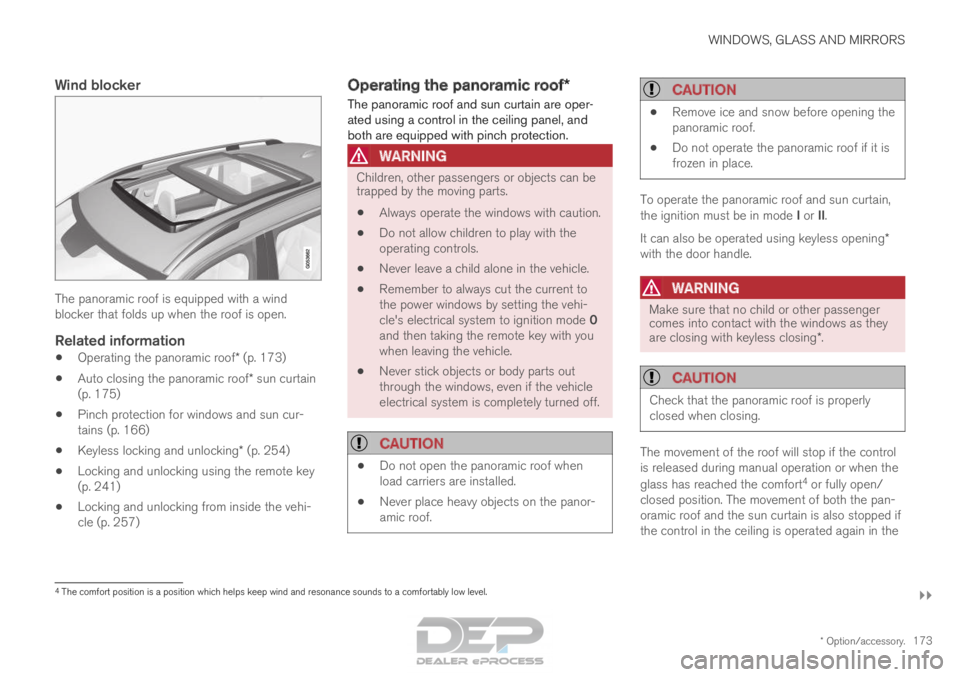
Wind blockerThe panoramic roof is equipped with a wind
blocker that folds up when the roof is open.
Related information
•
Operating the panoramic roof* (p. 173)
• Auto closing the panoramic roof* sun curtain
(p. 175)
• Pinch protection for windows and sun cur-
tains (p. 166)
• Keyless locking and unlocking* (p. 254)
• Locking and unlocking using the remote key
(p. 241)
• Locking and unlocking from inside the vehi-
cle (p. 257) Operating the panoramic roof*
The panoramic roof and sun curtain are oper-
ated using a control in the ceiling panel, and
both are equipped with pinch protection.
WARNING Children, other passengers or objects can be
trapped by the moving parts.
• Always operate the windows with caution.
• Do not allow children to play with the
operating controls.
• Never leave a child alone in the vehicle.
• Remember to always cut the current to
the power windows by setting the vehi-
cle's electrical system to ignition mode 0
and then taking the remote key with you
when leaving the vehicle.
• Never stick objects or body parts out
through the windows, even if the vehicle
electrical system is completely turned off.
CAUTION •
Do not open the panoramic roof when
load carriers are installed.
• Never place heavy objects on the panor-
amic roof.
CAUTION •
Remove ice and snow before opening the
panoramic roof.
• Do not operate the panoramic roof if it is
frozen in place. To operate the panoramic roof and sun curtain,
the ignition must be in mode I or II.
It can also be operated using keyless opening*
with the door handle.
WARNING Make sure that no child or other passenger
comes into contact with the windows as they
are closing with keyless closing*.
CAUTION
Check that the panoramic roof is properly
closed when closing.
The movement of the roof will stop if the control
is released during manual operation or when the
glass has reached the comfort
4
or fully open/
closed position. The movement of both the pan-
oramic roof and the sun curtain is also stopped if
the control in the ceiling is operated again in the 4
The comfort position is a position which helps keep wind and resonance s\
ounds to a comfortably low level.
Page 176 of 686

||WINDOWS, GLASS AND MIRRORS
174
direction opposite that of the current direction of
movement.
The panoramic roof and sun curtain are also
equipped with pinch protection.
NOTE
For manual opening, the sun curtain must be
completely open before the panoramic roof
can be opened. For the reverse procedure,
the panoramic roof must be completely
closed before the sun curtain can be com-
pletely closed.
Opening and closing ventilation
position
Ventilation position, rear edge raised.
Open by pushing the control upward once.
Close by pushing the control downward
once.
When ventilation mode is selected, the rear edge
of the front section of the roof is raised. If the sun
curtain is fully closed when ventilation position is
selected, it will automatically open approx. 50 mm
(approx. 2 inches).
If the panoramic roof is closed from the ventila-
tion position, the sun curtain will also automati-
cally close.Fully opening and closing the
panoramic roof with the control in the
ceiling Operation, manual mode
Operation, automatic mode
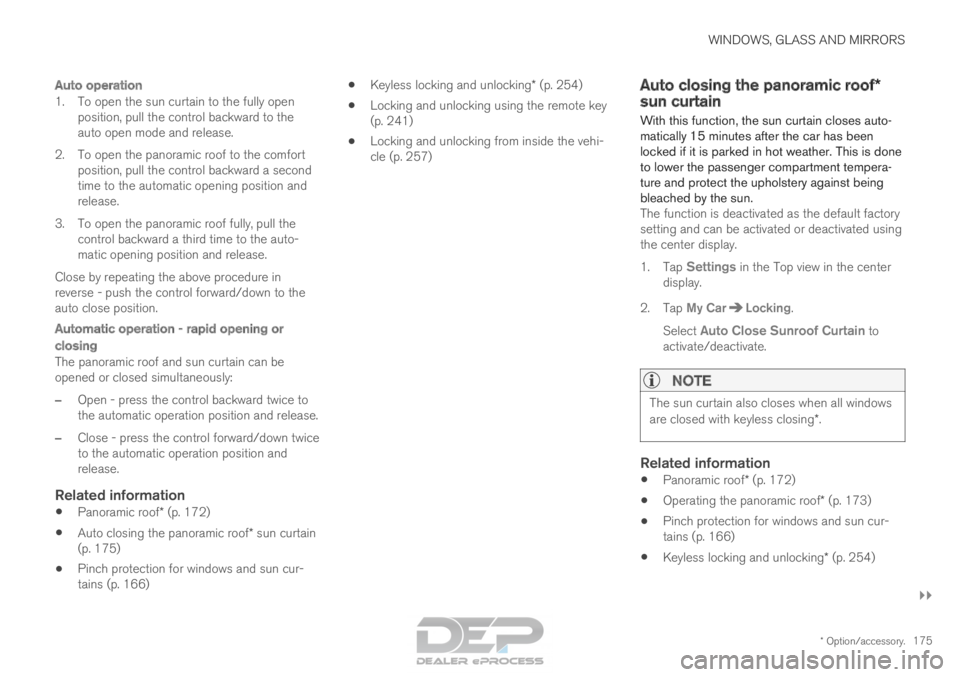
Manual operation
1. To open the sun curtain, pull the control
backward to the manual open mode.
2. To open the panoramic roof to the comfort position, pull the control backward a second
time to the manual opening position.
3. To open the panoramic roof fully, pull the control backward a third time to the manual
opening position.
Close by repeating the above procedure in
reverse - push the control forward/down to the
manual closing position.
Page 177 of 686
WINDOWS, GLASS AND MIRRORS
}}
* Option/accessory. 175
Auto operation
1. To open the sun curtain to the fully open
position, pull the control backward to the
auto open mode and release.
2. To open the panoramic roof to the comfort position, pull the control backward a second
time to the automatic opening position and
release.
3. To open the panoramic roof fully, pull the control backward a third time to the auto-
matic opening position and release.
Close by repeating the above procedure in
reverse - push the control forward/down to the
auto close position.
Automatic operation - rapid opening or
closing
The panoramic roof and sun curtain can be
opened or closed simultaneously:
– Open - press the control backward twice to
the automatic operation position and release.
– Close - press the control forward/down twice
to the automatic operation position and
release.
Related information
• Panoramic roof* (p. 172)
• Auto closing the panoramic roof* sun curtain
(p. 175)
• Pinch protection for windows and sun cur-
tains (p. 166) •
Keyless locking and unlocking* (p. 254)
• Locking and unlocking using the remote key
(p. 241)
• Locking and unlocking from inside the vehi-
cle (p. 257) Auto closing the panoramic roof*
sun curtain
With this function, the sun curtain closes auto-
matically 15 minutes after the car has been
locked if it is parked in hot weather. This is done
to lower the passenger compartment tempera-
ture and protect the upholstery against being
bleached by the sun. The function is deactivated as the default factory
setting and can be activated or deactivated using
the center display.
1. Tap Settings in the Top view in the center
display.
2.
Tap My Car Locking
.
Select Auto Close Sunroof Curtain to
activate/deactivate.
NOTE The sun curtain also closes when all windows
are closed with keyless closing*.
Related information
•
Panoramic roof* (p. 172)
• Operating the panoramic roof* (p. 173)
• Pinch protection for windows and sun cur-
tains (p. 166)
• Keyless locking and unlocking* (p. 254)
Page 178 of 686

WINDOWS, GLASS AND MIRRORS
* Option/accessory.
176 •
Locking and unlocking using the remote key
(p. 241)
• Locking and unlocking from inside the vehi-
cle (p. 257) Using the windshield wipers
The windshield wipers clean the windshield. The
right-side steering wheel lever is used to adjust
windshield wiper settings. Right-hand steering wheel lever.
Thumb wheel, used to set rain sensor sensi-
tivity and interval wiper speed.
Single sweepMove the lever down and release for a
single sweep.
Wipers offMove the lever to position 0 to turn off
the windshield wipers.
Interval wipersSet the number of sweeps per time unit
with the thumb wheel when interval wip-
ers are selected.
Continuous wipersMove the lever upward for the wipers to
operate at normal speed. Move the lever upward again for the wip-
ers to operate at high speed.
CAUTION
Before activating the wipers, make sure that
the wiper blades are not frozen in place and
that any snow or ice on the windshield and
rear window has been scraped away.
CAUTION
Use plenty of washer fluid when the wipers
clean the windshield. The windshield must be
wet when the windshield wipers are working.
Related information
•
Using the rain sensor (p. 177)
• Using the windshield and headlight washers
(p. 179)
• Using automatic rear window wiping when
backing up (p. 181)
• Heated windshield washer nozzles* (p. 177)
• Using the rain sensor's memory function
(p. 178)
• Using the rear window wiper/washer
(p. 180)
Page 179 of 686

WINDOWS, GLASS AND MIRRORS
}}
* Option/accessory. 177
•
Filling washer fluid (p. 650)
• Windshield wipers in the service position
(p. 649)
• Replacing windshield wiper blades (p. 648)
• Changing rear window wipers (p. 647) Heated windshield washer nozzles*
The washer nozzles are heated automatically in
cold weather to prevent the washer fluid from
freezing.
Related information
• Using the rain sensor (p. 177)
• Using the windshield and headlight washers
(p. 179)
• Using automatic rear window wiping when
backing up (p. 181)
• Using the rain sensor's memory function
(p. 178)
• Using the rear window wiper/washer
(p. 180)
• Filling washer fluid (p. 650)
• Windshield wipers in the service position
(p. 649)
• Replacing windshield wiper blades (p. 648)
• Changing rear window wipers (p. 647)
• Using the windshield wipers (p. 176) Using the rain sensor
The rain sensor monitors the amount of water on
the windshield and automatically starts the wind-
shield wipers. Rain sensor sensitivity can be
adjusted using the thumb wheel on the right-
hand steering wheel lever.
Right-hand steering wheel lever.
Rain sensor button
Thumb wheel, sensitivity/interval wiper speed
When the rain sensor is activated, the rain
sensor symbol will be displayed in the instrument
panel.
Activating the rain sensorWhen the rain sensor is activated, the engine
must be running or the ignition must be in mode I
or II. The windshield wiper lever must also be in
position 0 or in the single sweep position.
Page 180 of 686

||WINDOWS, GLASS AND MIRRORS
* Option/accessory.
178 Activate the rain sensor by pressing the rain sen-
sor button .
If the lever is pressed down, the wipers will make
additional sweeps across the windshield.
Turn the thumb wheel upward for increased sen-
sitivity and downward for decreased sensitivity.
The wipers will make one extra sweep when the
thumb wheel is turned upward.
Deactivate the rain sensor
Deactivate the rain sensor by pressing the rain sensor button or moving the lever upward to
another wiper mode.
The rain sensor is automatically deactivated in
ignition mode 0 or when the engine is switched
off.
The rain sensor is also automatically deactivated
when the wiper blades are put in the service
position. The rain sensor will reactivate when
service mode is switched off.
CAUTION The windshield wipers may start inadvertently
and be damaged in automatic car washes.
Deactivate the rain sensor when the engine is
running or when the ignition is in mode I or II.
The symbol in the instrument panel will go
out.
Related information
• Using the windshield and headlight washers
(p. 179)
• Using automatic rear window wiping when
backing up (p. 181)
• Heated windshield washer nozzles* (p. 177)
• Using the rain sensor's memory function
(p. 178)
• Using the rear window wiper/washer
(p. 180)
• Filling washer fluid (p. 650)
• Windshield wipers in the service position
(p. 649)
• Replacing windshield wiper blades (p. 648)
• Changing rear window wipers (p. 647)
• Using the windshield wipers (p. 176) Using the rain sensor's memory
function
The rain sensor monitors the amount of water on
the windshield and automatically starts the wind-
shield wipers.
Activating/deactivating memory
function
The rain sensor's memory function can be set to
activate so that the rain sensor button does not
need to be pressed each time the engine is
started:
1.
Tap Settings in the Top view in the center
display.
2.
Tap My Car Wipers
.
3. Select Rain Sensor Memory to activate/
deactivate the memory function.
Related information
• Using the rain sensor (p. 177)
• Using the windshield and headlight washers
(p. 179)
• Using automatic rear window wiping when
backing up (p. 181)
• Heated windshield washer nozzles* (p. 177)
• Using the rear window wiper/washer
(p. 180)
• Filling washer fluid (p. 650)
Page 181 of 686

WINDOWS, GLASS AND MIRRORS
}}
* Option/accessory. 179
•
Windshield wipers in the service position
(p. 649)
• Replacing windshield wiper blades (p. 648)
• Changing rear window wipers (p. 647)
• Using the windshield wipers (p. 176) Using the windshield and headlight
washers
The windshield and headlight washers clean the
windshield and headlights. Use the right-side
steering wheel lever to start the windshield and
headlight washers.
Starting the windshield and headlight
washers Washing function, right-hand steering wheel lever.
–
Move the right-hand steering wheel lever
toward the steering wheel to start the wind-
shield and headlight washers.
>
After the lever is released, the wipers
make several extra sweeps.
CAUTION Avoid activating the washer system when it is
frozen or the fluid reservoir is empty. Other-
wise, there is a risk of damaging the pump.
Headlight washer*To save washer fluid, the headlights are washed
automatically according to a defined interval
when the headlights are on.
Reduced washingWhen there is about 1 liter (1 qt) of washer fluid
left in the reservoir and the
Washer fluid Level
low, refill message is displayed in the instrument
panel together with the symbol, the washer
fluid supply to the headlights is cut off. This is to
prioritize windshield cleaning and visibility
through it. The headlights are only washed if high
or low beam is on.
Related information
• Using the rain sensor (p. 177)
• Using automatic rear window wiping when
backing up (p. 181)
• Heated windshield washer nozzles* (p. 177)
• Using the rain sensor's memory function
(p. 178)
• Using the rear window wiper/washer
(p. 180)
• Filling washer fluid (p. 650)
Page 182 of 686
WINDOWS, GLASS AND MIRRORS
* Option/accessory.
180 •
Windshield wipers in the service position
(p. 649)
• Replacing windshield wiper blades (p. 648)
• Changing rear window wipers (p. 647)
• Using the windshield wipers (p. 176) Using the rear window wiper/
washer
The rear window wiper/washer cleans the rear
window. Use the right-side steering wheel lever
to start and control the wiper/washer.
Activating the rear window wiper/
washer
NOTE The rear window wiper is equipped with over-
heating protection that switches off the motor
wiper if it becomes overheated. The rear win-
dow wiper can be operated again after a cool-
ing-down period.
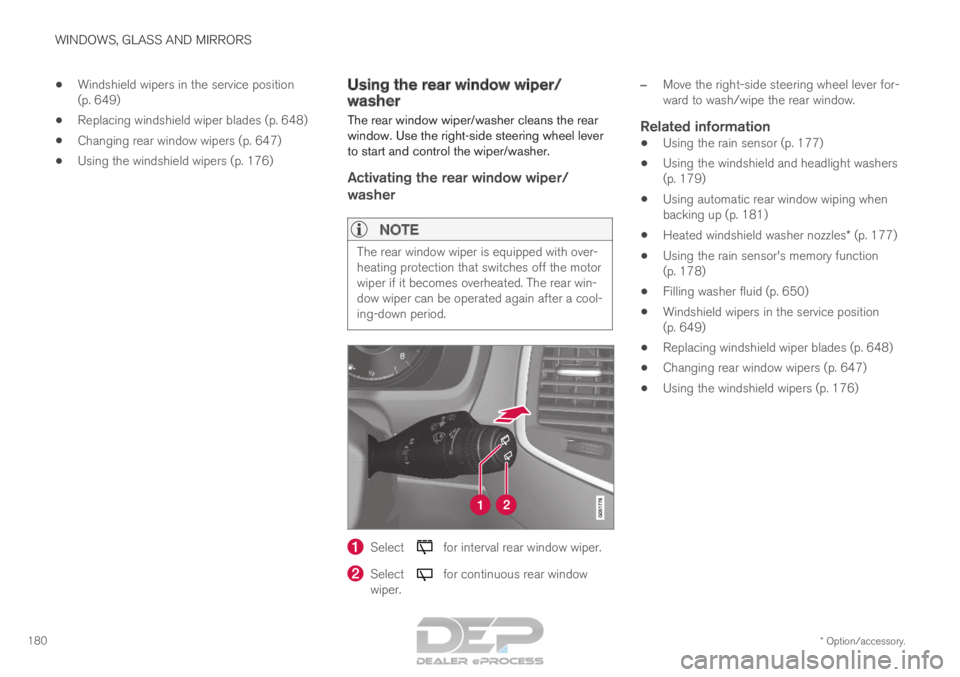
Select for interval rear window wiper.
Select for continuous rear window
wiper. –
Move the right-side steering wheel lever for-
ward to wash/wipe the rear window.
Related information
• Using the rain sensor (p. 177)
• Using the windshield and headlight washers
(p. 179)
• Using automatic rear window wiping when
backing up (p. 181)
• Heated windshield washer nozzles* (p. 177)
• Using the rain sensor's memory function
(p. 178)
• Filling washer fluid (p. 650)
• Windshield wipers in the service position
(p. 649)
• Replacing windshield wiper blades (p. 648)
• Changing rear window wipers (p. 647)
• Using the windshield wipers (p. 176)
Page 183 of 686

WINDOWS, GLASS AND MIRRORS
* Option/accessory.181
Using automatic rear window wiping
when backing up
If reverse gear is engaged while the windshield
wipers are on, the rear window wipers will start.
This function is deactivated when a different
gear is selected.
1. Tap Settings in the Top view in the center
display.
2.
Tap My Car Wipers
.
3. Select Auto Rear Wiper to activate/deacti-
vate automatic rear window wiping when
backing up.
If the rear window wipers are already in continu-
ous wiper mode, no change will be made.
Related information
• Using the rain sensor (p. 177)
• Using the windshield and headlight washers
(p. 179)
• Heated windshield washer nozzles* (p. 177)
• Using the rain sensor's memory function
(p. 178)
• Using the rear window wiper/washer
(p. 180)
• Filling washer fluid (p. 650)
• Windshield wipers in the service position
(p. 649)
• Replacing windshield wiper blades (p. 648) •
Changing rear window wipers (p. 647)
• Using the windshield wipers (p. 176)
Page 188 of 686
||SEATS AND STEERING WHEEL
* Option/accessory.
186 Only one movement (forward/rearward/up/
down) can be performed at a time.
The front seat backrests cannot be folded down
completely.
Related information
•
Manual front seats (p. 184)
• Power front seats* (p. 185)
• Storing memory settings in power front
seats* (p. 186)
• Using stored memory in a powered front seat
(p. 187)
• Adjusting front seat massage settings*
(p. 188)
• Adjusting front seat cushion length (p. 189)
• Front seat massage settings* (p. 188)
• Adjusting front seat side bolster settings*
(p. 190)
• Adjusting front seat lumbar support* (p. 190)
• Adjusting the passenger seat from the driv-
er's seat* (p. 191) Storing memory settings in power
front seats*
The memory function can be used to store the
settings for the seat, door mirrors and head-up
display*.
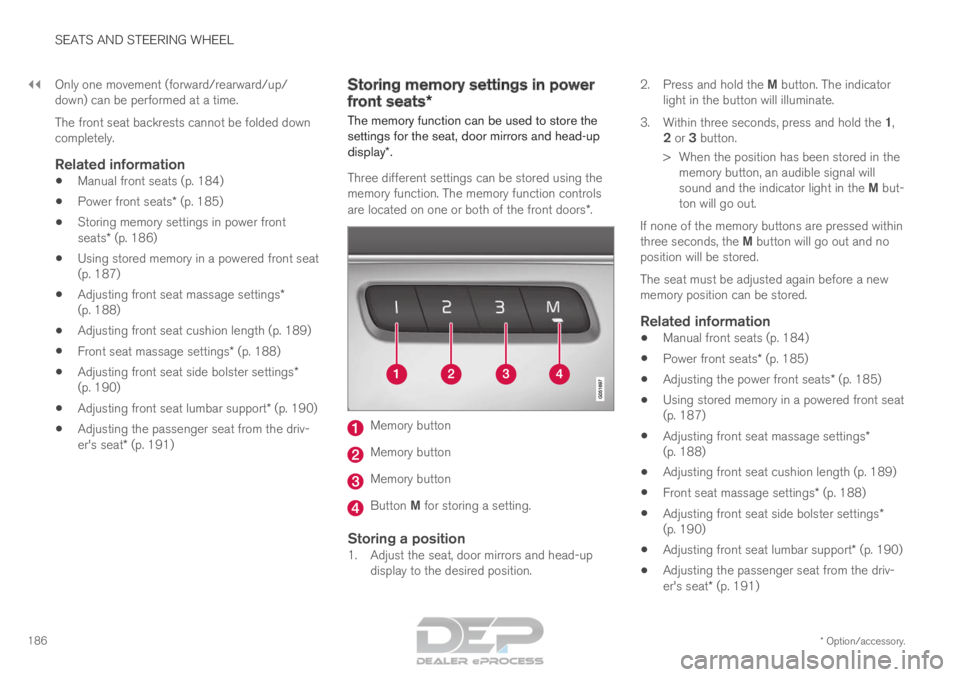
Three different settings can be stored using the
memory function. The memory function controls
are located on one or both of the front doors*. Memory button
Memory button
Memory button
Button M for storing a setting.
Storing a position1. Adjust the seat, door mirrors and head-up
display to the desired position. 2.
Press and hold the M button. The indicator
light in the button will illuminate.
3. Within three seconds, press and hold the 1,
2 or 3 button.
> When the position has been stored in the memory button, an audible signal will
sound and the indicator light in the M but-
ton will go out.
If none of the memory buttons are pressed within
three seconds, the M button will go out and no
position will be stored.
The seat must be adjusted again before a new
memory position can be stored.
Related information
• Manual front seats (p. 184)
• Power front seats* (p. 185)
• Adjusting the power front seats* (p. 185)
• Using stored memory in a powered front seat
(p. 187)
• Adjusting front seat massage settings*
(p. 188)
• Adjusting front seat cushion length (p. 189)
• Front seat massage settings* (p. 188)
• Adjusting front seat side bolster settings*
(p. 190)
• Adjusting front seat lumbar support* (p. 190)
• Adjusting the passenger seat from the driv-
er's seat* (p. 191)