mirror VOLVO XC90 TWIN ENGINE 2018 Owner's Guide
[x] Cancel search | Manufacturer: VOLVO, Model Year: 2018, Model line: XC90 TWIN ENGINE, Model: VOLVO XC90 TWIN ENGINE 2018Pages: 686, PDF Size: 17 MB
Page 189 of 686

SEATS AND STEERING WHEEL
* Option/accessory.187
Using stored memory in a powered
front seat
The memory function can be used to store the
settings for the seat, door mirrors and head-up
display*.
Using a stored positionA stored position can be used with the front door
open or closed:
Front door open
– Briefly press one of the memory buttons
(1-3). The seat, door mirrors and head-up
display will move and stop at the positions
stored in that button.
Front door closed
– Press and hold one of the memory buttons
(1-3) until the seat, door mirrors and head-
up display stop in the positions stored in that
memory button.
If the memory button is released, the seat, door
mirrors and head-up display will stop moving.
WARNING •
Because the front seats can be adjusted
with the ignition off, children should never
be left unattended in the vehicle.
• Movement of the seat can be STOPPED
at any time by pressing any button on the
power seat control panel.
• Do not adjust the seat while driving.
• The seat should be adjusted so that the
brake pedal can be depressed fully. In
addition, position the seat as far rearward
as comfort and control allow.
• The seat rails on the floor must not be
obstructed in any way when the seat is in
motion.
Related information
• Manual front seats (p. 184)
• Power front seats* (p. 185)
• Adjusting the power front seats* (p. 185)
• Storing memory settings in power front
seats* (p. 186)
• Adjusting front seat massage settings*
(p. 188)
• Adjusting front seat cushion length (p. 189)
• Front seat massage settings* (p. 188)
• Adjusting front seat side bolster settings*
(p. 190) •
Adjusting front seat lumbar support* (p. 190)
• Adjusting the passenger seat from the driv-
er's seat* (p. 191)
Page 204 of 686
CLIMATE CONTROL
* Option/accessory.
202 Climate
The vehicle is equipped with electronic climate
control. The climate system cools, heats and
dehumidifies the air in the passenger compart-
ment. All of the climate system functions are controlled
from the center display and the buttons on the
center console.
Certain rear seat functions can also be controlled
from the climate controls* on the rear of the tun-
nel console.
Related information
• Climate zones (p. 202)
• Climate control sensors (p. 202)
• Perceived temperature (p. 203)
• Climate control system voice commands
(p. 203)
• Parking climate (p. 230)
• Air quality (p. 204)
• Air distribution (p. 207)
• Climate system controls (p. 213) Climate zones
The vehicle is divided into climate zones to make
it possible to set different temperatures for dif-
ferent parts of the passenger compartment.
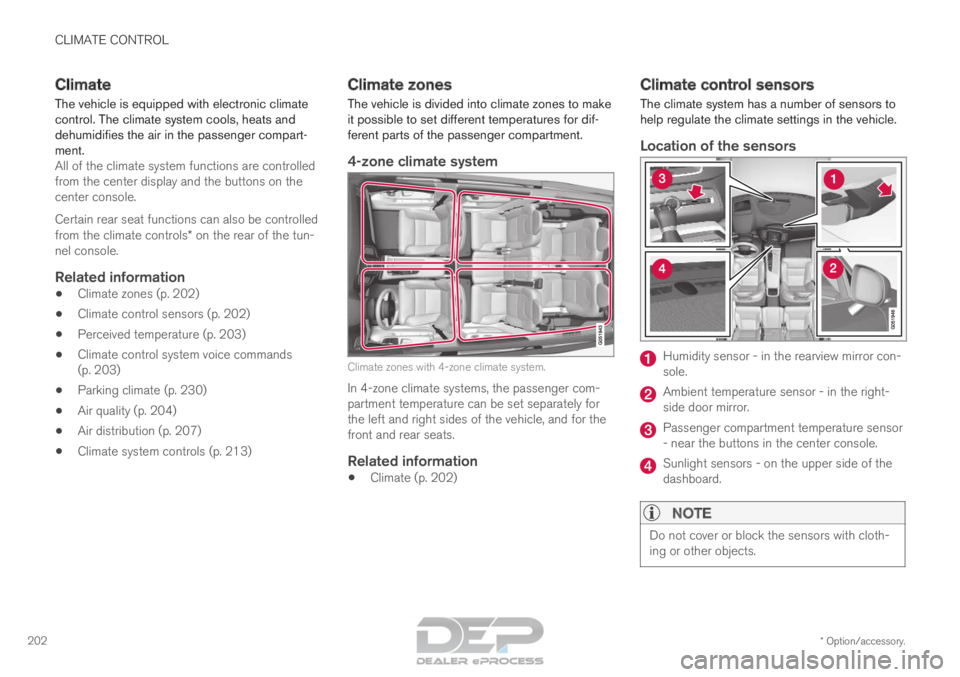
4-zone climate system Climate zones with 4-zone climate system.
In 4-zone climate systems, the passenger com-
partment temperature can be set separately for
the left and right sides of the vehicle, and for the
front and rear seats.
Related information
• Climate (p. 202) Climate control sensors
The climate system has a number of sensors to
help regulate the climate settings in the vehicle.
Location of the sensors Humidity sensor - in the rearview mirror con-
sole.
Ambient temperature sensor - in the right-
side door mirror.
Passenger compartment temperature sensor
- near the buttons in the center console.
Sunlight sensors - on the upper side of the
dashboard.
NOTE
Do not cover or block the sensors with cloth-
ing or other objects.
Page 206 of 686
||CLIMATE CONTROL
* Option/accessory.
204 •
"
Turn on auto" - activates automatic climate
control.
• "
Air condition on"/"Air condition off" -
activates/deactivates air conditioning.
• "
Recirculation on"/"Recirculation off " -
activates/deactivates air recirculation.
• "
Turn on defroster "/"Turn off defroster"
- activates/deactivates window and door mir-
ror defrosting.
• "
Turn on max defroster
"/"Turn off max
defroster " - activates/deactivates max
defroster.
• "
Turn on electric defroster"/"Turn off
electric defroster" - activates/deactivates
heated windshield*.
• "
Turn on rear defroster"/"Turn off rear
defroster" - Activates/deactivates heated rear window and door mirrors.
• "Turn steering wheel heat on"/"Turn
steering wheel heat off" - activates/deac-
tivates heated steering wheel *.
• "
Raise steering wheel heat "/"
Lower
steering wheel heat" - raises/lowers the
level of steering wheel heating*.
• "
Turn on seat heat"/"Turn off seat heat"
- activates/deactivates seat heating*.
• "
Raise seat heat"/"Lower seat heat" -
raises/lowers the level of seat heating*. •
"
Turn on seat ventilation"/"Turn off seat
ventilation" - activates/deactivates seat
ventilation*.
• "
Raise seat ventilation"/"Lower seat
ventilation" - raises/lowers the level of seat
ventilation*.
Related information
• Climate (p. 202)
• Voice control (p. 145)
• Using voice commands (p. 146)
• Voice control settings (p. 148) Air quality
The materials used in the passenger compart-
ment and air filtering system have been selected
to ensure a high level of air quality in the passen-
ger compartment.
Materials used in the passenger
compartment
The materials in the passenger compartment are
designed to be pleasant and comfortable, even
for people with asthma or allergies.
The materials have been developed and tested to
minimize dust in the passenger compartment and
make it easier to keep clean.
The mats in both the passenger compartment
and cargo compartment can be easily removed
for cleaning.
Use Volvo-recommended cleaning agents and
car care products to clean the interior.
Air filtering systemsIn addition to the passenger compartment filter,
the Clean Zone Interior Package* and Interior Air
Quality System* also help maintain high air qual-
ity in the passenger compartment.
Related information
• Climate (p. 202)
• Clean Zone* (p. 205)
• Clean Zone Interior Package* (p. 206)
Page 216 of 686
||CLIMATE CONTROL
* Option/accessory.
214
Main climate
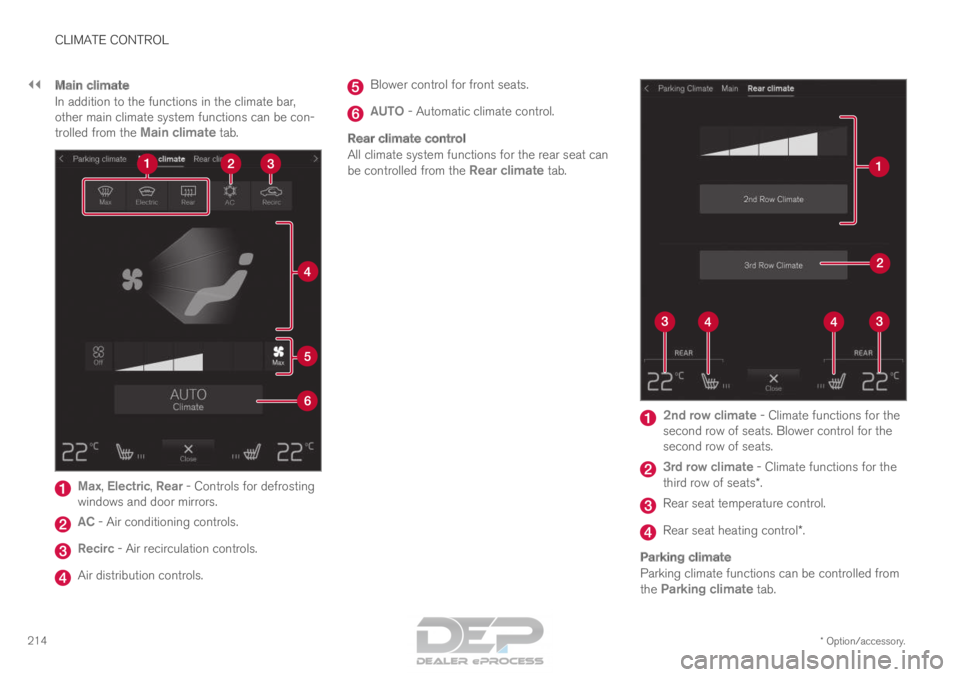
In addition to the functions in the climate bar,
other main climate system functions can be con-
trolled from the Main climate tab.Max, Electric, Rear - Controls for defrosting
windows and door mirrors. AC - Air conditioning controls.
Recirc - Air recirculation controls.
Air distribution controls. Blower control for front seats.
AUTO - Automatic climate control.
Rear climate control
All climate system functions for the rear seat can
be controlled from the
Rear climate tab. 2nd row climate
- Climate functions for the
second row of seats. Blower control for the
second row of seats. 3rd row climate
- Climate functions for the
third row of seats*. Rear seat temperature control.
Rear seat heating control*.
Parking climate
Parking climate functions can be controlled from
the
Parking climate tab.
Page 217 of 686
CLIMATE CONTROL
}}
* Option/accessory. 215
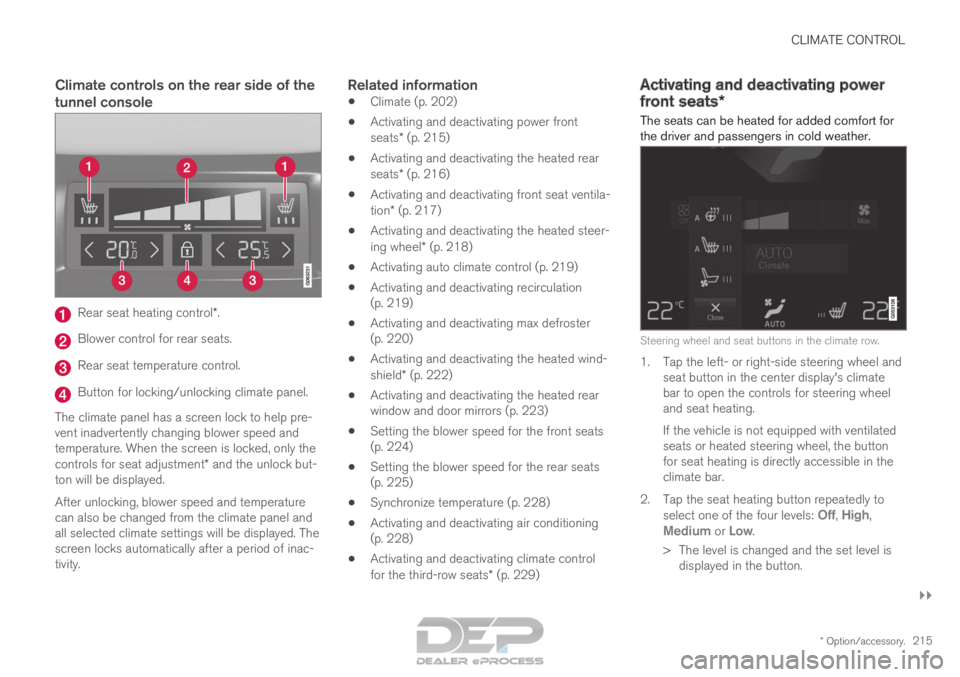
Climate controls on the rear side of the
tunnel consoleRear seat heating control*.
Blower control for rear seats.
Rear seat temperature control.
Button for locking/unlocking climate panel.
The climate panel has a screen lock to help pre-
vent inadvertently changing blower speed and
temperature. When the screen is locked, only the
controls for seat adjustment* and the unlock but-
ton will be displayed.
After unlocking, blower speed and temperature
can also be changed from the climate panel and
all selected climate settings will be displayed. The
screen locks automatically after a period of inac-
tivity.Related information
• Climate (p. 202)
• Activating and deactivating power front
seats* (p. 215)
• Activating and deactivating the heated rear
seats* (p. 216)
• Activating and deactivating front seat ventila-
tion* (p. 217)
• Activating and deactivating the heated steer-
ing wheel* (p. 218)
• Activating auto climate control (p. 219)
• Activating and deactivating recirculation
(p. 219)
• Activating and deactivating max defroster
(p. 220)
• Activating and deactivating the heated wind-
shield* (p. 222)
• Activating and deactivating the heated rear
window and door mirrors (p. 223)
• Setting the blower speed for the front seats
(p. 224)
• Setting the blower speed for the rear seats
(p. 225)
• Synchronize temperature (p. 228)
• Activating and deactivating air conditioning
(p. 228)
• Activating and deactivating climate control
for the third-row seats* (p. 229) Activating and deactivating power
front seats*
The seats can be heated for added comfort for
the driver and passengers in cold weather. Steering wheel and seat buttons in the climate row.
1. Tap the left- or right-side steering wheel and
seat button in the center display's climate
bar to open the controls for steering wheel
and seat heating.
If the vehicle is not equipped with ventilated
seats or heated steering wheel, the button
for seat heating is directly accessible in the
climate bar.
2.
Tap the seat heating button repeatedly to
select one of the four levels: Off,
High,
Medium or Low.
>
The level is changed and the set level is
displayed in the button.
Page 225 of 686
CLIMATE CONTROL
* Option/accessory.223
Activating and deactivating
automatic windshield heating*
Windshield heating is used to quickly remove
condensation and ice from the windshield.
Windshield heating can be set to automatically
activate when the engine is started. With auto-
matic start activated, heating will be activated
when there is a risk of ice or condensation on the
windows or mirrors. Heating is automatically
switched off when the window or door mirror is
sufficiently warm and the condensation or ice is
gone.
1. Tap Settings in the Top view in the center
display.
2. Tap Climate.
3. Select Auto Front Defroster to activate/
deactivate automatic windshield heating.
Related information
• Activating and deactivating the heated wind-
shield* (p. 222) Activating and deactivating the
heated rear window and door
mirrors
The heated rear window and door mirrors are
used to quickly remove condensation and ice
from the glass.
Activating and deactivating the heated
rear window and door mirrors from the
center console
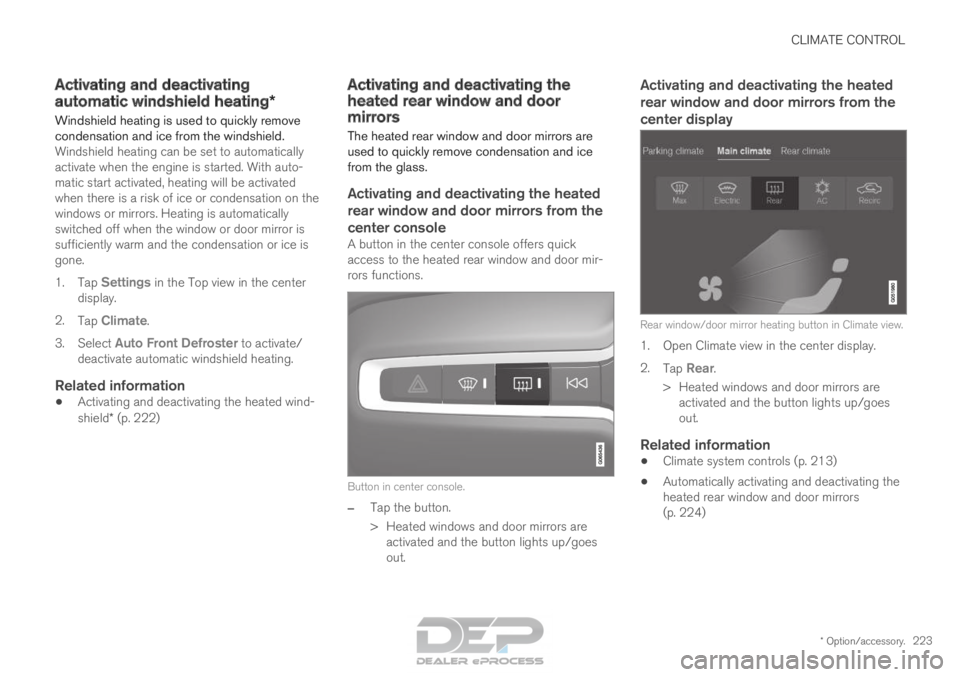
A button in the center console offers quick
access to the heated rear window and door mir-
rors functions.
Button in center console.
–
Tap the button.
>
Heated windows and door mirrors are
activated and the button lights up/goes
out.
Activating and deactivating the heated
rear window and door mirrors from the
center display Rear window/door mirror heating button in Climate view.
1. Open Climate view in the center display.
2.
Tap Rear.
>
Heated windows and door mirrors are
activated and the button lights up/goes
out.
Related information
• Climate system controls (p. 213)
• Automatically activating and deactivating the
heated rear window and door mirrors
(p. 224)
Page 226 of 686
CLIMATE CONTROL
224Automatically activating and
deactivating the heated rear window
and door mirrors
The heated rear window and door mirrors are
used to quickly remove condensation and ice
from the glass.
It is possible to select whether rear window and
door mirror heating should be automatically acti-
vated or deactivated when the engine is started.
With automatic start activated, heating will be
activated when there is a risk of ice or condensa-
tion on the windows or mirrors. Heating is auto-
matically switched off when the window or door
mirror is sufficiently warm and the condensation
or ice is gone.
1. Tap Settings in the Top view in the center
display.
2. Tap Climate.
3. Select Auto Rear Defroster to activate/
deactivate automatic rear window and door
heating.
Related information
• Activating and deactivating the heated rear
window and door mirrors (p. 223) Setting the blower speed for the
front seats
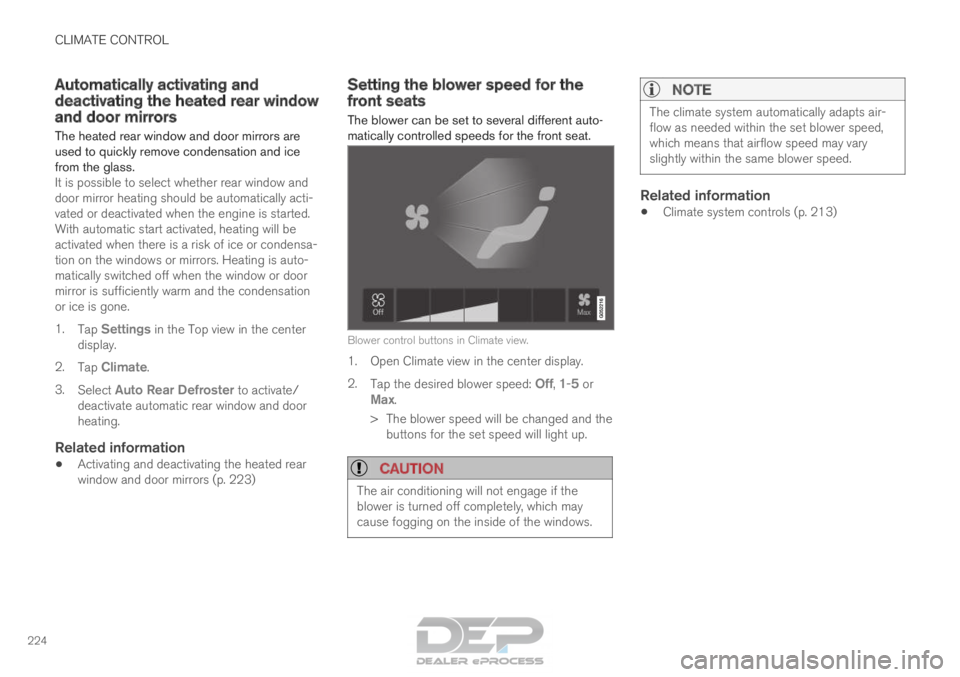
The blower can be set to several different auto-
matically controlled speeds for the front seat.
Blower control buttons in Climate view.
1. Open Climate view in the center display.
2.
Tap the desired blower speed: Off, 1-5 or
Max.
>
The blower speed will be changed and the
buttons for the set speed will light up.
CAUTION The air conditioning will not engage if the
blower is turned off completely, which may
cause fogging on the inside of the windows.
NOTE The climate system automatically adapts air-
flow as needed within the set blower speed,
which means that airflow speed may vary
slightly within the same blower speed.
Related information
•
Climate system controls (p. 213)
Page 232 of 686

CLIMATE CONTROL
* Option/accessory.
230 Parking climate
The passenger compartment climate can be pre-
conditioned or maintained when the vehicle is
parked. For full functionality, the vehicle's charg-
ing cable must be plugged in. Preconditioning and the climate comfort retaining func-
tion are controlled from the Parking climate tab in the
center display's Climate view.
Related information
•
Climate (p. 202)
• Preconditioning (p. 230)
• Climate comfort retaining function (p. 234)
• Parking climate symbols and messages
(p. 236) Preconditioning
Preconditioning the vehicle before driving can
help reduce wear and reduce energy consump-
tion during a trip.
Preconditioning can be started immediately or
started at a preset time using a timer.
The function utilizes several of the vehicle's sys-
tems:
• In cold weather, the high-voltage coolant
heater (HVCH) heats the passenger com-
partment to a comfortable temperature.
• In warm weather, air conditioning cools the
passenger compartment to a comfortable
temperature.
• The electrically heated steering wheel* and
seats* can be activated.
• Heating for the windshield, rear window and
door mirrors are automatically activated as
needed.
During preconditioning in a hot climate, conden-
sation from the air conditions may drip under the
vehicle. This is normal.
Page 240 of 686
KEY, LOCKS AND ALARM
* Option/accessory.
238 Lock indication
When the vehicle is locked or unlocked, the turn
signals will flash to indicate that the vehicle has
been locked or unlocked correctly.
Exterior confirmationLocking
• The turn signals will flash once and the door
mirrors will fold in 1
to confirm the vehicle is
locked.
Unlocking
• The turn signals will flash twice and the door
mirrors will fold out 1
to confirm the vehicle is
unlocked.
All doors, tailgate and hood must be closed for
confirmation to be given. If only the driver's door
is closed when the vehicle is locked 2
, the vehicle
will be locked but the turn signals will only flash
to indicate locking when all doors and the hood
and tailgate have been closed.
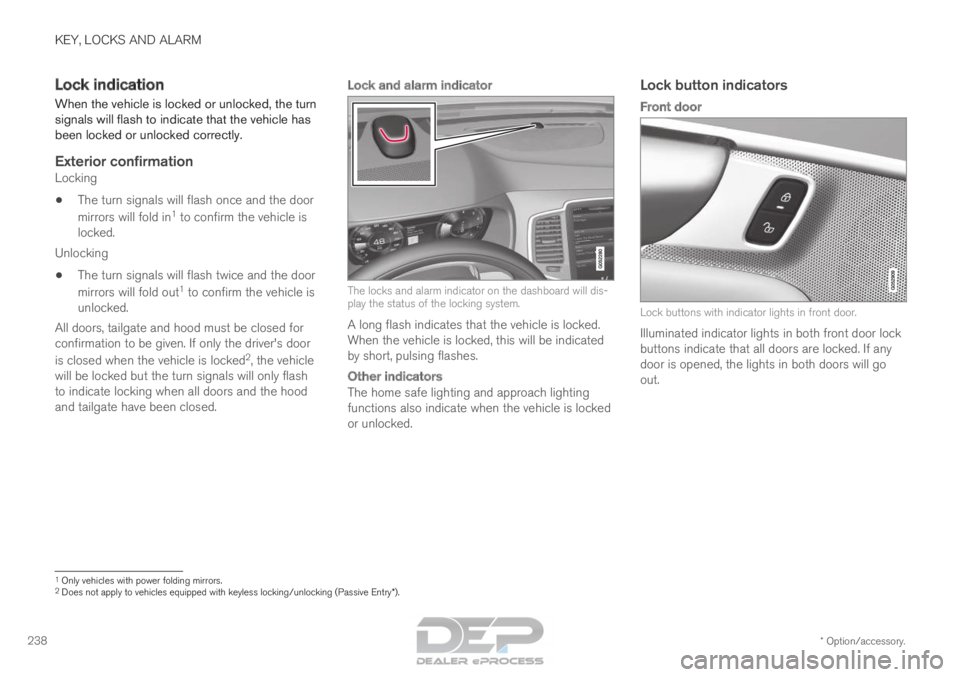
Lock and alarm indicator The locks and alarm indicator on the dashboard will dis-
play the status of the locking system.
A long flash indicates that the vehicle is locked.
When the vehicle is locked, this will be indicated
by short, pulsing flashes.
Other indicators
The home safe lighting and approach lighting
functions also indicate when the vehicle is locked
or unlocked.
Lock button indicators
Front door Lock buttons with indicator lights in front door.
Illuminated indicator lights in both front door lock
buttons indicate that all doors are locked. If any
door is opened, the lights in both doors will go
out. 1
Only vehicles with power folding mirrors.
2 Does not apply to vehicles equipped with keyless locking/unlocking (Pas\
sive Entry*).
Page 241 of 686
KEY, LOCKS AND ALARM
}}
* Option/accessory. 239
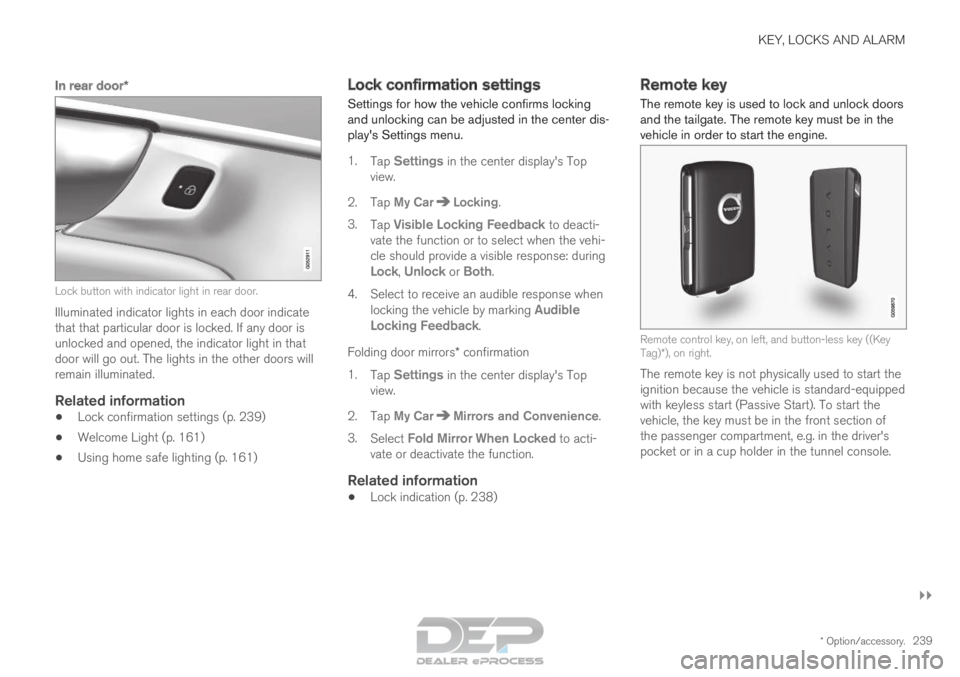
In rear door*Lock button with indicator light in rear door.
Illuminated indicator lights in each door indicate
that that particular door is locked. If any door is
unlocked and opened, the indicator light in that
door will go out. The lights in the other doors will
remain illuminated.
Related information
•
Lock confirmation settings (p. 239)
• Welcome Light (p. 161)
• Using home safe lighting (p. 161) Lock confirmation settings
Settings for how the vehicle confirms locking
and unlocking can be adjusted in the center dis-
play's Settings menu.
1.
Tap Settings in the center display's Top
view.
2.
Tap My Car Locking
.
3. Tap Visible Locking Feedback to deacti-
vate the function or to select when the vehi-
cle should provide a visible response: during
Lock, Unlock or Both.
4.
Select to receive an audible response when
locking the vehicle by marking Audible
Locking Feedback.
Folding door mirrors* confirmation
1. Tap Settings in the center display's Top
view.
2.
Tap My Car Mirrors and Convenience
.
3. Select Fold Mirror When Locked to acti-
vate or deactivate the function.
Related information
• Lock indication (p. 238) Remote key
The remote key is used to lock and unlock doors
and the tailgate. The remote key must be in the
vehicle in order to start the engine. Remote control key, on left, and button-less key ((Key
Tag)*), on right.
The remote key is not physically used to start the
ignition because the vehicle is standard-equipped
with keyless start (Passive Start). To start the
vehicle, the key must be in the front section of
the passenger compartment, e.g. in the driver's
pocket or in a cup holder in the tunnel console.