mirror VOLVO XC90 TWIN ENGINE 2018 User Guide
[x] Cancel search | Manufacturer: VOLVO, Model Year: 2018, Model line: XC90 TWIN ENGINE, Model: VOLVO XC90 TWIN ENGINE 2018Pages: 686, PDF Size: 17 MB
Page 138 of 686
||DISPLAYS AND VOICE CONTROL
* Option/accessory.
136 Type of
setting
Description
Slider
Select a level for a function by
pressing and dragging the slider
control, e.g. to set volume level.
Informa-
tion dis-
play This is not an actual setting, but
instead displays information such
as the vehicle's VIN number.
Related information
•
Center display overview (p. 109) Table of settings in the center
display
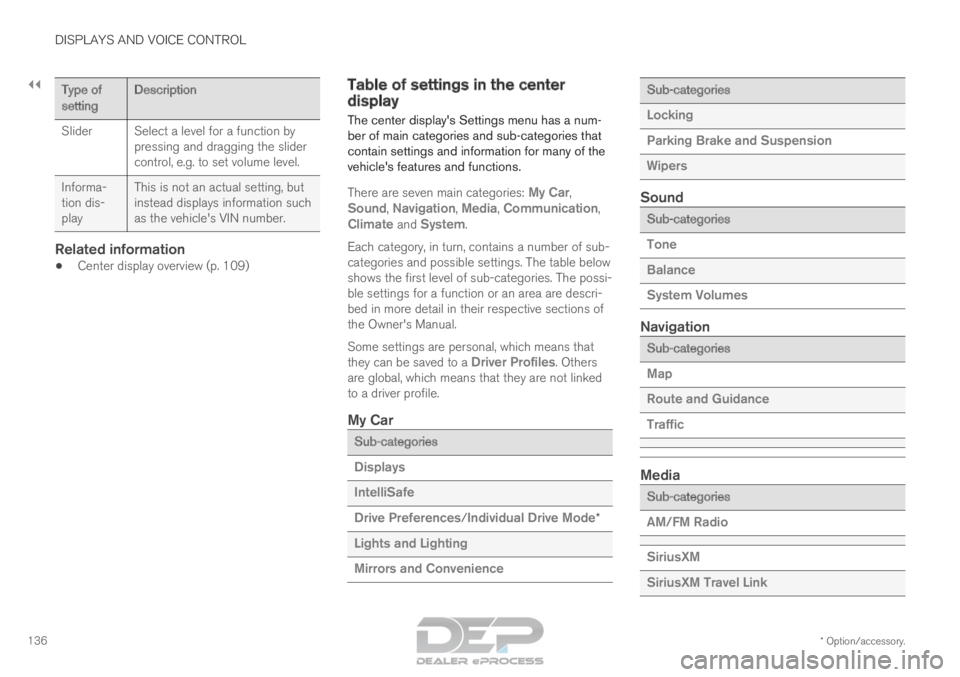
The center display's Settings menu has a num-
ber of main categories and sub-categories that
contain settings and information for many of the
vehicle's features and functions.
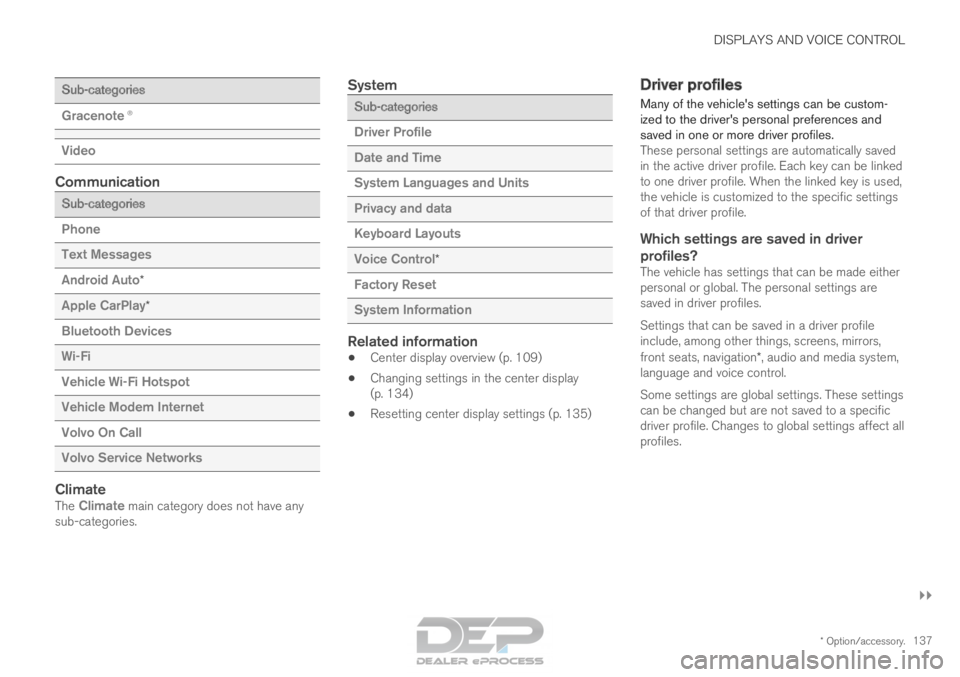
There are seven main categories:
My Car,
Sound, Navigation, Media, Communication,
Climate and System.
Each category, in turn, contains a number of sub-
categories and possible settings. The table below
shows the first level of sub-categories. The possi-
ble settings for a function or an area are descri-
bed in more detail in their respective sections of
the Owner's Manual.
Some settings are personal, which means that
they can be saved to a Driver Profiles. Others
are global, which means that they are not linked
to a driver profile.
My Car Sub-categories
Displays
IntelliSafe
Drive Preferences/Individual Drive Mode*
Lights and Lighting
Mirrors and Convenience Sub-categories
Locking
Parking Brake and Suspension
Wipers
Sound
Sub-categories
Tone
Balance
System Volumes
Navigation
Sub-categories
Map
Route and Guidance
Traffic
Media
Sub-categories
AM/FM Radio
SiriusXM
SiriusXM Travel Link
Page 139 of 686
DISPLAYS AND VOICE CONTROL
}}
* Option/accessory. 137Sub-categories
Gracenote®
Video
Communication
Sub-categories
Phone
Text Messages
Android Auto
*
Apple CarPlay*
Bluetooth Devices
Wi-Fi
Vehicle Wi-Fi Hotspot
Vehicle Modem Internet
Volvo On Call
Volvo Service Networks
ClimateThe Climate main category does not have any sub-categories.
System Sub-categories
Driver Profile
Date and Time
System Languages and Units
Privacy and data
Keyboard Layouts
Voice Control
*
Factory Reset
System Information
Related information
• Center display overview (p. 109)
• Changing settings in the center display
(p. 134)
• Resetting center display settings (p. 135) Driver profiles
Many of the vehicle's settings can be custom-
ized to the driver's personal preferences and
saved in one or more driver profiles. These personal settings are automatically saved
in the active driver profile. Each key can be linked
to one driver profile. When the linked key is used,
the vehicle is customized to the specific settings
of that driver profile.
Which settings are saved in driver
profiles?
The vehicle has settings that can be made either
personal or global. The personal settings are
saved in driver profiles.
Settings that can be saved in a driver profile
include, among other things, screens, mirrors,
front seats, navigation*, audio and media system,
language and voice control.
Some settings are global settings. These settings
can be changed but are not saved to a specific
driver profile. Changes to global settings affect all
profiles.
Page 165 of 686
LIGHTING
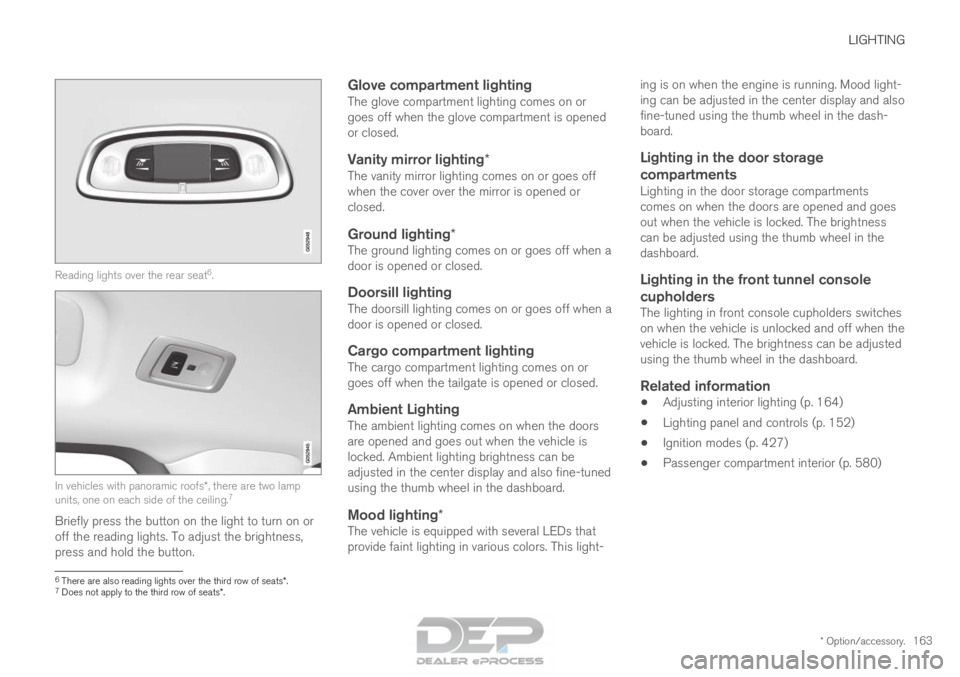
* Option/accessory.163Reading lights over the rear seat
6
. In vehicles with panoramic roofs*, there are two lamp
units, one on each side of the ceiling. 7
Briefly press the button on the light to turn on or
off the reading lights. To adjust the brightness,
press and hold the button.
Glove compartment lightingThe glove compartment lighting comes on or
goes off when the glove compartment is opened
or closed.
Vanity mirror lighting*The vanity mirror lighting comes on or goes off
when the cover over the mirror is opened or
closed.
Ground lighting*The ground lighting comes on or goes off when a
door is opened or closed.
Doorsill lightingThe doorsill lighting comes on or goes off when a
door is opened or closed.
Cargo compartment lightingThe cargo compartment lighting comes on or
goes off when the tailgate is opened or closed.
Ambient LightingThe ambient lighting comes on when the doors
are opened and goes out when the vehicle is
locked. Ambient lighting brightness can be
adjusted in the center display and also fine-tuned
using the thumb wheel in the dashboard.
Mood lighting*The vehicle is equipped with several LEDs that
provide faint lighting in various colors. This light- ing is on when the engine is running. Mood light-
ing can be adjusted in the center display and also
fine-tuned using the thumb wheel in the dash-
board.
Lighting in the door storage
compartments
Lighting in the door storage compartments
comes on when the doors are opened and goes
out when the vehicle is locked. The brightness
can be adjusted using the thumb wheel in the
dashboard.
Lighting in the front tunnel console
cupholders
The lighting in front console cupholders switches
on when the vehicle is unlocked and off when the
vehicle is locked. The brightness can be adjusted
using the thumb wheel in the dashboard.
Related information
• Adjusting interior lighting (p. 164)
• Lighting panel and controls (p. 152)
• Ignition modes (p. 427)
• Passenger compartment interior (p. 580) 6
There are also reading lights over the third row of seats*.
7 Does not apply to the third row of seats*.
Page 168 of 686
WINDOWS, GLASS AND MIRRORS
* Option/accessory.
166 Windows, glass and mirrors
The vehicle is equipped with controls for win-
dows, glass and mirrors. Some of the windows
in the car are laminated.
Laminated glass
The windshield and panoramic roof* have lamina-
ted glass. The glass is reinforced, which provides
better protection against break-ins and improved
soundproofing in the passenger compartment.
Laminated glass is available as an option for
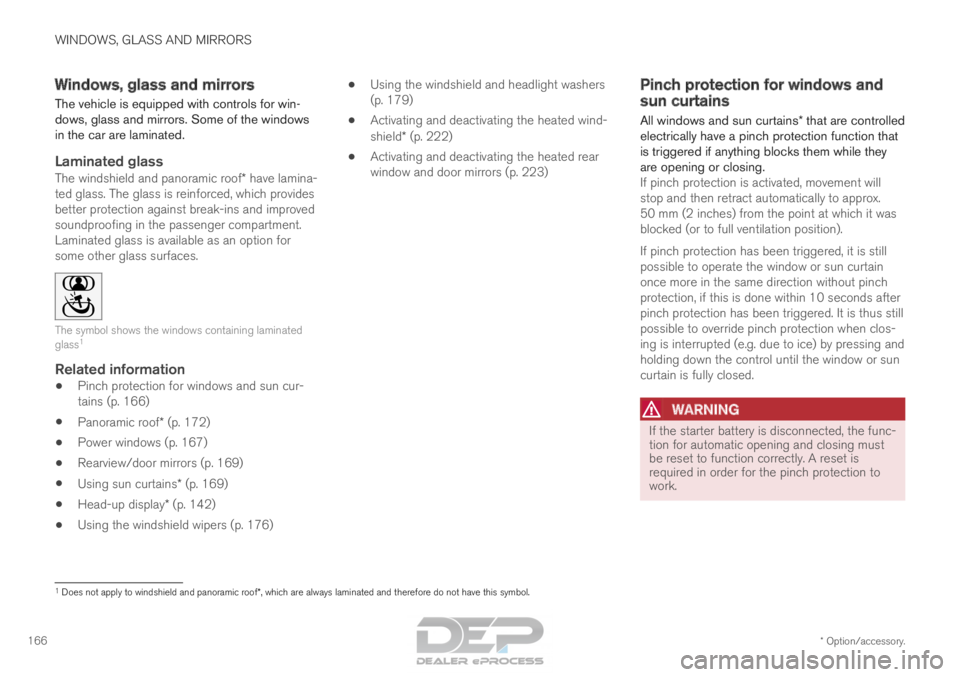
some other glass surfaces. The symbol shows the windows containing laminated
glass
1
Related information
•
Pinch protection for windows and sun cur-
tains (p. 166)
• Panoramic roof* (p. 172)
• Power windows (p. 167)
• Rearview/door mirrors (p. 169)
• Using sun curtains* (p. 169)
• Head-up display* (p. 142)
• Using the windshield wipers (p. 176) •
Using the windshield and headlight washers
(p. 179)
• Activating and deactivating the heated wind-
shield* (p. 222)
• Activating and deactivating the heated rear
window and door mirrors (p. 223) Pinch protection for windows and
sun curtains
All windows and sun curtains* that are controlled
electrically have a pinch protection function that
is triggered if anything blocks them while they
are opening or closing. If pinch protection is activated, movement will
stop and then retract automatically to approx.
50 mm (2 inches) from the point at which it was
blocked (or to full ventilation position).
If pinch protection has been triggered, it is still
possible to operate the window or sun curtain
once more in the same direction without pinch
protection, if this is done within 10 seconds after
pinch protection has been triggered. It is thus still
possible to override pinch protection when clos-
ing is interrupted (e.g. due to ice) by pressing and
holding down the control until the window or sun
curtain is fully closed.
WARNING If the starter battery is disconnected, the func-
tion for automatic opening and closing must
be reset to function correctly. A reset is
required in order for the pinch protection to
work.
1
Does not apply to windshield and panoramic roof*, which are always laminated and therefore do not have this symbol.
Page 169 of 686
WINDOWS, GLASS AND MIRRORS
}}
* Option/accessory. 167
Related information
•Reset procedure for pinch protection
(p. 167)
• Operating the power windows (p. 168)
• Using sun curtains* (p. 169)
• Panoramic roof* (p. 172) Reset procedure for pinch
protection
If the power windows are not operating properly,
you can try a reset procedure.
WARNING If the starter battery is disconnected, the func-
tion for automatic opening and closing must
be reset to function correctly. A reset is
required in order for the pinch protection to
work.
If the problem persists or if it affects the panor-
amic roof or sunroof, contact a workshop. 2
Resetting a power window
1. Start with the window in the closed position.
2. Then operate the window in manual mode
three times upward toward the closed posi-
tion.
> The system will be automatically initiated.
Related information
• Pinch protection for windows and sun cur-
tains (p. 166)
• Operating the power windows (p. 168)
• Using sun curtains* (p. 169) Power windows
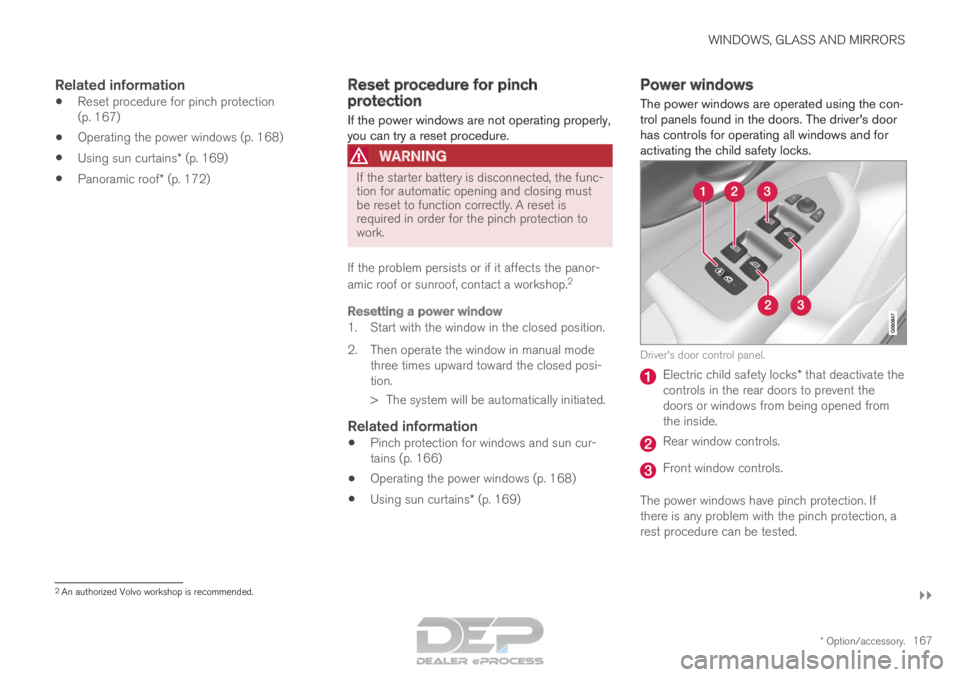
The power windows are operated using the con-
trol panels found in the doors. The driver's door
has controls for operating all windows and for
activating the child safety locks. Driver's door control panel.
Electric child safety locks* that deactivate the
controls in the rear doors to prevent the
doors or windows from being opened from
the inside. Rear window controls.
Front window controls.
The power windows have pinch protection. If
there is any problem with the pinch protection, a
rest procedure can be tested. 2
An authorized Volvo workshop is recommended.
Page 170 of 686
||WINDOWS, GLASS AND MIRRORS
* Option/accessory.
168
WARNING Children, other passengers or objects can be
trapped by the moving parts.
• Always operate the windows with caution.
• Do not allow children to play with the
operating controls.
• Never leave a child alone in the vehicle.
• Remember to always cut the current to
the power windows by setting the vehi-
cle's electrical system to ignition mode 0
and then taking the remote key with you
when leaving the vehicle.
• Never stick objects or body parts out
through the windows, even if the vehicle
electrical system is completely turned off.
Related information
•Operating the power windows (p. 168)
• Pinch protection for windows and sun cur-
tains (p. 166)
• Reset procedure for pinch protection
(p. 167) Operating the power windows
All power windows can be operated using the
control panel in the driver's door. The control
panels in the other doors can be used to oper-
ate that particular door. The power windows have pinch protection. If
there is any problem with the pinch protection, a
rest procedure can be tested.
WARNING Children, other passengers or objects can be
trapped by the moving parts.
• Always operate the windows with caution.
• Do not allow children to play with the
operating controls.
• Never leave a child alone in the vehicle.
• Remember to always cut the current to
the power windows by setting the vehi-
cle's electrical system to ignition mode 0
and then taking the remote key with you
when leaving the vehicle.
• Never stick objects or body parts out
through the windows, even if the vehicle
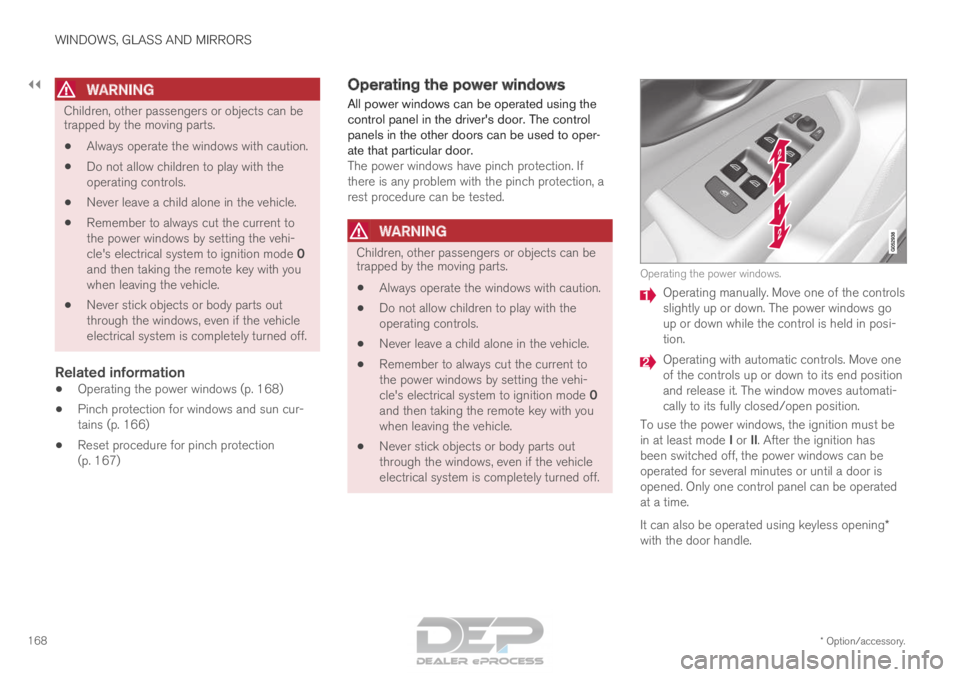
electrical system is completely turned off. Operating the power windows.
Operating manually. Move one of the controls
slightly up or down. The power windows go
up or down while the control is held in posi-
tion.
Operating with automatic controls. Move one
of the controls up or down to its end position
and release it. The window moves automati-
cally to its fully closed/open position.
To use the power windows, the ignition must be
in at least mode I or II. After the ignition has
been switched off, the power windows can be
operated for several minutes or until a door is
opened. Only one control panel can be operated
at a time.
It can also be operated using keyless opening*
with the door handle.
Page 171 of 686
WINDOWS, GLASS AND MIRRORS
}}
* Option/accessory. 169
WARNINGMake sure that no child or other passenger
comes into contact with the windows as they
are closing with keyless closing*.
NOTE
One way to reduce the pulsating wind noise
heard when the rear windows are open is to
also open the front windows slightly.
NOTE
The windows cannot be opened at speeds
over approx. 180 km/h (ca112 mph), but they
can be closed.
The driver is always responsible for following
applicable traffic regulations.
Related information
•
Power windows (p. 167)
• Pinch protection for windows and sun cur-
tains (p. 166)
• Reset procedure for pinch protection
(p. 167)
• Keyless locking and unlocking* (p. 254)
• Locking and unlocking using the remote key
(p. 241)
• Locking and unlocking from inside the vehi-
cle (p. 257) Using sun curtains*
Sun curtains are integrated into each of the rear
doors.
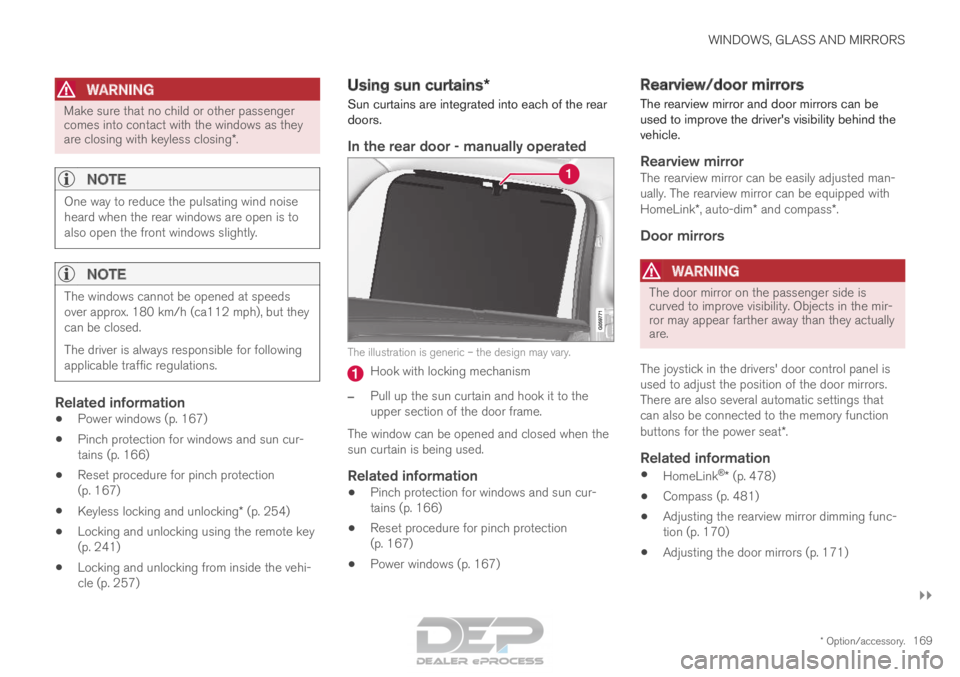
In the rear door - manually operated The illustration is generic – the design may vary.
Hook with locking mechanism
– Pull up the sun curtain and hook it to the
upper section of the door frame.
The window can be opened and closed when the
sun curtain is being used.
Related information
• Pinch protection for windows and sun cur-
tains (p. 166)
• Reset procedure for pinch protection
(p. 167)
• Power windows (p. 167) Rearview/door mirrors
The rearview mirror and door mirrors can be
used to improve the driver's visibility behind the
vehicle.
Rearview mirrorThe rearview mirror can be easily adjusted man-
ually. The rearview mirror can be equipped with
HomeLink*, auto-dim* and compass*.
Door mirrors
WARNING The door mirror on the passenger side is
curved to improve visibility. Objects in the mir-
ror may appear farther away than they actually
are.
The joystick in the drivers' door control panel is
used to adjust the position of the door mirrors.
There are also several automatic settings that
can also be connected to the memory function
buttons for the power seat*.
Related information
• HomeLink ®
* (p. 478)
• Compass (p. 481)
• Adjusting the rearview mirror dimming func-
tion (p. 170)
• Adjusting the door mirrors (p. 171)
Page 172 of 686
WINDOWS, GLASS AND MIRRORS
* Option/accessory.
170 •
Storing memory settings in power front
seats* (p. 186)
• Activating and deactivating the heated rear
window and door mirrors (p. 223) Adjusting the rearview mirror
dimming function
Bright light entering the vehicle from behind, e.g.
from the headlights of following vehicles, could
reflect in the rearview mirror and door mirrors
and cause a glare. Use the dimming function
when light from behind is distracting.
Auto-dimIf bright light enters the vehicle from behind, the
door mirrors will automatically dim. Auto-dim is
always active when the engine is running, except
when reverse gear is engaged.
NOTE When the level of sensitivity is changed, this
change will not be noticeable immediately but
will instead take effect after a short period of
time.
The sensitivity level for dimming will affect both
the rearview mirror and door mirrors.
1.
Tap Settings in the Top view in the center
display.
2.
Tap My Car Mirrors and Convenience
.
3. Under Rearview Mirror Auto Dimming ,
select
Normal, Dark or Light.
The rearview mirror instead has two sensors -
one pointing forward and one pointing rearward -
which work together to identify and eliminate glare. The forward-pointing sensor monitors
ambient light, while the rearward-pointing sensor
monitors light from the headlights of following
vehicles.
For the door mirrors to be equipped with auto-
dim, the rearview mirror must also be equipped
with auto-dim.
NOTE
If the sensors are obstructed by e.g. a parking
permit, transponder, sunshade or objects on
the seats or in the cargo compartment in a
way that prevents light from reaching the sen-
sors, the auto-dim function in the door and
rearview mirrors will be reduced.
Related information
•
Rearview/door mirrors (p. 169)
• Adjusting the door mirrors (p. 171)
Page 173 of 686
WINDOWS, GLASS AND MIRRORS
}}
* Option/accessory. 171
Adjusting the door mirrors
To improve visibility to the rear, the door mirrors
need to be adjusted to the driver's height and
seating position. There are several automatic
settings that can also be connected to the mem-
ory function buttons for the power seat*.
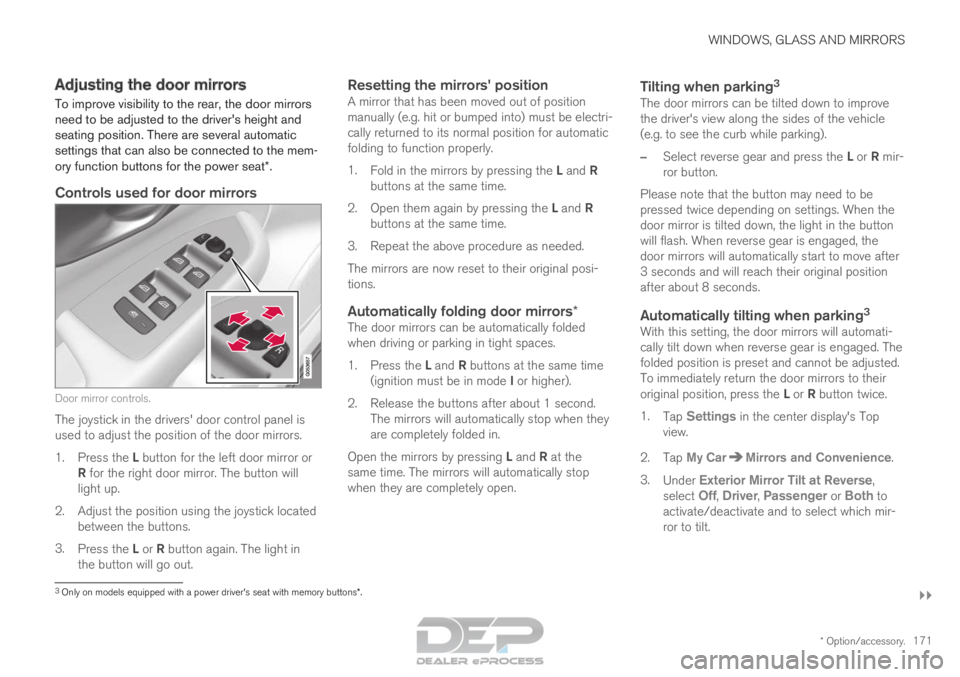
Controls used for door mirrors Door mirror controls.
The joystick in the drivers' door control panel is
used to adjust the position of the door mirrors.
1.
Press the L button for the left door mirror or
R for the right door mirror. The button will
light up.
2.
Adjust the position using the joystick located
between the buttons.
3. Press the L or R button again. The light in
the button will go out.
Resetting the mirrors' positionA mirror that has been moved out of position
manually (e.g. hit or bumped into) must be electri-
cally returned to its normal position for automatic
folding to function properly.
1. Fold in the mirrors by pressing the L and R
buttons at the same time.
2. Open them again by pressing the L and R
buttons at the same time.
3. Repeat the above procedure as needed.
The mirrors are now reset to their original posi-
tions.
Automatically folding door mirrors*The door mirrors can be automatically folded
when driving or parking in tight spaces.
1. Press the L and R buttons at the same time
(ignition must be in mode I or higher).
2. Release the buttons after about 1 second. The mirrors will automatically stop when they
are completely folded in.
Open the mirrors by pressing L and R at the
same time. The mirrors will automatically stop
when they are completely open.
Tilting when parking 3The door mirrors can be tilted down to improve
the driver's view along the sides of the vehicle
(e.g. to see the curb while parking).
–
Select reverse gear and press the L or R mir-
ror button.
Please note that the button may need to be
pressed twice depending on settings. When the
door mirror is tilted down, the light in the button
will flash. When reverse gear is engaged, the
door mirrors will automatically start to move after
3 seconds and will reach their original position
after about 8 seconds.
Automatically tilting when parking 3With this setting, the door mirrors will automati-
cally tilt down when reverse gear is engaged. The
folded position is preset and cannot be adjusted.
To immediately return the door mirrors to their
original position, press the L or R button twice.
1. Tap Settings in the center display's Top
view.
2.
Tap My Car Mirrors and Convenience
.
3. Under Exterior Mirror Tilt at Reverse ,
select
Off, Driver, Passenger or Both to
activate/deactivate and to select which mir-
ror to tilt.
3 Only on models equipped with a power driver's seat with memory button\
s*.
Page 174 of 686
||WINDOWS, GLASS AND MIRRORS
* Option/accessory.
172
Automatic folding when the vehicle is
locked*
The door mirrors automatically fold in when the
vehicle is locked and open when the vehicle is
unlocked using the remote key.
1.
Tap Settings in the center display's Top
view.
2.
Tap My Car Mirrors and Convenience
.
3. Select Fold Mirror When Locked to acti-
vate/deactivate.
Related information
• Rearview/door mirrors (p. 169)
• Adjusting the rearview mirror dimming func-
tion (p. 170)
• Storing memory settings in power front
seats* (p. 186)
• Activating and deactivating the heated rear
window and door mirrors (p. 223) Panoramic roof*
The panoramic roof is divided into two glass
sections. The front section can be opened verti-
cally at the rear edge (ventilation position) or hor-
izontally (open position). The rear section cannot
be moved.
The panoramic roof has a wind deflector and
sun curtain made of perforated fabric (located
beneath the glass sections) for extra protection
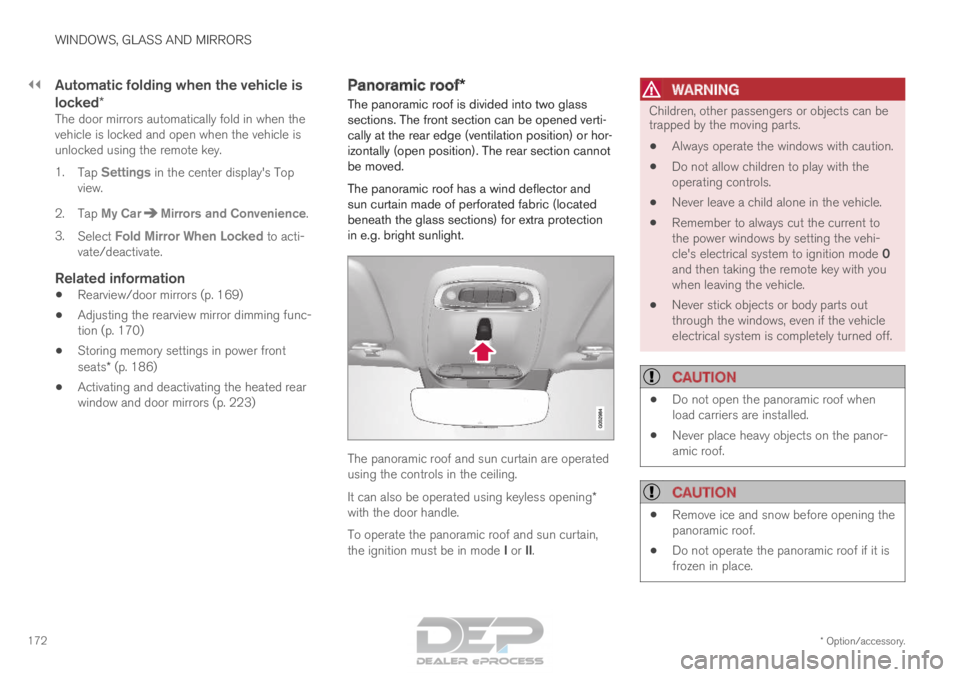
in e.g. bright sunlight. The panoramic roof and sun curtain are operated
using the controls in the ceiling.
It can also be operated using keyless opening*
with the door handle.
To operate the panoramic roof and sun curtain,
the ignition must be in mode I or II.
WARNING Children, other passengers or objects can be
trapped by the moving parts.
• Always operate the windows with caution.
• Do not allow children to play with the
operating controls.
• Never leave a child alone in the vehicle.
• Remember to always cut the current to
the power windows by setting the vehi-
cle's electrical system to ignition mode 0
and then taking the remote key with you
when leaving the vehicle.
• Never stick objects or body parts out
through the windows, even if the vehicle
electrical system is completely turned off.
CAUTION •
Do not open the panoramic roof when
load carriers are installed.
• Never place heavy objects on the panor-
amic roof.
CAUTION •
Remove ice and snow before opening the
panoramic roof.
• Do not operate the panoramic roof if it is
frozen in place.