display VOLVO XC90 TWIN ENGINE 2018 Repair Manual
[x] Cancel search | Manufacturer: VOLVO, Model Year: 2018, Model line: XC90 TWIN ENGINE, Model: VOLVO XC90 TWIN ENGINE 2018Pages: 686, PDF Size: 17 MB
Page 120 of 686
||DISPLAYS AND VOICE CONTROL
118
If there are many functions, you can also scroll
downward through the view. This is done by
sweeping/dragging from the bottom upwards.
Unlike in App view, where you tap an app to open
it, in Function view, tapping a function activates or
deactivates it. Certain functions (trigger func-
tions) open in their own window when tapped.
To return to Home view, swipe the screen from
right to left
5
or press the Home button.
Related information
• Handling tiles in the center display (p. 119)
• Symbols in the center display status bar
(p. 124)
• Opening settings in the center display
(p. 132)
• Opening contextual setting in the center dis-
play (p. 133)
• Owner's Manual in the center display (p. 17)
• Driver profiles (p. 137)
• Climate system controls (p. 213)
• Apps (p. 487)
• Function view in the center display (p. 122)
• Center display overview (p. 109) 5
Applies for left-hand drive vehicles. For right-hand drive vehicles, swi\
pe in the other direction.
Page 121 of 686

DISPLAYS AND VOICE CONTROL
}}
119
Handling tiles in the center display
Home view consists of four tiles:
Navigation,
Media, Phone and a fourth tile. These views
can be expanded.
Page 122 of 686
||DISPLAYS AND VOICE CONTROL
120
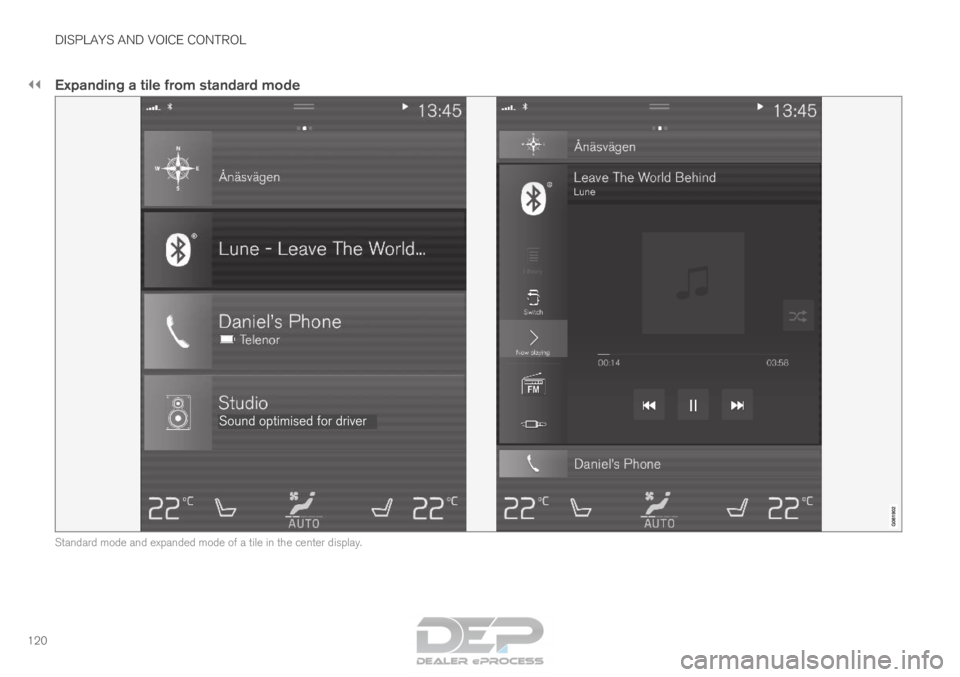
Expanding a tile from standard mode
Standard mode and expanded mode of a tile in the center display.
Page 123 of 686

DISPLAYS AND VOICE CONTROL
121
Expanding a tile:
– For tiles Navigation, Media and Phone:
Tap the screen anywhere in the tile. When a
tile is expanded, the extra tile in the home
view is temporarily forced away. The other
two tiles will be minimized and only show
certain information. When the extra tile is
tapped, the other three tiles are minimized
and only certain information is displayed.
Expanded view provides access to the basic
functions of the respective apps.
Closing an expanded tile:
– The tile can be closed in three different
ways:
• Tap the top section of the expanded tile.
• Tap another tile (it will then be opened in
expanded mode instead).
• Press briefly on the Home button under
the center display.
Opening or closing a tile in full-screen
mode
The fourth tile 6
and tile for Navigation can be
opened in full-screen mode to show additional
information and possible settings.
When a tile is opened in full-screen mode, no
information from the other tiles is displayed. In expanded mode, open the
app in full-screen mode. Tap
the symbol. To return to expanded mode,
tap the symbol or press the
Home button under the screen.
Center display's home button.
You can always press the Home button to return
to Home view. To return to Home view's standard
view from full-screen mode, press the Home but-
ton twice.
Related information
• Handling the center display (p. 112)
• Activating and deactivating the center display
(p. 115)
• Navigating in the center display's views
(p. 115) 6
Does not apply to all apps or vehicle functions opened via the fourth ti\
le
Page 124 of 686

DISPLAYS AND VOICE CONTROL
122Function view in the center display
Function view, which is one of the center dis-
play's basic views, contains all of the vehicle's
function buttons. From the Home view, navigate to Function view by swiping from left to right
over the screen
7
.
Different types of buttonsThere are three different types of buttons for
vehicle functions; see below: Type of button
Functions Vehicle function affected
Function buttons
Have On/Off modes.
When a function is active, an LED indicator light will illuminate to the\
left of the button's icon.
Press the button to turn the function on or off. Most buttons in Function view are func-
tion buttons.
Trigger buttons Do not have On/Off modes. Pressing a trigger button opens a window for the function. This can be, \
for example, a win-
dow to change seat position. •
Camera
• Headrest Fold
• Head-up Display Adjustments
Parking buttons Have On/Off and scanning modes. Similar to function buttons, but have an extra mode for parking scanning\
. •
Park In
• Park Out 7
Applies for left-hand drive vehicles. For right-hand drive vehicles, swi\
pe in the other direction.
Page 125 of 686

DISPLAYS AND VOICE CONTROL
123
Button modes
When a function or parking button's LED indica-
tor is green, the function is activated (on). For
some functions, an additional text explaining the
function will be shown when the function is ini-
tially activated. The text will be displayed for a few
seconds and then the button will be displayed
with the LED indicator illuminated.
For Lane Keeping Aid, for example, the text
Works only at certain speeds will be displayed when the button is pressed.
Press the button briefly to activate or deactivate
the function. The function is deactivated when the LED indica-
tor light is switched off.
A warning triangle in the right-hand section of
the button indicates that something is not work-
ing correctly.
Related information
•
Handling the center display (p. 112)
• Navigating in the center display's views
(p. 115)
Page 126 of 686
DISPLAYS AND VOICE CONTROL
124Moving apps and buttons in the
center display
The apps and buttons for vehicle functions can
be moved and organized in the App and Func-
tion views. 1. Swipe from right to left 8
to access App view
or swipe from left to right 8
to access Func-
tion view.
2.
Press and hold an app or button.
> The app or button will change size and become slightly transparent. It can then
be moved.
3. Drag the app or button to an available posi- tion in the view.
A maximum of 48 rows can be used to position
apps or buttons. To move an app or button out-
side the visible view, drag it to the bottom of the
view. New rows will be added and the app or but-
ton can be placed in one of these.
Apps or buttons placed below the view's normal
display will not be visible on the screen.
Swipe the screen to scroll up or down in the view
to display information outside the view.
NOTE Hide the apps that are rarely or never used by
moving them far down, outside of the visible
view. This makes it easier to find the apps
used more frequently.
NOTE
Apps and vehicle function buttons cannot be
situated at spots already in use.
Related information
•
Function view in the center display (p. 122)
• Apps (p. 487)
• Handling the center display (p. 112) Symbols in the center display status
bar
Overview of symbols displayed in the center dis-
play status bar.
The status bar shows current vehicle activities
and in certain cases, also their status. Due to the
limited space in the status bar, not all symbols
will be displayed at all times. Symbol
Meaning Connected to the Internet.
Could not connect to Internet.
Roaming activated.
Cell phone network signal strength.
Bluetooth device connected.
Bluetooth activated but no device
connected.
Information sent to and from GPS.
Connected to Wi-Fi network.
8
Applies for left-hand drive vehicles. For right-hand drive vehicles, swi\
pe in the other direction.
Page 127 of 686

DISPLAYS AND VOICE CONTROL
125Symbol
Meaning Tethering activated (Wi-Fi hotspot).
This means that the vehicle shares
an available Internet connection.
Vehicle modem activated.
USB sharing active.
Action in progress.
Timer for preconditioning active.
AAudio source being played.
Audio source paused.
Phone call in progress.
Audio source muted.
News broadcasts from current radio
station.
B Traffic information being received.
BClock.
A
Only hybrid models.
B Not available in all markets.
Related information
• Navigating in the center display's views
(p. 115)
• Messages in the center display (p. 140)
Page 128 of 686

DISPLAYS AND VOICE CONTROL
126Using the center display keyboard
You can use the keyboard in the center display
to enter characters or to switch to handwriting
mode to "write" letters and characters on the
screen.
The keyboard can be used to enter characters
(letters, numbers, symbols, etc.) to e.g. send text
messages from the vehicle, enter passwords or
search for information in the digital Owner's Man-
ual.
The keyboard will only appear when it is possible
to enter text on the screen.
NOTE
The keyboard cannot be used while the vehi-
cle is moving.
Page 129 of 686

DISPLAYS AND VOICE CONTROL
}}
127 The illustration shows an overview of some of the buttons that may be sh\
own on the keyboard. The appearance may vary depending on language setti\
ngs and the context in which
the keyboard is used.