lock VOLVO XC90 TWIN ENGINE 2019 Owners Manual
[x] Cancel search | Manufacturer: VOLVO, Model Year: 2019, Model line: XC90 TWIN ENGINE, Model: VOLVO XC90 TWIN ENGINE 2019Pages: 697, PDF Size: 10.33 MB
Page 416 of 697

DRIVER SUPPORT
* Option/accessory.
414 Park Assist Pilot* messages
Messages for Park Assist Pilot PAP 129
may be
displayed in the instrument panel and/or the
center display. Some examples of symbols and messages are shown in the table below. Message
Meaning
Park Assist System
Sensors blocked, cleaning needed One or more of the sensors are blocked. Check and clean/remove the obsta\
cle as soon as possible.
Park Assist System
Unavailable Service required The system is not functioning as intended. Contact a workshop ‒ an authorized Volvo workshop is recommended.A text message can be erased by briefly pressing
the
button in the center of the right-side
steering wheel keypad.
If the message persists: Contact a workshop ‒ an
authorized Volvo workshop is recommended.
Related information
Park Assist Pilot* (p. 406) 129
Park Assist Pilot
Page 424 of 697

HYBRID INFORMATION
422Charging cable temperature
monitoring
To help ensure the vehicle's hybrid battery is reli-
ably charged each time it is connected, charging
is stopped if the temperature in the charging
cable becomes too high and reaches a critical
limit.
CAUTION If charging is often inadvertently interrupted,
have the charging cable and the vehicle's
charging system inspected by a trained and
qualified Volvo service technician.
Related information
Charge cable (p. 419) Opening and closing the charging
socket cover
The cover for the hybrid battery's charging
socket opens manually. Unlock the vehicle using the remote key.
Press in the rear edge of the charger door
and release.
Open the door.
Remove the charging socket's protective
cover and secure it in the holder on the
inside of the charger door. Make sure the
cover's rubber stopper is bent downward to
prevent the cover from falling out of the
holder.
CAUTION Make sure the charging socket's protective
cover is positioned so it does not damage the
paint (in e.g., windy conditions).
Perform the following steps in reverse to close
the charger door.
NOTE
Since the hatch is locked during driving, the
vehicle must be unlocked again to be able to
open the hatch.
Related information
Initiating hybrid battery charging (p. 423)
Stopping hybrid battery charging (p. 429)
Charging the hybrid battery (p. 417)
Page 426 of 697

||HYBRID INFORMATION
424
Open the charger door and remove the
charging socket's protective cover. Push the
charging handle all the way into the vehicle's
socket.
3.
The charging cable handle will lock into
place and charging will begin within
5 seconds. When charging starts, the green
LED light in the charging socket will begin to
flash. The approximate remaining charging
time or the charging status will be displayed
in the instrument panel.
Charging may be temporarily interrupted if
the vehicle is unlocked:
and a door is open ‒ charging will restart
within a few minutes.
if no door is opened ‒ the vehicle will
automatically relock. Charging will resume
after 1 minute.
CAUTION Never detach the charging cable from the
120/240 V outlet (AC, alternating current)
while charging is in progress – the
120/240 V outlet could be damaged in such
circumstances. Always interrupt charging first
and then disconnect the charging cable – first
from the vehicle's charging socket and then
from the 120/240 V outlet.
During charging, condensation from the air con-
ditioning may form under the vehicle. This is nor-
mal and is caused by the hybrid battery cooling.
Related information
Charging the hybrid battery (p. 417)
Opening and closing the charging socket
cover (p. 422)
Charging status in the vehicle's charging
socket (p. 425)
Charging status in the instrument panel
(p. 427)
Charging status in the charging cable's
charging module (p. 425)
Stopping hybrid battery charging (p. 429)
Page 427 of 697

HYBRID INFORMATION
}}
425
Charging status in the vehicle's
charging socket
The charging status is indicated by an LED light
in the charging socket. Location of the LED indicator light in the vehicle's
charging socket.
The LED indicator light shows the current charge
status during charging. If the LED indicator light
is not illuminated, check to make sure the cable
is securely connected in the wall outlet and in the
outlet in the vehicle. A white, red or yellow light
illuminates when the passenger compartment
lighting is activated and will remain illuminated for
a short time after the passenger compartment
lighting has gone out. LED indicator
light's color
Meaning
White
Courtesy light.
Yellow Wait modeA
– waiting for
charging to start.
Flashing green Charging is in progress B
.
Green Charging completed C
.
Red Malfunction. A
E.g. after a door has been opened or if the charging cable han-
dle is not locked in place.
B The more slowly the light flashes, the closer the battery is to
being fully charged.
C The light will go out after a short time.
Related information
Charging the hybrid battery (p. 417)
Charging status in the instrument panel
(p. 427)
Charging status in the charging cable's
charging module (p. 425)
Stopping hybrid battery charging (p. 429) Charging status in the charging
cable's charging module
The red and blue lights in the charging module
indicate the status of ongoing and completed
charging. Charge module: 1. Red warning light, 2. Blue status indi-
cator
When the charge module is initially plugged into
a wall outlet, the red warning light will flash once
to indicate that a startup safety check has been
performed. When the safety check has been
completed, the blue status indicator will glow
steadily and the red warning light will be off. The
charger is now ready to be used. If the red warn-
ing light continues to flash or glows steadily, a
fault has been detected and the charger will not
deliver power to the vehicle. Contact a Volvo
retailer or a certified Volvo service technician.
Page 430 of 697

||HYBRID INFORMATION
428
NOTE
If the instrument panel is not used, it will go
dark after a period of time. To reactivate the
display:
depress the brake pedal,
open one of the doors, or
put the ignition in mode I by turning the
START knob clockwise and then releas-
ing.
Related information
Charging the hybrid battery (p. 417)
Twin Engine symbols and messages in the
instrument panel (p. 430)
Charging status in the vehicle's charging
socket (p. 425)
Charging status in the charging cable's
charging module (p. 425)
Stopping hybrid battery charging (p. 429)
Page 431 of 697

HYBRID INFORMATION
* Option/accessory.429
Stopping hybrid battery charging
To stop charging of the hybrid battery, unlock
the vehicle, unplug the charging cable from the
vehicle's charging socket and then unplug the
cable from the 120/240 V outlet (alternating
current).
CAUTION Before the charging cable is removed from
the vehicle's charging socket, the vehicle
must be unlocked using the unlock button on
the remote key. This must be done even if the
vehicle's doors are already unlocked. If the
vehicle is not unlocked using the unlock but-
ton, the charging cable or system may be
damaged.
NOTE
Always unlock the vehicle so that charging is
cut off before the connection to the
120/240 V outlet (AC, alternating current) is
disconnected. Note that the charging cable
must be disconnected from the vehicle's
charging socket before it is disconnected
from the 120/240 V outlet, partly to prevent
damage to the system and party to prevent
unintentional interruption of charging. Unlock the vehicle with the remote key.
Charging will stop.
Press the lock button on the charging
cable's handle. The handle will be released/
unlocked. Remove the cable from the vehi-
cle's charging socket, put the socket's cover
back in place and close the charger door. Unplug the cable from the 120/240 V outlet.
Stow the charging cable in the storage com-
partment under the cargo area floor.
Charging cable automatically locksIf the charging cable cannot be removed from the
charging socket, it will automatically lock into
place again after unlocking to maximize charging
and range and to enable preconditioning before
driving. The charging cable can be removed again
if the vehicle is unlocked using the remote key.
For vehicles with Passive Entry*, the handle can
be used to lock and unlock.
Related information
Opening and closing the charging socket
cover (p. 422)
Charge cable (p. 419)
Charging the hybrid battery (p. 417)
Initiating hybrid battery charging (p. 423)
Page 436 of 697
STARTING AND DRIVING
* Option/accessory.
434 Starting the vehicle
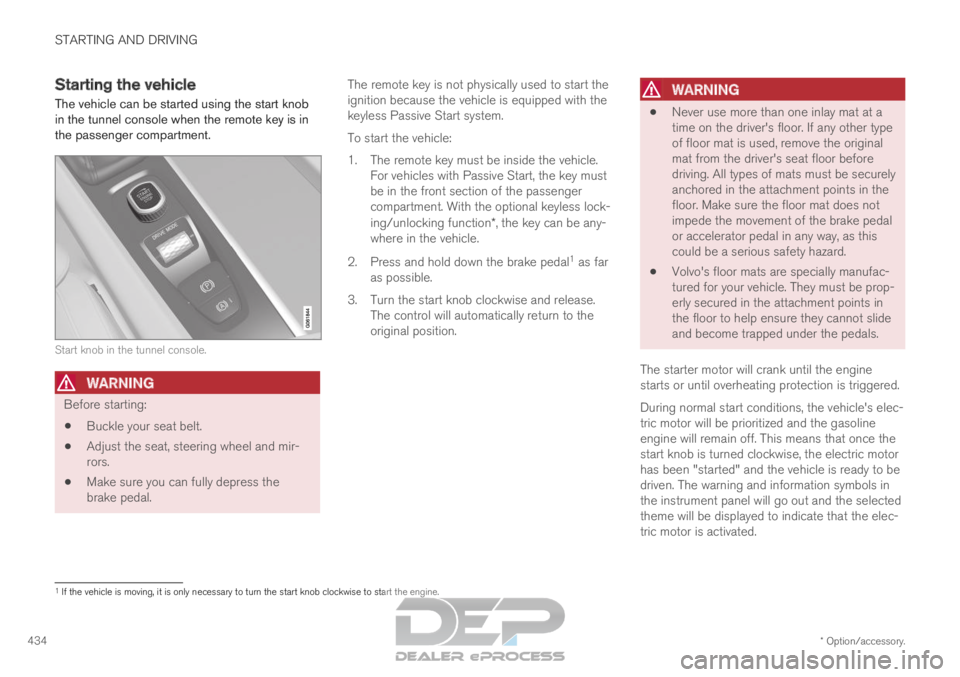
The vehicle can be started using the start knob
in the tunnel console when the remote key is in
the passenger compartment. Start knob in the tunnel console.
WARNING
Before starting:
Buckle your seat belt.
Adjust the seat, steering wheel and mir-
rors.
Make sure you can fully depress the
brake pedal. The remote key is not physically used to start the
ignition because the vehicle is equipped with the
keyless Passive Start system.
To start the vehicle:
1.
The remote key must be inside the vehicle.
For vehicles with Passive Start, the key must
be in the front section of the passenger
compartment. With the optional keyless lock-
ing/unlocking function*, the key can be any-
where in the vehicle.
2. Press and hold down the brake pedal 1
as far
as possible.
3. Turn the start knob clockwise and release. The control will automatically return to the
original position.
WARNING
Never use more than one inlay mat at a
time on the driver's floor. If any other type
of floor mat is used, remove the original
mat from the driver's seat floor before
driving. All types of mats must be securely
anchored in the attachment points in the
floor. Make sure the floor mat does not
impede the movement of the brake pedal
or accelerator pedal in any way, as this
could be a serious safety hazard.
Volvo's floor mats are specially manufac-
tured for your vehicle. They must be prop-
erly secured in the attachment points in
the floor to help ensure they cannot slide
and become trapped under the pedals.
The starter motor will crank until the engine
starts or until overheating protection is triggered.
During normal start conditions, the vehicle's elec-
tric motor will be prioritized and the gasoline
engine will remain off. This means that once the
start knob is turned clockwise, the electric motor
has been "started" and the vehicle is ready to be
driven. The warning and information symbols in
the instrument panel will go out and the selected
theme will be displayed to indicate that the elec-
tric motor is activated. 1
If the vehicle is moving, it is only necessary to turn the start knob cl\
ockwise to start the engine.
Page 437 of 697

STARTING AND DRIVING
}}
435
In some situations, such as in cold weather or if
the hybrid battery's charge level is too low, the
gasoline engine will start instead.
The vehicle should not be started with the charg-
ing cable connected. However, if the cable can-
not be pulled out or if the vehicle incorrectly
detects a cable that is not connected, the vehicle
can be started using an override procedure:
1.
Press the brake pedal and turn the start
knob clockwise.
2. Charge cable Remove before start will
appear in the instrument panel.
3.
Turn the start knob clockwise again.
4. Removed? Turn and hold start knob 7s
will appear. Turn the knob clockwise and hold
it for 7 seconds to start the vehicle. Location of the backup reader in the tunnel console. If the
Vehicle key not found message is shown
in the instrument panel at start, place the remote
key at the backup reader and then make a new
start attempt.
NOTE When the remote key is placed in the backup
reader, make sure that no other vehicle keys,
metal objects or electronic devices (e.g. cellu-
lar phones, tablets, laptops or chargers) are in
the backup reader. Multiple vehicle keys close
to each other in the backup reader can dis-
rupt their functionality.
If Vehicle start System check, wait is dis-
played in the instrument panel while attempting
to start the vehicle, wait until the message disap-
pears and try again to start the vehicle.
CAUTION If the engine has not responded after 3
attempts – wait for 3 minutes before starting
a new attempt. Starting capability increases if
the starter battery is given time to recover.
NOTE
The vehicle cannot be started if the hybrid
battery is discharged.
WARNING Never remove the remote control key from
the vehicle while driving.
WARNING
Always remove the remote key from the
passenger compartment when you leave
the vehicle and make sure the ignition is
in mode 0.
Always put the gear selector in P and
apply the parking brake before leaving
the vehicle. Never leave the vehicle unsu-
pervised while the engine is running.
Always open the garage door fully and
make sure that ventilation is very good
before starting the engine in a garage.
The exhaust fumes produced by the vehi-
cle contain carbon monoxide, which is
invisible and odorless but very toxic.
NOTE With a cold start, idling speed may be consid-
erably higher than normal for certain engine
types. This is done to get the emissions sys-
tem up to normal operating temperature as
quickly as possible, which minimizes exhaust
emissions and protects the environment.
Page 438 of 697
||STARTING AND DRIVING
436
CAUTION
When starting in cold weather, the auto-
matic transmission may shift up at slightly
higher engine speeds than normal until
the automatic transmission fluid reaches
normal operating temperature.
Do not race a cold engine immediately
after starting. This could prevent fluids
from properly lubricating vital compo-
nents in the engine before it has reached
the proper operating temperature.
The engine should be idling when the
gear selector is moved. Never accelerate
until the gear is fully engaged. Accelerat-
ing rapidly before a gear is properly
engaged could lead to harder wear of
components.
To help prevent the transmission oil from
overheating, select P or N when idling at
a standstill for prolonged periods of time.
Related information
Switching off the vehicle (p. 436)
Ignition modes (p. 437)
Adjusting the steering wheel (p. 201)
Jump starting using another battery (p. 481)
Selecting ignition mode (p. 438) Switching off the vehicle
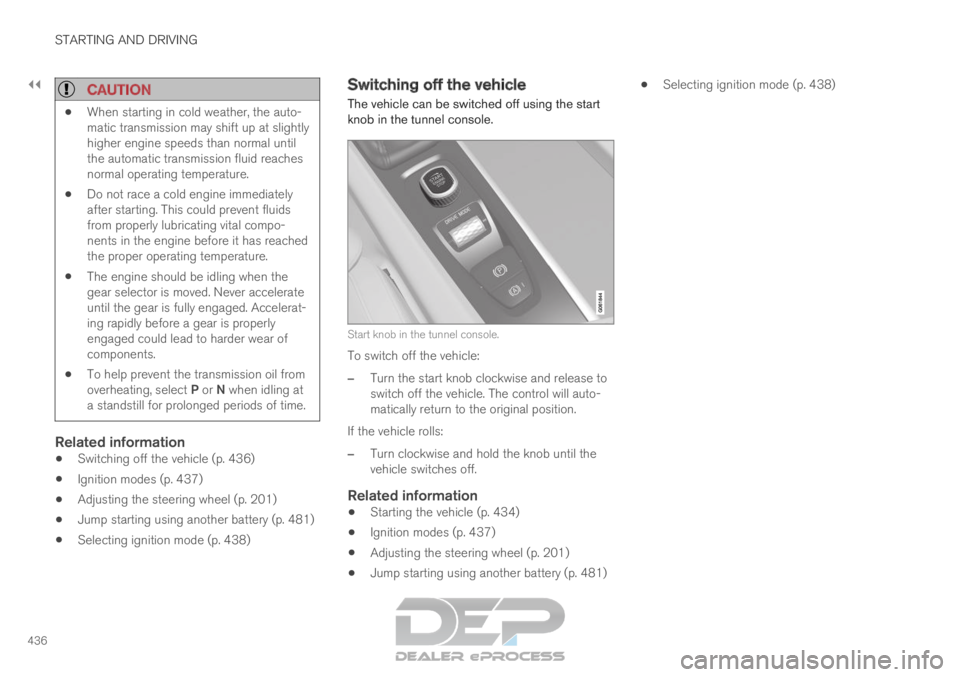
The vehicle can be switched off using the start
knob in the tunnel console.
Start knob in the tunnel console.
To switch off the vehicle:
– Turn the start knob clockwise and release to
switch off the vehicle. The control will auto-
matically return to the original position.
If the vehicle rolls:
– Turn clockwise and hold the knob until the
vehicle switches off.
Related information
Starting the vehicle (p. 434)
Ignition modes (p. 437)
Adjusting the steering wheel (p. 201)
Jump starting using another battery (p. 481)
Selecting ignition mode (p. 438)
Page 439 of 697
STARTING AND DRIVING
* Option/accessory.437
Ignition modes
The vehicle's ignition can be put in various
modes (levels) to make different functions availa-
ble.
To enable the use of a limited number of func-
tions when the engine is not running, the ignition
can be put in one of three different levels: 0, I
and II. These levels are referred to as "ignition
modes" in the Owner's Manual.
The following table shows which functions are
available in each ignition mode: Mode
Functions
0 The odometer, clock and tem-
perature gauge are illuminated A
.
The power* seats can be
adjusted.
The power windows can be used.
The center display is activated
and can be used A
.
The infotainment system can be
used A
.
In this mode, the functions are availa-
ble for a limited time and then switch
off automatically.
I The panoramic roof, power win-
dows, 12-volt electrical socket in
the passenger compartment,
Bluetooth, navigation, phone,
blower and windshield wipers can
be used.
The power seats can be adjusted.
The 12-volt electrical socket* in
the cargo compartment can be
used.
Electrical current will be taken
from the battery in this ignition
mode. Mode
Functions
II The headlights illuminate.
Warning/indicator lights illumi-
nate for 5 seconds.
A number of other systems are
activated. However, seat and rear
window heating can only be acti-
vated when the engine is running.
This ignition mode uses a lot of
current from the battery and
should be avoided whenever pos-
sible! A
Also activated when the door is opened.
Related information
Starting the vehicle (p. 434)
Adjusting the steering wheel (p. 201)
Jump starting using another battery (p. 481)
Selecting ignition mode (p. 438)